Page 241 of 272
Mobility
239Reference
At a glance
Controls
Driving tips
Communications
Navigation
Entertainment
Page 245 of 272
Reference 243
At a glance
Controls
Driving tips
Communications
Navigation
Entertainment
Mobility
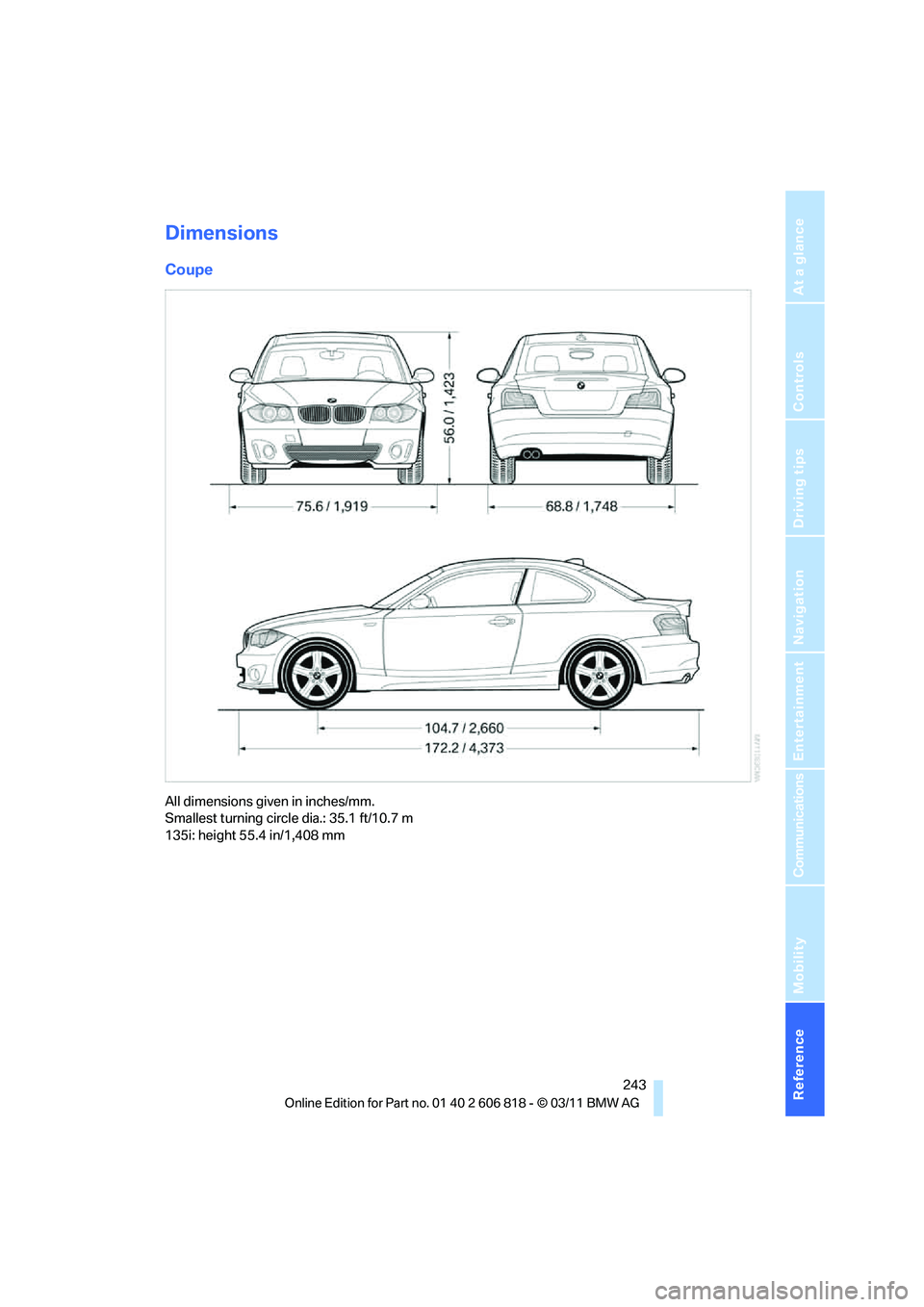
Dimensions
Coupe
All dimensions given in inches/mm.
Smallest turning circle dia.: 35.1 ft/10.7 m
135i: height 55.4 in/1,408 mm
Page 247 of 272
Reference 245
At a glance
Controls
Driving tips
Communications
Navigation
Entertainment
Mobility
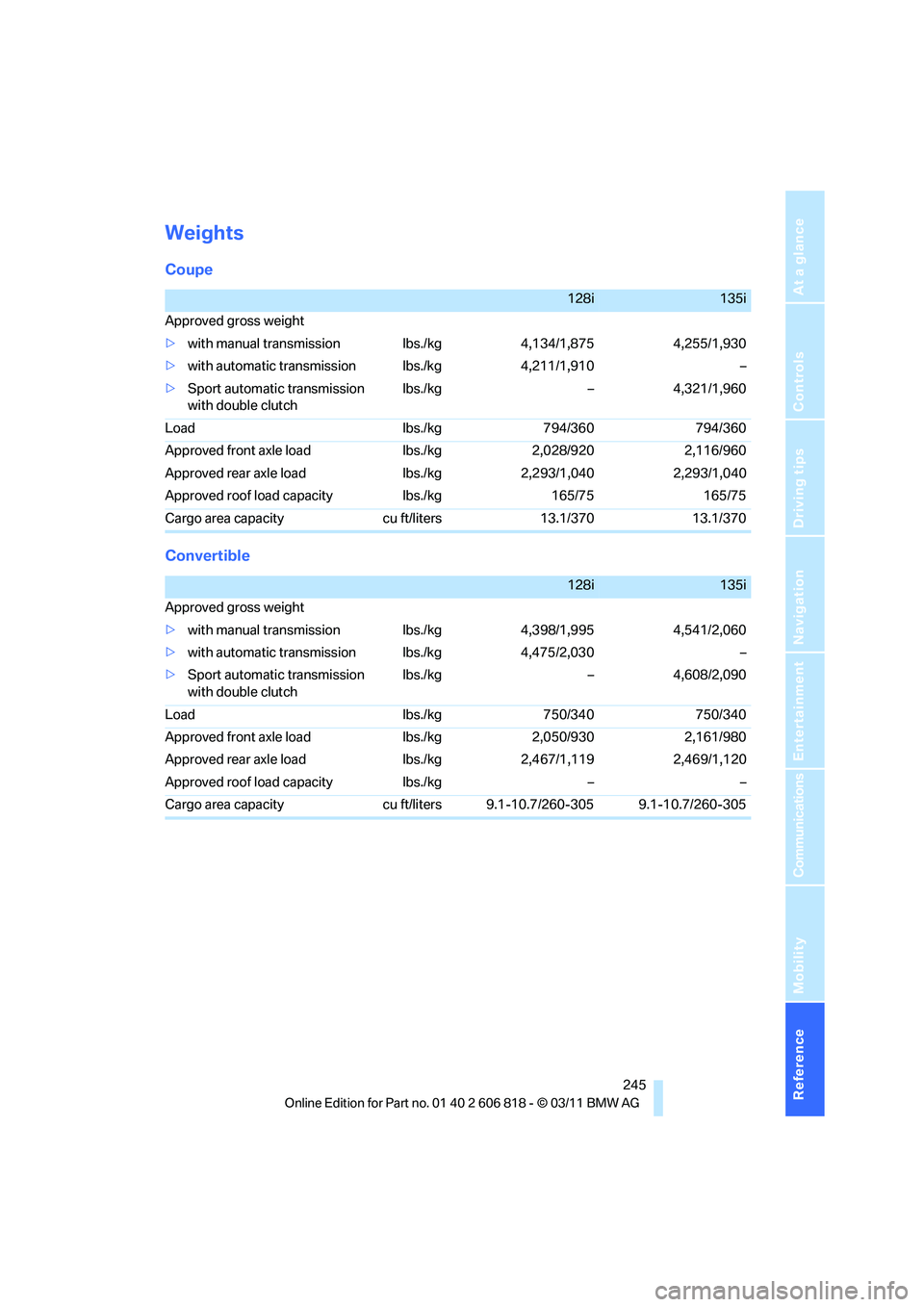
Weights
Coupe
Convertible
128i135i
Approved gross weight
>with manual transmission lbs./kg 4,134/1,875 4,255/1,930
>with automatic transmission lbs./kg 4,211/1,910 –
>Sport automatic transmission
with double clutchlbs./kg – 4,321/1,960
Load lbs./kg 794/360 794/360
Approved front axle load lbs./kg 2,028/920 2,116/960
Approved rear axle load lbs./kg 2,293/1,040 2,293/1,040
Approved roof load capacity lbs./kg 165/75 165/75
Cargo area capacity cu ft/liters 13.1/370 13.1/370
128i135i
Approved gross weight
>with manual transmission lbs./kg 4,398/1,995 4,541/2,060
>with automatic transmission lbs./kg 4,475/2,030 –
>Sport automatic transmission
with double clutchlbs./kg – 4,608/2,090
Load lbs./kg 750/340 750/340
Approved front axle load lbs./kg 2,050/930 2,161/980
Approved rear axle load lbs./kg 2,467/1,119 2,469/1,120
Approved roof load capacity lbs./kg – –
Cargo area capacity cu ft/liters 9.1-10.7/260-305 9.1-10.7/260-305
Page 249 of 272
Reference 247
At a glance
Controls
Driving tips
Communications
Navigation
Entertainment
Mobility
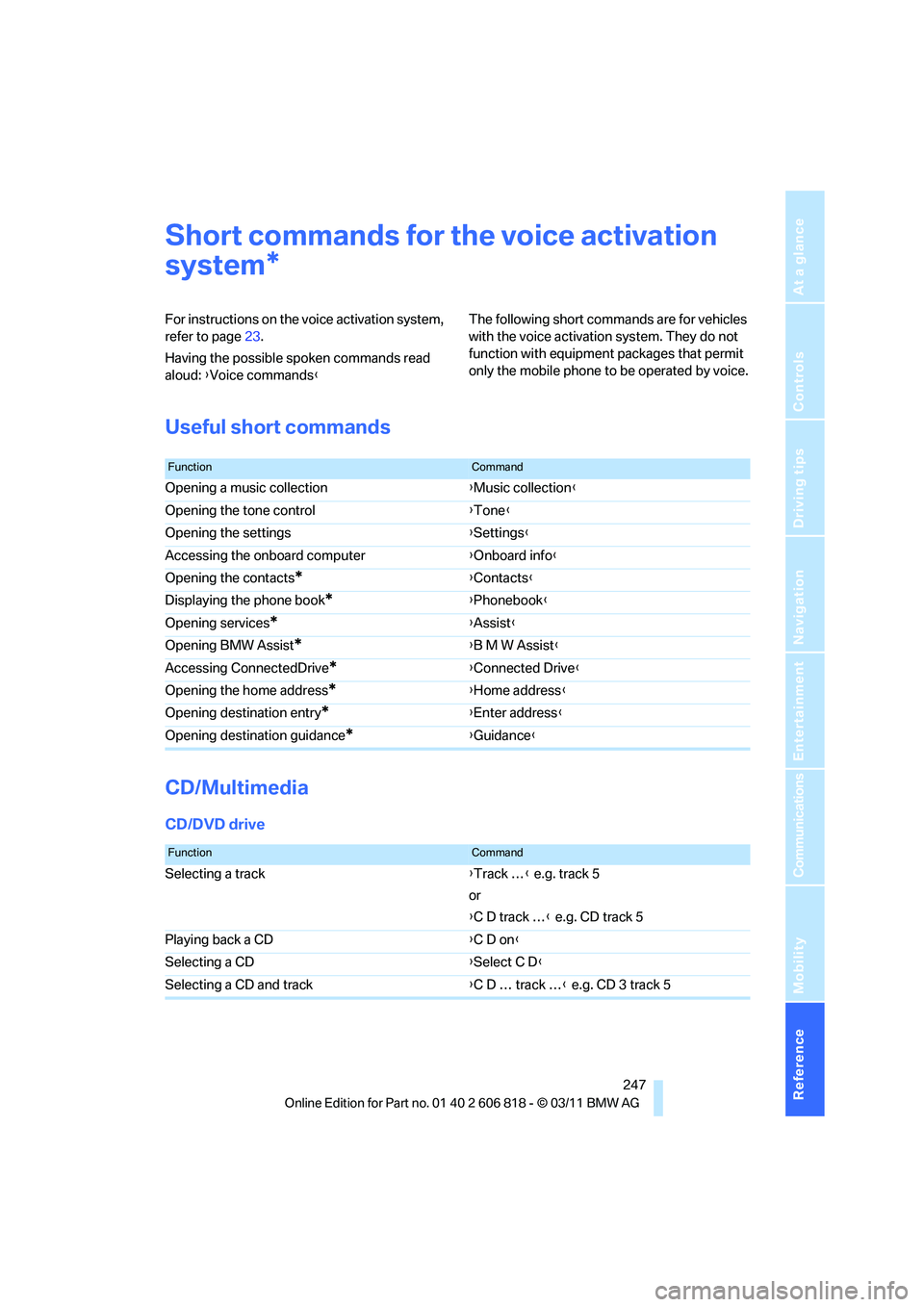
Short commands for the voice activation
system
For instructions on the voice activation system,
refer to page23.
Having the possible spoken commands read
aloud: {Voice commands}The following short commands are for vehicles
with the voice activation system. They do not
function with equipment packages that permit
only the mobile phone to be operated by voice.
Useful short commands
CD/Multimedia
CD/DVD drive
*
FunctionCommand
Opening a music collection{Music collection}
Opening the tone control{Tone}
Opening the settings{Settings}
Accessing the onboard computer{Onboard info}
Opening the contacts
*{Contacts}
Displaying the phone book
*{Phonebook}
Opening services
*{Assist}
Opening BMW Assist
*{B M W Assist}
Accessing ConnectedDrive
*{Connected Drive}
Opening the home address
*{Home address}
Opening destination entry
*{Enter address}
Opening destination guidance
*{Guidance}
FunctionCommand
Selecting a track{Track …} e.g. track 5
or
{C D track …} e.g. CD track 5
Playing back a CD{C D on}
Selecting a CD{Select C D}
Selecting a CD and track{C D … track …} e.g. CD 3 track 5
Page 251 of 272
Reference 249
At a glance
Controls
Driving tips
Communications
Navigation
Entertainment
Mobility
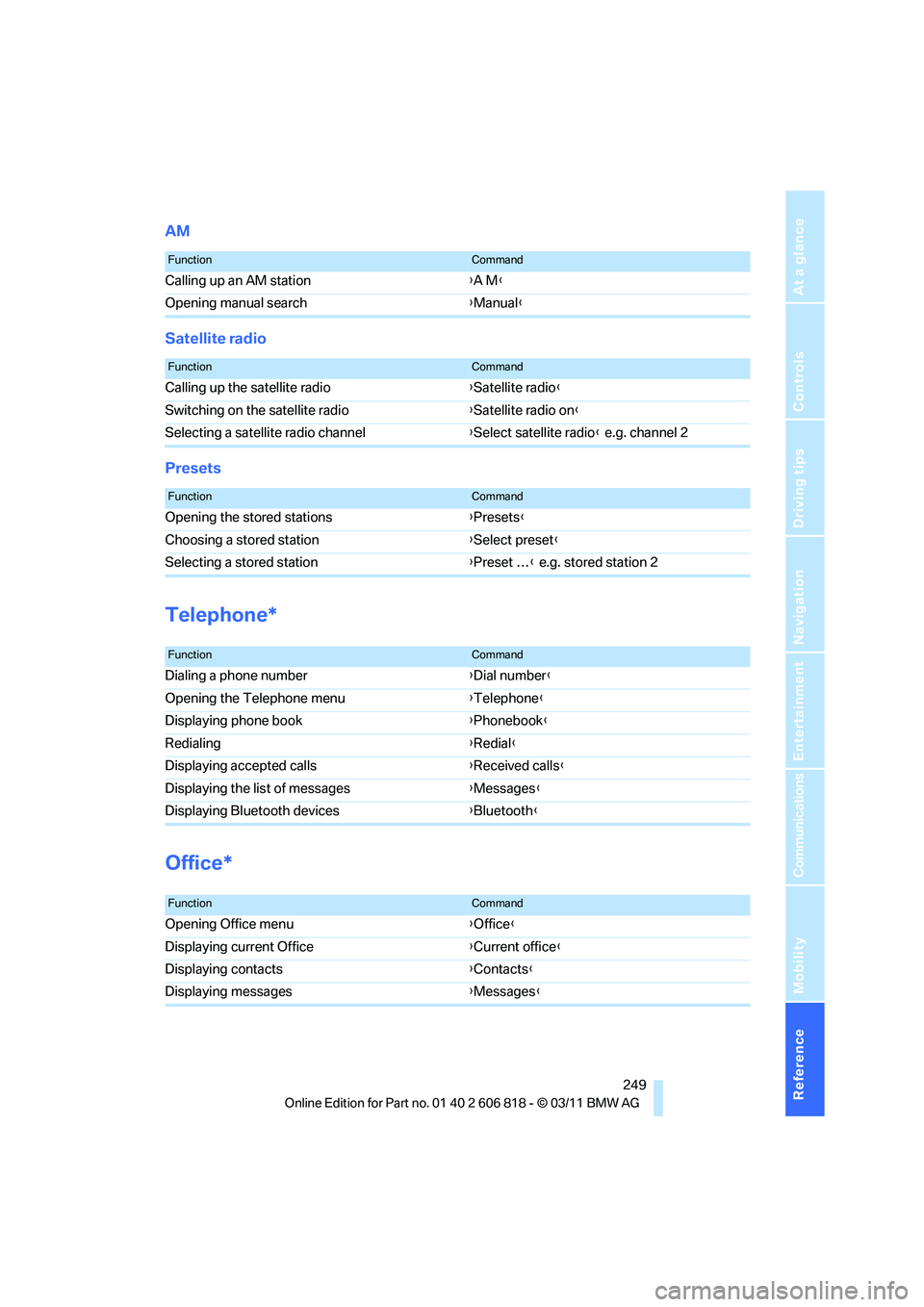
AM
Satellite radio
Presets
Telephone*
Office*
FunctionCommand
Calling up an AM station{A M}
Opening manual search{Manual}
FunctionCommand
Calling up the satellite radio{Satellite radio}
Switching on the satellite radio{Satellite radio on}
Selecting a satellite radio channel{Select satellite radio} e.g. channel 2
FunctionCommand
Opening the stored stations{Presets}
Choosing a stored station{Select preset}
Selecting a stored station{Preset …} e.g. stored station 2
FunctionCommand
Dialing a phone number{Dial number}
Opening the Telephone menu{Telephone}
Displaying phone book{Phonebook}
Redialing{Redial}
Displaying accepted calls{Received calls}
Displaying the list of messages{Messages}
Displaying Bluetooth devices{Bluetooth}
FunctionCommand
Opening Office menu{Office}
Displaying current Office{Current office}
Displaying contacts{Contacts}
Displaying messages{Messages}
Page 252 of 272
Short commands for the voice activation system
250
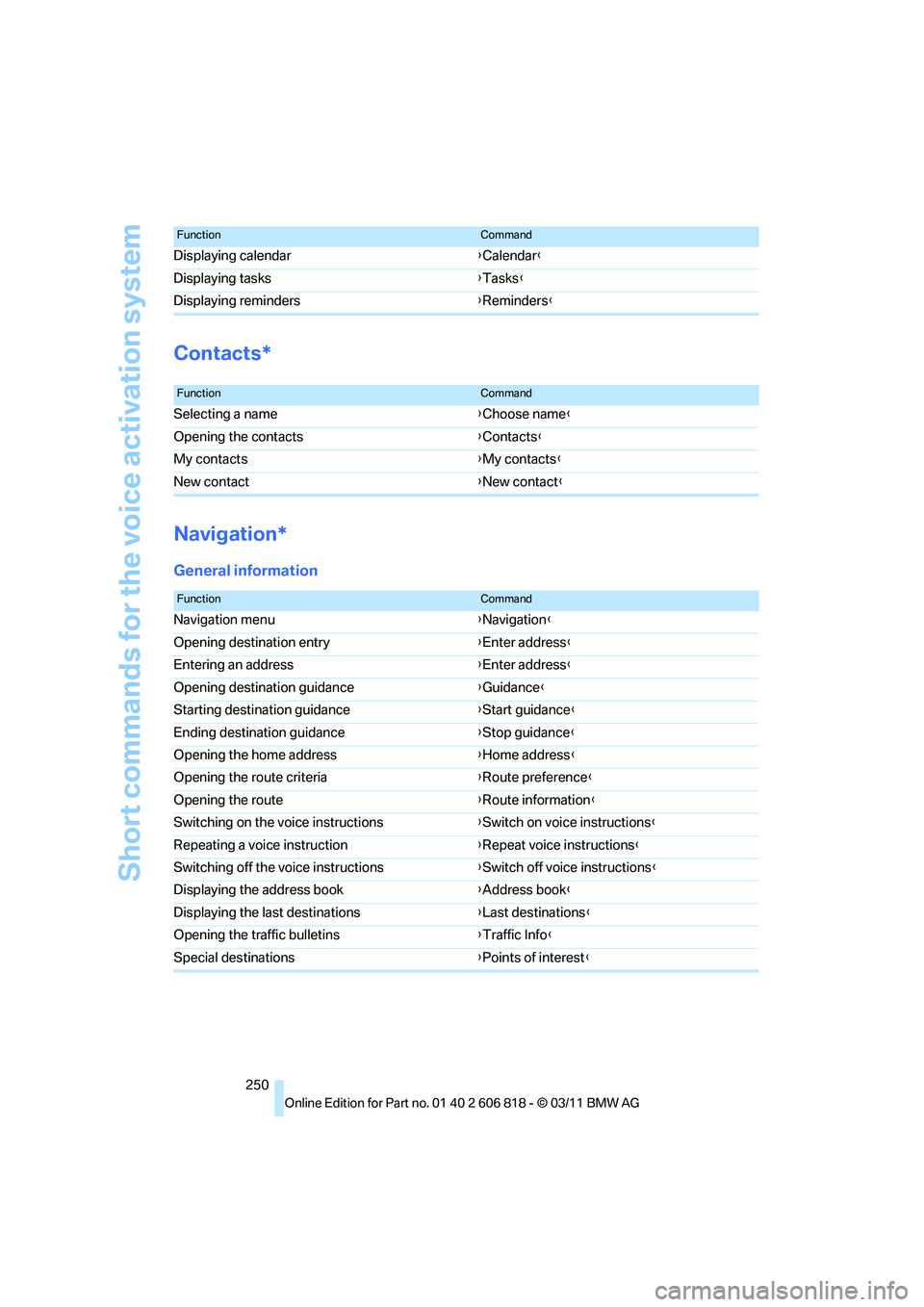
Contacts*
Navigation*
General information
Displaying calendar{Calendar}
Displaying tasks{Tasks}
Displaying reminders{Reminders}
FunctionCommand
FunctionCommand
Selecting a name{Choose name}
Opening the contacts{Contacts}
My contacts{My contacts}
New contact{New contact}
FunctionCommand
Navigation menu{Navigation}
Opening destination entry{Enter address}
Entering an address{Enter address}
Opening destination guidance{Guidance}
Starting destination guidance{Start guidance}
Ending destination guidance{Stop guidance}
Opening the home address{Home address}
Opening the route criteria{Route preference}
Opening the route{Route information}
Switching on the voice instructions{Switch on voice instructions}
Repeating a voice instruction{Repeat voice instructions}
Switching off the voice instructions{Switch off voice instructions}
Displaying the address book{Address book}
Displaying the last destinations{Last destinations}
Opening the traffic bulletins{Traffic Info}
Special destinations{Points of interest}
Page 253 of 272
Reference 251
At a glance
Controls
Driving tips
Communications
Navigation
Entertainment
Mobility
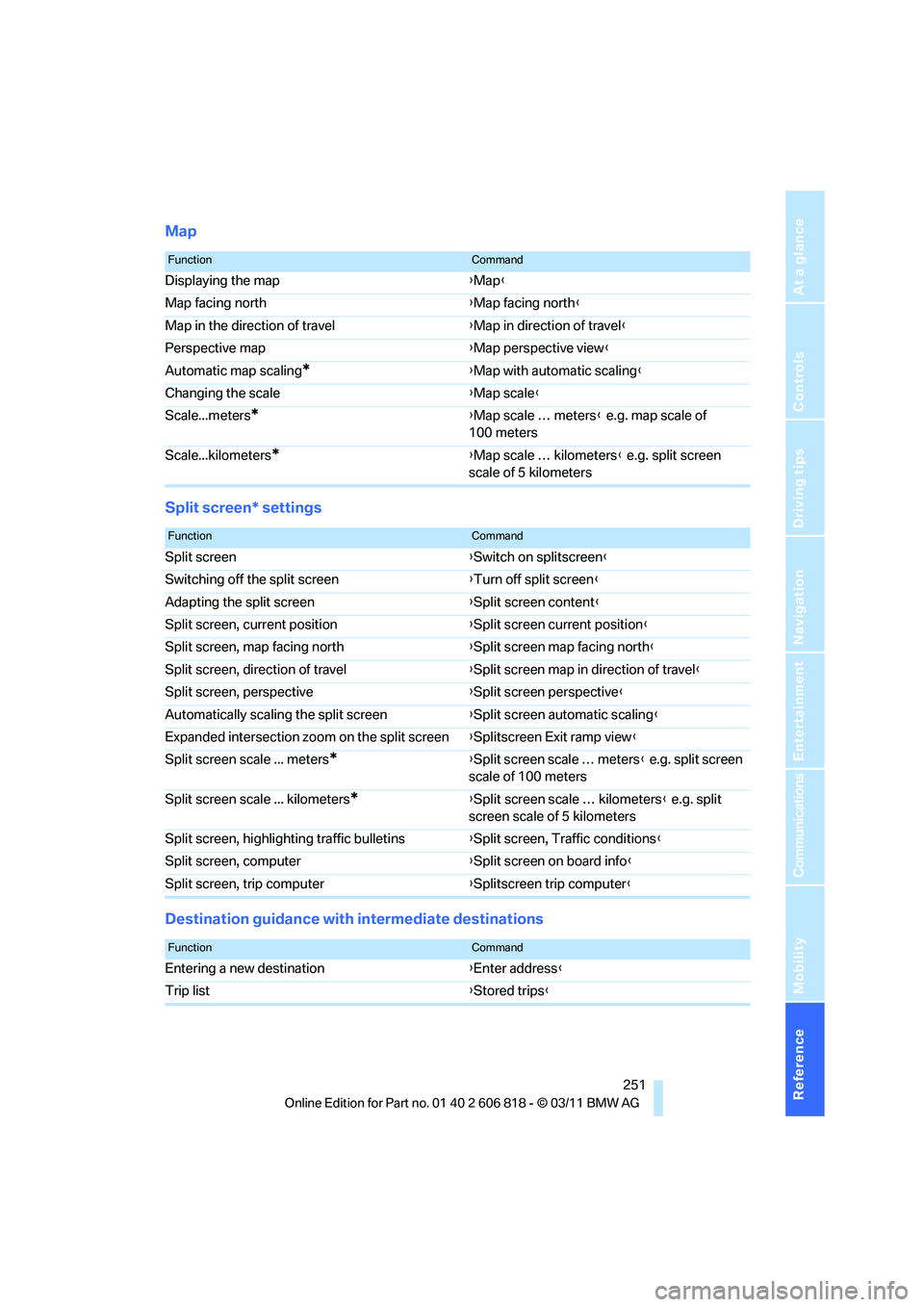
Map
Split screen* settings
Destination guidance with intermediate destinations
FunctionCommand
Displaying the map{Map}
Map facing north{Map facing north}
Map in the direction of travel{Map in direction of travel}
Perspective map{Map perspective view}
Automatic map scaling
*{Map with automatic scaling}
Changing the scale{Map scale}
Scale...meters
*{Map scale … meters} e.g. map scale of
100 meters
Scale...kilometers
*{Map scale … kilometers} e.g. split screen
scale of 5 kilometers
FunctionCommand
Split screen{Switch on splitscreen}
Switching off the split screen{Turn off split screen}
Adapting the split screen{Split screen content}
Split screen, current position{Split screen current position}
Split screen, map facing north{Split screen map facing north}
Split screen, direction of travel{Split screen map in direction of travel}
Split screen, perspective{Split screen perspective}
Automatically scaling the split screen{Split screen automatic scaling}
Expanded intersection zoom on the split screen{Splitscreen Exit ramp view}
Split screen scale ... meters
*{Split screen scale … meters} e.g. split screen
scale of 100 meters
Split screen scale ... kilometers
*{Split screen scale … kilometers} e.g. split
screen scale of 5 kilometers
Split screen, highlighting traffic bulletins{Split screen, Traffic conditions}
Split screen, computer{Split screen on board info}
Split screen, trip computer{Splitscreen trip computer}
FunctionCommand
Entering a new destination{Enter address}
Trip list{Stored trips}
Page 255 of 272
Reference 253
At a glance
Controls
Driving tips
Communications
Navigation
Entertainment
Mobility