2012 AUDI R8 SPYDER steering
[x] Cancel search: steeringPage 75 of 236

The parking brake warning light_
(USA)/ . (CON) ill uminates when the parking
brake is set and you switch on the ignition .
A WARNING
-
Always release the parking brake com
pletely. A partially engaged brake will
overheat the rear brakes, reduce the ir ef
fectiveness and cause excess ive wear. This
cou ld lead to brake failure and an accident .
(D Note
Only after the ve hicle has come to com
plete stop, should you f irm ly set the park
ing brake and move the gearsh ift lever into
a gear .
Parking
To prevent a parked vehicle from rolling
away, there are a few things you should do.
.,. Stop the vehicle using the brake pedal.
.,. Set the parking brake firmly .
.,. Switc h off the engine .
" Engage a gear
~ &.-
What else you should do when parking
your v ehicle on an incline or decline
T u rn the steering wheel so that if the vehicle
should sta rt to ro ll, it will roll into the curb .
A WARNING
This is how yo u can reduce the risk of in
jury when le aving your veh icle.
- Never par k the vehicle whe re it ca n come
in contac t wi th dry grass, s pilled f uel or
any other flammable mater ials .
- Neve r allow anyone - especially small
ch ildren - to rem ain in the vehicle whe n
it is locked. Locked doors ma ke it mo re
difficult for rescuers to access the pas
senger compartment in the event of an
emergency. Danger to life!
- Never leave c hildren unsupervised in the
vehicle. Children co uld re lease the park
ing brake or move the gea rshift lever out
-
On th e ro ad 73
of gear . The vehicle cou ld sta rt to ro ll
away and cause an acc ident.
- No matte r what the season is, the tem
peratu re in a parked veh icle can reach
dangerous leve ls .
Starting on hills
App lies to vehicles : wit h hill ho ld assist
Hill ho ld assist makes it eas ier to start on
hills .
The system is activated when the brake peda l
is depressed
for a few seconds .
After releasing the brake pedal, the brake
power is held for a
brief moment to prevent
the ve hicle from rolling back when starting .
D uring this t ime, you can easily begin to move
your vehicle.
A WARNING
- If you did not begin moving immed iate ly
after rel easing the brake pedal, the vehi
cle could b eg in to roll bac kward unde r
cer ta in c ircu mstances . Dep ress the brake
pe dal imme diate ly or eng age the p arking
bra ke.
- If the engine sta lls, de pre ss the bra ke
pe dal imme diate ly or engage the pa rking
brake .
- T o prevent the vehicle from ro lling b ack
un intent iona lly when st arting in stop
an d-go tra ffic, keep the brake pedal de
pressed for a few seconds before d riving
off.
(D Tips
You can find o ut if yo ur vehicle is eq uipped
wi th "hi ll hol d assist" at an a uthorized Au
di dealer.
Page 79 of 236

Transmission Manual transmission
Gearshift lever
App lies to vehicles: with manual transmission
The clutch pedal must be depressed all the
way before you can start the engine.
T he manual transmission in your Audi is
equipped with an
interlock-feature.
• Depress the clutch pedal all the way.
• Start the engine with the gearshift lever in
Neutral and the clutch pedal depressed.
(D Note
Always depress the clutch pedal fully when
changing gears . Do not hold the vehicle on
a hill with the clutch pedal partially de
pressed. This may cause premature clutch
wear or damage .
@ Tips
- Resting your hand on the gearshift lever
knob while driving will cause premature
wear in the transmission.
- The back-up lights go on when you sh ift
into Reverse w ith the ignition on.
Gearshift pattern (6-speed manual
transmission)
Applies to vehicles: with 6-speed manual transmission
Fig. 86 Gearshift pattern : 6 -speed manual tran smi s
sio n
Drive in 6th gear for optim um fuel economy
when cruising . However, if more acceleration
is required (when passing, for example), shift
down.
Transmission 77
Engaging reverse gear (R)
• Move the shift lever all the way to the left,
press it down, then push it backward.
Especially after driving forward, stop the vehi
cle completely, sh ift into
Neutral and rest the
shift lever br iefly in Neutra l before shift ing in
to
Reverse .
Launch Control Program
Applies to vehicles: with VlO eng ine and manual t ra ns·
miss ion
The Launch Control Program enables maxi
mum acceleration .
Requirement: The engine must be at operat
ing temperature and the steering wheel must
not be turned .
• With the engine running, press the button
Im one time. The ESC indicator light 1B in the
Driver Informat ion System display illumi
nates and the message
ESP sport - Warn
ing! Restricted stability
appears.
• Press the clutch and hold it down.
• Engage the first gear.
• Press the accelerator pedal all the way
down until the engine speed remains steady
at 6500 RPM .
• Release the clutch carefu lly <=> .& ..
A WARNING
- Always adapt your dr iving to the traffic
flow.
- Only use Launch Control when road and
traffic conditions allow it and other dr iv
ers will not be endangered or annoyed by
your driving and the vehicle's accelera
tion.
- Please note that the driving wheels can
spin and the vehicle can break away
when ESC is switched off, especially
when the road is slippery.
- Once you have accelerated, you sho uld
sw itch the ESC back on by pressing the
button
[fil .
Page 80 of 236
78 Transmission
@ Tips
-When accelerating using the Launch
Control program, all vehicle parts are
subject to heavy loads. This can result in
increased wear.
- The Launch Control Program only func tions when the parking brake is released
and the vehicle speed is less than 3 mph
(5 km/h).
R tronic
Description
Applies to vehicles: with R tro nic
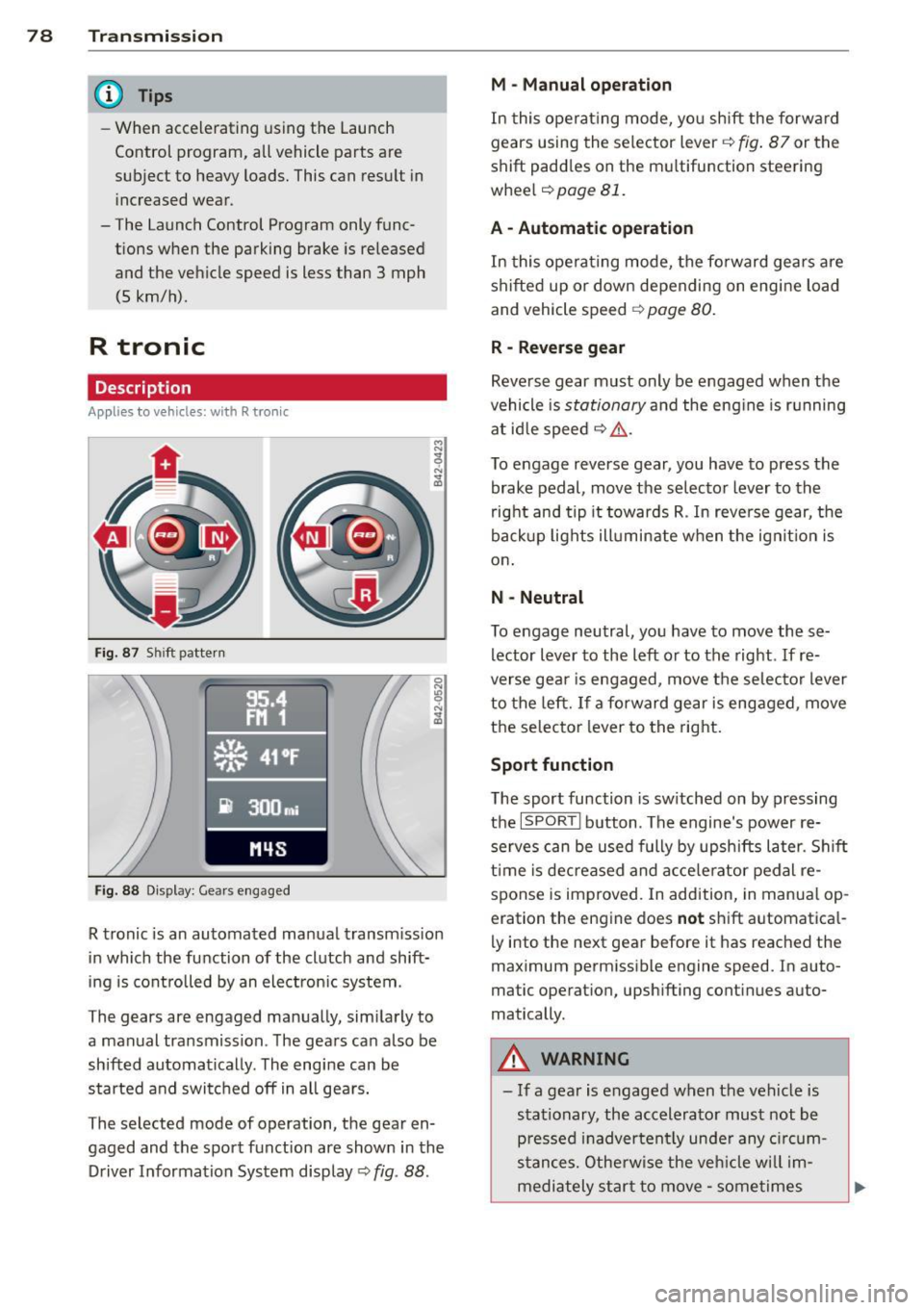
Fig. 87 Shi ft pattern
Fig. 88 Disp lay: Gea rs engaged
R tronic is an automated manual transmission
in which the function of the clutch and shift
ing is controlled by an electron ic system .
The gears are engaged manually, sim ilarly to
a manual transmission . The gears can also be
shifted automatically . The engine can be
started and switched off in all gears.
The selected mode of operation, the gear en
gaged and the sport function are shown in the
Driver Information System display
Q fig . 88 .
M -Manual operation
In this operat ing mode, you shift the forward
gears using the selector lever
Q fig. 87 or the
shift paddles on the mu ltifunction steering
whee l
Q page 81.
A - Automatic operation
In this opera ting mode, the forward gears are
shifted up or down depending on engine load
and vehicle speed
Q page 80.
R -Reverse gear
Reverse gear must only be engaged when the
vehicle is
stationary and the eng ine is running
at idle speed
¢ ,&. .
To engage reverse gear, you have to press the
brake pedal,
move the selector lever to the
right and tip it to wards R . In reverse gear, the
backup lights illuminate when the ignit ion is
on .
N -Neutral
To engage neutral, you have to move these
lector lever to the left or to the right.
If re
verse gear is engaged,
move the selector lever
to the left.
If a forward gear is engaged , move
the selector lever to the right.
Sport function
The sport function is sw itched on by pressing
the
I SPOR T I button. The engine's power re
serves can be used fully by upshifts later. Shift
time is decreased and accelerator pedal re
sponse is improved. In addition, in manual op
eration the engine does
not shift automatica l
ly into the next gear before it has reached the
maximum permissible engine speed. In auto
matic operation, upsh ifting cont inues auto
matically.
A WARNING
-- If a gear is engaged when the vehicle is
stationary, the accelerato r must not be
p ressed inadvertently under any circum
stances. Otherwise the vehicle w ill im
mediately star t to
move -sometimes
Page 82 of 236

80 Transmi ssion
(0 Note
If you must stop on an incline, always hold
the vehicle in place w ith the foot brake to
prevent it from roll ing back. Never hold
the vehicle on an incline w ith a slipping
clutch. The clutch was overloaded if
Clutch
overheat ing! If possib le pl ea se st op ve hi
cle appears in the Driver Information Sys
t em disp lay.
Automatic operation
Ap plies to ve hicles : wit h R tro nic
The forward gears are shifted up or down au
tomatically.
Startin g from a stop
11-Press and ho ld the brake pedal.
11-Tap the se lector lever towards A .
... Re lease the brake pedal and acce lerate
¢ ,& in Manual operation on page 79 .
Under certain circumstances (driving in the
mounta ins for example), it can be beneficia l
to switch tempo rarily to the manual shift pro
g ram ¢
page 79in order to adjust th e gear ra
tios to driv ing cond itions
manually.
Kick-down
A ppl ies to vehicles : wit h R tro nic
When you depress the accelera to r pedal be
yond the resistance po int, R tron ic downsh ifts
into a lower gear, depending on vehicle speed
and engine rpm. The ups hift into the next
h igher gear takes place once the max imum
specified engine speed is reached. Exception:
You have activated the sport funct ion .
A WARNING
Please note that the drive wheels can spin
if kick-down is used on a smooth slippery
road -there is a risk of skidding.
Launch Control Program
App lies to veh icles : w it h R tro nic
The Launch Control Program enables maxi
mum acceleration .
Requirement: The engine must be at operat
ing temperature and the steering wheel must
not be turned .
... With the engine running, press the
I!! but
ton one time. The ESC ind icator light
I in
the Driver Information System d isplay illu
m inates and the message
ESP sport - Warn
ing! R estr icted stability
appears .
... Press the b rake pedal w it h your l eft foot
and hold i t down.
11-Eng age a gear.
11-Press the I SPORT I button on the selector
lever cover .
... Press the accelerator peda l wit h your right
foot sim ultaneously until the engine has
reached a constant speed .
... Remove your left foot from the brake¢,& .
A WARNING ,-
-Always adapt your dr iving to the traffic
f low.
- Onl y use Launch Control when road and
traffic cond itions allow it and ot her dr iv
ers will not be endange red o r annoyed by
your driving and the vehicle's ac celera
t ion .
- Please note that t he d riving wheels ca n
sp in and the vehicle can br eak away
when ESC is swi tched off, especially
when the roa d is s lippery.
- Once the s tarting procedure is comple te,
you sho uld sw itch ESC on again by press
i n g the
I!] switch.
(D Tips
When a ccele rat ing using the Lau nch Con
t rol program, all vehicle parts are s ubje ct
to heavy loads . This can result in increase d
wear .
-
Page 83 of 236

Steering wheel with shift paddles
Applies to vehicles: with R tro nic
The shift paddles allow you to select gears
manually at the steering wheel.
Fi g. 89 Spo rt steering wheel: Sh ift paddles
.,. To shift down, press the p ad d le on t he le ft
0 .
.,. To shift up, press the paddle on the right
0 .
Of course, yo u ca n con tinue to use the manual
shift p rog ram w it h the selector lever in the
center console .
Transmission 81
Page 87 of 236

Reverse parking
Applies to vehicles: with parking system advanced
Parking mode 1 can be used when parking in
a garage or into a parking space.
Fig. 96 Navigation system display: Aiming at a parking
spot
Fig. 97 Navigation system display: Al ign ing the veh icle
~ Switc h the navigation system and the dis
play of the navigation system on.
~ Select the reverse gear.
~ Turn the steering wheel until the orange
orientation lines(!) appear in the parking
spot
9 fig. 96. Use the markings @to help
you estimate the distance from an obstacle.
Each marking represents 3
ft. (1 m). The
blue area represents an extension of the ve
hicle's outline by approximately 16
ft. (5 m)
to the rear.
~ While driving in reverse gear, adjust the
steering wheel angle to fit the parking spot
with the a id of the orange orientation lines
9(D. @ marks the rear bumper. Stop the
vehicle once the red orientation line©
touches an object
9 ,&. .
A WARNING
-The rearview camera does not show the
entire area behind the vehicle~
page 82,
fig. 93. Watch out especially for small
Parking system 85
children and animals. The rear view cam
era cannot always detect them, posing
risk of an accident!
- Please note that objects not touching the
ground can appear to be farther away
than they really are (for example, the
bumper of a vehicle or the rear of a
truck). In this case, you should not use
the orientation lines to help with park
ing, which poses danger of an accident!
(D Note
In the navigation system display, the direc
tion of travel of the vehicle rear is repre
sented depending on the steering wheel
angle. The vehicle front swings out more
than the vehicle rear. Maintain plenty of
distance so that your outside mirror or a
corner of your vehicle does not collide with
any obstacles. This can damage to your ve hicle.
Parallel parking
Applies to vehicles: with parking system advanced
Use parking mode 2 to help you parallel park
along the side of a street.
Fig. 98 Navigat ion system display: Blue surface
a ligne d with parking spot
Fig. 99 Navigat ion system display: The blue curved line
contacting the curb
IJi,,-
Page 88 of 236

86 Parking system
The following steps app ly only when there is
no obstacle such as a wall near the parking
spot. Otherwise, please read the informat ion
prov ided in the "Parking Next to Obstacles"
section.
.. Activate the turn signal.
.. Position your vehicle parallel to the edge of
the street, approximately 3 ft. (1 m) from a parked vehicle .
.. Switch the navigation system and the nav i
gat ion system d isplay on.
.. Se lect rev erse gear . T he parking aid turns
on and pa rking mode 1 appea rs on the dis
play.
.. Press the cont ro l button 1 on the nav iga
tion system ¢
fig. 98. Parking mode 2 ap
pears .
.. Back up and align your vehicle so the b lue
area @ borders on the rear end of the vehi
cle or on the parking spot line. The blue area
represents an extension of the ve hicle's out
line by approximately 16 ft (5 meters) to the
r ear. The long side of the blue area shou ld
be o n the curb. The entire blue area must fit
i n to the par king spot .
.. Wi th the veh icle stopped, turn the steer ing
wheel to the right as far as it wi ll go .
.. Back into the parking spot unti l the blue
curve to uches the curb¢
fig. 99. Stop the
vehicle .
.. With the veh icle stopped, turn the steer ing
whee l to the left as fa r as it wi ll go .
.. Co nti nu e to back into the pa rk ing spot until
the vehicle is par ked para llel to the curb. @
ma rks the rear bumper. Stop the vehicle
when the red orientation line@ borders an
obje ct ¢ .&,. . Keep an eye on the fron t of
yo ur vehicle while doing this
c> (D.
Parking next to obstacles
When the re is an obsta cle (suc h as a wall)
next to the pa rking spot, choose a spot w ith
mo re space on the sides. Pos ition the long
side of the blue area so t hat there is sufficient
space from the c urb. The area must not be on
the c urb. Yo u wi ll also need to start turning
the steering wheel much ear lier. There should
be a suffic ient amount of space between the c
ur b and the blue curve, and the b lue curve
c> fig. 99 must not touch the curb.
A WARNING
--The rearview came ra does not show the
entire area behind the vehicle¢
page 82,
fig. 93. Watch out especially for small
children and anima ls . The rear view cam
era can not always detect them, posing
ris k of an accident!
- Please note that objects not touching the ground can appear to be farther away
than they really a re (fo r example, the
bumper of a vehicle or the rear of a
t ruck). In th is case, you should not use
the orientation lines to help wi th par k
ing, which poses dan ger of an accident!
(D Note
In the navigation system disp lay, the direc
tion o f tra ve l o f th e veh icle re ar is rep re
sented depend ing on the steering wheel
angle. The vehicle front swings out mo re
than the vehicle rear . Ma inta in p lenty of
distance so that your o utside mirror or a
corner of you r vehicle does not coll ide with
any obstacles . This can damage to your ve
hicle .
@ Tips
The left o r right orientation lines and su r
faces will be disp layed, depending on t he
turn s ignal being used .
Adjusting the warning tones
Applies to vehicles: with parking system advanced
Fi g. 100 N av igation syste m dis pl ay: a djustin g t he
park ing syst em
Page 93 of 236

Driving Safely
General notes
Safe driving habits
Please remember -safety first!
This chapter contains important information,
tips, instructions and warnings that you need
to read and observe for your own safety, the
safety of your passengers and others . We have
summarized here what you need to know
about safety belts, airbags, child restraints as
well as child safety. Your safety is for us
priori
ty number 1.
Always observe the information
and warnings in this section - for your own
safety as well as for that of your passengers.
The information in this section applies to all
model versions of your vehicle . Some of the
features described in this sections may be
standard equipment on some models, or may
be optional equipment on others. If you are
not sure, ask your authorized Audi dealer.
A WARNING
- Make certain that you follow the instruc
tions and heed the WARNINGS in this
Manual. It is in your interest and in the
interest of your passengers.
- Always keep the complete owner's litera
ture in your Audi when you lend or sell
your vehicle so that this important infor
mation will always be available to the
driver and passengers.
- Always keep the owner's literature handy
so that you can find it easily if you have
questions.
Safety equipment
The safety features are part of the occupant
restraint system and work together to help
reduce the risk of injury in a wide variety of
accident situations .
Your safety and the safety of your passengers
should not be left to chance. Advances in
technology have made a variety of features
available to help reduce the risk of injury in an
Driving Safely 91
accident. The following is a listing of just a
few of the safety features in your Audi:
- sophisticated safety belts for driver and all
passenger seating positions,
- safety belt pretensioners ,
- front airbags,
- knee airbags,
- side airbags in the seats
- adjustable head restraints,
- adjustable steering column.
These individual safety features can work to
gether as a system to help protect you and
your passengers in a wide range of accidents.
These features cannot work as a system if
they are not always properly adjusted and
properly used!
Safety is everybody's responsibility!
Important things to do before driving
Safety is everybody's job! Vehicle and occu
pant safety always depends on the informed and careful driver.
For your safety and the safety of your passen
gers,
before driving always:
~ Make sure that all lights and signals are op
erating correctly .
~ Make sure that the tire pressure is correct.
~ Make sure that all windows are clean and
afford good visibility to the outside.
~ Secure all luggage and other items carefully
c::>page 62.
~ Make sure that nothing can interfere with
the pedals.
~ Adjust front seat, head restraint and mir
rors correctly for your height .
~ Instruct passengers to adjust the head re
straints according to their height .
~ Make sure to use the right child restraint
correctly to protect children¢
page 130,
Child Safety.
~ Sit properly in your seat and make sure that
your passengers do the same¢
page 59,
Seats and storage. .,..
•
•