2012 AUDI A8 park
[x] Cancel search: parkPage 120 of 300

118 Advanced Parking System
Reverse Parking
Applies to vehicles: with park ing system advanced
Parking mode 1 con be used when parking in
a garage or into a parking space.
Fig. 127 MMI display: aiming at a parking spot
Fig. 128 MMI display : al igning the vehicl e
• Turn the steering wheel until the orange
orientation lines
(D appear in the parking
spot
c::> fig . 12 7 . Use the markings @to help
you estimate the distance from an obstacle. Each marking represents 3
ft (1 meter). The
blue area represents an extension of the ve
hicle's outline by approximately 16
ft (5 me
ters) to the rear.
• While driving in reverse gear, adjust the
steering wheel angle to fit the parking space
with the aid of the orange orientation lines
¢(D. @ marks the rear bumper. Stop the
vehicle when the red orientation line © bor
ders an object
c::> ,& !
_& WARNING
-The rear view camera does not show the
entire area behind the vehicle
¢page 115, fig. 123. Watch out espe
cially for small children and animals. The rear view camera cannot always detect
them, posing risk of an accident!
- Please note that objects not touching the
ground can appear to be further away
than they really are (for example, the
bumper of a parked vehicle, a trailer
hitch, or the rear of a truck). In this case,
you should not use the help lines to help
with parking, which poses danger of an accident!
(D Note
In the M MI dis play , the direction of travel
of the vehicle rear is represented depend
ing on the steering wheel angle . The vehi
cle front swings out more than the vehicle
rear. Maintain plenty of distance so that
your outside mirror or a corner of your ve
hicle does not collide with any obstacles.
This can damage to your vehicle.
Parallel Parking
Applies to vehicles: with parking system adva nced
Use parking mode 2 to help you parallel pork
along the side of a street.
Fig. 129 MMI display: blue surface in the park ing spot
Fig. 130 MMI disp lay: Blu e curve on the curb
Page 121 of 300

The following steps app ly only when there is
no obsta cle such as a wa ll near the parking
spot. Otherwise, please read the information
provided in the "Parking Next to Obstacles"
section
c::> page 119.
~ Activate the turn signal.
~ Position your vehicle parallel to the edge of
the street, approximately 3 ft (1 meter)
from a parked vehicle .
~ Switch the MM I on and se lect reverse gear .
The parking aid tu rns o n and parking mode
1 appears on the display .
~ Press the contro l bu tton (D c::> fig. 129 on
the MMI contro l conso le. Parking mode 2
appea rs .
~ Back up and align yo ur vehicle so t he b lue
area @ borders on the rear end of the vehi
cle or on the parking spot line. The bl ue area
represents an extension of the veh icle's out
line by approximate ly 16 ft (5 meters) to the
rear . The long side of the blue area should
be o n the curb . The entire blue area must fit
i nto the parking spot .
~ With the vehicle stopped, turn the steer ing
whee l to the right as far as it w ill go.
~ Back into the park ing spot until the blue
cu rve to uches the curb
c::> fig. 130. Stop the
vehicle.
~ With the veh icle stopped, turn the steer ing
wheel to the left as far as it will go .
~ Continue to back into the park ing spot until
the vehicle is parked para llel to the curb .@
marks the rear bumper. Stop the vehicle
when the red orientation line@ borde rs an
object
c::> .&, . Keep an eye o n the fron t of
yo ur vehicle while do ing this
c::> (j) .
Parking next to obstacles
When t here is an obstacle (such as a wall)
next to the pa rking spot, choose a spot w ith
mo re space on t he sides. Position the long
side of the b lue a rea so that there is sufficient
space from the curb. The a rea m ust no t be on
the c urb. You w ill also need to start turn ing
the steering wheel much earlie r. T he re should
be a suffic ient amo unt of space between the
curb and the blue curve, and the blue c urve
c::> fig. 130 must not touch the curb.
Ad vanced P arking S ystem 119
A WARNING
-The rear view camera does not show the
entire area behind the vehicle
c::> page 115, fig. 12 3 . Watch out espe
cially fo r small children and anima ls . The
rea r view came ra ca nnot alway s de te ct
them, posing r is k of an a ccident!
- P lease note that objects not touching the
g rou nd can appear to be further away
than they really are (for example, the
bumper of a parked vehicle, a trai ler
hitch, or the rea r of a truck) . In this case,
you shou ld not use the help lines to help
with parking, wh ich poses danger of an
accident!
(D Note
In the MMI display, the direction of travel
of the vehicle rear is represented depend
i ng on the steering wheel angle . The vehi
cle front swings out more than the vehicle
rear. Maintain ple nty of d istance so that
your outside mirror or a corner of your ve
hicle does not col lide with any obstacles.
T his can damage to your ve hicle.
(0 Tips
The left o r right orientation lines and su r
faces will be disp layed, depending on the
turn s ignal being used .
Adjusting the display
and warning tones
App lies to v ehicl es: wi th parkin g sys tem advanced
The display and warning tones can be adjust
ed in the MMI.
~ Select: I CAR I function b utton > Car sy stem s
contro l button > Dri ver a ssist > Parking aid
> Setting s control b utton .
Display
On -when the parking system is switched on,
either the vis ual d isp lay or the picture from
the rea r view camera is disp layed .
IJI>
Page 122 of 300

120 Advanc ed Parking S ystem
Off -when the parking system is switched off,
only audible signa ls are given.
Warning tones
Front v olume -front sensor volume
Rea r vo lu m e -rear sensor volume
Front frequ ency -front sensor frequency
Rea r frequ enc y -rear sensor frequency
Mu sic vo lume whil e parking -when the park
ing system is switched on, the volume of the
active audio sou rce is lowered.
The newly adjusted value is briefly heard from
the signa l generator.
(Di Tips
- The warning tones can a lso be adjusted
directly by the v isual display or the p ic
ture from the rear v iew camera. Simp ly
press the
S ett ing s cont ro l button.
- Changed settings are activated when
parking system is switched on again .
-The sett ings are automatically stored
and ass igned to the remote control key .
Error messages
Applies to vehicles: with parking system advanced
There is an error in the system if the LED on
the
P'ljA switch is blinking and you hear a con
tinuous alarm for a few seconds afte r switch
ing on the parking system or when the pa rk
ing system is already act ivated. Have your au
thor ized Audi dealer correct the error .
(D Tips
If
the error is not corrected before you
switch off the ignition, when you switch on
the par king system aga in , the LED in the
? ljA switch will blink.
Page 123 of 300

Homelink®
Universal remote
control
General information
Applies to vehicles: with Horne Link® universal remote
control
The Homelink universal remote control can
be programmed with hand -held transmitters
from existing equipment.
Using the Homelink universal remote control,
you can operate equipment such as garage
doors, property gates and house lights from inside your vehicle.
Using the Homelink universal remote control,
you can replace up to three separate hand
held transmitters for equipment on your
property with just one universal remote con
trol. Most of these transmitters a re used to
operate ga rage doo rs and property gates. The
individua l transmitters are programmed at
the front bumper. That is where the control
module is located.
The transmitters must be programmed first in
order to operate systems using the Homelink universal remote control.
A WARNING
-
- Never use the Homelink® transmitter
with any garage door opener that does have not the safety stop and reverse fea
ture as required by federal safety stand ards . Th is includes any garage door open
er model manufactured before April 1, 1982.
- A garage door opener which cannot de
tect an object, signaling the door to stop
and reverse does not meet current feder
al safety standards. Using a garage door
opener without these features increases
risk of serious injury or death.
- For safety reasons never release the
parking brake or start the engine while
anyone is standing in front of the vehicle .
- A garage door or an estate gate may
sometimes be set in motion when the
Homelink ® 121
Homelink ® remote control is being pro
grammed.
If the device is repeatedly ac
tivated, this can overstrain motor and
damage its electrical components - an
overheated motor is a fire hazard!
- To avoid possible injuries or property
damage, please always make absolutely
certain that no persons or objects are lo
cated in the range of motion of any
equ ipment being operated.
(D Tips
- If you would like additional information
on the Homelink ® Universal Transce iver,
Homelink compatible products, or to
purchase other accessories such as the
Homel ink ® Lighting Package, please
contact Homelink at 1 -800 -355-3515 or
on the Internet at www.homelink.com.
- For Declaration of Comp liance to United
States FCC and Industry Canada regu la
tions ~
page 283.
Page 124 of 300
122 Homelink®
Programming transmitters
Applies to vehicles: with Horne link
You con program the buttons in the Home
Link universal remote control located in the
v e hicle headliner.
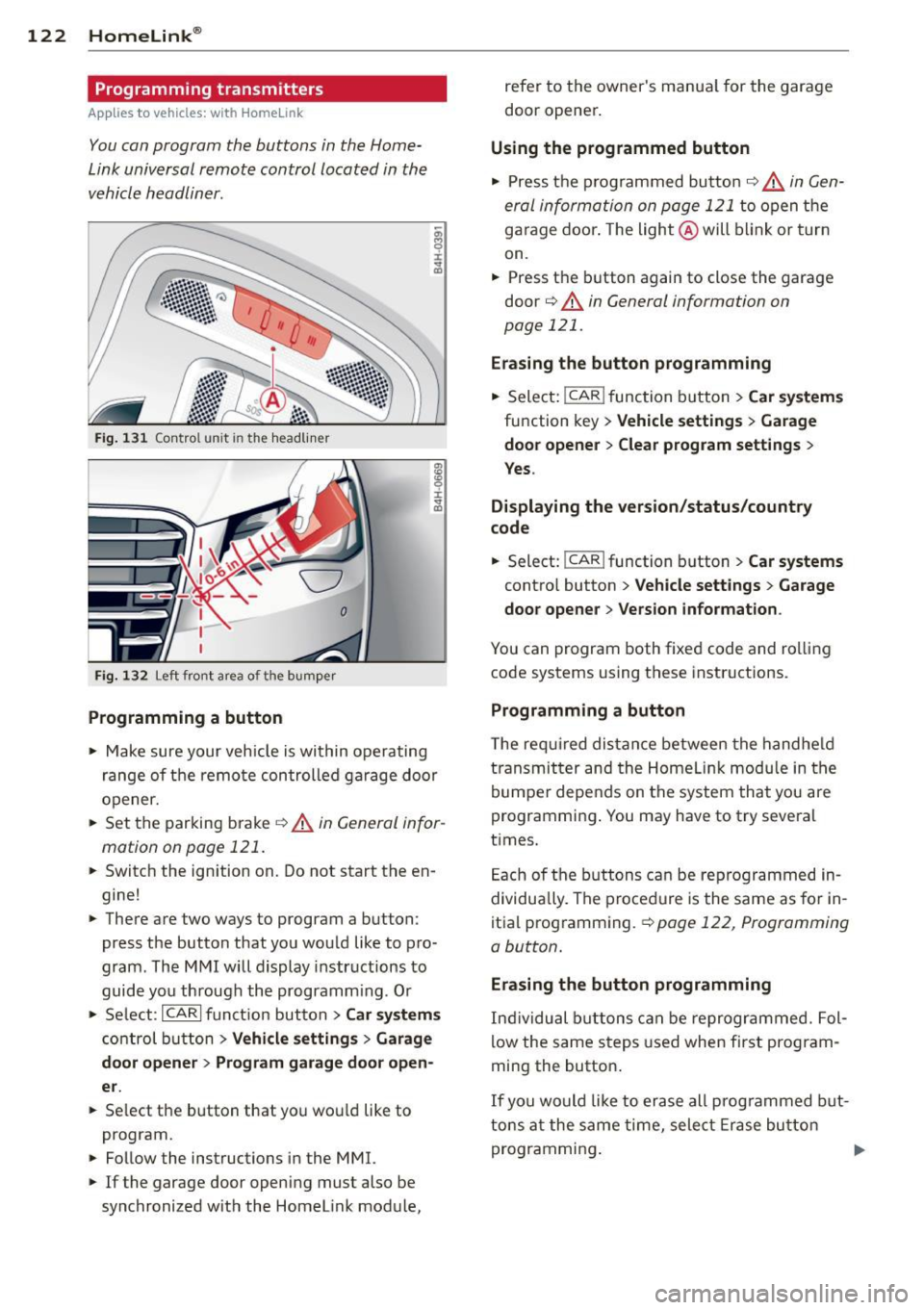
F ig. 1 31 Co ntrol un it in the h ead liner
Fi g. 1 32 L eft front area of the bum per
Programming a button
.. Make sure your veh icle is wi thin operating
ra nge of the remo te con trolled ga rage d oor
opener.
.. Set t he parking bra ke
~ A in General infor
mation on pa ge 121 .
.. Switc h the ignition on. Do not start the en
gine!
.. The re a re two ways to program a button :
press the button that yo u would like to pro
gram . The M MI will display instruct ions to
guide yo u th rough the programm ing . O r
.,. Se lect :
ICARI f u nct io n button > Car systems
cont rol bu tton > Vehicle settings > Garage
door opener > Program garage door open
er .
.. Se lect t he b utton that yo u wo uld like to
program.
.. Follow the inst ructions in the MMI.
.. If the garage door openi ng must also be
synchronized wit h the Homel ink mod ule, refer to the owner
's manua l for the gar age
door opener .
Using the programmed button
.. Pres s th e pr og rammed butto n~ ,& in Gen
eral informati on on page 1 21
to open t he
g ar age doo r. T he li ght @ will blink or tur n
on .
.. Press t he bu tton again to close the garage
door
q A in General information on
page 121.
Erasing the button programming
.. Sele ct: I CAR I func tion b utt on > Car systems
function key > Vehicle settings > Garage
door opener > Clear program settings
>
Yes .
Displaying the version/status/country
code
.. Select: I CAR I function b utton > Car systems
contro l button > Vehicle settings > Garage
door opener > Version information .
You can program both fi xed code and ro lling
code systems using these instr uctions.
Programming a button
The re quired di stance between the hand he ld
transmit ter and the Homel ink module in the
bumpe r depe nds on the system tha t you are
programmi ng . You may have to try several
t imes.
E ach of the buttons c an be re progra mmed in
dividua lly . The proced ure is the same as fo r in
itia l prog ramming .
~page 12 2, Programming
a button.
Erasing the button programming
I n di vidu al but tons ca n b e reprogr ammed. Fol
l ow the same s teps used when fi rst prog ram
ming the butto n.
If y ou wo uld lik e to er ase all prog rammed but
t o ns at the same time, sele ct Era se bu tt on
p rogr ammi ng .
Page 193 of 300

& WARNING
-Never let the vehicle roll to a stop with
the engine shut
off.
- If the brake booster is not working, for
example when towing your vehicle, or
because the brake booster has somehow
been damaged, the brake pedal must be
pressed considerably harder to make up
for the lack of booster assistance.
Servotronic ® -
advanced power
steering system
-
The power steering systems use the power of
the running engine to allow precise steering
with little effort.
The advanced Servotronic ® power steering
system senses the road speed and e lectroni
cally adjusts power ass istance to provide com
fortable and safe steering response exactly matched to the veh icle speed.
Power steering wi ll not work if the engine is
off. As a resu lt, the steering whee l wi ll be hard
to turn.
The power steering fluid level is checked dur ing the scheduled maintenance services.
(D Note
I f there is an electronic malfunct ion, ser
votronic
will sti ll function like a conven
tional power steering system, providing a
constant steering support force that is no
longer proportionate to the vehicle speed.
This is most noticeable when turning the steer ing whee l at low speeds (for examp le
when parking), -more effo rt will be re
qui red than usual.
- Be awa re of the different than usual
steering response and adjust your stee r
i ng fo rce accord ingly.
- Have the p roblem checked and set right
by an Aud i dealer as soon as possib le .
Int ellig ent technolog y 191
(D Tips
-When the engine is running, never ho ld
the steering wheel turned all the way to
the right or to the left for longer than 15
seconds. The power steering pump will
overheat the hydrau lic fluid if you keep
holding the stee ring wheel turned all the
way. This is likely to damage the power
steering system.
- If the powe r stee ring system should fa il
entire ly, o r if the e ngine is not run ning
(for example, wh ile be ing towed), you
w ill still be able to stee r the veh icle.
However,
considerably more effor t will
be required to do so .
- If the power stee ring system sho uld
have a lea k, or is not functioning proper
ly, contact your authorized A udi dealer
immediately.
- The power steering system req uires a
specially formu lated hydra ulic fluid. The
power steering fluid reservoir is located
in the engine compartment
Q page 221.
The correct fluid level in the reservoir is
important for proper functioning of the
powe r stee ring.
Driving with your
quattro ®
With All Wheel Drive, all four wheels ore driv
en.
General information
Wi th A ll Wheel Drive, power is dis tributed to
all four w heels. This happens automatically
depend ing on your driving style and the road
conditions at the time . See a lso
Q page 187.
With the sport different ia l*, power distribu
tion to the rear wheels is variable and can be
adjusted with Audi drive select*
Qpage 103.
Always read and follow safety precautions
Q&_ ,
Winter tires
When dr iving in the winter, yo ur vehicle with
A ll Wheel Drive has an advantage, even w ith
regular tires. In winter road conditions it may ..,. •
•
Page 197 of 300

Catalytic converter
It is very important that your emission control system (catalytic converter) is function
ing properly to ensure that your vehicle is run
ning in an environmentally sound manner .
.. Always use lead-free gasoline¢ page 215,
Fuel supply.
.,. Never run the tank down all the way to
empty.
.,. Never put too much motor oil in your en-
gine
¢ page 225, Adding engine oil~-
.,. Never try to push- or tow-start your veh icle.
The catalytic converter is an eff icient "clean
up" device built into the exhaust system of
the vehicle . The catalytic converter burns
many of the pollutants in the exhaust gas be
fore they are released into the atmosphere.
The exclusive use of unleaded fuel is critically
importa nt for the life of the cata lytic convert
e r and proper functioning of the engine.
A WARNING
-
- Do not park or operate the vehicle in
areas where the hot exhaust system may
come in contact with dry grass, brush,
fuel spill or other material which can cause a fire.
- Do not apply additional undercoating or
rustproofing on or near the exhaust
man ifold, exhaust pipes, catalytic con
verter or heat shields. During driving, the
substance used for undercoating cou ld
overheat and cause a fire.
0 Note
- Be aware that just one tank filling with
leaded fuel will already seriously de
grade the performance of the catalytic
converter.
- Do not exceed the correct engine oil level
¢ page 225.
-Do not drive until the fuel tank becomes
completely empty. The eng ine could mis
fire . U nburned fuel could a lso get i nto
Dri vin g and en vironm ent 195
the exhaust system and this cou ld cause
the catalytic converter to overheat .
- Do not switch off the ignit ion while the
vehicle is mov ing.
- Do not continue to ope rate your veh icle
unde r these conditions, as othe rwise fuel
can reach the catalytic converter. This
co uld result in overheating of the con
verter, requir ing its replacement .
- To assure efficient operation of the Emis
sion Control System:
- H ave your vehicle maintained prope rly
and in accordance w ith the se rv ice rec
ommendat ions in you r Warranty &
M aintenance boo klet.
- L ack of prope r maintenance as we ll as
improper use of the vehi cle w il l impair
the function of the em ission contro l
system and could lead to damage .
@ For the sake of the environment
Even when the Emiss ion Control System is
operat ing properly, the exha ust gas can
have a sul fur -li ke exhaust gas smell under
some operating states . This depends on
the sulfur content of the fuel being used .
Using a different brand of fue l may help,
or filling the tank with lead-free super
grade gasoline .
Avoid damaging the
vehicle
When you are drivi ng on poo r roads, or over
c ur bs, s teep ramps, etc., ma ke certai n that
low -lying parts s uch as spoilers and exhaust
system pa rts do not bottom o ut and get dam
aged.
T h is is espec ially true for veh icles w ith low
s lung chassis (spor ts chassis)* and fully load
ed vehicles. •
•
Page 203 of 300

drive at the maximum permissible speed. Re
duce your speed even more if load, weather or
wind condit ions are unfavorable -part icularly
when going downhill.
Reduce vehicle speed
immediately if the trail
er shows the slightest sign of swaying .
Do not
try to stop the swaying by accelerating.
Observe speed limits . In some areas, speeds
for vehicles towing trailers are lower than for
regular vehicles .
A lways apply brakes early. When driving
downhill, shift into a lower gear to use the en
gine braking effect to slow the vehicle . Use of
the brakes a lone can cause them to overheat
and fail.
Coolant temperature
The coolant temperature gauge c:> page 10
must be observed carefully. The coo lant tem
perature can increase if you drive on long in
clines in a low gear at high engine speeds. Re
duce your speed immed iate ly if the L EDs in
the top part of the display turn on.
F or more information about indicator lights,
refer to.
i::> page 15.
A WARNING
Anyone not properly restrained in a mov
ing vehicle is at a much greater risk in an
accident . Never let anyone r ide in your car
who is not properly wear ing the restra ints
provided by Aud i.
Trailer towing tips
Important to know
Your veh icle hand les different ly when tow ing
-
a trailer because of the addit ional weight and
d ifferent weight distribution . Safety, perform
ance and economy will greatly depend on how
carefully you load your trailer and operate
your ng .
Before you actually tow your trailer, practice
turning, stopp ing and back ing up in an area
away from traffic. Keep practicing until you
Trailer towing 201
have become completely familiar with the way
your vehicle-trai ler combination behaves and
responds .
Backing up is difficult and requires practice .
Backing up with a t railer generally requires
steering action opposite to that when backing
up your vehicle without a tra iler.
Maintain a greater distance between your ve
hicle and the one in front of you . You wi ll need
more room to stop. To compensate for the
trailer, you w ill need a larger than normal
turning rad ius.
When passing, remembe r that you cannot ac
ce lerate as fast as you norma lly would be
cause of the added load. Make sure you have
enough room to pass. After passing, allow plenty of room for your trailer before chang
ing lanes again.
Avoid jerky starts, sharp turns or rapid lane changes.
(D Tips
- Do not tow a trailer during the break-in
period of your vehicle.
- If you tow a trailer, your Audi may re
quire more frequent maintenance due to
the extra load
c:> page 280.
Parking on a slope
Do not park on a slope with a trailer. If it can
not be avoided, do so only a~er doing the fol
lowing:
When parking:
.,. App ly the foot brake.
.,. Have someone p lace chocks under both the
vehicle and the trailer wheels .
.,. With chocks in place, slowly release the
brakes until the wheel chocks absorb the
load.
.,. Turn the wheels towards the curb .
.,. Apply the parking brake .
.,. Select the P selector lever posit ion .
When restarting after parking:
.,. Apply the foot brake.
•
•