2012 AUDI A8 park
[x] Cancel search: parkPage 83 of 300
CD Note
-Avoid high engine rpm, fu ll throttle and
heavy engine loads unti l the engine has
reached operating temperature -other
wise you risk engine damage.
- T he engine cannot be started by pushing
or towing the veh icle.
- If the engine has been under heavy load
for an extended period, heat builds up in
the engine compartment after the en
gine is switched off -there is a risk of
damag ing the engine . Allow the eng ine
to run at idle for about 2 m inutes befo re
swit ching it off.
@ Tips
- If you open the dr iver's door w ith the ig
nit ion on, a buzzer sounds and the mes
sage
Igniti on i s on appears in the instru
ment cluster disp lay. Switch the ign it ion
off .
-If you leave the vehicle with the ignit ion
swi tched on, the ignition will switch off
after a certain period of time. Please
note that e lectrica l equipment such as
exter ior lights wi ll switch off as well
when that happens .
Stopping the engine
... Bring your vehicle to a comple te stop .
... Move the selector lever to the P or N posi
t ion .
... Press the !START E NGIN E STOPI button
Q page 80, fig. 81 .
Emergen cy off
If necessary, the engine can be swi tched off
with the selector lever in the R, Dor S posi
tions . The eng ine stops if you press the
I START E NGIN E STOP I button at speeds be low
6 mph (10 km/h).
_& WARNING
- Never turn off the eng ine unt il the vehi
cle has come to a complete stop.
On th e road 81
- The brake booster and power steering
only work when the engine is running. If
the engine is off, you have to use more
force when steering or braking . Because
you cannot s teer and brake as you usual
ly would, th is could lead to crashes and
serious injuries.
- For safety reasons , you sho uld a lways
park your vehicle with the selector lever
in P . Otherwise, the vehicle could inad
vertently roll away.
- After the eng ine has been switched off,
the radiator fan can cont in ue to run for
up to 10 minutes -even with the igni tion
switched off .
It can also switch on again
after some time if the coolant tempera
ture rises as the result of a heat b uildup
or if the engine is hot and the engine
compartment is additionally heated by
the sun's rays .
~
CD Note
Do not stop the eng ine immediately after
hard or extended driving. Keep the engine
running for approximate ly two minutes to
prevent excess ive heat bu ild -up .
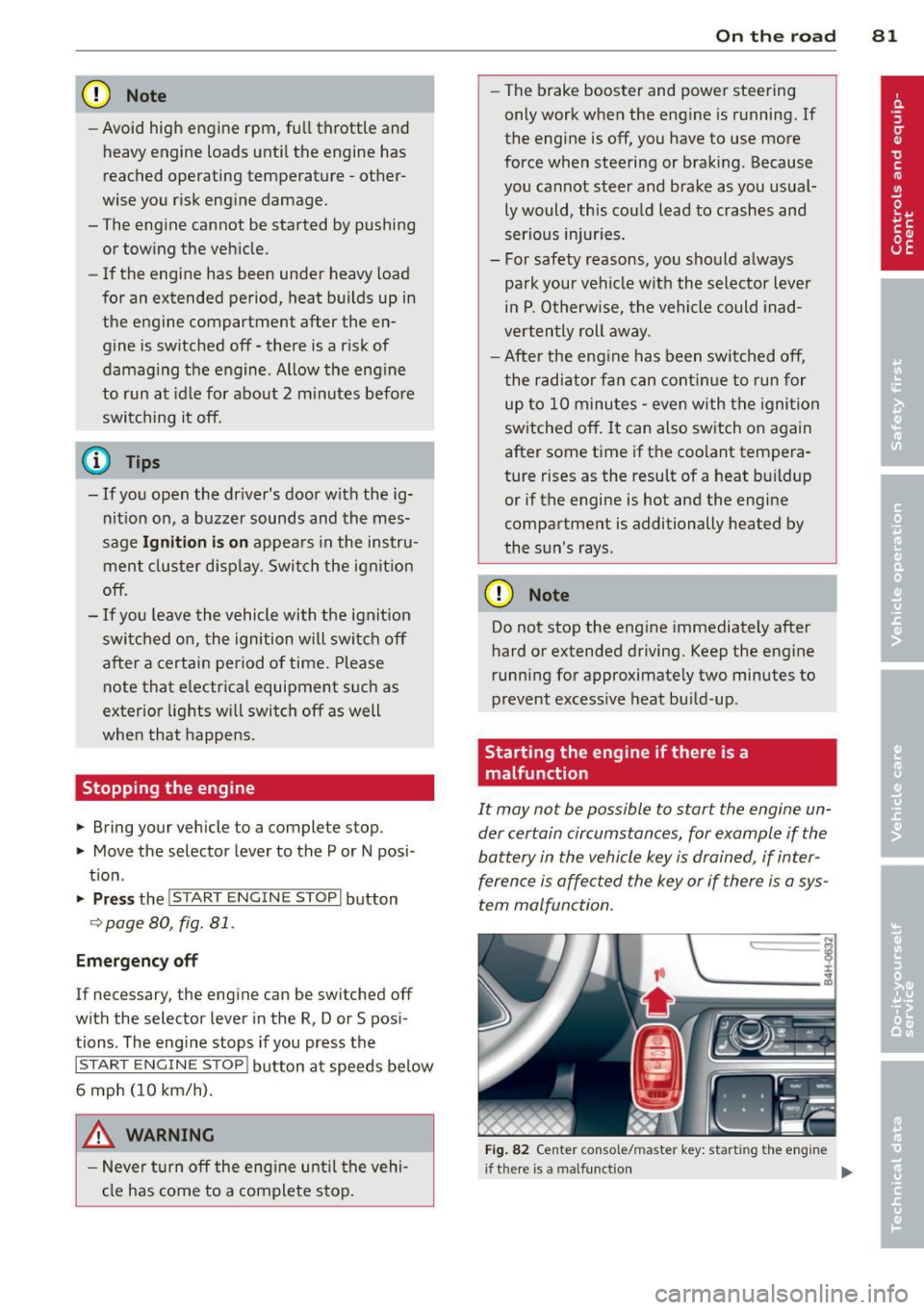
Starting the engine if there is a
malfunction
It may not be possible to start the engine un
der certain circumstances , for example if the
battery in the vehicle key is drained, if inter
ference is affected the key or if there is a sys
tem malfunction.
ij
:c
---- -~
Fig . 82 Center co nsole/m aste r key : star ting the engine
I
if th ere is a malfun ction Ill>
Page 84 of 300

82 On the road Requirem ent : The message
Key not recog
nized. Hold b ack of key against marked area.
See owner 's manual.
must appear and the in
dicator light
m must sw itch on.
• Hold the master key vertica lly in the loca
tion indicated y>l} q fig .
82.
• Press the brake pedal~ A in Starting the
engine on page 80.
.. Press the !~S _T _A_ R_T_ E_N_ G_ I_ N _E_ S_T_ O_ P~ I button.
The eng ine will start .
• Drive to your author ized Audi dealer imme
diately to have the malfunct ion corrected .
@ Tips
You can view the message again by press
ing the !START ENGINE STOP I button.
Electromechanical
parking brake
Operation
The electromechanical parking broke replaces
the hand broke.
Fig . 83 Ce nter console: Parking brake
• Pull on the switch(®) ~ fig. 83 @ to app ly
the parking brake . The indica tor light in the
switch illuminates.
• Step on the brake pedal or the accelerator
pedal and press the switch(®) at the same
t ime to release the parking brake. The indi
cator light in the switch goes out .
Your vehicle is equipped wit h an electrome
cha nica l parking brake. The parking brake is
designed to prevent the vehicle from rol ling
unintentionally and rep laces the hand brake . In
addition to the normal functions of a tradi
tiona l hand brake, the electromechanical
parking brake provides var io us convenience
and safety functions .
When starting from rest
-The integral start ing ass ist helps you when
driving by automatically releasing the park
ing brake
~ page 83, Starting from rest .
-When starting on inclines, the starting as
sist prevents the vehicle from unintentiona l
ly rolling back. The braking force of the
parking brake is not released until sufficient
driving force has been built up at the
wheels.
Emergency brake function
An emergency brake ensures that the vehicle can be slowed down even if the
normal brakes
fail
q page 84, Emergency broking.
Indicator lights
-If the parking brake is closed with the ign i
tion
switched on the indicator lights come
on - (U SA mode ls)/ . (Canada models)
in the instrument cluster and in the switch.
- If the parking brake is closed with the igni
tion
switched off the indicator lights come
on - (USA mode ls)/ . (Canada models}
in the instrument cluster and in the sw itch
for about 20 seconds .
A WARNING
Do not press the acce lerator pedal inadver
tently if the vehicle is stationary but the
engine is running and a gear is selected.
Otherwise the vehicle will start to
move
immedia tely and could result in a crash.
(D Note
If the symbol . in the display or the indi
cator light .. (USA models)/ . (Cana
da models) in the instrum ent cluster flash
es, there is a malfunction in the brake sys
tem. Please refer to the detailed descrip-
tion of the indicator lights
~ page 14. ll-
Page 85 of 300

-If the indicato r light - (USA mod
els)
,111 (Canada models) or I.I turns
on, there may be a malfunction in the
parking brake
¢page 15.
@ Tips
-You can apply the parking brake at any
time - even w ith the ignition switched
off. The ignit ion must be on in order to
release the parking brake.
- Occasiona l noises when the park ing
brake is applied and released are norma l
and are not a cause for concern.
- When the vehicle is parked, the parking
brake goes through a self-test cycle at
regular intervals. Any assoc iated noises
are norma l.
Parking
Various rules apply to prevent the parked ve
hicle from rolling away accidentally.
P a rking
~ Stop the vehicle w ith the foot brake.
~ Pu ll the switch© to apply the parking
brake.
~ Se lect the P selector lever position
¢page 109.
~ Turn the eng ine off ¢,& .
In addition on incline s and grade s
~ Turn the steering wheel so that your vehicle
will roll against the curb in case it should
start to move.
A WARNING
-When you leave your veh icle - even if on
ly b riefly - always take the ignition key
with you. This applies particu la rly when
children remain in the veh icle. Otherw ise
the ch ild ren could sta rt the engine, re
lease the parking brake or operate elec
trical equipment (e .g. power windows).
There is the risk of an accident.
- When the vehicle is locked, no one - par
t icu larly not ch ildren should remain in
the vehicle. Locked doors make it more
On th e ro ad 83
difficult for emergency workers to get in
to the vehicle - putting lives at risk.
Starting from rest
The starting assist function ensures that the
parking broke is released automatically upon
starting.
Stopping and appl ying p arking brake
~ Pull the switch(®) to apply the pa rking
brake.
Sta rting and automaticall y releasing the
parking brak e
~ When you start to drive as us ual, the pa rk
ing brake is automatically released and your
veh icle begins to move .
When stopp ing at a traffic signal or stopping
in city t raff ic, the parking b rake can be ap
plied. The vehicle does not have to be held
with the footbrake. The parking brake elimi
nates the tendency to creep w ith a dr ive range
engaged. As soon as you drive off as usua l,
the parking brake is released automatically
and the vehicle starts to move.
St arting on slope s
When starting on inclines, the sta rting assist
prevents the vehicle from unintentionally roll
ing back. The braking force of the parking
brake is not re leased until suff ic ient driving
force has been built up at the wheels.
(D Tips
For safety reasons, the parking brake is re
l eased automatically on ly when the driv
er's safety belt is engaged in the buckle.
Starting off with a trailer
To prevent rolling back unintentionally on an
incline, do the following:
~ Keep the switch(®) pulled and depress the
accelerator. The parking brake stays applied
and prevents the vehicle from roll ing back-
ward . ..,.
Page 86 of 300

84 On th e road
• You can release the switch (®) once you are
sure that you are developing enough for
ward momentum at the wheels as you de
press the accelerator .
Depending on the weight of the rig (vehicle
and trai ler) and the severity of the incline, you
may roll backwards as you start . You can pre
vent roll ing backwards by holding the parking
brake switch(®) pulled out and accelerating -
just as you would when starting on a hill with
a conventional hand brake .
Emergency braking
In the event that the conventional brake sys
tem fails or locks .
• In an emergency, pull the switch(®) and
continue to pull it to slow your vehicle down
with the parking brake .
• As soon as you release the sw itch
C®> or ac-
cele rate , the braking p rocess stops.
If you pull the switch(®) and hold it above a
speed of about 5 mph (8 km/h), the emergen
cy braking function is in it iated. The veh icle is
b raked at all four wheels by activa ting the hy
d raul ic br ake system. The b rake performance
is simi lar to making an emergency stop
c::> & .
In order not to activate the emergency brak
i ng by m ista ke, an audible wa rning tone (bu z
z er) sounds when the swi tc h
C®> is pulled. As
soon as the switch(®) is released, or the accel
erator pedal is depressed, emergency braking
stops .
.&_ WARNING
Emergency braking should only be used in
an emergency, when the normal foot brake
has failed or the brake pedal is obstructed.
Using the parking bra ke to perform emer
gency braking will slow yo ur vehicle down
as if you had made a fu ll brake applicat ion.
T he laws of physics cannot be s uspended
even w ith ESC and its associate d compo
nents (ABS, ASR, EDL). In corners and
when road or weather conditions are bad, a full brake application can cause the vehi- cle to sk
id or the rear end to break away -
risking an accident.
Speed warning system
, Introduction
The speed warning system helps you to stay
under a specified maximum speed .
The speed warning system warns you if you
are exceeding the maximum speed that you
have set . You will hear a warning tone when
your speed exceeds the stored value by ap proximate ly 3 mph (3 km/h). An ind icator
l ight . (USA
models) ;a (Canada mode ls) in
the instr ument cluster d isp lay also tur ns on at
the same time. The indicator light.,.
turns off when the speed decreases be low the
stored maxim um speed.
Setting a th reshold is recommended if you
would like to be rem inded when you reach a
certain maxim um speed. Situations whe re you
may want to do so include driving in a co untry
with a genera l speed limit or if there is a
specified maximum speed for winter tires.
(D Tips
Even though your vehicle is equipped w ith
a speed warn ing system, you should still
watch the speedometer to make sure you
are not dr iv ing faster than the speed limit.
Setting the threshold
You can set, change and delete the threshold
in the MMI.
• Select: !CAR ! function b utton > Car systems
contro l button > Dri ver ass ist > Speed warn
ing .
You can set any threshold between 20 mph
(30 km/h) and 150 mph (240 km/h). Sett ings
can each be adj usted in increments of 5 mph
(10 km/h).
Page 96 of 300

94 Audi adap tive cruise control and br aking guard
stopped vehicle or stationary obstacle
(end of a traffic jam or veh icle that has
broken down in traffic).
- Always remember that the radar sensor
for the Audi braking guard works only
within defined detection and range limits
that may prevent the proper detection of
other vehicles .
- The radar sensor's function and range
can be reduced by rain, snow and heavy
spray. Moving vehicles up ahead may not
be promptly detected or may not be de
tected at al l.
- Reflective surfaces includ ing crash barri
ers or tunnel entrances may impair the
func tion of the radar sensor.
{D) Tips
- You can cancel the braking w ith increas
i ng force that is initiated by the system
by braking yo urself, by accelerating no
ticeab ly or by swerving.
- Audi braking guard error messages
¢page 94.
- Keep in mind that braking gua rd can
brake u nexpectedly. Always secure any
ca rgo or objec ts th at yo u are transport
i ng to reduce the risk of damage or in
ju ry.
Settings in the MMI
Applies to vehicles: with Audi adaptive cruise co ntrol
.. Se lect: I CARI function button > Ca r sys tem s
control button > Drive r assist > Audi b rak
ing guard .
System -
Switch Audi braking g uard On and
Off . When you switch the ignition on, the
message
Aud i braking gua rd off appears if
the system is switched off.
Ea rly warnin g -The distance and approach
warn ings in the display can be switched
On /
Off .
(D Tips
- Your settings are automatically stored
and ass igned to the remote control key being used at the times the settings are
made.
- If you switch the ESC to sport mode, A u
di braking gua rd switc hes off a utomat i
cally r=:>page
189.
- Switch A udi braking guard off when you
are loading the vehicle onto a vehicle car
rier, train, ship or other type of transpor
tat ion. This can prevent undesired warn
ings from the braking guard system.
Messages
Applies to vehicles: with Aud i adaptive cru ise contro l
ACC unavailable
ACC and b raking gua rd: unavailable
T he system cannot detect moving vehicles up
ahead correctly and is switched off. The sen
sors have been displaced or a re not working
proper ly . The Audi pre sense functions may a l
so be affected. Drive to your authorized Audi
dealer or authorized A udi service facility im
med iate ly to have the malfunction corrected.
ACC: unavaila ble at thi s time. No sen sor vi
sion
ACC and braking guide: un ava ilabl e at thi s
time . No s ensor vi sion
Th is message appears if the sensor v iew is ob
structed, for examp le by leaves, snow, heavy
spray o r d irt. Clean the sensors
r=;, page 87,
fig. 86 .
ACC: unavailabl e at this time. Inclin e too
s teep
The road exceeds the max imum possible an
gle for proper adaptive cru ise control opera
t ion. Adaptive cru ise cont rol is switched off.
ACC: only selector lever pos itions D , S or M
available
Se lect the D, Sor M selector lever position .
ACC: un available at thi s time . Parking brake
s et
T he adapt ive cru ise control system switches
off au tomatically if the par king b rake is set. .,.
Page 97 of 300

Audi adaptive cruise control and braking guard 95
ACC: unavailable at this time . ESP interven
tion
This me ssage appea rs if the Ele ct ron ic Stab ili
t y Control (ESC) is wor king to help stab ilize
the vehicle . In this case, adaptive cru ise con
trol switches off a utomatica lly .
ACC : Please take over
This message appea rs whe n adapt ive cr uise
con trol cannot set t he parking b ra ke . P ress
the brake pedal to preve nt the vehicle from
r olling .
•••
Three wh ite dots appear if a setting cannot be
se lected with t he se lecto r lever . Fo r example,
this happens if adapt ive cr uise c ontrol can not
resume dr iv ing in stop-and -go traff ic because
one of the conditions required for ACC to wor k
i s not p resent.
Door open
The adaptive c ruise control system cannot
sw itch on when a d oor is open .
Stationary object ahead
This message appea rs if you would li ke to
sw itch ad aptive cr uise con trol o n and t here is
a sta ti onar y ve hicle or obsta cle direc tly ah ea d
of yo ur vehicle.
Page 105 of 300

Audi drive select Driving settings
Introduction
Aud i drive select makes it possible to experi
ence different types of vehicle settings in one
veh icle. The driver can select th ree
Comfort,
Auto
and Dynamic modes in the MMI to
switch between a sporty and a comfortable
driving mode.
You can also adjust the setting according to
your preferences in the
individual mode. For
examp le, you can combine settings such as a
sporty engine tuning with light steering.
Descript ion
The vehicle setup in each mode depends on
the vehicle's features. The engine, transmis
sion, steering, reversible safety belt tension
ers and adaptive air suspension are always in
volved .
Engine and transmission
Depending on the mode, the engine and the
transmission respond more quickly or in a
more balanced manner to accelerator pedal
movements. In the sporty dynamic mode, the
transmission sh ifts at higher RPMs.
Air suspension
The adaptive air suspension/adaptive air sus
pension sport*
( Air suspension in the MMI) is
an electronically cont rolled air suspension and
damping system. They are adjusted depend ing on the selected driving mode, the driver's
steering, braking and acceleration input and
the road s urface, veh icle speed and load. A
sporty setting is generally used in vehicles
with adaptive air suspension sport *.
The vehicle clearance va ries depending on the
selected mode and the speed .
The highway setting is activated automatically
when you drive above 75 mph (120 km/h) for
mo re than 30 seconds in the
auto or dynamic
mode. The g round clearance is increased auto-
Audi drive select 103
matically if the speed drops below 44 mph
(70 km/h) for more than 120 seconds.
Steering
The steering adapts in terms of steering effort
and steering ratios. Indirect steering that
moves easily as in comfort mode is especially
s ui ted to long drives on a highway. In con
trast, dynamic mode provides sporty, direct
steering.
T he following applies to vehicles with dynamic
steering*: the steering ratio changes based on
vehicle speed in order to maintain optimum
steering effort for the driver at all times. This
sets the steering to be less sens itive at higher
speeds in order to provide improved vehicle
control.
Sport diffe rential*
As a component of the all whee l drive system
(quattro
® ) c> page 191, the Sport differen
tial* distributes the driving power to the rear
axle depending on the situat ion. The dis tribu
tion of power varies depending on the select
ed mode, from balanced (comfort) to agile
(dynamic). The goal is a hig h level of agility
and ability to accelerate on curves. Th e vehi cle
is very responsive to steer ing.
Adaptive cruise control*
The behav ior when accelerating can be adjust
from comfortable to sporty, depending on the
drive select mode. Adaptive cruise control al
so responds to the driving behavior of the ve
hicle ahead in a more conserva tive or sporty
manner.
(D Note
- Make sure there is enough clearance
above and below the vehicle when park
ing . The height of the vehicle can change
once it is parked due to temperature
fluctuations, changes to the load condi
tions and changes to the driving modes,
w hich can affect clearance.
- When transporting the vehicle on a car
carrier, train, ship or by other means, on-
ly tie the vehicle down at the running
IJJ,,
Page 109 of 300

steering angle. The pedestrian warning prompts you to pay even closer attention to
the area in front of the vehicle and to watch
out for pedestrians.
I f another display such as the trip comp uter
replaces the image from the night vision as
sistant, the indicator light turns red when
there is a pedestrian warn ing
I Q fig. 111.
@ Tips
The pedestrian marking and warning tone can be adjusted in the MMI
¢ page 108.
General information
Applies to vehicles: with night vision assistant
N 0
8 :i:
~
Fig. 112 Front of the vehicle: night vision assistant
camera
The following situations may affect the func
tion of the night vision assistant system:
- poor v is ibility such as snow, rain, fog or
heavy road spray
- dirty lens on the night vision assistant cam- era
Make sure the n ight v ision assistant camera
i::> fig. 112 is not cove red by stickers, deposits
or any other obstruct ions because that can
prevent the camera from working properly.
F or information on cleaning the lens, refer to
¢page 205.
P edestrian detection depends on the differ
ence in temperat ure between the person and
the background. Pedestrians may not be de
tected if the temperature difference is too
small. The pedestrian highlighting feature is
deactivated at temperatures above 77 °F (25
0
() and when it is light outside.
N ig ht visi on ass is ta n t 107
A WARNING
Night vision ass istant has limits and can
not always detect pedestr ians . Always pay
close attention to traffic and the area
around your vehicle even when night vision
assistant is sw itched on.
- Night vision assistant can only warn
about people located within the visual
range of the infrared camera. The vis ual
range corresponds to the image in t he in
strument cluster display.
- Night vision assistant may not detect
peop le and highlight them if
- they are not in an upright posit ion, for
example if they are sitt ing, crouching
or lying down and/or
- if the outline in the display is incom
plete or interrupted, for example be
cause the person is part ially hidden by
a parked vehicle .
@ Tips
- Pedestrian detection and the pedestrian
warm ing a re limited to objects that are
detected as pedestrians. The system
does not detect an imals. Even though
the shape and warmth radiated by each
object detected is evaluated, the system
does have limitat ions and it can give in
correct warnings .
- For technical reasons, the image pauses
in split second intervals.
Switching on and off
Applies to vehicles: with night vision assistant
F ig. 113 Area around the light switch: night v is ion as-
s ista nt button .,.