2012 AUDI A5 COUPE change time
[x] Cancel search: change timePage 53 of 316

Daytime running lights
When you turn on the ignition the daytime
ru nning lights will com e on automatically.
USA mode ls
The daytime runni ng lights are activated when
the light switch
c:> page 49, fig. 48 is in the 0
position or the AUTO pos ition (only in daylight
conditions). The daytime running lights func
tion can be turned on and off in the rad io or
M MI* menu
Exterior light ing c:> page 50 .
Canada model s
The daytime run ning lights are activated when
the light switch
c:> page 49, fig. 48 is in the 0
position, oooc position or the AUTO posit io n
(o nly in daylight cond it ions) . T he daytime run
ni ng lig hts fu nction cannot be tu rned off.
_& WARNING
N ever u se day time ru nning ligh ts to see
w here y ou are goin g. They are no t bright
e n oug h an d wi ll not l et yo u see far enou gh
ahead for safety, especia lly at dusk o r
w hen it is dark. Be aware of cha nges in
outs ide light conditions when you are driv
ing and respond by sw itching on your low
beams
jD.
(D Note
Always be aware of changes in outside light conditions while you are driving. Re
spond in time to fading daylight by turn
ing the light switch to position
jD (or
"AUTO")
to turn on your headlights .
-
Clear vision 51
Instrument lighting
The basic brightness of the illumination for
the instruments, the center console and the
display can be adjusted.
Fi g. S O Instrument light ing
.,. Press t he knob to re lease i t.
.. Rotating the kno b to the r ight"+" w ill in
crease t he basic brightness when it is da rk .
.. Rotating the knob to the left"-" will de
crease the basic brightness when it is dark.
.,. Pressing the knob will prevent u nintention
al c hanges .
(D Tips
The ill umination for the instrument cluste r
li ghts up whenever you switc h on the igni
tion w ith th e vehicle headlights off. As the
d ay ligh t fad es, th e inst ru m ent cluste r illu
mina tio n lik ewise dims a utomatic a lly a nd
will g o out comp le tely whe n the o utsi de
ligh t is very low . This feature is me ant to
r emi nd you to switch o n the hea dlights
whe n outs ide lig ht conditions beco me
p oor .
Xenon headlights
App lies to vehicles : wit h xe non head lig hts
After starting the eng ine, the xenon head
li ghts are automatically adjusted to the load
and angle of the veh icle (for example, dur ing
acce lerat io n an d bra ki ng) . Th is prevents on
com ing t raff ic fro m experiencing un necess ary
he ad light glare from y our xe non headli ghts.
If the system is not ope rat ing properly, a
warning symbol in the Auto-Ch eck Control is
displayed
c:> page 36.
Page 76 of 316

7 4 Seats and storage
(D Note
- Your vehicle warranty does not cover any
damages to the vehicle caused by using
roof racks or mounting structures not
approved by Audi for your vehicle . The
same applies to damage resulting from incorrect roof rack installation .
- Always check the roof rack mountings
and hardware before each trip and dur
ing a trip to make sure everything is se
curely tightened. If necessary, retighten
the mountings and check the ent ire sys
tem from time to time.
- After mounting a roof rack system, or
when you transport objects on the roof
of your vehicle, the height of the vehicle
is naturally increased. Be careful when
driving under low bridges or in parking
garages for example. This could cause
damage to the load and even the vehicle itself.
Mounting points
T he roof rack must be attached only at the lo
cations marked .
Fig. 87 Mounting locations for roof rack
Installation
When installing the front feet , make sure that
they are positioned exactly on the positioning
bolts provided @between the side panel and
the uppe r roof frame¢
fig . 87. Th e bolt is visi
ble as soon as you push back the seal from the
upper roof frame using the installation tool
supplied with the roof rack . The rear markings
@ are identified at the upper edge of the side
glass by two small arrowheads.
A WARNING
-After traveling several miles, ensure that
the roof rack is secure.
(D Tips
The roof rack indicates whether it is to be mounted in the front or back.
Roof load
The cargo on the roof must be securely at
tached. Handling characteristics change
when cargo is transported.
The permissible roof load for your vehicle is
165 lbs. (75 kg) . The roof load is a combina
tion of the weight of the carrier system and the cargo.
When using roof rack systems with a lower
load capacity, you cannot use the maximum
permissible roof load . In this case, the roof
rack can only be loaded to the weight limit
given in the installation guide.
A WARNING
- The cargo must be securely attached on
the roof rack, otherwise you risk an acci
dent.
- You must under no circumstances exceed
the permissible roof load, the permissi
ble axle loads and the permissible overall
weight of your vehicle -risk of an acci
dent.
- Consider that when transporting heavy
objects or one with a large surface, the
handling characteristics change due to
shift in the center of gravity or the great
er surface exposed to the wind. So adapt
your driving and your speed to prevailing conditions.
~ For the sake of the environment
As a result of the increase wind resistance
created by a roof rack, your vehicle is using
fuel unnecessarily. So remove the roof rack
after using it.
Page 86 of 316

84 Warm and cold
With this setting, you attain maximum com
fort in the least amo unt of time. Change this
setting, as des ired, to meet yo ur persona l
needs.
The climate controls are a combination of heating, venti lation and cooling systems,
which automatica lly reduce hum idity and cool
the air inside your vehicle.
The climate control automatically maintains a
temperature once it has been set . The tem
perature of the air from the vents, fan speed
(air volume) and air distribution are also auto
mat ically adjusted . The system also takes into
account strong sunshine so that manual ad
justment is not necessary . So in almost all
cases,
autom atic mo de offers the best cond i
tions for the comfo rt of the occupants at all
times of the year¢
page 86.
Please note the following :
Turn on the air cond itioner to reduce hum idity
in the vehicle . Th is also prevents the w indows
from fogging up.
When the outside temperature is high and the
a ir is very hum id,
conden sation from the
evaporator may drip under the vehicle. This is normal and does not indicate a leak .
If the outside temperature is low, the fan nor
mally only switches to a h igher speed once
the eng ine coolant has warmed up sufficient
ly .
The air conditioner temporarily switches off
when you drive off from a standstill using full
thrott le to save engine power.
The compressor also switches off if the cool
ant temperature is too high, so that the en
g ine can be adequately coo led under extreme
loads.
Du st and pollen filter
The dust and pollen filter (a combined particle
fi lter and activated charcoal filter) reduces or
prevents outside air pollut ion (dust, or po llen)
from entering the vehicle . T
he dust and po llen fi lter must be changed at
the interva ls specified in your Mai ntenance
booklet , so that the air conditioner can prop
erly work.
If you drive your vehicle in an area with a high
degree of air pollution, the filter may need to
be changed more frequently than specif ied in
your Audi Warranty
& Maintenance book let. If
in doubt, ask your authorized Audi Service Ad
visor fo r advice .
Key recognition
The current climate contro l settings are auto
matically stored and assigned to the remote
key
Energy management
T o prevent the battery from being discharged
and to resto re the ba lance of energy, compo
nents which require large amo unts of energy
are temporarily cut back or switched off
¢ page 211. Heat ing systems in particular re
quire a great deal of energy. If you notice, for
example, that the rear w indow heater is not
heating, then it has bee n tempora rily cut back
o r switched off by
energy managemen t.
These sys tems are available again as soon as
the energy balance has been resto red.
.&_ WARNING ~
Reduced visibi lity is dangerous and can
cause accidents .
-
- For safe d riving it is very impor tant that
all windows be free of ice, snow and con
densation .
- Comp lete ly fam iliari ze yourse lf with the
proper use and function of the heating
and venti lation system and especially
how to defog and defrost the w indows.
- Never use the windshield wipe r/washer
system in freez ing weather unt il you
have warmed the windshie ld first, using
the heating and ventilation system. The
washer sol ution may freeze on the w ind-
shie ld and red uce visib ility.
~
Page 102 of 316

100 On the road
you r speed and the distance between
your vehicle and othe r vehicles.
- For reasons of safety, cruise contro l
sho uld not be used in the city, in sto p
and-go traff ic, on twist ing roads and
w hen road conditions are poor (such as
ice, fog, gravel, heavy rain and hydro
planing) -you cou ld have an acc ident .
- Switch the cruise contro l off temporarily
when d rivi ng in turn ing lanes, highway
exits or in construction zones .
- Please note that unconsciously "resting" yo ur foot on the accelerator pedal causes
c ruise contro l not to brake. This is due to
the control system be ing ove rridden by
the drive r's ac celeration.
{O) Tips
- Vehicles with manual t ransmission: You
can attain the set speed only if the gea r
that is currently engaged wi ll allow it, or
if i t does not tax t he engine and allows it
to run smoothly . There fore shift into a
higher or lower gear in a timely manner.
- The bra ke ligh ts illuminate as soo n as
the b rakes app ly automatica lly.
Changing speed
.. Press the lever in the direction of the 0
r::!v page 99, fig. 108 or in the direction of the
0 to increase or decrease your speed.
.,. Let go of the lever to save that speed.
Change speed in increments of 1 mph (1 km/ h) by light ly pressing the lever. If you keep the
lever pressed down, you will alter your speed
in 5 mph (10 km/h) increments .
You can a lso press the accelerator pedal down
to increase your speed, e.g. if yo u want to
pass someone. The speed you saved earl ier
will resume as soon as you let off of the accel
erator pedal.
If, however, you exceed your saved speed by
5 mp h (10 km/h) for longer than 5 minutes,
the cruise contro l will be turned offtempora -rily. The green symbo
l in the d isp lay t urns
white, the saved speed is retained .
Pre-selecting speed
You can pre-select your desired speed while
the vehicle is not moving .
.,. Tur n on the ign ition.
.,. Pull leve r into posi tion 1
¢ page 99,
fig. 108 .
.. Press the lever in the 0 or 0 direction to
increase or decrease your speed .
.,. Let go of the lever to save that speed.
This function makes it possib le, for examp le,
to save the speed you want before driving on
the h ighway. Once on the h ighway, act ivate
the cru ise control by pulling the lever toward
(D .
Switching off
Temporary deactivat ion
.,. Step on the brake pedal, or
.,. Manual transmission: Keep the cl utch pedal
pressed down
Longer, o r
.,. Press t he leve r into position @(n ot clicked
into place)
¢ page 99, fig . 108, or
.,. Drive for longer than 5 m inutes a t more
t han 5 mph (10 km/h) above the stored
spee d.
Switching off completely
.,. Press lever into position @(clicked into
p lace), or
.,. Switch t he ignit ion off .
T he speed you saved will be retai ned if the
cr uise control ha s been switched off tempora
rily . To resume the saved speed, le t up o n the
brake or clutch pedal and p ull the leve r to po
sition
(D .
The saved speed w ill be erased afte r tu rning
t h e ignit io n off. .,..
Page 107 of 316
@ Tips
For safety reasons, the stored speed is de
leted when the ign ition is turned off.
Changing stored speed
App lies to vehicles: with adaptive cruise co ntrol
The speed con be changed without touching
the accelerator or broke pedal.
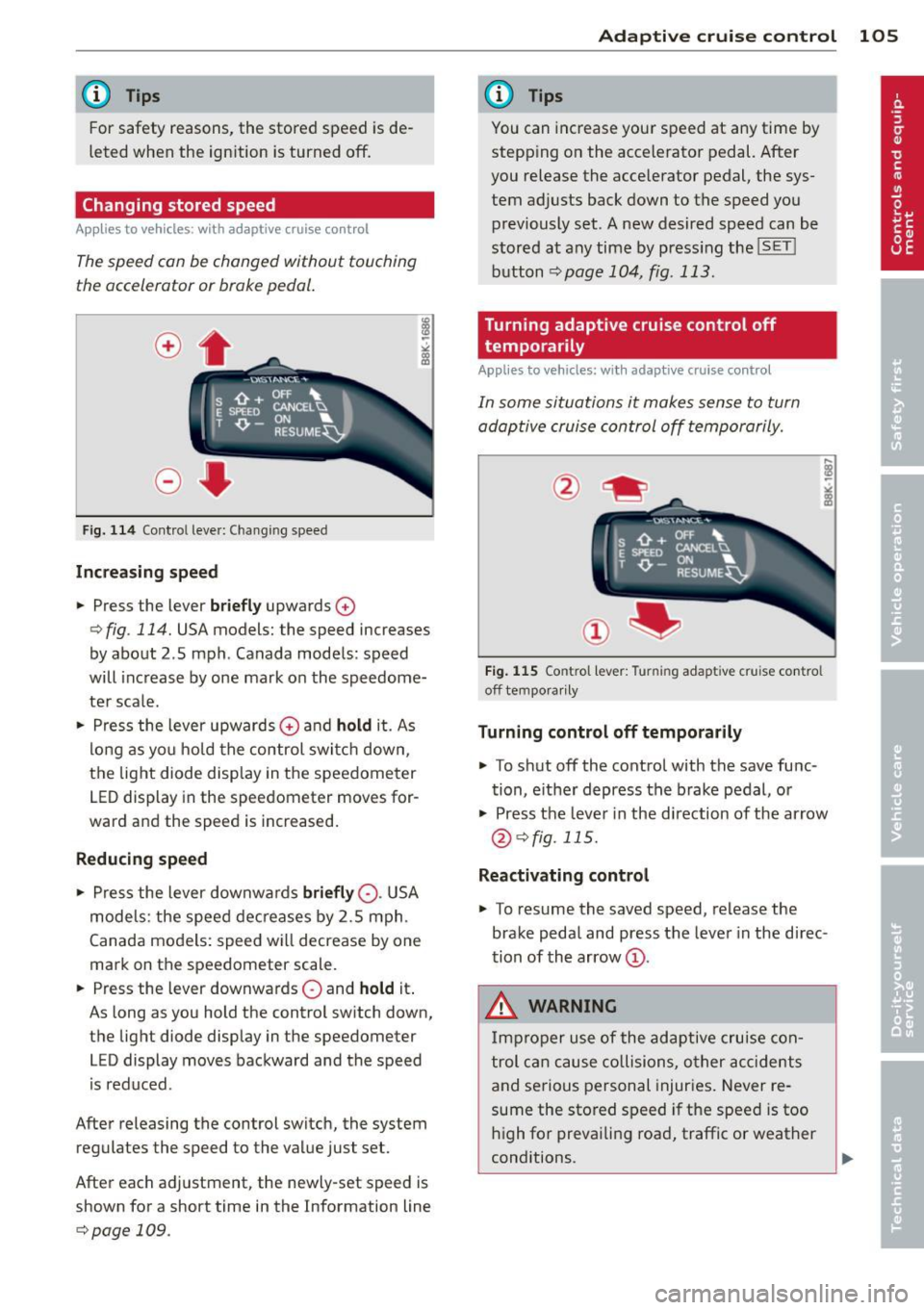
Fig. 114 Contro l leve r: Changing speed
Increasing speed
.. Press the lever briefly upwards 0
¢ fig. 114. USA models: the speed increases
by about 2 .5 mph . Canada models : speed
will increase by one mark on the speedome
ter sca le .
.. Press the lever upwards
0 and hold it. As
long as you hold the control switch down,
the light diode display in the speedometer
LED display in the speedometer moves for
ward and the speed is increased.
Reducing speed
.,. Press the lever downwa rds briefly 0-USA
models: the speed decreases by 2.5 mph.
Canada models: speed will decrease by one
mark on the speedometer scale .
.. Press the lever downwards
0 and hold it.
As long as you hold the control sw itch down,
the light diode display in the speedometer
LED display moves backward and the speed
i s reduced .
After releasing the control switch, the system
regulates the speed to the value just set.
After each adjustment, the newly-set speed is
shown for a short time in the Information line
¢page 109.
Adaptive cruise control 105
@ Tips
You can increase your speed at any time by
stepp ing on the accelerator pedal. After
you release the acce lerator pedal, the sys
tem adjusts back down to the speed you
previously set. A new desired speed can be
stored at any time by press ing the
!SET !
button ¢page 104, fig . 113.
Turning adaptive cruise control off
temporarily
Appl ies to vehicles: wit h adaptive cruise control
In some situations it makes sense to turn
adoptive cruise control off temporarily.
Fig. 115 Contro l l ever: Turnin g adapt ive cru ise contro l
off tempora rily
Turning control off temporarily
.. To shut off the control with the save func
tion, either depress the brake pedal, or
.. Press the lever in the d irection of the arrow
@¢fig. 115.
Reactivating control
.,. To resume the saved speed, release the
brake pedal and press the lever in the d irec
tion of the arrow
(D.
_&. WARNING
Improper use of the adaptive cruise con
trol can cause collisions, other accidents
and serious personal injuries. Never re-
sume the stored speed if the speed is too
high for prevailing road, traffic or weather
-
conditions. ..,.
Page 110 of 316

108 Adapti ve crui se control
You can select among the different in forma
tion by repeated brief taps on the
I RESET I but
ton on the windshield wiper lever¢
page 23,
Operation.
© S tatus in dicator
The information in area © is not displayed
permanently. Information is disp layed only if
you set or change the speed setting, change
the time interval, when messages are dis
played or if the adaptive cruise control is
turned off for safety reasons.
Speedometer and indicator light display
App lies to vehicles: with adaptive cruise control
~
- ---
~
® @ ©
Fig . 118 Instrument clus ter: Indicator light
Desired spe ed
The desired speed set by the driver is dis
p layed by a red LED in the LED display in the
speedometer.
N
?3
" 00 a,
I f the des ired speed was set between two
lines on the speedometer using the
ISETI b ut
ton, the two closest light diodes wi ll come on
¢ page 107, fig. 117.
The system a llows only speeds from 20 to 95
mph (30 to 150 km/h) to be set. This speed
range is faint ly illuminated in the speedome
ter (LED lights) .
Indicator lights (symbols )
- @ Open r oad :
The ind icator light shows
that adapt ive cru ise contro l is active a nd
that no object is ahead of the veh icle. Astor
ed speed requested is maintai ned .
-@ Driving in traff ic: The ind icator light indi
cates that an object has been detected trav
eling in front. Your speed is adjusted accord- ing to the speed of the vehicle in front.
The
adaptive cruise contro l accelerates and
brakes automatica lly w ithin the system's op
eration parameters.
- ©
Dri ver i nte rvention prompt : The red
flashing warning light means
Reque st for
driver to as sume con trol.
You as the dr iver
must slow the vehicle with the foot brake.
The symbol tells you that the adaptive
cruise control is not able to slow the veh icle
down enough to keep a enough distance to
the vehicle in front of you. An warning tone
w ill also sound when the symbo l appears.
For more information about the driver inter
vention prompt
¢ page 111.
CJ) Tips
-If you use the accelera tor to go faste r
t han the speed of the object ahead of
you, the
d riv e r intervent ion p rompt wi ll
not be accompanied by a warning s ignal.
- If the speed you previously set is exceed
ed, the indicator light in the speedome
ter wi ll switch off.
Display in the instrument cluster
Applies to vehicles: wit h adaptive cruise control
F ig . 119 Display in the inst rume nt cluster
Scroll th roug h the available informa tion d is
plays by briefly tapping the
I RESET ! button at
the end of the windshield wiper lever. You can
se lect information from the tr ip computer,
navigation system* or adaptive cruise control.
@ Vehicle symbol
@ Distance
© Status
Page 111 of 316

@ Vehicle symbol
The vehicle symbol indicates whether the sys
tem has detected an object traveling in front.
-Vehicle outline : Open road, no vehicle
ahead.
- White vehicle: A vehicle is detected ahead .
-Red vehicle: Request for driver to assume
control.
@ Distance
Using the arrows and scale, you can detect
how far it is to the vehicle in front of you.
-Open road: No arrow appears when the ve
hicle is on an open road and there is no vehi
cle ahead.
- Driving in traffic: If a vehicle is detected
ahead, the arrow moves on the scale . The
green area represents the distance set.
When approaching s low ly, the arrow moves
from the
gray zone to the green zone on the
scale.
- Request for driver to assume control: When
approaching rapidly, the arrow serves as an
early warning signal. If the d istance select
ed is exceeded or possibly not reached, the
arrow moves into the
red zone on the scale .
In certa in driving situations, you as the driv
er will have to ta ke act ion
q page 111, Driv
er intervention prompt.
@Status
-The text ACC OFF appears in white letters
when adapt ive cruise control is turned off.
- The text
ACC AVAILABLE appears in wh ite
letters when the system is turned on but no
desired speed has been set .
- The text
OVERRIDE appears in white letters
when you exceed the desired speed by accel
erating .
- The text
DISTANCE! appears in red letters
when the interval to a vehicle traveling
ahead is too short and you have to slow you r
vehicle additionally with the foot brake .
- The text messages
DISTANCE 1 to DIS ·
TANCE 4
appear in green letters to ind icate
Adaptive cruise control 109
the time interval you have set and adaptive
cruise contro l is in management mode.
- If the driving program "standard" is re
placed by "comfort" or "dynamic" using the
MMI*, the above text message is supple
mented by an appropriate prompt, e.g.
DIS
TANCE 1 DYN .
System status indicator
Applies to vehicles: wit h adaptive cruise contro l
The text messages and symbols shown in this
area of the display ore not displayed perma
nently.
Fig. 120 System status indicator
Time intervals (such as~ ---- ~>
The different symbols for the time intervals
appear if you change the settings ~
fig. 120 .
The text message ... (three white dots) ap
pears if a setting cannot be implemented with
the operat ing lever . The following are possible
reasons:
- If you pull the contro l lever towards you to
resume speed but no requested speed was
set .
- If you push the lever up to increase (or down
to reduce) speed when no speed has been
set previously.
- If you push the lever up to increase (or down
to reduce) speed and this speed is outside
the range from 20 to 95 mp h (Canada mod
els: 30 to 150 km/h).
ACC functionality limited
The text message ACC functionality limited
appears when the ACC system does not detect ..,.
Page 118 of 316

116 Audi side assist
Audi side assist
Lane change assistant
Description
App lies to vehicles: with si de ass ist
The side assist helps you when changing
lanes .
a::ro
AUDI
.ii 0 0
Fig. 130 Rear bum per: Pos ition of radar senso rs ( not
vis ible on outs ide)
Fig. 131 Signal ligh t on t he outside mirror -driver's
side
Side assist uses radar sensors (not visib le on
outside) ¢
fig. 130 to help the d river check
blind spots, and see what is happening in traf
fic behind the vehicle
¢ page 117, fig. 133.
Signal lights are built into both outside mir
rors @¢
fig. 131. The signa l light on the left
outside mirror assists when moving over into
the left lane and the signa l light on the right
outside mirror assists when moving over into
the right lane.
The signal light comes on to te ll you that side
assist has detected a vehicle on that side and
that the position of this other vehicle should
be taken into account if you were to change
lanes . This is called the
informational stage
signal ¢
page 118 . The informational stage signal
is designed so that you notice it only
when you are looking in the outs ide mirror.
When you activate the turn signal and side as
s ist detects a vehicle in a notable location, the
corresponding signal on the outside mirror
flashes briefly and brightly several times. This
is the
alert stage signal¢ page 118.
Activating and deactivating
Applies to vehicles: wit h side assist
Fig. 132 Driver 's door: S ide ass ist button
Activating
"' Press the¢ fig. 132 button. The indicator
on the button lights up.
Deactivating
"' Press the button again . The indicator light
on the button goes out .
The system works at speeds faster than 19 mph (30 km/h) .
A WARNING
--Improper reliance on the side assist sys-
tem can cause collis ions and serious per
sonal injury:
- Never rely on ly on side assist when
changing lanes .
- Always check rear view mirrors to make
sure that it is safe to change lanes.
- Side assist cannot detect all vehicles un
der all conditions- danger of acc ident!
- Side assist cannot detect vehicles in time
to a lert you when they approach from
behind at very high speed, or fall drop
back very quickly.
11>