Page 466 of 650

�µ
Turning the Automated Appointment
pref erence of f will disable
appointment notif ications in the
vehicle based on appointments
createdorchangedatMyAcura’s
online scheduling website.
Appointments can still be created,
rescheduled, and canceled f rom the
vehicle; however the appointment
inf ormation stored in the vehicle will
not be updated. Any changes to
those appointments should be made
fromtheMyAcurawebsite. To access the f ollowing f unctions,
press the INFO button. Select ‘‘Set
up’’ to view the SET UP screen. Push
the interface selector to the right to
select Other, then rotate the
interf ace dial to select AcuraLink/
Messages.
Select this
option to delete all stored messages
within a category, except f or
diagnostic info and recall campaign
messages. These messages can only
be deleted by a certif ied technician
af ter the recall is done or the
problem is corrected, or through a
broadcast message f rom Acura.
AcuraL ink/Message Screen
Delete Messages
AcuraLink(U.S. models only)
462
11/01/14 19:15:47 31TK4630_467
Features
2012 TL
Page 467 of 650
�µ
�µ
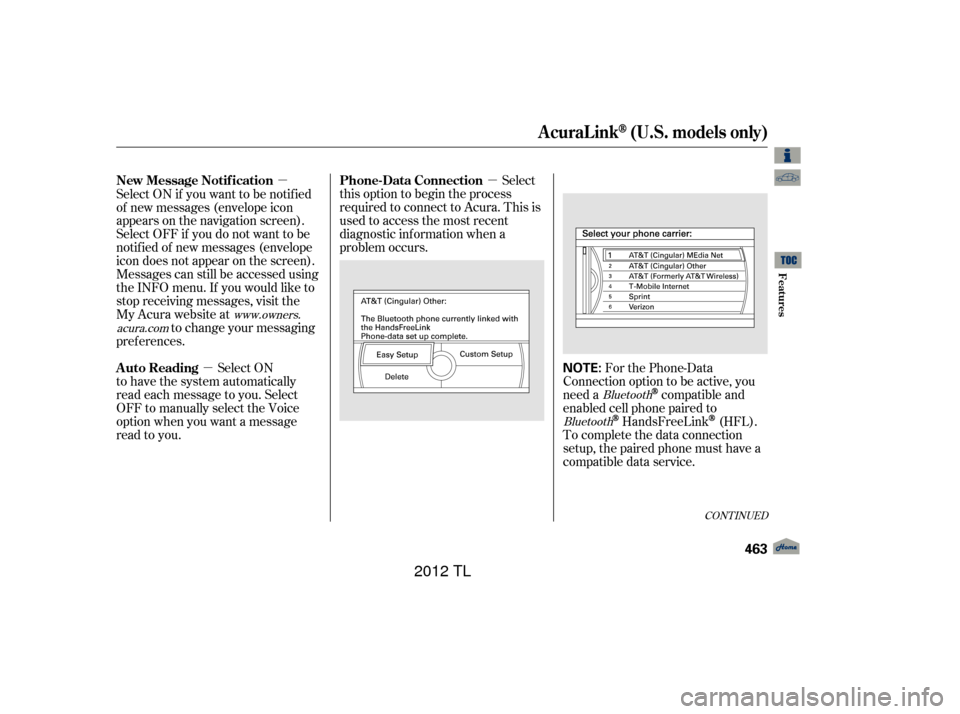
�µ For the Phone-Data
Connection option to be active, you
need a
compatible and
enabled cell phone paired to
HandsFreeLink(HFL).
To complete the data connection
setup, the paired phone must have a
compatible data service.
Select
this option to begin the process
required to connect to Acura. This is
used to access the most recent
diagnostic inf ormation when a
problem occurs.
Select ON if you want to be notif ied
of new messages (envelope icon
appears on the navigation screen).
Select OFF if you do not want to be
notif ied of new messages (envelope
icon does not appear on the screen).
Messages can still be accessed using
the INFO menu. If you would like to
stop receiving messages, visit the
My Acura website at
to change your messaging
pref erences.
Select ON
to have the system automatically
read each message to you. Select
OFF to manually select the Voice
option when you want a message
read to you.
Bluetooth
Bluetooth
www.owners.
acura.com
CONT INUED
Phone-Data Connection
New Message Notif ication
Auto Reading
AcuraLink(U.S. models only)
Features
463
NOTE:
11/01/14 19:15:56 31TK4630_468
2012 TL
Page 468 of 650

�µ
The def ault setting is prompt. When
a diagnostic inf o message appears,
and you select the Check Now option,
the system will prompt you bef ore
connecting to the Acura server. If
you do not wish to connect at that
time, select No at the prompt, and
you will see the inf ormation f rom the
onboard database. The ‘‘Auto’’
setting will remove the prompt when
you select the Check Now option and
will automatically connect to the
Acura server. This setting only
applies when you have a
enabled phone that is paired with
HFLandyouhavecompletedthe
Phone-Data Connection setup.
To find more information on
compatible and enabled
cell phones, visit or call
the HandsFreeLink
consumer
support at 1-888-528-7876.
Bluetooth As required by the FCC:
This device complies with Part 15 of theFCC rules. Operation is subject to thef ollowing two conditions: (1) This devicemay not cause harmf ul interf erence, and(2) this device must accept anyinterf erence received, includinginterf erence that may cause undesiredoperation.
Changes or modif ications not expresslyapproved by the party responsible f orcompliance could void the user’sauthority to operate the equipment.
Bluetooth
www.acura.com/handsfree link
Connect to the Acura Server
AcuraLink(U.S. models only)
464
11/01/14 19:16:02 31TK4630_469
Features
2012 TL
Page 638 of 650

................................
AAC .273, 313,365
....................................
Accessories .479
ACCESSORY (Ignition Key .....................................
Position) .151
ACCESSORY Mode ...................
(Power Mode) . 184,185
............
Accessory Power Sockets . 215
................
Active Head Restraints . 165
....................................
AcuraLink
. 449
....................
Additives, Engine Oil . 544
...........................
Advanced Airbags .28
...............................
Airbag (SRS) .9, 24
..........
Airbag System Components . 24
......
Air Conditioning System . 226,227
.........................................
Usage .228
...............
Air Pressure, Tires . 568,570
......................................
Antif reeze .546
Anti-lock Brakes (ABS) ...............................
Indicator .66, 508
...................................
Operation .508
..............
Anti-thef t, Audio System . 390
Anti-thef t Steering Column ....................................
Lock .151, 189
................................
Audio System .235 .
Automatic Lighting Off Feature . 141
...
Automatic Seat Belt Tensioners . 22
.............
Automatic Speed Control . 401
..............
Automatic Transmission . 494
..........................
Capacity, Fluid .614
...............
Checking Fluid Level . 549
..........................
Paddle Shif ters .499
.......................................
Shif ting .495
Shif t Lever Position ...............................
Indicators .494
....................
Shif t Lock Release . 497
......................
Auxiliary Input Jack .389
Battery Charging System ...........................
Indicator .65, 596
............................
Jump Starting .591
..............................
Maintenance .577
.................
Management System . 87
............................
Specif ications .615
..............................
Bef ore Driving .467
....................................
Belts,Seat .8,20
.........................
Beverage Holders .214 Blind Spot Inf ormation System
...........................................
(BSI) .519
...................
Audio . 281,376
...............
HandsFreeLink. 407, 424
..................................
Booster Seats .54
Brakes ...........
Anti-lock System (ABS) . 508
.............
Break-in, New Linings . 468
...........................................
Fluid .553
.......................................
Parking .212
.................
System Indicator . 65,598
........................
Wear Indicators .507
.............................
Braking System .507
.................
Break-in, New Vehicle . 468
Brightness Control, ...............................
Instruments .143
....................................
Built-In Key .201
Bluetooth
Bluetooth
A
B
I
11/01/17 13:16:41 31TK4630_640
INDEXA B C D E F G H I J K L \℮M N O P Q R S T U V W X \℮Y Z
2012 TL
Page:
< prev 1-8 9-16 17-24