Page 458 of 650
Message categories can be added,
revised, or deleted through
broadcast messages f rom Acura.These messages, based on updated
vehicle inf ormation and comments
f rom other TL owners, supplement
your Owner’s Manual. They provide
you with relevant inf ormation f or a
safe and enjoyable ownership
experience. For additional
inf ormation, call Acura Client
Services directly through HFL.During the f irst 90 days of
ownership, a number of messages
appears each day. These messages
help you to use and understand the
f eatures of your vehicle.
There are six message categories in
AcuraLink: Feature Guide, Quick
Tips, Scheduled Dealer
Appointments, Recalls/Campaigns,
Diagnostic Inf o, and Maintenance
Minder . The system can store up
to 255 messages.
Feature Guide
Quick T ips
Message Categories
AcuraLink(U.S. models only)
454
TM
11/01/14 19:14:26 31TK4630_459
Features
2012 TL
Page 459 of 650

These messages provide detailed
inf ormation about the service
needed f or your vehicle. When a
maintenance message appears on
the multi-information display, a list of
needed maintenance items is
provided through an AcuraLink
message. These messages tell you
the exact maintenance needed,
helping you to avoid unnecessary
maintenance costs.You can use the following
message options:
Reschedule the appointment with
the dealer.
Call your dealer f or an
appointment.
Find the nearest dealer. You can make an appointment with
your dealer through AcuraLink
when you receive a Maintenance
Minder message.
To use the automated appointment
f unction, you should visit the My
Acura website at
, register some
required settings, and complete the
Phone-Data Connection set-up (see
page ). Your
compatible phone should also be
paired and linked to your vehicle
(see page ).
Make an appointment f rom the
schedule at the dealer.
432
463
www.owners.acura.com
Bluetooth
CONT INUED
Maintenance MinderA ut omat ed A ppoint ment
AcuraLink(U.S. models only)
Features
455
TM
11/01/14 19:14:38 31TK4630_460
2012 TL
Page 460 of 650
The system will automatically
connect to the Acura server, then
show you an appropriate
appointment date and time on the
navigation screen. If you accept this
appointment, select ‘‘Conf irm
Appointment,’’ then press ENTER.
When you see the Maintenance
Minder message on the multi-
inf ormation display, you will also
receive a message in the navigation
screen. To open the message, press
ENTER. Select ‘‘New Messages,’’
then press ENTER. You will see the
list of all messages. The most recent
message is listed at the top. Select the received message, then
press ENTER. You will see the
message as shown. To make an
appointment, select ‘‘Schedule
Dealer Appt.’’ then press ENTER.
AcuraLink(U.S. models only)
456
11/01/14 19:14:46 31TK4630_461
Features
2012 TL
Page 461 of 650
CONT INUED
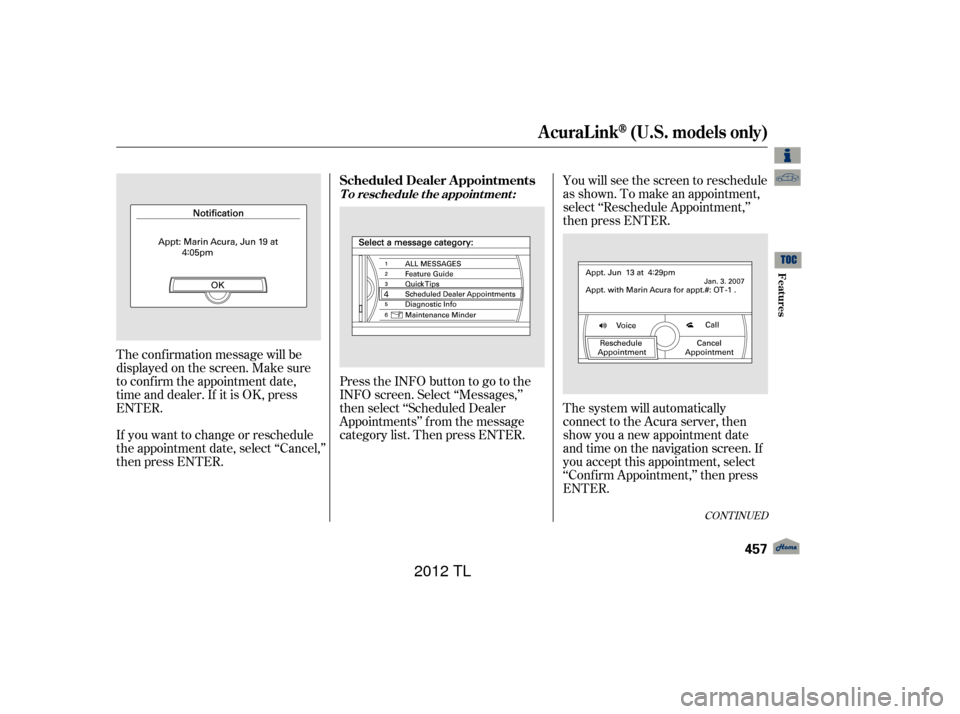
You will see the screen to reschedule
as shown. To make an appointment,
select ‘‘Reschedule Appointment,’’
then press ENTER.
The system will automatically
connect to the Acura server, then
show you a new appointment date
and time on the navigation screen. If
you accept this appointment, select
‘‘Conf irm Appointment,’’ then press
ENTER.
The conf irmation message will be
displayed on the screen. Make sure
to conf irm the appointment date,
time and dealer. If it is OK, press
ENTER.
If you want to change or reschedule
the appointment date, select ‘‘Cancel,’’
then press ENTER.
PresstheINFObuttontogotothe
INFO screen. Select ‘‘Messages,’’
then select ‘‘Scheduled Dealer
Appointments’’ f rom the message
category list. Then press ENTER.
AcuraLink(U.S. models only)
T o reschedule t he appoint ment :
Scheduled Dealer A ppointments
Features
457
11/01/14 19:14:59 31TK4630_462
2012 TL
Page 462 of 650
The system will request you to
conf irm the cancellation on the
navigation screen. To cancel the
appointment, select ‘‘YES,’’ then
press ENTER. If you select ‘‘NO,’’
the screen goes back to the previous
message display.The system will automatically
connect to the Acura server, then
show you the conf irmation on the
navigation screen. If you accept the
cancellation, press ENTER.
Select ‘‘Messages’’ on the INFO
screen, then press ENTER. Select
‘‘Scheduled Dealer Appointments’’
from the message category list.
Then press ENTER. To cancel the
appointment, select ‘‘Cancel
Appointment,’’ then press ENTER.
If you cancel the appointment, you
cannot reschedule it. If you want to
change or reschedule the
appointment date, call your dealer
directly with HFL.
T o cancel t he appoint ment :
AcuraLink(U.S. models only)
458
11/01/14 19:15:09 31TK4630_463
Features
2012 TL
Page 463 of 650
Using automated appointments, your
registered dealer through My Acura
is automatically selected. If you want
to select another dealer, such as in
case of an emergency, f ind the
nearest dealer and call the dealer
directly with HFL.
When a maintenance appointment is
due soon, you will also receive an
appointment reminder message.If your vehicle is af f ected by a recall
or other important saf ety
inf ormation, a letter will be mailed to
you about the issue and how to f ix it.
You will also receive a reminder
message through AcuraLink. You
canthenusethemessageoptionsto
call your dealer f or an appointment
or to f ind the nearest dealer.For this reason, it is important that
we retain your current phone
number. Please update your
inf ormation using My Acura at
www.owners.acura.com.
AcuraLink(U.S. models only)
Recall/Campaigns
Features
459
11/01/14 19:15:17 31TK4630_464
2012 TL
Page 464 of 650
When an indicator comes on or a
message is displayed on the Multi-
Inf ormation Display (MID),
AcuraLink can provide inf ormation
about the cause of the indicator or
message and the recommended
action to address it. This helps you
handle the problem as it occurs,
preventing or limiting costly repairs.
The AcuraLink system cannot
determine mechanical problems
(such as squeaks or rattles) that are
not triggered by the diagnostic
indicator monitors.
For more information on the
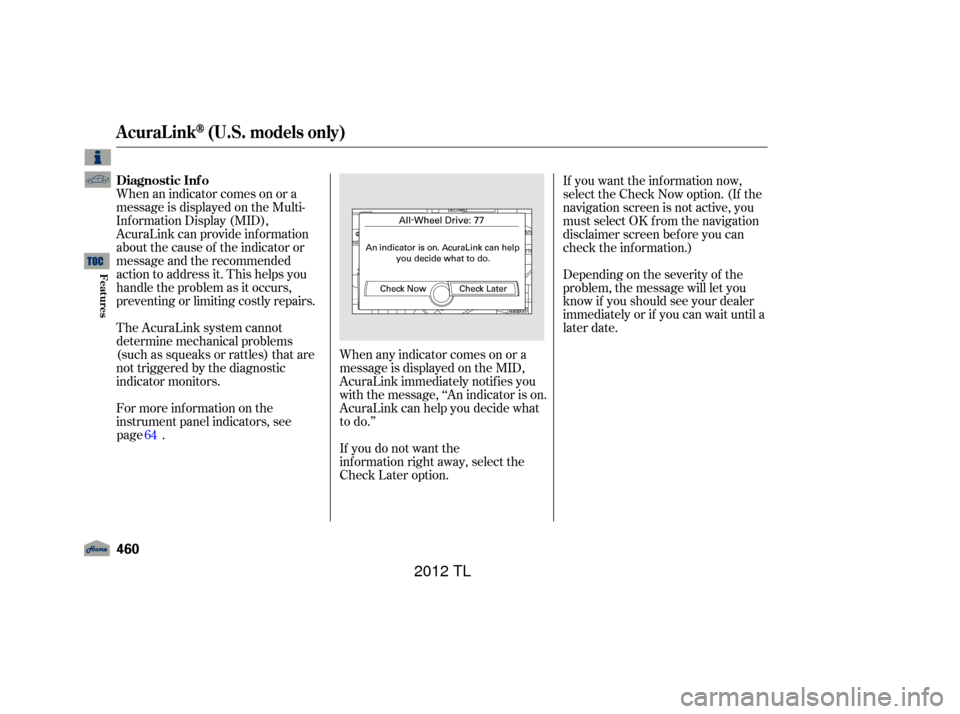
instrument panel indicators, see. When any indicator comes on or a
message is displayed on the MID,
AcuraLink immediately notif ies you
with the message, ‘‘An indicator is on.
AcuraLink can help you decide what
to do.’’
If you do not want the
information right away, select the
Check Later option. Depending on the severity of the
problem, the message will let you
know if you should see your dealer
immediately or if you can wait until a
later date. If you want the information now,
select the Check Now option. (If the
navigation screen is not active, you
must select OK f rom the navigation
disclaimer screen bef ore you can
check the inf ormation.)
AcuraLink(U.S. models only)
Diagnostic Inf o
460
11/01/14 19:15:28 31TK4630_465
page
64
Features
2012 TL
Page 465 of 650
You can then use the message
options to call your dealer for an
appointment or to find the
nearest dealer.When you make an appointment
through My Acura’s online Schedule
Service Appointment, you can be
reminded in advance about that
appointment through AcuraLink.
If you need to reschedule or cancel
the appointment, see page .
When viewing a diagnostic inf o
message through the INFO menu,
you can select the Diagnostic Inf o
option to connect to the Acura server
and retrieve the latest inf ormation
regarding the problem.
Theremaynotbeany
additional inf ormation, depending on
thetimeelapsedsincetheprevious
time you retrieved the inf ormation
f rom the Acura server.
457
CONT INUED
AcuraLink(U.S. models only)
Reminder Message
Features
461
NOTE:
11/01/14 19:15:39 31TK4630_466
2012 TL