Page 232 of 518

FADER/BALANCE-These
modes adjust the strength of the
sound coming from each speaker.
Fader adjusts the front-to-back
strength, while balance adjusts the
side-to-side strength. To adjust fader
and balance, select FADER or
BALANCE, then press ENTER on
the interface selector. The current
setting is shown on the audio control
display. Turn the interface dial to the
desired level (fader: F9 to R9,
balance: L9 to R9), and enter your
selection by pressing ENTER. To
equalize the fader or balance, turn
the interface dial until the readings
on the sound grid come to the center
of the adjustment bar. CENTER/SUBWOOFER
-To
adjust the strength of the sound from
the center or subwoofer speaker,
select it and press ENTER on the
interface selector. Turn the interface
dial to the desired level (- 6to+6),
and enter your selection by pressing
ENTER. The current setting is
shown on the audio control display.
Even if the adjustment level reaches
- 6, the sub woofer is not turned off. Dolby PL (Prologic) II
-Dolby PL
(Prologic) II signal processing
creates multi-channel surround
sound from the audio signal
recorded with 2 channel stereo
sources. Dolby prologic II can only
be activated when listening to CD
(CD-DA, MP3/WMA), XM radio,
and AUX. When it activates, ‘‘DPL II’’
is shown on the upper display.Playing the FM/AM Radio (Models with navigation system)22611/06/16 17:42:51 12 ACURA RDX MMC North America Owner's M 50 31STK650 enu
Page 246 of 518
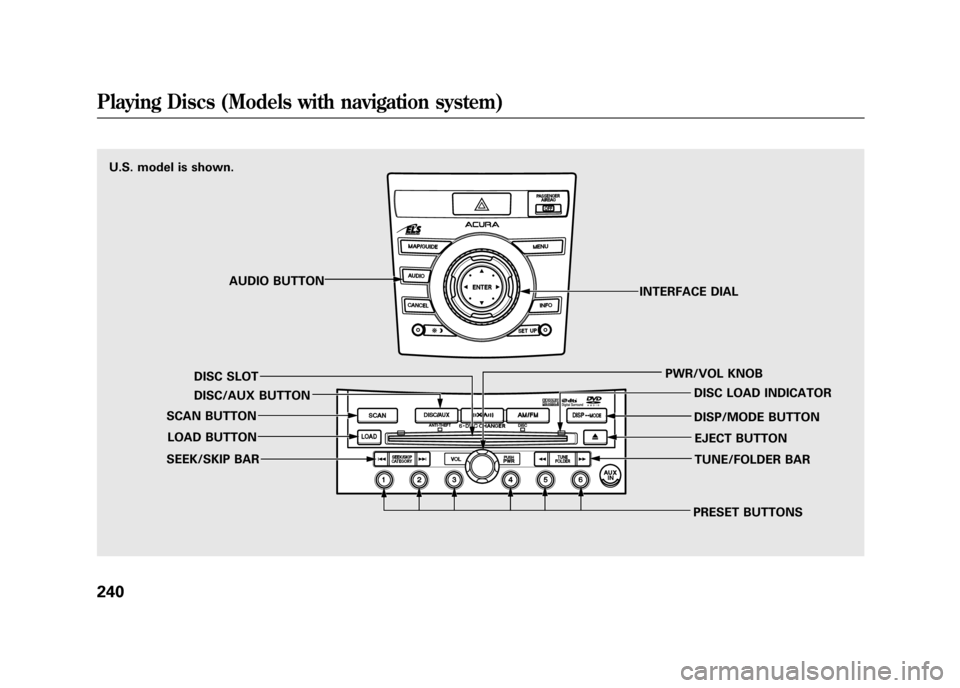
U.S. model is shown.AUDIO BUTTON
DISC SLOT
DISC/AUX BUTTON
SCAN BUTTON
LOAD BUTTON
SEEK/SKIP BAR
PRESET BUTTONSTUNE/FOLDER BAR EJECT BUTTON
DISP/MODE BUTTON DISC LOAD INDICATOR
PWR/VOL KNOB
INTERFACE DIALPlaying Discs (Models with navigation system)24011/06/16 17:42:51 12 ACURA RDX MMC North America Owner's M 50 31STK650 enu
Page 249 of 518

2. Insert a disc into the disc slotwhen the disc load indicator turns
green, and ‘‘LOAD ’’appears on the
upper display at the same time.
Insert the disc only about halfway;
the drive will pull it in the rest of
the way. You will see the disc
number blinking on the upper
display, and the disc load indicator
turns red again and blinks as the
CD is loaded.
Do not try to insert a disc until
‘‘ LOAD ’’appears. You could
damage the audio unit.
3. You will see ‘‘DISC READ ’’on the
upper display, then the system
begins to play the CD.
You can load a CD into an empty
position while a CD is playing. Press
the AUDIO button to view the audio
control display. Select the empty
position (‘‘ No Disc’’is shown on the
audio control display) by rotating the
interface dial. Then press ENTER on
the selector to enter your selection.
The current CD stops playing and
starts the loading sequence. The CD
just loaded will play. You can also select the empty
position by pressing the appropriate
preset button.
You can load a disc(s) in any mode
(AM, FM, XM, or AUX) if you do not
select an empty position.
You cannot select the empty position
if there is no disc in the changer.
EMPTY POSITION
CONTINUED
Playing Discs (Models with navigation system)
243
Features
11/06/16 17:42:51 12 ACURA RDX MMC North America Owner's M 50 31STK650 enu
Page 250 of 518

To Play a DiscSelect the changer by pressing the
DISC/AUX button. You will see the
‘‘CD ’’on the upper display. The
system will begin playing the last
selected CD in the CD changer.
If you want to see the list of the discs
in the CD changer, press the AUDIO
button to view the audio control
display. You will see the current disc
position highlighted. When playing a CD (CD-DA), the
audio control display shows disc
number, album name, track number,
and elapsed time. When playing a
CD without this information, the
number of the disc and track playing
and the elapsed time are shown on
the audio control display.
When the system reaches the end of
the disc, it will advance to the
beginning of the first track/file (in
MP3/WMA mode) on the next disc,
then play that track/file.
To select a disc, press an appropriate
preset button (1
-6), or select an
appropriate preset icon by rotating
the interface dial, then press ENTER
on the interface selector. If you select
an empty position ( ‘‘No Disc’’ is
shown) in the CD changer, the
system will load a CD into the empty
slot (see page 243).
CURRENT DISC
EMPTY POSITION
Playing Discs (Models with navigation system)24411/06/16 17:42:51 12 ACURA RDX MMC North America Owner's M 50 31STK650 enu
Page 259 of 518

Playing a DVD-A Disc
You can play a DVD-A disc in the CD
changer. The disc controls are same
as previously described.
To Pause a Disc
To pause a disc, press the preset
button which corresponds to the
current disc. To play the disc again,
press the preset button again.To Stop Playing a Disc
If you turn the system off while a disc
is playing, either with the PWR/VOL
knob or by turning off the ignition
switch, the disc will stay in the drive.
When you turn the system back on,
the disc will begin playing where it
left off.
To take the system out of disc mode,
press the AM/FM, or DISC/AUX, or
button to switch to the radio,
or satellite radio, or auxiliary input
while a disc is playing. When you
return to disc mode by pressing the
DISC/AUX button, play will continue
at the same point that it left off. Removing Discs from the Changer
To remove the disc that is currently
playing, press and release the eject
(
) button. You will see
‘‘EJECT ’’
on the upper display. When you
remove the disc from the slot, the
system begins the load sequence so
you can load another disc in that
position. If you do not load another
disc within 10 seconds, the system
selects the previous mode (AM,
FM1, FM2, or XM Radio).
If you do not remove the disc from
the slot, the system will reload the
disc after 10 seconds and put the CD
changer in pause mode. To begin
playing the disc, press the DISC/
AUX button.
CONTINUED
Playing Discs (Models with navigation system)
253
Features
11/06/16 17:42:51 12 ACURA RDX MMC North America Owner's M 50 31STK650 enu
Page 267 of 518
U.S. model is shown.AUDIO BUTTON
DISC/AUX BUTTON
SEEK/SKIP BAR PWR/VOL KNOB
INTERFACE DIAL
CONTINUED
Playing an iPod
®(Models with navigation system)
261
Features
11/06/16 17:42:51 12 ACURA RDX MMC North America Owner's M 50 31STK650 enu
Page 268 of 518

To Play an iPod
®
This audio system can operate the
audio files on the iPod
®with the
same controls used for the in-dash
disc changer. To play an iPod,
connect it to the USB adapter cable
in the console compartment by using
your dock connector, then press the
DISC/AUX button. The ignition
switch must be in the ACCESSORY
(I) or ON (II) position. The iPod will
also be recharged with the ignition
switch in these positions.
The system will only play songs
stored on the iPod with iTunes.
iPod and iTunes are registered
trademarks owned by Apple Inc.
Voice Control SystemYou can select the AUX mode by
using the navigation system voice
control buttons, but cannot operate
the play mode functions. iPod models confirmed to be
compatible with your audio system
using the USB adapter cable are:
Model
iPod classic 80/160 G
iPod classic 120 G
iPod classic 160 G (launch in 2009)
iPod (5th generation)
iPod nano
iPod touch
This system may not work with all
software versions of these devices. NOTE:
●Do not connect your iPod using a
hub.●Do not keep the iPod in the
vehicle. Direct sunlight and high
heat will damage it.●Do not use an extension cable
between the USB adapter cable
equipped with your vehicle and
your dock connector.●We recommend backing up your
data before playing it.●Some devices cannot be powered
or charged via the USB adapter, if
this is the case use the accessory
adapter to supply power to your
device.
Playing an iPod
®(Models with navigation system)
26211/06/16 17:42:51 12 ACURA RDX MMC North America Owner's M 50 31STK650 enu
Page 273 of 518
ALBUM RANDOM-This feature
plays all available albums from the
selected items in the iPod menu list
(playlists, artists, albums or songs) in
random order. The files in each
album are played in the recorded
order. You will see ALBUM
RANDOM on the screen. To turn it off, have this mode
highlighted and press ENTER again.
You can also select another list from
the iPod menu while keeping the
random function.
NOTE:
Available operating function varies
on the model or version. Some
functions may not be available on the
vehicle's audio system.
To Stop Playing Your iPod
To play the radio, press the AM, FM,
or
button. Press the DISC/
AUX button to switch between disc
(if a disc is loaded),
Bluetooth
®
Audio, and the iPod.
CONTINUED
Playing an iPod
®(Models with navigation system)
267
Features
11/06/16 17:42:51 12 ACURA RDX MMC North America Owner's M 50 31STK650 enu