Page 353 of 621

Cruise control may not hold the set
speed when you are going up and
down hills. If your vehicle speed
increases going down a hill, use the
brakes to slow down. This will cancel
the cruise control. On models with
adaptive cruise control (ACC), this
also causes the cruise control
indicator on the instrument panel to
go off and the cruise mode indicator
to come on. To resume the set speed,
press the RES/ACCEL button. The
CRUISE CONTROL indicator on the
instrument panel will come back on.Changing the Set Speed
You can increase the set cruising
speed in any of these ways:
●
Press and hold the RES/ACCEL
button. When you reach the
desired cruising speed, release the
button.
●
Push on the accelerator pedal.
Accelerate to the desired cruising
speed, then press the SET/
DECEL button.
●
To increase the speed in very
small amounts, tap the RES/
ACCEL button. Each time you do
this, your vehicle will speed up
about 1 mph (1.6 km/h).You can decrease the set cruising
speed in any of these ways:
●
Press and hold the SET/DECEL
button. Release the button when
you reach the desired speed.
●
To slow down in very small
amounts, tap the SET/DECEL
button. Each time you do this,
your vehicle will slow down about
1 mph (1.6 km/h).
●
Tap the brake pedal lightly with
your foot. The CRUISE CONTROL
indicator on the instrument panel
will go out. When the vehicle
slows to the desired speed, press
the SET/DECEL button.
Cruise Control346
Page 370 of 621

The HomeLink
®Universal
Transceiver built into your vehicle can
be programmed to operate up to three
remote controlled devices around
your home, such as garage doors,
lighting, or home security systems.
General Safety InformationBefore programming your HomeLink
to operate a garage door opener,
confirm that the opener has an
external entrapment protection
system, such as an‘‘electronic eye,’’or
other safety and reverse stop features.
If your garage door was manufactured
before April 1, 1982, you may not be
able to program HomeLink to operate
it. These units do not have safety
features that cause the motor to stop
and reverse it if an obstacle is
detected during closing, increasing
the risk of injury. Do not use
HomeLink with any garage door
opener that lacks safety stop and
reverse features.Units manufactured between April 1,
1982 and January 1, 1993 may be
equipped with safety stop and reverse
features. If your unit does not have an
external entrapment protection
system, an easy test to confirm the
function and performance of the safety
stop and reverse feature is to lay a 2
╳4 under the closing door. The door
should stop and reverse upon
contacting the piece of wood.
As an additional safety feature, garage
door openers manufactured after
January 1, 1993 are required to have
external entrapment protection
systems, such as an electronic eye,
which detect an object obstructing the
door.
Important Safety PrecautionsRefer to the safety information that came
with your garage door opener to test that
the safety features are functioning
properly. If you do not have this
information, contact the manufacturer of
the equipment.
Before programming HomeLink to a
garage door or gate opener, make sure
that people and objects are out of the way
of the device to prevent potential injury or
damage.
When programming a garage door opener,
park just outside the garage.Training HomeLinkBefore you begin
-If you just
received your vehicle and have not
trained any of the buttons in
HomeLink before, you should erase
any previously learned codes before
training the first button.
To do this, press and hold the two
outside buttons on the HomeLink
transceiver for about 20 seconds,
until the red indicator flashes.
Release the buttons, then proceed to
step 1.
CONTINUED
HomeLink
®
Universal Transceiver
363
Features
Page 390 of 621
Bluetooth
®HandsFreeLink
®(HFL)
allows you to place and receive
phone calls using either the
navigation system controls or voice
commands without the distraction of
handling your cell phone.
To use HFL, you need a Bluetooth-
compatible cell phone. For a list of
compatible phones, pairing
procedures, and special feature
capabilities:
In the U.S., visit
www.acura.com/handsfreelink,
or
call (888) 528-7876.
In Canada, visit
www.handsfreelink.
ca
, or call (888) 528-7876.Using HFL
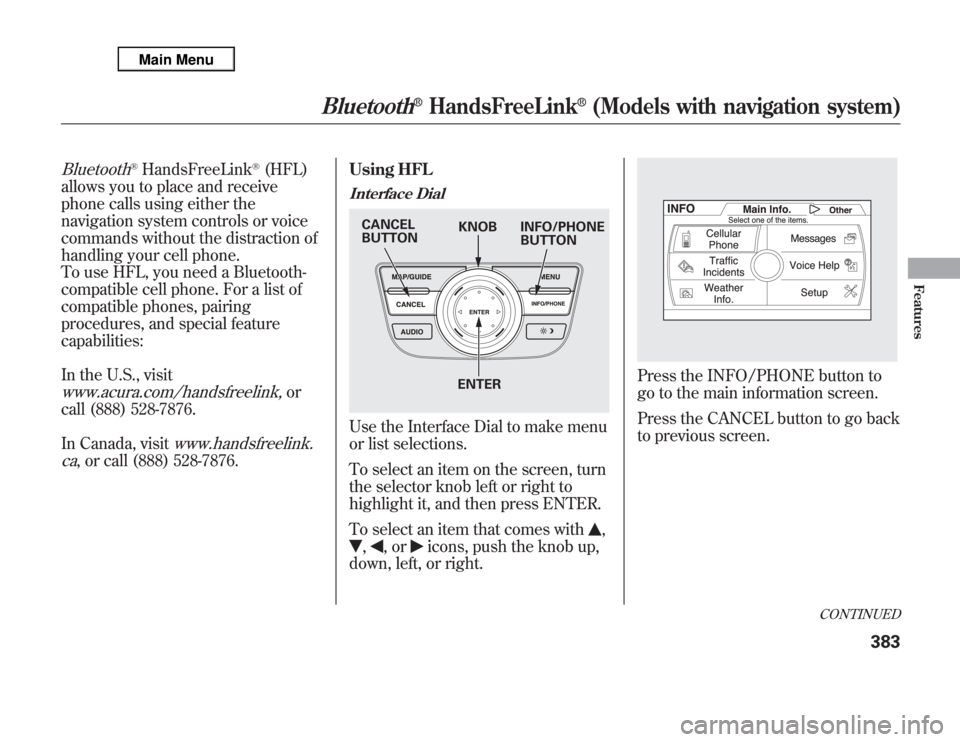
Interface DialUse the Interface Dial to make menu
or list selections.
To select an item on the screen, turn
the selector knob left or right to
highlight it, and then press ENTER.
To select an item that comes with
,
,
,or
icons, push the knob up,
down, left, or right.
Press the INFO/PHONE button to
go to the main information screen.
Press the CANCEL button to go back
to previous screen.
KNOB CANCEL
BUTTONINFO/PHONE
BUTTON
ENTER
CONTINUED
Bluetooth
®
HandsFreeLink
®
(Models with navigation system)
383
Features
Page 409 of 621

AcuraLink
®(U.S. models only)
On models with navigation systemAcuraLink enhances your ownership
experience by providing a direct
communication link between your
vehicle and the Acura Server.
Working through the XM radio
satellite, AcuraLink works in
conjunction with the navigation
system,
Bluetooth
®HandsFreeLink
®
(HFL), and audio system in your
vehicle. It displays and receives
several kinds of messages, including:
●
Operating tips and information on
your vehicle's features.
●
Important recall and safety
information.
●
Maintenance information to keep
your vehicle in top condition.
●
Diagnostic information to provide
information about any problems
with your vehicle.
Interface Dial
Most AcuraLink functions are
controlled by the interface dial. The
interface dial has two parts, a knob
and a selector.
The knob turns left and right. Use it
to make selections or adjustments to
a list or menu on the screen.
The selector can be pushed left,
right, up, down, and in. Use the
selector to scroll through lists, to
select menus, and to highlight menu
items. When you make a selection,
push the center of the selector
(ENTER) to go to that selection.
KNOB ENTER
SELECTOR
AcuraLink
®
(U.S. models only)
402
Page 411 of 621
Select‘‘Messages’’, then select a
message category by pressing
ENTER. Select the message you
want to read and press ENTER.Unread messages have a closed
envelope icon next to them. The icon
disappears when it has already been
read.
NOTE:Only Diagnostic Info
messages overlay the navigation
screen while driving. They indicate if
your vehicle has a problem that may
need immediate attention (see page
413).
After purchasing your vehicle,
messages may not appear
immediately.
Your dealer has to register the
vehicle identification before you can
receive messages. This can take
several days to process.Message Options
When you open a message, you can
read a summary of it, and then
choose one of several options. If an
option is not available for a message,
that button will not be highlighted.
AcuraLink
®
(U.S. models only)
404
Page 425 of 621
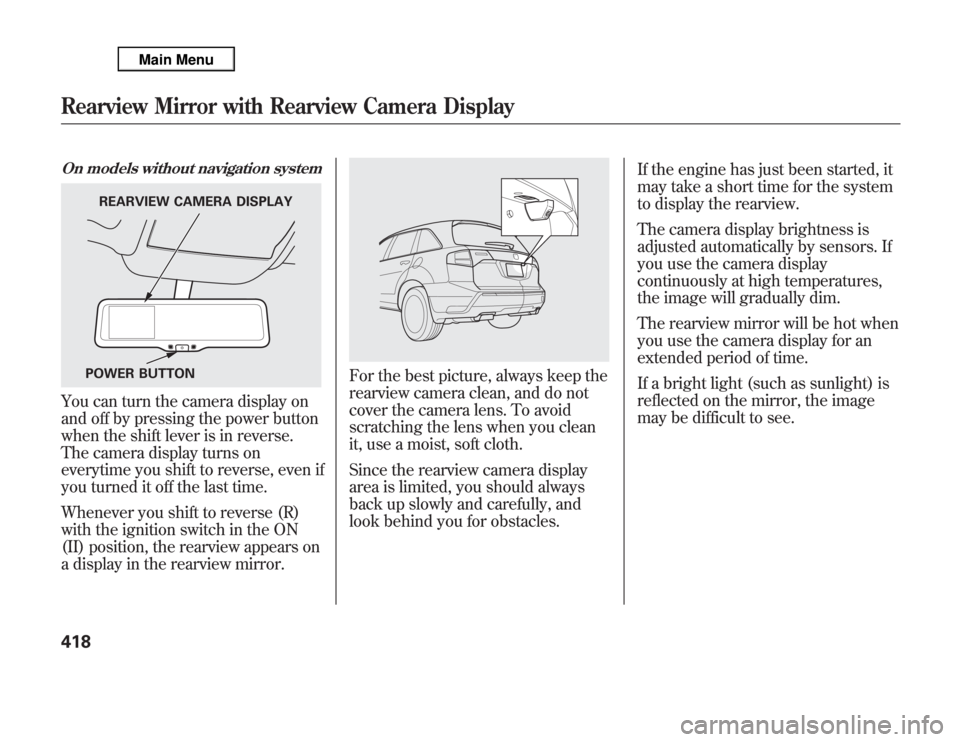
On models without navigation systemYou can turn the camera display on
and off by pressing the power button
when the shift lever is in reverse.
The camera display turns on
everytime you shift to reverse, even if
you turned it off the last time.
Whenever you shift to reverse (R)
with the ignition switch in the ON
(II) position, the rearview appears on
a display in the rearview mirror.
For the best picture, always keep the
rearview camera clean, and do not
cover the camera lens. To avoid
scratching the lens when you clean
it, use a moist, soft cloth.
Since the rearview camera display
area is limited, you should always
back up slowly and carefully, and
look behind you for obstacles.If the engine has just been started, it
may take a short time for the system
to display the rearview.
The camera display brightness is
adjusted automatically by sensors. If
you use the camera display
continuously at high temperatures,
the image will gradually dim.
The rearview mirror will be hot when
you use the camera display for an
extended period of time.
If a bright light (such as sunlight) is
reflected on the mirror, the image
may be difficult to see.
REARVIEW CAMERA DISPLAY
POWER BUTTON
Rearview Mirror with Rearview Camera Display418
Page 433 of 621
Opening and Closing the Hood1. Park the vehicle, and set the
parking brake. Pull the hood
release handle located under the
lower left corner of the dashboard.
The hood will pop up slightly.
2. Put your fingers under the front
edge of the hood near the center.
Slide your hand to your left until
you feel the hood latch handle.
Push this handle up until it
releases the hood. Lift up the
hood.
If the hood latch handle moves stiffly,
or if you can open the hood without
lifting the handle, the mechanism
should be cleaned and lubricated.3. Lift the hood up most of the way.
The hydraulic supports will lift it
up the rest of the way and hold it
up.
To close the hood, lower the hood to
about a foot (30 cm) above the
fender, then press down firmly with
your hands. Make sure it is securely
latched.
HOOD RELEASE HANDLE
LATCH
Service Station Procedures426
Page 435 of 621
Actual Mileage and EPA Fuel
Economy Estimates Comparison.
Fuel economy is not a fixed number.
It varies based on driving conditions,
driving habits and vehicle condition.
Therefore, it is not possible for one
set of estimates to predict fuel
economy precisely for all drivers in
all environments.
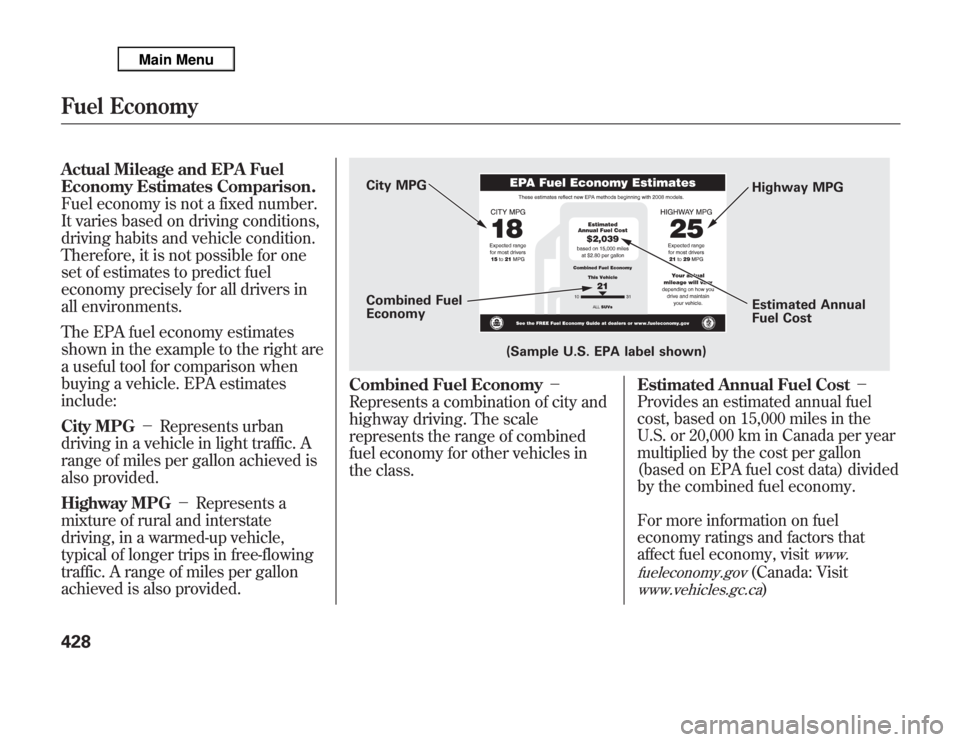
The EPA fuel economy estimates
shown in the example to the right are
a useful tool for comparison when
buying a vehicle. EPA estimates
include:
City MPG-Represents urban
driving in a vehicle in light traffic. A
range of miles per gallon achieved is
also provided.
Highway MPG-Represents a
mixture of rural and interstate
driving, in a warmed-up vehicle,
typical of longer trips in free-flowing
traffic. A range of miles per gallon
achieved is also provided.
Combined Fuel Economy-
Represents a combination of city and
highway driving. The scale
represents the range of combined
fuel economy for other vehicles in
the class.
Estimated Annual Fuel Cost-
Provides an estimated annual fuel
cost, based on 15,000 miles in the
U.S. or 20,000 km in Canada per year
multiplied by the cost per gallon
(based on EPA fuel cost data) divided
by the combined fuel economy.
For more information on fuel
economy ratings and factors that
affect fuel economy, visit
www.
fueleconomy.gov
(Canada: Visit
www.vehicles.gc.ca
)
City MPG
Combined Fuel
Economy
(Sample U.S. EPA label shown)Highway MPG
Estimated Annual
Fuel Cost
Fuel Economy428

