2011 TOYOTA VERSO S warning
[x] Cancel search: warningPage 610 of 664
6108-2. Steps to take in an emergency
WARNING
■Avoiding 12-volt battery fires or explosions
Observe the following precautions to prevent accidentally igniting the flam-mable gas that may be emitted from
the 12-volt battery:
●Make sure each jumper cable is connected to the correct terminal
and that it is not unintentionally in contact with any other than the intended terminal.
●Do not allow the other end of the jumper cable connected to the “+”
terminal to come into contact with any other parts or metal surfaces in the area, such as brackets or
unpainted metal.
●Do not allow the + and - clamps of
the jumper cables to come into con- tact with each other.
●Do not smoke, use matches, ciga-rette lighters or allow open flame near the 12-volt battery.
■12-volt battery precautions
The 12-volt battery contains poison-
ous and corrosive acidic electrolyte, while related parts contain lead and lead compounds. Observe the follow-
ing precautions when handling the 12-volt battery:
●When working with the 12-volt bat-
tery, always wear safety glasses and take care not to allow any bat-tery fluids (acid) to come into con-
tact with skin, clothing or the vehicle body.
●Do not lean over the 12-volt battery.
●In the event that battery fluid comes
into contact with the skin or eyes, immediately wash the affected area with water and seek medical atten-
tion. Place a wet sponge or cloth over the affected area until medical
attention can be received.
●Always wash your hands after han- dling the 12-volt battery support, terminals, and other battery-related
parts.
●Do not allow children near the 12-
volt battery.
■After recharging the 12-volt bat-
tery
Have the 12-volt battery inspected at any authorized Toyota retailer or
Toyota authorized repairer, or any reliable repairer as soon as possible.If the 12-volt battery is deteriorating,
continued use may cause the 12-volt battery to emit a malodorous gas, which may be detrimental to the
health of passengers.
■When replacing the 12-volt bat-
tery
●For information regarding 12-volt battery replacement, contact any
authorized Toyota retailer or Toyota authorized repairer, or any reliable repairer.
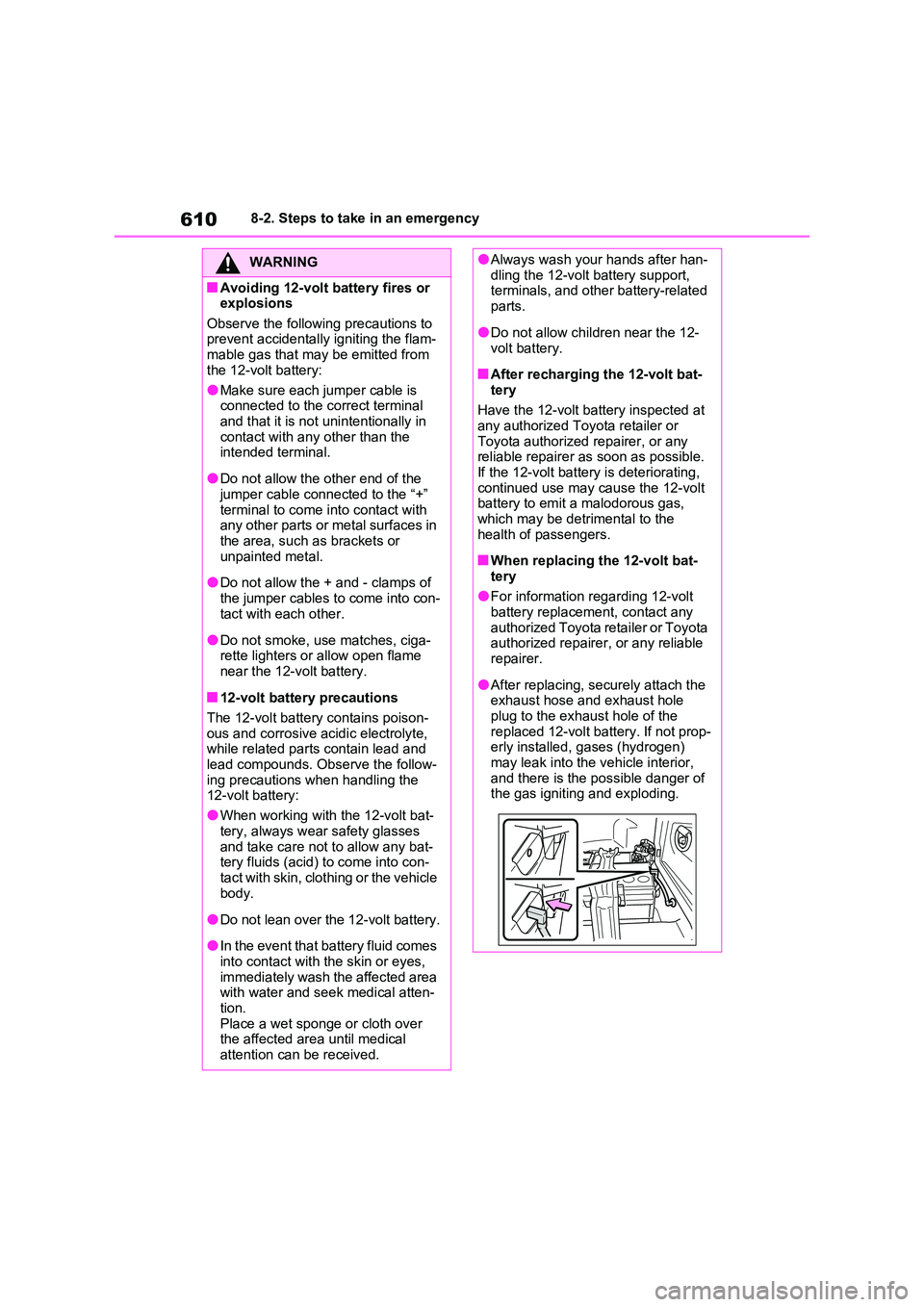
●After replacing, securely attach the exhaust hose and exhaust hole
plug to the exhaust hole of the replaced 12-volt battery. If not prop-erly installed, gases (hydrogen)
may leak into the vehicle interior, and there is the possible danger of the gas igniting and exploding.
Page 611 of 664
611
8
8-2. Steps to take in an emergency
When trouble arises
■If the high coolant temperature
warning light comes on,
flashes or “Engine Coolant
Temp High Stop in a Safe
Place See Owner’s Manual” is
shown on the multi-informa-
tion display
1 Stop the vehicle in a safe place
and turn off the air conditioning
system, and then stop the hybrid
system.
2 If you see steam:
Carefully lift the hood after the
steam subsides.
If you do not see steam:
Carefully lift the hood.
NOTICE
■When handling jumper cables
When connecting the jumper cables,
ensure that they do not become entangled in the cooling fan, etc.
■To prevent damaging the vehicle
The exclusive jump starting terminal is to be used when charging the 12-
volt battery from another vehicle in an emergency. It cannot be used to jump start another vehicle.
If your vehicle overheats
The following may indicate that
your vehicle is overheating.
The high coolant temperature
warning light ( P.170) comes
on or flashes, or a loss of
hybrid system power is experi-
enced. (For example, the vehi-
cle speed does not increase.)
“Engine Coolant Temp High
Stop in a Safe Place See
Owner’s Manual” or “Hybrid
System Overheated Output
Power Reduced” is shown on
the multi-information display.
Steam comes out from under
the hood.
Correction procedures
Page 614 of 664
6148-2. Steps to take in an emergency
mation display.
If the message does not disap-
pear: Stop the hybrid system
and contact any authorized
Toyota retailer or Toyota autho-
rized repairer, or any reliable
repairer.
If the message is not displayed: The hybrid system temperature has dropped and the vehicle may be driven
normally. However, if the message appears again frequently, contact any authorized
Toyota retailer or Toyota authorized repairer, or any reliable repairer.
WARNING
■When inspecting under the hood of your vehicle
Observe the following precautions.
Failure to do so may result in serious injury such as burns.
●If steam is seen coming from under
the hood, do not open the hood until the steam has subsided. The engine compartment may be very
hot.
●After the hybrid system has been
turned off, check that the “READY” indicator is off.When the hybrid system is operat-
ing, the gasoline engine may auto- matically start, or the cooling fan may suddenly operate even if the
gasoline engine stops. Do not touch or approach rotating parts such as the fan, which may lead to fingers
or clothing (especially a tie, a scarf or a muffler) getting caught, result-ing in serious injury.
●Do not loosen the coolant reservoir cap while the hybrid system and
radiator are hot. High temperature steam or coolant could spray out.
NOTICE
■When adding engine/power con-trol unit coolant
Add coolant slowly after the hybrid system has cooled down sufficiently. Adding cool coolant to a hot hybrid
system too quickly can cause dam- age to the hybrid system.
■To prevent damage to the cool-ing system
Observe the following precautions:
●Avoid contaminating the coolant with foreign matter (such as sand or dust, etc.).
●Do not use any coolant additive.
Page 615 of 664
615
8
8-2. Steps to take in an emergency
When trouble arises
1 Stop the hybrid system. Set the
parking brake and shift the shift
lever to P.
2 Remove the mud, snow or sand
from around the stuck tire.
3 Place wood, stones or some
other material to help provide
traction under the tires.
4 Restart the hybrid system.
5 Shift the shift lever to D or R and
release the parking brake. Then,
while exercising caution,
depress the accelerator pedal.
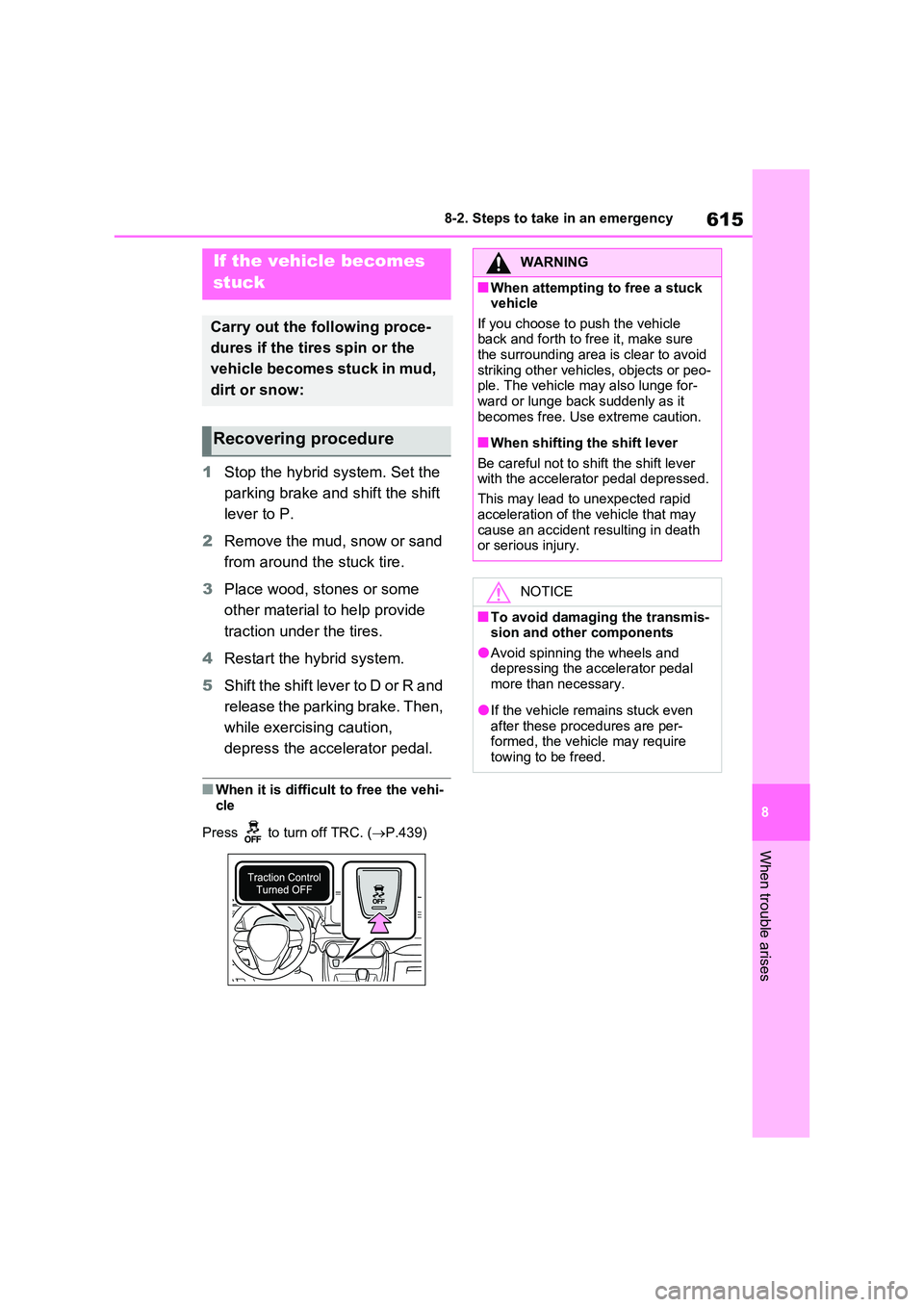
■When it is difficult to free the vehi-
cle
Press to turn off TRC. ( P.439)
If the vehicle becomes
stuck
Carry out the following proce-
dures if the tires spin or the
vehicle becomes stuck in mud,
dirt or snow:
Recovering procedure
WARNING
■When attempting to free a stuck vehicle
If you choose to push the vehicle back and forth to free it, make sure the surrounding area is clear to avoid
striking other vehicles, objects or peo- ple. The vehicle may also lunge for-ward or lunge back suddenly as it
becomes free. Use extreme caution.
■When shifting the shift lever
Be careful not to shift the shift lever with the accelerator pedal depressed.
This may lead to unexpected rapid
acceleration of the vehicle that may cause an accident resulting in death or serious injury.
NOTICE
■To avoid damaging the transmis-sion and other components
●Avoid spinning the wheels and depressing the accelerator pedal more than necessary.
●If the vehicle remains stuck even
after these procedures are per- formed, the vehicle may require towing to be freed.
Page 629 of 664
629
9
9-2. Customization
Vehicle specifications
9-2.Customiz ation
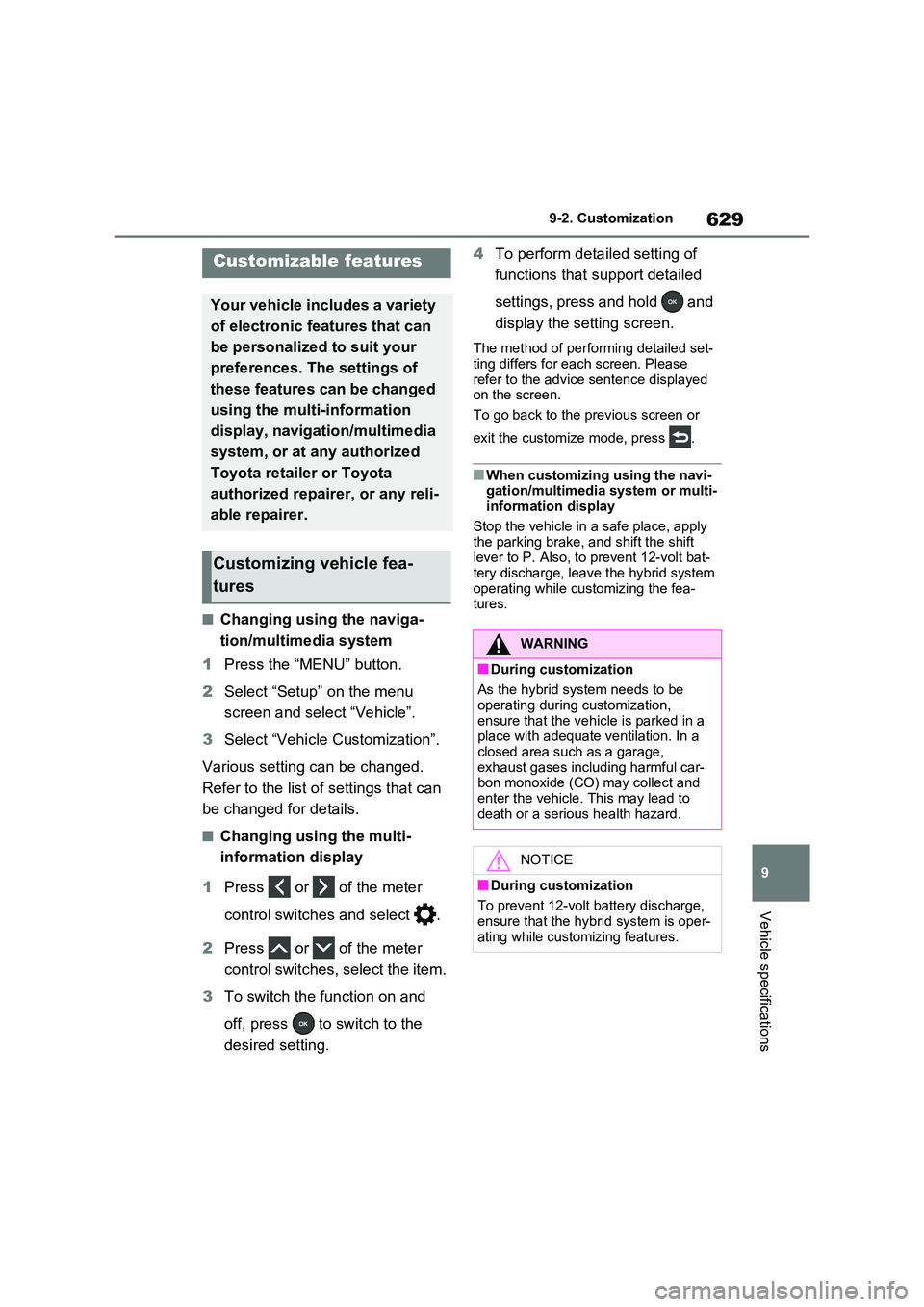
■Changing using the naviga-
tion/multimedia system
1 Press the “MENU” button.
2 Select “Setup” on the menu
screen and select “Vehicle”.
3 Select “Vehicle Customization”.
Various setting can be changed.
Refer to the list of settings that can
be changed for details.
■Changing using the multi-
information display
1 Press or of the meter
control switches and select .
2 Press or of the meter
control switches, select the item.
3 To switch the function on and
off, press to switch to the
desired setting.
4 To perform detailed setting of
functions that support detailed
settings, press and hold and
display the setting screen.
The method of performing detailed set- ting differs for each screen. Please
refer to the advice sentence displayed on the screen.
To go back to the previous screen or
exit the customize mode, press .
■When customizing using the navi- gation/multimedia system or multi-information display
Stop the vehicle in a safe place, apply the parking brake, and shift the shift lever to P. Also, to prevent 12-volt bat-
tery discharge, leave the hybrid system operating while customizing the fea-tures.
Customizable features
Your vehicle includes a variety
of electronic features that can
be personalized to suit your
preferences. The settings of
these features can be changed
using the multi-information
display, navigation/multimedia
system, or at any authorized
Toyota retailer or Toyota
authorized repairer, or any reli-
able repairer.
Customizing vehicle fea-
tures
WARNING
■During customization
As the hybrid system needs to be operating during customization,
ensure that the vehicle is parked in a place with adequate ventilation. In a closed area such as a garage,
exhaust gases including harmful car- bon monoxide (CO) may collect and
enter the vehicle. This may lead to death or a serious health hazard.
NOTICE
■During customization
To prevent 12-volt battery discharge, ensure that the hybrid system is oper-
ating while customizing features.
Page 636 of 664
6369-2. Customization
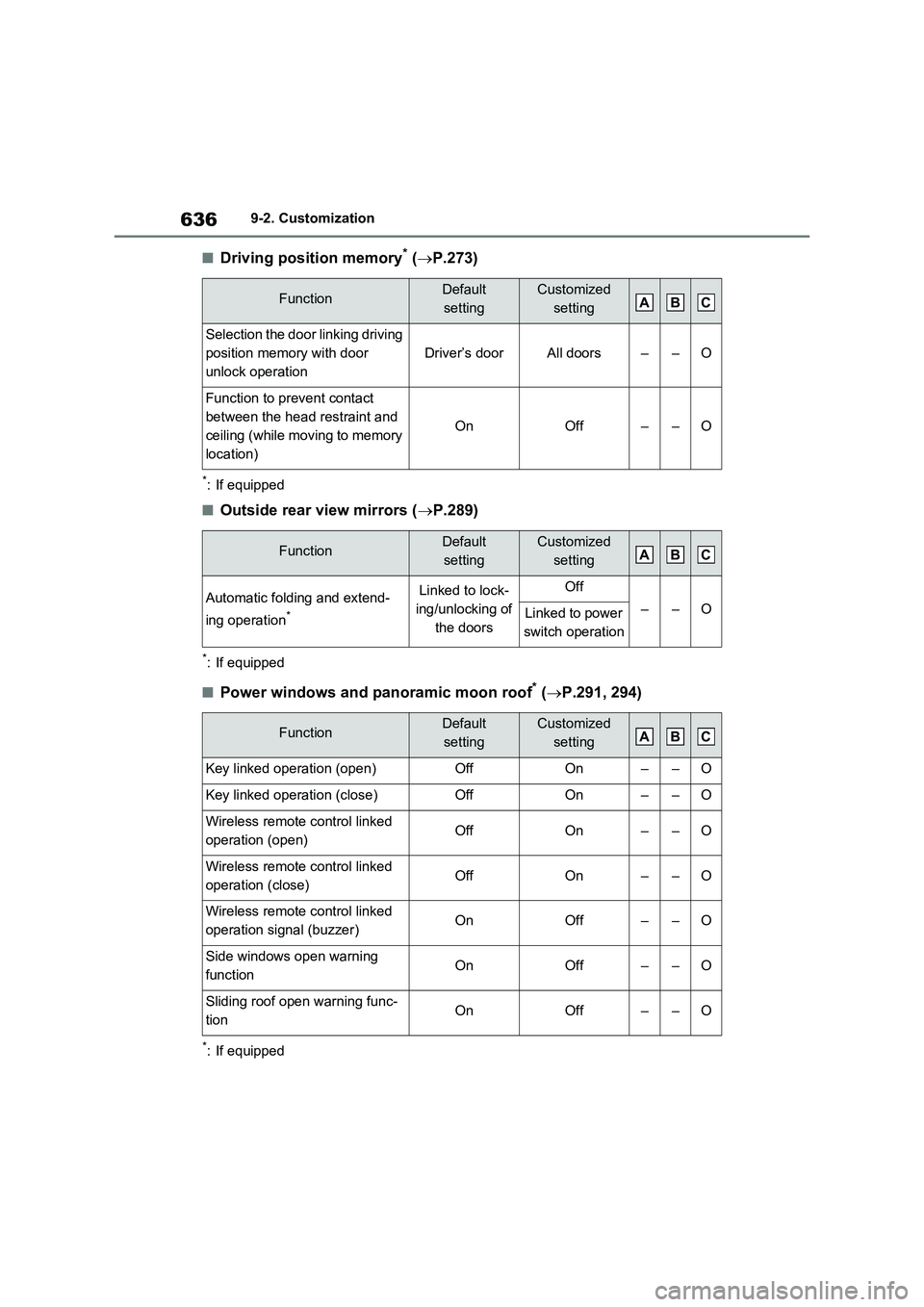
■Driving position memory* (P.273)
*: If equipped
■Outside rear view mirrors (P.289)
*: If equipped
■Power windows and panoramic moon roof* (P.291, 294)
*: If equipped
FunctionDefault
settingCustomized
setting
Selection the door linking driving
position memory with door
unlock operation
Driver’s doorAll doors––O
Function to prevent contact
between the head restraint and
ceiling (while moving to memory
location)
OnOff––O
FunctionDefault
settingCustomized
setting
Automatic folding and extend-
ing operation
*
Linked to lock-
ing/unlocking of
the doorsOff
––OLinked to power
switch operation
FunctionDefault
settingCustomized
setting
Key linked operation (open)OffOn––O
Key linked operation (close)OffOn––O
Wireless remote control linked
operation (open)OffOn––O
Wireless remote control linked
operation (close)OffOn––O
Wireless remote control linked
operation signal (buzzer)OnOff––O
Side windows open warning
functionOnOff––O
Sliding roof open warning func-
tion OnOff––O
ABC
ABC
ABC
Page 638 of 664
6389-2. Customization
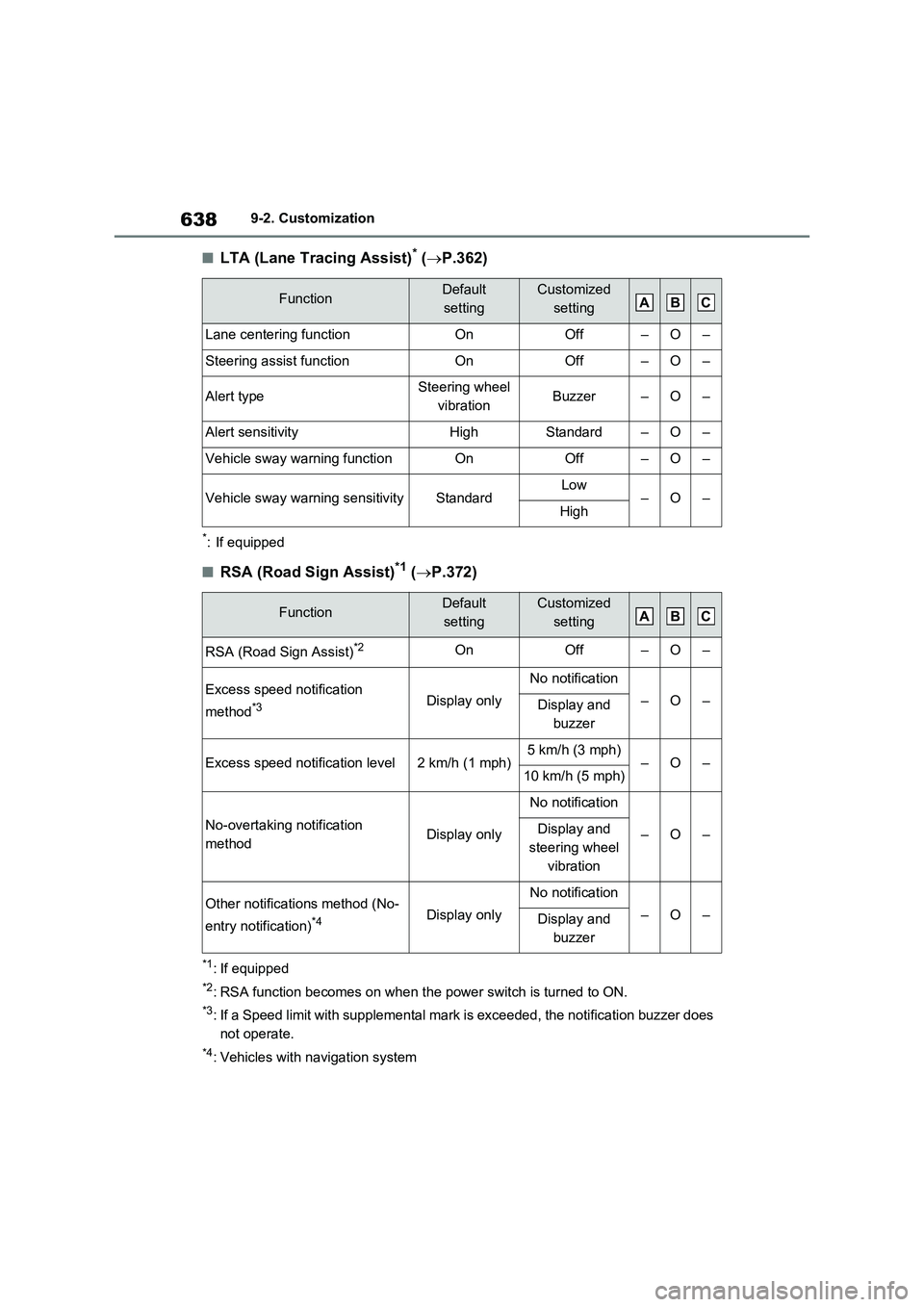
■LTA (Lane Tracing Assist)* (P.362)
*: If equipped
■RSA (Road Sign Assist)*1 (P.372)
*1: If equipped
*2: RSA function becomes on when the power switch is turned to ON.
*3: If a Speed limit with supplemental mark is exceeded, the notification buzzer does
not operate.
*4: Vehicles with navigation system
FunctionDefault
settingCustomized
setting
Lane centering functionOnOff–O–
Steering assist functionOnOff–O–
Alert typeSteering wheel
vibrationBuzzer–O–
Alert sensitivityHighStandard–O–
Vehicle sway warning functionOnOff–O–
Vehicle sway warning sensitivityStandardLow–O–High
FunctionDefault
settingCustomized
setting
RSA (Road Sign Assist)*2OnOff–O–
Excess speed notification
method
*3Display only
No notification
–O–Display and
buzzer
Excess speed notification level2 km/h (1 mph)5 km/h (3 mph)–O–10 km/h (5 mph)
No-overtaking notification
methodDisplay only
No notification
–O–Display and
steering wheel
vibration
Other notifications method (No-
entry notification)
*4Display only
No notification
–O–Display and
buzzer
ABC
ABC
Page 643 of 664
643
9 9-3. Initialization
Vehicle specifications
9- 3. In it ia li za ti on
*: If equipped
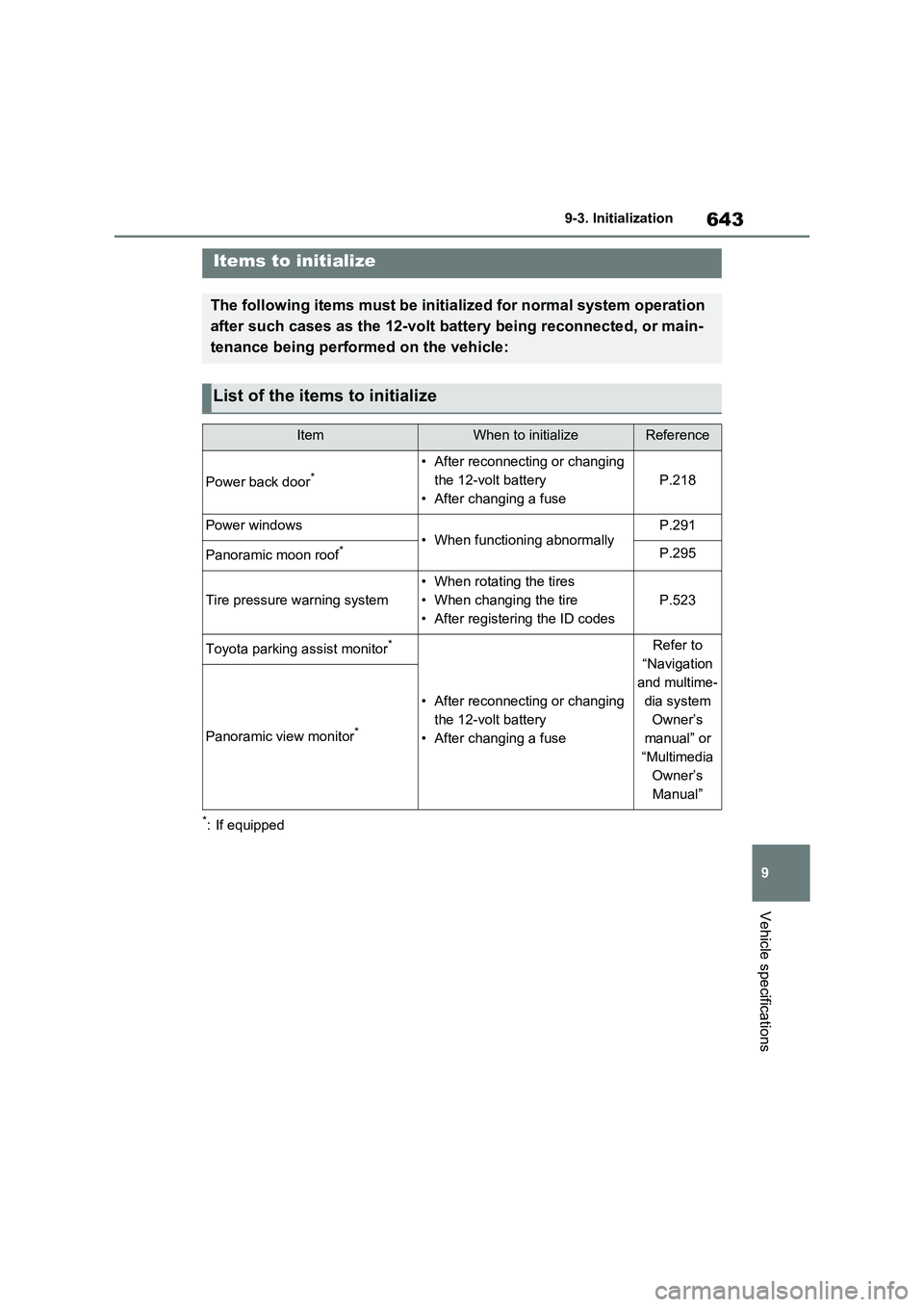
Items to initialize
The following items must be initialized for normal system operation
after such cases as the 12-volt battery being reconnected, or main-
tenance being performed on the vehicle:
List of the items to initialize
ItemWhen to initializeReference
Power back door*• After reconnecting or changing
the 12-volt battery
• After changing a fuse
P.218
Power windows• When functioning abnormallyP.291
Panoramic moon roof*P.295
Tire pressure warning system
• When rotating the tires
• When changing the tire
• After registering the ID codes
P.523
Toyota parking assist monitor*
• After reconnecting or changing
the 12-volt battery
• After changing a fuse
Refer to
“Navigation
and multime-
dia system
Owner’s
manual” or
“Multimedia
Owner’s
Manual”
Panoramic view monitor*