2011 TOYOTA VERSO S cooling
[x] Cancel search: coolingPage 284 of 664
2844-4. Adjusting the steering wheel and mirrors
■Cleaning the mirror surface
If the mirror surface is dirty, the
image on the display may be diffi-
cult to see.
Clean the mirror surface gently
using a soft dry cloth.
■Cleaning the camera
If the camera lens is dirty, the dis-
played image may not be clear. In
this case, clean it with a soft cloth
dampened with water or a swab.
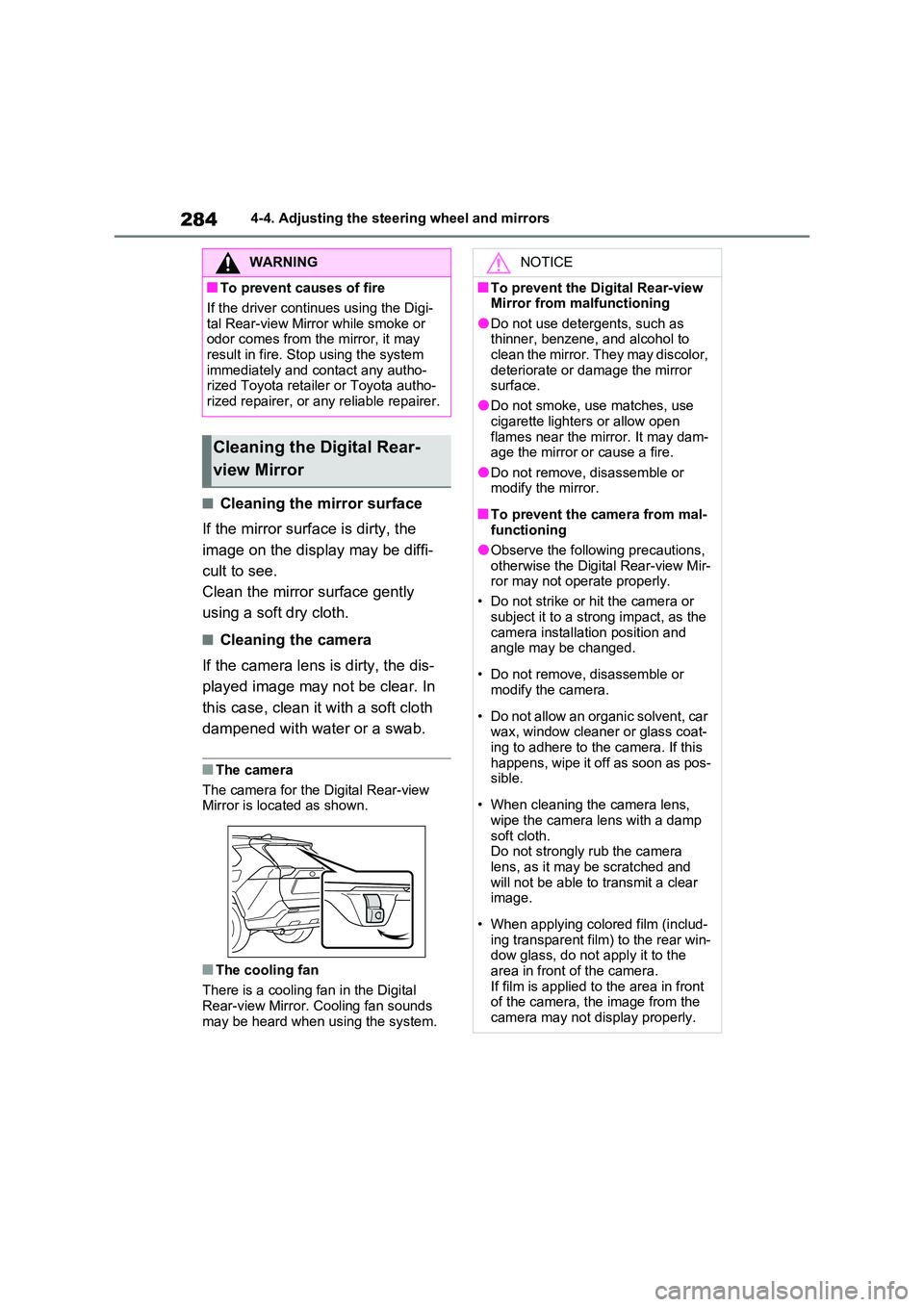
■The camera
The camera for the Digital Rear-view Mirror is located as shown.
■The cooling fan
There is a cooling fan in the Digital
Rear-view Mirror. Cooling fan sounds may be heard when using the system.
WARNING
■To prevent causes of fire
If the driver continues using the Digi-
tal Rear-view Mirror while smoke or odor comes from the mirror, it may result in fire. Stop using the system
immediately and contact any autho- rized Toyota retailer or Toyota autho-rized repairer, or any reliable repairer.
Cleaning the Digital Rear-
view Mirror
NOTICE
■To prevent the Digital Rear-view Mirror from malfunctioning
●Do not use detergents, such as thinner, benzene, and alcohol to clean the mirror. They may discolor,
deteriorate or damage the mirror surface.
●Do not smoke, use matches, use
cigarette lighters or allow open flames near the mirror. It may dam-age the mirror or cause a fire.
●Do not remove, disassemble or modify the mirror.
■To prevent the camera from mal-functioning
●Observe the following precautions,
otherwise the Digital Rear-view Mir- ror may not operate properly.
• Do not strike or hit the camera or
subject it to a strong impact, as the camera installation position and angle may be changed.
• Do not remove, disassemble or modify the camera.
• Do not allow an organic solvent, car wax, window cleaner or glass coat-
ing to adhere to the camera. If this happens, wipe it off as soon as pos-sible.
• When cleaning the camera lens, wipe the camera lens with a damp
soft cloth. Do not strongly rub the camera lens, as it may be scratched and
will not be able to transmit a clear image.
• When applying colored film (includ- ing transparent film) to the rear win-dow glass, do not apply it to the
area in front of the camera. If film is applied to the area in front of the camera, the image from the
camera may not display properly.
Page 434 of 664
4345-5. Using the driving support systems
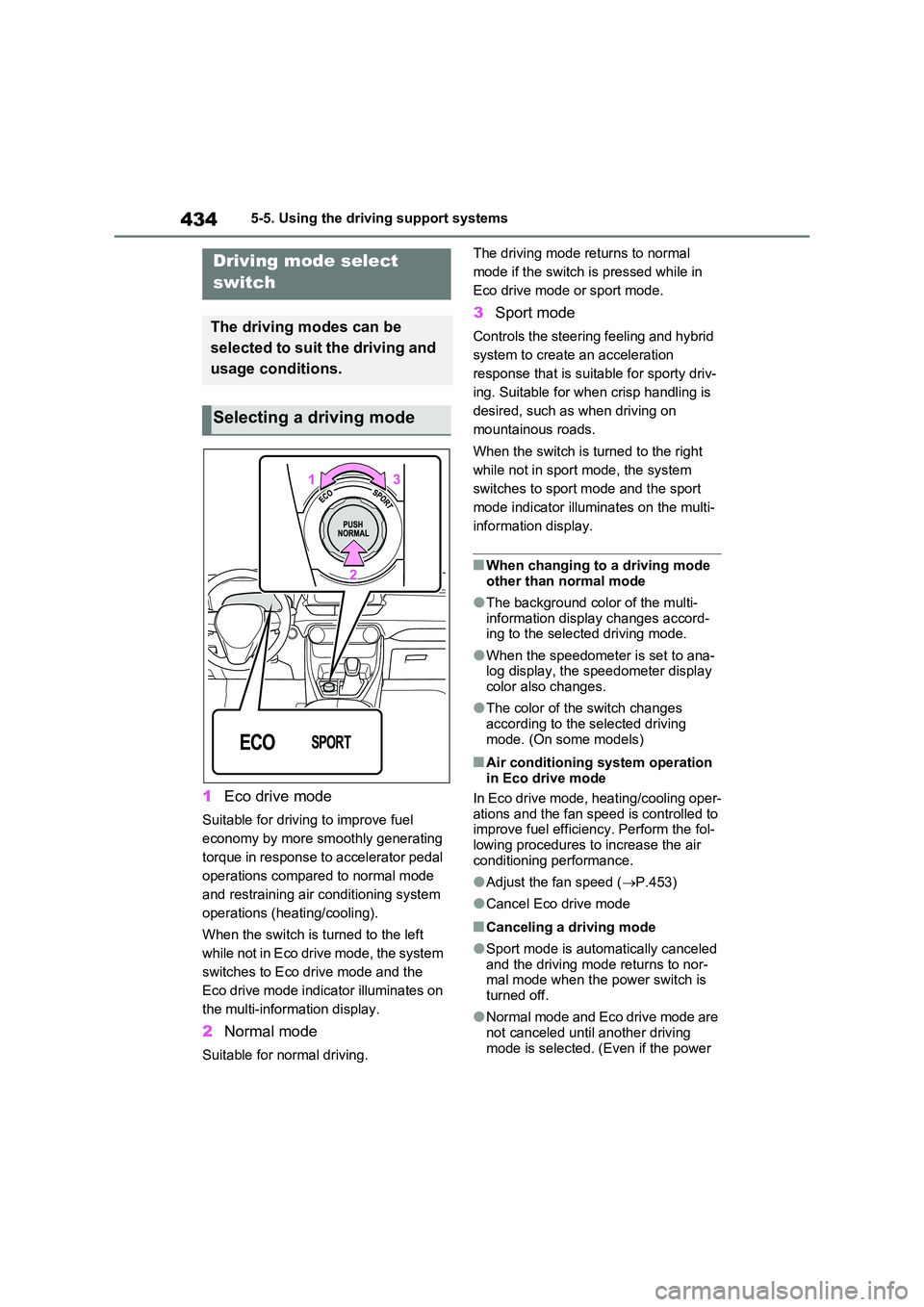
1Eco drive mode
Suitable for driving to improve fuel
economy by more smoothly generating
torque in response to accelerator pedal
operations compared to normal mode
and restraining air conditioning system
operations (heating/cooling).
When the switch is turned to the left
while not in Eco drive mode, the system
switches to Eco drive mode and the
Eco drive mode indicator illuminates on
the multi-information display.
2 Normal mode
Suitable for normal driving.
The driving mode returns to normal
mode if the switch is pressed while in
Eco drive mode or sport mode.
3 Sport mode
Controls the steering feeling and hybrid
system to create an acceleration
response that is suitable for sporty driv-
ing. Suitable for when crisp handling is
desired, such as when driving on
mountainous roads.
When the switch is turned to the right
while not in sport mode, the system
switches to sport mode and the sport
mode indicator illuminates on the multi-
information display.
■When changing to a driving mode
other than normal mode
●The background color of the multi-
information display changes accord- ing to the selected driving mode.
●When the speedometer is set to ana-log display, the speedometer display color also changes.
●The color of the switch changes according to the selected driving
mode. (On some models)
■Air conditioning system operation in Eco drive mode
In Eco drive mode, heating/cooling oper-
ations and the fan speed is controlled to improve fuel efficiency. Perform the fol-lowing procedures to increase the air
conditioning performance.
●Adjust the fan speed ( P.453)
●Cancel Eco drive mode
■Canceling a driving mode
●Sport mode is automatically canceled and the driving mode returns to nor-mal mode when the power switch is
turned off.
●Normal mode and Eco drive mode are
not canceled until another driving mode is selected. (Even if the power
Driving mode select
switch
The driving modes can be
selected to suit the driving and
usage conditions.
Selecting a driving mode
Page 453 of 664
453
6
6-1. Using the air conditioning system and defogger
Interior features
■Adjusting the temperature set-
ting
Turn driver’s side temperature con-
trol dial clockwise to increases the
temperature and turn the dial coun-
terclockwise to decreases the tem-
perature.
The air conditioning system switches
between individual and simultaneous
modes each time the “DUAL” switch is
pressed.
Simultaneous mode (the indicator on
the “DUAL” switch is off):
The driver’s side temperature control
dial can be used to adjust the tempera-
ture for the driver’s and passenger’s
side. At this time, operate the passen-
ger’s side temperature control dial to
enter individual mode.
Individual mode (the indicator on the
“DUAL” switch is on):
The temperature for the driver’s and
passenger’s side can be adjusted sepa-
rately.
■Setting the fan speed
Press the fan speed increase
switch to increase the fan speed
and the fan speed decrease switch
to decrease the fan speed.
Pressing the “OFF” switch to turns off
the fan.
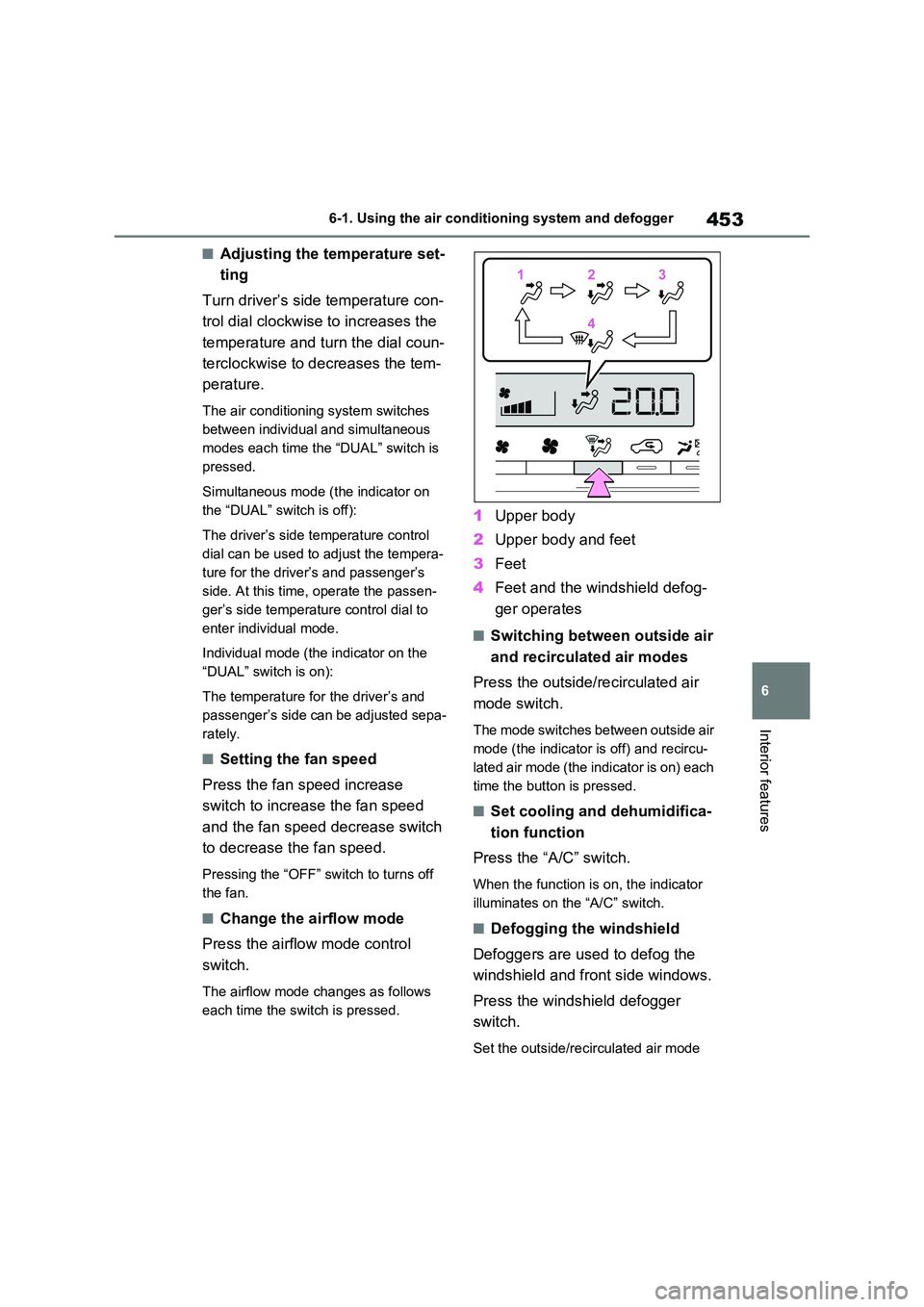
■Change the airflow mode
Press the airflow mode control
switch.
The airflow mode changes as follows
each time the switch is pressed.
1 Upper body
2 Upper body and feet
3 Feet
4 Feet and the windshield defog-
ger operates
■Switching between outside air
and recirculated air modes
Press the outside/recirculated air
mode switch.
The mode switches between outside air
mode (the indicator is off) and recircu-
lated air mode (the indicator is on) each
time the button is pressed.
■Set cooling and dehumidifica-
tion function
Press the “A/C” switch.
When the function is on, the indicator
illuminates on the “A/C” switch.
■Defogging the windshield
Defoggers are used to defog the
windshield and front side windows.
Press the windshield defogger
switch.
Set the outside/recirculated air mode
112233
44
Page 461 of 664
461
6
6-1. Using the air conditioning system and defogger
Interior features
●The outside temperature is extremely
low
●When the hybrid system is cool (for
example, after being left for a long time in low temperatures)
■Windshield defogger
When defogging the windshield using
the Remote Air Conditioning System, defogging may be insufficient due to the power being restricted more than during
normal air conditioning operation. Also, the outside of the windshield may fog up due to the outside temperature, humidity
or air conditioning set temperature.
■Using the heater via the Remote Air Conditioning System
●When the outside temperature is low, heating may feel insufficient due to restricted operation of the air condi-
tioning.
●When the outside heat exchanger
becomes frosted over, heating perfor- mance may decline due to automati-cally switching to the frost removal
operation. ( P.452)
■Security feature
Any unlocked doors will be automatically locked when the system is operating.
The emergency flashers flash to indicate that the doors have been locked or the system has been turned off.
■Conditions affecting operation
P.225
■While the Remote Air Conditioning System is operating
●Depending on the operating condition of the Remote Air Conditioning Sys-tem, the air conditioning compressor
or cooling fan may spin and an operat- ing noise may be heard.However, this does not indicate a mal-
function.
●The air conditioning operation
switches, etc. will not operate while the Remote Air Conditioning System is operating.
■Electronic key battery depletion
P.202
■When the electronic key battery is fully depleted
P.543
■Customization
Setting (e.g. Operation using “A/C” on the wireless remote control) can be changed. (Customizable features:
P.629)
WARNING
■Precautions for the Remote Air Conditioning System
●Do not use the system if people are in the vehicle. Even when the system is in use, the
internal temperature may still reach a high or low level due to features such as the automatic shut-off.
Children and pets left inside the vehicle may suffer heatstroke dehy-dration or hypothermia, or could
result in death or serious injury.
●Depending on the surrounding envi-
ronment, signals from the wireless switch may transmit further than expected. Pay appropriate attention
to the vehicle’s surroundings and use the switch only when neces-sary.
●Do not operate “A/C” on the wire-less remote control if the hood is
open. The air conditioning may operate unintentionally and objects may be drawn into the electrical
cooling fan.
NOTICE
■To prevent the hybrid battery (traction battery) from being dis-charged
Use “A/C” on the wireless remote control only when necessary.
Page 497 of 664
497
7
7-3. Do-it-yourself maintenance
Maintenance and care
WARNING
■When working on the engine compartment
●Make sure that “IGNITION ON” on the multi-information display and the “READY” indicator are both off.
●Keep hands, clothing and tools away from the moving fan.
●Be careful not to touch the engine, power control unit, radiator, exhaust
manifold, etc. right after driving as they may be hot. Oil and other flu-ids may also be hot.
●Do not leave anything that may burn easily, such as paper and
rags, in the engine compartment.
●Do not smoke, cause sparks or
expose an open flame to fuel or the 12-volt battery. Fuel and 12-volt battery fumes are flammable.
●Take care because brake fluid can harm your hands or eyes and dam-
age painted surfaces. If fluid gets on your hands or in your eyes, flush the affected area with clean water
immediately. If you still experience discomfort, consult a doctor.
■When working near the electric cooling fan or radiator grille
Be sure the power switch is off.
With the power switch in ON, the electric cooling fan may automatically start to run if the air conditioning is on
and/or the coolant temperature is high. ( P.504)
■Safety glasses
Wear safety glasses to prevent flying or falling material, fluid spray, etc.,
from getting in your eyes.
NOTICE
■If you remove the air cleaner fil- ter
Driving with the air cleaner filter removed may cause excessive engine wear due to dirt in the air.
■If the fluid level is low or high
It is normal for the brake fluid level to
go down slightly as the brake pads wear or when the fluid level in the accumulator is high.
If the reservoir needs frequent refill- ing, it may indicate a serious problem.
Page 501 of 664
501
7 7-3. Do-it-yourself maintenance
Maintenance and care
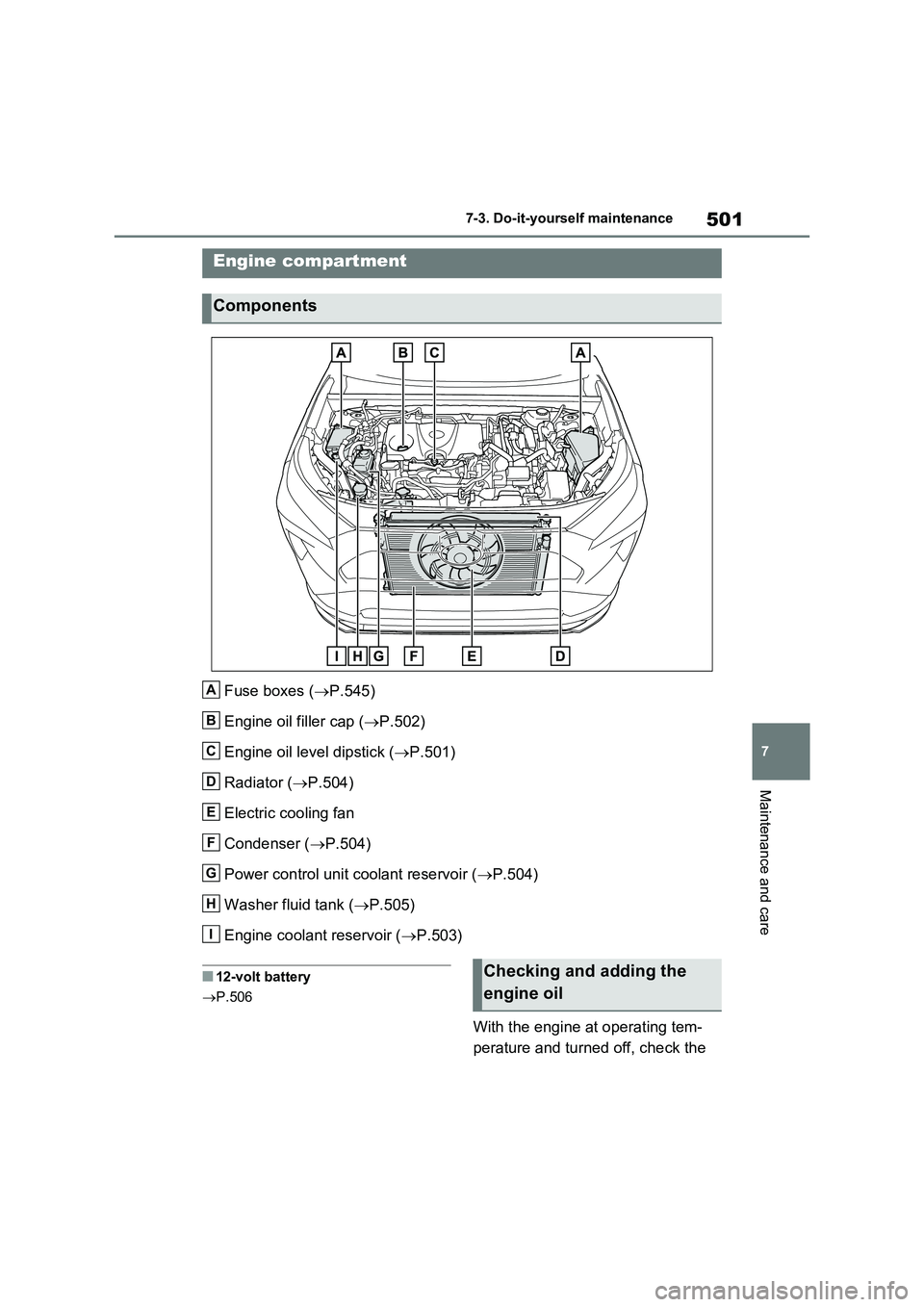
Fuse boxes (P.545)
Engine oil filler cap (P.502)
Engine oil level dipstick (P.501)
Radiator (P.504)
Electric cooling fan
Condenser (P.504)
Power control unit coolant reservoir (P.504)
Washer fluid tank (P.505)
Engine coolant reservoir (P.503)
■12-volt battery
P.506
With the engine at operating tem-
perature and turned off, check the
Engine compartment
Components
A
B
C
D
E
F
G
H
I
Checking and adding the
engine oil
Page 504 of 664
5047-3. Do-it-yourself maintenance
“LOW” line
If the level is on or below the “LOW”
line, add coolant up to the “FULL” line.
( P.611)
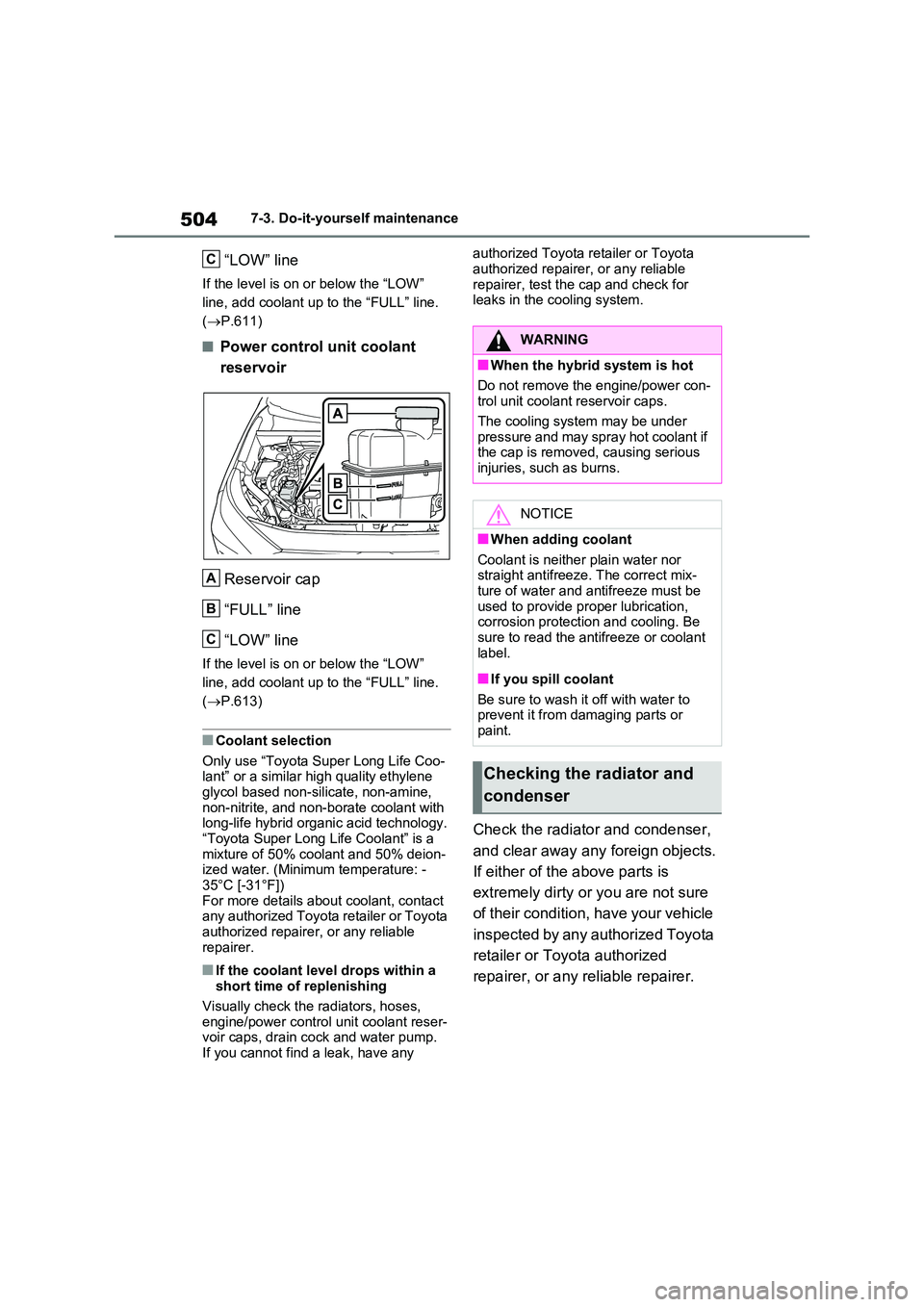
■Power control unit coolant
reservoir
Reservoir cap
“FULL” line
“LOW” line
If the level is on or below the “LOW”
line, add coolant up to the “FULL” line.
( P.613)
■Coolant selection
Only use “Toyota Super Long Life Coo- lant” or a similar high quality ethylene glycol based non-silicate, non-amine,
non-nitrite, and non-borate coolant with long-life hybrid organic acid technology.“Toyota Super Long Life Coolant” is a
mixture of 50% coolant and 50% deion- ized water. (Minimum temperature: -35°C [-31°F])
For more details about coolant, contact any authorized Toyota retailer or Toyota authorized repairer, or any reliable
repairer.
■If the coolant level drops within a short time of replenishing
Visually check the radiators, hoses,
engine/power control unit coolant reser- voir caps, drain cock and water pump.If you cannot find a leak, have any
authorized Toyota retailer or Toyota
authorized repairer, or any reliable repairer, test the cap and check for leaks in the cooling system.
Check the radiator and condenser,
and clear away any foreign objects.
If either of the above parts is
extremely dirty or you are not sure
of their condition, have your vehicle
inspected by any authorized Toyota
retailer or Toyota authorized
repairer, or any reliable repairer.
C
A
B
C
WARNING
■When the hybrid system is hot
Do not remove the engine/power con- trol unit coolant reservoir caps.
The cooling system may be under pressure and may spray hot coolant if the cap is removed, causing serious
injuries, such as burns.
NOTICE
■When adding coolant
Coolant is neither plain water nor straight antifreeze. The correct mix-ture of water and antifreeze must be
used to provide proper lubrication, corrosion protection and cooling. Be sure to read the antifreeze or coolant
label.
■If you spill coolant
Be sure to wash it off with water to prevent it from damaging parts or
paint.
Checking the radiator and
condenser
Page 505 of 664
505
7
7-3. Do-it-yourself maintenance
Maintenance and care
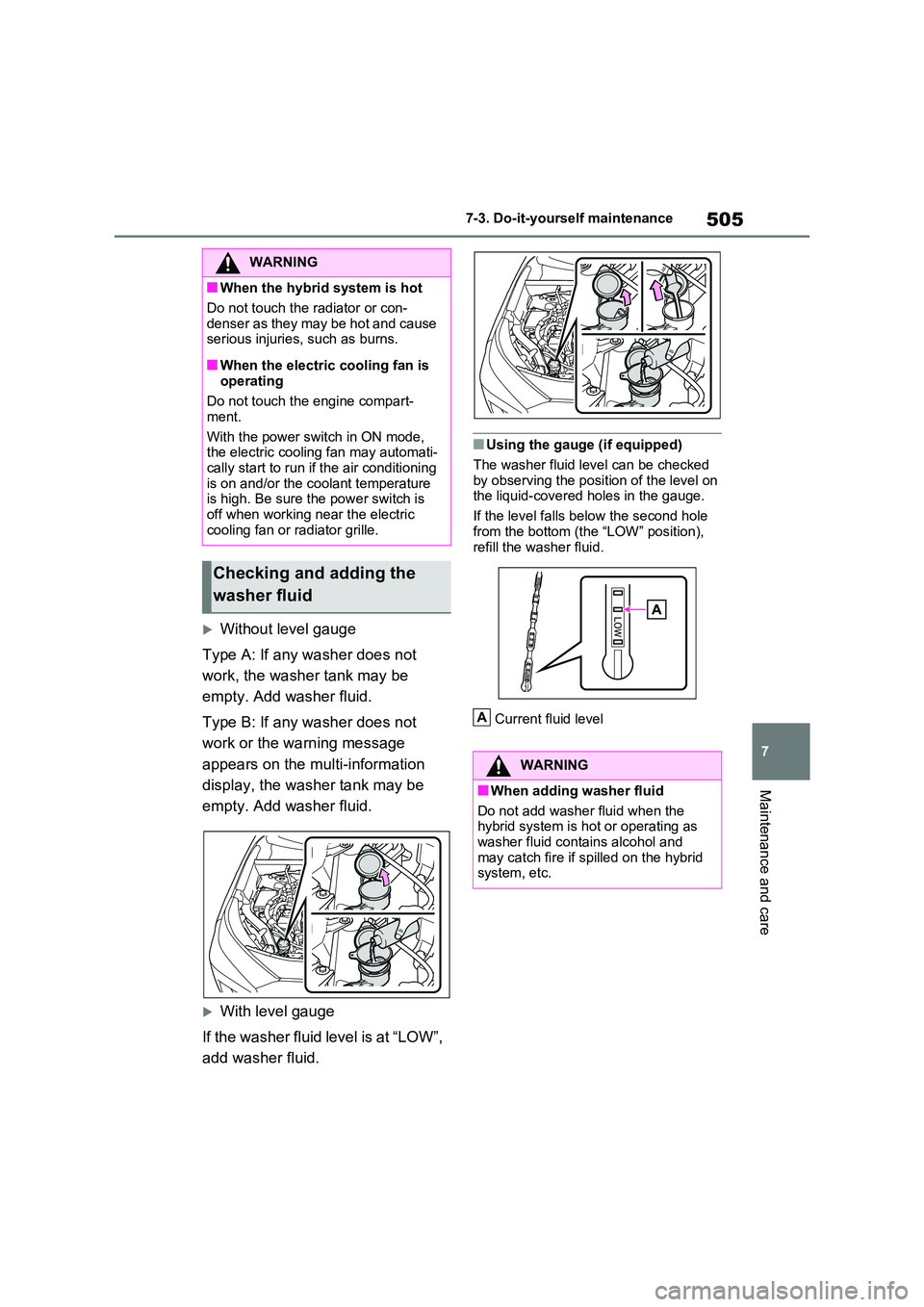
Without level gauge
Type A: If any washer does not
work, the washer tank may be
empty. Add washer fluid.
Type B: If any washer does not
work or the warning message
appears on the multi-information
display, the washer tank may be
empty. Add washer fluid.
With level gauge
If the washer fluid level is at “LOW”,
add washer fluid.
■Using the gauge (if equipped)
The washer fluid level can be checked
by observing the position of the level on the liquid-covered holes in the gauge.
If the level falls below the second hole
from the bottom (the “LOW” position), refill the washer fluid.
Current fluid level
WARNING
■When the hybrid system is hot
Do not touch the radiator or con-
denser as they may be hot and cause serious injuries, such as burns.
■When the electric cooling fan is operating
Do not touch the engine compart-
ment.
With the power switch in ON mode, the electric cooling fan may automati-
cally start to run if the air conditioning is on and/or the coolant temperature is high. Be sure the power switch is
off when working near the electric cooling fan or radiator grille.
Checking and adding the
washer fluid
WARNING
■When adding washer fluid
Do not add washer fluid when the hybrid system is hot or operating as
washer fluid contains alcohol and may catch fire if spilled on the hybrid system, etc.
A