Page 296 of 588
296 3-1. Using the air conditioning system and defogger
VERSO_WE_OM64524E
Using the system in recirculated air mode
The windows will fog up more easily if the recirculated air mode is used for
an extended period.
When outside air temperature approaches 0°C (32°F) (vehicles with air
conditioning system)
The air conditioning system may not operate even when is pressed.
When is selected for the air outlets used
For your driving comfort, air flowing to the feet may be warmer than air flow-
ing to the upper body depending on the position of the temperature adjust-
ment dial.
Air conditioning odors
During use, various odors from inside and outside the vehicle may enter
into and accumulate in the air conditioning system. This may then cause
odor to be emitted from the vents.
To reduce potential odors from occurring:
It is recommended that the air conditioning system be set to outside air
mode prior to turning the vehicle off.
CAUTION
To prevent the windshield from fogging up
Do not set the air outlet selection dial to during cool air operation in
extremely humid weather. The difference between the temperature of the
outside air and that of the windshield can cause the outer surface of the
windshield to fog up, blocking your vision.
NOTICE
To prevent battery discharge
Do not leave the air conditioning system on longer than necessary when the
engine is stopped.
Page 302 of 588

302 3-1. Using the air conditioning system and defogger
VERSO_WE_OM64524ERight and left side outlets
Direct air flow to the left or
right, up or down.
Turn the knob to open or close
the vent.
Using the automatic mode
Fan speed is adjusted automatically in accordance with the temperature set-
ting and ambient conditions. As a result, the following may occur.
The system may switch automatically to recirculated air mode when the
coolest temperature setting is selected in summer.
Immediately after
is pressed, the fan may stop for a while until
warm or cool air is ready to flow.
Cool air may flow to the area around the upper body when the heater is
on.
Using the system in recirculated air mode
The windows will fog up more easily if the recirculated air mode is used for
an extended period.
Window defogger feature
Recirculated air mode may automatically switch to outside air mode in situa-
tions where the windows need to be defogged.
When outside temperature approaches 0°C (32°F)
The air conditioning system may not operate even when
is pressed.
When is selected for the air outlets used
For your driving comfort, air flowing to the feet may be warmer than air flow-
ing to the upper body depending on the position of the temperature adjust-
ment dial.
Page 318 of 588
318 3-2. Using the audio system
VERSO_WE_OM64524E
Reception sensitivity
Maintaining perfect radio reception at all times is difficult due to the con-
tinually changing position of the antenna, differences in signal strength
and surrounding objects, such as trains, transmitters, etc.
When is used, automatic station selection and automatic register-
ing of stations may not be possible.
The radio antenna is mounted on the rear roof.
The antenna can be removed from the base by turning it.
Digital Audio Broadcast (DAB) radio
The optional radio antenna and tuner are necessary for the use of Digital
Audio Broadcast (DAB) radio.
NOTICE
To prevent damage, remove the antenna in the following cases
The antenna will touch the ceiling of a garage.
A cover will be put on the roof.
When driving through an automatic car wash.
Any other cases where there is a risk of touching surrounding parts.
Page 335 of 588
335 3-2. Using the audio system
3
Interior features
VERSO_WE_OM64524E
CAUTION
Caution while driving
Do not connect iPod or operate the controls.
NOTICE
To prevent damage to iPod
Do not leave iPod in the vehicle. The temperature inside the vehicle may
become high, resulting in damage to the iPod.
Do not push down on or apply unnecessary pressure to the iPod while it is
connected as this may damage the iPod or its terminal.
Do not insert foreign objects into the port as this may damage the iPod or
its terminal.
Page 341 of 588

341 3-2. Using the audio system
3
Interior features
VERSO_WE_OM64524E
MP3 and WMA playback
• When a device containing MP3 or WMA files is connected, all files in
the USB memory are checked. Once the file check is finished, the first
MP3 or WMA file is played. To make the file check finish more quickly,
we recommend that you do not include any files other than MP3 or
WMA files or create any unnecessary folders.
• When the USB memory is connected and the audio source is changed
to USB memory mode, the USB memory will start playing the first file in
the first folder. If the same device is removed and reinserted (and the
contents have not been changed), the USB memory will resume play
from the same point in which it was last used.
Extensions
If the file extensions .mp3 and .wma are used for files other than MP3 and
WMA files, they will be skipped (not played).
Playback
• To play MP3 files with steady sound quality, we recommend a fixed bit
rate of at least 128 kbps and a sampling frequency of 44.1 kHz.
• There is a wide variety of freeware and other encoding software for
MP3 and WMA files on the market, and depending on the status of the
encoding and the file format, poor sound quality or noise at the start of
playback may result. In some cases, playback may not be possible at
all.
• Microsoft, Windows, and Windows Media are registered trademarks of
Microsoft Corporation in the U.S.A. and other countries.
CAUTION
Caution while driving
Do not connect USB memory or operate the controls.
Page 344 of 588
344 3-2. Using the audio system
VERSO_WE_OM64524EAdjusting sound quality
Turning adjusts the level.
*: The sound quality level is adjusted individually in each audio mode.
Adjusting the Automatic Sound Levelizer (ASL)
When ASL is selected, turning to the right changes the
amount of ASL in the order of LOW, MID and HIGH.
Turning to the left turns ASL off.
ASL automatically adjusts the volume and tone quality to compensate for
varying noise levels while driving.
Sound
quality modeMode
displayedLevelTurn to the
leftTurn to the
right
Bass*“BAS”-5 to 5LowHighTreble*“TRE”-5 to 5
Front/rear
volume
balance
“FAD”F7 to R7Shifts to rearShifts to
front
Left/right
volume
balance
“BAL”L7 to R7Shifts to leftShifts to
right
Page 353 of 588
353 3-4. Using the storage features
3
Interior features
VERSO_WE_OM64524E
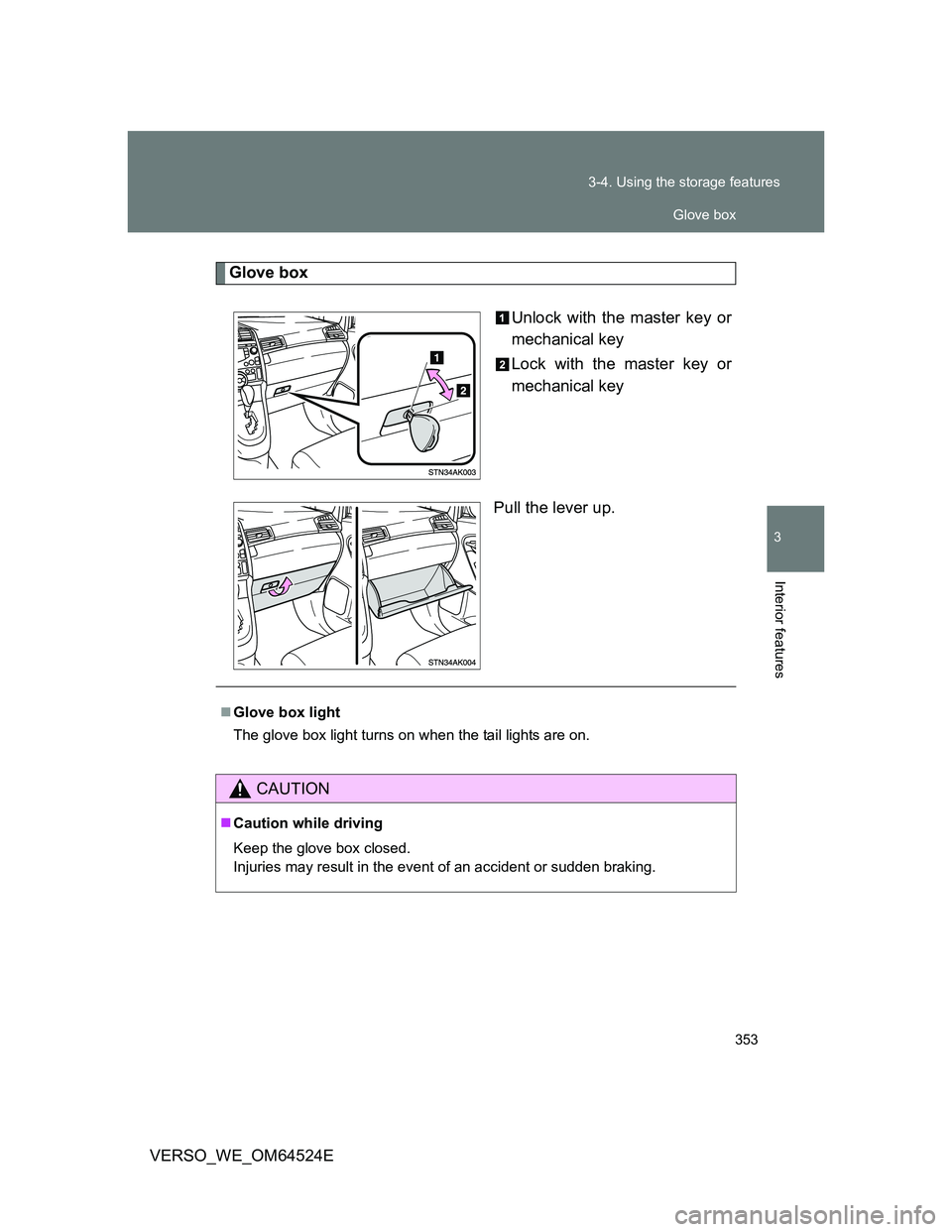
Glove box
Unlock with the master key or
mechanical key
Lock with the master key or
mechanical key
Pull the lever up.
Glove box light
The glove box light turns on when the tail lights are on.
CAUTION
Caution while driving
Keep the glove box closed.
Injuries may result in the event of an accident or sudden braking.
Glove box
Page 355 of 588
355 3-4. Using the storage features
3
Interior features
VERSO_WE_OM64524E
Overhead console
Press the lid.
The overhead console is useful
for temporarily storing small
items. Tray in the console box
CAUTION
Caution while driving (Type B)
Keep the box closed.
Injuries may result in the event of an accident or sudden braking.
The tray can be removed and used as a
separator.
Console box and overhead console