Page 224 of 732
224 2-4. Using other driving systems
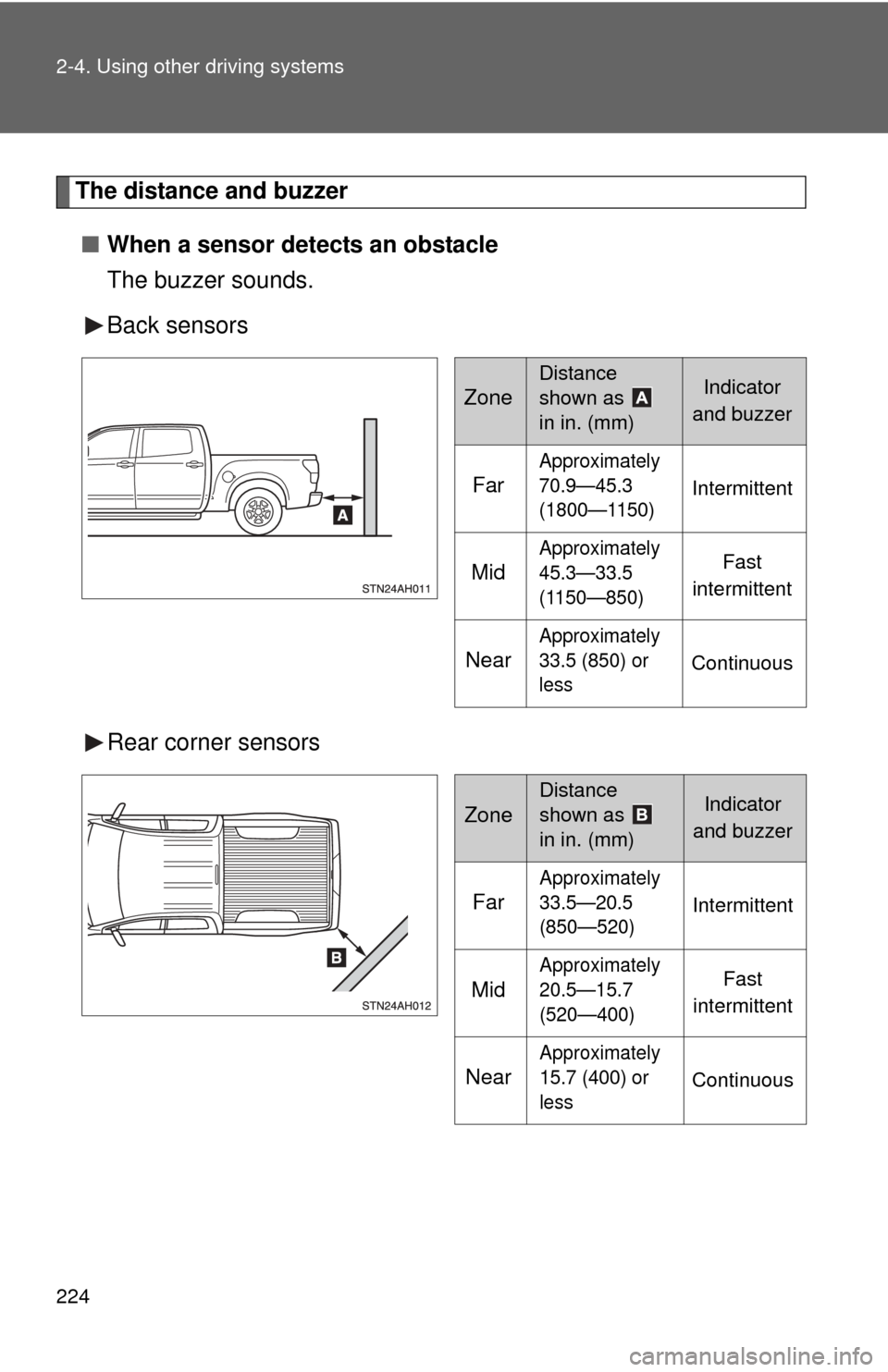
The distance and buzzer■ When a sensor detects an obstacle
The buzzer sounds.
Back sensors
Rear corner sensors
Zone
Distance
shown as
in in. (mm)Indicator
and buzzer
Far
Approximately
70.9—45.3
(1800—1150)
Intermittent
Mid
Approximately
45.3—33.5
(1150—850)Fast
intermittent
Near
Approximately
33.5 (850) or
less
Continuous
Zone
Distance
shown as
in in. (mm)Indicator
and buzzer
Far
Approximately
33.5—20.5
(850—520)
Intermittent
Mid
Approximately
20.5—15.7
(520—400)Fast
intermittent
Near
Approximately
15.7 (400) or
less
Continuous
Page 225 of 732
225
2-4. Using other
driving systems
2
When driving
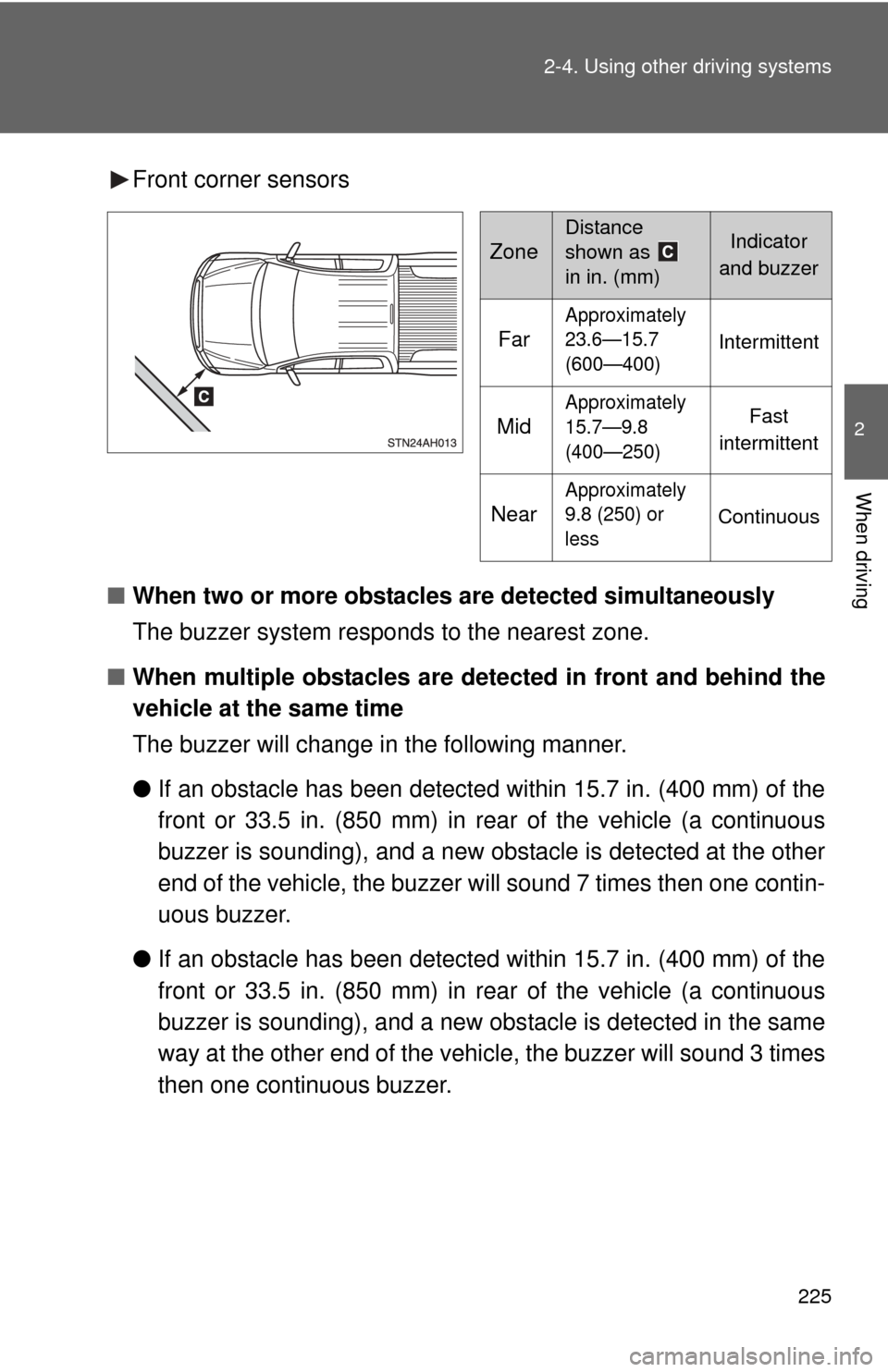
Front corner sensors
■ When two or more obstacles are detected simultaneously
The buzzer system responds to the nearest zone.
■ When multiple obstacles are detected in front and behind the
vehicle at the same time
The buzzer will change in the following manner.
● If an obstacle has been detected within 15.7 in. (400 mm) of the
front or 33.5 in. (850 mm) in rear of the vehicle (a continuous
buzzer is sounding), and a new obstacle is detected at the other
end of the vehicle, the buzzer will sound 7 times then one contin-
uous buzzer.
● If an obstacle has been detected within 15.7 in. (400 mm) of the
front or 33.5 in. (850 mm) in rear of the vehicle (a continuous
buzzer is sounding), and a new obs tacle is detected in the same
way at the other end of the vehi cle, the buzzer will sound 3 times
then one continuous buzzer.
Zone
Distance
shown as
in in. (mm)Indicator
and buzzer
Far
Approximately
23.6—15.7
(600—400)
Intermittent
Mid
Approximately
15.7—9.8
(400—250)Fast
intermittent
Near
Approximately
9.8 (250) or
less
Continuous
Page 226 of 732
226 2-4. Using other driving systems
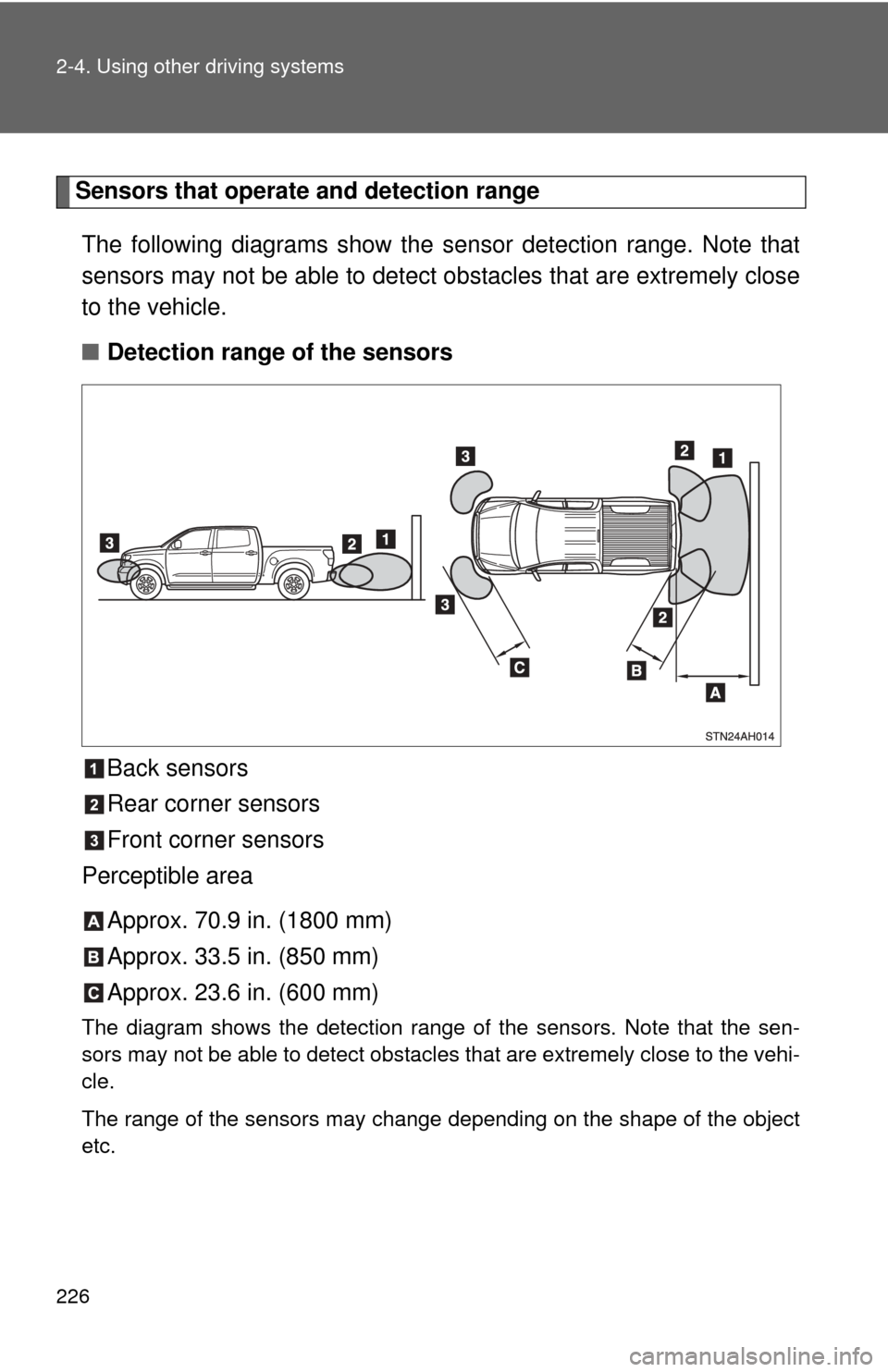
Sensors that operate and detection rangeThe following diagrams show the sensor detection range. Note that
sensors may not be able to detect obstacles that are extremely close
to the vehicle.
■ Detection range of the sensors
Back sensors
Rear corner sensors
Front corner sensors
Perceptible area
Approx. 70.9 in. (1800 mm)
Approx. 33.5 in. (850 mm)
Approx. 23.6 in. (600 mm)
The diagram shows the detection range of the sensors. Note that the sen-
sors may not be able to detect obstacles that are extremely close to the vehi-
cle.
The range of the sensors may change depending on the shape of the object\
etc.
Page 227 of 732

227
2-4. Using other
driving systems
2
When driving
■The Intuitive parking assist system can be operated when
●Front corner sensors:
• The engine switch is in the ON position.
• The shift lever is in R.
• The shift lever is not in P or R and vehicle speed is approximate 6 mph
(10 km/h) or less.
● Back and rear corner sensors:
• The engine switch is in the ON position.
• The shift lever is in R
■ Sensor detection information
●Certain vehicle conditions and the surrounding environment may affect
the ability of a sensor to correctly detect an obstacle. Particular instances
where this may occur are listed below.
• There is dirt, snow or ice on a sensor.
• A sensor is frozen.
• A sensor is covered in any way.
• The vehicle is leaning considerably to one side.
• On an extremely bumpy road, on an incline, on gravel, or on grass.
• The vicinity of the vehicle is noisy due to vehicle horns, motorcycle
engines, air brakes of large vehicles, or other loud noises producing
ultrasonic waves.
• There is another vehicle equipped with intuitive parking assist sensors in the vicinity.
• A sensor is coated with a sheet of spray or heavy rain.
• The vehicle is equipped with a fender pole or radio antenna.
• A bumper or sensor receives a strong impact.
• The vehicle is approaching a tall or right-angled curb.
• In harsh sunlight or intense cold weather.
• The area directly under the bumpers is not detected. Objects lower than the sensors or thin stakes etc. may be detected ini-
tially, but as they draw closer, they may cease to be detected.
• A towing hitch is mounted to the vehicle.
• A non-genuine Toyota suspension (lowered suspension etc.) is installed.
• When attaching a two-way radio antenna.
• When the bumper is damaged.
Page 228 of 732
228 2-4. Using other driving systems
In addition to the examples above, there are instances in which, because of
their shapes, signs and other objects may be judged by a sensor to be closer
than they are.
●The shape of the obstacle may prevent a sensor from detecting it. Pay
particular attention to the following obstacles:
• Wires, fences, ropes, etc.
• Cotton, snow and other materials that absorb sound waves
• Sharply-angled objects
• Low obstacles
• Tall obstacles with upper sections projecting outwards in the direction
of your vehicle
• A person near the vehicle (depending on the type of clothes worn)
• When the bumper is damaged.
■ Certification (Canada only)
This ISM device complies with Canadian ICES-001.
■ If the indicator is continuously on
Have the vehicle inspected by your Toyota dealer.
■ If the indicator remains blinking but do not sound the buzzer
Clean the sensors with soft cloth.
CAUTION
■Caution when using the intuitive parking assist
Observe the following precautions.
Failure to do so may result in the vehicle being unable to be driven safely
and possibly cause an accident.
●Do not use the sensor at speeds in excess of 6 mph (10 km/h).
● Do not attach any accessories within the sensor range.
NOTICE
■Notes when washing the vehicle
Do not apply intensive bursts of water or steam to the sensor area.
Doing so may result in the sensor malfunctioning.
Page 514 of 732
514 3-8. Other interior features
NOTICE
■To avoid the compass malfunctions
Do not place magnets or any metal objects near the inside rear view mirror.
Doing this may cause a malfunction of the compass sensor.
■ To ensure normal operation of the compass
●Do not perform circling calibration of the compass in a place where the
earth’s magnetic field is subject to inte rference by artificial magnetic fields.
● During calibration, do not operate electric systems (moon roof, power win-
dows, etc.) as they may interfere with the calibration.
Page 597 of 732
5
When trouble arises
597
5-1. Essential information
Event data recorder
In a crash or a near car crash eventThe SRS airbag sensor assembly contains the EDR. In a crash or a
near car crash event, this device may record some or all of the follow-
ing information:
● Engine speed
● Whether the brake pedal was applied or not
● Vehicle speed
● To what extent the accelerator pedal was depressed
● Position of the transmission shift lever
● Whether the driver and front passenger wore seat belts or not
● Driver’s seat position
● SRS airbag deployment data
● SRS airbag system diagnostic data
● Front passenger’s occupant classification
The information above is intended to be used for the purpose of
improving vehicle safety performance. Unlike general data recorders,
the EDR does not record sound data such as conversation between
passengers.
Your vehicle has computers that monitor and control certain aspects
of your vehicle. These computers assi st in driving and maintaining
optimal vehicle performance.
Besides storing data useful for tr oubleshooting, there is an event
data recorder (EDR) that records data in a crash or a near car
crash event.
Page 604 of 732

604 5-2. Steps to take in an emergency
■Open moon roof reminder buzzer
The buzzer indicate that the moon roof is still opened (with the engine switch
in the ACC or LOCK position and the driver’s door opened).
■ If the malfunction indicator lamp comes on while driving
First check the following:
● Is your vehicle low on gas?
If it is, refuel the vehicle immediately.
● Is the fuel tank cap loose?
If it is, tighten it securely.
The light will go off after taking several driving trips.
If the light does not go off even after several trips, contact your Toyota dealer
as soon as possible.
■ Front passenger detect ion sensor and passenger seat belt reminder
If luggage or other load is placed on the right front passenger seat, depend-
ing on its weight, the reminder light to flash and buzzer to sound.
■
When the tire pressure warning light comes on
Check the tire inflation pressure and adjust to the appropriate level.
Pushing the tire pressure warning reset switch does not turn off the tire
pressure warning light.
■The tire pressure warning light ma y turn on due to natural causes
The tire pressure warning light may turn on due to natural causes such
as natural air leaks or tire inflation pressure changes caused by temper-
ature. In this case, adjusting the ti re inflation pressure will turn off the
warning light (after several minutes).
■When a tire is replaced with a spare tire
The temporary spare tire is not equipped with the tire pressure warning
valve and transmitter. If a tire goes flat, the tire pressure warning light will
not turn off even though the flat tire is replaced with the temporary spare
tire. Replace the temporary spare tire with the repaired tire and adjust
the proper tire inflatio n pressure. The tire pres sure warning light will turn
off after several minutes.