Page 3 of 732

1
2
3
4
5
6
7
3
2-3. Operating the lights and wipers
Headlight switch .................. 212
Fog light switch ................... 216
Windshield wipers and washer .............................. 217
2-4. Using other driving systems Cruise control ...................... 220
Intuitive parking assist......... 223
Rear view monitor system... 229
Four-wheel drive system ..... 236
AUTO LSD system.............. 240
Driving assist systems ........ 243
2-5. Driving information Off-road precautions ........... 251
Cargo and luggage ............. 256
Vehicle load limits ............... 259
Winter driving tips ............... 261
Trailer towing ...................... 265
Dinghy towing ..................... 288 3-1. Using the air conditioning
system and defogger
Automatic air conditioning system .............................. 292
Manual air conditioning system .............................. 301
Outside rear view mirror defoggers and front
windshield wiper de-icer
(if equipped on Regular
Cab and Double Cab
models) ............................ 309
Back window, outside rear view mirror defoggers and
front windshield wiper
de-icer (if equipped on
CrewMax models) ............ 311
3-2. Using the audio system Audio system types ............ 314
Using the radio ................... 318
Using the CD player ........... 326
Playing MP3 and WMA discs ................................. 335
Operating an iPod .............. 343
Operating a USB memory ............................ 349
Optimal use of the audio system .............................. 356
Using the AUX port............. 360
Using the steering wheel audio switches.................. 362
3Interior and exterior
features
Page 32 of 732
32
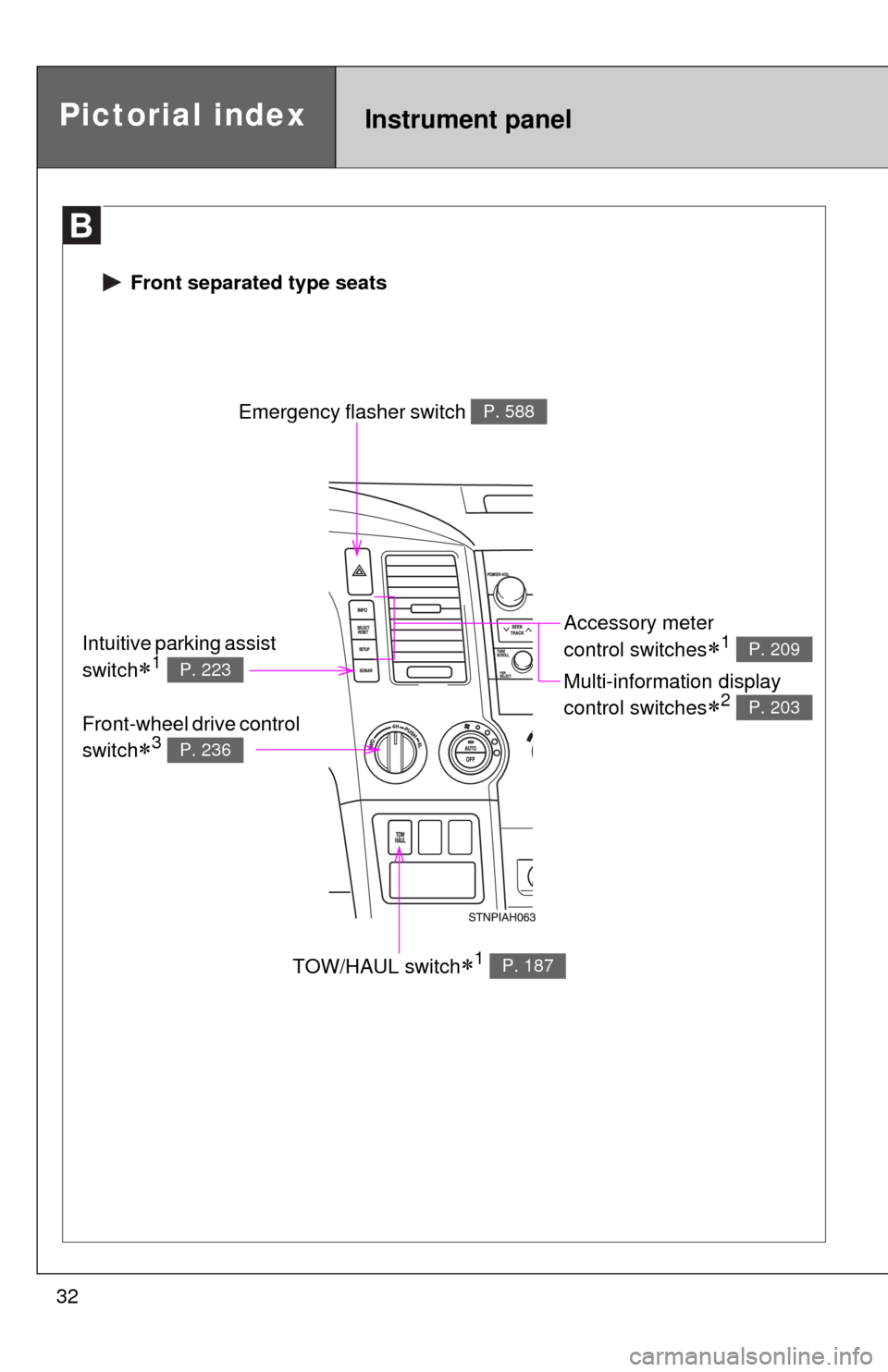
Pictorial indexInstrument panel
Emergency flasher switch P. 588
TOW/HAUL switch1 P. 187
Accessory meter
control switches
1
Multi-information display
control switches
2
P. 209
P. 203
Intuitive parking assist
switch
1 P. 223
Front-wheel drive control
switch
3 P. 236
Front separated type seats
Page 33 of 732
33
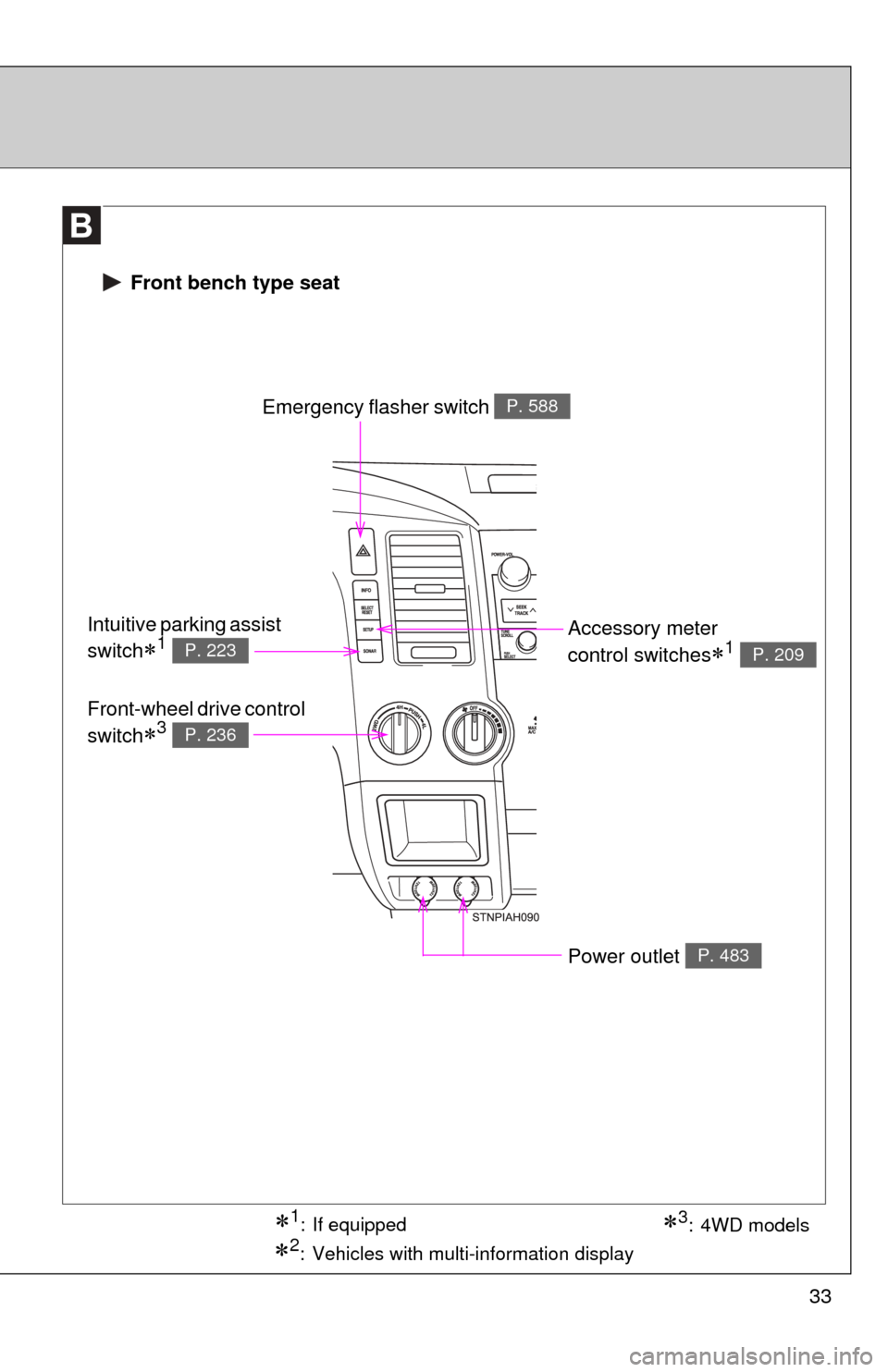
1: If equipped
2: Vehicles with multi-information display
3: 4WD models
Front bench type seat
Emergency flasher switch P. 588
Accessory meter
control switches
1 P. 209
Intuitive parking assist
switch
1 P. 223
Front-wheel drive control
switch
3 P. 236
Power outlet P. 483
Page 171 of 732
When driving2
171
2-1. Driving proceduresDriving the vehicle............ 172
Engine (ignition) switch .... 181
Automatic transmission .... 184
Turn signal lever .............. 189
Parking brake ................... 190
Horn ................................. 191
2-2. Instrument cluster Gauges and meters ......... 192
Indicators and warning lights .............................. 198
Multi-information display............................ 203
Accessory meter .............. 209
2-3. Operating the lights and wipers
Headlight switch ............... 212
Fog light switch ................ 216
Windshield wipers and washer ........................... 217
2-4. Using other driving systems Cruise control ................... 220
Intuitive parking assist...... 223
Rear view monitor system ........................... 229
Four-wheel drive system ........................... 236
AUTO LSD system........... 240
Driving assist systems ..... 243 2-5. Driving information
Off-road precautions ........ 251
Cargo and luggage .......... 256
Vehicle load limits ............ 259
Winter driving tips ............ 261
Trailer towing ................... 265
Dinghy towing .................. 288
Page 179 of 732

179
2-1. Driving procedures
2
When driving
CAUTION
■
When braking the vehicle
●If the power brake assist function does not operate, do not follow other
vehicles closely and avoid downhills or sharp turns that require braking.
In this case, braking is still possible, but it will require more force on the
pedal than usual. Braking distance may also increase.
● Do not pump the brake pedal if the engine stalls.
Each push on the brake pedal uses up the reserve for the power-assisted
brakes.
● The brake system consists of 2 individual hydraulic systems: If one of the
systems fails, the other will still operate. In this case, the brake pedal
should be depressed more firmly than usual and braking distance
becomes longer.
Do not drive your vehicle with only a single brake system. Have your
brakes fixed immediately.
NOTICE
■When driving the vehicle
●Do not depress the accelerator and brake pedals at the same time during
driving. If the brake pedal is depressed while driving with the accelerator
pedal depressed, driving torque may be restrained.
● Do not use the accelerator pedal or depress accelerator and brake pedals
together to hold the vehicle on a hill.
■ When parking the vehicle
Always put the shift lever in P.
Failure to do so may cause the vehicle to move or the vehicle may acceler-
ate suddenly if the accelerator pedal is accidentally depressed.
■ Avoiding damage to vehicle parts
●Do not turn the steering wheel fully in either direction and hold it there for a
long time.
Doing so may damage the power steering pump.
● When driving over bumps in the road, drive as slowly as possible to avoid
damaging the wheels, underside of the vehicle, etc.
Page 223 of 732
223
2-4. Using other driving systems
2
When driving
Intuitive parking assist
: If equipped
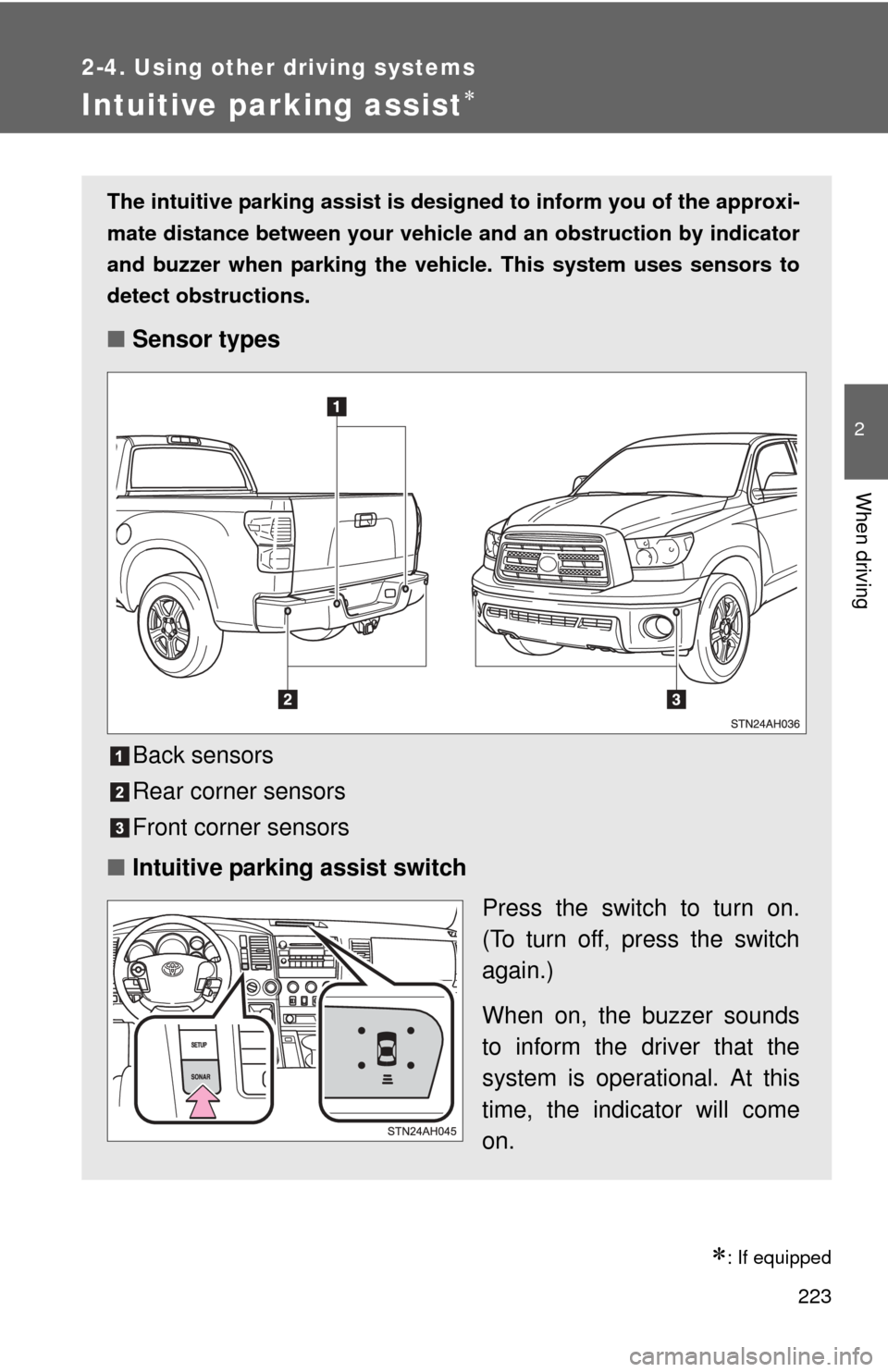
The intuitive parking assist is designed to inform you of the approxi-
mate distance between your vehicle and an obstruction by indicator
and buzzer when parking the veh icle. This system uses sensors to
detect obstructions.
■ Sensor types
Back sensors
Rear corner sensors
Front corner sensors
■ Intuitive parking assist switch
Press the switch to turn on.
(To turn off, press the switch
again.)
When on, the buzzer sounds
to inform the driver that the
system is operational. At this
time, the indicator will come
on.
Page 227 of 732

227
2-4. Using other
driving systems
2
When driving
■The Intuitive parking assist system can be operated when
●Front corner sensors:
• The engine switch is in the ON position.
• The shift lever is in R.
• The shift lever is not in P or R and vehicle speed is approximate 6 mph
(10 km/h) or less.
● Back and rear corner sensors:
• The engine switch is in the ON position.
• The shift lever is in R
■ Sensor detection information
●Certain vehicle conditions and the surrounding environment may affect
the ability of a sensor to correctly detect an obstacle. Particular instances
where this may occur are listed below.
• There is dirt, snow or ice on a sensor.
• A sensor is frozen.
• A sensor is covered in any way.
• The vehicle is leaning considerably to one side.
• On an extremely bumpy road, on an incline, on gravel, or on grass.
• The vicinity of the vehicle is noisy due to vehicle horns, motorcycle
engines, air brakes of large vehicles, or other loud noises producing
ultrasonic waves.
• There is another vehicle equipped with intuitive parking assist sensors in the vicinity.
• A sensor is coated with a sheet of spray or heavy rain.
• The vehicle is equipped with a fender pole or radio antenna.
• A bumper or sensor receives a strong impact.
• The vehicle is approaching a tall or right-angled curb.
• In harsh sunlight or intense cold weather.
• The area directly under the bumpers is not detected. Objects lower than the sensors or thin stakes etc. may be detected ini-
tially, but as they draw closer, they may cease to be detected.
• A towing hitch is mounted to the vehicle.
• A non-genuine Toyota suspension (lowered suspension etc.) is installed.
• When attaching a two-way radio antenna.
• When the bumper is damaged.
Page 228 of 732
228 2-4. Using other driving systems
In addition to the examples above, there are instances in which, because of
their shapes, signs and other objects may be judged by a sensor to be closer
than they are.
●The shape of the obstacle may prevent a sensor from detecting it. Pay
particular attention to the following obstacles:
• Wires, fences, ropes, etc.
• Cotton, snow and other materials that absorb sound waves
• Sharply-angled objects
• Low obstacles
• Tall obstacles with upper sections projecting outwards in the direction
of your vehicle
• A person near the vehicle (depending on the type of clothes worn)
• When the bumper is damaged.
■ Certification (Canada only)
This ISM device complies with Canadian ICES-001.
■ If the indicator is continuously on
Have the vehicle inspected by your Toyota dealer.
■ If the indicator remains blinking but do not sound the buzzer
Clean the sensors with soft cloth.
CAUTION
■Caution when using the intuitive parking assist
Observe the following precautions.
Failure to do so may result in the vehicle being unable to be driven safely
and possibly cause an accident.
●Do not use the sensor at speeds in excess of 6 mph (10 km/h).
● Do not attach any accessories within the sensor range.
NOTICE
■Notes when washing the vehicle
Do not apply intensive bursts of water or steam to the sensor area.
Doing so may result in the sensor malfunctioning.