Page 66 of 732
66 1-3. Adjustable components (seats, mirrors, steering wheel)
CAUTION
■When adjusting a rear seat (CrewMax models)
●Be careful that the seat does not hit passengers or luggage.
● Do not recline the seat more than necessary when the vehicle is in motion
to reduce the risk of sliding under the lap belt. If the seat is too reclined,
the lap belt may slide past the hips and apply restraint forces directly to the
abdomen or your neck may contact the shoulder belt, increasing the risk of
death or serious injury in the event of an accident.
● Be careful not to get your hands or feet caught in the seat.
■ Before folding down a rear seat
Do not fold down a rear seat when there are passengers sitting in the rear
seats or when there is luggage placed on/under the rear seats.
■ After adjusting a seat (CrewMax models)
Observe the following precautions. Failure to do so may result in death or
serious injury.
●Make sure that the seat and seatback are securely locked in position by
lightly rocking them back and forth.
● Check that the seat belts are not twisted or caught in the seat.
■ When the seatback is folded/the bo ttom cushion is raised (Double Cab
models)
Do not sit on or place anything on the seatback or storage box while driving.
■ When returning the seats to their original position
Observe the following precautions. Failure to do so may result in death or
serious injury.
●Be careful not to get your hands or feet pinched in the seat.
● Make sure the seatbacks and bottom cushions are securely locked. Fail-
ure to do so will prevent the seat belt from operating properly.
● Check that the seat belts are not twisted or caught in the seat.
● Arrange the seat belts in the proper positions for ready use.
Page 161 of 732
161
1-7. Safety information
1
Before driving
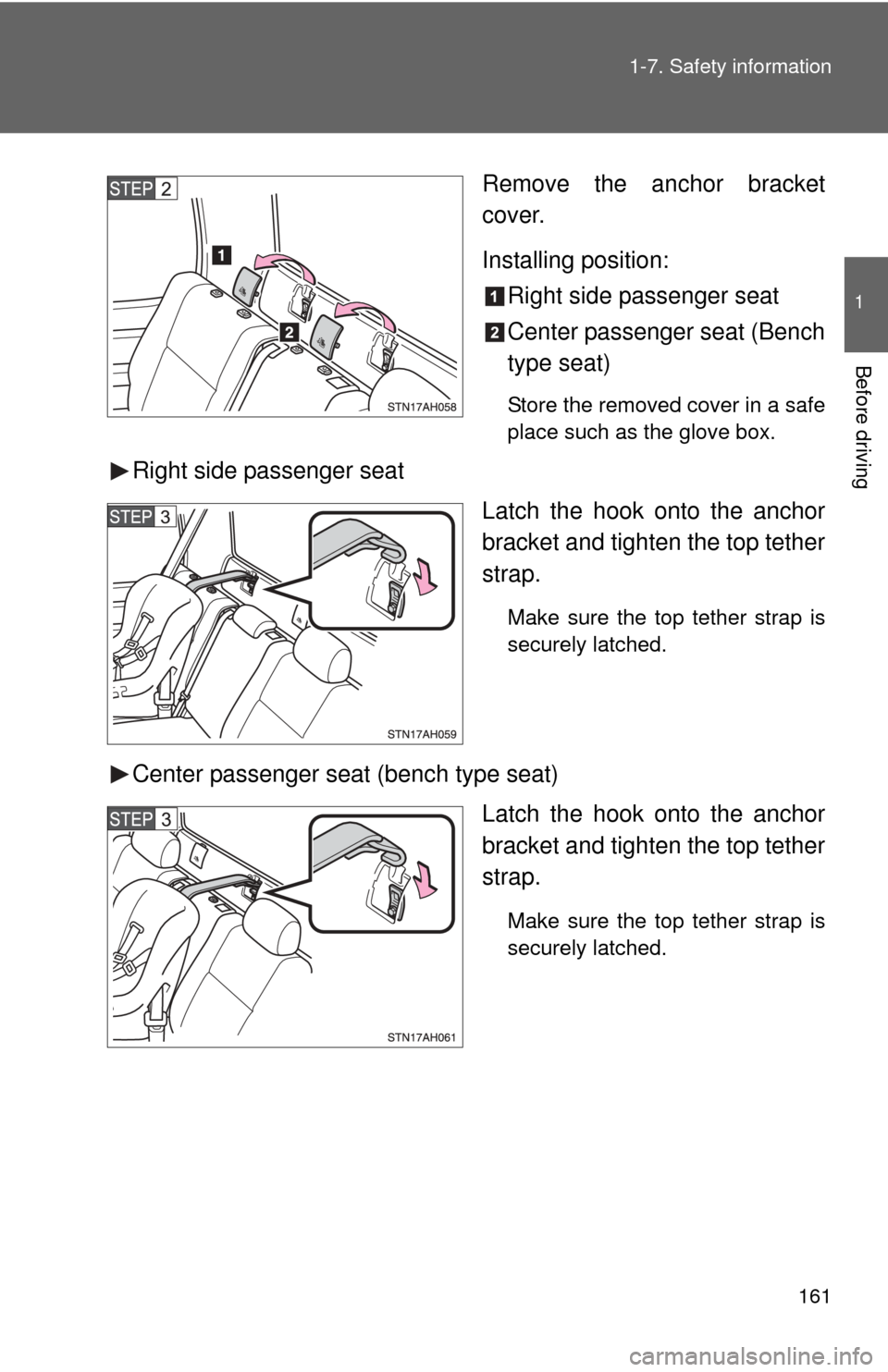
Remove the anchor bracket
cover.
Installing position:
Right side passenger seat
Center passenger seat (Bench
type seat)
Store the removed cover in a safe
place such as the glove box.
Right side passenger seat
Latch the hook onto the anchor
bracket and tighten the top tether
strap.
Make sure the top tether strap is
securely latched.
Center passenger seat (bench type seat)
Latch the hook onto the anchor
bracket and tighten the top tether
strap.
Make sure the top tether strap is
securely latched.
Page 258 of 732
258 2-5. Driving information
CAUTION
■Things that must not be carried in the luggage compartment
The following things may cause a fire if loaded in the luggage compart-
ment.
●Receptacles containing gasoline
●Aerosol cans
■Storage precautions
●Do not stack anything behind the front seats higher than the seat-
backs.
Such items may be thrown about and possibly injure people in the
vehicle during sudden braking or in an accident.
●Do not place cargo or luggage in or on the following locations as the
item may get under the brake or accelerator pedal and prevent the
pedals from being depressed properly, block the driver’s vision, or hit
the driver or passengers, causing an accident.
• Driver’s feet
• Front passenger or rear seats (when stacking items)
• Instrument panel
• Dashboard
• Auxiliary box or tray that has no lid
●Secure all items in the occupant compartment, as they may shift and
injure someone during sudden braking, sudden swerving or an acci-
dent.
●Never allow anyone to ride in the rear deck. It is not designed for pas-
sengers. They should ride in their seats with their seat belts properly
fastened. Otherwise, they are much mo re likely to suffer death or seri-
ous bodily injury, in the event of sudden braking, sudden swerving or
an accident.
■Capacity and distribution
●Do not exceed the maximum axle weight rating or the total vehicle
weight rating.
●Even if the total load of occupant’s weight and the cargo load is less
than the total load capacity, do not apply the load unevenly. Improper
loading may cause deterioration of steering or braking control which
may cause death or serious injury.
Page 291 of 732
Interior and exteriorfeatures3
291
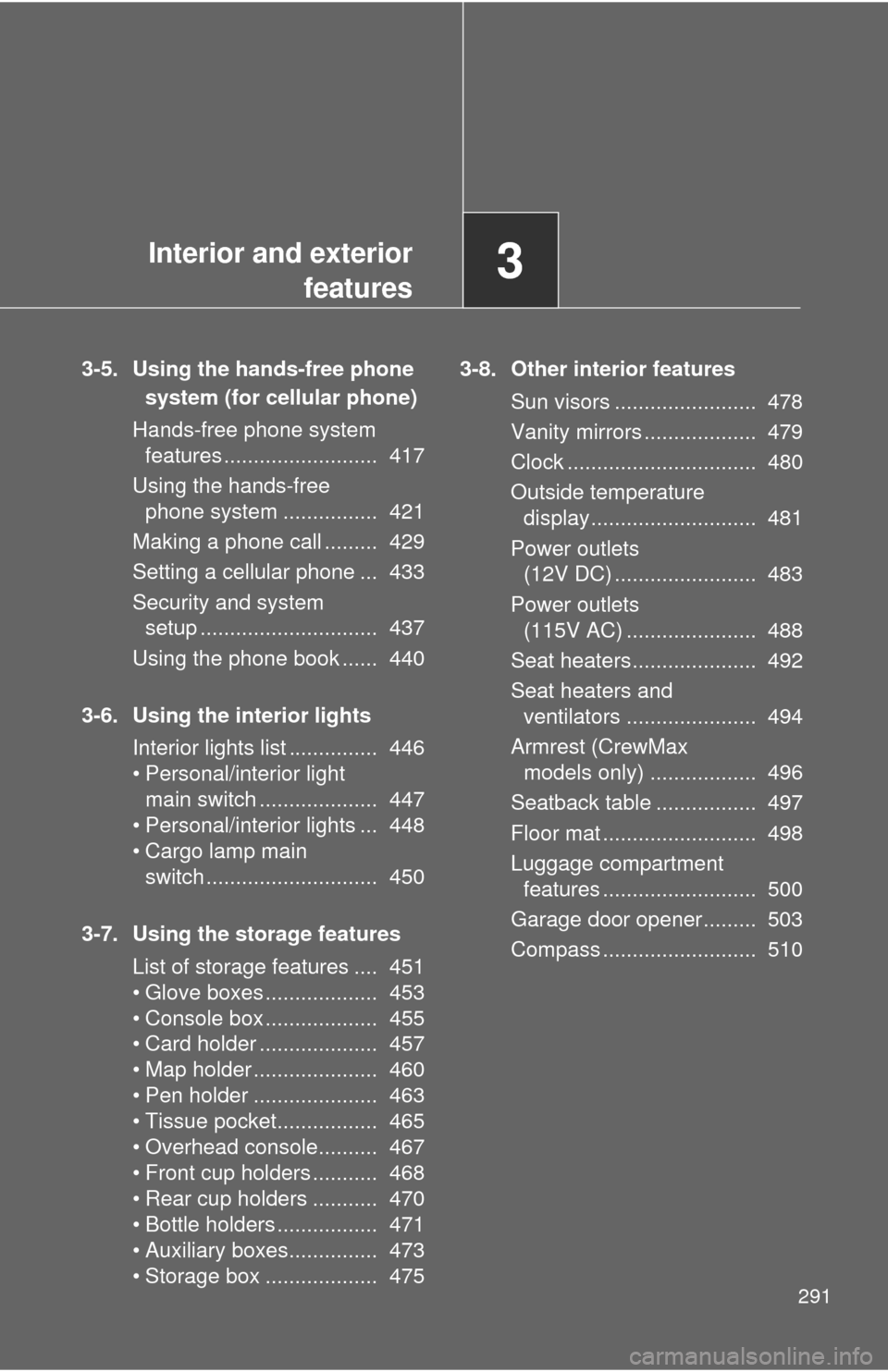
3-5. Using the hands-free phone
system (for cellular phone)
Hands-free phone system features .......................... 417
Using the hands-free phone system ................ 421
Making a phone call ......... 429
Setting a cellular phone ... 433
Security and system setup .............................. 437
Using the phone book ...... 440
3-6. Using the interior lights Interior lights list ............... 446
• Personal/interior light main switch .................... 447
• Personal/interior lights ... 448
• Cargo lamp main switch ............................. 450
3-7. Using the storage features List of storage features .... 451
• Glove boxes ................... 453
• Console box ................... 455
• Card holder .................... 457
• Map holder ..................... 460
• Pen holder ..................... 463
• Tissue pocket................. 465
• Overhead console.......... 467
• Front cup holders ........... 468
• Rear cup holders ........... 470
• Bottle holders ................. 471
• Auxiliary boxes............... 473
• Storage box ................... 475 3-8. Other interior features
Sun visors ........................ 478
Vanity mirrors ................... 479
Clock ................................ 480
Outside temperature display............................ 481
Power outlets (12V DC) ........................ 483
Power outlets (115V AC) ...................... 488
Seat heaters..................... 492
Seat heaters and ventilators ...................... 494
Armrest (CrewMax models only) .................. 496
Seatback table ................. 497
Floor mat .......................... 498
Luggage compartment features .......................... 500
Garage door opener......... 503
Compass .......................... 510
Page 347 of 732
347
3-2. Using the audio system
3
Interior and exterior features
Switching the display
Press .
Each time is pressed, the display changes in the following order:
Track title Track title/Artist name Track title/Album name Track
title/Elapsed time
■ About iPod
●Apple is not responsible for the operation of this device or its compliance
with safety and regulatory standards.
● iPod is a trademark of Apple Inc., registered in the U.S. and other coun-
tries.
■ iPod functions
●When an iPod is connected and the audio source is changed to iPod
mode, the iPod will resume play from the same point at which it was last
used.
● Depending on the iPod that is connected to the system, certain functions
may not be available. Disconnecting the device and reconnecting it once
again may resolve some malfunctions.
■ iPod problems
To resolve most problems encountered when using your iPod, disconnect
your iPod from the vehicle iPod connection and reset it.
For instructions on how to reset your iPod, refer to your iPod Owner’s Man-
ual.
■ Error messages
“IPOD ERROR”: This indicates a problem in the iPod, inside the USB box or
the connection between them.
“NO SONGS”:This indicates that there is no music data in the iPod.
“UPDATE YOUR IPOD”:This indicates that the version of the iPod is not compatible.
Page 352 of 732
352 3-2. Using the audio system
Switching the displayPress .
Each time is pressed, the display changes in the following order:
Track title Track title/Artist name Track title/Album name Track
title/Elapsed time
■ USB memory functions
Depending on the USB memory that is connected to the system, certain
functions may not be available. Disconnecting the device and reconnecting it
once again may resolve some malfunctions.
■ Error messages
“USB ERROR”:This indicates a problem in the USB memory, in the USB box
or connection between them.
“NO MUSIC”: This indicates that no MP3/WMA files are included in the USB memory.
Page 365 of 732

365
3
Interior and exterior features
3-3. Using the Bluetooth® audio system
Bluetooth® audio system
: If equipped
■Conditions under which th e system will not operate
● If using a portable player that does not support Bluetooth
®
●If the portable player is switched off
● If the portable player is not connected
● If the portable player’s battery is low
● If the portable player is behind the seat or in the glove box or console box
● If metal is covering or touching the portable player
The Bluetooth® audio system enables you to enjoy music played on
a portable digital audio player (portable player) from the vehicle
speakers via wireless communication.
This audio system supports Bluetooth
®, a wireless data system
capable of playing portable audio music without cables. If your por-
table player does not support Bluetooth
®, the Bluetooth® audio sys-
tem will not function.
Owners of models equipped with a navigation system should refer to
the “Navigation System Owner’s Manual”.
TitlePage
Using the Bluetooth
® audio system P. 368
Operating a Bluetooth
® enabled portable player P. 373
Setting up a Bluetooth
® enabled portable player P. 375
Bluetooth
® audio system setup P. 380
Page 419 of 732
419
3-5. Using the hand
s-free phone system (for cellular phone)
3
Interior and exterior features
■Conditions affecting operation
The hands-free phone system may not operate normally in the following situ-
ations:
●The cellular phone is turned off, or located outside the service area.
● The cellular phone has a low battery.
● The cellular phone is not connected to the system.
● The cellular phone is behind the seat or in the glove box, or metal mate-
rial covers or touches the phone.
■ When transferring ownership of the vehicle
Be sure to initialize the system to prevent personal data from being improp-
erly accessed.
■ Required profiles for the cellular phone
●HFP (Hands Free Profile) Ver. 1.0
● OPP (Object Push Profile) Ver. 1.1
■ For detailed information ab out Handsfree Phone System
For assistance with pairing and operating your cell phone, go to the website
www.toyota.letstalk.com.
■ About Bluetooth
®
■Certification for the hands-free phone system
FCC ID: ACJ932C5ZZZ035
IC ID: 216J-C5ZZZ035
MADE IN MEXICO
This device complies with Part 15 of the FCC Rules and RSS-210 Rules.
Operation is subject to the following two conditions; (1) This device may not
cause harmful interference, and (2) This device must accept any interfer-
ence received, including interference that may cause undesired operation.
Bluetooth is a registered trademark of
Bluetooth SIG. Inc.