Page 3 of 732

1
2
3
4
5
6
7
3
2-3. Operating the lights and wipers
Headlight switch .................. 212
Fog light switch ................... 216
Windshield wipers and washer .............................. 217
2-4. Using other driving systems Cruise control ...................... 220
Intuitive parking assist......... 223
Rear view monitor system... 229
Four-wheel drive system ..... 236
AUTO LSD system.............. 240
Driving assist systems ........ 243
2-5. Driving information Off-road precautions ........... 251
Cargo and luggage ............. 256
Vehicle load limits ............... 259
Winter driving tips ............... 261
Trailer towing ...................... 265
Dinghy towing ..................... 288 3-1. Using the air conditioning
system and defogger
Automatic air conditioning system .............................. 292
Manual air conditioning system .............................. 301
Outside rear view mirror defoggers and front
windshield wiper de-icer
(if equipped on Regular
Cab and Double Cab
models) ............................ 309
Back window, outside rear view mirror defoggers and
front windshield wiper
de-icer (if equipped on
CrewMax models) ............ 311
3-2. Using the audio system Audio system types ............ 314
Using the radio ................... 318
Using the CD player ........... 326
Playing MP3 and WMA discs ................................. 335
Operating an iPod .............. 343
Operating a USB memory ............................ 349
Optimal use of the audio system .............................. 356
Using the AUX port............. 360
Using the steering wheel audio switches.................. 362
3Interior and exterior
features
Page 4 of 732

TABLE OF CONTENTSIndex
4
3-3. Using the Bluetooth® audio
system
Bluetooth
® audio system .... 365
Using the Bluetooth®
audio system .................... 368
Operating a Bluetooth
®
enabled portable player ... 373
Setting up a Bluetooth
®
enabled portable player ... 375
Bluetooth
® audio system
setup ................................ 380
3-4. Using the rear audio/video system
Rear seat entertainment system .............................. 381
Using the DVD player (DVD video)...................... 390
Using the DVD player (video CD) ........................ 399
Using the DVD player (audio CD/CD text) ........... 402
Using the DVD player (MP3 discs) ...................... 404
Using the video mode ........ 407
Changing the Setup Menu settings ............................. 409
3-5. Using the hands-free phone system (for cellular phone)
Hands-free phone system features ............................ 417
Using the hands-free phone system ................... 421
Making a phone call ........... 429
Setting a cellular phone...... 433
Security and system setup ................................ 437
Using the phone book ........ 440 3-6. Using the interior lights
Interior lights list.................. 446
• Personal/interior light main switch ....................... 447
• Personal/interior lights ...... 448
• Cargo lamp main switch ... 450
3-7. Using the storage features List of storage features ....... 451
• Glove boxes ..................... 453
• Console box ..................... 455
• Card holder ....................... 457
• Map holder ....................... 460
• Pen holder ........................ 463
• Tissue pocket ................... 465
• Overhead console ............ 467
• Front cup holders ............. 468
• Rear cup holders .............. 470
• Bottle holders ................... 471
• Auxiliary boxes ................. 473
• Storage box ...................... 475
3-8. Other interior features Sun visors ........................... 478
Vanity mirrors ..................... 479
Clock................................... 480
Outside temperature display .............................. 481
Power outlets (12V DC) ...... 483
Power outlets (115V AC) .... 488
Seat heaters ....................... 492
Seat heaters and ventilators ......................... 494
Armrest (CrewMax models only) .................................. 496
Seatback table .................... 497
Floor mat ............................ 498
Luggage compartment features ............................ 500
Garage door opener ........... 503
Page 130 of 732

130 1-7. Safety information
CAUTION
■SRS airbag precautions
●If breathing becomes difficult after the SRS airbag has deployed, open a
door or window to allow fresh air in, or leave the vehicle if it is safe to do
so. Wash off any residue as soon as possible to prevent skin irritation.
● If the areas where the SRS airbags are stored, such as the steering wheel
pad and front and rear pillar garnishes, are damaged or cracked, have
them replaced by your Toyota dealer.
■ Modification and disposal of SRS airbag system components
Do not dispose of your vehicle or perform any of the following modifications
without consulting your Toyota dealer.
The SRS airbags may malfunction or deploy (inflate) accidentally, causing
death or serious injury.
● Installation, removal, disassembly and repair of the SRS airbags.
● Repairs, modifications, removal or replacement of the steering wheel,
instrument panel, dashboard, seats or seat upholstery, front, side and rear
pillars or roof side rails.
● Repairs or modifications of the front fender, front bumper, or side of the
occupant compartment.
● Installation of snow plows, winches, etc. to the front grille (bull bars, kan-
garoo bar etc.).
● Modifications to the vehicle’s suspension system.
● Do not use tires or wheels other than the manufacturer’s recommended
size. ( P. 665)
● Installation of electronic devices such as mobile two-way radios or CD
players.
● Modifications to your vehicle for a person with a physical disability.
Page 290 of 732

290
3-1. Using the air conditioning system and defogger
Automatic air conditioning system ........................... 292
Manual air conditioning system ........................... 301
Outside rear view mirror defoggers and front
windshield wiper de-icer
(if equipped on Regular
Cab and Double Cab
models) .......................... 309
Back window, outside rear view mirror defoggers
and front windshield
wiper de-icer (if equipped
on CrewMax models) ..... 311
3-2. Using the audio system Audio system types .......... 314
Using the radio ................. 318
Using the CD player ......... 326
Playing MP3 and WMA discs ..................... 335
Operating an iPod ............ 343
Operating a USB memory .......................... 349
Optimal use of the audio system ........................... 356
Using the AUX port .......... 360
Using the steering wheel audio switches ............... 362 3-3. Using the Bluetooth® audio
system
Bluetooth
® audio
system ........................... 365
Using the Bluetooth
®
audio system.................. 368
Operating a Bluetooth
®
enabled portable
player ............................. 373
Setting up a Bluetooth
®
enabled portable
player ............................. 375
Bluetooth
® audio system
setup .............................. 380
3-4. Using the rear audio/video system
Rear seat entertainment system ........................... 381
Using the DVD player (DVD video) ................... 390
Using the DVD player (video CD)...................... 399
Using the DVD player (audio CD/CD text) ........ 402
Using the DVD player (MP3 discs) .................... 404
Using the video mode ...... 407
Changing the Setup Menu settings .......................... 409
Interior and exterior
features3
Page 314 of 732
314
3-2. Using the audio system
Audio system types
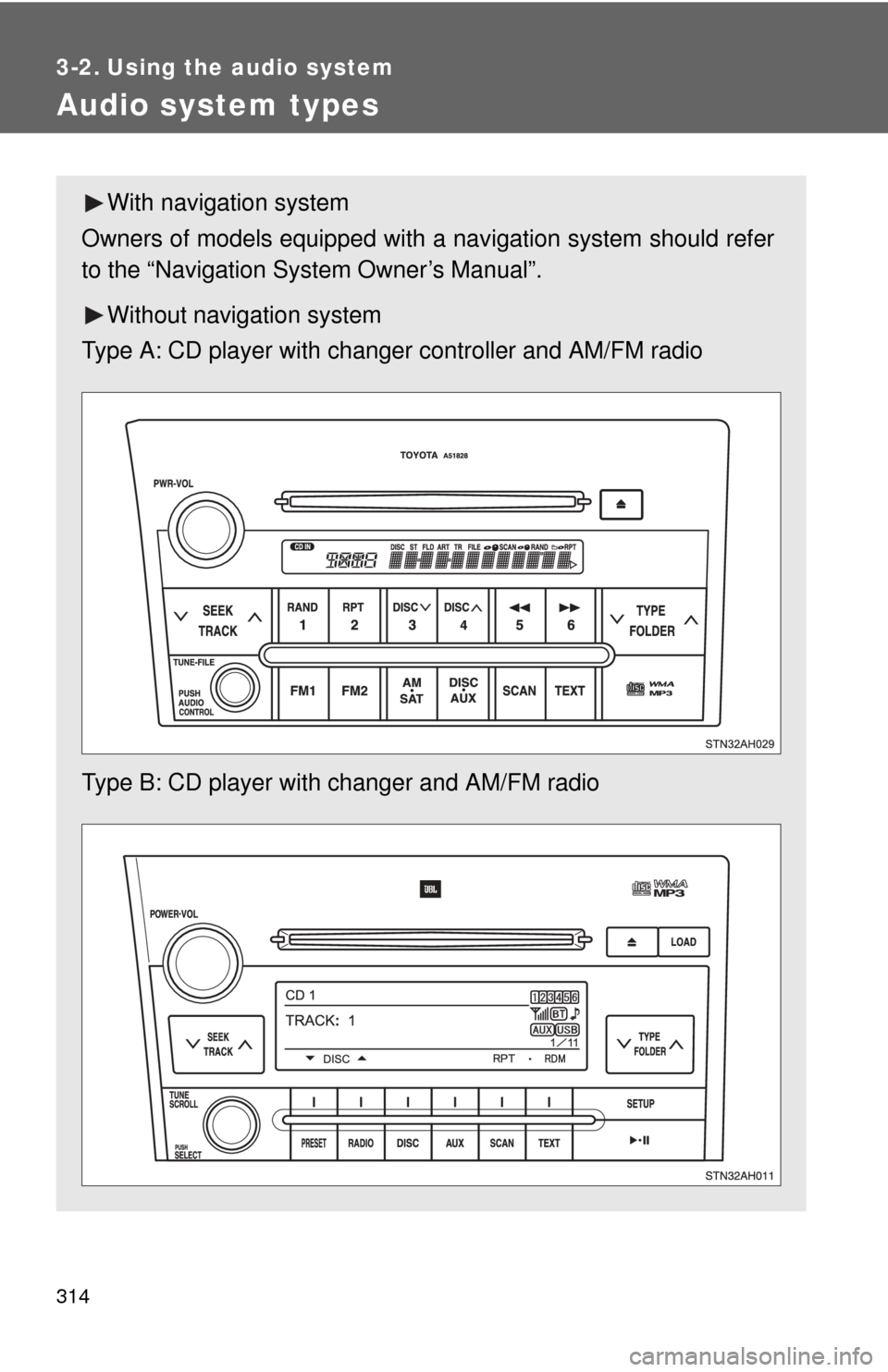
With navigation system
Owners of models equipped with a navigation system should refer
to the “Navigation System Owner’s Manual”.
Without navig ation system
Type A: CD player with changer controller and AM/FM radio
Type B: CD player with changer and AM/FM radio
Page 315 of 732
315
3-2. Using the audio system
3
Interior and exterior features
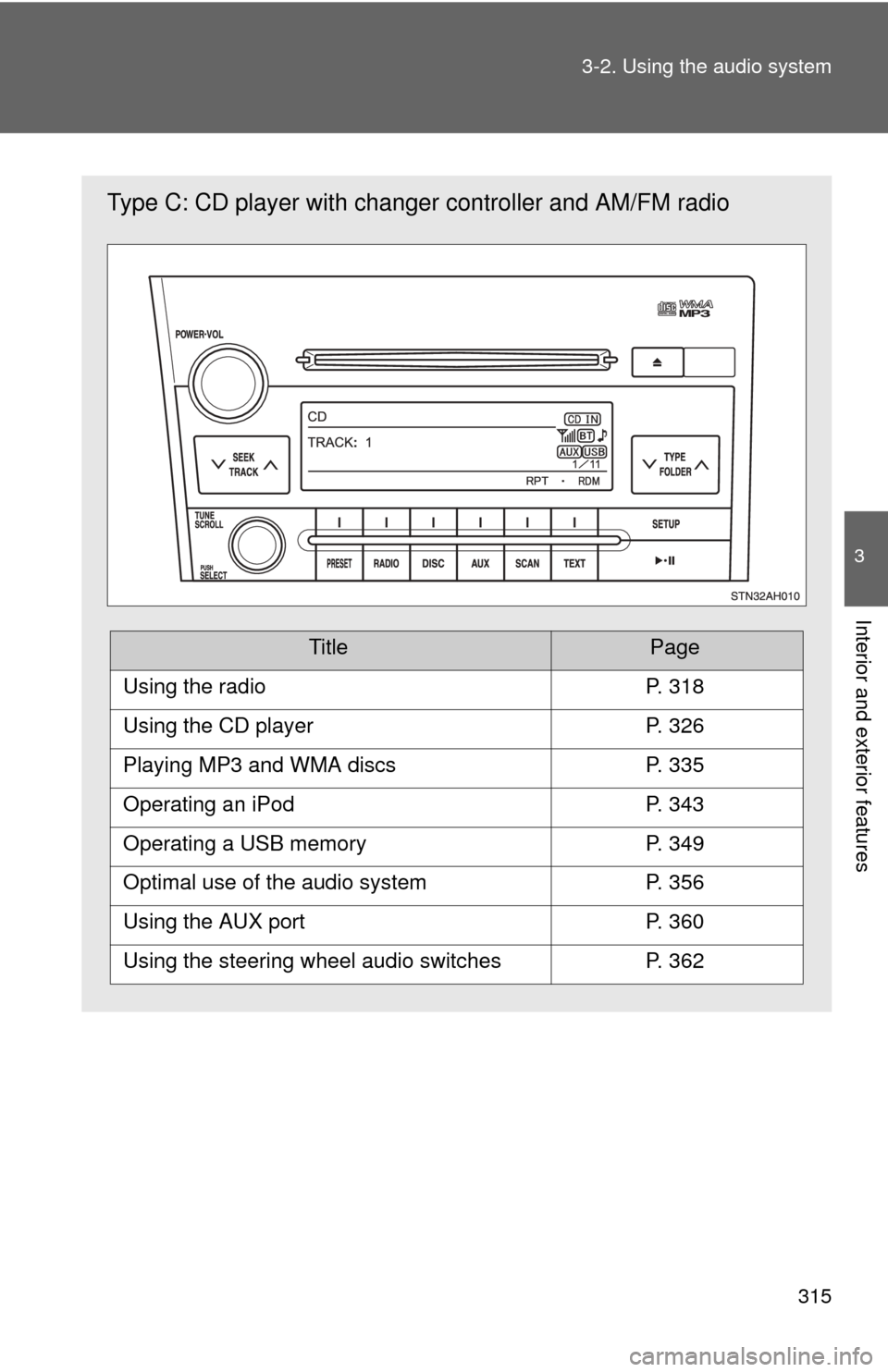
Type C: CD player with changer
controller and AM/FM radio
TitlePage
Using the radioP. 318
Using the CD playerP. 326
Playing MP3 and WMA discsP. 335
Operating an iPodP. 343
Operating a USB memoryP. 349
Optimal use of the audio systemP. 356
Using the AUX portP. 360
Using the steering wheel audio switchesP. 362
Page 317 of 732

317
3-2. Using the audio system
3
Interior and exterior features
CAUTION
■
For vehicles sold in U.S.A. and Canada
●Part 15 of the FCC Rules
FCC Warning:
Any unauthorized changes or modifications to this equipment will void the
user’s authority to operate this device.
● Laser products
• Do not take this unit apart or attempt to make any changes yourself.
This is an intricate unit that uses a laser pickup to retrieve information
from the surface of compact discs. The laser is carefully shielded so
that its rays remain inside the cabinet. Therefore, never try to disas-
semble the player or alter any of its parts since you may be exposed to
laser rays and dangerous voltages.
• This product utilizes a laser. Use of controls or adjustments or performance of procedures other
than those specified herein may result in hazardous radiation expo-
sure.
NOTICE
■ To prevent battery discharge
Do not leave the audio system on longer than necessary with the engine o\
ff.
■ To avoid damaging the audio system
Take care not to spill drinks or other fluids over the audio system.
Page 326 of 732
326
3-2. Using the audio system
Using the CD player
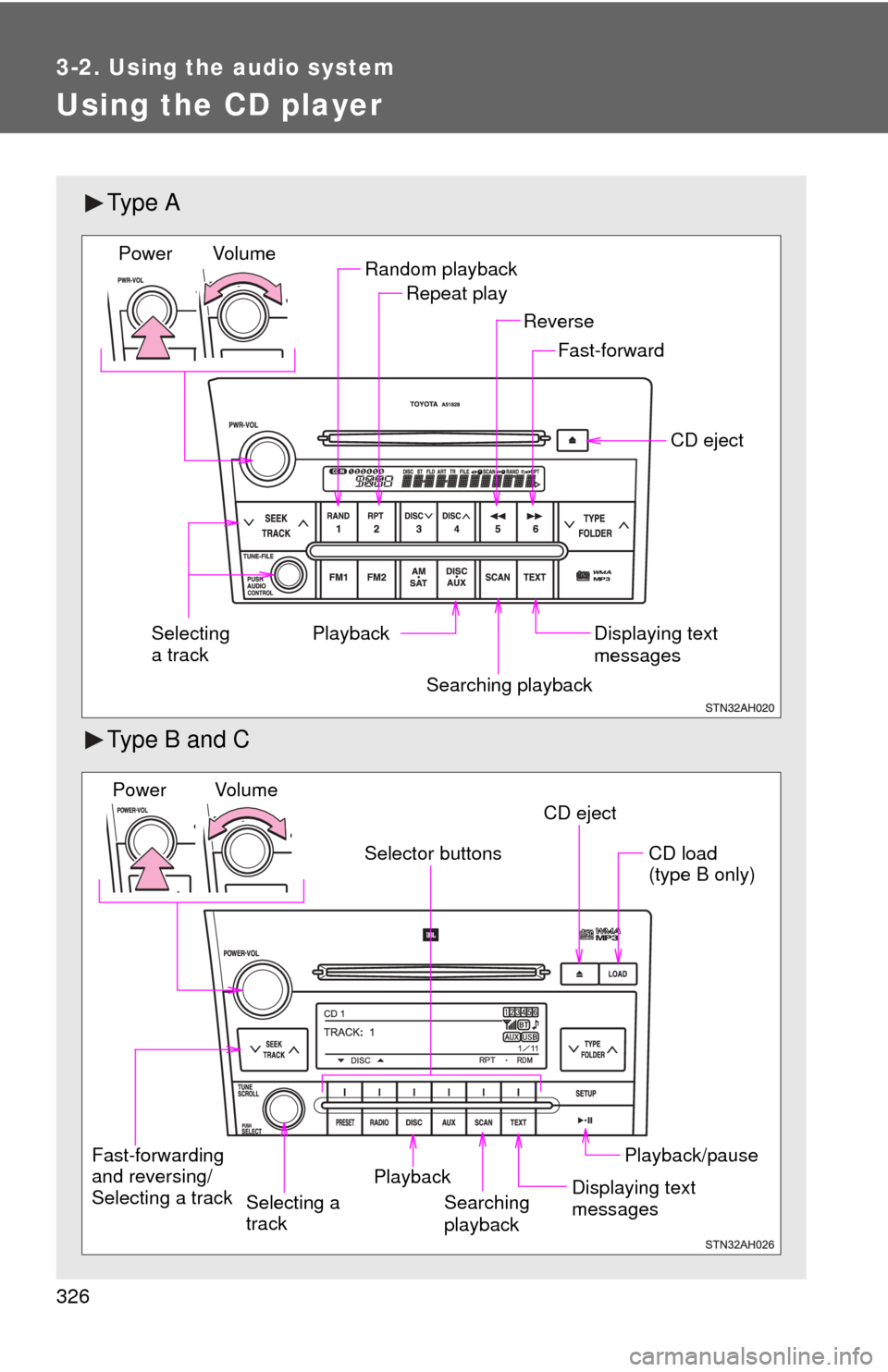
Ty p e A
Type B and C
Random playbackRepeat play
Playback CD eject
Displaying text
messages
Selecting
a track
Fast-forward
Reverse
Searching playback
Vol u m e
Power
CD eject
Fast-forwarding
and reversing/
Selecting a track Searching
playbackCD load
(type B only)
Playback/pause
Displaying text
messages
Selector buttons
Playback
Vo l u m e
Power
Selecting a
track