Page 177 of 608
177
2-3. Operating the lights and wipers
2
When driving
L/C200_U (OM60F74U)
Turning on the high beam headlights
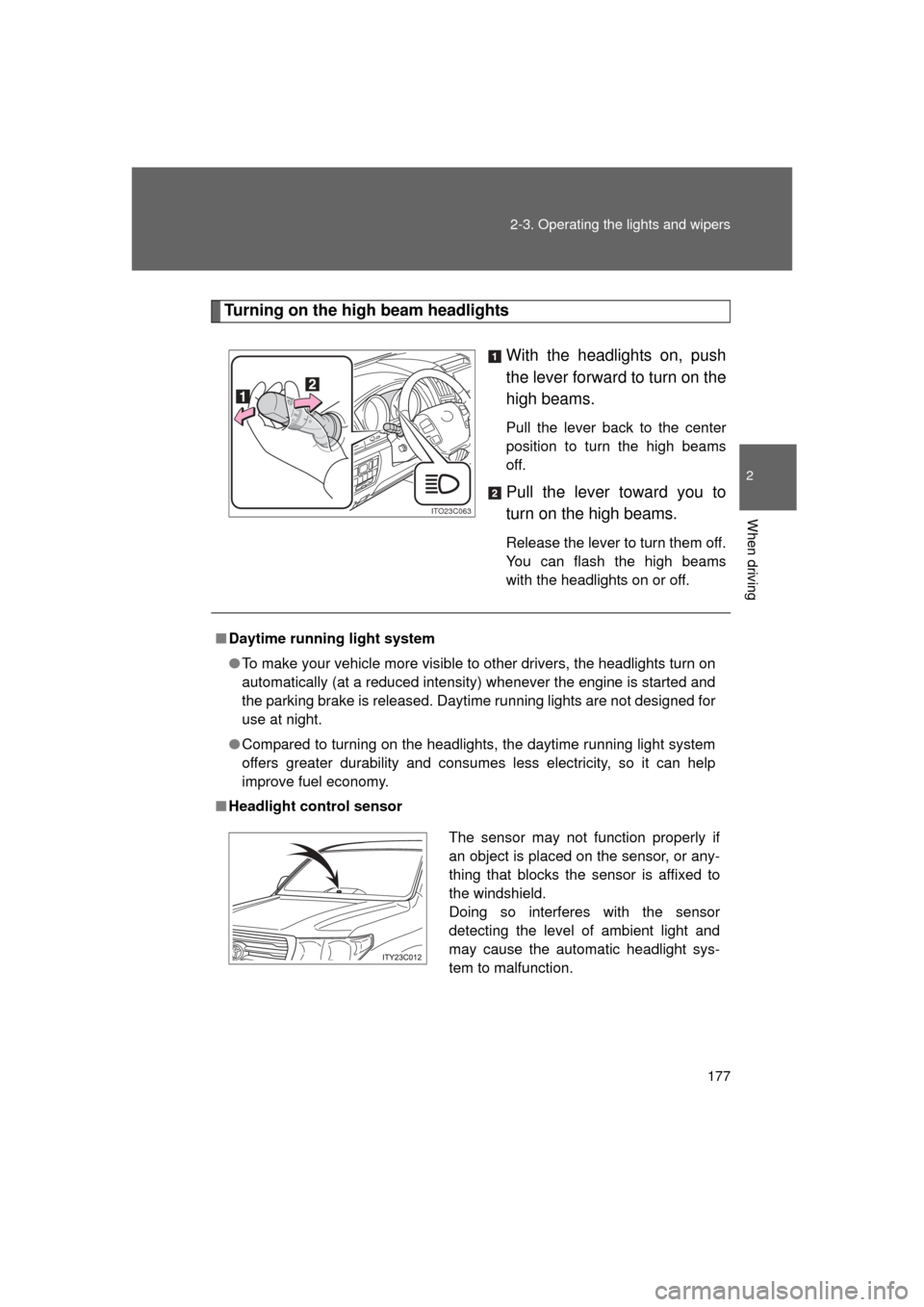
With the headlights on, push
the lever forward to turn on the
high beams.
Pull the lever back to the center
position to turn the high beams
off.
Pull the lever toward you to
turn on the high beams.
Release the lever to turn them off.
You can flash the high beams
with the headlights on or off.
ITO23C063
■Daytime running light system
● To make your vehicle more visible to other drivers, the headlights turn on
automatically (at a reduced intensity) whenever the engine is started and
the parking brake is released. Daytime running lights are not designed for
use at night.
● Compared to turning on the headlights, the daytime running light system
offers greater durability and consumes less electricity, so it can help
improve fuel economy.
■ Headlight control sensor
The sensor may not function properly if
an object is placed on the sensor, or any-
thing that blocks the sensor is affixed to
the windshield.
Doing so interferes with the sensor
detecting the level of ambient light and
may cause the automatic headlight sys-
tem to malfunction.
Page 178 of 608
178 2-3. Operating the lights and wipers
L/C200_U (OM60F74U)
■Automatic light off system
● When the headlights are on: The headlights and tail lights turn off 30 sec-
onds after a door is opened and closed if the “ENGINE START STOP”
switch has been switched to ACCESSORY or OFF mode.
● When only the tail lights are on: The tail lights turn off automatically if the
“ENGINE START STOP” switch is switched to ACCESSORY or OFF
mode and driver’s door is opened.
To turn the lights on again, turn the “ENGINE START STOP” switch to IGNI-
TION ON mode, or turn the light switch off once and then back to the
or
position.
■ Customization
Settings (e.g. light sensor sensitivity) can be changed.
(Customizable features P. 583)
NOTICE
■To prevent battery discharge
Do not leave the lights on longer than necessary when the engine is not run-
ning.
Page 183 of 608
183
2-3. Operating the lights and wipers
2
When driving
L/C200_U (OM60F74U)
■
The windshield wiper and washer can be operated when
The “ENGINE START STOP” switch is in IGNITION ON mode.
■ Effects of vehicle speed on wiper operation (vehicles equipped with
rain-sensing windshield wipers)
Vehicle speed affects the wiper operation when the washer is being used
(delay until drip prevention wiper sweep occurs) even when the wipers are
not in “AUTO” mode.
With “ ” selected, wiper operation will be switched from low speed to inter-
mittent wiper operation only when the vehicle is stationary.
(However, when the sensor sensitivity is adjusted to the highest level, the
mode cannot be switched.)
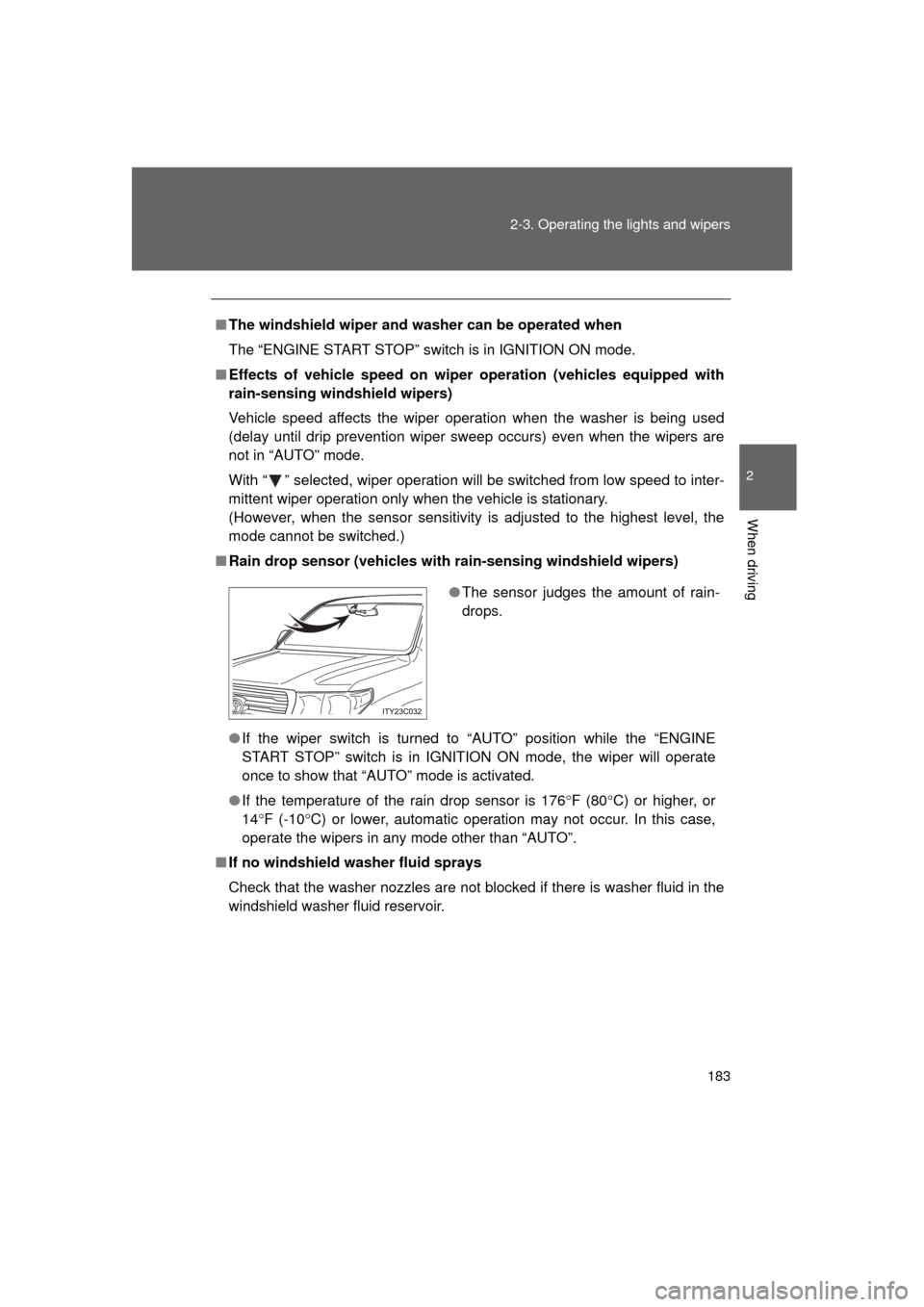
■ Rain drop sensor (vehicles with rain-sensing windshield wipers)
● If the wiper switch is turned to “AUTO” position while the “ENGINE
START STOP” switch is in IGNITION ON mode, the wiper will operate
once to show that “AUTO” mode is activated.
● If the temperature of the rain drop sensor is 176 F (80 C) or higher, or
14 F (-10 C) or lower, automatic operation may not occur. In this case,
operate the wipers in any mode other than “AUTO”.
■ If no windshield washer fluid sprays
Check that the washer nozzles are not blocked if there is washer fluid in the
windshield washer fluid reservoir.
●The sensor judges the amount of rain-
drops.
Page 185 of 608
185
2-3. Operating the lights and wipers
2
When driving
L/C200_U (OM60F74U)
Rear window wiper and washer
■The rear window wiper and w asher can be operated when
The “ENGINE START STOP” switch is in IGNITION ON mode.
NOTICE
■ When the rear window is dry
Do not use the wipers, as it may damage the rear window.
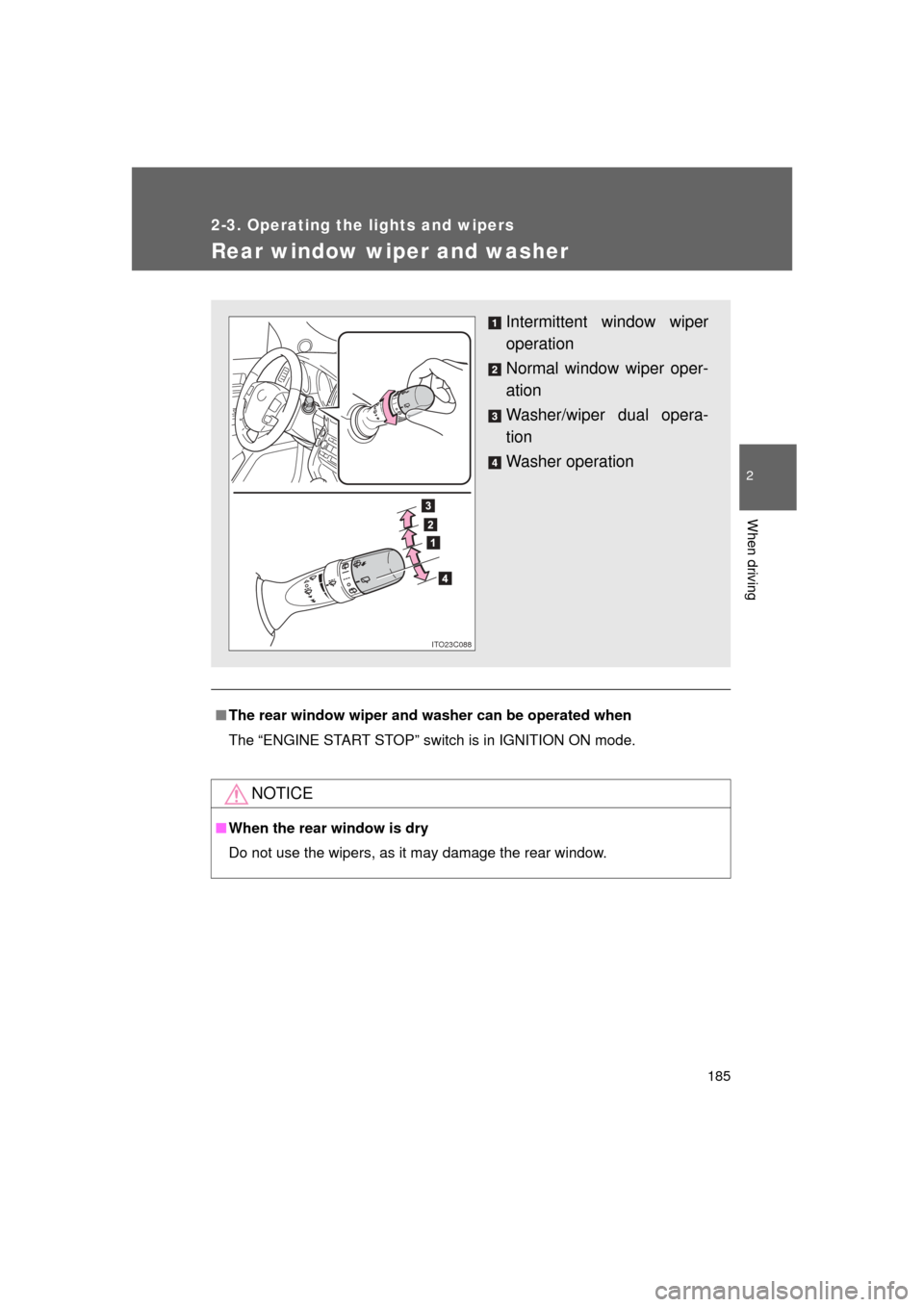
Intermittent window wiper
operation
Normal window wiper oper-
ation
Washer/wiper dual opera-
tion
Washer operation
ITO23C088
Page 186 of 608
186
2-3. Operating the lights and wipers
L/C200_U (OM60F74U)
Headlight cleaner switch
: If equipped
■The headlight cleaner can be operated when
The “ENGINE START STOP” switch is in IGNITION ON mode and the head-
light switch is turned on.
NOTICE
■When the washer fluid tank is empty
Do not use this function when the washer fluid tank is empty. This may
cause the washer fluid pump to overheat.
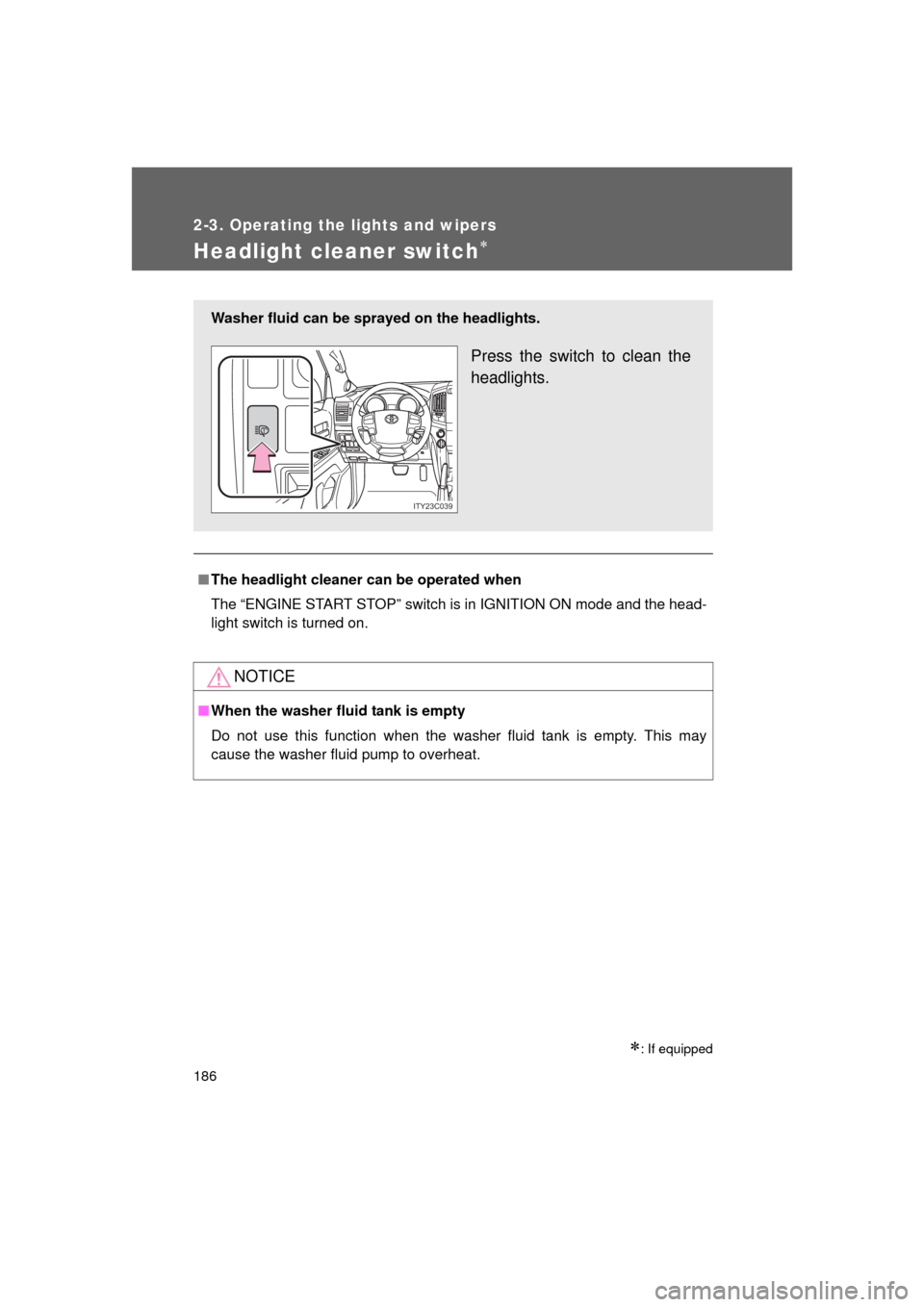
Washer fluid can be sprayed on the headlights.
Press the switch to clean the
headlights.
ITY23C039
Page 197 of 608
197
2-4. Using other
driving systems
2
When driving
L/C200_U (OM60F74U)■
Changing the warning beep volume
Touch “1” to “5” of “Alert Volume”.
Adjust the beep volume, then touch “Save”.
■ Display off setting
Touch “On” or “Off” of “Display”.
When an obstacle is detected while the rear view monitor is in use, the
warning indicator will appear in the top right of the screen even “Of\
f” has
been selected.
■Changing display and alert settings
Touch “Distance”.
Touch “Rear” to change the distance for the back sensors dis-
play and tone indication, then touch “Save”.
■The intuitive parking assist can be operated when
● Front corner sensors:
• The “ENGINE START STOP” switch is in IGNITION ON mode.
• The shift lever is in a position other than “P”.
• The vehicle speed is less than about 6 mph (10 km/h).
● Rear corner and back sensors:
• The “ENGINE START STOP” switch is in IGNITION ON mode.
• The shift lever is in “R”.
STEP1
STEP2
STEP1
STEP2
Page 198 of 608

198 2-4. Using other driving systems
L/C200_U (OM60F74U)
■Sensor detection information
● Certain vehicle conditions and the surrounding environment may affect
the ability of the sensor to correctly detect obstacles. Particular instances
where this may occur are listed below.
• There is dirt, snow or ice on the sensor. (Wiping the sensor will resolve
this problem.)
• The sensor is frozen. (Thawing the sensor will resolve this problem.)
• The sensor is covered in any way.
• In harsh sunlight or intense cold weather.
• When driving on bumpy, sloped or gravel roads, or over grass.
• If there is something producing ultrasonic waves nearby, such as another vehicle’s horn, motorcycle engine noise, air braking sound
from heavy-duty vehicles, or another vehicle using the park assist sys-
tem.
• In heavy rain, or if water is splashed on the sensors.
• The vehicle is leaning considerably to one side.
• If a commercial fender pole or radio antenna is installed.
• If moving towards a high curb or a curb corner.
• If towing eyelet is installed on your vehicle.
• The bumper or sensor receives a strong impact.
• A non-genuine Toyota suspension (lowered suspension etc.) is installed.
In addition to the examples above, there are instances in which, because of
their shapes, signs and other objects may be judged by the sensor to be
closer than they are.
● The shape of the obstacle may prevent the sensor from detecting it. Pay
particular attention to the following obstacles.
• Thin objects such as wire, fencing or rope.
• Objects that absorb sound waves, such as cotton or snow.
• Objects with sharp corners.
• Low objects.
• Objects where the upper section projects out over the lower section.
Page 202 of 608

202 2-4. Using other driving systems
L/C200_U (OM60F74U)
■The four-wheel drive control switch can be operated when
● The “ENGINE START STOP” switch is in IGNITION ON mode.
● The shift lever is in the “N” position.
● The vehicle is stopped completely.
■ The low speed four-wheel drive indicator light
The indicator light blinks while shifting between “H4” and “L4”.
■ Advice for driving on slippery roads
● If you shift the four-wheel drive control switch to “L4” and the shift lever to
the “2” range of “S” while driving in steep off-road areas, the output of the
brake can be controlled effectively by the Active TRAC, which assists the
driver to control the driving power of 4 wheels.
● Use the “1” range of “S” of the shift lever for maximum power and traction
when your wheels get stuck or when driving down a steep incline.
■ The center differential lock indicator light
The indicator light blinks while locking/unlocking the center differential.
■ The center differential lock/unlo ck button can be operated when
● The “ENGINE START STOP” switch is in IGNITION ON mode.
● The vehicle speed is less than 60 mph (100 km/h).
■ Locking/unlocking the center differential
● When the center differential is locked, VSC is automatically turned off.
(The center differential lock and “VSC OFF” indicator lights come on.)
● If the operation is not completed, the center differential lock indicator
blinks. If the indicator light does not turn off when unlocking the center
differential, drive straight ahead while accelerating or decelerating, or
drive in reverse.
● If the center differential lock/unlock is not completed within 5 seconds
while the cruise control system is on, cancel the cruise control system.