Page 195 of 360

AUDIO/VIDEO SYSTEM
195
Audio: This DVD player can play liner
PCM, Dolby Digital and MPEG audio for-
mat DVD. Other decoded type cannot be
played.
Title and chapter: Video and audio pro-
grams stored in DVD video disc are divid-
ed in parts by title and chapter.
Title: The largest unit of the video and au-
dio programs stored on DVD video discs.
Usually, one piece of movie, one album, or
one audio program is assigned as a title.
Chapter: The unit smaller than that of title.
A title comprises plural chapters.
Manufactured under license from
Dolby Laboratories. “Dolby”, and the
doubleD symbol are trademarks of
Dolby Laboratories.
This product incorporates copyright
protection technology that is protected
by method claims of certain U.S. pat-
ents and other intellectual property
rights owned by Macrovision Corpora-
tion and other rights owners. Use of
this copyright protection technology
must be authorized by Macrovision
Corporation, and is intended for home
and other limited viewing uses only un-
less otherwise authorized by Macrovi-
sion Corporation. Reverse engineering
or disassembly is prohibited.
“DTS” and “DTS Digital Surround” are
registered trademarks of Digital The-
ater Systems, Inc.
Manufactured under license under
U.S. Patent #’s: 5,451,942; 5,956,674;
5,974,380; 5,978,762; 6,487,535 & oth-
er U.S. and worldwide patents issued
& pending. DTS and the Symbol are
registered trademarks & DTS Digital
Surround and the DTS logos are trade-
marks of DTS, Inc. Product includes
software. DTS, Inc. All Rights Re-
served. The Bluetooth�
audio system enables
users to enjoy music played on a porta-
ble player from the vehicle speaker via
wireless communication.
This audio system supports
Bluetooth �, a wireless data system
capable of playing portable audio
music without cables. If your portable
player does not support Bluetooth �,
the Bluetooth� audio system will not
function.
— Bluetooth� audio
operation
Page 196 of 360

AUDIO/VIDEO SYSTEM
196
INFORMATION
Portable players must correspond to
the following specifications in order
to be connected to the Bluetooth� au-
dio system. However, please note
that some functions may be limited
depending on the type of portable
player.
� Bluetooth � Specification
Ver.1.1 or higher
(Recommended: Ver.2.0+EDR or
higher)
� Profile
� A2DP (Advanced Audio Dis-
tribution Profile) Ver.1.0 or high-
er
� AVRCP (Audio/Video Remote
Control Profile) Ver.1.0 or higher
(Recommended: Ver .1.3 or high-
er)
Please go to “http://www.toyota.
letstalk.com/” to find approved
Bluetooth � phones for this system.
Bluetooth is a trademark owned by
Bluetooth SIG. Inc.
CAUTION
Do not operate the player’s controls
or connect to the Bluetooth � audio
system while driving.
NOTICE
Do not leave your portable player in
the car. In particular, high tempera-
tures inside the vehicle may damage
the portable player.
INFORMATION
�In the following conditions, the
system may not function.
� The portable player is turned off.
� The portable player is not con-
nected.
� The portable player has a low bat-
tery.
�It may take time, the phone connec-
tion is carried out during
Bluetooth � audio play.
Page 197 of 360

AUDIO/VIDEO SYSTEM
197
1Indicates the condition of the
Bluetooth� connection.
“Blue” indicates an excellent connection
to Bluetooth� .
“Yellow” indicates a bad connection to
Bluetooth �, resulting in possible deteriora-
tion of audio quality.
: No connection to Bluetooth �.
2Indicates the amount of battery
charge left.
Empty Full
Remaining charge is not displayed while
the Bluetooth� is connecting.
The amount left does not always corre-
spond with the one of your portable player.
This system doesn’t have a charging func-
tion. An antenna for the Bluetooth�
connection is
built in to the instrument
panel. The indication of the Bluetooth�
connection may turn yellow and the
system may not function when you use
the Bluetooth� portable player in the
following conditions.
�Your portable player is hiding behind
from the display (behind the seat or in
the glove box or console box).
�Your portable player touches or is cov-
ered with metal materials.
Leave the Bluetooth � portable player in a
place where the “Blue” indication is dis-
played.
The portable player information is regis-
tered when the Bluetooth� audio system is
connected. When you release possession
of your vehicle, remove your portable play-
er. (See “(a) Removing a Bluetooth � au-
dio” on page 330.)
Page 198 of 360

AUDIO/VIDEO SYSTEM
198
FCC ID : AJDK021
This device complies with Part 15 of the
FCC Rules and RSS −Gen and
RSS−210 of IC Rules. Operation is sub-
ject to the following two conditions : (1)
This device may not cause harmful inter-
ference, and (2) this device must accept
any interference received, including in-
terference that may cause undesired
operation.
CAUTION
FCC WARNING: Changes or modifi-
cations not expressly approved by
the party responsible for compliance
could void the user’s authority to op-
erate the equipment.
CAUTION: Radio Frequency Radi-
ation Exposure
This equipment complies with FCC
radiation exposure limits set forth for
uncontrolled equipment and meets
the FCC radio frequency (RF) Expo-
sure Guidelines in Supplement C to
OET65. This eq uipment has very low
levels of RF energy that it deemed to
comply without maximum permis-
sive exposure evaluation (MPE). But
it is desirable that it should be
installed and operated with at least 20
cm and more between the radiator
and person’s body (excluding ex-
tremities: hands, wrists, feet and
ankles).
Colocation: This transmitter must
not be colocated or operated in con-
junction with any other antenna or
transmitter.
(a) Connecting Bluetooth� audio play-
er
To use the Bluetooth� audio system,
you need to enter your portable player
into the system. Once you have
registered it, you can enjoy your music
on the vehicle’s audio system. (See “—
Setting Bluetooth� audio” on page
328.)
For the operation procedure for the
portable player, see the instruction
manual that comes with it.
�When the connection method is
“From Vehicle”.
�When the auto connection is on
When the portable player is
standby for the connection, it
will be automatically connected
whenever the “ENGINE START
STOP” switch is in either AC-
CESSORY or IGNITION ON
mode.
�When the auto connection is off
Manually connect the portable
player in accordance with the
following procedure.
Page 199 of 360
AUDIO/VIDEO SYSTEM
199
Touch “Connect”.
When the connection is completed, this
screen is displayed. Now you can use the
portable player.
This screen will appear when the connec-
tion has failed.
�When the connection method is
“From Portable Player”
Operate the portable player and con-
nect it to the Bluetooth � audio system.
For the operation procedure for the
portable player, see the instruction
manual that comes with it.
Touch “Connect”.
Connect the portable audio player to the
Bluetooth � audio system.
This screen will appear when the connec-
tion has been successfully established.
Page 200 of 360

AUDIO/VIDEO SYSTEM
200 �
Reconnecting the portable player
If the portable player is disconnected with
a poor reception from the Bluetooth � net-
work when the “ENGINE START STOP”
switch is in ACCESSORY or IGNITION
ON mode, the system automatically re-
connects the portable player.
If the Bluetooth� is disconnected on pur-
pose such as you turned your portable
player off, this does not happen.
Reconnect it by the following method.
�Select the portable player again.
�Enter the portable player. (b) Playing a Bluetooth�
audio
�Playing and pausing a Bluetooth �
audio
Push the “AUX·USB” button or push
the “AUDIO” button to display this
screen and touch “BT” tab if the
Bluetooth � audio player is already
connected.
Touch
and the music will start playing.
Touch
and the music will pause.
Touch
and the music will start playing
again.
Depending on the portable player that is
connected to the system, the music may
start playing when touching
while it is
paused. On the other h and, the music may
pause when touching
while it is play-
ing.
Page 201 of 360
AUDIO/VIDEO SYSTEM
201
Some titles may not be displayed depend-
ing on the type of portable player.
�Selecting a desired track
“SEEK·TRACK” button: Use for direct
access to a desired track.
Push the “
” or “” button of
“SEEK·TRACK” and repeat it until the de-
sired track number appears on the screen.
As you release the button, the portable
player will start playing the selected track
from the beginning.
Fast forward:
Push and hold the “
” button of
“SEEK·TRACK” to fast forward the play-
er. When you release the button, the porta-
ble player will resume playing from that
position.
Reverse:
Push and hold the “
” button of
“SEEK·TRACK” to reverse the player.
When you release the button, the player
will resume playing.
INFORMATION
Depending on the portable player that
is connected to the system, certain
functions may not be available.
Page 202 of 360
AUDIO/VIDEO SYSTEM
202 �
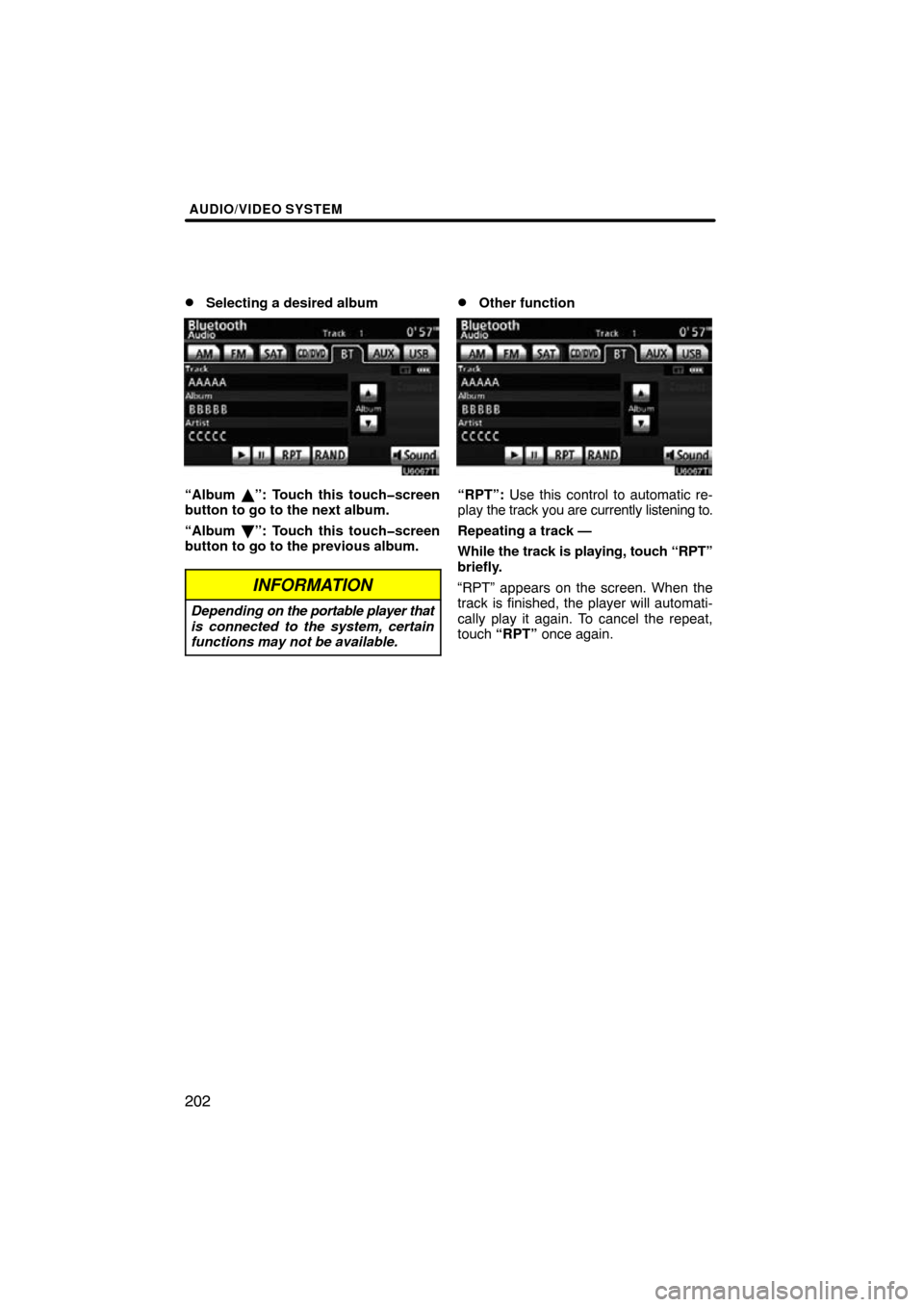
Selecting a desired album
“Album �”: Touch this touchscreen
button to go to the next album.
“Album \b”: Touch this touchscreen
button to go to the previous album.
INFORMATION
Depending on the portable player that
is connected to the system, certain
functions may not be available.
�Other function
“RPT”: Use this control to automatic re-
play the track you are currently listening to.
Repeating a track —
While the track is playing, touch “RPT”
briefly.
“RPT” appears on the screen. When the
track is finished, the player will automati-
cally play it again. To cancel the repeat,
touch “RPT” once again.