2011 TOYOTA AURIS HYBRID ECO MODE indicator
[x] Cancel search: ECO MODE indicatorPage 175 of 524

175
2-1. Driving procedures
2
When driving
UK_AURIS_HV_EE
Power (ignition) switch
Performing the following operations when carrying the electronic
key on your person starts the hybrid system or changes “POWER”
switch modes.
Starting the hybrid system
Check that the parking brake is set.
Firmly depress the brake pedal.
The “POWER” switch indicator will turn green. If the indicator
does not turn green, the hybrid system cannot be started.
When shift position N is selected, the hybrid system cannot start.
Select the P position when starting the hybrid system. (P. 185)
Press the “POWER” switch.
After a few seconds, the
“READY” indicator comes on
with a beep sound.
The vehicle can move when
the “READY” indicator is on,
even if the engine is stopped.
Continue depressing the brake
pedal until the hybrid system is
completely started.
The hybrid system can be
started from any “POWER”
switch mode.
Check that the “READY” indicator is on.
The vehicle will not move when the “READY” indicator is off.
STEP1
STEP2
STEP3
STEP4
Page 177 of 524
177 2-1. Driving procedures
2
When driving
UK_AURIS_HV_EE
If the hybrid system does not start
The immobilizer system may not have been deactivated. (P. 107)
If the “READY” indicator does not come on
If the “READY” indicator does not come on when you press the “POWER”
switch with the shift position in P and the brake pedal pressed, contact any
authorized Toyota dealer or repairer, or another duly qualified and equipped
professional immediately.
When the “POWER” switch indicator flashes in amber
The system may be malfunctioning. Have the vehicle inspected by any
authorized Toyota dealer or repairer, or another duly qualified and equipped
professional, immediately.
Auto power off function
If the vehicle is left in ACCESSORY or ON mode (hybrid system is not oper-
ating) for more than an hour with the shift position in P, the “POWER” switch
will automatically turn off. However, this function cannot entirely prevent 12-
volt battery discharge. Do not leave the vehicle with the “POWER” switch in
ACCESSORY or ON mode for long periods of time when the hybrid system
is not operating.
Operation of the “POWER” switch
When operating the “POWER” switch, one short, firm press is enough. If
the switch is pressed improperly, the hybrid system may not start or the
“POWER” switch mode may not change. It is not necessary to press and
hold the switch.
If an attempt is made to restart the hybrid system immediately after turn-
ing the “POWER” switch off, the hybrid system may not start in some
cases. After turning the “POWER” switch off, wait a few seconds before
restarting the hybrid system.
When leaving the vehicle
If the indicator on the “POWER” switch stays on, the “POWER” switch is not
yet off.
Turn the “POWER” switch off before you leave the vehicle.
Page 179 of 524

179 2-1. Driving procedures
2
When driving
UK_AURIS_HV_EE
CAUTION
When starting the hybrid system
Always start the hybrid system while sitting in the driver's seat. Do not
depress the accelerator pedal while starting the hybrid system under any cir-
cumstances. Doing so may cause an accident resulting in death or serious
injury.
Stopping the hybrid system in an emergency
If you want to stop the hybrid system in an emergency while driving the vehi-
cle, press and hold the “POWER” switch for more than 3 seconds.
However, do not touch the “POWER” switch while driving except in an emer-
gency. Turning the hybrid system off while driving will not cause loss of
steering or braking control, but the power assist to these systems will be lost.
This will make it more difficult to steer and brake, so you should pull over
and stop the vehicle as soon as it is safe to do so.
NOTICE
To prevent 12-volt battery discharge
Do not leave the “POWER” switch in ACCESSORY or ON mode for long
periods if the hybrid system is not operating.
If the hybrid system is off, but the indicator on the “POWER” switch is illu-
minated, this indicates that the “POWER” switch is still turned on. When
exiting the vehicle, always check that the “POWER” switch is off.
When starting the hybrid system
If the hybrid system becomes difficult to start, have the hybrid system
checked immediately.
Page 181 of 524

181 2-1. Driving procedures
2
When driving
UK_AURIS_HV_EE
Situations in which EV-Drive Mode cannot be turned on
The followings are examples of situations under which the EV-Drive Mode
may not be turned on. If it cannot be turned on, a buzzer will sound and a
message will be shown on the multi-information display.
The temperature of the hybrid system is high.
The vehicle has been left in the sun, driven on a hill, driven at high
speeds, etc.
The temperature of the hybrid system is low.
The vehicle has been left in freezing temperatures for a long period of
time etc.
The gasoline engine is warming up.
The hybrid battery (traction battery) is low.
The remaining battery level indicated in the “Energy Monitor” display is
low. (P. 36)
Vehicle speed is high.
The accelerator pedal is depressed firmly or the vehicle is on a hill etc.
The windshield defogger is in use.
Switching to EV-Drive Mode when the gasoline engine is cold
If the hybrid system is started while the gasoline engine is cold, the gasoline
engine will start automatically after a short period of time in order to warm
up. In this case, you will become unable to switch to EV-Drive Mode.
After the hybrid system has started and the “READY” indicator has illumi-
nated, press the “EV” switch before the gasoline engine starts to switch to
EV-Drive Mode.
Automatic cancellation of EV-Drive Mode
When driving in EV-Drive Mode, the gasoline engine may automatically
restart in the following situations. When EV-Drive Mode is canceled, a
buzzer will sound and the EV-Drive Mode indicator will flash and go off.
The hybrid battery (traction battery) becomes low.
The remaining battery level indicated in the “Energy Monitor” display is
low. (P. 36)
Vehicle speed becomes high.
The accelerator pedal is depressed firmly or the vehicle is on a hill etc.
Page 184 of 524

184 2-1. Driving procedures
UK_AURIS_HV_EE
When selecting a shift position, make sure that the shift position
has been changed to the desired position by checking the shift
position indicator provided on the instrument panel.
When a shift position other than D or B is selected, the arrow
toward B disappears from the shift position indicator.
Shift position purpose
*: For good fuel economy and noise reduction, the D position should usu-
ally be used.
Shift positionFunction
PParking the vehicle or starting the hybrid system
RReversing
NNeutral
DNormal driving*
BApplying moderate engine braking when driving
down hills or on steep slopes
Page 195 of 524
195 2-2. Instrument cluster
2
When driving
UK_AURIS_HV_EE
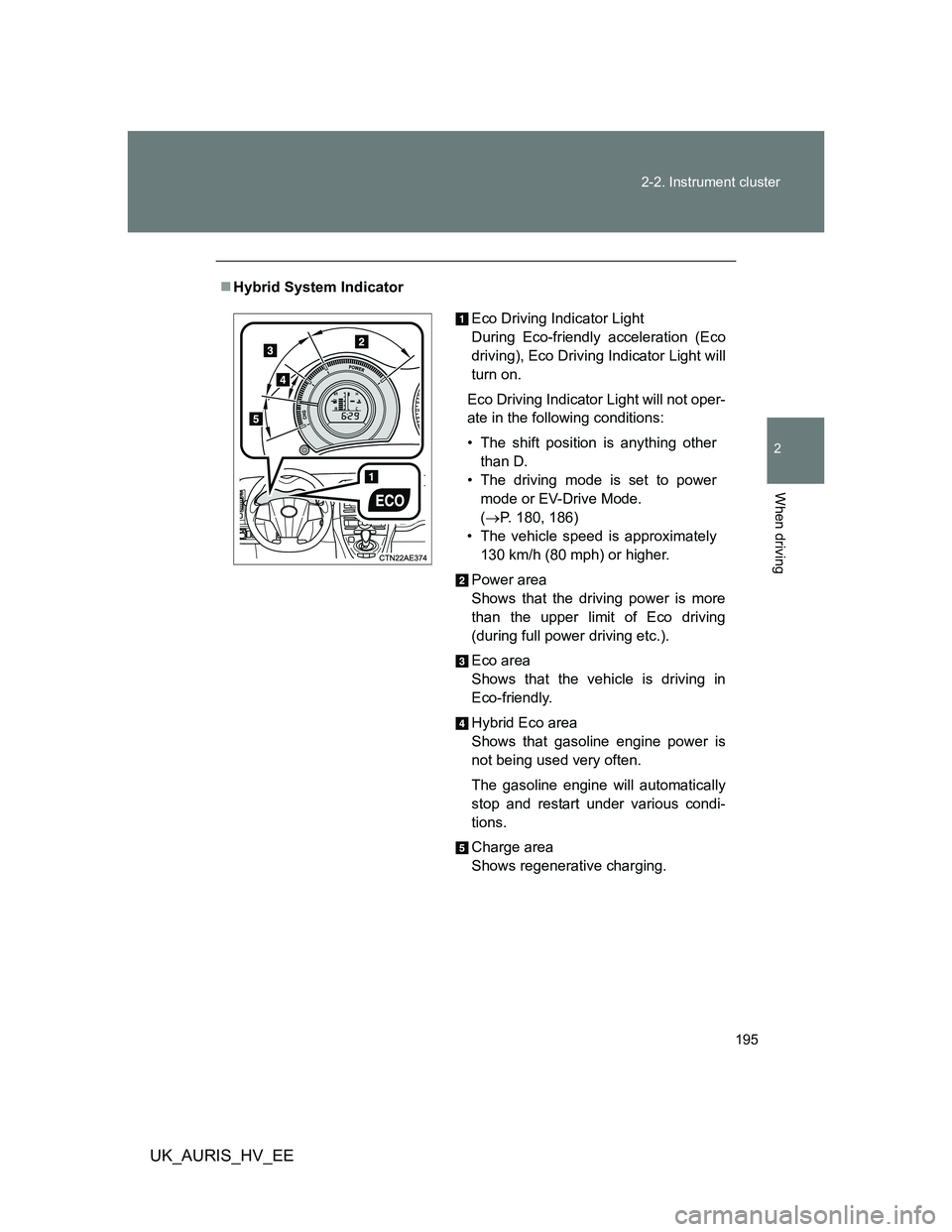
Hybrid System Indicator
Eco Driving Indicator Light
During Eco-friendly acceleration (Eco
driving), Eco Driving Indicator Light will
turn on.
Eco Driving Indicator Light will not oper-
ate in the following conditions:
• The shift position is anything other
than D.
• The driving mode is set to power
mode or EV-Drive Mode.
(P. 180, 186)
• The vehicle speed is approximately
130 km/h (80 mph) or higher.
Power area
Shows that the driving power is more
than the upper limit of Eco driving
(during full power driving etc.).
Eco area
Shows that the vehicle is driving in
Eco-friendly.
Hybrid Eco area
Shows that gasoline engine power is
not being used very often.
The gasoline engine will automatically
stop and restart under various condi-
tions.
Charge area
Shows regenerative charging.
Page 198 of 524

198 2-2. Instrument cluster
UK_AURIS_HV_EE
Indicators
The indicators inform the driver of the operating state of the
vehicle’s various systems.
*1: These lights turn on when the “POWER” switch is turned to ON
mode to indicate that a system check is being performed. They will
turn off after the hybrid system is started, or after a few seconds.
There may be a malfunction in a system if a light does not come on,
or if the lights do not turn off. Have the vehicle inspected by any
authorized Toyota dealer or repairer, or another duly qualified and
equipped professional for details.
*2: The light flashes to indicate that the system is operating.
*3: The light does not turn on when the system is disable.
Turn signal indicator
(P. 190)
(If equipped)
Cruise control indicator
(P. 219)
Headlight high beam
indicator (P. 206)Slip indicator
(P. 229, 232)
Tail light indicator
(P. 206)Shift position indicators
(P. 193)
Front fog light indicator
(P. 211)Power mode indicator
(P. 186)
Rear fog light indicator
(P. 211)“ECO MODE”
indicator (P. 186)
Eco Driving Indicator
Light (P. 195)EV-Drive Mode indicator
(P. 180)
Security indicator
(P. 107, 115)“READY” indicator
(P. 175)
Airbag manual on-off
indicator(P. 160)
*1, 2
*1, 3
*1
Page 352 of 524

352
3-7. Other interior features
UK_AURIS_HV_EE
Floor mat
CAUTION
Observe the following precautions.
Failure to do so may cause the driver's floor mat to slip, possibly interfering
with the pedals while driving. An unexpectedly high speed may result or it may
become difficult to stop the vehicle, leading to a serious accident.
When installing the driver's floor mat
Do not use floor mats designed for other models or different model year
vehicles, even if they are Toyota Genuine floor mats.
Only use floor mats designed for the driver's seat.
Always install the floor mat securely using the retaining hooks (clips) provided.
Do not use two or more floor mats on top of each other.
Do not place the floor mat bottom-side up or upside-down.
Before driving
Use only floor mats designed specifically for vehicles of the same
model and model year as your vehicle. Fix them securely in place
onto the carpet.
Fix the floor mat in place using
the retaining hooks (clips) pro-
vided.
The shape of the retaining
hooks (clips) and the fixing pro-
cedure of the floor mat for your
vehicle may differ from those
shown in the illustration. For
details, refer to the floor mat
retention clip installation instruc-
tions supplied with the clips.
Check that the floor mat is securely
fixed in the correct place with all the
provided retaining hooks (clips). Be
especially careful to perform this check
after cleaning the floor.
With the hybrid system stopped and the
P position illuminated on the shift posi-
tion indicator, fully depress each pedal
to the floor to make sure it does not
interfere with the floor mat.