Page 207 of 680

207
2-3. Operating the lights and wipers
2
When driving
4RUNNER_U
Rear window wiper and washer
■The rear window wiper and w asher can be operated when
● Vehicles without a smart key system: The engine switch is in the “ON”
position.
Vehicles with a smart key system: The “ENGINE START STOP” switch is
in IGNITION ON mode.
● The back window is completely closed.
■ Intermittent window wiper operation
● When intermittent window wiper operation mode is selected, the wiper
will operate a couple of times and then switch to intermittent operation.
● During intermittent operation, the wiper stops temporarily at the reversing
position.
Before operating the rear window wiper and washer switch, make
sure the back window is completely closed. ( P. 9 4 )
The wiper operation is selected by moving the lever as follows:
Intermittent window wiper
operation
Normal window wiper oper-
ation
Washer/wiper dual opera-
tion
Washer/wiper dual opera-
tion
The wiper will automatically
operate a couple of times after
the washer squirts.
(After operating several times,
the wiper operates one more
time after a short delay to pre-
vent dripping.)
CTH23AS035
Page 208 of 680

208 2-3. Operating the lights and wipers
4RUNNER_U
■When the rear window wiper and washer switch is turned off
The rear wiper will stop operation, and return to the retracted position after
approximately 3 seconds.
However, if the engine switch is turned to the “ACC” or “LOCK” position
(vehicles without a smart key system) or the “ENGINE START STOP” switch
is turned to ACCESSORY mode or tur ned off (vehicles with a smart key sys-
tem) while the rear wiper is operating, the rear wiper will stop at that position
and will not return to the retracted position.
■ If no washer fluid sprays
Check that the washer nozzle is not blocked if there is washer fluid in the
washer fluid reservoir.
■ Customization that can be co nfigured at Toyota dealer
Settings (e.g. drip prevention function) can be changed.
(Customizable features P. 640)
NOTICE
■When the rear window is dry
Do not use the wiper, as it may damage the rear window.
■ When the washer fluid tank is empty
Do not operate the switch continually as the washer fluid pump may over-
heat.
■ When a nozzle becomes blocked
Do not try to clear it with a pin or other object. The nozzle will be damaged.
Page 215 of 680
215
2-4. Using other
driving systems
2
When driving
4RUNNER_U
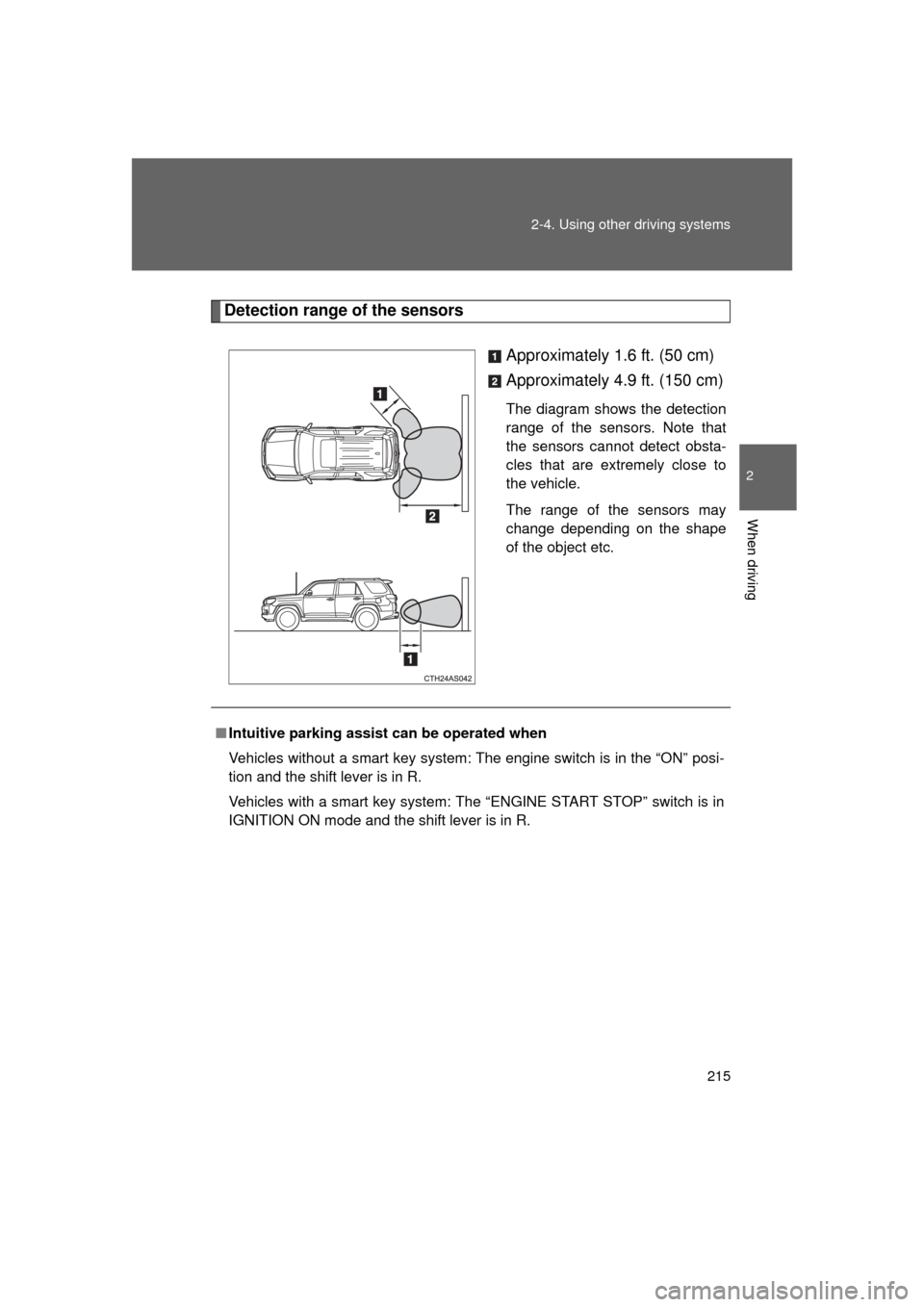
Detection range of the sensors
Approximately 1.6 ft. (50 cm)
Approximately 4.9 ft. (150 cm)
The diagram shows the detection
range of the sensors. Note that
the sensors cannot detect obsta-
cles that are extremely close to
the vehicle.
The range of the sensors may
change depending on the shape
of the object etc.
■Intuitive parking assist can be operated when
Vehicles without a smart key system: The engine switch is in the “ON” posi-
tion and the shift lever is in R.
Vehicles with a smart key system: The “ENGINE START STOP” switch is in
IGNITION ON mode and the shift lever is in R.
Page 219 of 680
219
2-4. Using other
driving systems
2
When driving
4RUNNER_U
■The rear view monitor system can be operated when
Vehicles without a smart key system: The engine switch is in the “ON” posi-
tion and the shift lever is in R.
Vehicles with a smart key system: The “ENGINE START STOP” switch is in
IGNITION ON mode and the shift lever is in R.
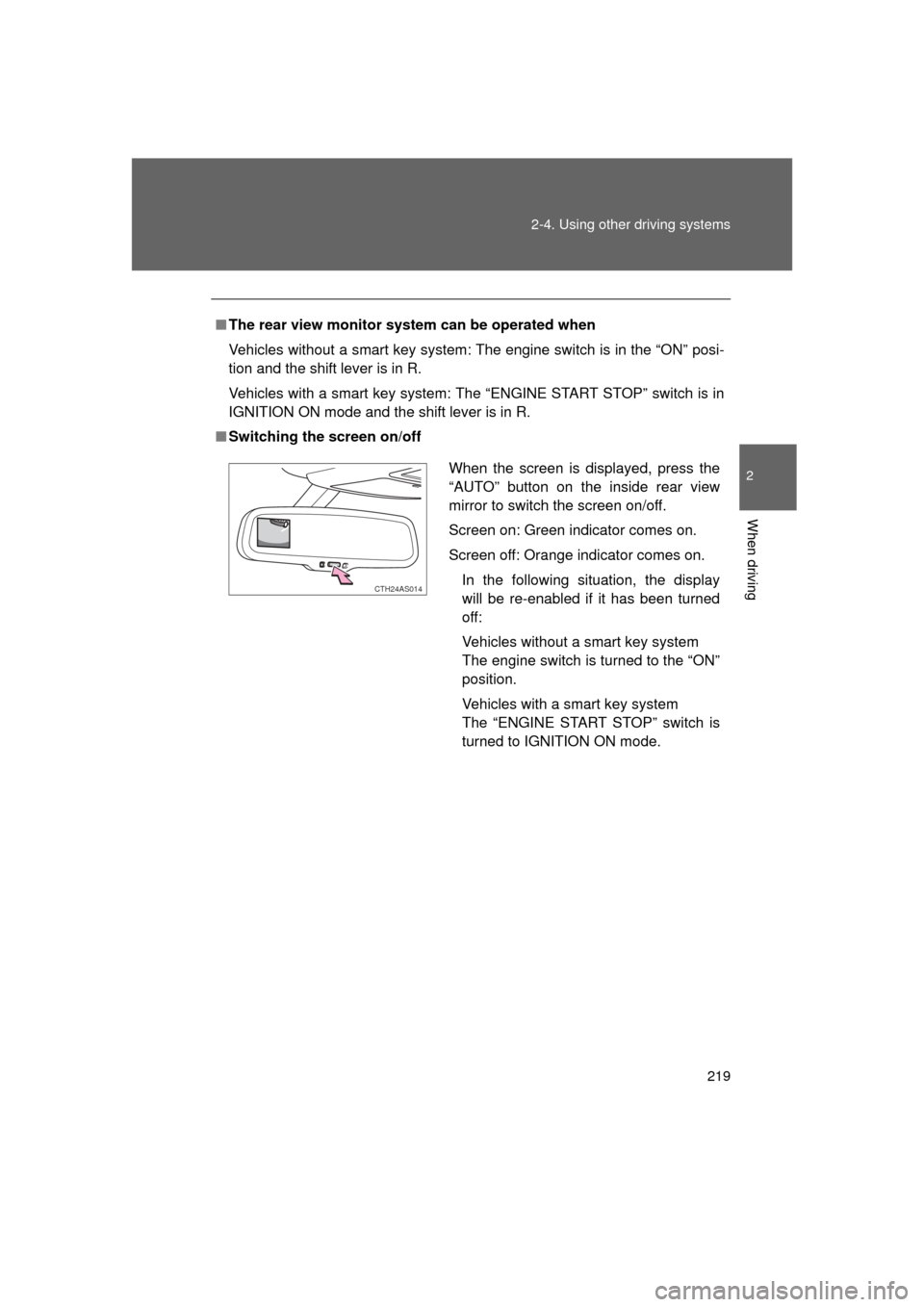
■ Switching the screen on/off
When the screen is displayed, press the
“AUTO” button on the inside rear view
mirror to switch the screen on/off.
Screen on: Green indicator comes on.
Screen off: Orange indicator comes on.
In the following situation, the display
will be re-enabled if it has been turned
off:
Vehicles without a smart key system
The engine switch is turned to the “ON”
position.
Vehicles with a smart key system
The “ENGINE START STOP” switch is
turned to IGNITION ON mode.
CTH24AS014
Page 240 of 680

240 2-4. Using other driving systems
4RUNNER_U
■System malfunction
In case of a system malfunction, the following may occur:
● The downhill assist control system indicator flashes in a situation other
than those listed above.
● The downhill assist control system indicator does not come on when the
engine switch is turned to the “ON” position (vehicles without a smart key
system) or the “ENGINE START STOP” switch is turned to IGNITION ON
mode (vehicles with a smart key system).
Have your vehicle inspected by your Toyota dealer.
CAUTION
■ Conditions which may affect the downhill assist control system opera-
tion
● Do not rely too heavily on the downhill assist control system. On extremely
steep inclines, icy surfaces or muddy roads, the vehicle may slip and the
system may not be able to maintain the constant low vehicle speed of
about 3 mph (5 km/h), leading to an accident causing death or serious
injury.
● Do not shift the shift lever to R while driving forward, or to D while driving
backward. Doing so may cause the wheels to lock up, leading to an acci-
dent causing death or serious injury. In addition, excessive stress will be
applied to the automatic transmission, possibly resulting in damage.
Page 311 of 680
311
3-1. Using the air conditioning system
and defogger
3
Interior features
4RUNNER_U
■The defoggers can be operated when
● Vehicles without a smart key system:
The engine switch is in the “ON” position.
Vehicles with a smart key system:
The “ENGINE START STOP” switch is in IGNITION ON mode.
● The back window is completely closed.
■ The outside rear view mirror defoggers
Turning the rear window defogger on will turn the outside rear view mirror
defoggers on.
CAUTION
■ When the outside rear view mirror defoggers are on
Do not touch outside surface of the rear view mirrors, as they can become
very hot and burn you.
Page 312 of 680
312
3-1. Using the air conditioning system and defogger
4RUNNER_U
Windshield wiper de-icer
■The windshield wiper de-icer can be operated when
Vehicles without a smart key system
The engine switch is in the “ON” position.
Vehicles with a smart key system
The “ENGINE START STOP” switch is in IGNITION ON mode.
CAUTION
■ When the windshield wiper de-icer is on
Do not touch the lower part of the windshield or the side of the front pillars,
as the surfaces can become very hot and burn you.
: If equipped
This feature is used to prevent ice from building up on the wind-
shield and wiper blades.
Turns the windshield wiper de-
icer on/off
The windshield wiper de-icer
will automatically turn off after
approximately 15 minutes.
CTH31AS020
Page 369 of 680

369
3-3. Using the Bluetooth
® audio system
3
Interior features
4RUNNER_U
Using the Bluetooth® audio system for the first time
Before using the Bluetooth
® audio system, it is necessary to register
a Bluetooth® enabled portable player in the system. Follow the proce-
dure below to register (pair) a portable player:
Press and hold until “BT AUDIO” is displayed.
Press (SETUP).
The introductory guidance and port able player name registration
instructions are heard.
Select “Pair Audio Players (Pai r audio player)” using a voice
command or .
Register a portable player nam e by either of the following
methods:
a. Select “Record Name” using , and say the name to
be registered.
b. Press the talk switch and say the name to be registered.
A voice guidance instruction to confirm the input is heard.
Select “Confirm” using a voice command or .
A passkey is displayed and heard, and a voice guidance instruction
for inputting the passkey into the portable player is heard.
STEP 1
STEP 2
STEP 3
STEP 4
STEP 5