Page 125 of 680
125
1-7. Safety information
1
Before driving
4RUNNER_U
CAUTION
■
SRS airbag precautions
●Do not attach anything to or lean any-
thing against areas such as the dash-
board, steering wheel pad and lower
portion of the instrument panel. These
items can become projectiles when the
SRS driver, front passenger and knee
airbags deploy.
● Do not attach anything to areas such as
a door, windshield glass, side door
glass, front and rear pillars, roof side
rail or assist grip.
● Vehicles without a smart key system:
Do not attach any heavy, sharp or hard
objects such as keys and accessories
to the key. The objects may restrict the
SRS knee airbag inflation or be thrust
into the driver's seat area by the force
of the deploying airbag, thus causing a
danger.
CTH17AS077
CTH17AS020
CTH17AS021
Page 128 of 680

128 1-7. Safety information
4RUNNER_U
Deactivating the curtain shield airbags in a vehicle rollover
On/off (hold for a few seconds)
Vehicles without a smart key sys-
tem: The “RSCA OFF” indicator
turns on. (only when the engine
switch is in the “ON” position).
The roll sensing function for the
curtain shield airbags and seat
belt pretensioners will turn back
on automatically each time the
engine switch is turned to the
“ON” position.
Vehicles with a smart key system:
The “RSCA OFF” indicator comes
on. (only when the “ENGINE
START STOP” switch is in IGNI-
TION ON mode).
The roll sensing function for the
curtain shield airbags and seat
belt pretensioners will turn back
on automatically each time the
“ENGINE START STOP” switch is
turned to IGNITION ON mode.
CTH17AS084
■This switch only should be used
In a situation where the inflation is not desired (such as during extreme off-
road driving).
■ Operating conditions when the “RSC A OFF” indicator is illuminated
● The curtain shield airbags and seat belt pretensioner will not activate in a
vehicle rollover.
● The curtain shield airbags will activate in a severe side impact.
Page 153 of 680

When driving2
153
4RUNNER_U
2-1. Driving proceduresDriving the vehicle............ 154
Engine (ignition) switch (vehicles without a
smart key system).......... 164
Engine (ignition) switch (vehicles with a smart
key system).................... 167
Automatic transmission .... 173
Turn signal lever .............. 179
Parking brake ................... 180
Horn ................................. 181
2-2. Instrument cluster Gauges and meters ......... 182
Indicators and warning lights .............................. 189
Accessory meter .............. 194
2-3. Operating the lights and wipers
Headlight switch ............... 198
Fog light switch ................ 204
Windshield wipers and washer ........................... 205
Rear window wiper and washer ........................... 207 2-4. Using other driving
systems
Cruise control ................... 209
Intuitive parking assist...... 213
Rear view monitor system ........................... 218
Four-wheel drive system (part-time 4WD
models) .......................... 223
Four-wheel drive system (full-time 4WD
models) .......................... 226
Active traction control system ........................... 230
AUTO LSD system........... 232
Rear differential lock system ........................... 235
Downhill assist control system ........................... 238
Crawl Control ................... 241
Multi-terrain Select ........... 245
Driving assist systems ..... 253
2-5. Driving information Off-road precautions ........ 262
Cargo and luggage .......... 267
Vehicle load limits ............ 273
Winter driving tips ............ 275
Trailer towing ................... 280
Dinghy towing .................. 293
Page 154 of 680

154
4RUNNER_U
2-1. Driving procedures
Driving the vehicle
The following procedures should be observed to ensure safe driv-
ing:
■ Starting the engine
P. 164, 167
■ Driving
With the brake pedal depressed, shift the shift lever to D.
( P. 173)
Release the parking brake. ( P. 180)
Gradually release the brake pedal and gently depress the
accelerator pedal to accelerate the vehicle.
■ Stopping
With the shift lever in D, depress the brake pedal.
If necessary, set the parking brake.
If the vehicle is to be stopped for an extended period of time, shift
the shift lever to P or N. ( P. 173)
■Parking the vehicle
With the shift lever in D, depress the brake pedal.
Set the parking brake. ( P. 180)
Shift the shift lever to P. ( P. 173)
If parking on a hill, block the wheels as needed.
Vehicles without a smart key system:
Turn the engine switch to the “LOCK” position to stop the
engine.
Vehicles with a smart key system:
Press the “ENGINE START STOP” switch to stop the
engine.
Lock the door, making sure that you have the key on your
person.
STEP 1
STEP 2
STEP 3
STEP 1
STEP 2
STEP 1
STEP 2
STEP 3
STEP 4
STEP 5
Page 164 of 680
164
2-1. Driving procedures
4RUNNER_U
Engine (ignition) switch (vehicles without a smar t key system)
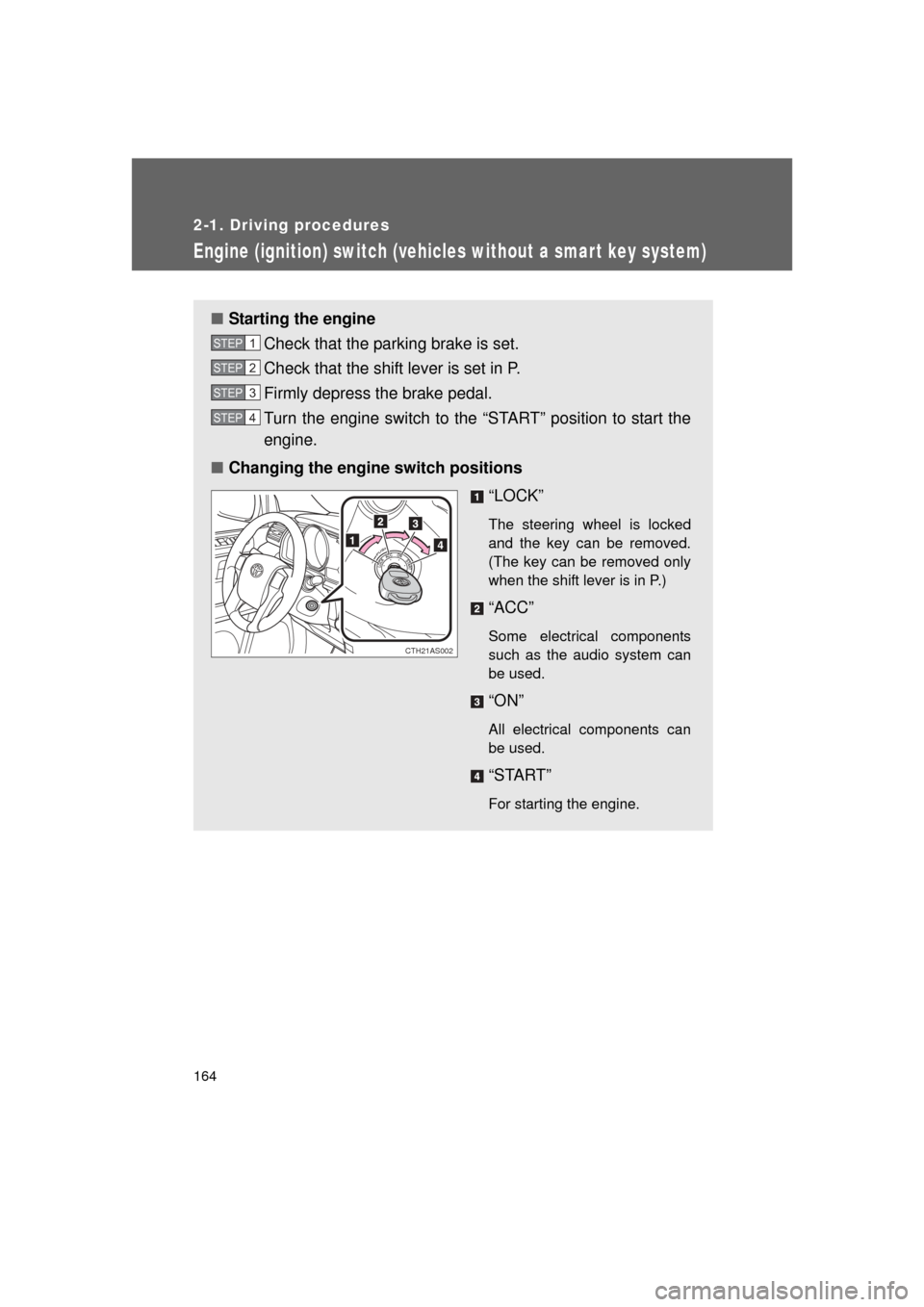
■Starting the engine
Check that the parking brake is set.
Check that the shift lever is set in P.
Firmly depress the brake pedal.
Turn the engine switch to the “START” position to start the
engine.
■ Changing the engine switch positions
“LOCK”
The steering wheel is locked
and the key can be removed.
(The key can be removed only
when the shift lever is in P.)
“ACC”
Some electrical components
such as the audio system can
be used.
“ON”
All electrical components can
be used.
“START”
For starting the engine.
STEP 1
STEP 2
STEP 3
STEP 4
CTH21AS002
Page 165 of 680
165
2-1. Driving procedures
2
When driving
4RUNNER_U
■
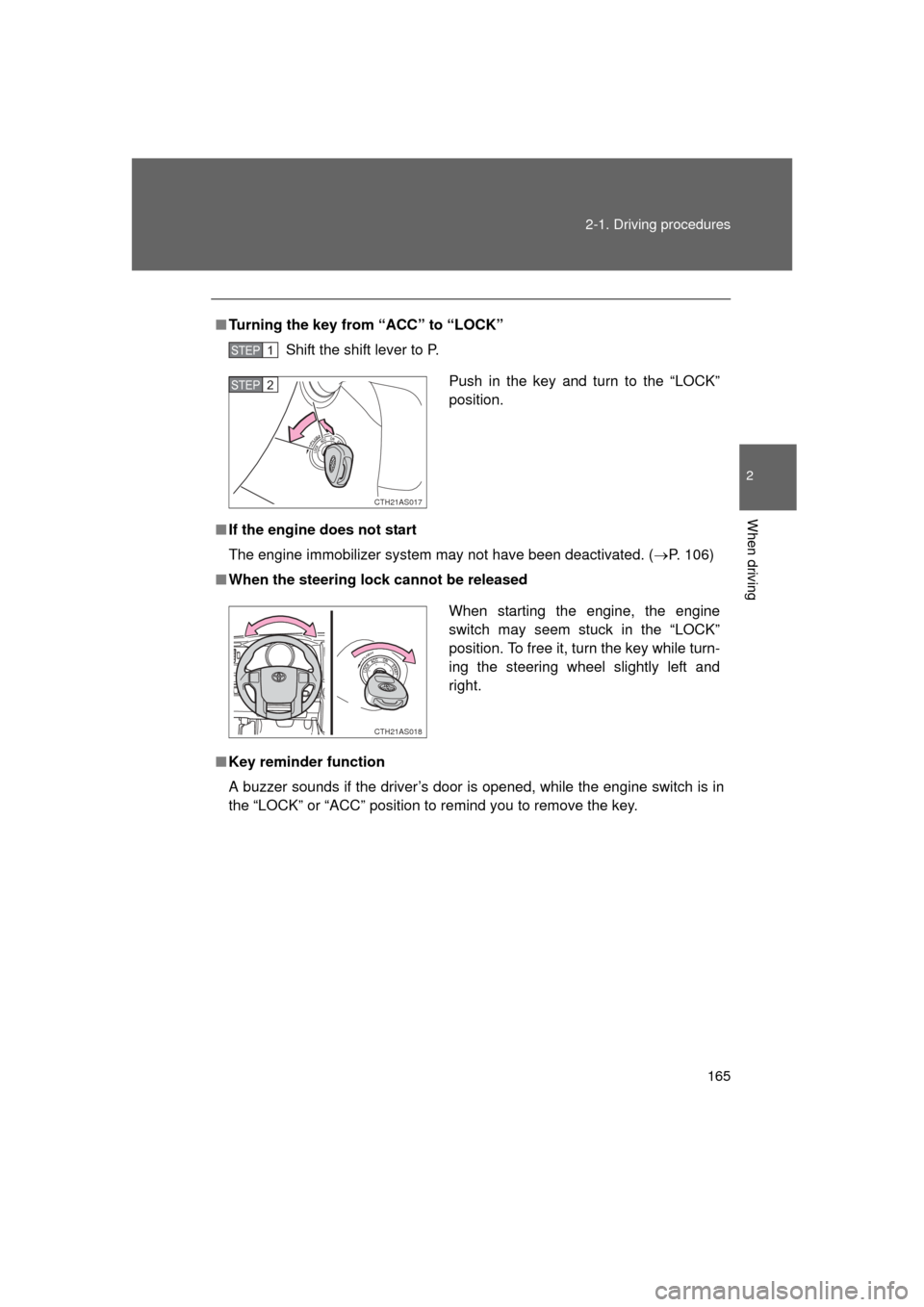
Turning the key from “ACC” to “LOCK”
Shift the shift lever to P.
■ If the engine does not start
The engine immobilizer system may not have been deactivated. ( P. 106)
■ When the steering lock cannot be released
■ Key reminder function
A buzzer sounds if the driver’s door is opened, while the engine switch is in
the “LOCK” or “ACC” position to remind you to remove the key\
.
STEP 1
Push in the key and turn to the “LOCK”
position.
CTH21AS017
STEP 2
When starting the engine, the engine
switch may seem stuck in the “LOCK”
position. To free it, turn the key while turn-
ing the steering wheel slightly left and
right.
CTH21AS018
Page 167 of 680
167
2-1. Driving procedures
2
When driving
4RUNNER_U
Engine (ignition) switch (vehicles with a smart key system)
Performing the following operations when carrying the electronic
key on your person starts the en gine or changes “ENGINE START
STOP” switch modes.
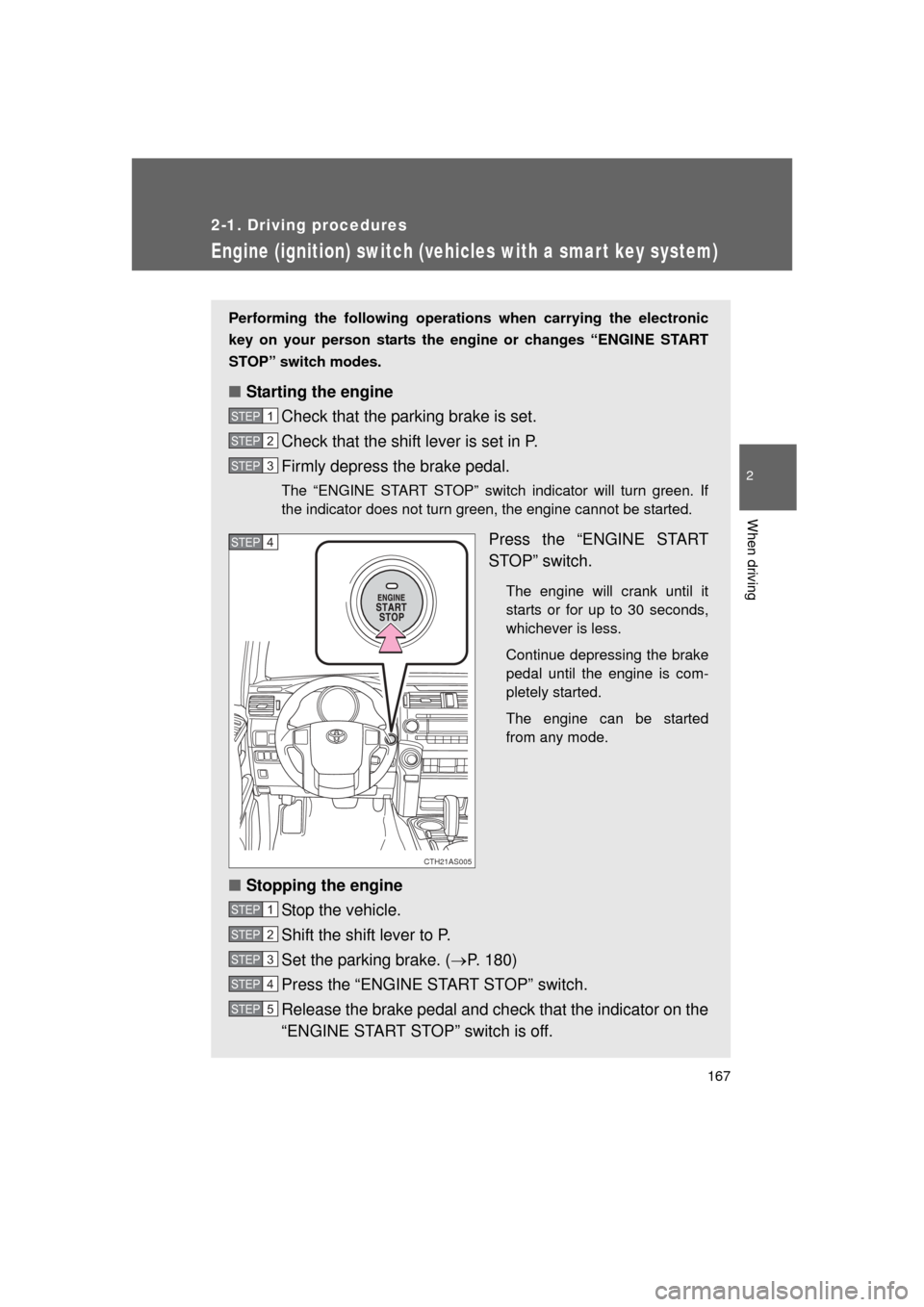
■ Starting the engine
Check that the parking brake is set.
Check that the shift lever is set in P.
Firmly depress the brake pedal.
The “ENGINE START STOP” switch indicator will turn green. If
the indicator does not turn green, the engine cannot be started.
Press the “ENGINE START
STOP” switch.
The engine will crank until it
starts or for up to 30 seconds,
whichever is less.
Continue depressing the brake
pedal until the engine is com-
pletely started.
The engine can be started
from any mode.
■Stopping the engine
Stop the vehicle.
Shift the shift lever to P.
Set the parking brake. ( P. 180)
Press the “ENGINE START STOP” switch.
Release the brake pedal and check that the indicator on the
“ENGINE START STOP” switch is off.
STEP 1
STEP 2
STEP 3
CTH21AS005
STEP 4
STEP 1
STEP 2
STEP 3
STEP 4
STEP 5
Page 169 of 680

169
2-1. Driving procedures
2
When driving
4RUNNER_U
When stopping the engine with the shift lever in a position other than P
If the engine is stopped with the sh
ift lever in a position other than P,
the “ENGINE START STOP” switch will not be turned off but instead
be turned to ACCESSORY mode. Perform the following procedure to
turn the switch off:
Check that the parking brake is set.
Shift the shift lever to P.
Check that the indicator on the “ENGINE START STOP”
switch is illuminated in amber and then press the “ENGINE
START STOP” switch once.
Check that the indicator on the “ENGINE START STOP”
switch is off.
■Auto power off function
If the vehicle is left in ACCESSORY or IGNITION ON mode (the engine is
not running) for more than an hour with the shift lever in P, the “ENGINE
START STOP” switch will automatically turn off. However, this function can-
not entirely prevent battery discharge. Do not leave the vehicle with the
“ENGINE START STOP” switch in ACCESSORY or IGNITION ON mode for
long periods of time when the engine is not running.
■ Operation of the “ENG INE START STOP” switch
When operating the “ENGINE START STOP” switch, one short, firm press is
enough. If the switch is pressed improperly, the engine may not start or the
“ENGINE START STOP” switch mode may not change. It is not necessary to
press and hold the switch.
■ Electronic key battery depletion
P. 4 4
■ Conditions aff ecting operation
P. 4 1
■ Note for the entry function
P. 3 3
STEP 1
STEP 2
STEP 3
STEP 4