2011 SKODA FABIA warning
[x] Cancel search: warningPage 80 of 220
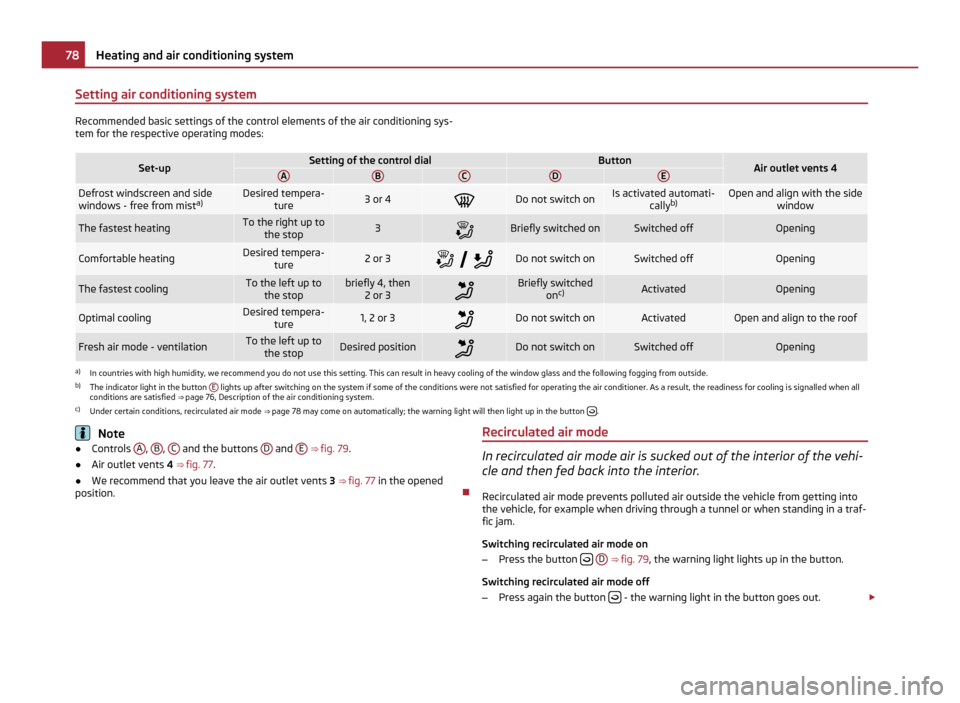
Setting air conditioning system
Recommended basic settings of the control elements of the air conditioning sys-
tem for the respective operating modes:
Set-up Setting of the control dial Button
Air outlet vents 4
A B C D E
Defrost windscreen and side
windows - free from mist
a) Desired tempera-
ture 3 or 4
Do not switch on Is activated automati-
callyb) Open and align with the side
windowThe fastest heating To the right up to
the stop 3
Briefly switched on Switched off Opening
Comfortable heating Desired tempera-
ture 2 or 3
Do not switch on Switched off Opening
The fastest cooling To the left up to
the stop briefly 4, then
2 or 3 Briefly switched
onc) Activated Opening
Optimal cooling Desired tempera-
ture 1, 2 or 3
Do not switch on Activated Open and align to the roof
Fresh air mode - ventilation To the left up to
the stop Desired position
Do not switch on Switched off Opening
a)
In countries with high humidity, we recommend you do not use this setting. This can result in heavy cooling of the window glass and the following fogging from outside.
b) The indicator light in the button E lights up after switching on the system if some of the conditions were not satisfied for operating the air conditioner. As a result, the readiness for cooling is signalled when all
conditions are satisfied ⇒ page 76,
Description of the air conditioning system.
c) Under certain conditions, recirculated air mode ⇒ page 78 may come on automatically; the warning light will then light up in the button .
Note
● Controls A ,
B ,
C and the buttons
D and
E ⇒
fig. 79 .
● Air outlet vents 4
⇒ fig. 77
.
● We recommend that you leave the air outlet vents 3 ⇒ fig. 77 in the opened
position. Recirculated air mode In recirculated air mode air is sucked out of the interior of the vehi-
cle and then fed back into the interior.
Recirculated air mode prevents polluted air outside the vehicle from getting into
the vehicle, for example when driving through a tunnel or when standing in a traf-
fic jam.
Switching recirculated air mode on
– Press the button
D ⇒ fig. 79
, the warning light lights up in the button.
Switching recirculated air mode off
– Press again the button - the warning light in the button goes out.
£78
Heating and air conditioning system
Page 81 of 220

The recirculated air mode is switched off automatically if the air distribution con-
trol
C is in position ⇒
fig. 79 . You can also switch recirculated air mode on
again from this setting by repeatedly pressing pushbutton .
WARNING
You should not leave recirculated air mode on over a longer period of time, as
“stale ” air may result in fatigue in the driver and occupants, divert your atten-
tion and also cause the windows to mist up. The risk of having an accident in-
creases. Switch recirculated air mode off as soon as the windows begin mist-
ing up.
Climatronic (automatic air conditioning) Description The Climatronic system is an automatic heating, fresh air and cool-
ing system which provides optimal comfort for the occupants of the
car.
The Climatronic maintains a constant temperature fully automatically, once it has
been set. This is achieved by automatically varying the temperature of the out-
flowing air, the blower stages and the air distribution. The system also takes into
account sunlight which eliminates the need to alter the settings manually. The
automatic mode ⇒ page 80 ensures maximum wellbeing of the occupants at all
times of the year.
Description of Climatronic system
The cooling operates only if the following conditions are met:
● engine running,
● outside temperature above approx. +2 °C,
● AC switched on.
The AC compressor is switched off at a high coolant temperature in order to en-
sure cooling of the engine at high loads. Recommended setting for all periods of the year:
●
Set the desired temperature, we recommend 22 °C (72 °F).
● Press the button AUTO ⇒ fig. 80
.
● Move the air outlet vents 3 and 4 so that the air flow is directed slightly up-
wards.
Switching over between degrees Celsius and degrees Fahrenheit
Press and hold the buttons AUTO and
AC ⇒ fig. 80
at the same time. The informa-
tion in the desired temperature measuring unit appears in the display. Note
● We recommend that you have Climatronic cleaned by a specialist garage once
every year.
Overview of the control elements Fig. 80 Climatronic: Control elements
Buttons / control dial
Setting the interior temperature
The displays Display of selected inside temperature, e.g.: +22 °C (72
°F)
Degrees Celsius or Fahrenheit
Automatic air conditioning mode
De-mist or de-ice the windscreen £
1 2
3
4
5 79
Heating and air conditioning system Using the system Safety Driving Tips General Maintenance Breakdown assistance Technical data
Page 83 of 220

WARNING
● “Stale air ” may result in fatigue in the driver and occupants, reduce atten-
tion levels and also cause the windows to mist up. The risk of having an acci-
dent increases.
● Do not switch the Climatronic system off for longer than necessary.
● Switch the Climatronic system on as soon as the windows mist up.
Recirculated air mode In recirculated air mode air is sucked out of the interior of the vehi-
cle and then fed back into the interior.
Recirculated air mode prevents polluted air outside the vehicle from getting into
the vehicle, for example when driving through a tunnel or when standing in a traf-
fic jam.
Switching recirculated air mode on
– Press the button
17
⇒ fig. 80
, appears in the display.
Switching recirculated air mode off
– Press button again, the symbol in the display goes out.
WARNING
You should not leave recirculated air mode on over a longer period of time, as
“stale ” air may result in fatigue in the driver and occupants, divert your atten-
tion and also cause the windows to mist up. The risk of having an accident in-
creases. Switch recirculated air mode off as soon as the windows begin mist-
ing up. Note
If recirculation mode is switched on for around 15 minutes, the symbol will be-
gin to flash in the display as a sign that the recirculation mode is switched on
long-term. If the recirculation mode is not switch off, the symbol flashes for
around 5 minutes. 81
Heating and air conditioning system Using the system Safety Driving Tips General Maintenance Breakdown assistance Technical data
Page 84 of 220

Starting-off and Driving
Setting steering wheel position Fig. 81 Adjustable steering wheel: Lever below the steering column/Safe distance to steering
wheel
You can set the height and the forward/back position of the steering wheel to the
desired position.
–
Adjust the driver seat ⇒ page 52.
– Pull the lever below the steering wheel down ⇒ fig. 81 - left ⇒ .
– Set the steering wheel to the desired position (concerning height and forward/
back position).
– Then push the lever up against the steering column until it locks into place. WARNING
● You must not adjust the steering wheel when the vehicle is moving!
● The driver must maintain a distance of at least 25 cm to the steering wheel
⇒ fig. 81 - right. Not maintaining this minimum distance will mean that the air-
bag system will not be able to properly protect you - hazard!
● For safety reasons the lever must always be firmly pushed up to avoid the
steering wheel altering its position unintentionally when driving - risk of acci-
dent! WARNING (Continued)
● If you adjust the steering wheel further towards the head, you will reduce
the protection offered by the driver airbag in the event of an accident. Check
that the steering wheel is aligned to the chest.
● When driving, hold the steering wheel with both hands firmly on the outer
edge in the 9 o'clock and 3 o'clock position. Never hold the steering wheel
firmly in the 12 o'clock position or in another way (e.g. in the middle of the
steering wheel or at the inner steering wheel edge). In such cases, injuries to
the arms, the hands and the head can occur when the driver airbag is de-
ployed.
Ignition lock Fig. 82 Ignition lock positions
Petrol engines 1 - ignition switched off, engine off, the steering can be locked.
2 - ignition switched on
3 - start engine
Diesel engines 1 - interruption of fuel supply, ignition switched off, engine off, the steering can
be locked.
2 - heating glow plugs on, ignition switched on
● You should not switch on any major electrical components during the heating
period otherwise the vehicle battery will be drained unnecessarily. £82
Starting-off and Driving
Page 85 of 220

3
- start engine
Applies to all models:
Position 1 To
lock the steering , with the ignition key withdrawn, turn the steering wheel un-
til the steering locking pin is heard to engage. You should always lock the steering
as a general rule if you leave your vehicle. This acts as a deterrent against possible
theft of your vehicle ⇒ .
Position 2 Move the steering wheel back and forward a little if the ignition key cannot, or
cannot easily be turned into this position, in order to release the steering lock.
Position
3 The engine is started in this position. At the same time switched on low beam or
main beam or other electrical components with major power consumption are
briefly switched off. The ignition key moves back into position
2 when one relea-
ses the key.
The ignition key must be turned back into position 1 each time before starting
the engine again. The starter repeat lock in the ignition lock prevents the starter
being engaged when the engine is running and thus getting damaged. WARNING
● When driving, the ignition key must always be in the position 2 (ignition
switched on) without the engine running. This position is indicated by the
warning lights coming on. If this is not the case, it could result in unexpected
locking of the steering wheel - risk of accident!
● Do not withdraw the ignition key from the lock until the car has come to a
stop. The steering lock can engage immediately - risk of accident!
● Always withdraw the ignition key if you are going to leave the vehicle,
even for a short time. This is particularly important if children are left in the
vehicle. The children might otherwise start the engine or operate electrical
equipment (e.g. power windows) - risk of injury! Starting the engine
General You can only start the engine only using an original ignition key.
● Place the gearshift lever into neutral (or place the selector lever to the posi-
tion P or N in the case of an automatic gearbox) and put on the handbrake firmly
before starting the engine.
● The clutch pedal should be fully depressed when starting the engine which
means that the starter only has to crank the engine.
● Let go of the key as soon as the engine starts otherwise there may be damage
to the starter.
The engine running noises may louder at first be louder for a short time after
starting the cold engine until oil pressure can be built up in the hydraulic valve
clearance compensation. This is quite normal and is not an operating problem.
If the engine does not start ...
You can use the battery of another vehicle as a jump-start aid ⇒ page 178. WARNING
● Never run the engine in non ventilated or enclosed areas. The exhaust
gases of the engine contain besides the odorless and colourless carbon mon-
oxide a poisonous gas - hazard! Carbon monoxide can cause unconsciousness
and death.
● Never leave your vehicle unattended with the engine running. CAUTION
● The starter may only be operated (ignition key position 3 ), if the engine is not
running. If the starter is immediately operated after switching off the engine, the
starter or the engine can be damaged.
● Avoid high engine revolutions, full throttle and high engine loads as long as
the engine has not yet reached its normal operating temperature - risk of damag-
ing the engine!
● Do not tow start the engine - danger of damaging the engine. On vehicles with
a catalytic converter, unburnt fuel may get into the catalytic converter where it
may ignite. This in turn may damage or destroy the catalytic converter. You can
use the battery of another vehicle as a jump-start aid ⇒ page 178, Jump-starting.£ 83
Starting-off and Driving Using the system Safety Driving Tips General Maintenance Breakdown assistance Technical data
Page 86 of 220

For the sake of the environment
Never warm up the engine when the vehicle is standing. Drive off right away.
When driving the engine reaches its operating temperature more rapidly and the
pollutant emissions are lower.
Petrol engines These engines are fitted with a starter system which selects the correct fuel-air
mixture for every external air temperature.
●
Do not operate accelerator before and when starting engine.
● Interrupt the attempt at starting after 10 seconds if the engine does not start
right awayand wait for about 30 seconds before repeating the attempt.
● It is possible that the fuse on the electrical fuel pump is defect if the engine
still does not start. Check the fuse and replace it if necessary ⇒ page 182.
● If the engine does not start, contact the nearest specialist garage to obtain
professional assistance.
It may be necessary, if the engine is very hot, to slightly depress the accelerator
after the engine has started.
Diesel engines Glow plug system
Diesel engines are equipped with a glow plug system, the preglow period being
controlled automatically in line with the coolant temperature and outside temper-
ature.
The preglow indicator light
comes on after the ignition has been switched on.
You should not switch on any major electrical components during the heating
period otherwise the vehicle battery will be drained unnecessarily.
● You should start the engine immediately after the glow plug warning light
has gone out.
● The glow plug warning light will come on for about one second if the engine is
at a normal operating temperature or if the outside temperature is above +5°C.
This means that you can start the engine right away.
● Interrupt the attempt at starting after 10 seconds if the engine does not start
right awayand wait for about 30 seconds before repeating the attempt. ●
It is possible that the fuse on the diesel preglow system is defect if the engine
still does not start. Check the fuse and replace it if necessary ⇒ page 182.
● Contact the nearest specialist garage to obtain professional assistance.
Starting the engine after fuel tank has run dry
It may take longer than normal to start the engine after refuelling if the fuel tank
has run completely dry - up to one minute. This is because the fuel system must
first of all be filled while the attempting to start the engine.
Switching off the engine –
The engine can be switched off by turning the ignition key from position
⇒ fig. 82 into position 1 .
WARNING
● Never switch off the engine before the vehicle is stationary - risk of acci-
dent!
● The brake booster only operates when the engine is running. Greater
physical effort for braking is required when engine is switched off. Because if
you do not stop as normal, this can cause an accident and severe injuries. CAUTION
you should not switch the engine off right away at the end of your journey after
the engine has been operated for a lengthy period at high loads but should be al-
lowed it to run at idling speed for about 2 minutes. This prevents any accumula-
tion of heat when the engine is switched off. Note
● The radiator fan may continue running for a further 10 minutes or so after the
engine and the ignition have been switched off. The coolant fan may, however, al-
so switch on again after some time if the coolant temperature rises because of an
accumulation of heat in the engine or if the engine is warm and the engine com-
partment is additionally heated by strong sunlight.
● This is why particular care is required when carrying out any work in the en-
gine compartment ⇒ page 153
, Working in the engine compartment. 84
Starting-off and Driving
Page 87 of 220

Shifting (manual gearbox)
Fig. 83 Shift pattern on models fitted
with 5-speed manual gearbox
Shift into reverse only when the car is stationary. Depress the clutch pedal and
hold it fully depressed. Wait a moment before engaging reverse gear in order to
avoid any shift noises.
The reversing light will come on once reverse gear is engaged, provided the igni-
tion is on. WARNING
Never engage the reverse gear when driving - risk of accident! Note
● One should not lay the hand on the shift lever while driving the vehicle. The
pressure of the hand will be transferred to the gearshift forks in the gearbox. This
can, over a period of time, lead to early wear of the gearshift forks.
● Depress the clutch pedal fully when changing gears, in order to avoid unneces-
sary wear and damage. Pedals Operation of the pedals must not be hindered!
WARNING
● In the driver's footwell, only a footmat, which is attached to the two corre-
sponding attachment points, may be used.
● No objects are allowed in the driver's footwell – risk of obstruction or limi-
tation in operating the pedal! Note
● Greater brake pedal distances may be needed when there is a fault in the
brake system.
● Use only footmats from the range of ŠKODA Original Accessories, which are at-
tached at two attachment points.
Handbrake Fig. 84 Centre console: Handbrake
Applying the handbrake
– Pull the handbrake lever up fully.
Releasing the handbrake
– Pull the handbrake lever up slightly and at the same time press in the locking
button ⇒ fig. 84
.
– Hold the button pressed and push the handbrake lever down fully ⇒ .
£ 85
Starting-off and Driving Using the system Safety Driving Tips General Maintenance Breakdown assistance Technical data
Page 88 of 220

The handbrake warning light
lights up when the handbrake is applied, provided
the ignition is on.
A warning signal sounds and the following text appears in the Information display
if you have inadvertently driven off with the handbrake applied:
Release parking brake! (Release parking brake!)
The handbrake warning is activated if you drive at a speed of more than 6 km/h
for more than 3 seconds. WARNING
● Please note that the handbrake must be fully released. A handbrake which
is only partially released can result in the rear brakes overheating which will
have a negative effect on the operation of the brake system - risk of accident!
In addition this can result in premature wear of the rear brake pads.
● Never leave children unattended in the vehicle. The children might, for ex-
ample, release the handbrake or take the vehicle out of gear. The vehicle
might then move off - risk of accident! CAUTION
After the car has come to a stop, always first of all apply the handbrake firmly be-
fore then additionally engaging a gear (manual gearbox) or moving the selector
lever into position P (automatic gearbox).
Parking aid The parking aid provides a warning of obstacles behind the vehicle.
Fig. 85 Parking aid: Range of sensorsThe audible parking aid determines the distance from the rear bumper to an ob-
stacle behind the car with the aid of ultrasound sensors. The sensors are integra-
ted in the rear bumper.
Range of sensors
The clearance warning begins at a distance of about 160 cm from the obstacle
(area
A ⇒
fig. 85 ). The interval between the warning signals becomes shorter as
the clearance is reduced.
A continuous tone sounds from a distance of approx. 30 cm (area B ) - danger
area. You should not reverse any further after this signal sounds! If the vehicle is
equipped with a factory-fitted towing device, the indication threshold of the dan-
ger area starts - continuous tone
- 5 cm further behind the vehicle. The vehicle
can be extended through an installed detachable towing device.
On factory-fitted radio navigation systems and car stereos, the distance to the ob-
struction can also be shown graphically in the display. On vehicles with a factory-
fitted towing device, the rear sensors are deactivated when towing a trailer. The
driver is informed about this by a graphic display (vehicle towing a trailer) in the
radio or the radio navigation display. The factory-fitted radio or navigation system
can be set so that the play function volume decreases when activating the park-
ing aid, see Owner's Manual radio or radio navigation system. As a result, the sig-
nal tones from the parking aid can be better recognised.
Activating
The parking aid is activated automatically when reverse gear is engaged and the
ignition is turned on. This is confirmed by a brief audible signal.
Deactivating
The parking aid is deactivated by disengaging the reverse gear or by switching the
ignition off. £86
Starting-off and Driving