Page 52 of 232
50
Steering mounted controls
If the brightness sensor
does not function
correctly, the lights come on
accompanied by the service
warning light, an audible
signal and a message on the display.
Consult a PEUGEOT dealer.
Guide-me-home lighting
The temporary maintaining of the
dipped headlamps lighting, with the
ignition off, makes the driver's exit
easier when the light is poor.
HEADLAMP BEAM
Depending on the load in your vehicle,
the beam setting must be adjusted.
0 - No load.
1 - Partial load.
2 - Average load.
3 - Maximum authorised load.
Manual operation
- With the ignition off, "fl ash" the
headlamps within one minute after
switching off the ignition.
The guide-me-home lighting switches
off automatically after a set time.
Automatic operation
Refer to the "Display fl ow chart"
section of chapter 9.
Initial setting is position 0. Activate the function via the
"Vehicle confi g" menu.
Page 53 of 232

51
Steering mounted controls
EASE OF USE
andCOMFOR
T
3
2 Fast wipe (heavy rain).
1 Normal wipe (moderate rain).
l Intermittent wipe.
0 Off.
È Single wipe
(press downwards).
In the I ntermittent position, the wiping
speed is in proportion to the vehicle
speed.
Whenever the ignition has been
switched off for more than one minute,
WINDSCREEN WIPER STALK
Manual windscreen wipers
with the windscreen wiper stalk in
position 2, 1 or I, the stalk must be
reactivated:
- move the stalk to any position,
- then move it back to the required
position.
Do not cover the rain sensor,
located in the centre of the
windscreen, behind the
mirror.
Activation
Press the control downwards.
Activation of the function is
accompanied by a message on the
display.
Deactivation/Switching off
Place the windscreen wipers stalk in
position I , 1 or 2 . Deactivation of the
function is accompanied by a message
on the display.
In the event of
malfunction of the
automatic windscreen wipers, the
windscreen wipers will operate in
intermittent mode.
Contact a PEUGEOT dealer to have
the system checked. In the AUTO position, the windscreen
wipers operate automatically and
adapt their speed to the
intensity
of the
rainfall.
When not in AUTO mode, for the
other positions, refer to the manual
windscreen wipers section.
The automatic windscreen wipers
function must be reactivated
if the
ignition has been switched off for more
than one minute, by pressing the stalk
downwards.
When using an automatic car
wash, switch off the ignition to
avoid triggering of the automatic
wiping.
In winter, it is advisable to wait for the
windscreen to completely clear of ice
before operating the automatic wipe.
Automatic windscreen wipers
Page 54 of 232

52
Steering mounted controls
Wash-wipe and headlamp wash
Pull the stalk towards you, the wash-
wipe is accompanied by a timed sweep
of the wipers.
The headlamp wash is linked with the
wash-wipe, it is triggered if the dipped
headlamps are on.
Turn the ring past the fi rst
notch: the windscreen wash
then the windscreen wiper
operate for a fi xed time.
In winter, in the event of a
considerable amount of snow
or ice, switch on the rear screen
demister. Once de-icing is complete,
remove the snow or ice which has
accumulated on the rear wiper
blade. You can then operate the rear
windscreen wiper. To top up the levels, refer to the
"Levels" section of chapter 6.
Special position of the
windscreen wipers
In the minute following switching
off of the ignition, any action on the
stalk positions the wipers against the
windscreen uprights.
This action enables you to position
the wiper blades for winter parking,
cleaning or replacement.
Refer to the "Changing a
windscreen wiper blade" section of
chapter 7.
To park the wipers in their normal
position after this has been done,
switch on the ignition and move
the stalk. Turn the ring to the fi rst notch.
Rear windscreen wiper
Rear windscreen wash
Page 55 of 232
53
Steering mounted controls
EASE OF USE
andCOMFOR
T
3
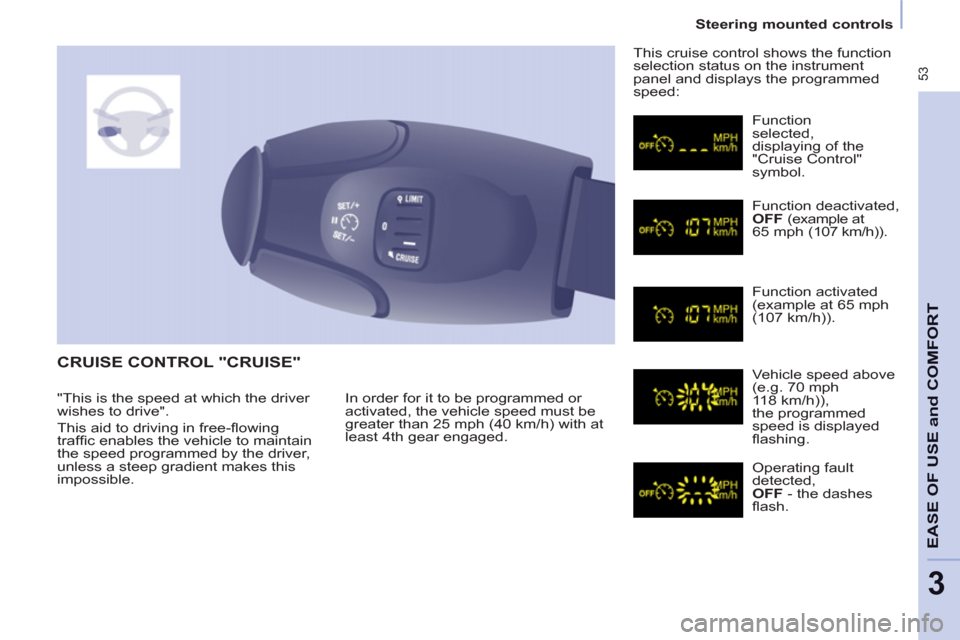
CRUISE CONTROL "CRUISE"
In order for it to be programmed or
activated, the vehicle speed must be
greater than 25 mph (40 km/h) with at
least 4th gear engaged. This cruise control shows the function
selection status on the instrument
panel and displays the programmed
speed:
Function
selected,
displaying of the
"Cruise Control"
symbol.
Function deactivated,
OFF (example at
65 mph (107 km/h)).
Function activated
(example at
65 mph(107 km/h)).
Vehicle speed above
(e.g. 7
0 mph118 km/h)),
the programmed
speed is displayed
fl ashing.
Operating fault
detected,
OFF - the dashes
fl ash. "This is the speed at which the driver
wishes to drive".
This aid to driving in free-fl owing
traffi c enables the vehicle to maintain
the speed programmed by the driver,
unless a steep gradient makes this
impossible.
Page 56 of 232
54
Steering mounted controls
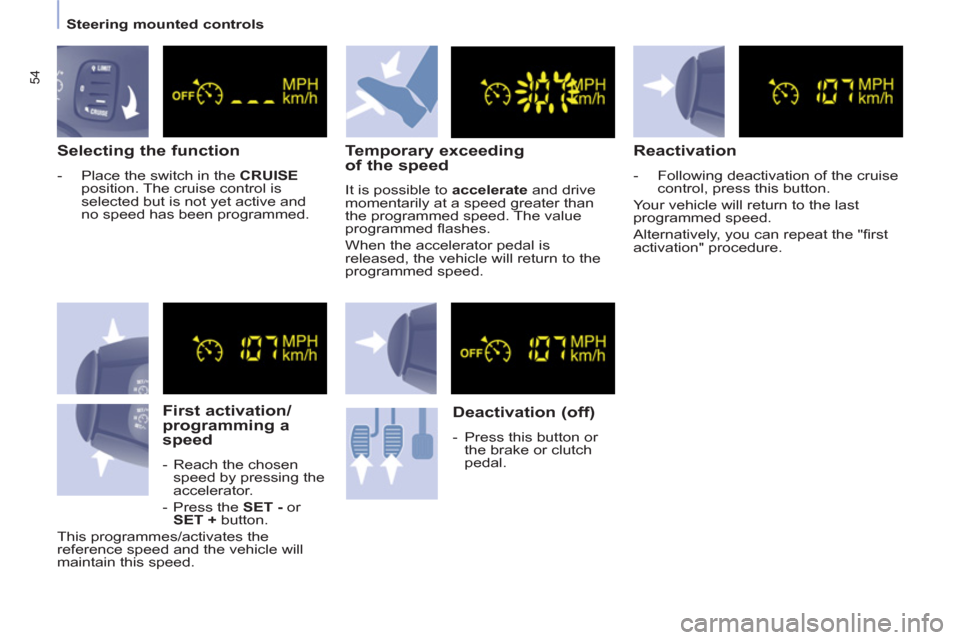
Selecting the function
- Place the switch in the CRUISE
position. The cruise control is
selected but is not yet active and
no speed has been programmed.
First activation/
programming a
speed
- Reach the chosen
speed by pressing the
accelerator.
- Press the SET - or
SET + button.
This programmes/activates the
reference speed and the vehicle will
maintain this speed.
Temporary exceeding
of the speed
It is possible to accelerate and drive
momentarily at a speed greater than
the programmed speed. The value
programmed fl ashes.
When the accelerator pedal is
released, the vehicle will return to the
programmed speed.
Deactivation (off)
- Press this button or
the brake or clutch
pedal.
Reactivation
- Following deactivation of the cruise
control, press this button.
Your vehicle will return to the last
programmed speed.
Alternatively, you can repeat the "fi rst
activation" procedure.
Page 57 of 232
55
Steering mounted controls
EASE OF USE
andCOMFOR
T
3
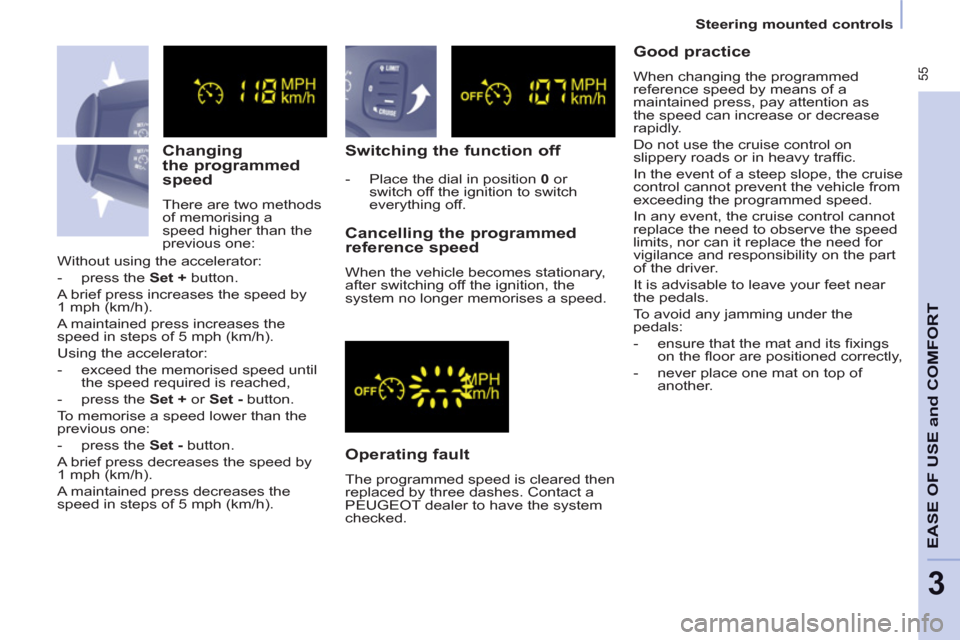
Changing
the programmed
speed
There are two methods
of memorising a
speed higher than the
previous one:
Switching the function off
Operating fault
The programmed speed is cleared then
replaced by three dashes. Contact a
PEUGEOT dealer to have the system
checked.
Cancelling the programmed
reference speed
When the vehicle becomes stationary,
after switching off the ignition, the
system no longer memorises a speed. Without using the accelerator:
- press the Set + button.
A brief press increases the speed by
1 mph (km/h).
A maintained press increases the
speed in steps of 5 mph (km/h).
Using the accelerator:
- exceed the memorised speed until
the speed required is reached,
- press the Set + or Set - button.
To memorise a speed lower than the
previous one:
- press the Set - button.
A brief press decreases the speed by
1 mph (km/h).
A maintained press decreases the
speed in steps of 5 mph (km/h).
- Place the dial in position 0 or
switch off the ignition to switch
everything off.
Good practice
When changing the programmed
reference speed by means of a
maintained press, pay attention as
the speed can increase or decrease
rapidly.
Do not use the cruise control on
slippery roads or in heavy traffi c.
In the event of a steep slope, the cruise
control cannot prevent the vehicle from
exceeding the programmed speed.
In any event, the cruise control cannot
replace the need to observe the speed
limits, nor can it replace the need for
vigilance and responsibility on the part
of the driver.
It is advisable to leave your feet near
the pedals.
To avoid any jamming under the
pedals:
- ensure that the mat and its fi xings
on the fl oor are positioned correctly,
- never place one mat on top of
another.
Page 58 of 232
56
Steering mounted controls
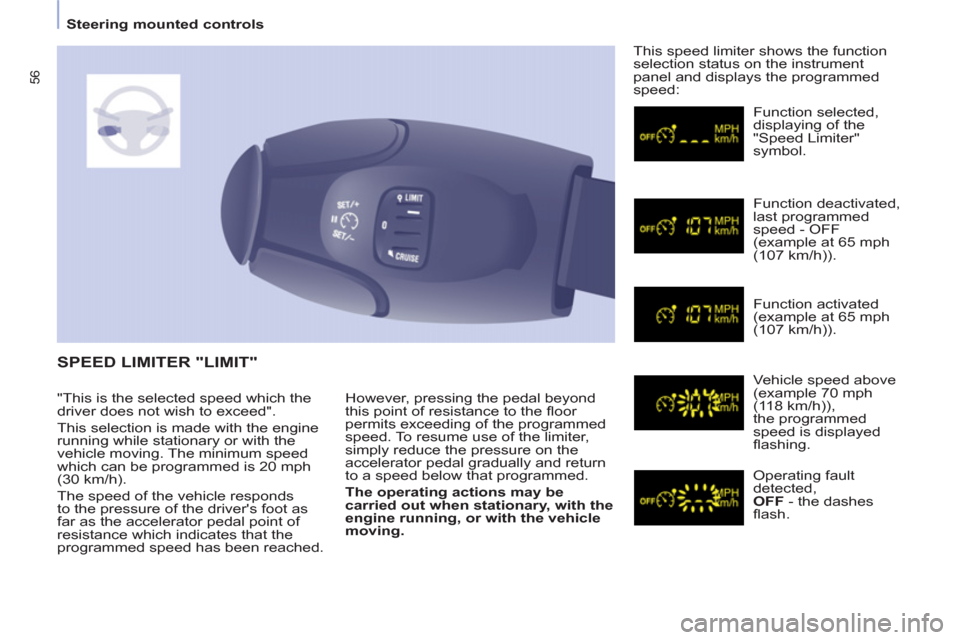
However, pressing the pedal beyond
this point of resistance to the fl oor
permits exceeding of the programmed
speed. To resume use of the limiter,
simply reduce the pressure on the
accelerator pedal gradually and return
to a speed below that programmed.
The operating actions may be
carried out when stationary, with the
engine running, or with the vehicle
moving. This speed limiter shows the function
selection status on the instrument
panel and displays the programmed
speed:
SPEED LIMITER "LIMIT"
Function selected,
displaying of the
"Speed Limiter"
symbol.
Function deactivated,
last programmed
speed - OFF
(example at 65 mph
(107 km/h)).
Function activated
(example at 65 mph
(107 km/h)).
Vehicle speed above
(example 70 mph
(118 km/h)),
the programmed
speed is displayed
fl ashing.
Operating fault
detected,
OFF - the dashes
fl ash. "This is the selected speed which the
driver does not wish to exceed".
This selection is made with the engine
running while stationary or with the
vehicle moving. The minimum speed
which can be programmed is 20 mph
(30 km/h).
The speed of the vehicle responds
to the pressure of the driver's foot as
far as the accelerator pedal point of
resistance which indicates that the
programmed speed has been reached.
Page 59 of 232
57
Steering mounted controls
andCOMFOR
T
3
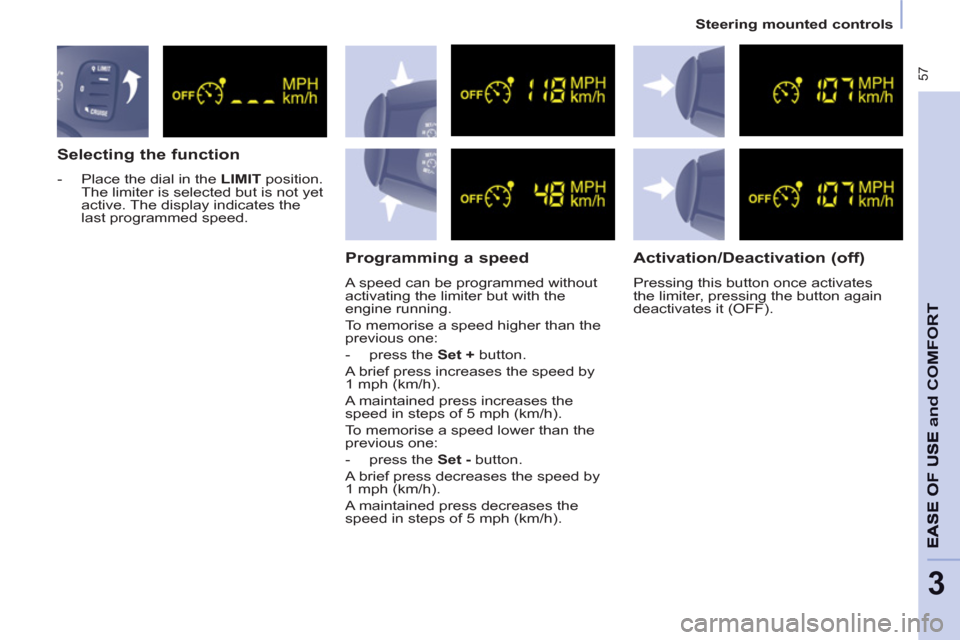
Selecting the function
- Place the dial in the LIMIT position.
The limiter is selected but is not yet
active. The display indicates the
last programmed speed.
Programming a speed
A speed can be programmed without
activating the limiter but with the
engine running.
To memorise a speed higher than the
previous one:
- press the Set + button.
A brief press increases the speed by
1 mph (km/h).
A maintained press increases the
speed in steps of 5 mph (km/h).
To memorise a speed lower than the
previous one:
- press the Set - button.
A brief press decreases the speed by
1 mph (km/h).
A maintained press decreases the
speed in steps of 5 mph (km/h).
Activation/Deactivation (off)
Pressing this button once activates
the limiter, pressing the button again
deactivates it (OFF).