2011 Peugeot Partner radio
[x] Cancel search: radioPage 5 of 200
3
Contents
CONTENT
S
Emergencyor assistance 9.1
Peugeot Connect Navigation 9.3
Bluetooth telephone 9.23
Peugeot Connect Sound 9.35
Peugeot Connect USB 9.42
Bluetooth 9.45
Towing a trailer 98
Other accessories 99
Trade range 99
Telematic unit 100
Opening the bonnet 102
Petrol engine 103
Diesel engine 104
Levels 105
Checks 107
Fuel 109
Circuit disarmed 110
Diesel
repriming pump 110
Battery 111
Changing a wheel 112
Removable
snow screen 116
Changing a bulb 117
a fuse 122
a windscreen
wiper blade 126
Being towed 127
Dimensions 128
Weights 133
Identifi cation features 134
Exterior 135
Instruments
and controls 136
Interior 138
Technical data -
Maintenance 139
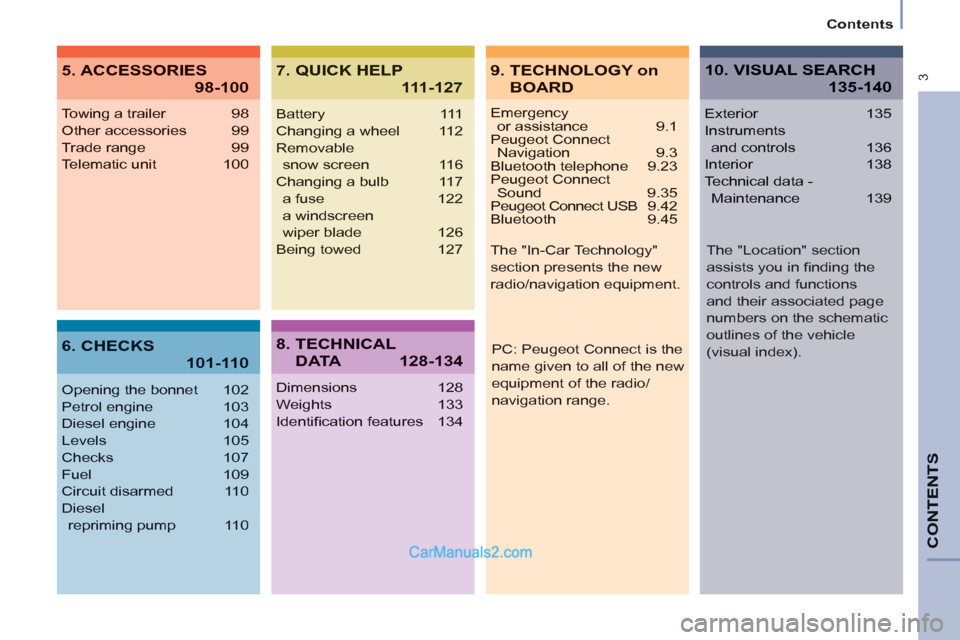
9. TECHNOLOGY on
BOARD
5. ACCESSORIES
98-100
7. QUICK HELP
111-127
10. VISUAL SEARCH
135-140
6. CHECKS
101-110
8. TECHNICAL
D ATA128-134
PC: Peugeot Connect is the
name given to all of the new
equipment of the radio/
navigation range. The "In-Car Technology"
section presents the new
radio/navigation equipment.
The "Location" section
assists you in fi nding the
controls and functions
and their associated page
numbers on the schematic
outlines of the vehicle
(visual index).
Page 36 of 200
34
Instruments and controls
Puncture
Stop immediately, avoiding any sudden
movement of the steering wheel and
the brakes.
Change the damaged (punctured or
very defl ated) tyre, and have the tyre
pressure checked as soon as possible.
Sensor(s) not detected
Under-infl ation detection is absent
from one (or several) tyre(s). Contact a
PEUGEOT dealer to replace the faulty
sensor(s).
This message is also displayed when
one of the tyres is away from the
vehicle (being repaired) or when a
wheel without a sensor is fi tted.
All repairs and changing of tyres on a
wheel fi tted with this system must be
carried out by a PEUGEOT dealer.
The tyre under-infl ation detection
system is a driving aid which does
not take the place of vigilance or the
responsibility of the driver.
This system does not remove the need
to have the tyre pressure checked
regularly (including the spare wheel), to
ensure that the dynamic performance
of the vehicle remains at its best and
to avoid premature wear of the tyres,
in particular in the case of arduous
driving (heavy load, high speed).
The system may temporarily be
disturbed by radio broadcasts on a
frequency close to it.
DETECTION
- CO (carbon monoxide),
- HC (unburnt hydrocarbons),
- NOx (nitrogen oxides) or particles,
detected by oxygen sensors placed
upstream and downstream of the
catalytic converters.
Therefore, the driver is warned of any
malfunction of this emission control
system by the lighting of this specifi c
warning lamp on the instrument panel.
There is a risk of damage to the
catalytic converter. Have it checked by
a PEUGEOT dealer.
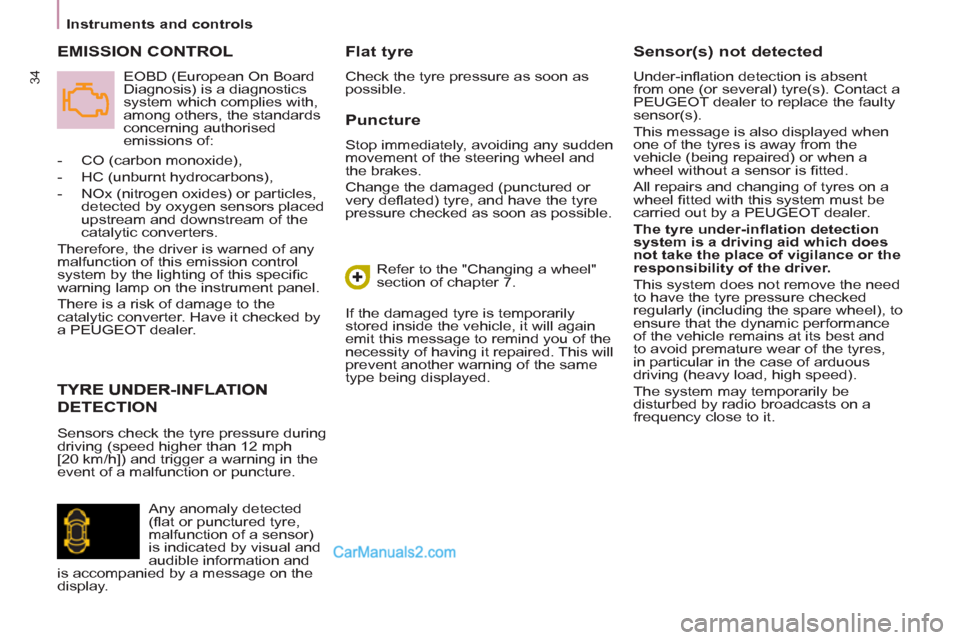
EMISSION CONTROL
Flat tyre
Check the tyre pressure as soon as
possible.
Refer to the "Changing a wheel"
section of chapter 7.
If the damaged tyre is temporarily
stored inside the vehicle, it will again
emit this message to remind you of the
necessity of having it repaired. This will
prevent another warning of the same
type being displayed.
Sensors check the tyre pressure during
driving (speed higher than 12 mph
[20 km/h]) and trigger a warning in the
event of a malfunction or puncture.
EOBD (European On Board
Diagnosis) is a diagnostics
system which complies with,
among others, the standards
concerning authorised
emissions of:
Any anomaly detected
(fl at or punctured tyre,
malfunction of a sensor)
is indicated by visual and
audible information and
is accompanied by a message on the
display.
Page 102 of 200
100
Equipment
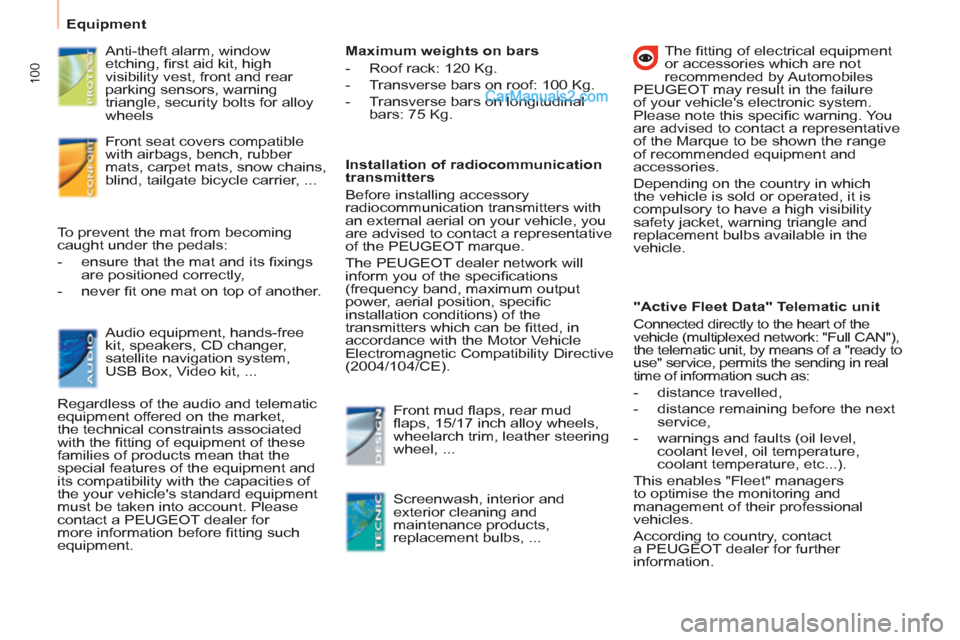
Anti-theft alarm, window
etching, fi rst aid kit, high
visibility vest, front and rear
parking sensors, warning
triangle, security bolts for alloy
wheels
Front seat covers compatible
with airbags, bench, rubber
mats, carpet mats, snow chains,
blind, tailgate bicycle carrier, ...
Audio equipment, hands-free
kit, speakers, CD changer,
satellite navigation system,
USB Box, Video kit, ... To prevent the mat from becoming
caught under the pedals:
- ensure that the mat and its fi xings
are positioned correctly,
- never fi t one mat on top of another.
Regardless of the audio and telematic
equipment offered on the market,
the technical constraints associated
with the fi tting of equipment of these
families of products mean that the
special features of the equipment and
its compatibility with the capacities of
the your vehicle's standard equipment
must be taken into account. Please
contact a PEUGEOT dealer for
more information before fi tting such
equipment.
Maximum weights on bars
- Roof rack: 120 Kg.
- Transverse bars on roof: 100 Kg.
- Transverse bars on longitudinal
bars: 75 Kg.
Installation of radiocommunication
transmitters
Before installing accessory
radiocommunication transmitters with
an external aerial on your vehicle, you
are advised to contact a representative
of the PEUGEOT marque.
The PEUGEOT dealer network will
inform you of the specifi cations
(frequency band, maximum output
power, aerial position, specifi c
installation conditions) of the
transmitters which can be fi tted, in
accordance with the Motor Vehicle
Electromagnetic Compatibility Directive
(2004/104/CE).
Front mud fl aps, rear mud
fl aps, 15/17 inch alloy wheels,
wheelarch trim, leather steering
wheel, ...
Screenwash, interior and
exterior cleaning and
maintenance products,
replacement bulbs, ...
The fi tting of electrical equipment
or accessories which are not
recommended by Automobiles
PEUGEOT may result in the failure
of your vehicle's electronic system.
Please note this specifi c warning. You
are advised to contact a representative
of the Marque to be shown the range
of recommended equipment and
accessories.
Depending on the country in which
the vehicle is sold or operated, it is
compulsory to have a high visibility
safety jacket, warning triangle and
replacement bulbs available in the
vehicle.
"Active Fleet Data" Telematic unit
Connected directly to the heart of the
vehicle (multiplexed network: "Full CAN"),
the telematic unit, by means of a "ready to
use" service, permits the sending in real
time of information such as:
- distance travelled,
- distance remaining before the next
service,
- warnings and faults (oil level,
coolant level, oil temperature,
coolant temperature, etc...).
This enables "Fleet" managers
to optimise the monitoring and
management of their professional
vehicles.
According to country, contact
a PEUGEOT dealer for further
information.
Page 139 of 200
9.3
The Peugeot Connect Navigation is protected in such away that it will only operate in your vehicle. If it is to be
installed in another vehicle, contact a PEUGEOT dealer for confi guration of the system.
Certain functions described in this handbook will
become available during the year.
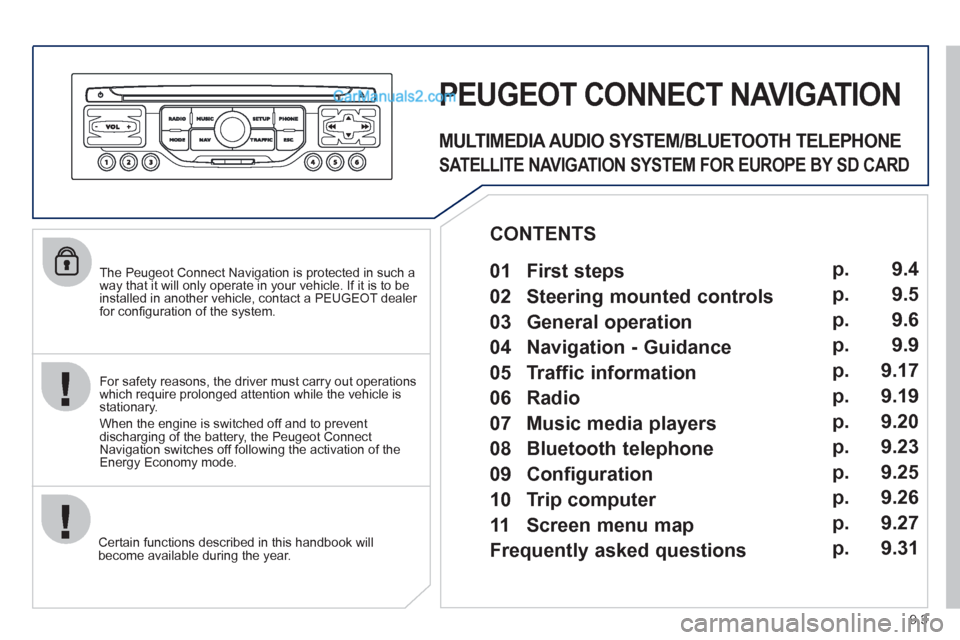
PEUGEOT CONNECT NAVIGATION
For safety reasons, the driver must carry out operations which require prolonged attention while the vehicle is stationary.
When the en
gine is switched off and to prevent
discharging of the battery, the Peugeot Connect
Navigation switches off following the activation of the Energy Economy mode.
MULTIMEDIA AUDIO SYSTEM/BLUETOOTH TELEPHONE
SATELLITE NAVIGATION SYSTEM FOR EUROPE BY SD CARD
01 First steps
CONTENTS
02 Steering mounted controls
03 General operation
04 Navigation - Guidance
05 Traffic information
06 Radio
07 Music media players
08 Bluetooth telephone
09 Configuration
10 Trip computer p.
p.
p.
p.
p.
p.
p.
p.
p.
p.
11 Screen menu map
Frequently asked questions p.
p. 9.4
9.5
9.6
9.9
9.17
9.19
9.20
9.23
9.25
9.26
9.27
9.31
Page 140 of 200
01
11
55
101
22
334466
131
111
99
144155
77881212161
9.4
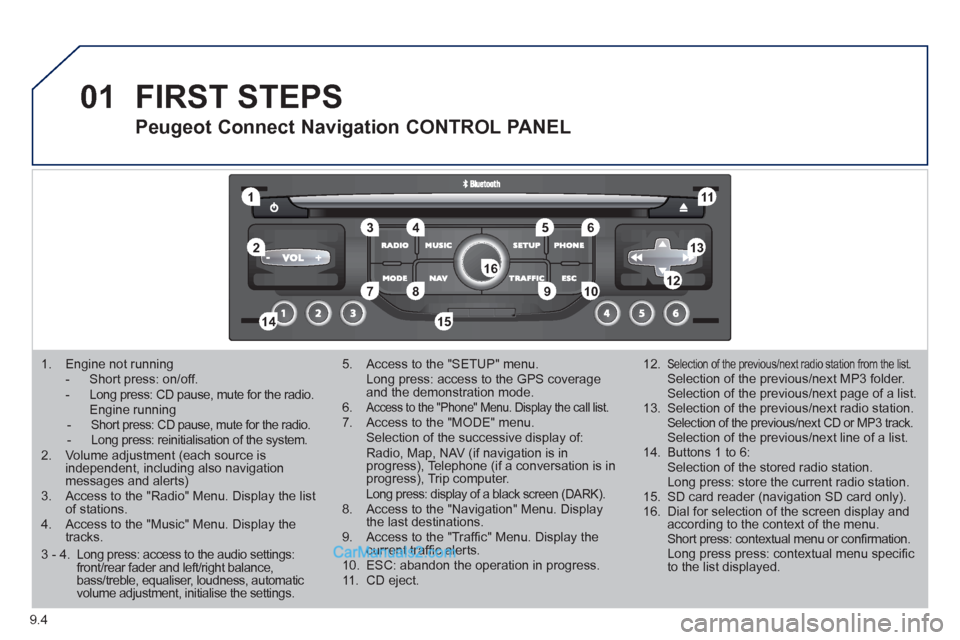
1. Engine not running
- Short press: on/off. - Long press: CD pause, mute for the radio. Engine running - Short press: CD pause, mute for the radio. - Long press: reinitialisation of the system.2. Volume adjustment (each source is independent, including also navigation messages and alerts)3. Access to the "Radio" Menu. Display the list of stations. 4. Access to the "Music" Menu. Display thetracks.
5. Access to the "SETUP" menu. Long press: access to the GPS coverage and the demonstration mode.6.Access to the "Phone" Menu. Display the call list. 7. Access to the "MODE" menu. Selection of the successive display of:Radio, Map, NAV (if navigation is inprogress), Telephone (if a conversation is inprogress), Trip computer. Long press: display of a black screen (DARK). 8. Access to the "Navigation" Menu. Display the last destinations.9. Access to the "Traffi c" Menu. Display thecurrent traffi c alerts. 10. ESC: abandon the operation in progress. 11. CD eject.
12.Selection of the previous/next radio station from the list. Selection of the previous/next MP3 folder. Selection of the previous/next page of a list.
13. Selection of the previous/next radio station. Selection of the previous/next CD or MP3 track. Selection of the previous/next line of a list.
14. Buttons 1 to 6: Selection of the stored radio station. Long press: store the current radio station.
15. SD card reader (navigation SD card only).
16. Dial for selection of the screen display andaccording to the context of the menu. Short press: contextual menu or confi rmation. Long press press: contextual menu specifi c to the list displayed.
FIRST STEPS
Peugeot Connect Navigation CONTROL PANEL
3 - 4. Long press: access to the audio settings: front/rear fader and left/right balance, bass/treble, equaliser, loudness, automatic volume adjustment, initialise the settings.
Page 141 of 200
02
9.5
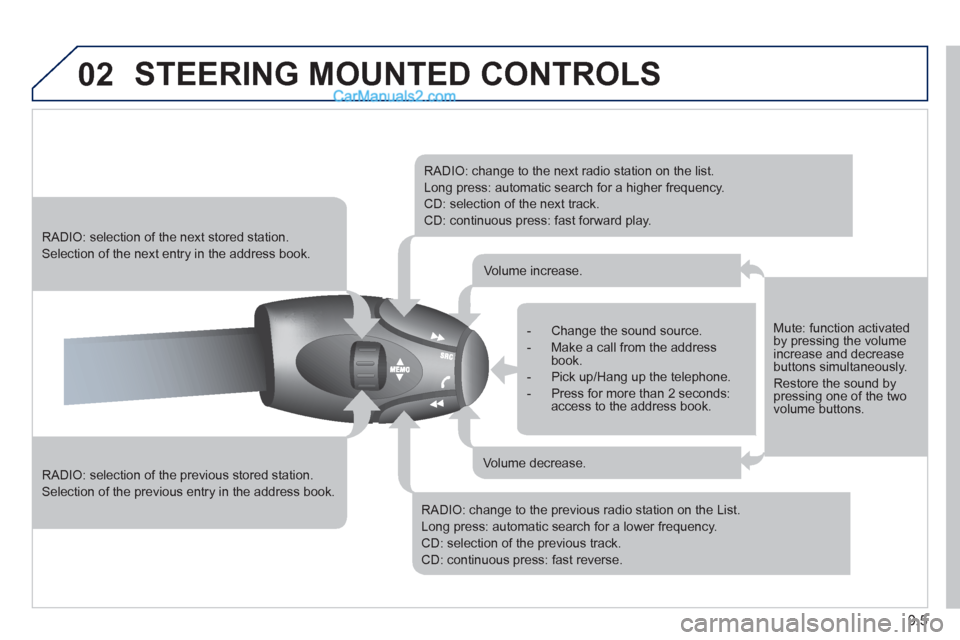
STEERING MOUNTED CONTROLS
RADIO: selection of the previous stored station.
Selection of the previous entry in the address book.
RADIO: selection of the next stored station.
Selection of the next entry in the address book.
RADIO: change to the next radio station on the list.
Long press: automatic search for a higher frequency.
CD: selection of the next track.
CD: continuous press: fast forward play.
RADIO: change to the previous radio station on the List.
Long press: automatic search for a lower frequency.
CD: selection of the previous track.
CD: continuous press: fast reverse.
- Change the sound source.
- Make a call from the address book.
- Pick up/Hang up the telephone.
- Press for more than 2 seconds:access to the address book.
Volume increase.
Volume decrease.
Mute: function activated by pressing the volumeincrease and decreasebuttons simultaneously.
Restore the sound bypressing one of the two volume buttons.
Page 142 of 200
03
9.6
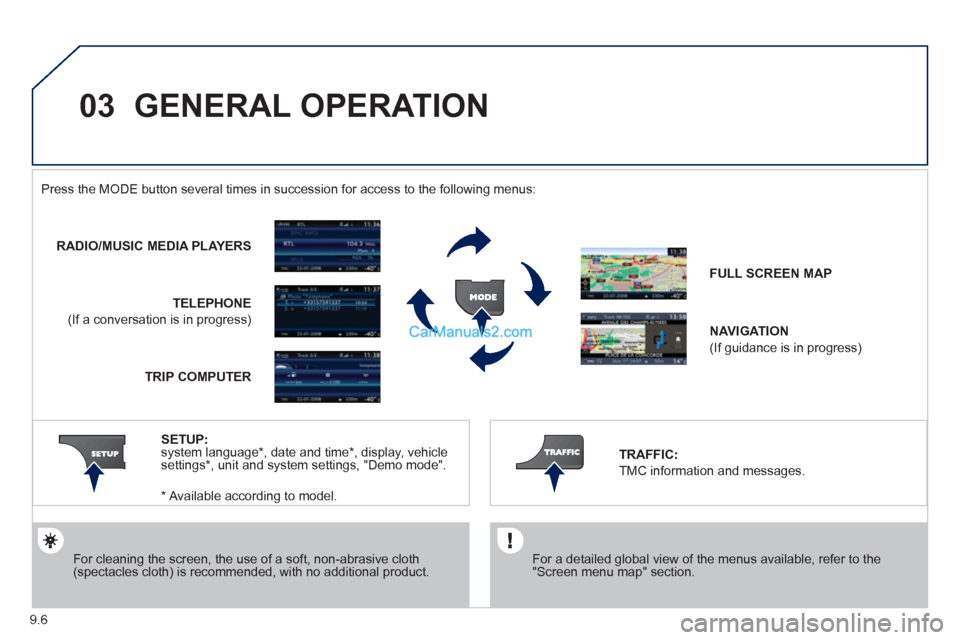
GENERAL OPERATION
For a detailed global view of the menus available, refer to the"Screen menu map" section.
Press the M
ODE button several times in succession for access to the following menus:
For cleaning the screen, the use of a soft, non-abrasive cloth (spectacles cloth) is recommended, with no additional product.
RADIO/MUSIC MEDIA PLAYERS
TELEPHONE
(If a conversation is in progress)
FULL SCREEN MA
P
NAVIGATION
(If guidance is in progress)
SETUP
: system language * , date and time * , display, vehiclesettings * , unit and system settings, "Demo mode". TRAFFIC:
TMC information and messages.
* Available accordin
g to model. TRIP COMPUTE
R
Page 144 of 200
03
9.8
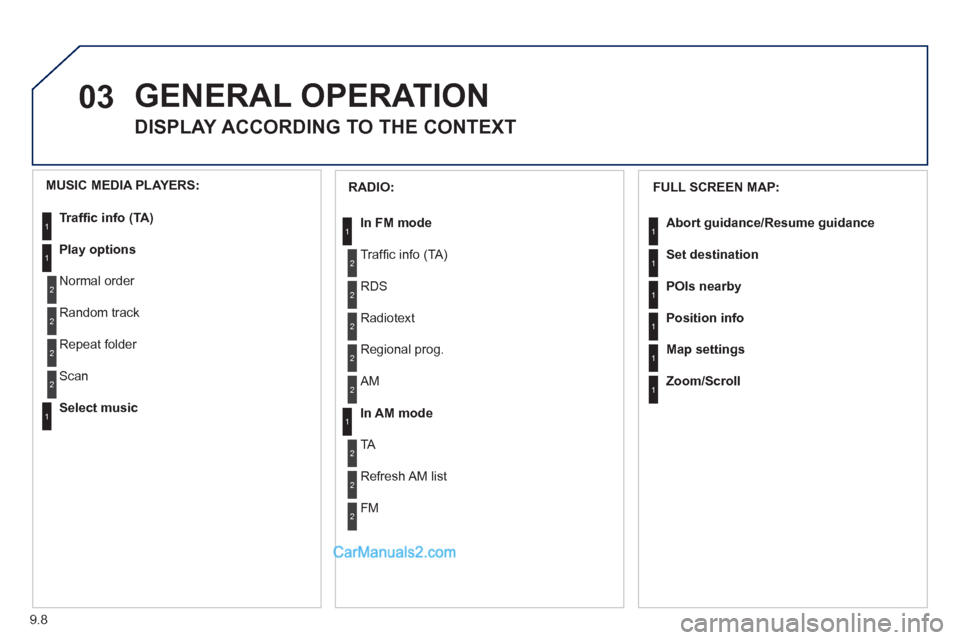
GENERAL OPERATION
DISPLAY ACCORDING TO THE CONTEXT
FULL SCREEN MAP:
Abort guidance/Resume guidance
Set destination
POIs nearb
y
Position info
Map settings
Zoom/Scroll
1
1
1
1
1
1
RADIO:
In FM mode
Traffi c info (TA)
RD
S
R
adiotext
Regional prog.
In AM mode
AM
TA
R
efresh AM list
FM
1
2
1
2
2
2
2
2
2
2
MUSIC MEDIA PLAYERS:
Traffi c info (TA)
Play options
Normal order
R
andom track
Re
peat folder
Select musi
c
Scan
1
1
2
2
2
2
1