2011 Peugeot Partner buttons
[x] Cancel search: buttonsPage 18 of 200
16
Access
Good practice
Take care not to allow the remote
control to come into contact with
grease, dust, rain or a damp
environment.
A heavy object attached to the key
(keyring, ...) weighing on the shaft of
the key in the switch, may cause a
malfunction.
REMOTE CONTROL
Programming the remote
control
Following changing of the remote
control battery or disconnection of the
vehicle battery, the remote control may
have to be reprogrammed.
Wait at least one minute before using
the remote control.
Insert the key in the ignition switch with
the buttons (padlocks) of the remote
control facing you.
Switch on the ignition.
Press the locking padlock for at
least fi ve seconds within the next
ten seconds.
Switch off the ignition.
Wait at least one minute before using
the remote control.
The remote control is now working
again. Use only identical batteries or
batteries of an equivalent type to those
recommended by PEUGEOT dealers.
Do not discard the remote control
batteries, they contain metals which
are harmful to the environment.
Deposit them at a PEUGEOT
dealership, or at any other approved
collection point.
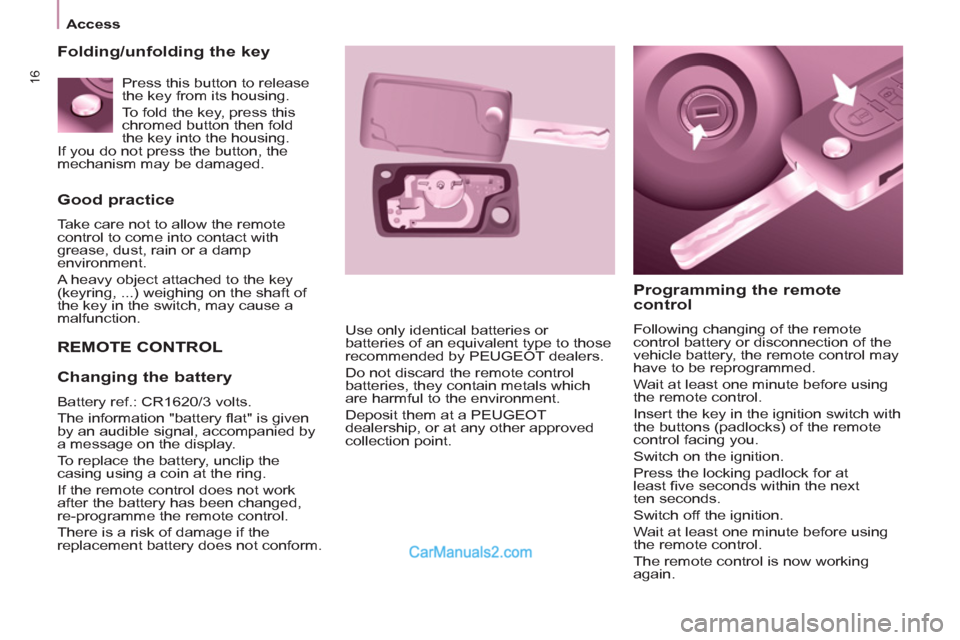
Folding/unfolding the key
Changing the battery
Battery ref.: CR1620/3 volts.
The information "battery fl at" is given
by an audible signal, accompanied by
a message on the display.
To replace the battery, unclip the
casing using a coin at the ring.
If the remote control does not work
after the battery has been changed,
re-programme the remote control.
There is a risk of damage if the
replacement battery does not conform. Press this button to release
the key from its housing.
To fold the key, press this
chromed button then fold
the key into the housing.
If you do not press the button, the
mechanism may be damaged.
Page 140 of 200
01
11
55
101
22
334466
131
111
99
144155
77881212161
9.4
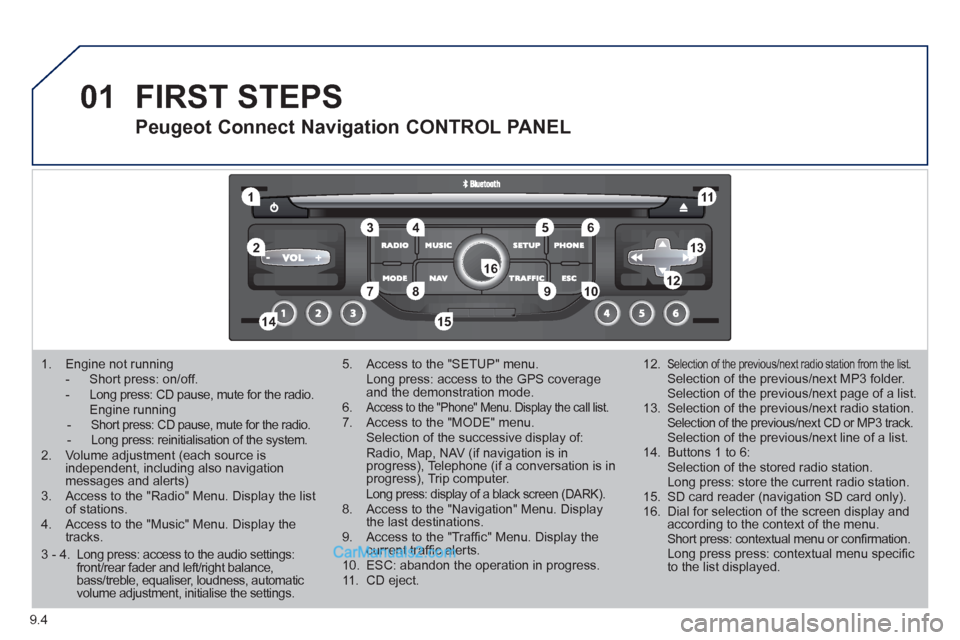
1. Engine not running
- Short press: on/off. - Long press: CD pause, mute for the radio. Engine running - Short press: CD pause, mute for the radio. - Long press: reinitialisation of the system.2. Volume adjustment (each source is independent, including also navigation messages and alerts)3. Access to the "Radio" Menu. Display the list of stations. 4. Access to the "Music" Menu. Display thetracks.
5. Access to the "SETUP" menu. Long press: access to the GPS coverage and the demonstration mode.6.Access to the "Phone" Menu. Display the call list. 7. Access to the "MODE" menu. Selection of the successive display of:Radio, Map, NAV (if navigation is inprogress), Telephone (if a conversation is inprogress), Trip computer. Long press: display of a black screen (DARK). 8. Access to the "Navigation" Menu. Display the last destinations.9. Access to the "Traffi c" Menu. Display thecurrent traffi c alerts. 10. ESC: abandon the operation in progress. 11. CD eject.
12.Selection of the previous/next radio station from the list. Selection of the previous/next MP3 folder. Selection of the previous/next page of a list.
13. Selection of the previous/next radio station. Selection of the previous/next CD or MP3 track. Selection of the previous/next line of a list.
14. Buttons 1 to 6: Selection of the stored radio station. Long press: store the current radio station.
15. SD card reader (navigation SD card only).
16. Dial for selection of the screen display andaccording to the context of the menu. Short press: contextual menu or confi rmation. Long press press: contextual menu specifi c to the list displayed.
FIRST STEPS
Peugeot Connect Navigation CONTROL PANEL
3 - 4. Long press: access to the audio settings: front/rear fader and left/right balance, bass/treble, equaliser, loudness, automatic volume adjustment, initialise the settings.
Page 141 of 200
02
9.5
STEERING MOUNTED CONTROLS
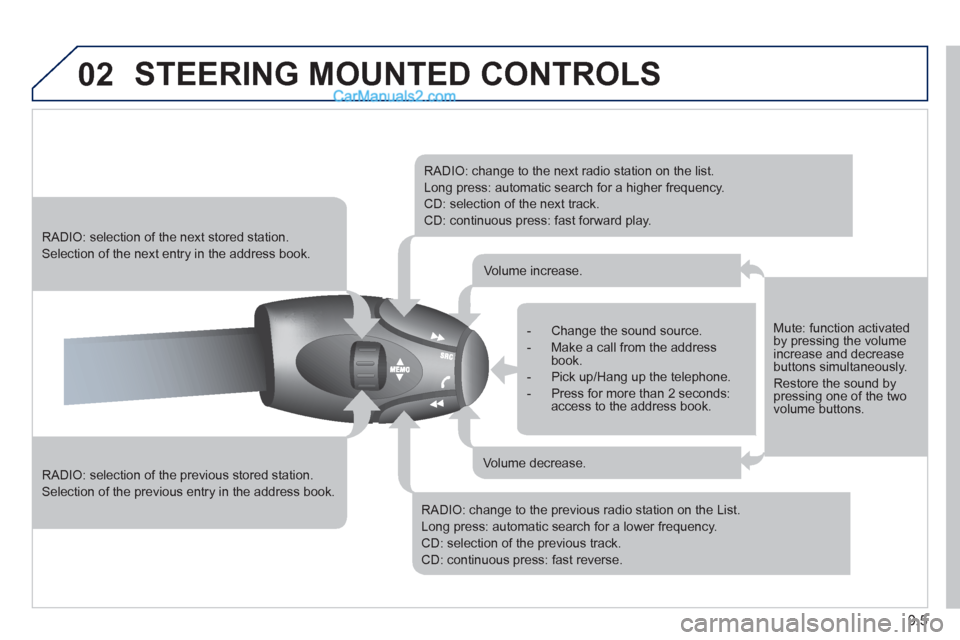
RADIO: selection of the previous stored station.
Selection of the previous entry in the address book.
RADIO: selection of the next stored station.
Selection of the next entry in the address book.
RADIO: change to the next radio station on the list.
Long press: automatic search for a higher frequency.
CD: selection of the next track.
CD: continuous press: fast forward play.
RADIO: change to the previous radio station on the List.
Long press: automatic search for a lower frequency.
CD: selection of the previous track.
CD: continuous press: fast reverse.
- Change the sound source.
- Make a call from the address book.
- Pick up/Hang up the telephone.
- Press for more than 2 seconds:access to the address book.
Volume increase.
Volume decrease.
Mute: function activated by pressing the volumeincrease and decreasebuttons simultaneously.
Restore the sound bypressing one of the two volume buttons.
Page 155 of 200
06
3 2 1 1
9.19
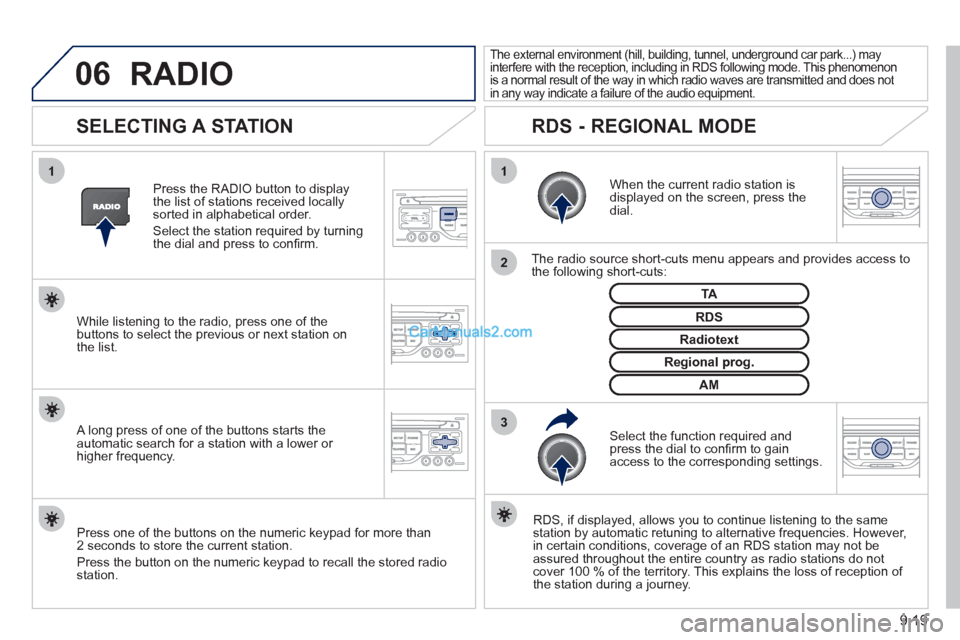
SELECTING A STATION
When the current radio station isdisplayed on the screen, press thedial.
The radio source short-cuts menu appears and provides access to
the following short-cuts:
Select the function re
quired and press the dial to confi rm to gain
access to the corresponding settings.
TA
RDS, if displayed, allows you to continue listening to the same station by automatic retuning to alternative frequencies. However,
in certain conditions, coverage of an RDS station may not be
assured throughout the entire country as radio stations do notcover 100 % of the territory. This explains the loss of reception of
the station during a journey.
The external environment (hill, building, tunnel, underground car park...) may
interfere with the reception, including in RDS following mode. This phenomenon
is a normal result of the way in which radio waves are transmitted and does not
in any way indicate a failure of the audio equipment.
RDS - REGIONAL MODE
Press the RADIO button to display
the list of stations received locally sorted in alphabetical order.
Select the station required by turningthe dial and press to confi rm.
Re
gional prog.
Radiotext
RDSWhile listening to the radio, press one of the
buttons to select the previous or next station on
the list.
Press one o
f the buttons on the numeric keypad for more than
2 seconds to store the current station.
Press the button on the numeric keypad to recall the stored radio
station.
AM
A long press of one of the buttons starts theautomatic search for a station with a lower or
higher frequency.
RADIO
Page 157 of 200
07
3 2 1
6
4
5
9.21
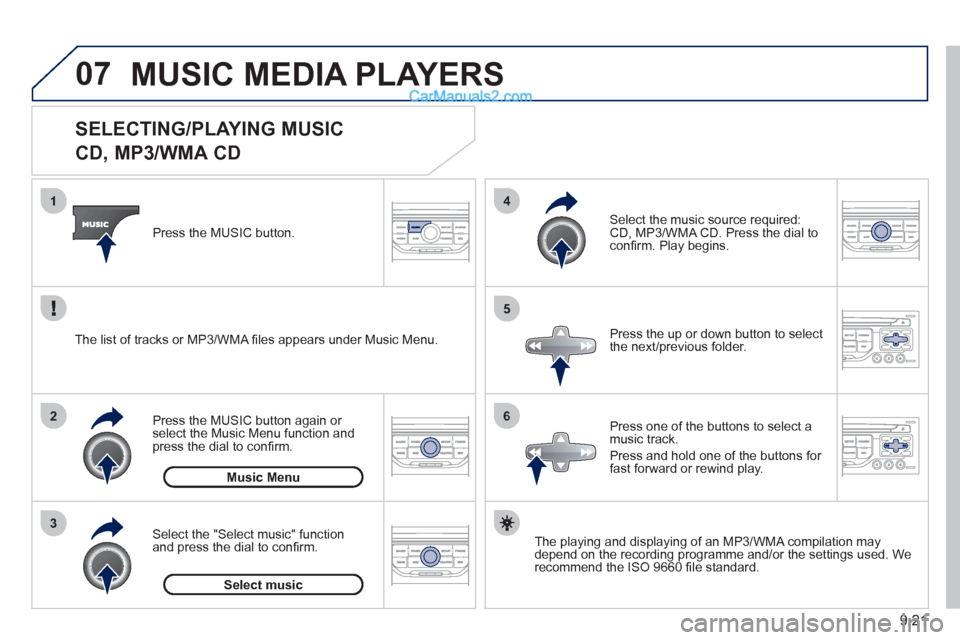
SELECTING/PLAYING MUSIC
CD, MP3/WMA CD
The playing and displaying of an MP3/WMA compilation may
depend on the recording programme and/or the settings used. We
recommend the ISO 9660 fi le standard. Press the M
USIC button.
Select the "Select music" function
and press the dial to confi rm.
Press the up or down button to select
the next
/previous folder.
Select the music source required:
CD, MP3/WMA CD. Press the dial to
confi rm. Play begins.
Select music Press the MUSIC button a
gain or select the Music Menu function and press the dial to confi rm.
Pr
ess one of the buttons to select amusic track.
Pr
ess and hold one of the buttons for
fast forward or rewind play. Music Menu The list of tracks or MP3/WMA fi les a
ppears under Music Menu.
MUSIC MEDIA PLAYERS
Page 172 of 200
9.36
01
1
22
10101111
133144155
33445566778899
122
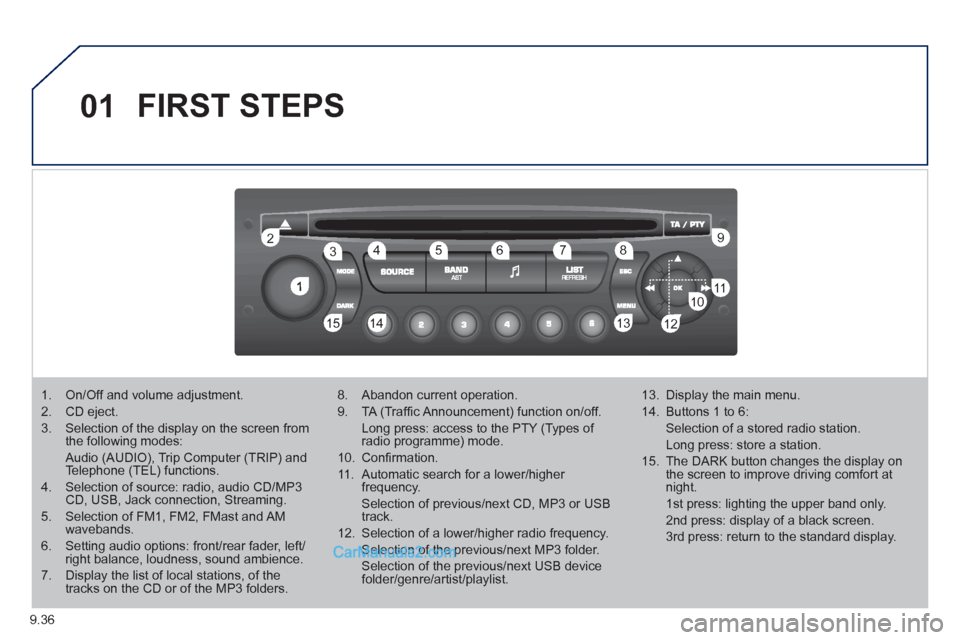
FIRST STEPS
1. On/Off and volume adjustment.
2. CD eject.
3. Selection of the display on the screen from the following modes:
Audio (AUDIO), Trip Computer (TRIP) and Telephone (TEL) functions.
4. Selection of source: radio, audio CD/MP3CD, USB, Jack connection, Streaming.
5. Selection of FM1, FM2, FMast and AMwavebands.
6. Setting audio options: front/rear fader, left/right balance, loudness, sound ambience.
7. Display the list of local stations, of thetracks on the CD or of the MP3 folders.
8. Abandon current operation.
9. TA (Traffi c Announcement) function on/off.
Long press: access to the PTY (Types of radio programme) mode.
10. Confi rmation.
11. Automatic search for a lower/higher frequency.
Selection of previous/next CD, MP3 or USB track.
12. Selection of a lower/higher radio frequency.
Selection of the previous/next MP3 folder.
Selection of the previous/next USB devicefolder/genre/artist/playlist.
13. Display the main menu.
14. Buttons 1 to 6:
Selection of a stored radio station.
Long press: store a station.
15. The DARK button changes the display on the screen to improve driving comfort at night.
1st press: lighting the upper band only.
2nd press: display of a black screen.
3rd press: return to the standard display.
Page 173 of 200
9.37
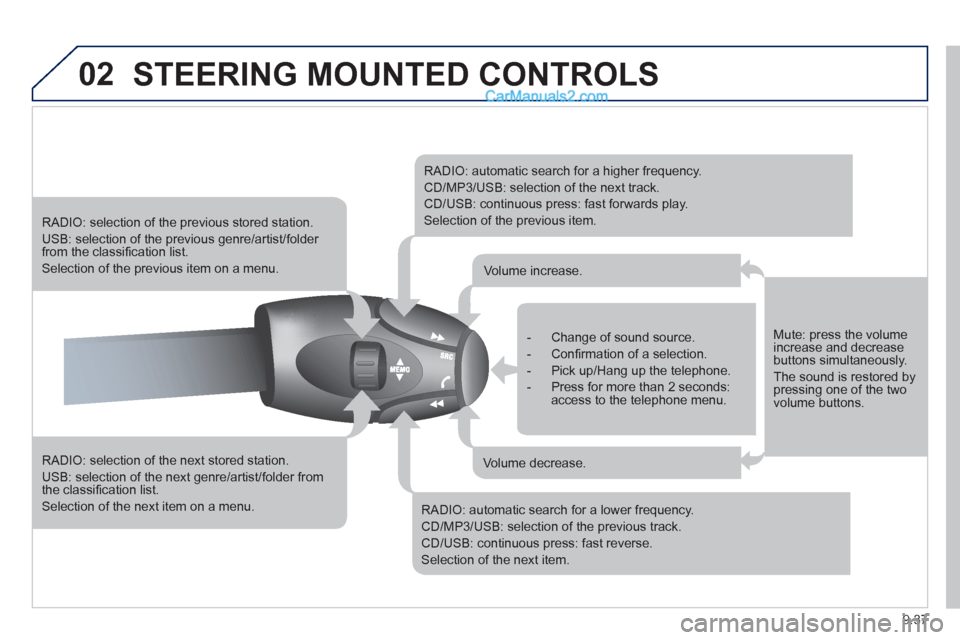
02STEERING MOUNTED CONTROLS
RADIO: selection of the next stored station.
USB: selection of the next genre/artist/folder from the classifi cation list.
Selection of the next item on a menu.
RADIO: selection of the previous stored station.
USB: selection of the previous genre/artist/folder from the classifi cation list.
Selection of the previous item on a menu.
RADIO: automatic search for a higher frequency.
CD/MP3/USB: selection of the next track.
CD/USB: continuous press: fast forwards play.
Selection of the previous item.
RADIO: automatic search for a lower frequency.
CD/MP3/USB: selection of the previous track.
CD/USB: continuous press: fast reverse.
Selection of the next item.
- Change of sound source.
- Confi rmation of a selection.
- Pick up/Hang up the telephone.
- Press for more than 2 seconds:access to the telephone menu.
Volume increase.
Volume decrease.
Mute: press the volumeincrease and decreasebuttons simultaneously.
The sound is restored by pressing one of the two volume buttons.
Page 175 of 200
9.39
04
1
2
3
4
1
2
3
4
AUDIO
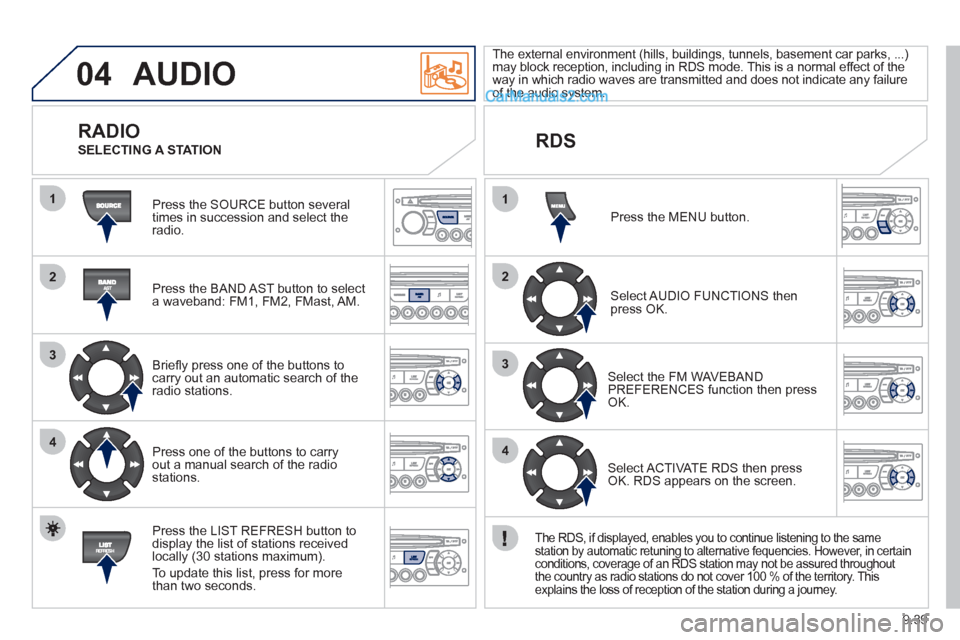
Press the SOURCE button several
times in succession and select theradio.
Press the BAND A
ST button to select
a waveband: FM1, FM2, FMast, AM.
Briefl
y press one of the buttons tocarry out an automatic search of theradio stations.
Press one o
f the buttons to carry out a manual search of the radio stations.
Press the LI
ST REFRESH button to
display the list of stations received
locally (30 stations maximum).
To update this list, press for more
t
han two seconds. The external environment
(hills, buildings, tunnels, basement car parks, ...) may block reception, including in RDS mode. This is a normal effect of the
way in which radio waves are transmitted and does not indicate any failure of the audio system.
RDS
RADIO
SELECTING A STATION
Pr
ess the MENU button.
Select AUDIO FUNCTIONS thenpress OK.
Select the FM WAVEBANDPREFERENCES function then pressOK.
Select ACTIVATE RDS then pressOK. RDS appears on the screen.
The RDS, if displayed, enables you to continue listening to the same
station by automatic retuning to alternative fequencies. However, in certain conditions, coverage of an RDS station may not be assured throughout
the country as radio stations do not cover 100 % of the territory. This explains the loss of reception of the station during a journey.