Page 54 of 312

Black plate (52,1)
Model "R35-N" EDITED: 2009/ 10/ 30
4. Highlight the correct street of the destina-tion from the list and push .
INFO:
In some cases, when a street name has
been entered, the number of matching
destinations in the “Matches” column may
be different from the number displayed on
the list screen. If this occurs, enter more
characters to further reduce the number of
matches.
5. The entire route is shown on the map. Highlight [Start] after confirming the location
of the displayed dest ination, and push
. The system sets the destination
to the selected location and starts calculat-
ing a route.
INFO:
Even after setting a destination, the location
of the destination can be adjusted, the route
can be stored, etc.“PROCEDURESAFTERSETTING
DESTINATION” page 2-43Setting by voice command
1. Push <
>located on the steering wheel.
2. After the tone sounds, speak a command.
To set the destination from a street address:
“Navigation” “Address” (Standard Mode)
“Address” (Alternate Command Mode)
INFO:
When using a voice command to set a street
name, it is recommended that the complete
street name is stated. Examples:
Correct input - North Elm Street
East Jefferson Boulevard
Incorrect input - Elm Street East Jefferson
FINDING PLACEThere are 3 methods that can be used to set the
destination to places of interest: typing the
name, choosing a category or selecting a
ZAGAT reviewed location. To help improve
searching, different start points can be chosen
to search from such as near current location,
near the destination or city center.Finding nearby place1. Push.
2. Highlight [Places] and push .
2-26
Navigation
Page 55 of 312
![NISSAN GT-R 2011 Owners Manual Black plate (53,1)
Model "R35-N" EDITED: 2009/ 10/ 30
3. Highlight the preferred nearby category fromthe list and push <ENTER>.
A list screen is displayed.
INFO:
Highlight [Customize Nearby Places] to](/manual-img/5/58175/w960_58175-54.png "NISSAN GT-R 2011 Owners Manual Black plate (53,1)
Model \"R35-N\" EDITED: 2009/ 10/ 30
3. Highlight the preferred nearby category fromthe list and push <ENTER>.
A list screen is displayed.
INFO:
Highlight [Customize Nearby Places] to")
Black plate (53,1)
Model "R35-N" EDITED: 2009/ 10/ 30
3. Highlight the preferred nearby category fromthe list and push .
A list screen is displayed.
INFO:
Highlight [Customize Nearby Places] to
customize the nearby places list to show
categories that are frequently used.
4. Highlight the preferred destination from the list, and push . The position of the selected location is displayed in the
preview on the right side of the screen.
INFO:
. A maximum of 100 facilities can be
displayed on the list screen.
. If the suggested route is already set, the
system displays the facilities located
along the route. To display all the icons,
deactivate [Show Along Route].
5. The entire route is shown on the map. Highlight [Start] after confirming the location
of the displayed dest ination, and push
. The system sets the destination
to the selected location and starts calculat-
ing a route.
INFO:
If there is a route already set, the newly selected
location can substitute a previously set destina-
tion or can be added to a route already set.
Other settings:The destination can also be set by pushing
in the current or scrolled location
map screen and selecting [Nearby Places].
Setting by voice command
1. Push <
>located on the steering wheel.
2. After the tone sounds, speak a command.
To display the nearby category list and select the
destination from it:
“Navigation” “Places” (Standard Mode)
“Places” (Alternate Command Mode)
Navigation
2-27
Page 60 of 312
![NISSAN GT-R 2011 Owners Manual Black plate (58,1)
Model "R35-N" EDITED: 2009/ 10/ 30
10. The entire route is shown on the map.Highlight [Start] after confirming the location
of the displayed destination and pushing
<ENTER> . The sy](/manual-img/5/58175/w960_58175-59.png "NISSAN GT-R 2011 Owners Manual Black plate (58,1)
Model \"R35-N\" EDITED: 2009/ 10/ 30
10. The entire route is shown on the map.Highlight [Start] after confirming the location
of the displayed destination and pushing
<ENTER> . The sy")
Black plate (58,1)
Model "R35-N" EDITED: 2009/ 10/ 30
10. The entire route is shown on the map.Highlight [Start] after confirming the location
of the displayed destination and pushing
. The system sets the destination
to the selected location and starts calculat-
ing a route.
INFO:
Even after setting a destination, the location
of the destination can be adjusted, the route
can be stored, etc.“PROCEDURES AFTER SETTING
DESTINATION” page 2-43
*C2009 Zagat Survey, LLC. Zagat Survey is a
registered trademark of Zagat Survey, LLC.SETTING HOME AS DESTINATIONThe home location can be set as the destination
to which the system calculates a route. This
function is especially useful when searching for
a route to return to the home location.1. Push .
2. Highlight [Home] and push .
3. The home location is displayed, and the
systemsetsthehomelocationasthe
destination.
INFO:
If the home location is not stored yet, the
system will automatically display a screen for
storing it.“STORING LOCATION” page 2-71
4. The entire route to the home location is shown on the map. Highlight [Start] after
confirming the location of the displayed
destination, and push .The
system sets the destination to the selected
location and starts calculating a route.
Setting by voice command
1. Push <
>located on the steering wheel.
2. After the tone sounds, speak a command.
2-32
Navigation
Page 62 of 312

Black plate (60,1)
Model "R35-N" EDITED: 2009/ 10/ 30
to the selected location and starts calculat-
ing a route.
INFO:
Even after setting a destination, the location of
the destination can be adjusted, the route can
be stored, etc.“PROCEDURES AFTER SETTING DES-
TINATION” page 2-43Setting by voice command
1. Push <
>located on the steering wheel.
2. After the tone sounds, speak a command.
To set the destination from the Address Book:
“Navigation” “Address Book” (Standard Mode)
“Address book” (Alternate Command Mode)
SETTING PREVIOUS DESTINATIONIt is possible to set the destination to a location
that has been previously set as a destination and
have the system calculate a route. Up to 300
previous destinations will be automatically
stored.
If the number of previous destinations exceeds
300, the oldest one will be replaced by the
newest one.1. Push .
2. Highlight [Previous Destinations] and push . A list screen is displayed.
3. Highlight the preferred destination from the
list and push .
INFO:
The list can be sorted by selecting [By Date]
or [By Name]. Highlight [By Date] to sort the
list in chronological order. Highlight [By
Name] to sort the list in alphabetical order.
4. The entire route is shown on the map. Highlight [Start] after confirming the location
2-34
Navigation
Page 63 of 312
Black plate (61,1)
Model "R35-N" EDITED: 2009/ 10/ 30
of the displayed destination, and push
. The system sets the destination
to the selected location and starts calculat-
ing a route.
INFO:
Even after setting a destination, the location of
the destination can be adjusted, the route can
be stored, etc.“PROCEDURES AFTER SETTING DES-
TINATION” page 2-43Setting by voice command
1. Push <
>located on the steering wheel.
2. After the tone sounds, speak a command.
To display the previous destinations list:
“Navigation” “Previous Destinations” (Standard
Mode)
“Previous Destinations” (Alternate Command
Mode)
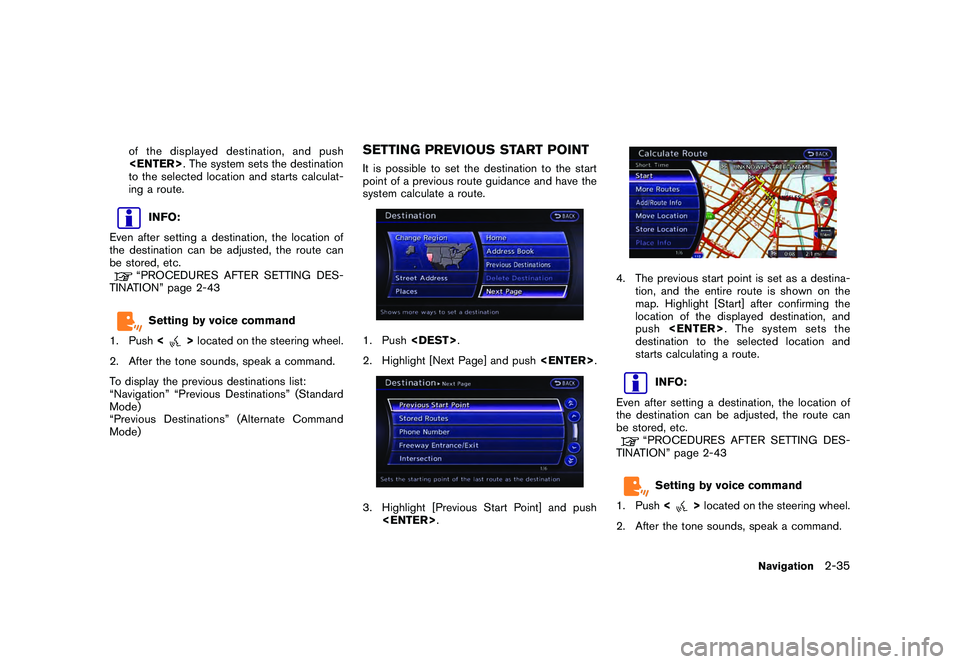
SETTING PREVIOUS START POINTIt is possible to set the destination to the start
point of a previous route guidance and have the
system calculate a route.1. Push .
2. Highlight [Next Page] and push .3. Highlight [Previous Start Point] and push
.
4. The previous start point is set as a destina-
tion, and the entire route is shown on the
map. Highlight [Start] after confirming the
location of the displayed destination, and
push . The system sets the
destination to the selected location and
starts calculating a route.
INFO:
Even after setting a destination, the location of
the destination can be adjusted, the route can
be stored, etc.“PROCEDURES AFTER SETTING DES-
TINATION” page 2-43Setting by voice command
1. Push <
>located on the steering wheel.
2. After the tone sounds, speak a command.
Navigation
2-35
Page 71 of 312
![NISSAN GT-R 2011 Owners Manual Black plate (69,1)
Model "R35-N" EDITED: 2009/ 10/ 30
2. Select [Delete Destination] and press<EN-
TER>.3. A confirmation message is displayed. Select [Yes] and press <ENTER>.
The destination and the](/manual-img/5/58175/w960_58175-70.png "NISSAN GT-R 2011 Owners Manual Black plate (69,1)
Model \"R35-N\" EDITED: 2009/ 10/ 30
2. Select [Delete Destination] and press<EN-
TER>.3. A confirmation message is displayed. Select [Yes] and press <ENTER>.
The destination and the")
Black plate (69,1)
Model "R35-N" EDITED: 2009/ 10/ 30
2. Select [Delete Destination] and press
TER>.3. A confirmation message is displayed. Select [Yes] and press .
The destination and the waypoints are
deleted.
INFO:
The deleted destination and waypoints are not
able to be reactivated.Setting by voice command
1. Push <
>on the steering wheel.
2. After the tone sounds, speak a command.
To delete a destination and all waypoints:
“Delete Destination” (Alternate Command
Mode)
PROCEDURES AFTER SETTING
DESTINATIONAfter performing a route search, the route
guidance can be immediately started. Also, it is
possible to confirm or change a route.Available items after setting destination
. [Start]:
Starts route guidance to the selected
destination.
“Starting route guidance” page 2-44
. [More Routes]:
Displays 3 alternative routes.“Selecting route” page 2-44 .
[Add/Route Info]:
Displays the route information. A destination
or a waypoint can also be added.
“Confirming route” page 2-45
. [Move Location]:
Displays a map screen. The location of the
destination can be adjusted.“Moving location of destination” page
2-46
. [Store Location]:
Stores the location in the Address Book.“Storing location” page 2-47
. [Place Info]:
Displays information about the facility that
has been set as the destination, if it is
included in the map data.“Viewing information about searched
location” page 2-47INFO:
. If no operations have been performed on the
system for several seconds, [Start] is auto-
matically selected, and the system starts
route guidance.
. When using waypoints, [More Routes] is
disabled. After the route is started, push
then select [Edit/Add to
Route] to change the route between each
waypoint.
Navigation
2-43
ROUTE GUIDANCE
Page 83 of 312
Black plate (81,1)
Model "R35-N" EDITED: 2009/ 10/ 30
Setting by voice command
1. Push <
>located on the steering wheel.
2. After the tone sounds, speak a command.
To cancel a route:
“Cancel Route” (Alternate Command Mode)
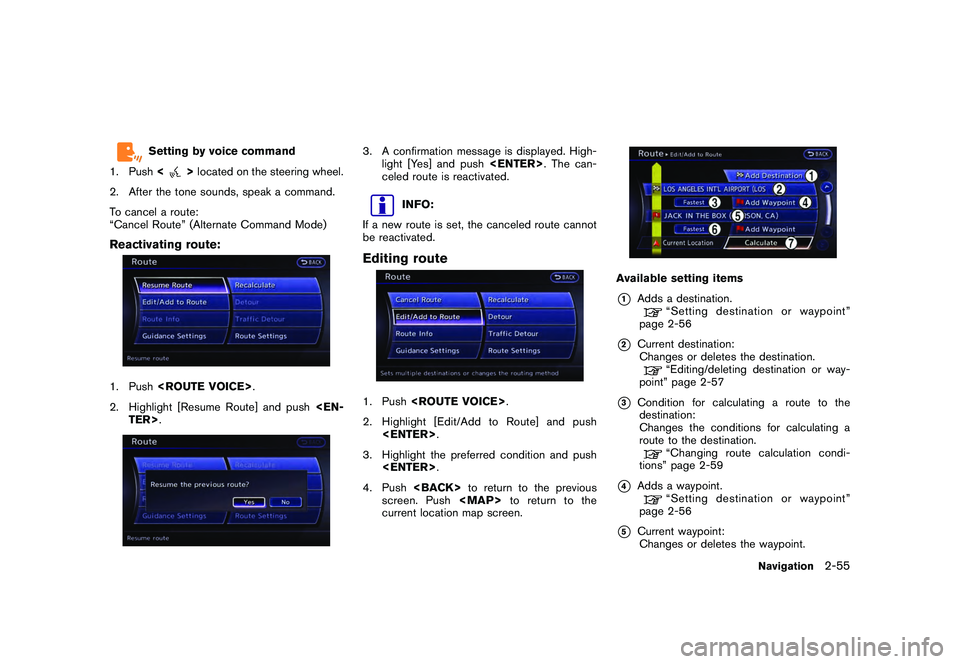
Reactivating route:1. Push .
2. Highlight [Resume Route] and push
TER>.
3. A confirmation message is displayed. High- light [Yes] and push . The can-
celed route is reactivated.
INFO:
If a new route is set, the canceled route cannot
be reactivated.
Editing route1. Push .
2. Highlight [Edit/Add to Route] and push .
3. Highlight the preferred condition and push .
4. Push to return to the previous
screen. Push
Page 90 of 312
![NISSAN GT-R 2011 Owners Manual Black plate (88,1)
Model "R35-N" EDITED: 2009/ 10/ 30
Available setting items
.[Guidance Voice]:
Activates or deactivates voice guidance. The
indicator illuminates if voice guidance is
activated.
. [G](/manual-img/5/58175/w960_58175-89.png "NISSAN GT-R 2011 Owners Manual Black plate (88,1)
Model \"R35-N\" EDITED: 2009/ 10/ 30
Available setting items
.[Guidance Voice]:
Activates or deactivates voice guidance. The
indicator illuminates if voice guidance is
activated.
. [G")
Black plate (88,1)
Model "R35-N" EDITED: 2009/ 10/ 30
Available setting items
.[Guidance Voice]:
Activates or deactivates voice guidance. The
indicator illuminates if voice guidance is
activated.
. [Guidance Volume]:
Adjusts the volume level of voice guidance.
. [Traffic Announcement]:
Provides the announcement of a traffic
information event on the route.
Setting by voice command
1. Push <
>located on the steering wheel.
2. After the tone sounds, speak a command. To turn the Voice Guidance ON or OFF:
“Voice Guidance On/Off” (Alternate Com-
mand Mode)
Recalculate routeA route can be manually searched again after
changing the search condition. When the
vehicle deviates from the suggested route, the
route from the current location to the destination
is automatically searched again.Manually re-searching route:1. Push .
2. Highlight [Recalculate] and push
TER>.
3. A message is displayed, and the route is
recalculated.4. Set the route conditions. After finishing thesetting, highlight [Start] and push
TER>.
“PROCEDURES AFTER SETTING
DESTINATION” page 2-43INFO:
When a waypoint has been set on the route, the
system will search for only one route even if
route recalculation is performed.
2-62
Navigation