2011 MITSUBISHI TRITON display
[x] Cancel search: displayPage 229 of 369
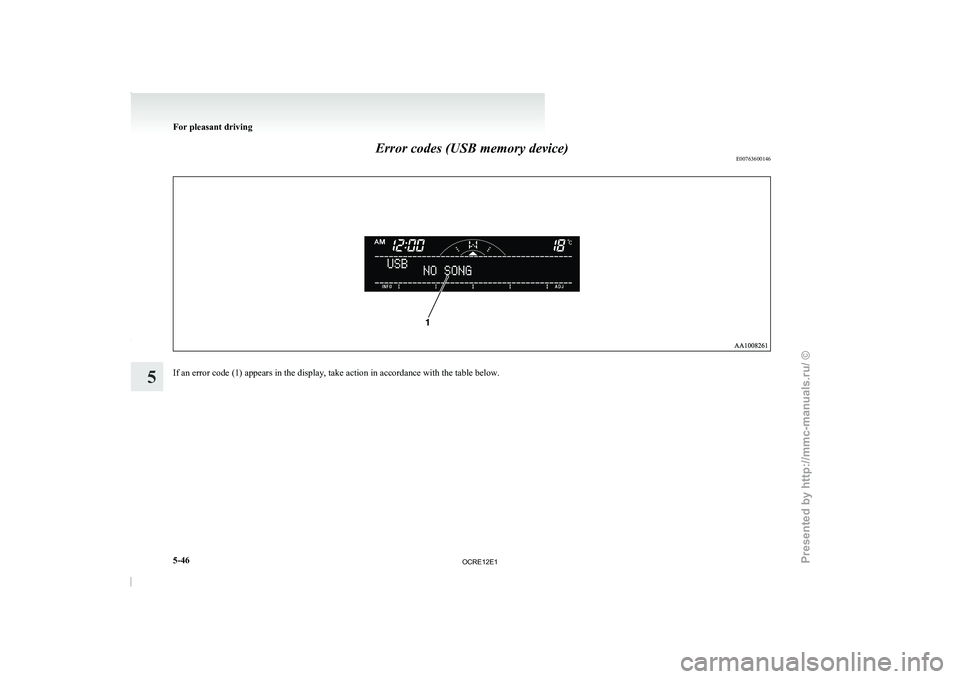
Error codes (USB memory device)
E00763600146If an error code (1) appears in the display, take action in accordance with the table below.For pleasant driving
5-46
5
OCRE12E1
Presented by http://mmc-manuals.ru/ \251
Page 230 of 369
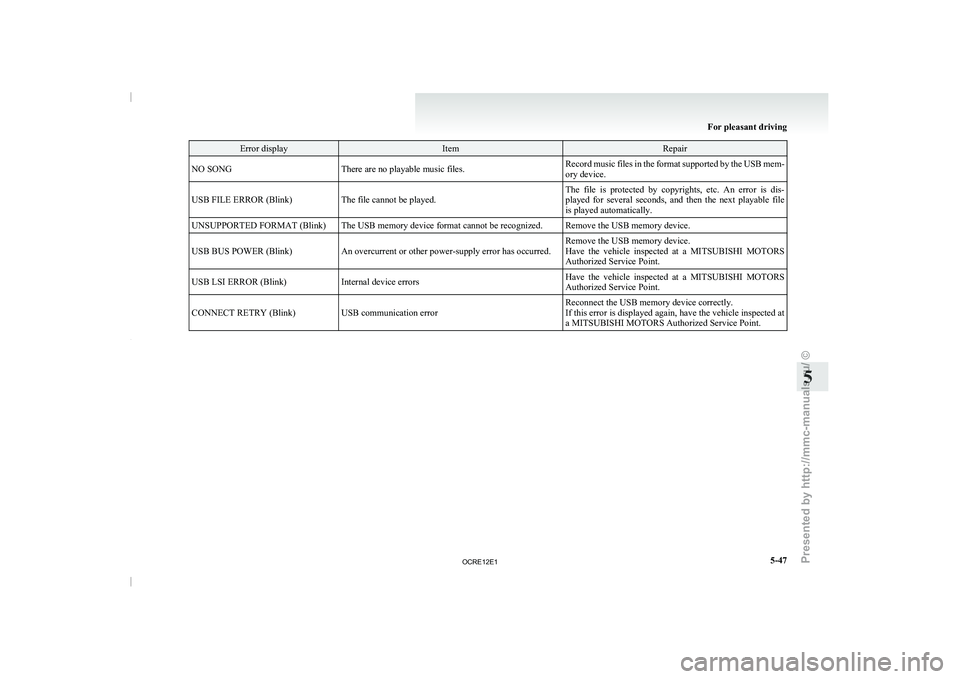
Error display Item Repair
NO SONG There are no playable music files. Record music files in the format supported by the USB mem-
ory device.
USB FILE ERROR (Blink) The file cannot be played. The file is protected by copyrights, etc. An error is dis-
played for several seconds, and
then the next playable file
is played automatically.
UNSUPPORTED FORMAT (Blink) The USB memory device format cannot be recognized. Remove the USB memory device.
USB BUS POWER (Blink) An overcurrent or other power-supply error has occurred. Remove the USB memory device.
Have the vehicle inspected at
a MITSUBISHI MOTORS
Authorized Service Point.
USB LSI ERROR (Blink) Internal device errors Have the vehicle inspected at a MITSUBISHI MOTORS
Authorized Service Point.
CONNECT RETRY (Blink) USB communication error Reconnect the USB memory device correctly.
If this error is displayed
again, have the vehicle inspected at
a MITSUBISHI MOTORS Authorized Service Point. For pleasant driving
5-47 5
OCRE12E1
Presented by http://mmc-manuals.ru/ \251
Page 231 of 369

Audio system anti-theft feature
E00710200348
To prevent theft of the
audio system, the control
knob can be removed. Always remove the control
knob when you leave the vehicle.
Removing the control knob
Slide the release button (A) to the right and remove
the control knob from the audio system.
The anti-theft function operates in two ways depend-
ing on the position of the ignition key. 1.
With the key in the “ON” or “ACC” posi-
tion
The “Please refit the control panel.” indicator
will appear on the
display. Any audio system
operation will be disabled while the “Please
refit the control panel.” indicator is displayed. 2.
With the key in the “LOCK” position
The lamp (B) will start
flashing to deter
thieves. NOTE
l When
sliding the release button,
place one
hand on the control knob to prevent it from
falling out.
Refitting the control knob
Put the control knob back into the original position
and then push it until it clicks. The “Please refit the
control panel.” indicator will disappear or the lamp
(B) will stop flashing.
NOTE l Do not leave the control knob in any place
where it may become hot (for example, the
dashboard) or in any place where it may be-
come wet.
l If you lose the control knob, contact a
MITSUBISHI MOTORS Authorized Service
Point. Handling of compact discs
E00723000034
l Use only the type
of
compact discs that have
the mark shown in the illustration below.
(Playback of CD-R or CD-RW discs may
cause problems.) For pleasant driving
5-48
5
OCRE12E1
Presented by http://mmc-manuals.ru/ \251
Page 235 of 369
WARNING
l Although the Bluetooth ®
2.0 interface al-
lows you to make hands-free calls, if you
choose to use the cellular phone while driv-
ing, you must not allow yourself to be dis-
tracted from the safe operation of your ve-
hicle. Anything, including cellular phone
usage, that distracts you from the safe op-
eration of your vehicle increases your
risk of an accident.
l Refer to and comply with all state and lo-
cal laws in your area regarding cellular
phone usage while driving.
NOTE l The Bluetooth ®
2.0 interface cannot
be used
if the Bluetooth ®
device has a flat battery or
the device power is turned off.
l Hands-free calls will not be possible if your
phone does not have service available.
l If you place the Bluetooth ®
device in the car-
go area, you may not be able to use the Blue-
tooth ®
2.0 interface.
l Some Bluetooth ®
devices are not compatible
with the Bluetooth ®
2.0 interface.
l For details on the Bluetooth ®
2.0 interface,
you can see them by accessing the
MITSUBISHI MOTORS website.
Please read and agree on the “Warning about
Links to the Web Sites of Other Companies”
because it connects to other than
MITSUBISHI MOTORS website.
http://www.mitsubishi-motors.com/en/prod-
ucts/index.html
Steering control switch ® p. 5-52 Voice recognition function
® p. 5-53
Useful voice commands ® p. 5-53
Speaker enrollment function ® p. 5-54
Connecting the Bluetooth®
2.0 interface and Blue-
tooth® device ® p. 5-55
Operating a music player connected via Blue-
tooth® ® p. 5-58
How to make or receive hands-free
calls ® p. 5-58
Phone book function ® p. 5-60
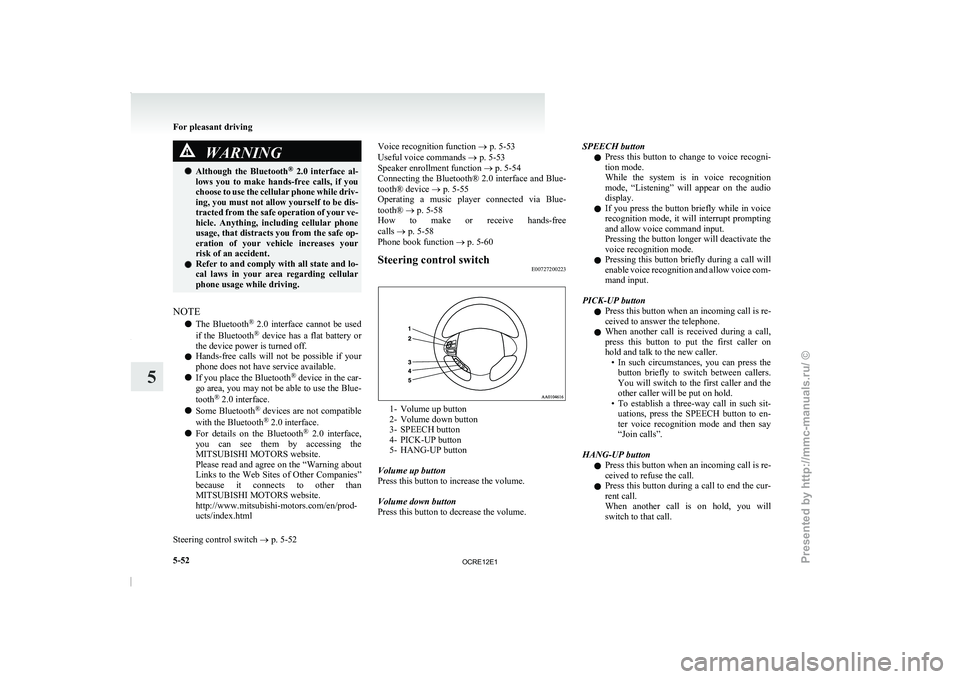
Steering control switch E00727200223 1- Volume up button
2- Volume down button
3- SPEECH button
4- PICK-UP button
5-
HANG-UP button
Volume up button
Press this button to increase the volume.
Volume down button
Press this button to decrease the volume. SPEECH button
l Press
this button to
change
to voice recogni-
tion mode.
While the system is in voice recognition
mode, “Listening” will appear on the audio
display.
l If you press the button briefly while in voice
recognition mode, it will interrupt prompting
and allow voice command input.
Pressing the button longer will deactivate the
voice recognition mode.
l Pressing this button briefly during a call will
enable voice recognition and allow voice com-
mand input.
PICK-UP button l Press this button when an incoming call is re-
ceived to answer the telephone.
l When another call is received during a call,
press this button to put the first caller on
hold and talk to the new caller.
• In such circumstances, you can press thebutton briefly to switch between callers.
You will switch to the first caller and the
other caller will be put on hold.
• To establish a three-way call in such sit- uations, press the SPEECH button to en-
ter voice recognition mode and then say
“Join calls”.
HANG-UP button l Press this button when an incoming call is re-
ceived to refuse the call.
l Press this button during a call to end the cur-
rent call.
When another call is on hold, you will
switch to that call. For pleasant driving
5-52
5
OCRE12E1
Presented by http://mmc-manuals.ru/ \251
Page 236 of 369

l
If this button is
pressed in the voice recogni-
tion mode, the voice recognition mode will
be deactivated.
NOTE l When you press the SPEECH button to enter
voice recognition mode with a cellular phone
paired to the system, current information on
the cellular phone, such as “remaining bat-
tery life,” “signal strength” or “roaming,”
will be displayed on the audio display.*
*: Some cellular phones will not send this in-
formation to the Bluetooth ®
2.0 interface.
l Call waiting and three-way calls can be used
by the Bluetooth ®
2.0 interface, only if it is
possible to use those services with your cellu-
lar phone.
Voice recognition function E00727300471
The Bluetooth ®
2.0 interface is equipped
with a
voice recognition function.
Simply say voice commands and you can perform
various operations and make or receive hands-free
calls.
With the Bluetooth ®
2.0 interface, voice recogni-
tion is possible for English, French, Spanish, Ital-
ian, German, Dutch, Portuguese and Russian. The
factory setting is English. NOTE
l If
the voice command that
you say differs
from the predefined command or cannot be
recognised due to ambient noise or some oth-
er reason, the Bluetooth ®
2.0 interface will
ask you for the voice command again up to 3
times.
l For best performance and further reduction
of ambient noise, the vehicle windows
should be closed while engaging the voice rec-
ognition function.
l Depending on the selected language, some
functions may not be available.
Selecting the Language 1. Press the SPEECH button.
2. Say “Setup”.
3. Say “Language.”
4. The voice guide will say “Select a language:English, French, Spanish, Italian, German,
Dutch, Portuguese or Russian” Say the de-
sired language. (Example: Say “English.”)
5. The voice guide will say “English (French, Spanish, Italian, German, Dutch, Portuguese
or Russian) selected. Is this correct?” Say
“Yes.”
Answer “No” to return to Step 4.
NOTE l The voice guide will repeat the same mes-
sage twice. The first message is in the cur-
rent language, and the second message is in
the selected language.
l If many entries are registered in the vehicle
phone book, changing the language will take
longer. l
Changing the language deletes
the mobile
phone book imported to the Bluetooth ®
2.0
interface. If you wish to use it, you will have
to import it again.
6. When the voice guide says “English (French, Spanish, Italian, German, Dutch, Portuguese
or Russian) selected,” the language change
process will be completed and the system
will return to the main menu.
Useful voice commands E00760000019
Help function E00760100010
The Bluetooth ®
2.0 interface is equipped
with a
help function. If you say “Help” when the system
is waiting for a voice command input, the system
will tell you a list of the commands that can be
used under the circumstances.
Cancelling E00760200011
There are two cancel functions.
If you are
at the
main menu, say “Cancel” to exit
from the Bluetooth ®
2.0 interface.
If you are anywhere else within the system, say
“Cancel” to return to the main menu.
Confirmation function setting E00760400013
The Bluetooth ®
2.0 interface is equipped
with a con-
firmation function.
With the confirmation function activated, you are
given more opportunities than normal to confirm a
command when making various settings to the Blue-
tooth ®
2.0 interface. This allows you to decrease
the possibility that a setting is accidentally changed.
The confirmation function can be turned on or off
by following the steps below. For pleasant driving
5-53 5
OCRE12E1
Presented by http://mmc-manuals.ru/ \251
Page 356 of 369

4
4-wheel drive operation 4-39
AAccessory (Installation) 04
Accessory socket 5-72
Active Stability & Traction Control (ASTC) 4-47
Additional equipment 8-19
Air conditioning
Automatic air conditioning 5-08
Important operation tips for the air condition-
ing 5-12
Manual air conditioning 5-03
Air purifier 5-12
Airbag 2-27
Antenna 5-50
Anti-lock brake system (ABS) 4-44 Warning lamp 4-45
Armrest (Double cab) 2-07
Ashtray 5-70
Audio Audio system anti-theft feature
5-48
Error codes 5-42
Handling of compact discs 5-48
LW/MW/FM electronic tuning radio with CD
player 5-13
Steering wheel remote control switch 5-40
Automatic air conditioning 5-08
Automatic transmission 4A/T 4-17 Fluid 8-07,9-22
Overdrive control switch 4-18
Selector lever operation 4-17,4-21
Selector lever position 4-18
Selector lever position indicator 4-17
Automatic transmission Sports Mode 5A/T 4-21 Fluid 8-07,9-22 Selector lever operation 4-21
Selector lever position indicator 4-22
Selector lever positions 4-22 Sports mode 4-23
Sports mode indicator 4-23
B Battery 8-10
Discharged battery (Emergency starting) 6-02
Specification 9-17
Bleeding the fuel system 6-05
Bluetooth® 2.0 interface 5-51
Bonnet 8-03
Bottle holder 5-79
Brake Anti-lock brake 4-44
Brake assist system 4-44
Braking 4-43
Fluid 8-08,9-22
Parking brake 4-07
Parking brake lever stroke
8-16
Pedal free play 8-16
Warning lamp 3-08
C Cargo loads 4-54
Catalytic converter 8-02
Cautions on handling of 4-wheel drive vehi-
cles 4-41
Central door locks 1-07
Centre console downlight 5-75
Bulb capacity 8-24
Replacement 8-34
Centre information display
3-10
Changing a fuse 8-22
Changing gears 4-15
Check engine warning lamp 3-08 Child restraint 2-13
Child-protection rear doors 1-08
Cigarette lighter 5-71
Cleaning
Exterior of your vehicle 7-03
Genuine leather 7-02
Interior of your vehicle
7-02
Plastic, vinyl leather, etc 7-02
Sunroof 7-05
Waxing 7-04
Clock 3-19,5-73
Clutch Fluid 8-09,9-22
Pedal free play 8-15
Coat hook 5-80
Combination headlamps and dipper switch 3-30
Convenient hook 5-80
Coolant (engine) 8-06,9-22
Cruise control 4-50 Switch 4-50
Cup holder 5-78
Curtain airbag system 2-35
D Demister (rear window) 3-40
Diesel particulate filter (DPF) 4-14
Differential oil 9-22
Digital clock 3-19,5-73
Dimensions 9-03
Dipper (High/Low beam change)
3-31
Door courtesy lamps 5-75 Replacement
8-33
Doors Central door locks 1-07
Child-protection 1-08
Lock and unlock 1-06
Driving, alcohol and drugs 4-02 Alphabetical index
1
OCRE12E1
Presented by http://mmc-manuals.ru/ \251