2011 MITSUBISHI TRITON Indicator
[x] Cancel search: IndicatorPage 220 of 369
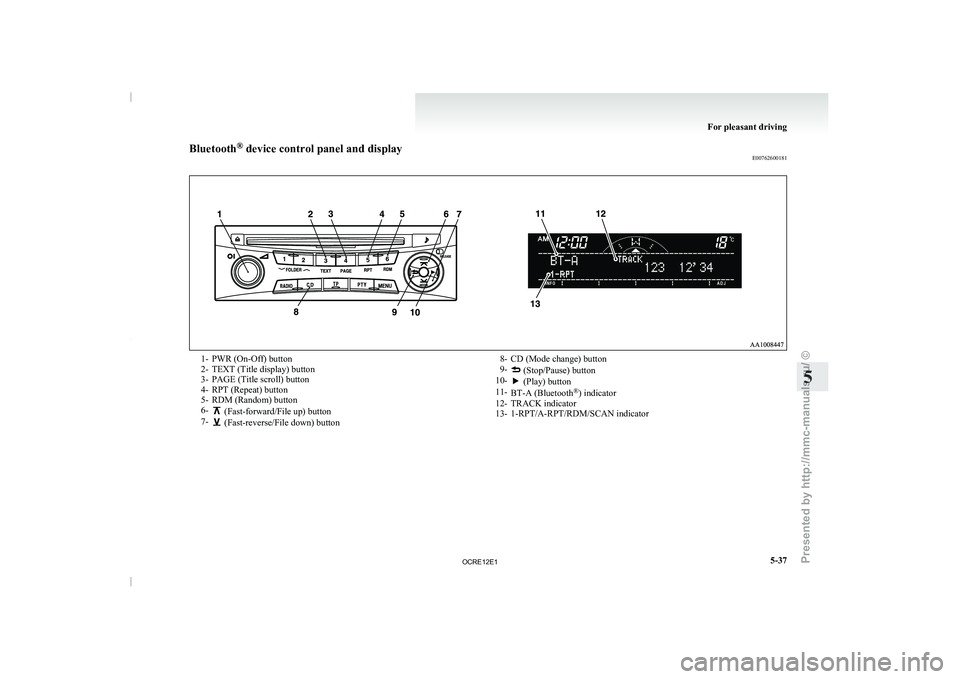
Bluetooth
®
device control panel and display
E007626001811- PWR (On-Off) button
2- TEXT (Title display) button
3- PAGE (Title scroll) button
4- RPT (Repeat) button
5-
RDM (Random) button
6- (Fast-forward/File up) button
7- (Fast-reverse/File down) button
8- CD (Mode change) button
9- (Stop/Pause) button
10- (Play) button
11- BT-A (Bluetooth ®
) indicator
12- TRACK indicator
13- 1-RPT/A-RPT/RDM/SCAN indicator For pleasant driving
5-37 5
OCRE12E1
Presented by http://mmc-manuals.ru/ \251
Page 221 of 369

To listen to tracks from a device con-
nected via Bluetooth
®
E00762700225
1. Press the PWR button (1)
to turn on the au-
dio system. The system turns on in the last
mode used.
2. Press the CD button (8) several times to
switch to the BT-A (Bluetooth ®
) mode. The
mode changes as follows every time the CD
button is pressed.
CD mode → USB (iPod) mode → Blue-
tooth ®
mode
NOTE l For vehicles equipped with Auxiliary Audio
connector (RCA), pressing and holding the
CD button for 2 seconds or more switches
the system to the AUX mode.
3. Connect your Bluetooth ®
device.
Refer to “Connecting the Bluetooth® 2.0 in-
terface and Bluetooth® device” on page
5-55.
4. Playback starts automatically.
NOTE l Depending on the connected device, the play-
back may not start automatically.
In this case, operate the connected device to
start the playback.
To stop the playback (if supported by the device) E00762800079
To stop the playback, press and hold the button
(9) until you hear a beep.
To restart the playback, press the button (10).To pause the playback (if supported by the device)
E00762900083
To pause the playback, press the button (9).
To restart the playback, press the button (10).
To fast-forward/reverse the track (if supported by
the device) E00765600010
Fast-forward
To fast-forward the current
track,
press the but-
ton (6). While the button
is pressed, the track will
be fast-forwarded.
Fast-reverse
To fast-reverse the current track, press the but-
ton (7). While the button
is pressed, the track will
be fast-reversed.
To select a track (if supported by the device) E00763000094
Track up
Press the button (6) repeatedly until the desired
track number appears on the display.
Track down
Press the button (7) repeatedly until the desired
track number appears on the display.
NOTE
l Pressing
the button (7) once during the
song will cause the audio
system to restart
playback from the beginning of the song.
To play the same track or all tracks repeatedly (if
supported by the device) E00763100079
Press the RPT button (4) several times to show
“1-RPT” (same track repeat mode)
or “A-RPT” (all
tracks repeat mode) in the display. The mode changes as follows every time the RPT
button is pressed.
1-RPT mode → A-RPT mode → mode off
To exit these mode,
press
the RPT button several
times until the 1-RPT indicator or the A-RPT indi-
cator goes off.
To play tracks in random order (if supported by
the device) E00763200070
Press the RDM button (5) to show “RDM” in the
display.
The system randomly selects and
plays tracks from
all tracks in the Bluetooth ®
device.
To exit this mode, press the button again.
To switch the display (if supported by the device) E00763400072
The display changes as follows every time the
TEXT button (2) is pressed briefly.
Album title → Title name
→ Artist name → Genre
→ Normal display
Example
Album title For pleasant driving
5-38
5
OCRE12E1
Presented by http://mmc-manuals.ru/ \251
Page 228 of 369

Error display Item Repair
NO SONG There are no playable music files. Record music files in the iPod.
VERSION ERROR (Blink) The iPod or its software cannot be recognized. Connect a supported iPod.
USB BUS PWR (Blink) An overcurrent or other power-supply error has occurred. Remove the iPod.
Have the vehicle inspected at
a MITSUBISHI MOTORS
Authorized Service Point.
USB LSI ERROR (Blink) Internal device errors Have the vehicle inspected at a MITSUBISHI MOTORS
Authorized Service Point.
CONNECT RETRY (Blink) If the iPod indicator illuminates, the iPod cannot be authen-
ticated.
Reconnect the iPod.
If the iPod indicator goes out, it shows the USB communi-
cation error. Reconnect the iPod correctly.
If this error is displayed
again, have the vehicle inspected at
a MITSUBISHI MOTORS Authorized Service Point. For pleasant driving
5-45 5
OCRE12E1
Presented by http://mmc-manuals.ru/ \251
Page 231 of 369

Audio system anti-theft feature
E00710200348
To prevent theft of the
audio system, the control
knob can be removed. Always remove the control
knob when you leave the vehicle.
Removing the control knob
Slide the release button (A) to the right and remove
the control knob from the audio system.
The anti-theft function operates in two ways depend-
ing on the position of the ignition key. 1.
With the key in the “ON” or “ACC” posi-
tion
The “Please refit the control panel.” indicator
will appear on the
display. Any audio system
operation will be disabled while the “Please
refit the control panel.” indicator is displayed. 2.
With the key in the “LOCK” position
The lamp (B) will start
flashing to deter
thieves. NOTE
l When
sliding the release button,
place one
hand on the control knob to prevent it from
falling out.
Refitting the control knob
Put the control knob back into the original position
and then push it until it clicks. The “Please refit the
control panel.” indicator will disappear or the lamp
(B) will stop flashing.
NOTE l Do not leave the control knob in any place
where it may become hot (for example, the
dashboard) or in any place where it may be-
come wet.
l If you lose the control knob, contact a
MITSUBISHI MOTORS Authorized Service
Point. Handling of compact discs
E00723000034
l Use only the type
of
compact discs that have
the mark shown in the illustration below.
(Playback of CD-R or CD-RW discs may
cause problems.) For pleasant driving
5-48
5
OCRE12E1
Presented by http://mmc-manuals.ru/ \251
Page 310 of 369
Wheel condition
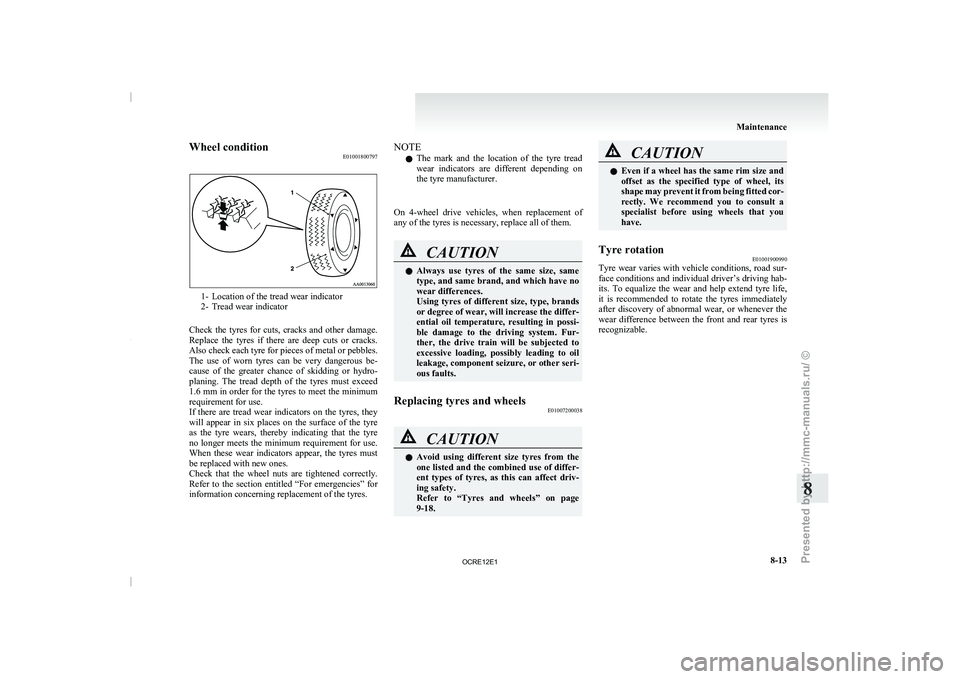
E010018007971- Location of the tread wear indicator
2- Tread wear indicator
Check the tyres for
cuts, cracks and other damage.
Replace the tyres if there are deep cuts or cracks.
Also check each tyre for pieces of metal or pebbles.
The use of worn tyres can be very dangerous be-
cause of the greater chance of skidding or hydro-
planing. The tread depth of the tyres must exceed
1.6 mm in order for the tyres to meet the minimum
requirement for use.
If there are tread wear indicators on the tyres, they
will appear in six places on the surface of the tyre
as the tyre wears, thereby indicating that the tyre
no longer meets the minimum requirement for use.
When these wear indicators appear, the tyres must
be replaced with new ones.
Check that the wheel nuts are tightened correctly.
Refer to the section entitled “For emergencies” for
information concerning replacement of the tyres. NOTE
l The
mark and the location
of the tyre tread
wear indicators are different depending on
the tyre manufacturer.
On 4-wheel drive vehicles, when replacement of
any of the tyres is necessary, replace all of them. CAUTION
l
Always use tyres of
the
same size, same
type, and same brand, and which have no
wear differences.
Using tyres of different size, type, brands
or degree of wear, will increase the differ-
ential oil temperature, resulting in possi-
ble damage to the driving system. Fur-
ther, the drive train will be subjected to
excessive loading, possibly leading to oil
leakage, component seizure, or other seri-
ous faults.
Replacing tyres and wheels E01007200038 CAUTION
l
Avoid using different size
tyres
from the
one listed and the combined use of differ-
ent types of tyres, as this can affect driv-
ing safety.
Refer to “Tyres and wheels” on page
9-18. CAUTION
l
Even if a wheel has
the same rim size and
offset as the specified type of wheel, its
shape may prevent it from being fitted cor-
rectly. We recommend you to consult a
specialist before using wheels that you
have.
Tyre rotation E01001900990
Tyre wear varies with vehicle conditions, road sur-
face conditions and
individual driver’s
driving hab-
its. To equalize the wear and help extend tyre life,
it is recommended to rotate the tyres immediately
after discovery of abnormal wear, or whenever the
wear difference between the front and rear tyres is
recognizable. Maintenance
8-13 8
OCRE12E1
Presented by http://mmc-manuals.ru/ \251
Page 315 of 369

NOTE
l Do
not allow the wiper
arm to fall onto the
windscreen; it could damage the glass.
3. Attach the retainers (C) to a new wiper blade. Refer to the illustration to ensure that the re-
tainers are correctly aligned as you attach
them. 4. Insert the wiper blade into the arm, starting
with the opposite end
of the blade from the
stopper. Make sure the hook (B) is fitted cor-
rectly in the grooves in the blade.
NOTE l If retainers are not supplied with the new wip-
er blade, use the retainers from the old blade. 5. Push the wiper blade until the hook (B) en-
gages securely with the stopper (A). General maintenance
E01002700113
Fuel, engine coolant, oil and exhaust
gas leakage
Look under the body of
your vehicle to check for
fuel, engine coolant, oil and exhaust gas leaks. WARNING
l If
you
see a
suspicious
fuel leak or if you
smell fuel, do not operate the vehicle; we
recommend you to call for assistance.
Exterior and interior lamp operation
Operate the combination lamp switch
to check that
all lamps are functioning properly.
If the lamps do not illuminate, the probable cause
is a blown fuse or defective lamp bulb. Check the
fuses first. If there is no blown fuses, check the
lamp bulbs.
For information regarding the inspection and re-
placement of the fuses and the lamp bulbs, refer to
“Fuses” on page 8-20 and “Replacement of lamp
bulbs” on page 8-23.
If the fuses and bulbs are all OK, we recommend
you to have your vehicle checked and repaired.
Meter, gauge and indicator/warning
lamps operation
Run the engine to check the operation of all meters,
gauges, and indicator/warning lamps.
If there is anything wrong, we recommend you to
have your vehicle inspected. Maintenance
8-18
8
OCRE12E1
Presented by http://mmc-manuals.ru/ \251
Page 356 of 369

4
4-wheel drive operation 4-39
AAccessory (Installation) 04
Accessory socket 5-72
Active Stability & Traction Control (ASTC) 4-47
Additional equipment 8-19
Air conditioning
Automatic air conditioning 5-08
Important operation tips for the air condition-
ing 5-12
Manual air conditioning 5-03
Air purifier 5-12
Airbag 2-27
Antenna 5-50
Anti-lock brake system (ABS) 4-44 Warning lamp 4-45
Armrest (Double cab) 2-07
Ashtray 5-70
Audio Audio system anti-theft feature
5-48
Error codes 5-42
Handling of compact discs 5-48
LW/MW/FM electronic tuning radio with CD
player 5-13
Steering wheel remote control switch 5-40
Automatic air conditioning 5-08
Automatic transmission 4A/T 4-17 Fluid 8-07,9-22
Overdrive control switch 4-18
Selector lever operation 4-17,4-21
Selector lever position 4-18
Selector lever position indicator 4-17
Automatic transmission Sports Mode 5A/T 4-21 Fluid 8-07,9-22 Selector lever operation 4-21
Selector lever position indicator 4-22
Selector lever positions 4-22 Sports mode 4-23
Sports mode indicator 4-23
B Battery 8-10
Discharged battery (Emergency starting) 6-02
Specification 9-17
Bleeding the fuel system 6-05
Bluetooth® 2.0 interface 5-51
Bonnet 8-03
Bottle holder 5-79
Brake Anti-lock brake 4-44
Brake assist system 4-44
Braking 4-43
Fluid 8-08,9-22
Parking brake 4-07
Parking brake lever stroke
8-16
Pedal free play 8-16
Warning lamp 3-08
C Cargo loads 4-54
Catalytic converter 8-02
Cautions on handling of 4-wheel drive vehi-
cles 4-41
Central door locks 1-07
Centre console downlight 5-75
Bulb capacity 8-24
Replacement 8-34
Centre information display
3-10
Changing a fuse 8-22
Changing gears 4-15
Check engine warning lamp 3-08 Child restraint 2-13
Child-protection rear doors 1-08
Cigarette lighter 5-71
Cleaning
Exterior of your vehicle 7-03
Genuine leather 7-02
Interior of your vehicle
7-02
Plastic, vinyl leather, etc 7-02
Sunroof 7-05
Waxing 7-04
Clock 3-19,5-73
Clutch Fluid 8-09,9-22
Pedal free play 8-15
Coat hook 5-80
Combination headlamps and dipper switch 3-30
Convenient hook 5-80
Coolant (engine) 8-06,9-22
Cruise control 4-50 Switch 4-50
Cup holder 5-78
Curtain airbag system 2-35
D Demister (rear window) 3-40
Diesel particulate filter (DPF) 4-14
Differential oil 9-22
Digital clock 3-19,5-73
Dimensions 9-03
Dipper (High/Low beam change)
3-31
Door courtesy lamps 5-75 Replacement
8-33
Doors Central door locks 1-07
Child-protection 1-08
Lock and unlock 1-06
Driving, alcohol and drugs 4-02 Alphabetical index
1
OCRE12E1
Presented by http://mmc-manuals.ru/ \251