2011 MITSUBISHI TRITON ESP
[x] Cancel search: ESPPage 151 of 369

Easy select 4WD*
E00614700119
Shifting to rear-wheel drive or
4-wheel drive can
be made by operating the transfer shift lever (A).
Shift the transfer shift lever to an appropriate posi-
tion according to the road surface conditions. In ad-
dition, the 2WD/4WD operation indication lamp in-
dicates the transfer shift lever shifting state. Refer
to “2WD/4WD operation indication lamp” on page
4-28.
Vehicles with manual transmission
Vehicles with automatic transmission Transfer shift lever position and 2WD/
4WD operation indication lamp
E00614800080 Transfer shift lever
position 2WD/4WD
operation in-
dication lamp Driving con-
ditions
2H Rear-wheel
drive When driv-
ing on dry
paved road.
4H 4-wheel
drive When driv-
ing on rough,
sand or snow
covered
roads.
4L Low range 4-
wheel drive When driv-
ing up or
down steep
hills,
on
rough
or
muddy roads
(especially
when in-
creased tor-
que is re-
quired). : Illuminate
: Remain offNOTE
l On vehicles with automatic
transmission,
when
the transfer shift lever is in “4L”, the
transmission will not shift into the overdrive
gear. CAUTION
l
The “4L” range gives
maximum
torque
for lowspeed driving on steep slopes, as
well as sandy, muddy, and other difficult
surfaces. On vehicles with automatic
transmission, do not exceed speeds of ap-
proximately 70 km/h (43 mph) in “4L”
range.
l Do not drive your vehicle in the “4H” or
“4L” on dry paved roads and highways.
Doing so may result in excessive tyre
wear, increased fuel consumption, and
possible noise generation. It may also in-
crease the differential oil temperature,
which may damage the drive system. Fur-
ther, the drive train will be subjected to
excessive loading, resulting in oil leakage,
component seizure, or other serious prob-
lems. On dry paved roads and highways,
drive the vehicle in “2H” only. Starting and driving
4-26
4
OCRE12E1
Presented by http://mmc-manuals.ru/ \251
Page 156 of 369

Transfer shift lever position and 2WD/
4WD operation indication lamp
E00605800228Transfer shift lever
position 2WD/4WD
operation in- dicationlamp Driving con-
ditions
2H Rear-wheel
drive When driv-
ing on dry
paved road.
4H Full-time 4-
wheel drive The basic
position for
super select
4WD.
When driv-
ing
on
dry
paved or
slippery
roads.
4HLc Centre dif-
ferential
lock engag- ed 4-wheel drive When driv-
ing on
rough, sand
or snow
cov-
ered roads.
4LLc Low range
centre
differ-
ential lock
engaged 4-
wheel drive When driv-
ing up or
down steep
hills,
on
rough
or
muddy
roads (espe-
cially when
increased
torque is re-
quired). : Illuminate
: Remain off
NOTE l On
vehicles with automatic transmission,
when the transfer shift lever is in “4LLc”, the
transmission
will not shift into the overdrive
gear. CAUTION
l
The “4LLc” range gives
maximum
tor-
que for low-speed driving on steep slopes,
as well as sandy, muddy, and other diffi-
cult surfaces. On vehicles with automatic
transmission, do not exceed speeds of ap-
proximately 70 km/h (43 mph) in “4LLc”
range.
l Do not drive your vehicle in the “4HLc”
or “4LLc” on dry paved roads and high-
ways. Doing so may result in excessive
tyre wear, increased fuel consumption,
and possible noise generation. It may also
increase the differential oil temperature,
which may damage the drive system. Fur-
ther, the drive train will be subjected to
excessive loading, resulting in oil leakage,
component seizure, or other serious prob-
lems. On dry paved roads and highways,
drive the vehicle in “2H” or “4H” only. Transfer shift lever operation
E00605900173
The shift pattern is shown
on the transfer shift lev-
er knob. The transfer shift lever should be positioned in ac-
cordance with the following operating conditions:
: Not push down the transfer shift lever
: Push down the transfer shift lever Starting and driving
4-31 4
OCRE12E1
Presented by http://mmc-manuals.ru/ \251
Page 164 of 369

4-wheel drive operation
E00606600920
By selecting 4-wheel drive, both
axles of the vehi-
cle are rigidly connected with each other. This im-
proves the traction characteristics. When turning
sharp corners or moving forward and backward re-
peatedly, however, the drive line is stressed, which
is felt as a braking effect. A 4-wheel drive vehicle
can accelerate more quickly and smoothly.
However, note that the braking distance is not short-
er than that of a rear-wheel drive vehicle.
When using 4-wheel drive on rough roads (snow,
mud, sand, etc.), it is important to operate the vehi-
cle correctly.
NOTE
l The driving posture should be more upright
and closer to the wheel than usual; adjust the
seat to a good position for easy steering and
pedal operation. Be sure to wear the seat belt.
l After driving on rough roads, check each
part of the vehicle and wash it thoroughly
with water. Refer to the “Vehicle care” sec-
tion and “Inspection and maintenance follow-
ing rough road operation” on page 4-41.
Driving on dry paved road and highway
Select “2H” position (easy select 4WD), “2H” or
“4H” position (super select 4WD) to drive on the
dry paved road. Especially on dry highway, never
select the “4H” or “4L” position (easy select
4WD), “4HLc” or “4LLc” position (super select
4WD). CAUTION
l
Selecting “4H” or “4L” position
(easy se-
lect 4WD), “4HLc” or “4LLc” position (su-
per select 4WD) to drive on dry paved
road will increase the fuel consumption
with possible noise generation and early
tyre wear.
It may also increase the differential oil
temperature, resulting in possible dam-
age to the driving system.
Further, the drive train will be subjected
to excessive loading, possibly leading to
oil leakage, component seizure, or other
serious faults.
Driving on snowy or icy roads
Set the transfer shift lever
to “4H” or “4L” position
(easy select 4WD), “4H” or “4HLc” position (su-
per select 4WD) in accordance with the road condi-
tions, and then gradually depress the accelerator ped-
al for a smooth start.
NOTE
l The use of snow tyres and/or tyre chains is
recommended.
l Maintain a safe distance between vehicles,
avoid sudden braking, and use engine brak-
ing (downshifting). CAUTION
l
Avoid sudden braking, sudden accelera-
tion,
and sharp turning; such operations
could cause skidding and spinouts. Driving on sandy or muddy roads
Set the transfer shift
lever
to “4H” or “4L” position
(easy select 4WD), “4HLc” or “4LLc” position (su-
per select 4WD) and then gradually depress the ac-
celerator pedal for a smooth start. Keep the pres-
sure on the accelerator pedal as constant as possi-
ble, and drive at low speed. CAUTION
l
Do not force the
vehicle
or drive reckless-
ly on sandy surfaces. In comparison with
normal road surfaces, the engine and oth-
er drive-system components are put un-
der excessive strain when driving on such
a surface, and this could lead to accidents.
l If any of following conditions occur while
the vehicle is being driven, immediately
park your vehicle in a safe place and fol-
low these procedures:
• The needle in the temperature gaugeapproaches the overheating zone.
Refer to “Engine overheating” on
page 6-04.
• Automatic transmission fluid temper- ature warning lamp comes on.
Refer to “When the A/T (automatic
transmission) fluid temperature warn-
ing lamp comes on” on pages 4-19,
4-24. Starting and driving
4-39 4
OCRE12E1
Presented by http://mmc-manuals.ru/ \251
Page 165 of 369

WARNING
l When attempting to rock your vehicle out
of a stuck position, be
sure that the area
around the vehicle is clear of people and
physical objects. The rocking motion may
cause the vehicle to suddenly launch for-
ward or backward, causing injury or dam-
age to nearby people or objects.
NOTE l Avoid
sudden braking, acceleration, and
turn-
ing; such operations could result in the vehi-
cle becoming stuck.
l If the vehicle becomes stuck in sandy or mud-
dy roads, it can often be moved a rocking mo-
tion. Move the selector lever rhythmically be-
tween the “D” (DRIVE) and “R” (RE-
VERSE) position (with M/T, between 1 st
and
Reverse), while applying slight pressure to
the accelerator pedal.
l It is recommended to start the vehicle with
parking brake partially, but not completely,
applied by slightly pulling the parking brake
lever.
After the vehicle has become free, do not for-
get to release the parking brake.
l If it is necessary to drive in extremely muddy
conditions, the use of tyre chains is recom-
mended. Because the extent of muddy condi-
tions is difficult to judge and the vehicle
could become bogged down very deeply, op-
eration should be at a low speed. If possible,
get out of the vehicle and check the condi-
tions ahead before proceeding. l
Driving over roads in
coastal
areas or roads
on which anti-skid preparations have been
spread can cause rust on the vehicle; wash
the vehicle thoroughly as soon as possible af-
ter such use.
Climbing sharp grades
Set the transfer shift lever to “4L” position (easy se-
lect 4WD), “4LLc” position (super select 4WD) to
maximize the engine torque. WARNING
l Go
straight
up. Do
not
try to traverse
across a steep slope.
l If you begin to lose traction, ease off the
accelerator pedal and gently turn the
steering wheel alternatively left and right
to regain adequate traction again.
NOTE l Choose
as smooth a slope
as possible with
few stones or other obstacles.
l Before attempting to drive up the slope, walk
up it to confirm that the vehicle can handle
the grade.
Descending sharp grades
Set the transfer shift lever to “4L” position (easy se-
lect 4WD), “4LLc” position (super select 4WD),
use the engine brake (downshifting) and descend
slowly. WARNING
l Avoid snaking down a sharp
grade. De-
scend the grade as straight as possible.
NOTE l When descending a sharp grade, if the brakes
are
applied suddenly because of
an obstacle
encountered, control of the vehicle could be
lost. Before descending the slope, walk down
it and confirm the path.
l Before descending a grade, it is necessary to
choose the appropriate gear. Avoid changing
gears or depressing the clutch while descend-
ing the grade.
l MITSUBISHI MOTORS is not responsible
to the operator for any damage or injury
caused or liability incurred by improper and
negligent operation of a vehicle. All techni-
ques of vehicle operation described herein de-
pend on the skill and experience of the opera-
tor and other participating parties and any de-
viation from the recommended operation in-
structions above is at their own risk.
Turning sharp corners
When turning a sharp corner in “4H” or “4L” posi-
tion (easy select 4WD), “4HLc” or “4LLc” posi-
tion (super select 4WD) at low speed, a slight dif-
ference in steering may be experienced similar to
as if the brakes were applied. This is called tight cor-
ner braking and results from each of the 4 tyres be-
ing at a different distance from the corner.
The phenomenon is peculiar to 4-wheel drive vehi-
cles. If this occurs, either straighten the steering
wheel, or change to rear-wheel drive. Starting and driving
4-40
4
OCRE12E1
Presented by http://mmc-manuals.ru/ \251
Page 168 of 369

Limited-slip differential*
E00606900037
A limited-slip differential is applied
for the rear
wheel differential only. The features of this limited-
slip differential are described below:
Just as with a conventional differential, the wheel
on one side is allowed to turn at a different speed
from the wheel on the other side when the vehicle
is cornering. The difference between the limited-
slip differential and a conventional differential is
that if the wheel on one side of the vehicle loses trac-
tion, a greater amount of torque is applied to the
wheel on the other side to improve traction.
NOTE
l Even if there is a difference in the amount of
traction the wheels can get, if both of them
are spinning, the limited-slip differential will
not be effective. CAUTION
l
Never start the engine
while
one of the
rear wheels is jacked up and the other in
contact with the ground; doing so may
cause the vehicle to jump forward.
l When attempting to extract the vehicle
from snow, mud, etc., and the engine is
run continuously at high speed, the limi-
ted-slip differential will be adversely af-
fected. Braking
E00607001494
All the parts
of the
brake system are critical to safe-
ty. We recommend you to have the vehicle
checked at regular intervals according to the serv-
ice booklet. CAUTION
l
Avoid driving habits that
cause
heavy
braking and never “ride” the brakes by
resting your foot on the brake pedal
while driving.
It causes brake overheating and fade.
Brake system
The service brake is divided
into two brake cir-
cuits. And your vehicle is equipped with power
brakes. If one brake circuit fails, the other is availa-
ble to stop the vehicle. If you should lose the pow-
er assist for some reason, the brakes will still work.
In these situations, even if the brake pedal moves
down to the very end of its possible stroke or re-
sists being depressed, keep depressing the brake ped-
al down harder and further than usual; stop driving
as soon as possible and have the brake system re-
paired. WARNING
l Do not turn off the
engine while your ve-
hicle is in motion. If you turn off the en-
gine while driving, the power assistance
for the braking system will stop working
and your brakes will not work effectively. WARNING
l If the power assist is
lost or if either
brake hydraulic system stops working
properly, have your vehicle checked im-
mediately.
Warning lamp
The brake warning lamp illuminates
to indicate a
fault in the braking system. Refer to “Brake warn-
ing lamp” on page 3-08.
When brakes are wet
Check the brake system while driving at a low
speed immediately after starting, especially when
the brakes are wet, to confirm they work normally.
A film of water can be formed on the brake discs
or brake drums and prevent normal braking after
driving in heavy rain or through large puddles, or
after the vehicle is washed. If this occurs, dry the
brakes out by driving slowly while lightly depress-
ing the brake pedal.
When driving downhill
It is important to take advantage of the engine brak-
ing by shifting to a lower shift position while driv-
ing on steep downhill roads in order to prevent the
brakes from overheating. Starting and driving
4-43 4
OCRE12E1
Presented by http://mmc-manuals.ru/ \251
Page 172 of 369

Power steering system
E00607400260
The power steering system operates
while the en-
gine is running. It helps reduce the effort needed to
turn the steering wheel.
The power steering system has mechanical steering
capability in case the power assist is lost. If the pow-
er assist is lost for some reason, you will still be
able to steer your vehicle. If the power assist is
lost, you will notice it takes much more effort to
steer and that there is much more “free play” in the
steering wheel. If this happens, take your vehicle to
an authorized MITSUBISHI MOTORS dealer. WARNING
l Do not stop the
engine
while the vehicle is
moving. Stopping the engine would make
the steering wheel extremely hard to
turn, possibly resulting in an accident. CAUTION
l
Do not leave the steering
wheel turned all
the way in one direction. This can cause
damage to the power steering system. Active Stability & Traction
Control (ASTC)* E00616700344
The active stability & traction
control (ASTC)
takes overall control of the anti-lock brake system,
traction control function and Active Stability Con-
trol function to help maintain the vehicle’s control
and traction. Please read this section in conjunction
with the page on the anti-lock brake system, trac-
tion control function and Active Stability Control
function.
Anti-lock brake system (ABS) ® p. 4-44
Active Traction Control function ® p. 4-48
Active Stability Control function ® p. 4-48 CAUTION
l
Do not over-rely on
the
ASTC. This sys-
tem, like any other system, has limits and
cannot help you to maintain traction and
control of the vehicle in all circumstan-
ces. Reckless driving may lead to acci-
dents. Always drive carefully, taking into
account the traffic, road and environmen-
tal conditions.
l Be sure to use the same specified type and
size of tyre on all 4 wheels. Otherwise, the
ASTC may not work correctly.
NOTE l After
your vehicle is driven
a short distance
after starting the engine, a click is heard from
the engine compartment; however, this is on-
ly the sound of ASTC being checked. l
Some
vibration will be
felt
in the vehicle
body and a whining sound of a motor will be
heard from the engine compartment when
the ASTC functions. This is a normal result
of the ASTC operation, and does not indicate
a malfunction.
l The ASTC does not operate while the ABS
warning lamp is illuminated.
l On vehicles with the rear differential lock,
the ASTC and ABS functions are suspended
while the rear differential lock is activated.
ASTC indication lamp, ASTC OFF indica-
tion lamp and ABS warning lamp are illumi-
nated while these functions are suspended. It
does not indicate a problem. When the rear
differential lock is disengaged, these lamps
go out and function again.
Refer to “ABS warning lamp” on page 4-45,
“ASTC indication lamp, ASTC OFF indica-
tion lamp” on page 4-48.
Driving hints E00616800039
When extricating the vehicle from mud, sand or
fresh snow, you may find
that operation of the
ASTC prevents the engine speed from increasing
in response to depression of the accelerator pedal.
If this happens and the vehicle remains stuck as a
result, deactivate the ASC function by pressing the
“ASC OFF” switch. The vehicle will then be easier
to extricate. (Brake control of the ATC function is
still working to prevent wheel spins when the ASC
function is deactivated by pressing the “ASC OFF”
switch.) Starting and driving
4-47 4
OCRE12E1
Presented by http://mmc-manuals.ru/ \251
Page 200 of 369
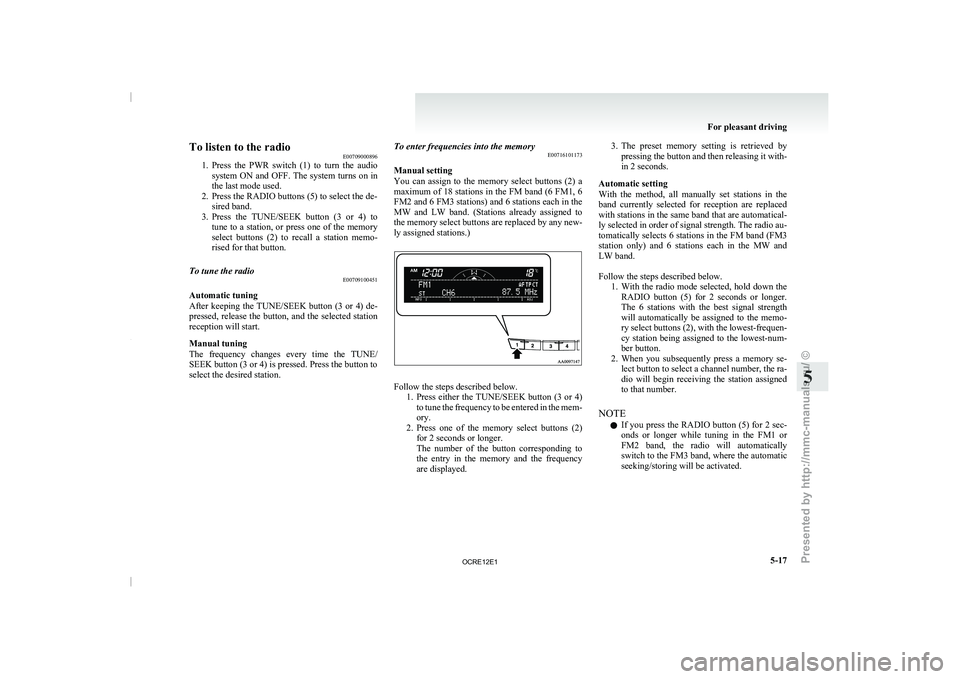
To listen to the radio
E00709000896
1. Press the PWR switch (1)
to turn the audio
system ON and OFF. The system turns on in
the last mode used.
2. Press the RADIO buttons (5) to select the de- sired band.
3. Press the TUNE/SEEK button (3 or 4) to tune to a station, or press one of the memory
select buttons (2) to recall a station memo-
rised for that button.
To tune the radio E00709100451
Automatic tuning
After keeping the TUNE/SEEK
button
(3 or 4) de-
pressed, release the button, and the selected station
reception will start.
Manual tuning
The frequency changes every time the TUNE/
SEEK button (3 or 4) is pressed. Press the button to
select the desired station. To enter frequencies into the memory
E00716101173
Manual setting
You can assign to
the
memory select buttons (2) a
maximum of 18 stations in the FM band (6 FM1, 6
FM2 and 6 FM3 stations) and 6 stations each in the
MW and LW band. (Stations already assigned to
the memory select buttons are replaced by any new-
ly assigned stations.) Follow the steps described below.
1. Press either the TUNE/SEEK button
(3 or 4)
to tune the frequency to be entered in the mem-
ory.
2. Press one of the memory select buttons (2) for 2 seconds or longer.
The number of the button corresponding to
the entry in the memory and the frequency
are displayed. 3. The preset memory setting is retrieved by
pressing the button and
then releasing it with-
in 2 seconds.
Automatic setting
With the method, all manually set stations in the
band currently selected for reception are replaced
with stations in the same band that are automatical-
ly selected in order of signal strength. The radio au-
tomatically selects 6 stations in the FM band (FM3
station only) and 6 stations each in the MW and
LW band.
Follow the steps described below. 1. With the radio mode selected, hold down theRADIO button (5) for 2 seconds or longer.
The 6 stations with the best signal strength
will automatically be assigned to the memo-
ry select buttons (2), with the lowest-frequen-
cy station being assigned to the lowest-num-
ber button.
2. When you subsequently press a memory se- lect button to select a channel number, the ra-
dio will begin receiving the station assigned
to that number.
NOTE l If you press the RADIO button (5) for 2 sec-
onds or longer while tuning in the FM1 or
FM2 band, the radio will automatically
switch to the FM3 band, where the automatic
seeking/storing will be activated. For pleasant driving
5-17 5
OCRE12E1
Presented by http://mmc-manuals.ru/ \251
Page 203 of 369
NOTE
l If
the TUNE/SEEK button (3
or 4) is pressed
for more than 1 second, the radio will try to
find out another broadcast of the same pro-
gram type as currently selected.
l If no station is found with your desired PTY,
the display will show “EMPTY” for about
5 seconds and the radio will return to the pre-
vious station.
How to enter PTYs in the memory E00721400135
As many as 6 PTYs can be entered in the memory.
Follow the steps described below.
1. Press either the TUNE/SEEK
button
(3 or 4)
to tune the PTY to be entered in the memory.
2. Press one of the memory select buttons (2) for 2 seconds or longer. The number of the
button corresponding to the entry into the
memory and the PTY are displayed.
3. The preset memory setting is retrieved by pressing the button and then releasing it with-
in about 2 seconds.
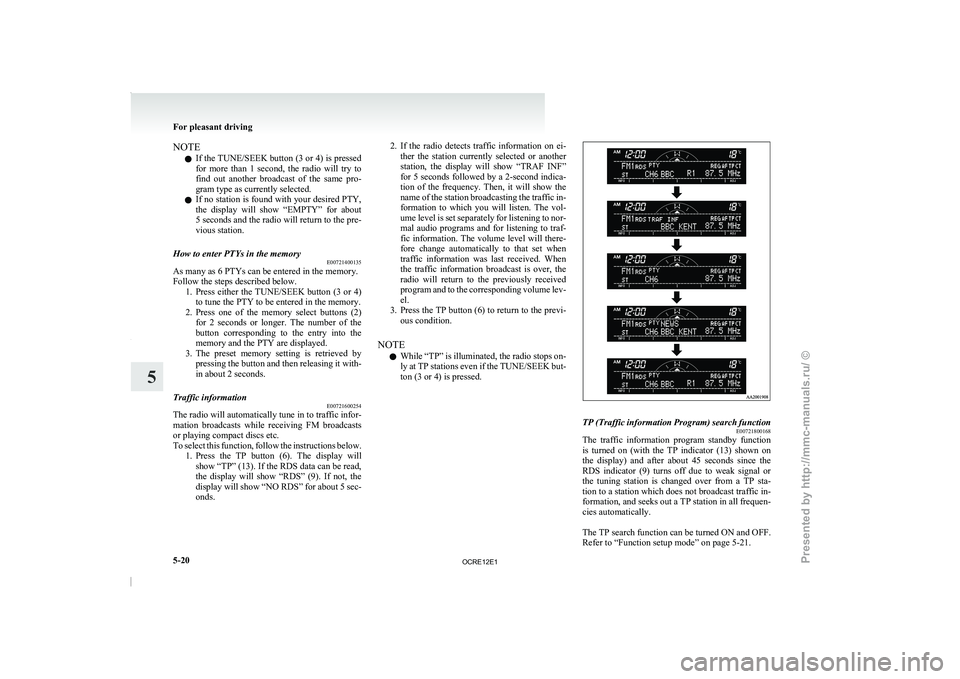
Traffic information E00721600254
The radio will automatically tune in to traffic infor-
mation broadcasts while receiving FM
broadcasts
or playing compact discs etc.
To select this function, follow the instructions below. 1. Press the TP button (6). The display willshow “TP” (13). If the RDS data can be read,
the display will show “RDS” (9). If not, the
display will show “NO RDS” for about 5 sec-
onds. 2. If the radio detects traffic information on ei-
ther the station currently
selected or another
station, the display will show “TRAF INF”
for 5 seconds followed by a 2-second indica-
tion of the frequency. Then, it will show the
name of the station broadcasting the traffic in-
formation to which you will listen. The vol-
ume level is set separately for listening to nor-
mal audio programs and for listening to traf-
fic information. The volume level will there-
fore change automatically to that set when
traffic information was last received. When
the traffic information broadcast is over, the
radio will return to the previously received
program and to the corresponding volume lev-
el.
3. Press the TP button (6) to return to the previ- ous condition.
NOTE l While “TP” is illuminated, the radio stops on-
ly at TP stations even if the TUNE/SEEK but-
ton (3 or 4) is pressed. TP (Traffic information Program) search function
E00721800168
The traffic information program standby function
is turned
on (with
the
TP indicator (13) shown on
the display) and after about 45 seconds since the
RDS indicator (9) turns off due to weak signal or
the tuning station is changed over from a TP sta-
tion to a station which does not broadcast traffic in-
formation, and seeks out a TP station in all frequen-
cies automatically.
The TP search function can be turned ON and OFF.
Refer to “Function setup mode” on page 5-21. For pleasant driving
5-20
5
OCRE12E1
Presented by http://mmc-manuals.ru/ \251