2011 MITSUBISHI PAJERO IV change time
[x] Cancel search: change timePage 206 of 377

To listen to a CD
E00709601958
1. Insert a disc
with the label facing up, and the
CD player will begin playing even if the ra-
dio is being used. The CD indicator (16), the
track number and the playing time will ap-
pear on the display. The CD player will also
start playback when the CD button (4) is press-
ed with a disc in the player.
2. To stop the CD, turn off the power by press- ing the PWR button (2) or change over to ra-
dio mode by pressing the AM/FM button (1),
or eject the disc by pressing the eject button
(7).
NOTE l To adjust the volume and tone, refer to “To
adjust the volume” on page 5-13 and “To ad-
just the tone” on page 5-13.
l For information concerning the handling of
compact discs, refer to “Handling of compact
discs” on page 5-65. To listen to an MP3 CD
This
CD player
allows you to play MP3 (MPEG Au-
dio Layer- 3) files recorded on CD-ROMs, CD-Rs
(recordable CDs), and CD-RWs (rewritable CDs)
in ISO9660 Level 1/Level 2, Joliet, and Romeo for-
mats. Each disc may have a maximum of 16 trees,
100 folders, and 255 files per disc. During MP3
playback, the unit can display ID3 tag information.
For information concerning ID3 tag, refer to “CD
text and MP3 title display” on page 5-25. 1. Insert
a disc containing MP3 files into the slot.
2. Press
the CD button (4) for 2 seconds or lon-
ger to switch to MP3 CD mode from normal
music CD mode. The display shows “READ-
ING”, then playback will begin. The folder
number and the track number will appear on
the display. NOTE
l While
listening to
a disc on which CD-DA
(CD-Digital Audio) and MP3 files have both
been recorded, you can switch between read-
ing of the CD-DA, reading of the MP3 files,
and the external audio input mode (AUX) by
pressing the CD button for 2 seconds or lon-
ger (until you hear a beep).
For information on the external audio input,
refer to “To use the external audio input func-
tion” on page 5-56.
l With a disc that contains both CD-DA and
MP3 files, the CD-DA files are automatical-
ly played first.
l The playback sound quality differs depend-
ing on the encoding software and the bit rate.
For details, refer to the user manual of your
encoding software.
l Depending on file/folder configurations on a
disc, it may take some time before playback
starts.
l MP3 encoding software and writing software
are not supplied with this unit.
l You may encounter trouble in playing an
MP3 or displaying the information of MP3
files recorded with certain writing software
or CD recorders (CD-R/RW drivers).
l If you record too many folders or files other
than MP3 onto a disc, it may take some time
before playback starts.
l This unit does not record MP3 files.
l For information concerning CD-Rs/RWs, re-
fer to “Notes on CD-Rs/RWs” on page 5-66. For pleasant driving
5-23 5
OBKE12E1
Page 214 of 377

To listen to the radio
E00709000418
1. Press the PWR
button (2) to turn the audio
system on and off.
Press the AM/FM button (1) to turn on the ra-
dio if a CD is being played.
2. Press the AM/FM button (1) to select the de- sired band.
3. Press the TUNE button (6 or 7) or SEEK but- ton (4 or 5) to tune to a station, or press one
of the memory select buttons (3) to recall a
station memorised for that button.
To tune the radio E00709100350
Automatic tuning
After pressing
the
SEEK button (4 or 5), the selec-
ted station reception will start.
Manual tuning
The frequency changes every time the TUNE but-
ton (6 or 7) is pressed. The frequency changes con-
tinuously if you keep pushing the button. Press the
button to select the desired station. To enter frequencies into the memory
E00716101014
Manual setting
You can
assign
to the memory select buttons (3) a
maximum of 18 stations in the FM band (6 FM1, 6
FM2 and 6 FM3 stations) and 6 stations each in the
MW and LW band. (Stations already assigned to
the memory select buttons are replaced by any new-
ly assigned stations.)
Follow the steps described below.
1. Press either the
TUNE button (6 or 7) to tune
the frequency to be entered in the memory.
2. Press one of the memory select buttons (3) for 2 seconds or longer. The sound will be
momentarily interrupted while the frequency
is being entered into the memory.
The number of the button corresponding to
the entry in the memory and the frequency
are displayed.
3. The preset memory setting is retrieved by pressing the button for less than 2 seconds. Automatic setting
With the
method,
all manually set stations in the
band currently selected for reception are replaced
with stations in the same band that are automatical-
ly selected in order of signal strength. The radio au-
tomatically selects 6 stations in the FM band (FM3
station only) and 6 stations each in the MW and
LW band.
Follow the steps described below. 1. With the radio mode selected, hold down theAM/FM button (1) for 2 seconds or longer.
The 6 stations with the best signal strength
will automatically be assigned to the memo-
ry select buttons (3), with the lowest-frequen-
cy station being assigned to the lowest-num-
ber button.
2. When you subsequently press a memory se- lect button to select a channel number, the ra-
dio will begin receiving the station assigned
to that number.
NOTE l If you press the AM/FM button (1) for
2 seconds or longer while tuning in the FM1
or FM2 band, the radio will automatically
switch to the FM3 band, where the automatic
seeking/storing will be activated. For pleasant driving
5-31 5
OBKE12E1
Page 216 of 377

AF (Alternative Frequencies) function
E00720900104
The AF function
finds a station broadcasting the
same program and selects the station with the stron-
gest signal of AF lists.
The AF function is turned on at all times unless
you manually switch it off.
The AF function can be turned ON and OFF. Refer
to “Function setup mode” on page 5-20.
CT (Clock Time) function E00721000098
The clock can be set automatically by using the sig-
nal from the
local RDS stations. Refer to “Adjust-
ing the time” on page 3-13.
REG (Regional) function E00721100015
REG function limits to receive the stations broad-
casting regional programs.
Regional programming and
regional networks are
organized differently depending on the country or
area (they may be changed according to the hour,
state, or broadcast area), so if you don’t want to re-
ceive the regional programs automatically, you can
set up REG ON not to receive regional programs.
The REG function can be turned ON and OFF. Re-
fer to “Function setup mode” on page 5-20.
PI (Program Identification) search function E00721200234
When travelling long distance and the recalled pre-
set station is
weak, the radio searches another fre-
quency broadcasting the same programming with
the same PI code in AF list. If there are no frequencies broadcasting the same
programming, the
radio
searches a frequency broad-
casting the regional programming. The radio suc-
ceeds in searching the regional programming, then
the display shows the REG indicator (13). If the ra-
dio does not succeed in searching the regional pro-
gramming, the radio returns to the recalled preset
station.
The PI function can be turned ON and OFF.
Refer to “Function setup mode” on page 5-20.
NOTE
l While searching, the audio system is muted.
The display shows “WAIT” or “SEARCH”.
PTY (Program type) E00721300280
RDS broadcasts are classified according to pro-
gram type (PTY)
as follows. Use the TUNE button
(7 or 8) to select your desired PTY. 1. NEWS
2. AFFAIRS (Current affairs)
3. INFO (Information)
4. SPORT
5. EDUCATE (Education)
6. DRAMA
7. CULTURE
8. SCIENCE
9. VARIED
10. POP M (Pop music)
11. ROCK M (Rock music)
12. EASY M (Easy music)
13. LIGHT M (Light classics)
14. CLASSICS
15. OTHER M (Other music)
16. WEATHER (Weather information)
17. FINANCE
18. CHILDREN 19. SOCIAL
20. RELIGION
21. PHONE IN
22.
TRAVEL
23. LEISURE
24. JAZZ
25. COUNTRY
26. NATION M (National music)
27. OLDIES
28. FOLK M (Folk music)
29. DOCUMENT
To search for a broadcast of desired program type: 1. Press the PTY button (10).
2. Press the TUNE button (7 or 8) for less than1 second at a time to select your desired PTY.
3. Two seconds after a desired PTY has been se- lected, the radio will begin to search for a
broadcast of your selected PTY. During
search, the selected PTY on the display blinks.
4. When the radio picks up a station with your desired PTY, the display will show the name
of the station. For pleasant driving
5-33 5
OBKE12E1
Page 222 of 377

l
If you
do not remove the disc before
15 seconds have elapsed, the autochanger
will automatically reload the disc and stop.
To eject all the discs 1. Press the eject button (7) for 2 seconds or lon-ger (until you hear a beep).
2. The currently selected disc will be ejected. When you remove the ejected disc, the next
disc will automatically be ejected.
3. Repeat the above-described steps until all of the discs have been ejected. The autochanger
will then enter loading standby mode.
NOTE l If you do not remove an ejected disc before
15 seconds have elapsed, the disc will be re-
loaded and the eject mode will be cancelled.
The reloaded disc will not be played.
To select a desired disc
You can select your desired disc by using the DISC
button (16 or 17). The active disc will be indicated
by “ ” on the display.
Disc up
Press the DISC
button (16) repeatedly until the de-
sired disc number appears on the display.
Disc down
Press the DISC button (17) repeatedly until the de-
sired disc number appears on the display. To listen to a music CD
Push the CD button (4) if the discs are already in
the
autochanger. The
autochanger will enter CD
mode and start playback. The disc number, the
track number and the playing-time will appear on
the display. The discs in the unit will be played con-
secutively and continuously. To listen to an MP3 CD
This
autochanger
allows
you to play MP3 (MPEG
Audio Layer-3) files recorded on CD-ROMs, CD-
Rs (recordable CDs), and CD-RWs (rewritable
CDs) in ISO9660 Level 1/Level 2, Joliet, and Ro-
meo formats. Each disc may have a maximum of
16 trees, 100 folders, and 255 files per disc. During
MP3 playback, the unit can display ID3 tag infor-
mation. For information concerning ID3 tag, refer
to “CD text and MP3 title display” on page 5-25. Push the CD button (4) if MP3 CDs are already in
the autochanger.
The
display shows
“READING”, then playback
will begin. The folder number, the track number,
the playing-time and “MP3” indicator will appear
on the display. For pleasant driving
5-39 5
OBKE12E1
Page 228 of 377

To play from an iPod
E00756300226
1. Press the PWR
button (2) to turn on the au-
dio system. The system turns on in the last
mode used.
2. Connect your iPod to the USB input termi- nal. Refer to “How to connect an iPod” on
page 5-82.
3. Press the CD button (4) several times to switch to the iPod mode. The input mode
changes every time the CD button is pressed.
CD mode → iPod mode → Bluetooth ®
mode* → Rear-seat display mode*
NOTE l If your vehicle is equipped with audio/video
input RCA terminals, pressing and holding
the CD button for 2 seconds or more
switches the system to the AUX mode.
4. Once the device is selected, playback starts and “iPod” appears on the display.
NOTE l Depending on the condition of your iPod, it
may take a longer time before the playback
starts.
5. To stop the playback, press the AM/FM but- ton (1) or CD button (4) to switch to a differ-
ent mode.
NOTE l Buttons on the iPod are disabled while the
iPod is connected to the audio system. l
To
adjust the volume and tone, refer to “To
adjust the volume” on pages 5-13, 5-27 and
“To adjust the tone” on pages 5-13, 5-27.
To fast-forward/reverse the track E00756400012
To fast-forward/reverse the current track, press the
fast-forward (8) or fast-reverse (7) button.
Fast-forward
To fast-forward the current track, press the fast-for-
ward (8) button.
While the button is pressed, the
track will be fast-forwarded.
Fast-reverse
To fast-reverse the current track, press the fast-re-
verse (7) button. While the button is pressed, the
track will be fast-reversed.
To select a desired track E00756500013
Press the TRACK button (11) to select the desired
track number.
Press : The track number increases by
one.
Press : The track number decreases by
one.
Press for a
long period (ap- prox. 2 seconds
or more) :
The track number increases con-
tinuously while the button is
pressed.
Press for a
long period (ap-
prox. 2 seconds
or more) :
The track number decreases con-
tinuouslywhile the button is
pressed. If the side of the button is pressed once while a
track is playing,
playback returns to the start of that
track.
NOTE
l Every time the track selection button is press-
ed, the track number in the display changes.
To find a track from the iPod menu E00756600014
You can select desired tracks from the “Playlists”,
“Artists”, “Albums”, “Songs”
or “Genre” (vehicles
with Bluetooth ®
2.0 interface) menus on your iPod.
Press the following buttons to select desired tracks.
The selected menu or category or track is shown in
the display.
FOLDER but-
ton (12 or 13) : To show the menu or category
or track.
MENU button
(10) : To select the menu or category
or track.
NOTE l To
cancel the
selection, press the DISC but-
ton (14) to return to the previous step.
l If no operation is performed for 10 seconds
or more or other button is operated after the
FOLDER button has been pressed, searching
of the desired tracks is cancelled.
l If no operation is performed for 5 seconds or
more after the track is displayed, playback
starts.
To play the same track repeatedly E00756700015
Press the RPT button (5) during playback to show
“RPT” in the display. For pleasant driving
5-45 5
OBKE12E1
Page 229 of 377
To exit this mode, press the button again.
To play tracks in random order
E00756900017
Press the RDM button (6) to show “SHUFFLE” in
the display.
The iPod randomly
selects tracks from the current
category and plays the selected tracks.
To exit this mode, press the button again.
To play tracks in each album in random order E00757000015
Press and hold the RDM button (6) until you hear a
beep to show “A-SHUFFLE” in the display.
The iPod randomly
selects tracks in the album
from the current category and play the selected
tracks.
To exit this mode, press the button again.
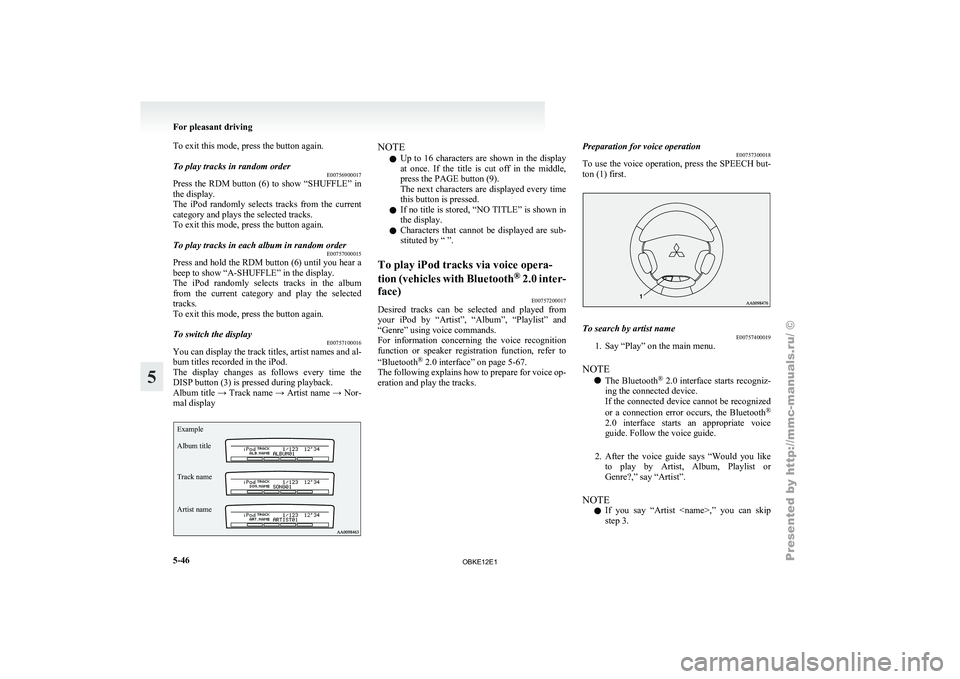
To switch the display E00757100016
You can display the track titles, artist names and al-
bum titles recorded in the iPod.
The display changes
as follows every time the
DISP button (3) is pressed during playback.
Album title → Track name → Artist name → Nor-
mal display
Example
Album title
Track name
Artist name NOTE
l Up
to 16
characters are shown in the display
at once. If the title is cut off in the middle,
press the PAGE button (9).
The next characters are displayed every time
this button is pressed.
l If no title is stored, “NO TITLE” is shown in
the display.
l Characters that cannot be displayed are sub-
stituted by “ ”.
To play iPod tracks via voice opera-
tion (vehicles with
Bluetooth®
2.0 inter-
face) E00757200017
Desired tracks can be selected and played from
your iPod by
“Artist”, “Album”, “Playlist” and
“Genre” using voice commands.
For information concerning the voice recognition
function or speaker registration function, refer to
“Bluetooth ®
2.0 interface” on page 5-67.
The following explains how to prepare for voice op-
eration and play the tracks. Preparation for voice operation
E00757300018
To use
the
voice operation, press the SPEECH but-
ton (1) first. To search by artist name
E00757400019
1. Say “Play” on the main menu.
NOTE l The Bluetooth ®
2.0
interface starts recogniz-
ing the connected device.
If the connected device cannot be recognized
or a connection error occurs, the Bluetooth ®
2.0 interface starts an appropriate voice
guide. Follow the voice guide.
2. After the voice guide says “Would you like to play by Artist, Album, Playlist or
Genre?,” say “Artist”.
NOTE l If you say “Artist
step 3. For pleasant driving
5-46
5
OBKE12E1
Page 233 of 377
To play from a USB memory device
E00762500210
1. Press the PWR
button (2) to turn on the au-
dio system. The system turns on in the last
mode used.
2. Connect your USB memory device to the USB input terminal. Refer to “How to con-
nect a USB memory device” on page 5-82.
3. Press the CD button (4) several times to switch to the USB mode. The input mode
changes as follows every time the CD button
is pressed.
CD mode → USB mode → Bluetooth ®
mode* → Rear-seat display mode*
NOTE l If your vehicle is equipped with audio/video
input RCA terminals, pressing and holding
the CD button for 2 seconds or more
switches the system to the AUX mode.
4. Once the device is selected, playback starts and “USB” appears on the display.
NOTE l Depending on the condition of your USB de-
vice, it may take a longer time before the play-
back starts.
5. To stop the playback, press the AM/FM but- ton (1) or CD button (4) to switch to a differ-
ent mode. NOTE
l To
adjust the
volume and tone, refer to “To
adjust the volume” on pages 5-13, 5-27 and
“To adjust the tone” on pages 5-13, 5-27.
Supported compressed music files E00758300318
This audio can play MP3, WMA, AAC and WAV
files recorded
in
a USB memory device. This audio
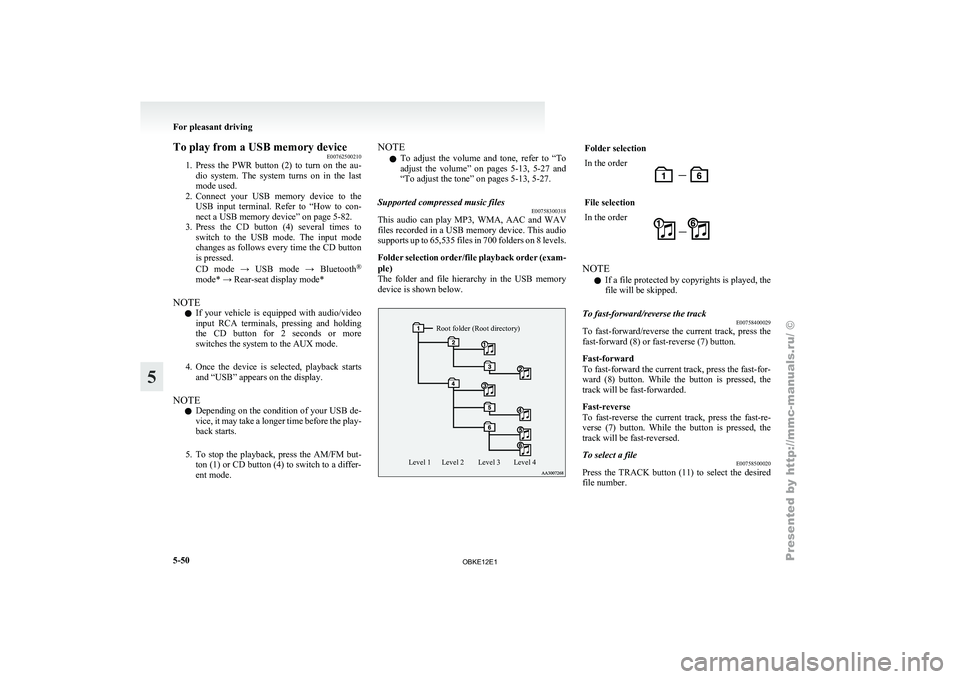
supports up to 65,535 files in 700 folders on 8 levels.
Folder selection order/file playback order (exam-
ple)
The folder and file hierarchy in the USB memory
device is shown below.
Root folder (Root directory)
Level 4
Level 3
Level 2
Level 1 Folder selection
In the order
File selection
In the order
NOTE
l If a file protected by copyrights is played, the
file will be skipped.
To fast-forward/reverse the track E00758400029
To fast-forward/reverse the current track, press the
fast-forward (8) or fast-reverse (7) button.
Fast-forward
To fast-forward the current track, press the fast-for-
ward (8) button.
While the button is pressed, the
track will be fast-forwarded.
Fast-reverse
To fast-reverse the current track, press the fast-re-
verse (7) button. While the button is pressed, the
track will be fast-reversed.
To select a file E00758500020
Press the TRACK button (11) to select the desired
file number. For pleasant driving
5-50
5
OBKE12E1
Page 234 of 377
Press : The track number increases by
one.
Press : The track number decreases by
one.
Press for a
long period
(approx. 2 sec-
onds or more) : The track number increases
continuously while the button
is pressed.
Press for a
long period
(approx. 2 sec-
onds or more) : The track number decreases
continuouslywhile the button
is pressed.
If the side of the button is pressed once after a
few seconds, playback
returns to the start of that
track.
NOTE
l Every time the TRACK button (11) is press-
ed, the file number in the display changes.
To find a track E00758600223
You can select a folder to find a desired track.
1. Press the FOLDER button (12 or 13) to showthe desired folder in the display.
NOTE l If
no
operation is performed for 10 seconds
or more or other button is operated after the
FOLDER button has been pressed, the selec-
ted track becomes unselected and the display
returns to the playback display.
2. Press the MENU button (10) to select the fold- er. NOTE
l When
the DISC
button (15) is pressed, the
track find mode will be cancelled.
3. Press the FOLDER button (12 or 13) to show the desired track in the display.
NOTE l When the DISC button (15) is pressed, the se-
lection is cancelled and returned to the previ-
ous step.
l If no operation is performed for 5 seconds or
more after the FOLDER button (12 or 13) is
pressed, the displayed track is played.
4. Press the MENU button (10) to select the file.
To play the same file repeatedly E00758700022
Press the RPT button (5) to show “RPT” in the dis-
play. To cancel this mode, press the button again.
To play the files in the same folder repeatedly E00758800023
Press and hold the RPT button (5) until you hear a
beep to show “F-RPT” in the display.
All tracks
in
the current folder are played repeatedly.
To exit this mode, press the button again.
To play a folder in random order E00758900024
Press the RDM button (6) to show “RDM” in the
display.
The audio randomly
selects tracks from the current
folder and plays the selected tracks.
To exit this mode, press the button again. To play all folders in random order
E00759000022
Press and hold
the RDM button (6) until you hear a
beep to show “F-RDM” in the display.
The audio randomly selects tracks from all folders
and plays the selected tracks.
To exit this mode, press the button again.
To find the start of each track in a folder for play-
back (vehicles without Bluetooth ®
2.0 interface)
E00759100111
Press the SCAN button (14). “SCAN” is shown in
the display and
the tracks in the current folder are
played for several seconds from the beginning.
The file number will blink while the scan mode is
selected.
To exit this mode, press the button again.
NOTE
l Once all tracks in the folder have been cued
playback will restart from the beginning of
the track that was playing when cueing started.
To find the start of each track in all folders for
playback (vehicles with Bluetooth ®
2.0 interface)
E00765800038
Press the SCAN button (14). “SCAN” is shown in
the display and
all tracks in all folders are played
for several seconds from the beginning.
The file number will blink while the scan mode is
selected.
To exit this mode, press the button again.
To find the start of first tracks in all folders for
playback E00759200112
Press and hold the SCAN button (14) until you
hear a beep to show “F-SCAN” in the display.
The first tracks
in all folders are played for several
seconds from the beginning. For pleasant driving
5-51 5
OBKE12E1