2011 MITSUBISHI PAJERO IV check engine
[x] Cancel search: check enginePage 164 of 377
Anti-lock brake system (ABS)
E00607101248
Environmental conditions can
have an effect on
braking. During sudden braking when there is
snow, ice, oil, water etc. on the road surface, a skid
may occur. In this situation, steering control and
braking effectiveness is reduced and the stopping
distance is increased. The vehicle may also go into
an uncontrolled spin.
The ABS helps prevent the wheels from locking dur-
ing braking, thus maintaining directional stability,
ensuring controllability and providing optimum
braking force.
Driving hints
l Always maintain the same distance from the
vehicle in front of you as you would for a ve-
hicle not equipped with ABS.
Compared with vehicles not fitted with ABS,
your vehicle may require a longer stopping
distance in the following cases:
• Driving on gravel or snow-covered roads.
• Driving with tyre chains installed.
• Driving on roads where the road surfaceis pitted or has other differences in sur-
face height.
• Driving on bumpy roads or other poor driv- ing surfaces.
l In order to ensure that the ABS will operate
correctly in situations where tyre chains have
been fitted, drive in the “4H”, “4HLc”, or
“4LLc” position. l
Operation of
ABS is not restricted to situa-
tions where brakes are applied suddenly.
This system may also operate to prevent
wheel lock when you are driving over man-
holes, steel road-work plates, or the vehicle
is driven over steps or level differences in
the road, road markings, or other surfaces
which are difficult for the wheels to grip.
l When the ABS is activated, you may feel the
brake pedal pulsation and the vibrations of
the vehicle body and steering wheel. You
may also hear a characteristic noise. At this
time, you may feel as if the pedal attempts to
resist being depressed.
This is a normal result of the ABS operation,
and does not indicate a problem.
In this situation, to let the ABS work for
you, just hold the brake pedal down more
firmly. Do not pump the brake. This will
result in reduced braking performance.
l When the engine starts and after starting to
drive, you might hear operation noise from
the engine compartment or feel a shock from
the brake pedal. This is normal. The ABS is
performing self-check.
l The ABS will operate after the vehicle has ac-
celerated to a speed in excess of approximate-
ly 10 km/h (6 mph). It stops operating when
the vehicle decelerates to a speed below
about 5 km/h (3 mph). CAUTION
l
Even the ABS
cannot prevent the natural
laws of physics from acting on the vehi-
cle. It cannot for instance avoid accidents
that may result from excessive speed on
bends or following another vehicle too
closely or aquaplaning. It should remain
the driver’s task to observe safety precau-
tions to judge speeds and brake applica-
tions correctly in such conditions.
l Be sure to use tyres of the same type and
size on 4 wheels.
If tyre types or sizes are mixed, ABS may
not function normally.
l Never install a limited-slip differential,
which is not a MITSUBISHI MOTORS
genuine part, as the ABS may not func-
tion normally.
We recommend you to consult a
MITSUBISHI MOTORS Authorized
Service Point. Starting and driving
4-39 4
OBKE12E1
Page 165 of 377
ABS warning lamp
E00607200532
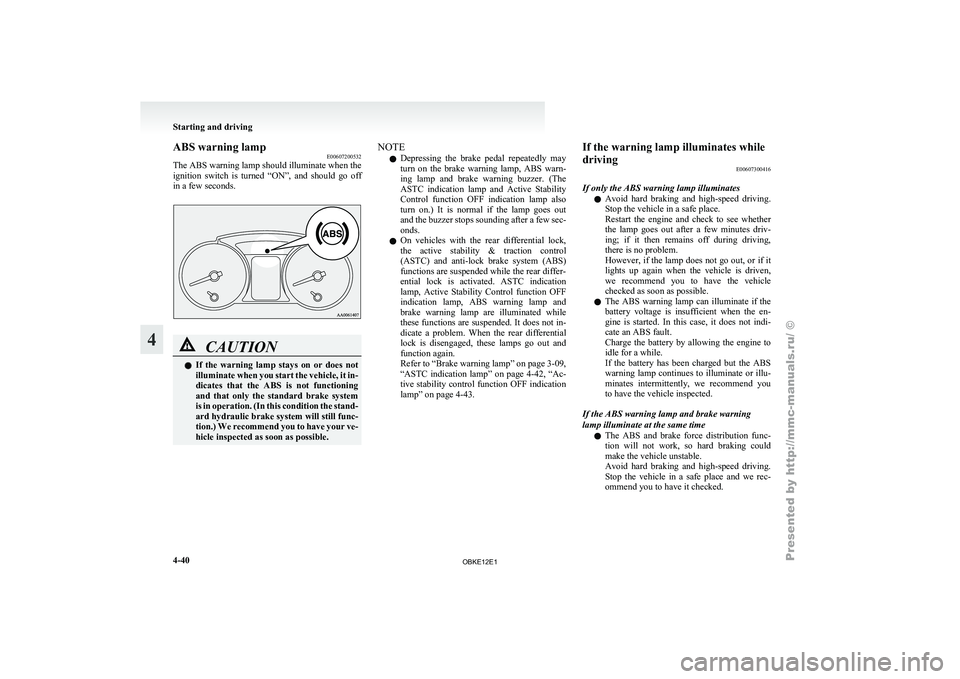
The ABS warning
lamp should illuminate when the
ignition switch is turned “ON”, and should go off
in a few seconds. CAUTION
l
If the
warning
lamp stays on or does not
illuminate when you start the vehicle, it in-
dicates that the ABS is not functioning
and that only the standard brake system
is in operation. (In this condition the stand-
ard hydraulic brake system will still func-
tion.) We recommend you to have your ve-
hicle inspected as soon as possible. NOTE
l Depressing
the brake
pedal repeatedly may
turn on the brake warning lamp, ABS warn-
ing lamp and brake warning buzzer. (The
ASTC indication lamp and Active Stability
Control function OFF indication lamp also
turn on.) It is normal if the lamp goes out
and the buzzer stops sounding after a few sec-
onds.
l On vehicles with the rear differential lock,
the active stability & traction control
(ASTC) and anti-lock brake system (ABS)
functions are suspended while the rear differ-
ential lock is activated. ASTC indication
lamp, Active Stability Control function OFF
indication lamp, ABS warning lamp and
brake warning lamp are illuminated while
these functions are suspended. It does not in-
dicate a problem. When the rear differential
lock is disengaged, these lamps go out and
function again.
Refer to “Brake warning lamp” on page 3-09,
“ASTC indication lamp” on page 4-42, “Ac-
tive stability control function OFF indication
lamp” on page 4-43. If the warning lamp illuminates while
driving
E00607300416
If only the ABS warning lamp illuminates l Avoid
hard
braking
and high-speed driving.
Stop the vehicle in a safe place.
Restart the engine and check to see whether
the lamp goes out after a few minutes driv-
ing; if it then remains off during driving,
there is no problem.
However, if the lamp does not go out, or if it
lights up again when the vehicle is driven,
we recommend you to have the vehicle
checked as soon as possible.
l The ABS warning lamp can illuminate if the
battery voltage is insufficient when the en-
gine is started. In this case, it does not indi-
cate an ABS fault.
Charge the battery by allowing the engine to
idle for a while.
If the battery has been charged but the ABS
warning lamp continues to illuminate or illu-
minates intermittently, we recommend you
to have the vehicle inspected.
If the ABS warning lamp and brake warning
lamp illuminate at the same time l The ABS and brake force distribution func-
tion will not work, so hard braking could
make the vehicle unstable.
Avoid hard braking and high-speed driving.
Stop the vehicle in a safe place and we rec-
ommend you to have it checked. Starting and driving
4-40
4
OBKE12E1
Page 166 of 377

Inspection following snowy road oper-
ation
E00618300012
After driving on
snowy roads, remove any snow
and ice which may have become adhered to the
wheel areas.
When doing this, be careful not to damage the
wheel speed sensors (A) and cables located at each
wheel on vehicles equipped with an ABS.
Front
Rear Power steering system
E00607400260
The power steering
system operates while the en-
gine is running. It helps reduce the effort needed to
turn the steering wheel.
The power steering system has mechanical steering
capability in case the power assist is lost. If the pow-
er assist is lost for some reason, you will still be
able to steer your vehicle. If the power assist is
lost, you will notice it takes much more effort to
steer and that there is much more “free play” in the
steering wheel. If this happens, take your vehicle to
an authorized MITSUBISHI MOTORS dealer. WARNING
l Do not
stop
the engine while the vehicle is
moving. Stopping the engine would make
the steering wheel extremely hard to
turn, possibly resulting in an accident. CAUTION
l
Do not leave
the steering wheel turned all
the way in one direction. This can cause
damage to the power steering system. Active stability & traction control
(ASTC) E00613800230
The active stability
& traction control (ASTC)
takes overall control of the anti-lock brake system,
Active Stability Control function and active trac-
tion control function to maintain the vehicle’s sta-
bility and traction. Please read this section in con-
junction with the pages on the anti-lock brake sys-
tem, Active Stability Control function and active
traction control function.
Anti-lock brake system (ABS) ® p. 4-39
Active stability control function ® p. 4-43
Active traction control function ® p. 4-44 CAUTION
l
Do not
over-rely
on the ASTC. Even
when the ASTC is operating, there are lim-
its to how far it can ensure vehicle stabili-
ty; reckless driving may lead to accidents.
Always drive carefully, taking account of
the road conditions.
l Be sure to use the same specified type and
size of tyre on all 4 wheels. Otherwise,
there is a possibility that the ASTC will
not work properly.
NOTE l An
operation noise
may be emitted from the
engine compartment in the following situa-
tions. The sound is associated with checking
the operations of the ASTC. At this time,
you may feel a shock from the brake pedal if Starting and driving
4-41 4
OBKE12E1
Page 168 of 377

Driving hints
E00618100036
When extricating the
vehicle from mud, sand or
fresh snow with the transfer shift lever in the “2H”,
“4H”, or “4HLc” position, you may find that opera-
tion of the ASTC prevents the engine speed from in-
creasing in response to depression of the accelera-
tor pedal. If this happens and the vehicle remains
stuck as a result, place the transfer shift lever in the
“4LLc” position or turn the Active Stability Con-
trol switch OFF. The vehicle will then be easier to
extricate. (Brake control of the active traction con-
trol function is still working to prevent wheel spins
when ASC OFF switch “OFF” or “4LLc” position
selected.)
NOTE
l If the vehicle speed increases to about
120 km/h (75 mph) with the Active Stability
Control function deactivated, the Active Sta-
bility Control function automatically starts op-
erating. To subsequently stop the Active Sta-
bility Control function, stop the vehicle and
press the ASC OFF switch again.
Active stability control function E00613900097
The Active Stability Control function is designed
to help maintain
the vehicle’s control in slippery
conditions, or during rapid steering manoeuvres. It
works by controlling the engine output and brake
on each wheel. NOTE
l The
Active Stability
Control function does
not operate when the transfer shift lever is in
the “4LLc” position.
When the Active Stability Control function
is operating with the transfer shift lever in
the “2H”, “4H” or “4HLc” position, moving
the shift lever to the “4LLc” position makes
the Active Stability Control function deacti-
vate automatically.
l On vehicles with rear differential lock, the Ac-
tive Stability Control function does not oper-
ate when the rear differential lock is activated.
Active stability control function indication lamp E00614000183 Active stability control function indica-
tion lamp
Active stability control function OFF in-
dication lamp
The indication lamps should illuminate when the ig-
nition switch is
turned to the “ON” position and
should go off after a few seconds. If the indication lamps stay on or do not illuminate
when the
ignition
switch is turned to the “ON” po-
sition, we recommend you to have your vehicle in-
spected.
indication lamp blinks when the Active Stability
Control function is operating. indication lamp illuminates when the Active Sta-
bility Control function
is deactivated by either of
the following operations:
l The ASC OFF switch is pressed to deacti-
vate the system.
l The transfer shift lever is placed in the
“4LLc” position. CAUTION
l
When indication lamp blinks, the Ac-
tive Stability Control
function is operat-
ing, which means that the road is slippery
or that your vehicle’s wheels are spinning
excessively. If this happens, drive slower
with less accelerator input.
l If a fault occurs in the device, the ABS
warning lamp or and indication
lamps illuminate as
warning. Park your
vehicle in a safe place and stop the en-
gine. Then, start the engine again and
check whether the ABS warning lamp or and indication lamps go out.
If the ABS
warning lamp or and in-
dication lamps remains
lit even after the
engine has been started, we recommend
you to have your vehicle checked. Starting and driving
4-43 4
OBKE12E1
Page 180 of 377

Check surroundings for safety.To change the indication on the screen
of the inside rear-view mirror
E00631300022
It is possible to turn off the screen of the inside rear-
view mirror and
change the language of the warn-
ing messages on the screen. To temporarily set the non- display mode
If you
press
the switch (1) while the image appears
on the display, it goes off temporarily.
To return to display mode, press the switch again
or turn the ignition key to the “ON” position after
turning to “LOCK” or “ACC” position. To permanently set the non- display mode
1. Turn the ignition key to the “ON” position. CAUTION
l
For safety
reasons,
do not perform follow-
ing operations with the engine running.
2. Put the shift lever (manual transmission) or
the selector
lever (automatic transmission) in
the “R” position.
3. Press and hold down the switch (1) (for about 15 seconds).
While you keep the switch pressed, the or-
ange indicator (2) comes on. When the im-
age goes off, the non-display mode setting is
completed.
To change the language of warning text(3) 1. Turn the ignition key to the “ON” position. CAUTION
l
For safety
reasons,
do not perform follow-
ing operations with the engine running.
2. Put the shift lever (manual transmission) or
the selector
lever (automatic transmission) in
the “R” position.
3. Press and hold down the switch (1) to enter language selection mode (for 6 to 11 seconds).
In this mode, the image appears and the
green indicator (2) comes on. 4. Press the switch until the desired language ap-
pears on the display.
Each time
you press the switch, the language
will change to the next one. When the warn-
ing text flashes, setting is completed. Starting and driving
4-55 4
OBKE12E1
Page 189 of 377

CAUTION
l
Normally, use the outside position to keep
the windscreen and
side windows clear
and quickly remove fog or frost from the
windscreen.
If high cooling performance is desired, or
if the outside air is dusty or otherwise con-
taminated use the recirculation position.
Switch to the outside position periodically
to increase ventilation so that the win-
dows do not become fogged up.
l Use of the recirculation position for exten-
ded time may cause the windows to fog up.
NOTE l If
you press
the AUTO switch to select auto-
matic control after manually switching be-
tween outside air and recirculated air, the air
selection will also be automatically controlled. AUTO switch
E00702600011
When the
AUTO
switch is pressed, the operation in-
dication lamp (A) illuminates and the mode selec-
tion (except for “ ”), blower speed adjustment,
recirculated/outside air
selection, temperature ad-
justment and air conditioner ON/OFF status are all
controlled automatically. Air conditioning switch
E00703500886
Push the switch to turn the air conditioning on, indi-
cation lamp (A) will come on. Push the switch again to switch it off.
CAUTION
l
When using
the air conditioning, the
idling speed may slightly increase as the
air conditioning compressor is switched
on/off automatically. While the vehicle
with an A/T is stationary, fully depress
the brake pedal to prevent the vehicle
from creeping.
NOTE l If
a problem
is detected in the air condition-
ing compressor, the air conditioning opera-
tion indication lamp (A) blinks. Stop the ve-
hicle in a safe place, turn off the engine, then
restart the engine. If the air conditioning op-
eration indication lamp does not blink, there
is no problem. If it does blink, we recom-
mend you to have it checked.
l Sometimes, for example after using a high-
pressure car wash, the condenser can get wet,
and the operation indication lamp (A) blinks
temporarily. In this case there is nothing
wrong. Stop the vehicle in a safe place, turn
off the engine, then restart the engine. Once
the water evaporates, the blinking will stop. For pleasant driving
5-06
5
OBKE12E1
Page 193 of 377

Rear air conditioning*
E00704600073
The rear air
conditioning can only be used while
the engine is running and the front air conditioning
is switched on.
When the front air conditioning is not switched on,
only blower operation without cooling is possible.
Control panel E007047000581- Blower speed selection dial
2- Main switch
3-
Temperature control dial Rear fan switch for the front seat
E00705000029
When the rear
fan switch is pressed, the rear blow-
er comes on, the rear blower operation display (A)
shows “REAR ON”. When the rear fan switch is
pressed again, the rear blower goes off. NOTE
l Check whether or not the rear blower is oper-
ating
by looking
at the operation display (A).
The operation display shows when the rear
blower is operating. Main switch for the rear seat
E00704900021
Push the main
switch, and the rear blower will op-
erate, turning the operation indication lamp (A) on.
Push the main switch again, and the rear blower
will stop. NOTE
l Either
the rear
fan switch or the main switch
can be used to switch the power of the rear
blower ON and OFF. For pleasant driving
5-10
5
OBKE12E1
Page 253 of 377
NOTE
l Password
will be
required to access the sys-
tem after the next ignition cycle.
l It is required for a little time after engine
stop that the entered password is actually re-
corded in the system.
If the ignition switch is made to “ACC” or
“ON” or the engine is started immediately af-
ter engine stop, there is a case when the en-
tered password is not recorded in the system.
At this time, please try to enter the password
again.
Entering the password
If a password has been set and the security function
is enabled, the voice guide will say “Hands-free sys-
tem is locked. State the password to continue”
when the SPEECH button is pressed to enter voice
recognition mode. Say the 4-digit password num-
ber to enter the password.
If the entered password is wrong, the voice guide
will say “<4- digit password>, Incorrect password.
Please try again”. Enter the correct password.
NOTE l You can re-enter the password as many times
as you want.
l If you have forgotten your password, say
“Cancel” to quit the voice input mode and
then check with a MITSUBISHI MOTORS
Authorized Service Point.
Disabling the password
Use the following procedure to turn off the security
function by disabling the password. NOTE
l System
must be
unlocked to disable the pass-
word.
1. Press the SPEECH button.
2. Say “Setup”.
3. Say “Password.”
4. The voice guide will say “Password is ena- bled. Would you like to disable it?” Answer
“Yes.”
Answer “No” to cancel the disabling of the
password and return to the main menu.
5. When the disabling of the password is com- pleted, the voice guide will say “Password is
disabled” and the system will return to the
main menu.
Speaker enrollment function E00727400209
The Bluetooth ®
2.0 interface
can use the speaker en-
rollment function to create a voice model for one
person per language.
This makes it easier for the Bluetooth ®
2.0 inter-
face to recognise voice commands said by you.
You can turn a voice model registered with the
speaker enrollment function on and off whenever
you want.
Speaker enrollment E00727500196
It takes about 2 to 3 minutes to complete the speak-
er enrollment process.
To ensure the
best results, run through the process
while in the driver’s seat, in an environment that is
as quiet as possible (when there is no rain or strong
winds and the vehicle windows are closed). Please
turn off your phone while in speaker enrollment to
prevent interruption of the process.
Use the following procedure for speaker enrollment. 1. Stop your vehicle in a safe area, put the gear-
shift lever
in the “N” (Neutral) position
(M/T), or the selector lever in the “P”
(PARK) position (A/T), and pull the parking
brake lever.
NOTE l Speaker enrollment is not possible unless the
vehicle is parked. Make sure you park the ve-
hicle in a safe area before attempting speaker
enrollment.
2. Press the SPEECH button.
3. Say “Voice training”.
4. The voice guide will say “This operation must be performed in a quiet environment
while the vehicle is stopped. See the owner’s
manual for the list of required training phra-
ses. Press and release the SPEECH button
when you are ready to begin. Press the HANG-
UP button to cancel at any time”.
Press the SPEECH button to start the speaker
enrollment process.
NOTE l If you do not start the speaker enrollment proc-
ess within 3 minutes of pressing the
SPEECH button, the speaker enrollment func-
tion will time out.
The voice guide will say “Speaker Enroll-
ment has timed out”. The system will then
beep and the voice recognition mode will be
deactivated.
5. The voice guide will prompt for phrase 1. Re- peat the corresponding phrase listed in table
“Enrollment commands” on page 5-81. For pleasant driving
5-70
5
OBKE12E1