Page 375 of 714
3-260 Features and controls
3
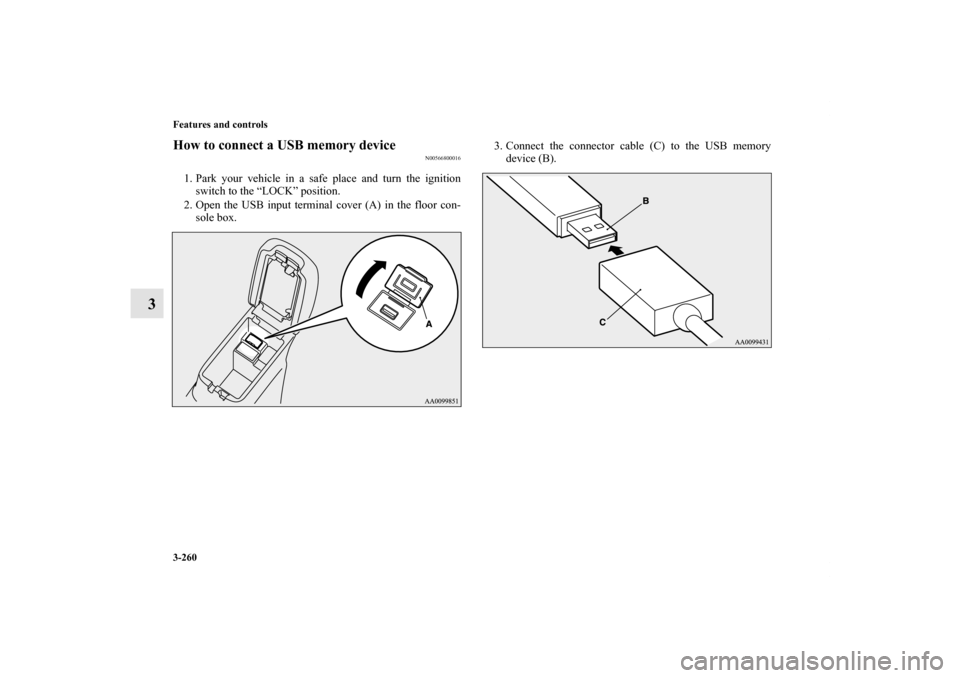
How to connect a USB memory device
N00566800016
1. Park your vehicle in a safe place and turn the ignition
switch to the “LOCK” position.
2. Open the USB input terminal cover (A) in the floor con-
sole box.3. Connect the connector cable (C) to the USB memory
device (B).
BK0122500US.book 260 ページ 2010年5月12日 水曜日 午前11時11分
Page 376 of 714
Features and controls
3-261
3
4. Connect the connector cable (C) to the USB input termi-
nal (D).
NOTE�Do not connect the USB memory device to the USB input
terminal directly.
The USB memory device may be damaged.
�When closing the floor console box, be careful not to trap
the connector cable.
5. To remove the connector cable, turn the ignition switch to
the “LOCK” position first and perform the installation
steps in reverse.
CAUTION
!�Keep the lid of the floor console box closed while
driving the vehicle. A lid or the contents of the floor
console box could otherwise cause injuries.
BK0122500US.book 261 ページ 2010年5月12日 水曜日 午前11時11分
Page 377 of 714
3-262 Features and controls
3
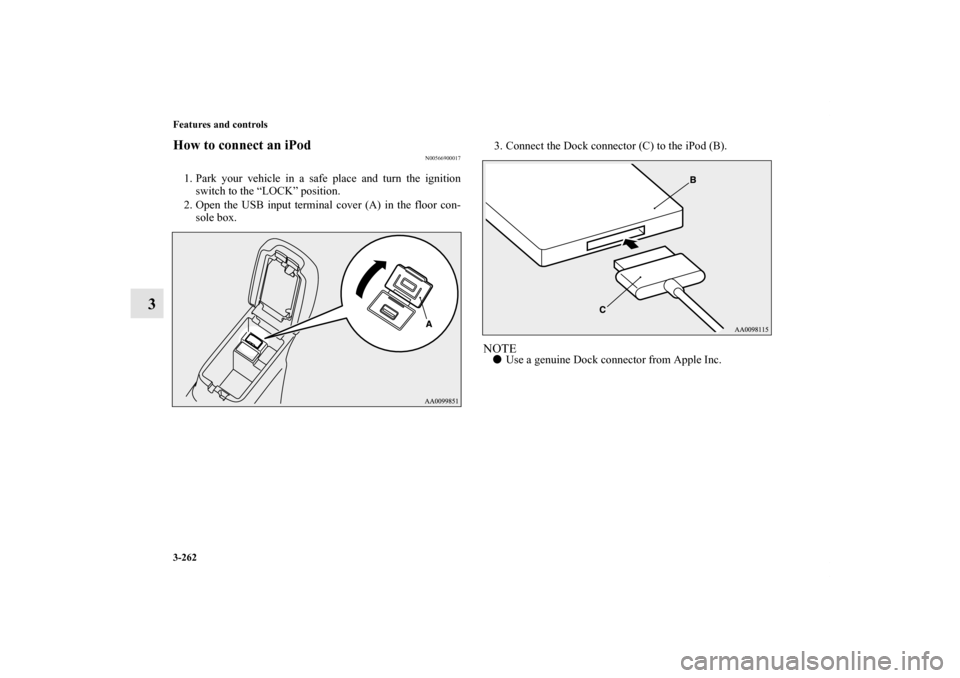
How to connect an iPod
N00566900017
1. Park your vehicle in a safe place and turn the ignition
switch to the “LOCK” position.
2. Open the USB input terminal cover (A) in the floor con-
sole box.3. Connect the Dock connector (C) to the iPod (B).
NOTE�Use a genuine Dock connector from Apple Inc.
BK0122500US.book 262 ページ 2010年5月12日 水曜日 午前11時11分
Page 378 of 714

Features and controls
3-263
3
4. Connect the Dock connector (C) to the USB input termi-
nal (D).NOTE�When closing the floor console box, be careful not to trap
the connector cable.
5. To remove the Dock connector, turn the ignition switch to
the “LOCK” position first and perform the installation
steps in reverse.
Types of connectable devices and supported file
specifications
N00567000015
Device types
N00567100045
Devices of the following types can be connected.
*: “iPod touch,” “iPod classic,” “iPod” and “iPod nano” are
registered trademarks of Apple Inc. in the Untied States and
other countries.
CAUTION
!�Keep the lid of the floor console box closed while
driving the vehicle. A lid or the contents of the floor
console box could otherwise cause injuries.
Model name
Condition
USB memory deviceStorage capacity of 256 Mbytes
or more
iPod touch* F/W Ver.1.1.1 or later
iPod classic* F/W Ver.1.0 or later
iPod (fifth generation)* F/W Ver.1.2.2 or later
iPod nano (fifth generation)* F/W Ver.1.2 or later
iPod nano (second generation)* F/W Ver.1.1.2 or later
Models other than USB mem-
ory devices and iPodsDigital audio player supporting
mass storage class
BK0122500US.book 263 ページ 2010年5月12日 水曜日 午前11時11分
Page 379 of 714
3-264 Features and controls
3
NOTE�Depending on the type of the USB memory device or
other device connected, the connected device may not
function properly or the available functions may be lim-
ited.
�Use the iPod whose firmware has been updated to the lat-
est version.
�You can charge your iPod by connecting it to the USB
input terminal when the ignition switch is in the “ACC” or
“ON” position.
�Do not keep your USB memory device or iPod in your
vehicle.
�It is recommended that you back up the files in case of
data damage.
�Do not connect to the USB input terminal any device
(hard disk, card reader, memory reader, etc.) other than
the connectable devices specified in the previous section.
The device and/or data may be damaged. If any of these
devices was connected by mistake, remove it after turning
the ignition switch to the “LOCK” position.
File specifications
N00567200017
You can play music files of the following specifications that
are saved in a USB memory device or other device supporting
mass storage class.Item
Condition
File format MP3, WMA, AAC, WAV
Maximum number of levels
(including the root)Level 8
Number of folders 700
Number of files 65,535
BK0122500US.book 264 ページ 2010年5月12日 水曜日 午前11時11分
Page 384 of 714
Features and controls
3-269
3
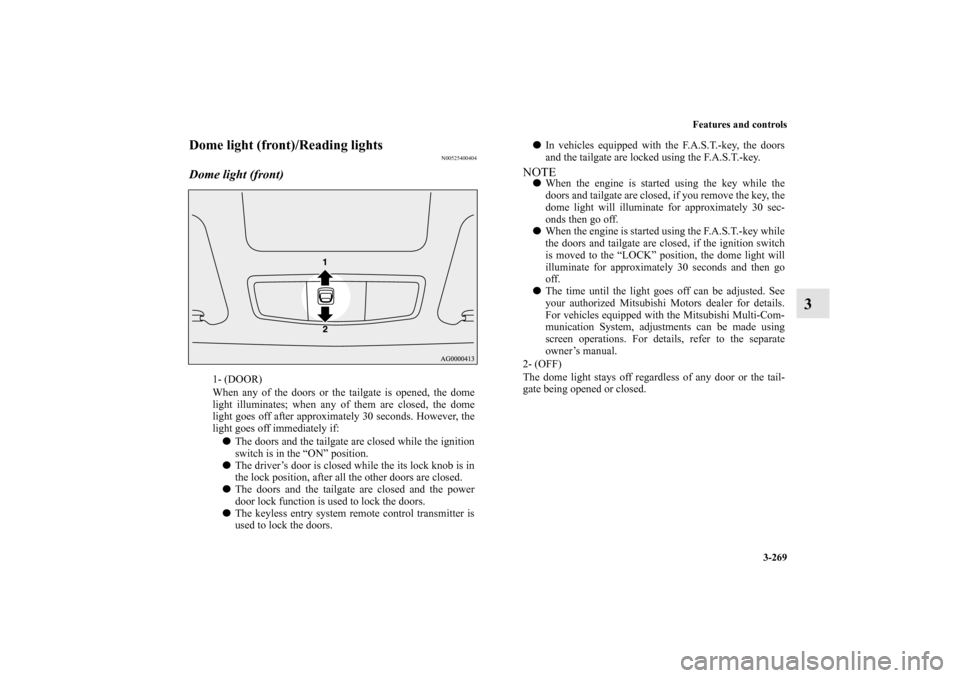
Dome light (front)/Reading lights
N00525400404
Dome light (front)
1- (DOOR)
When any of the doors or the tailgate is opened, the dome
light illuminates; when any of them are closed, the dome
light goes off after approximately 30 seconds. However, the
light goes off immediately if:
�The doors and the tailgate are closed while the ignition
switch is in the “ON” position.
�The driver’s door is closed while the its lock knob is in
the lock position, after all the other doors are closed.
�The doors and the tailgate are closed and the power
door lock function is used to lock the doors.
�The keyless entry system remote control transmitter is
used to lock the doors.
�In vehicles equipped with the F.A.S.T.-key, the doors
and the tailgate are locked using the F.A.S.T.-key.NOTE�When the engine is started using the key while the
doors and tailgate are closed, if you remove the key, the
dome light will illuminate for approximately 30 sec-
onds then go off.
�When the engine is started using the F.A.S.T.-key while
the doors and tailgate are closed, if the ignition switch
is moved to the “LOCK” position, the dome light will
illuminate for approximately 30 seconds and then go
off.
�The time until the light goes off can be adjusted. See
your authorized Mitsubishi Motors dealer for details.
For vehicles equipped with the Mitsubishi Multi-Com-
munication System, adjustments can be made using
screen operations. For details, refer to the separate
owner’s manual.
2- (OFF)
The dome light stays off regardless of any door or the tail-
gate being opened or closed.
BK0122500US.book 269 ページ 2010年5月12日 水曜日 午前11時11分
Page 385 of 714
3-270 Features and controls
3
Reading lights
N00537600139
Regardless of the dome light switch position, when you press
the lens (A), the light on the side that is pressed illuminates;
when you press the lens (A) again, the light goes out.
Dome light (rear)
N00525800176
1- (ON)
The dome light illuminates regardless of any door or the tail-
gate being opened or closed.
2- (�)
When any of the doors or the tailgate is opened, the dome
light illuminates; when any of them are closed, the dome
light goes off after approximately 30 seconds. However, the
light goes off immediately if:
�The door and the tailgate are closed while the ignition
switch is in the “ON” position.
�The driver’s door is closed while the its lock knob is in
the lock position, after all the other doors are closed.
�The door and the tailgate are closed and the power door
lock function is used to lock the doors.
BK0122500US.book 270 ページ 2010年5月12日 水曜日 午前11時11分
Page 386 of 714
Features and controls
3-271
3
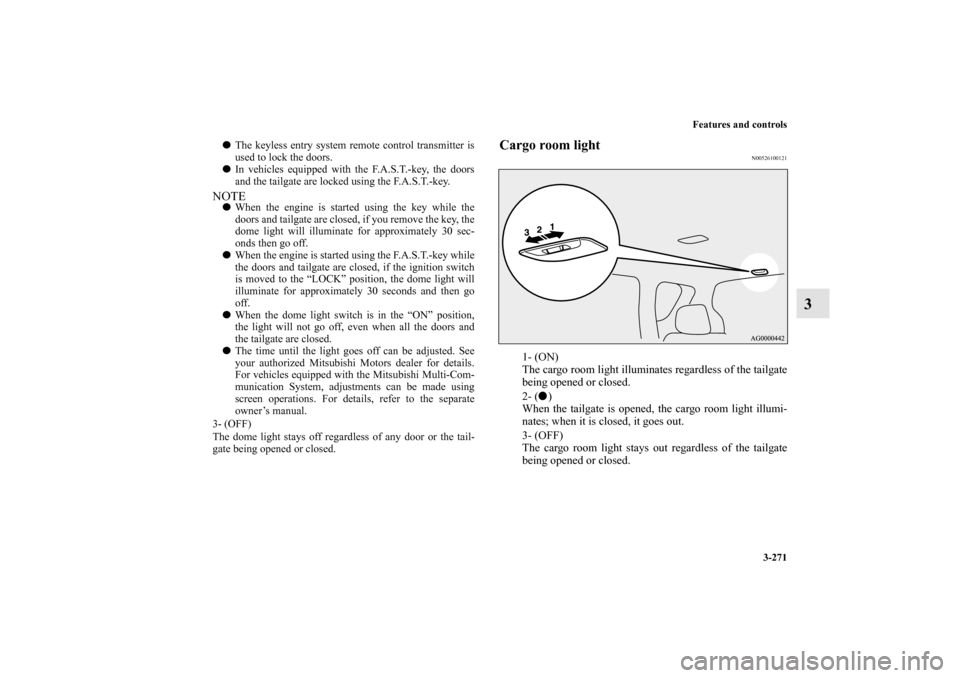
Cargo room light
N00526100121
1- (ON)
The cargo room light illuminates regardless of the tailgate
being opened or closed.
2- (�)
When the tailgate is opened, the cargo room light illumi-
nates; when it is closed, it goes out.
3- (OFF)
The cargo room light stays out regardless of the tailgate
being opened or closed.
�The keyless entry system remote control transmitter is
used to lock the doors.
�In vehicles equipped with the F.A.S.T.-key, the doors
and the tailgate are locked using the F.A.S.T.-key.NOTE�When the engine is started using the key while the
doors and tailgate are closed, if you remove the key, the
dome light will illuminate for approximately 30 sec-
onds then go off.
�When the engine is started using the F.A.S.T.-key while
the doors and tailgate are closed, if the ignition switch
is moved to the “LOCK” position, the dome light will
illuminate for approximately 30 seconds and then go
off.
�When the dome light switch is in the “ON” position,
the light will not go off, even when all the doors and
the tailgate are closed.
�The time until the light goes off can be adjusted. See
your authorized Mitsubishi Motors dealer for details.
For vehicles equipped with the Mitsubishi Multi-Com-
munication System, adjustments can be made using
screen operations. For details, refer to the separate
owner’s manual.
3- (OFF)
The dome light stays off regardless of any door or the tail-
gate being opened or closed.
BK0122500US.book 271 ページ 2010年5月12日 水曜日 午前11時11分