Page 228 of 714
Features and controls
3-113
3
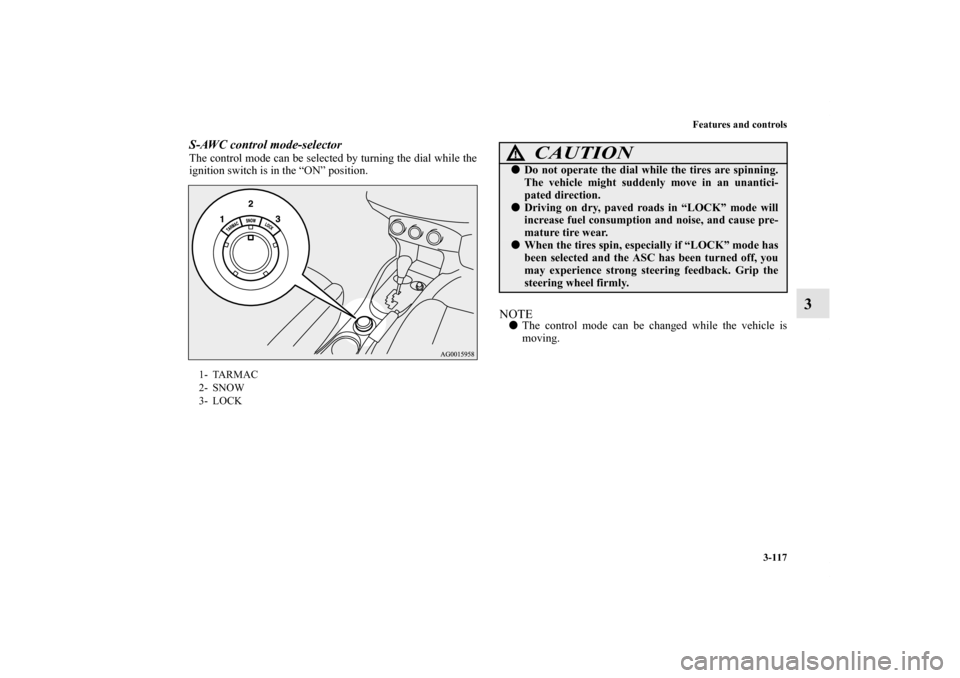
Drive mode-selectorThe drive mode can be switched by turning the dial while the
ignition switch is in the “ON” position.
The drive mode is displayed as an interrupt display on the
information screen in the multi-information display when the
drive mode is switched.
After a few seconds, the information screen returns from the
drive mode display to the previous screen.1- 2WD
2- 4WD AUTO
3- 4WD LOCK
Drive mode
Display
Type 1
Ty p e 2
2WD
4WD AUTO
4WD LOCKCAUTION
!�Do not operate the drive mode-selector with the
front wheels spinning on a snowy road or in similar
conditions. The vehicle could lunge in an unexpected
direction. �Driving on dry, paved roads in “4WD LOCK” mode
causes increased fuel consumption, noise, and pre-
mature tire wear.�Do not drive with the tires spinning in “2WD” mode.
Doing so could generate heat in the drive-system
components.
BK0122500US.book 113 ページ 2010年5月12日 水曜日 午前11時11分
Page 229 of 714
3-114 Features and controls
3
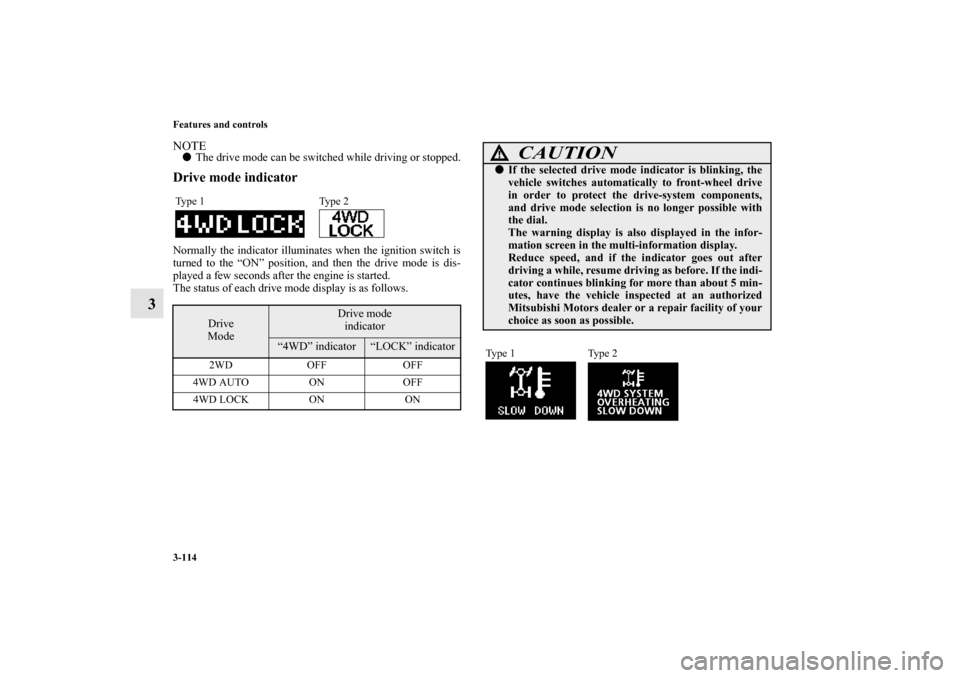
NOTE�The drive mode can be switched while driving or stopped.Drive mode indicatorNormally the indicator illuminates when the ignition switch is
turned to the “ON” position, and then the drive mode is dis-
played a few seconds after the engine is started.
The status of each drive mode display is as follows.Type 1 Type 2
Drive
Mode
Drive mode
indicator
“4WD” indicator
“LOCK” indicator
2WD OFF OFF
4WD AUTO ON OFF
4WD LOCK ON ON
CAUTION
!�If the selected drive mode indicator is blinking, the
vehicle switches automatically to front-wheel drive
in order to protect the drive-system components,
and drive mode selection is no longer possible with
the dial.
The warning display is also displayed in the infor-
mation screen in the multi-information display.
Reduce speed, and if the indicator goes out after
driving a while, resume driving as before. If the indi-
cator continues blinking for more than about 5 min-
utes, have the vehicle inspected at an authorized
Mitsubishi Motors dealer or a repair facility of your
choice as soon as possible.Type 1 Type 2
BK0122500US.book 114 ページ 2010年5月12日 水曜日 午前11時11分
Page 230 of 714
Features and controls
3-115
3
CAUTION
!�The warning display on the information screen in
the multi-information display, a problem has
occurred with the electronically controlled 4WD sys-
tem and the safety device has activated. Have an
inspection made by an authorized Mitsubishi
Motors dealer or a repair facility of your choice as
soon as possible.Ty p e 1 Ty p e 2
CAUTION
!�Always use tires of the same size, type, and brand
that have no wear differences. Using tires that differ
in size, type, brand, or wear amount may activate
the protection of the drive-system components, caus-
ing the drive mode in “4WD AUTO” mode to lock or
the “4WD” and “LOCK” indicators to blink alter-
nately.
BK0122500US.book 115 ページ 2010年5月12日 水曜日 午前11時11分
Page 231 of 714
3-116 Features and controls
3S-AWC (Super-All Wheel Control)
(if so
equipped)N00541300049
S-AWC is an integrated vehicle dynamics control system that
enhances driving performance, cornering performance and
vehicle stability over a wide range of driving conditions. It
does this by integrated controls over the front-rear distribution
of driving torque to the wheels and the left-right distribution of
driving torque to the front wheels.NOTE�If the parking brake lever is pulled up while the vehicle is
moving, the front-rear distribution of driving torque con-
trol will be forced to turn OFF which will allow the rear
wheel to lock easier.
S-AWC control mode
N00542400034
Select the control mode from the following three types to suit
the driving conditions.
CAUTION
!�Do not over-rely on the S-AWC. Even the S-AWC
cannot prevent the natural laws of physics from act-
ing on the vehicle. This system, like any other sys-
tem, has limits and cannot help you to maintain
traction and control of the vehicle in all circum-
stances. Reckless driving can lead to accidents. It is
the driver’s responsibility to drive carefully. This
means taking into account the traffic, road and envi-
ronmental conditions.�Be sure to use tires that are the same specified size,
type, and brand, and have no difference in the
amount of wear for all four wheels. Otherwise, the
S-AWC may not work properly.
S-AWC control
mode
Operation
TA R M A CNormally, use this control mode. Use this
mode for paved roads.
SNOWUse this control mode when driving on slip-
pery road surfaces, such as snow-covered
roads.
LOCKUse this control mode when driving on rough
roads where tires may slip or when necessary
to get out of mud or deep snow.
BK0122500US.book 116 ページ 2010年5月12日 水曜日 午前11時11分
Page 232 of 714
Features and controls
3-117
3
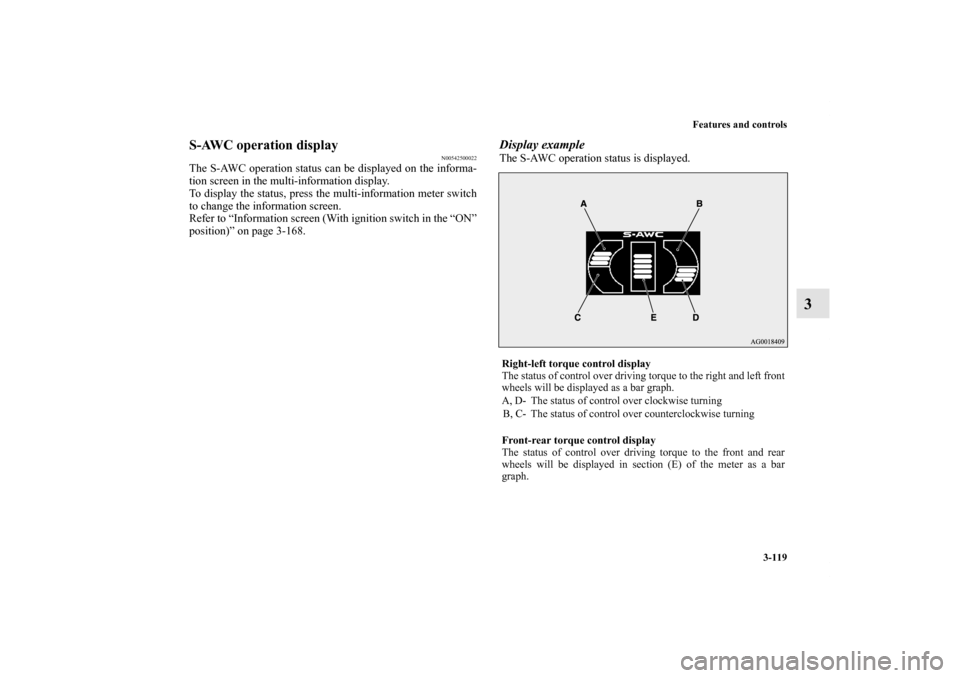
S-AWC control mode-selectorThe control mode can be selected by turning the dial while the
ignition switch is in the “ON” position.
NOTE�The control mode can be changed while the vehicle is
moving.
1- TARMAC
2- SNOW
3- LOCK
CAUTION
!�Do not operate the dial while the tires are spinning.
The vehicle might suddenly move in an unantici-
pated direction.�Driving on dry, paved roads in “LOCK” mode will
increase fuel consumption and noise, and cause pre-
mature tire wear.�When the tires spin, especially if “LOCK” mode has
been selected and the ASC has been turned off, you
may experience strong steering feedback. Grip the
steering wheel firmly.
BK0122500US.book 117 ページ 2010年5月12日 水曜日 午前11時11分
Page 234 of 714
Features and controls
3-119
3
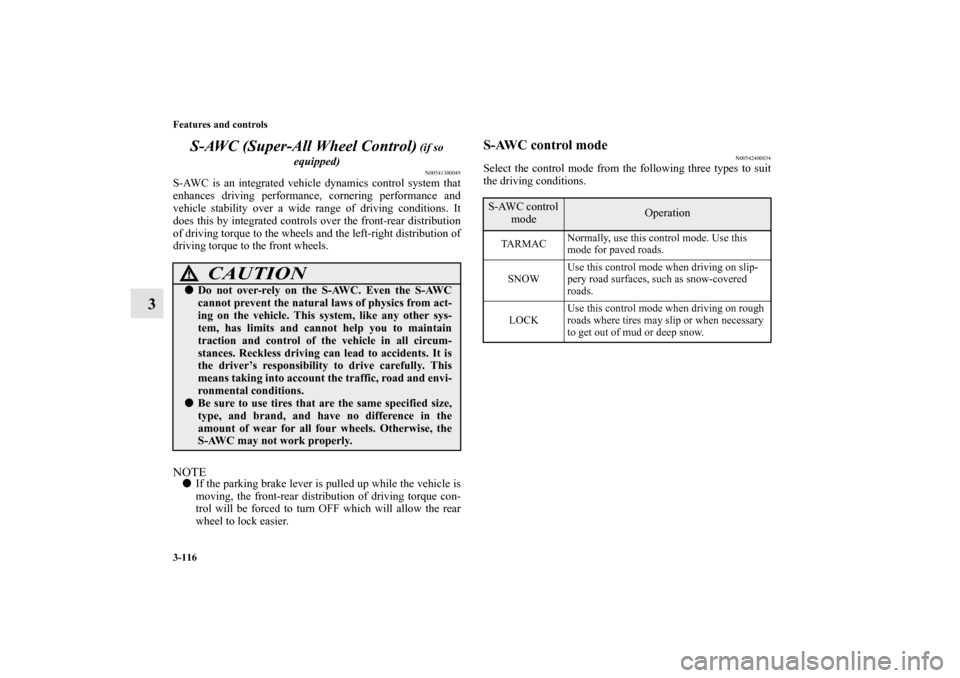
S-AWC operation display
N00542500022
The S-AWC operation status can be displayed on the informa-
tion screen in the multi-information display.
To display the status, press the multi-information meter switch
to change the information screen.
Refer to “Information screen (With ignition switch in the “ON”
position)” on page 3-168.
Display exampleThe S-AWC operation status is displayed.Right-left torque control display
The status of control over driving torque to the right and left front
wheels will be displayed as a bar graph.
A, D- The status of control over clockwise turning
B, C- The status of control over counterclockwise turning
Front-rear torque control display
The status of control over driving torque to the front and rear
wheels will be displayed in section (E) of the meter as a bar
graph.
BK0122500US.book 119 ページ 2010年5月12日 水曜日 午前11時11分
Page 237 of 714
3-122 Features and controls
3
�Note that the stopping distance required of the 4-wheel
drive vehicle differs very little from that of the front-
wheel drive vehicle. When driving on a snow-covered
road or a slippery, muddy surface, make sure that you
keep a sufficient distance between your vehicle and the
one ahead of you.
�The driving posture should be more upright; adjust the
seat to a good position for easy steering and pedal opera-
tion. Be sure to wear the seat belt.
�After driving on rough roads, check each part of the vehi-
cle and wash it thoroughly with water. Refer to the
“Inspection and maintenance following rough road opera-
tion” section and “Vehicle care and Maintenance” sec-
tions.Turning sharp cornersWhen turning a sharp corner in “4WD LOCK” or “LOCK”
position at low speed, a slight difference in steering may be
experienced similar to feeling as if the brakes were applied.
This is called tight corner braking and results from each of the
four tires being at a different distance from the corner. The phe-
nomenon is typical of 4-wheel drive vehicles. If this occurs,
either straighten out the steering wheel or change to another
mode.
On snowy or icy roadsSet the drive mode-selector to “4WD AUTO”, “4WD LOCK”
or “SNOW” in accordance with the road conditions, and then
gradually depress the accelerator pedal for a smooth start.NOTE�The use of snow tires is recommended.
�Maintain a safe distance between vehicles, avoid sudden
braking, and use engine braking (downshifting).Driving on sandy or muddy roadsSet the drive mode-selector to “4WD LOCK” or “LOCK” and
then gradually depress the accelerator pedal for a smooth start.
Keep the pressure on the accelerator pedal as constant as possi-
ble, and drive at low speed.
CAUTION
!�Setting the drive mode-selector to “4WD LOCK” or
“LOCK” position to drive on dry paved road will
increase fuel consumption, with possible noise gen-
eration.
CAUTION
!�Avoid sudden braking, sudden acceleration and
sharp turning. Skidding occurs and control of the
vehicle could be lost.
CAUTION
!�Do not force the vehicle or drive recklessly on sandy
surfaces. In comparison with normal road surfaces,
the engine and other drive-system components are
put under excessive strain when driving on such a
surface. This could lead to accidents.
BK0122500US.book 122 ページ 2010年5月12日 水曜日 午前11時11分
Page 243 of 714

3-128 Features and controls
3
Brake pad wear alarm
N00550700124
The disc brakes have an alarm that makes a metallic squeal
when the brake pads have worn down enough to need service.
If you hear this sound, have the brake pads replaced at an
authorized Mitsubishi Motors dealer or a repair facility of your
choice.
Hill start assist
(if so equipped)
N00562600016
The hill start assist makes it easy to start off on a steep uphill
slope by preventing the vehicle from moving backwards. It
keeps the braking force for about 2 second when you move
your foot from the brake pedal to the accelerator pedal.
WA R N I N G
!�Driving with worn brake pads will make it harder to
stop, and can cause an accident.
CAUTION
!�Do not overly rely on the hill start assist to prevent
backwards movement of the vehicle. Under certain
circumstances, even when hill start assist is acti-
vated, the vehicle may move backwards if the brake
pedal is not sufficiently depressed, if the vehicle is
heavily loaded, or if the road is very steep or slip-
pery. �The hill start assist is not designed to keep the vehi-
cle stopped in place on uphill slopes for more than 2
seconds.�When facing uphill, do not rely on using the hill
start assist to maintain a stopped position as an
alternative to depressing the brake pedal.
Doing so could cause an accident.�Do not turn the ignition switch to the “LOCK” or
“ACC” position while the hill start assist is operat-
ing. The hill start assist could stop operating, which
could result in an accident.
BK0122500US.book 128 ページ 2010年5月12日 水曜日 午前11時11分