Page 343 of 714
3-228 Features and controls
3
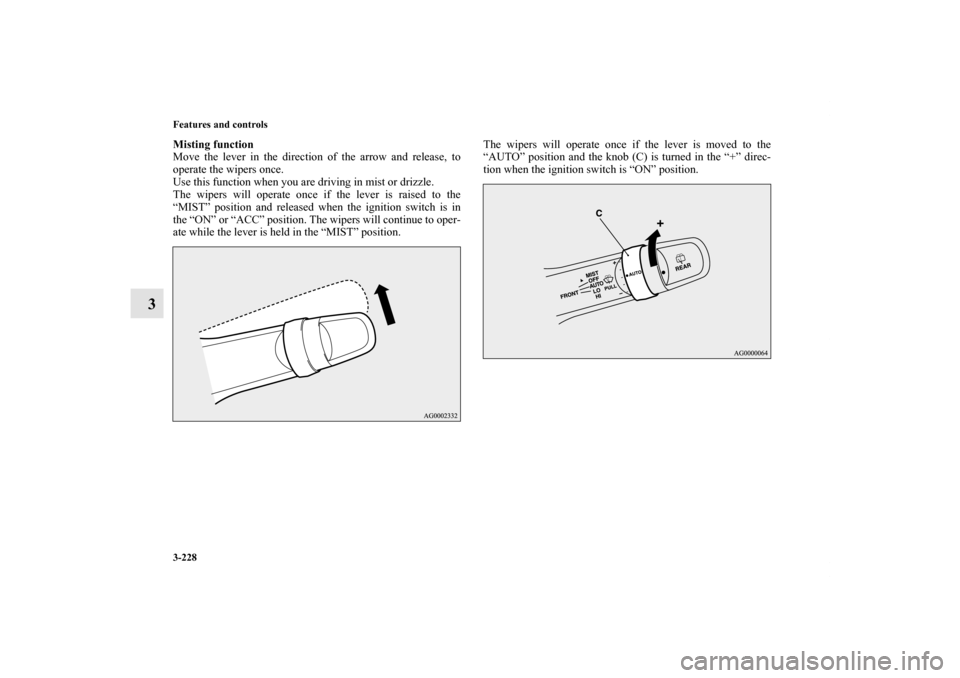
Misting function
Move the lever in the direction of the arrow and release, to
operate the wipers once.
Use this function when you are driving in mist or drizzle.
The wipers will operate once if the lever is raised to the
“MIST” position and released when the ignition switch is in
the “ON” or “ACC” position. The wipers will continue to oper-
ate while the lever is held in the “MIST” position.The wipers will operate once if the lever is moved to the
“AUTO” position and the knob (C) is turned in the “+” direc-
tion when the ignition switch is “ON” position.BK0122500US.book 228 ページ 2010年5月12日 水曜日 午前11時11分
Page 344 of 714
Features and controls
3-229
3
Windshield washer
N00504600230
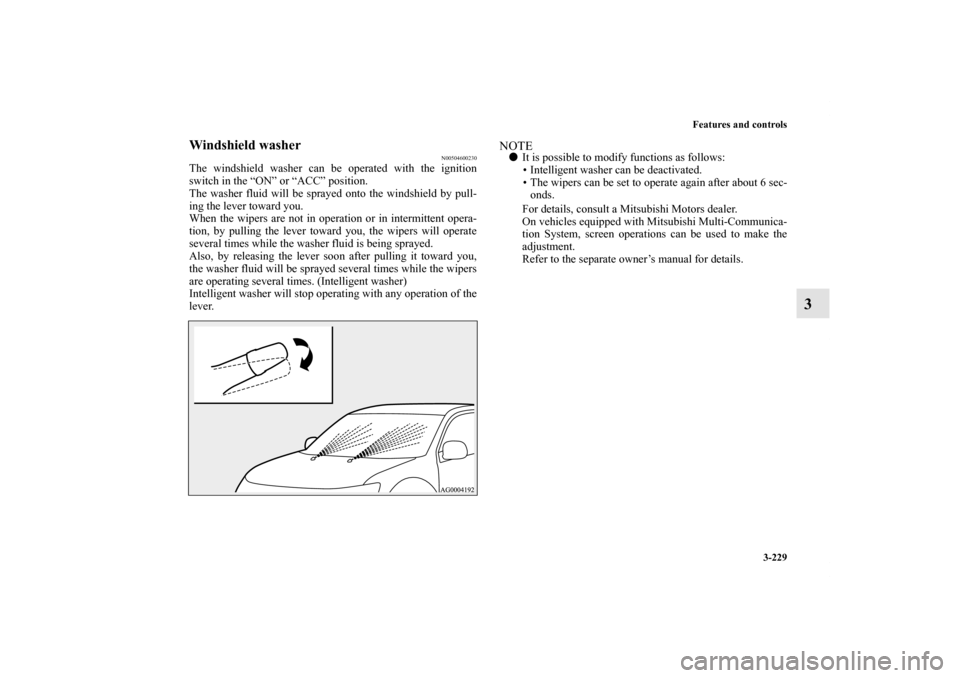
The windshield washer can be operated with the ignition
switch in the “ON” or “ACC” position.
The washer fluid will be sprayed onto the windshield by pull-
ing the lever toward you.
When the wipers are not in operation or in intermittent opera-
tion, by pulling the lever toward you, the wipers will operate
several times while the washer fluid is being sprayed.
Also, by releasing the lever soon after pulling it toward you,
the washer fluid will be sprayed several times while the wipers
are operating several times. (Intelligent washer)
Intelligent washer will stop operating with any operation of the
lever.
NOTE�It is possible to modify functions as follows:
• Intelligent washer can be deactivated.
• The wipers can be set to operate again after about 6 sec-
onds.
For details, consult a Mitsubishi Motors dealer.
On vehicles equipped with Mitsubishi Multi-Communica-
tion System, screen operations can be used to make the
adjustment.
Refer to the separate owner’s manual for details.
BK0122500US.book 229 ページ 2010年5月12日 水曜日 午前11時11分
Page 345 of 714
3-230 Features and controls
3
Rear window wiper and washer
N00523200378
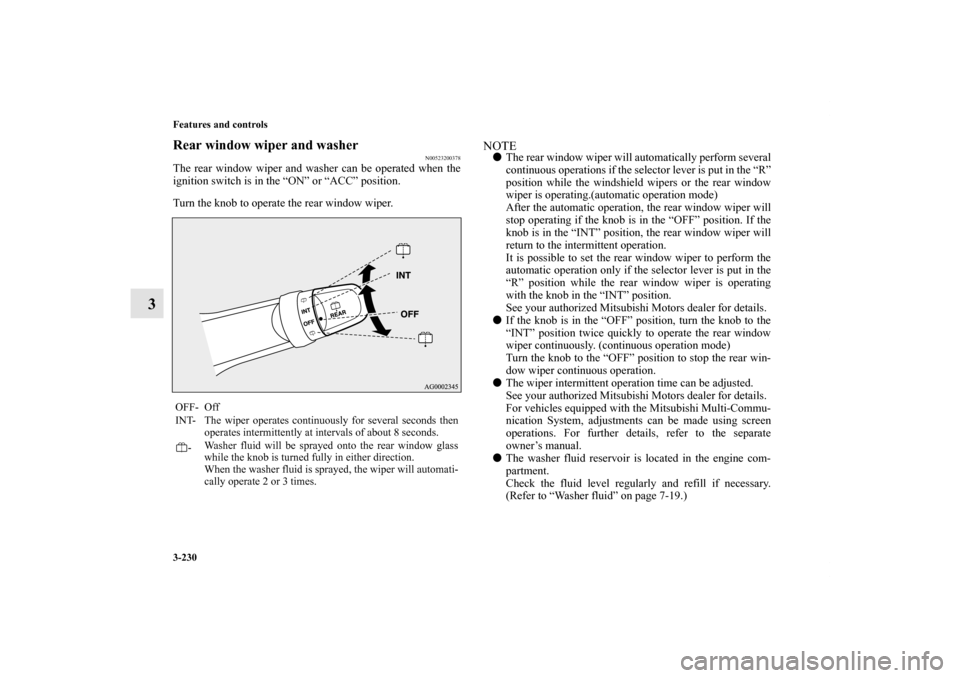
The rear window wiper and washer can be operated when the
ignition switch is in the “ON” or “ACC” position.
Turn the knob to operate the rear window wiper.
NOTE�The rear window wiper will automatically perform several
continuous operations if the selector lever is put in the “R”
position while the windshield wipers or the rear window
wiper is operating.(automatic operation mode)
After the automatic operation, the rear window wiper will
stop operating if the knob is in the “OFF” position. If the
knob is in the “INT” position, the rear window wiper will
return to the intermittent operation.
It is possible to set the rear window wiper to perform the
automatic operation only if the selector lever is put in the
“R” position while the rear window wiper is operating
with the knob in the “INT” position.
See your authorized Mitsubishi Motors dealer for details.
�If the knob is in the “OFF” position, turn the knob to the
“INT” position twice quickly to operate the rear window
wiper continuously. (continuous operation mode)
Turn the knob to the “OFF” position to stop the rear win-
dow wiper continuous operation.
�The wiper intermittent operation time can be adjusted.
See your authorized Mitsubishi Motors dealer for details.
For vehicles equipped with the Mitsubishi Multi-Commu-
nication System, adjustments can be made using screen
operations. For further details, refer to the separate
owner’s manual.
�The washer fluid reservoir is located in the engine com-
partment.
Check the fluid level regularly and refill if necessary.
(Refer to “Washer fluid” on page 7-19.)
OFF- Off
INT- The wiper operates continuously for several seconds then
operates intermittently at intervals of about 8 seconds.
-Washer fluid will be sprayed onto the rear window glass
while the knob is turned fully in either direction.
When the washer fluid is sprayed, the wiper will automati-
cally operate 2 or 3 times.BK0122500US.book 230 ページ 2010年5月12日 水曜日 午前11時11分
Page 349 of 714
3-234 Features and controls
3Bluetooth
® 2.0 interface
(if so equipped)
N00563900074
The Bluetooth
® 2.0 interface allows for making/receiving
hands-free calls in the vehicle using a Bluetooth
® compatible
cellular phone based on the wireless communication technol-
ogy commonly known as Bluetooth
®. It also allows the user to
play music, saved in a Bluetooth
® music player, from the vehi-
cle’s speakers.
The system is equipped with a voice recognition function,
which allows you to make hands-free calls by simple switch
operations and voice command operations using a defined
voice tree.
The Bluetooth
® 2.0 interface can be used when the ignition
switch is in the “ON” or “ACC” position.
Before you can use the Bluetooth
® 2.0 interface, you must pair
the Bluetooth
® device and Bluetooth
® 2.0 interface. Refer to
“Connecting the Bluetooth
® 2.0 interface and Bluetooth
®
device” on page 3-241.
Bluetooth
® is a registered trademark of BLUETOOTH SIG,
INC.
NOTE�If the ignition switch is left in the “ACC” position, the
accessory power will automatically turn off after a certain
period of time and you will no longer be able to use the
Bluetooth
® 2.0 interface. The accessory power comes on
again if the ignition switch is turned from the “ACC”
position. Refer to “ACC power auto-cutout function” on
page 3-87.
�The Bluetooth
® 2.0 interface cannot be used if the Blue-
tooth
® device has a dead battery or the device power is
turned off.
�Hands-free calls will not be possible if your phone does
not have service available.
�If you place the Bluetooth
® device in the vehicle’s third
seat or luggage compartment, you may not be able to use
the Bluetooth
® 2.0 interface.
WA R N I N G
!�Although the Bluetooth
® 2.0 interface allows you to
make hands-free calls, if you choose to use the cellu-
lar phone while driving, you must not allow yourself
to be distracted from the safe operation of your vehi-
cle. Anything, including cellular phone usage, that
distracts you from the safe operation of your vehicle
increases your risk of an accident.
�Refer to and comply with all state and local laws in
your area regarding cellular phone usage while driv-
ing.
BK0122500US.book 234 ページ 2010年5月12日 水曜日 午前11時11分
Page 354 of 714

Features and controls
3-239
3
Setting the passcode
Use the following procedure to turn on the security function by
setting a passcode.
1. Press the SPEECH button.
2. Say “Setup.”
3. Say “Passcode.”
4. The voice guide will say “Passcode is disabled. Would
you like to enable it?” Answer “Yes.”
Answer “No” to cancel the setting of the passcode and
return to the main menu.
5. The voice guide will say “Please say a 4-digit passcode.
Remember this passcode. It will be required to use this
system.”
Say a 4-digit number which you want to set as a passcode.
6. For confirmation purposes, the voice guide will say “Pass-
code <4-digit passcode>. Is this correct?” Answer “Yes.”
Answer “No” to return to the passcode input in Step 5.
7. When the registration of the passcode is completed, the
voice guide will say “Passcode is enabled” and the system
will return to the main menu. NOTE�Passcode will be required to access the system after the
next ignition cycle.
�Allow a short time after entering the passcode, for it to
record into the system. If the engine is started or the igni-
tion switch is turned to “ACC” or “ON” too soon, you
must re-enter the passcode.
Entering the passcode
If a passcode has been set and the security function is enabled,
the voice guide will say “Hands-free system is locked. State thepasscode to continue” when the SPEECH button is pressed to
enter voice recognition mode. Say the 4-digit passcode number
to enter the passcode.
If the entered passcode is wrong, the voice guide will say “<4-
digit passcode>, Incorrect passcode. Please try again.” Enter
the correct passcode.
NOTE�You can reenter the passcode as many times as you want.
�If you have forgotten your passcode, say “Cancel” to quit
the voice input mode and then check with an authorized
Mitsubishi Motors dealer or a repair facility of your
choice.
Disabling the passcode
Use the following procedure to turn off the security function by
disabling the passcode. NOTE�System must be unlocked to disable the passcode.
1. Press the SPEECH button.
2. Say “Setup.”
3. Say “Passcode.”
4. The voice guide will say “Passcode is enabled. Would you
like to disable it?” Answer “Yes.”
Answer “No” to cancel the disabling of the passcode and
return to the main menu.
5. When the disabling of the passcode is completed, the
voice guide will say “Passcode is disabled” and the sys-
tem will return to the main menu.
BK0122500US.book 239 ページ 2010年5月12日 水曜日 午前11時11分
Page 364 of 714
Features and controls
3-249
3
6. The voice guide will say “Calling ”
and then the system will dial the telephone number.NOTE�When the confirmation function is on, the system will
check if the name and location of the receiver are correct.
If the name is correct, answer “Yes.”
To change the name or location to call, answer “No.” The
system will return to Step 3.
Redialing
You can redial the last number called, based on the history of
dialed calls in the paired cellular phone.
Use the following procedure to redial.
1. Press the SPEECH button.
2. Say “Redial.”Send function
N00565700018
During a call, press the SPEECH button to enter voice recogni-
tion mode, then say “ SEND” to generate DTMF
tones.
For example, if during a call you need to simulate the pressing
of a phone button as a response to an automated system, press
the SPEECH button and speak “1 2 3 4 pound send” and the
1234# will be sent via your cellular phone.
Receiving calls
N00565800019
If an incoming phone call is received while the ignition switch
is in the “ACC” or “ON” position, the audio system will be
automatically turned on and switched to the incoming call,
even when the audio system was originally off.
The voice guide announcement for the incoming call will be
output from the front passenger’s seat speaker.
If the CD player or radio was playing when the incoming call
was received, the audio system will mute the sound from the
CD player or radio and output only the incoming call.
To receive the call, press the PICK-UP button on the steering
wheel control switch.
When the call is over, the audio system will return to its previ-
ous state.
BK0122500US.book 249 ページ 2010年5月12日 水曜日 午前11時11分
Page 375 of 714
3-260 Features and controls
3
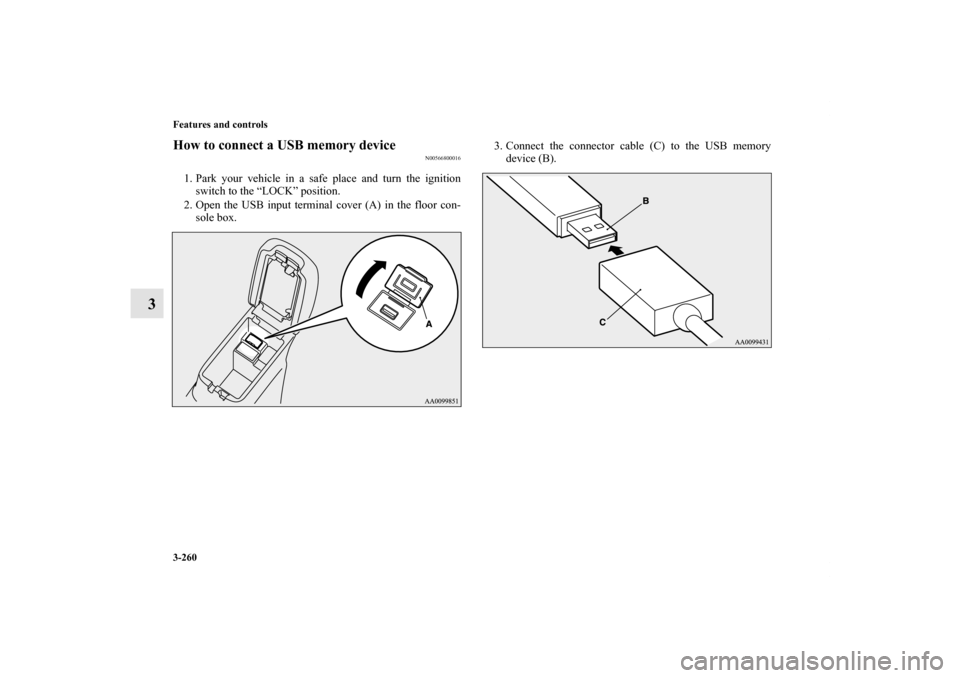
How to connect a USB memory device
N00566800016
1. Park your vehicle in a safe place and turn the ignition
switch to the “LOCK” position.
2. Open the USB input terminal cover (A) in the floor con-
sole box.3. Connect the connector cable (C) to the USB memory
device (B).
BK0122500US.book 260 ページ 2010年5月12日 水曜日 午前11時11分
Page 376 of 714
Features and controls
3-261
3
4. Connect the connector cable (C) to the USB input termi-
nal (D).
NOTE�Do not connect the USB memory device to the USB input
terminal directly.
The USB memory device may be damaged.
�When closing the floor console box, be careful not to trap
the connector cable.
5. To remove the connector cable, turn the ignition switch to
the “LOCK” position first and perform the installation
steps in reverse.
CAUTION
!�Keep the lid of the floor console box closed while
driving the vehicle. A lid or the contents of the floor
console box could otherwise cause injuries.
BK0122500US.book 261 ページ 2010年5月12日 水曜日 午前11時11分