Page 304 of 714

Features and controls
3-189
3
3. Press and hold the multi-information meter switch (for
about 2 seconds or more) to display “ALARM” (rest time
setting).
4. Lightly press the multi-information meter switch to select
the time until the display appears.
5. Press and hold the multi-information meter switch (for
about 2 seconds or more) to change the setting to the
selected time.NOTE�If the battery is disconnected, the memory of the unit set-
ting is erased and is automatically set to the “OFF”.
�The drive time is reset when the ignition switch is in the
“OFF” position.
Changing the turn signal sound
N00563500054
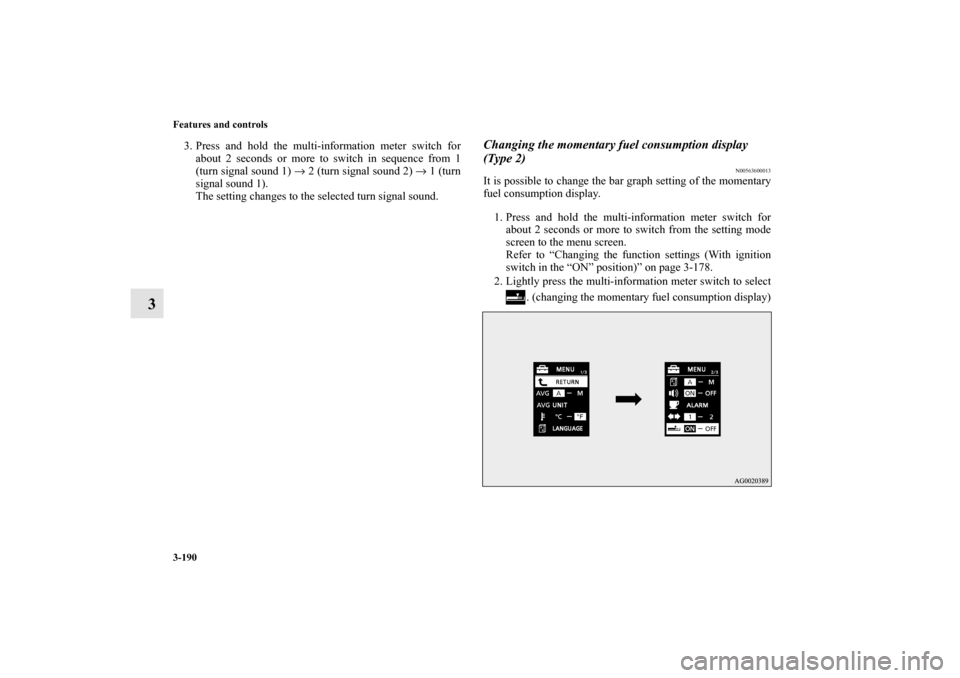
It is possible to change the turn signal sound.
1. Press and hold the multi-information meter switch for
about 2 seconds or more to switch from the setting mode
screen to the menu screen.
Refer to “Changing the function settings (With ignition
switch in the “ON” position)” on page 3-178.
2. Lightly press the multi-information meter switch to select
. (changing the turn signal sound)
Ty p e 1 Ty p e 2
Ty p e 1
Ty p e 2
BK0122500US.book 189 ページ 2010年5月12日 水曜日 午前11時11分
Page 305 of 714
3-190 Features and controls
3
3. Press and hold the multi-information meter switch for
about 2 seconds or more to switch in sequence from 1
(turn signal sound 1) → 2 (turn signal sound 2) → 1 (turn
signal sound 1).
The setting changes to the selected turn signal sound.
Changing the momentary fuel consumption display
(Type 2)
N00563600013
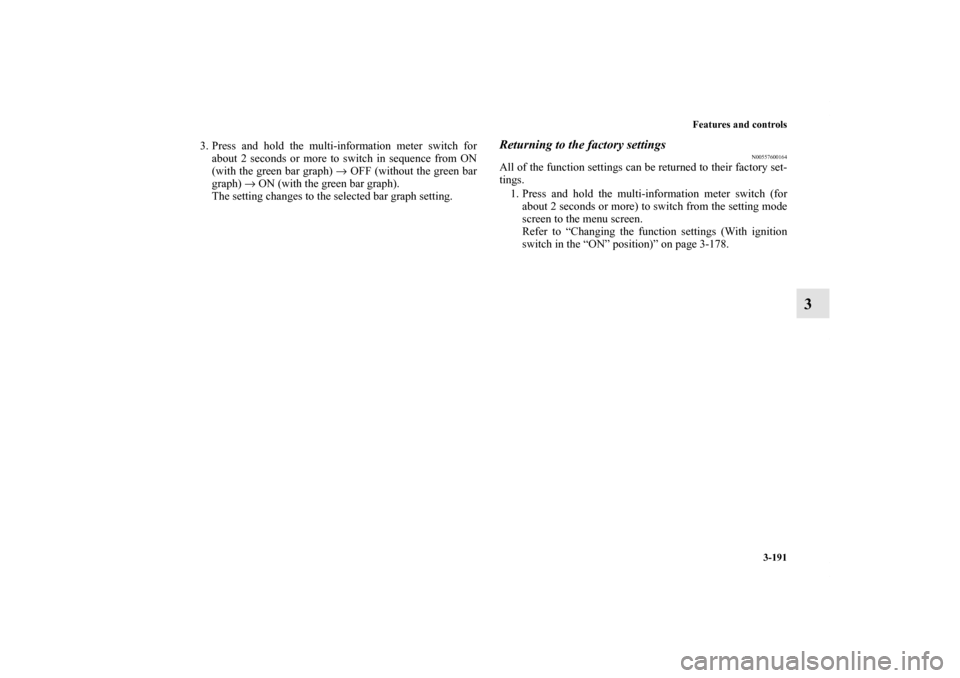
It is possible to change the bar graph setting of the momentary
fuel consumption display.
1. Press and hold the multi-information meter switch for
about 2 seconds or more to switch from the setting mode
screen to the menu screen.
Refer to “Changing the function settings (With ignition
switch in the “ON” position)” on page 3-178.
2. Lightly press the multi-information meter switch to select
. (changing the momentary fuel consumption display)
BK0122500US.book 190 ページ 2010年5月12日 水曜日 午前11時11分
Page 306 of 714
Features and controls
3-191
3
3. Press and hold the multi-information meter switch for
about 2 seconds or more to switch in sequence from ON
(with the green bar graph) → OFF (without the green bar
graph) → ON (with the green bar graph).
The setting changes to the selected bar graph setting.
Returning to the factory settings
N00557600164
All of the function settings can be returned to their factory set-
tings.
1. Press and hold the multi-information meter switch (for
about 2 seconds or more) to switch from the setting mode
screen to the menu screen.
Refer to “Changing the function settings (With ignition
switch in the “ON” position)” on page 3-178.
BK0122500US.book 191 ページ 2010年5月12日 水曜日 午前11時11分
Page 309 of 714

3-194 Features and controls
3
Information screen display list
N00557900079
When there is information to be announced, such as light reminder, the tone sounds and the screen switches to the displays shown
below. Refer to the appropriate page and take the necessary measures.
When the cause of the warning display is eliminated, the warning display goes out automatically.
Refer to Warning display list (With ignition switch in the “OFF” position) on page 3-195.
Refer to Warning display list (With ignition switch in the “ON” position) on page 3-198.
Refer to Other interrupt displays (With ignition switch in the “ON” position) on page 3-204.NOTE�In the following cases, a warning may be displayed on the information screen and the buzzer may sound for a few seconds, at
times.
This is caused by the system picking up interference such as strong electromagnetic waves or noise, and is not a functional
problem.
• An extremely strong electromagnetic wave is received from a source such as an illegal radio set, a spark from a wire, or a
radar station.
• Abnormal voltage or a static electricity discharge is generated by the operation of your vehicle’s electronics (including after-
market parts).
If the warning display has occurred a number of times, take your vehicle to an authorized Mitsubishi Motors dealer or a repair
facility of your choice and have the system checked.
BK0122500US.book 194 ページ 2010年5月12日 水曜日 午前11時11分
Page 310 of 714
Features and controls
3-195
3
Warning display list (With ignition switch in the “OFF” position)
N00558000181
Screen type 1
Screen type 2
Cause
Do this (Reference)
�You have forgotten to remove the key
from the ignition switch.�Remove the key.
Refer to “Key reminder system” on
page 3-55.
�You have forgotten to turn off the
lights.Refer to “Light auto-cutout function (head-
lights and other lights)” on page 3-215.
�The theft-alarm system is operating. Refer to “Theft-alarm system” on page 3-65.
�Immobilizer is registered. Refer to “Customer key programming
(Except for vehicles sold in Canada)” on
page 3-7.
Refer to “Customer F.A.S.T.-key program-
ming (Except for vehicles sold in Canada)”
on page 3-43.
BK0122500US.book 195 ページ 2010年5月12日 水曜日 午前11時11分
Page 311 of 714
3-196 Features and controls
3
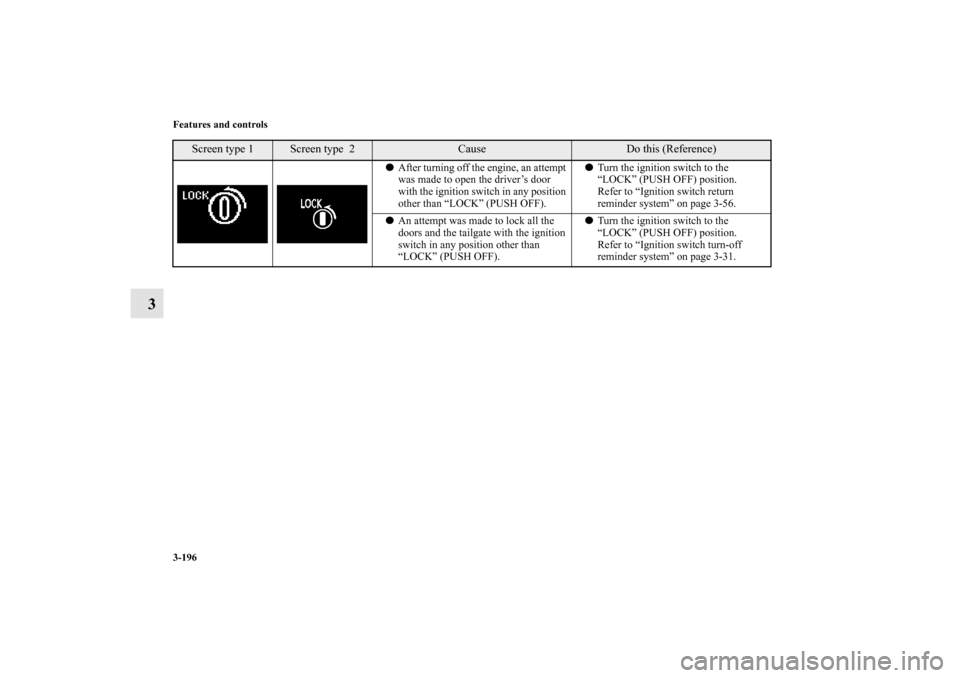
�After turning off the engine, an attempt
was made to open the driver’s door
with the ignition switch in any position
other than “LOCK” (PUSH OFF).�Turn the ignition switch to the
“LOCK” (PUSH OFF) position.
Refer to “Ignition switch return
reminder system” on page 3-56.
�An attempt was made to lock all the
doors and the tailgate with the ignition
switch in any position other than
“LOCK” (PUSH OFF).�Turn the ignition switch to the
“LOCK” (PUSH OFF) position.
Refer to “Ignition switch turn-off
reminder system” on page 3-31.
Screen type 1
Screen type 2
Cause
Do this (Reference)
BK0122500US.book 196 ページ 2010年5月12日 水曜日 午前11時11分
Page 313 of 714
3-198 Features and controls
3
Warning display list (With ignition switch in the “ON” position)
N00558100209
Screen type 1
Screen type 2
Cause
Do this (Reference)
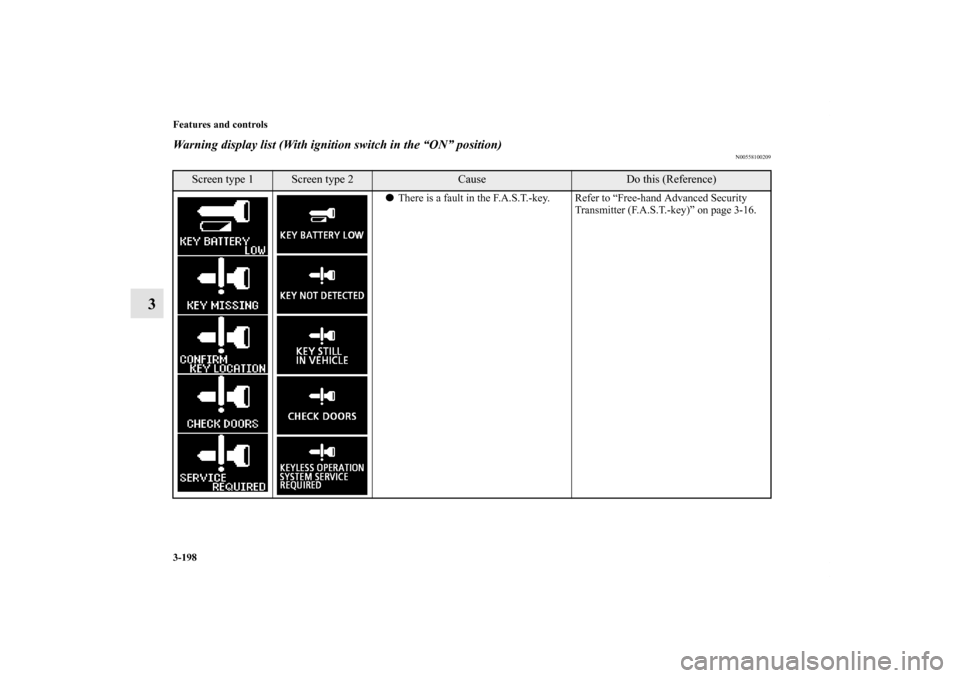
�There is a fault in the F.A.S.T.-key. Refer to “Free-hand Advanced Security
Transmitter (F.A.S.T.-key)” on page 3-16.
BK0122500US.book 198 ページ 2010年5月12日 水曜日 午前11時11分
Page 315 of 714
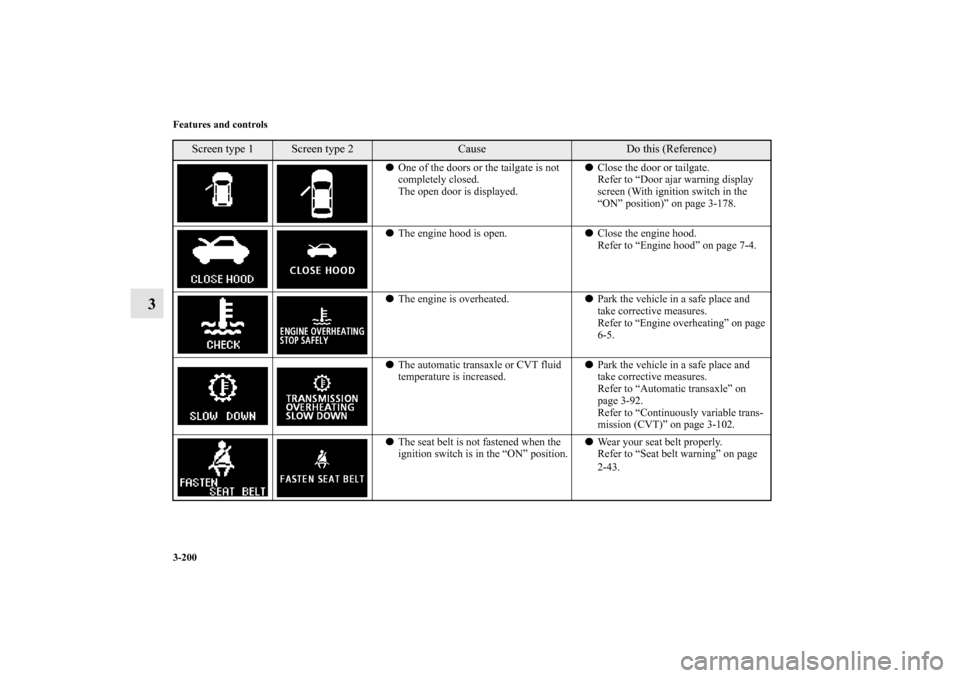
3-200 Features and controls
3
�One of the doors or the tailgate is not
completely closed.
The open door is displayed.�Close the door or tailgate.
Refer to “Door ajar warning display
screen (With ignition switch in the
“ON” position)” on page 3-178.
�The engine hood is open.�Close the engine hood.
Refer to “Engine hood” on page 7-4.
�The engine is overheated.�Park the vehicle in a safe place and
take corrective measures.
Refer to “Engine overheating” on page
6-5.
�The automatic transaxle or CVT fluid
temperature is increased.�Park the vehicle in a safe place and
take corrective measures.
Refer to “Automatic transaxle” on
page 3-92.
Refer to “Continuously variable trans-
mission (CVT)” on page 3-102.
�The seat belt is not fastened when the
ignition switch is in the “ON” position.�Wear your seat belt properly.
Refer to “Seat belt warning” on page
2-43.
Screen type 1
Screen type 2
Cause
Do this (Reference)
BK0122500US.book 200 ページ 2010年5月12日 水曜日 午前11時11分