2011 MINI Countryman auto locking doors
[x] Cancel search: auto locking doorsPage 23 of 196
Opening and closingControls
21
>Settings for the displays in the speedometer
and tachometer:
>12 h/24 h mode of the clock, refer to For-
mats and units of measure 54
> Date format, refer to Formats and units
of measure 54
> Units of measure for fuel consumption,
distance covered/re maining distances
and temperature, refer to Formats and
units of measure 54
> Light settings:
>Pathway lighting 71
> Daytime running lights 72
> Automatic climate control
*: activating/
deactivating the AUTO program, setting the
temperature, air volume and air
distribution 78
> Entertainment:
>Adjusting vo lume levels 102
> Tone control 103
Central lock ing system
The concept
The central locking system is ready for operation
whenever the driver's door is closed.
The system simultaneously engages and
releases the locks on the following:
>Doors
> Liftgate
> Fuel filler flap
Operating from outside
>Via the remote control
> Via the door lock
*
>In cars with Comfort Access*, via the door
handles on the driver's and passenger's
sides
The remote control can al so be used to switch
on/off the welcome lamps and interior lamps. The alarm system
* is also activated or deacti-
vated, page 26.
Operating from inside
Button for central locking system, page 24.
In the event of a sufficiently severe accident, the
central locking system unlocks automatically. In
addition, the hazard warning flashers and inte-
rior lamps come on.
Opening and closing:
from outside
Persons or animals in a parked vehicle
could lock the doors from the inside. Take
the key with you when you leave the vehicle so
that the vehicle can be opened from the out-
side. <
Using the remote control
Unlocking
Press the button.
The welcome lamps and interior lamps come on.
Unlocking mode
You can also set which parts of the car are
unlocked. The setting is stored for the remote
control in use.
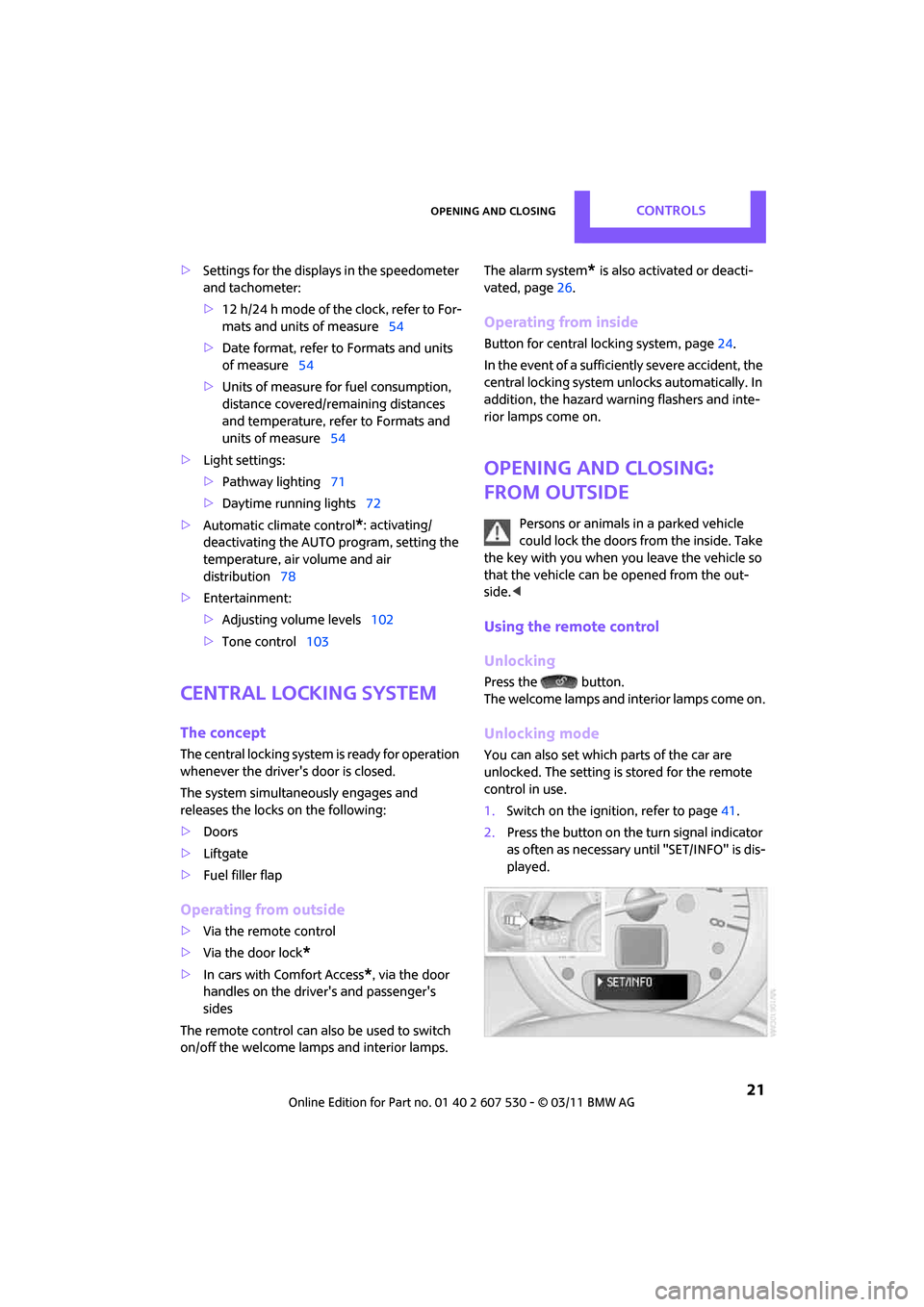
1.Switch on the ignition, refer to page 41.
2. Press the button on the turn signal indicator
as often as necessary until "SET/INFO" is dis-
played.
Page 27 of 196

Opening and closingControls
25
Persons or animals in a parked vehicle
could lock the doors from the inside. Take
the key with you when you leave the vehicle so
that the vehicle can be opened from the out-
side. <
Automatic locking*
You can also set the situ ations in which the car
locks. The setting is st ored for the remote con-
trol in use.
1. Switch on the ignition, refer to page 41.
2. Press the button on the turn signal indicator
as often as necessary until "SET/INFO" is dis-
played.
3. Press and hold the butt on until the display
changes.
4. Press the button as of ten as necessary until
the symbol and "SET" are displayed.
5. Press and hold the butt on until the display
changes. 6.
Briefly press the button repeatedly until the
display shows the illu strated symbol, arrow.
7. Press and hold the butt on until the display
changes.
8. Press the button to select:
>
The central locking system automatically
locks the vehicle after some time if no
door has been opened.
> The central locking system automatically
locks the vehicle as soon as you drive off.
> The central locking system automatically
locks the vehicle after some time if no
door has been opened, or as soon as you
drive off.
> The central locking system remains
unlocked.
9. Press and hold the butt on until the display
changes. The setting is stored.
Liftgate
To avoid damage, make sure there is suf-
ficient clearance before opening the lift-
gate.<
Opening
In some market-specific versions, the lift-
gate cannot be unlocked using the remote
control unless the vehicle is unlocked first.
Only drive with the liftgate fully closed; other-
Page 29 of 196

Opening and closingControls
27
Display on the revolution counter
When the system is armed, all LEDs pulse. After
approx. 16 minutes one LED flashes.
>LEDs pulse or LED flashes: system is armed.
> One LED flashes at short intervals:
A door, the hood or the liftgate is not prop-
erly closed. Even if these are not closed fully,
the remaining items are deadlocked and the
LEDs pulse after approx. 10 seconds for
approx. 16 minutes. Afterwards, one LED
flashes.
The interior movement detector is not acti-
vated.
> LEDs go out after the vehicle is unlocked:
No attempt was made to tamper with the
car.
> LEDs flash after unlocking until the key is
inserted in the ignition, but for no longer
than approx. 5 minutes: an attempt was
made to tamper with the car.
Tilt alarm sensor
The vehicle's inclination is monitored. The alarm
is triggered, for instance, if an attempt is made
to steal the car's wheels or tow it away.
Interior movement detector
Before the interior mo vement detector can
operate correctly, the windows and glass roof
must be closed.
Avoiding false alarms
The tilt alarm sensor an d the interior movement
detector can be swit ched off together. This prevents false alarms, e.g. in the following
situations:
>
In duplex garages
> When being transported on car-carrying
trains, ferries or trailers
> If pets are to remain inside the car
Switching off the tilt alarm sensor and
interior movement detector
>Press the button on the remote con-
trol twice in succession.
> Lock the vehicle twice with the integrated
key.
LEDs flash in short succession for approx.
2 seconds.
The tilt alarm sensor an d the interior movement
detector are switched of f until the car is next
unlocked and locked.
Comfort Access*
Comfort Access enables you to enter your vehi-
cle without having to hold the remote control in
your hand. All you need to do is wear the remote
control close to your body, e.g. in your jacket
pocket. The vehicle automatically detects the
remote control within the immediate vicinity or
in the passenger compartment.
Functional requirements
> The vehicle or the liftgate can only be locked
when the vehicle detects that the remote
control currently in use is outside of the
vehicle.
> The vehicle cannot be locked or unlocked
again until after approx. 2 seconds.
> The engine can only be started when the
vehicle detects that the remote control is
inside the vehicle.
> The doors and liftgate mu st be closed to be
able to operate the windows and glass sun-
roof
*.
Page 185 of 196

Everything from A to ZReference
183
Door key, refer to Integrated key/remote control 20
Door lock 24
Door lock, confirmation
signals 22
Doors, manual operation24
DOT Quality Grades 134
Drinks holders, refer to Cupholders 85
Drive-off assistan t, refer to Hill
Assist 62
Driving dynamics control, refer to Sport button 62
Driving lamps, refer to Parking lamps/low beams 71
Driving notes 90
Driving off on inclines, refer to Hill Assist 62
Driving stability control
systems 59
Driving through water 91
Driving tips, refer to Driving
notes 90
Dry air, refer to Cooling function 80
DSC Dynamic Stability Control 60
DTC Dynamic Traction
Control 61
Dynamic Brake Control DBC,
refer to Brake Assist 60
Dynamic Stability Control DSC 60
Dynamic Traction Control DTC 61
E
Eject button 108
Electrical malfunction
– door lock 24
– fuel filler flap 128
Electronic brake-force distribution 60
Electronic Stability Program
ESP, refer to Dynamic
Stability Control DSC 60Emergency operation, refer to
Manual operation
– door lock 24
– fuel filler flap 128
– transmission lock, automatic transmission 45
Emergency services, refer to
Roadside Assistance 158
Engine
– breaking in 90
– data 176
– overheated, refer to Coolant temperature 141
– speed 176
– starting 42
– starting, Comfort Access 27
– switching off 42
Engine compartment 139
Engine coolant, refer to
Coolant 140
Engine oil
– adding 140
– additives, refer to Approved engine oils 140
– alternative oil types 140
– approved engine oils 140
– capacity 140
– checking level 139
– dipstick 139
– intervals between changes,
refer to Service
requirements 55
– MINI Maintenance
System 142
Engine oil level, checking 139
Engine output, refer to Engine
data 176
Engine starting, refer to Starting the engine 42
ESP Electronic Stability Program, refer to Dynamic
Stability Control DSC 60
Exhaust system, refer to Hot exhaust system 90 Exterior mirrors
36
– adjusting 36
– automatic dimming feature 37
– automatic heating 36
– folding in and out 36
External audio device 83,102
External temperature display
– change units of measure 54
– in the on-board computer 54
Exte
rnal temperature
warning 52
Eyes
– for tow-starting and towing away 160
– for tying down loads 96
F
Failure messages, refer to
Check Control 57
Failure of an electrical
consumer 156
Fast forward
– CD 107
Fastening safety be lts, refer to
Safety belts 35
Fault messages, refer to Check
Control 57
Faulty
– tire 63
Filter
– microfilter for air
conditioner 78
– microfilter/activated- charcoal filter for automatic
climate control 80
Fine wood, care 147
First aid pouch 158
Fixture for remote control, refer to Ignition lock 41
Flash when locking/
unlocking 22
Flat load floor 94
Flat tire
– run-flat tires 136
– Tire Pressure Monitor TPM 64
Page 187 of 196

Everything from A to ZReference
185
Ignition key position 1, refer to Radio readiness 41
Ignition key position 2, refer to Ignition on 41
Ignition key, refer to Integrated key/remote
control 20
Ignition lock 41
Imprint 2
Incoming call 119
Indicator and warning lamps 13,162
– Tire Pressure Monitor TPM 65
Indicator lighting, refer to Instrument lighting 74
Individual air distribution 78
Individual settings, refer to Personal Profile 20
Inflation pressure monitoring,
refer to Tire Pressure Monitor
TPM 64
Initializing
– Flat Tire Monitor FTM 63
– glass roof, electric 30
Instrument cluster, refer to
Displays 12
Instrument lighting 74
Instrument panel, refer to
Cockpit 10
Instrument panel, refer to
Displays 12
Integrated key 20
Integrated universal remote
control 81
Interior lamps 75
– remote control 23
Interior rearview mirror 36
– automatic dimming feature 37
Interlock 44
Intermittent mode of the wipers 47
Internet page 4J
Jacking points 155
Jets, refer to Window washer
nozzles 48
Jumpering, refer to Jump-starting 158
Jump-starting 158
K
Key Memory, refer to Personal
Profile 20
Key, refer to Keys/remote controls 20
Keyless opening and closing,
refer to Comfort Access 27
Keyless-Go, refer to Comfort Access 27
Keypad dialing 120
Kickdown 44
– automatic transmission with
Steptronic 44
Knock control 129
L
Lamps and bulbs, replacing
bulbs 148
Lamps, refer to Parking lamps/
Low beams 71
Lashing eyes, refer to Securing cargo 96
LATCH child restraint fixing system 39
Leather care 146
LEDs light-emitting diodes 148
Length, refer to Dimensions 177
License plate lamp
– bulb replacement 152
Liftgate 25
– Comfort Access 28
– opening from outside 25
– opening/closing 25
– unlocking with remote control 23 Light
– automatic headlamp
control 71
Light alloy wheels, care 146
Light switch 71
Light-emitting diodes LEDs 148
Lighter 85
– socket 86
Lighting
– lamps and bulbs 148
– of the instruments 74
– of vehicle, refer to Lamps 71
Limit 173
Listening to test scan
– Radio MINI Boost CD 104
Load 95
Load securing equipment, refer to Securing cargo 96
Lock buttons of doors, refer to
Locking 24
Locking
– adjusting confirmation signal 22
– from inside 24
– from outside 22
– without remote control, refer
to Comfort Access 27
Locking and unlocking doors
– confirmation signals 22
– from inside 24
– from outside 21
Longlife oils
– approved motor oils 140
Low beams 71
– automatic 71
– replacing bulb 149
Lower back suppo rt, refer to
Lumbar support 33
Luggage compartment
– doors, refer to Liftgate 25
Lug
gage compartment
partition net, refer to Cargo
net 94
Luggage rack, re fer to Roof-
mounted luggage rack 97