2011 MERCEDES-BENZ GLK-Class Esc
[x] Cancel search: EscPage 65 of 304
ESP®
(Electronic Stability Program)
Important safety notesGWarning
Observe "Important safety notes"
( Y page 61).
If ESP ®
detects that the vehicle is deviating
from the direction desired by the driver, one
or more wheels are braked to stabilize the
vehicle. If necessary, the engine output is also
modified to keep the vehicle on the desired
course within physical limits. ESP ®
assists
the driver when pulling away on wet or
slippery roads. ESP ®
can also stabilize the
vehicle during braking.
If ESP ®
intervenes, the ä warning lamp
flashes in the instrument cluster.
GWarning!
Never switch off the ESP when you see the
ESP warning lamp ä flashing in the
instrument cluster. In this case proceed as
follows:
R When driving off, apply as little throttle as
possible.
R While driving, ease up on the accelerator
pedal.
R Adapt your speed and driving style to the
prevailing road conditions.
Failure to observe these guidelines could
cause the vehicle to skid. The ESP cannot
prevent accidents resulting from excessive
speed.
! Vehicles without 4MATIC: switch the
ignition off when:
R the parking brake is being tested using a
dynamometer
R the vehicle is being towed with the front/
rear axle raised
Application of the brakes by ESP ®
may
otherwise destroy the brake system.
! Vehicles with 4MATIC: switch off the
ignition when the parking brake is being
tested on a brake dynamometer.
Application of the brakes by ESP ®
may
otherwise destroy the brake system.
! Vehicles with 4MATIC: function or
performance tests may only be carried out
on a 2-axle dynamometer. If you wish to
operate the vehicle on such a
dynamometer, please consult an
authorized Mercedes-Benz Center in
advance. You could otherwise damage the
drive train or the brake system.
i Only use wheels with the recommended
tire sizes. Only then will ESP ®
function
properly.
ETS/4ETS (Electronic Traction System)GWarning
Observe "Important safety notes"
( Y page 61).
Traction control is part of ESP ®
.
Traction control brakes the drive wheels
individually if they spin. This enables you to
pull away and accelerate on slippery surfaces,
for example if the road surface is slippery on
one side. On vehicles with 4MATIC, more
drive torque is also transferred to the wheel
or wheels with traction.
Traction control remains active if you
deactivate ESP ®
.
Deactivating/activating ESP ®
GWarning
The ESP
®
should not be switched off during
normal driving other than in the
circumstances described below. Disabling
the system will reduce vehicle stability in
driving maneuvers.
Do not switch off the ESP ®
when a spare
wheel is mounted.
Driving safety systems63SafetyBA 204.9 USA, CA Edition A 2011; 1; 6, en-USd2mwentsVersion: 3.0.3.62010-06-15T08:58:39+02:00 - Seite 63Z
Page 66 of 304
ESP®
is activated automatically when the
engine is running.
It may be best to deactivate ESP ®
in the
following situations:
R when using snow chains
R in deep snow
R on sand or gravelGWarning!
Activate ESP ®
as soon as the situations
described above no longer apply. ESP ®
will
otherwise not be able to stabilize the vehicle
if the vehicle starts to skid or a wheel starts
to spin.
When you deactivate ESP ®
:
R ESP ®
no longer improves driving stability.
R the engine's torque is no longer limited and
the drive wheels can spin. The spinning of
the wheels results in a cutting action, which
provides better grip.
R traction control is still activated.
R ESP ®
still provides support when you
brake.
If ESP ®
is deactivated and one or more wheels
start to spin, the ä warning lamp in the
instrument cluster flashes. In such situations,
ESP ®
will not stabilize the vehicle.
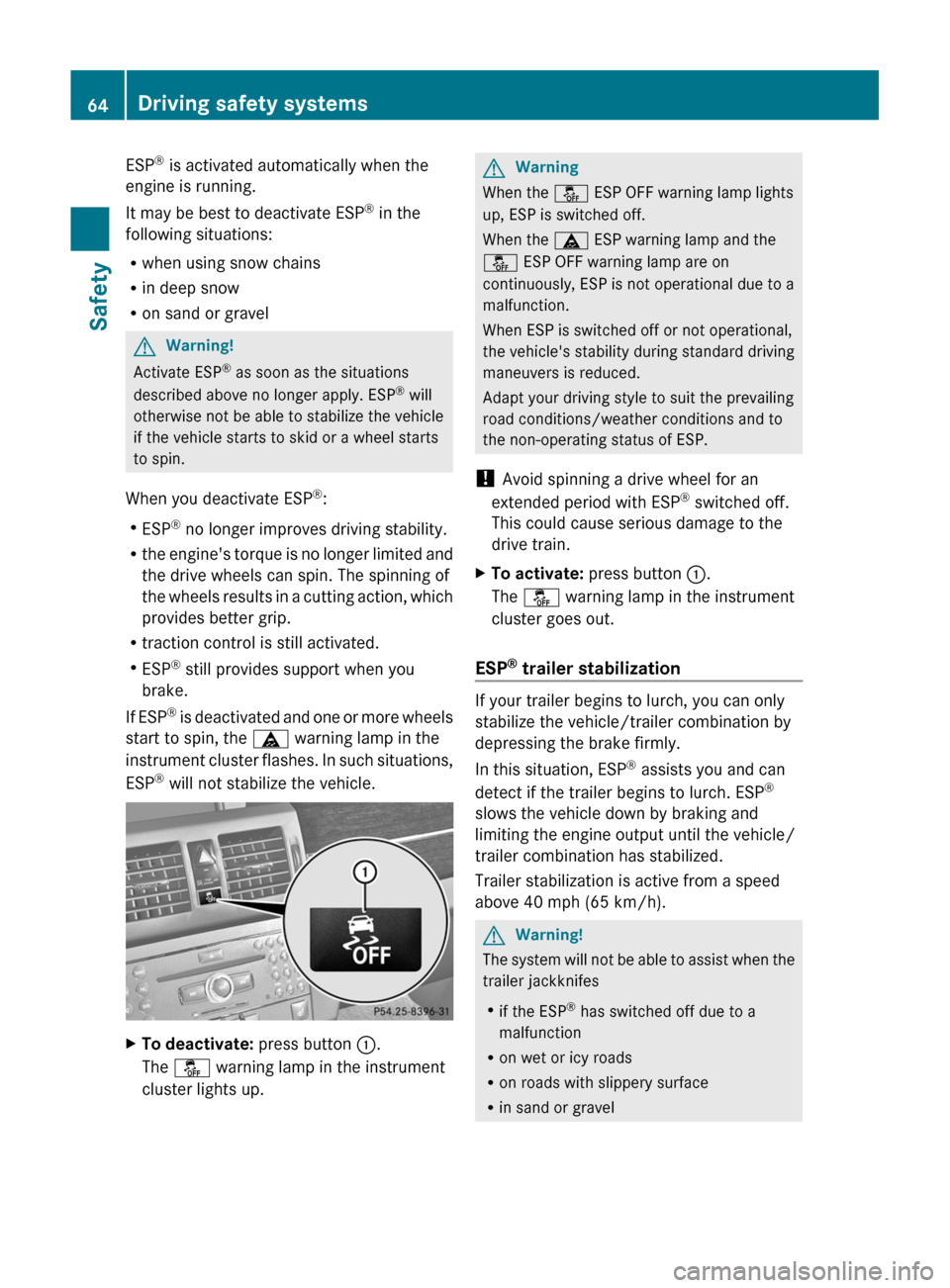
XTo deactivate: press button :.
The å warning lamp in the instrument
cluster lights up.GWarning
When the å ESP OFF warning lamp lights
up, ESP is switched off.
When the ä ESP warning lamp and the
å ESP OFF warning lamp are on
continuously, ESP is not operational due to a
malfunction.
When ESP is switched off or not operational,
the vehicle's stability during standard driving
maneuvers is reduced.
Adapt your driving style to suit the prevailing
road conditions/weather conditions and to
the non-operating status of ESP.
! Avoid spinning a drive wheel for an
extended period with ESP ®
switched off.
This could cause serious damage to the
drive train.
XTo activate: press button :.
The å warning lamp in the instrument
cluster goes out.
ESP ®
trailer stabilization
If your trailer begins to lurch, you can only
stabilize the vehicle/trailer combination by
depressing the brake firmly.
In this situation, ESP ®
assists you and can
detect if the trailer begins to lurch. ESP ®
slows the vehicle down by braking and
limiting the engine output until the vehicle/
trailer combination has stabilized.
Trailer stabilization is active from a speed
above 40 mph (65 km/h).
GWarning!
The system will not be able to assist when the
trailer jackknifes
R if the ESP ®
has switched off due to a
malfunction
R on wet or icy roads
R on roads with slippery surface
R in sand or gravel
64Driving safety systemsSafety
BA 204.9 USA, CA Edition A 2011; 1; 6, en-USd2mwentsVersion: 3.0.3.62010-06-15T08:58:39+02:00 - Seite 64
Page 70 of 304

Vehicle equipment
i This manual describes all the standard
and optional equipment of your vehicle
which was available at the time of
purchase. Country-specific differences are
possible. Bear in mind that your vehicle
may not feature all functions described
here. This also refers to safety-related
systems and functions.
SmartKey
Important safety notes
GWarning!
When leaving the vehicle, always remove the
SmartKey from the starter switch. Always
take the SmartKey with you and lock the
vehicle. Do not leave children unattended in
the vehicle, even if they are secured in a child
restraint system, or with access to an
unlocked vehicle. A child's unsupervised
access to a vehicle could result in an accident
and/or serious personal injury. The children
could
R injure themselves on parts of the vehicle
R be seriously or fatally injured through
excessive exposure to extreme heat or cold
R injure themselves or cause an accident with
vehicle equipment that can be operated
even if the SmartKey is removed from the
starter switch or removed from the vehicle,
such as seat adjustment, steering wheel
adjustment, or the memory function
If children open a door, they could injure other
persons or get out of the vehicle and injure
themselves or be injured by following traffic.
Do not expose the child restraint system to
direct sunlight. The child restraint system's
metal parts, for example, could become very
hot, and the child could be burned by these
parts.
GWarning!
Do not carry heavy or hard objects in the
passenger compartment or cargo
compartment unless they are firmly secured
in place.
Unsecured or improperly positioned cargo
increases a child’s risk of injury in the event
of
R strong braking maneuvers
R sudden changes of direction
R an accident
General information
All doors and the tailgate must be closed.
If you cannot open or lock the vehicle with the
SmartKey, either the battery in the SmartKey
is empty, the SmartKey is faulty, or the vehicle
battery is discharged.
XCheck the battery in the SmartKey and
replace it if necessary ( Y page 72).XUnlock the driver's door using the
mechanical key ( Y page 71).XLock the vehicle using the mechanical key
( Y page 71).XHave the vehicle battery and battery
contacts checked by an authorized
Mercedes-Benz Center.
If the SmartKey is faulty, contact Roadside
Assistance or an authorized Mercedes-Benz
Center.
SmartKey functions
Locking and unlocking centrally
The SmartKey centrally locks/unlocks:
R the doors
R the tailgate
R the fuel filler flap
68SmartKeyOpening and closing
BA 204.9 USA, CA Edition A 2011; 1; 6, en-USd2mwentsVersion: 3.0.3.62010-06-15T08:58:39+02:00 - Seite 68
Page 76 of 304

Problems with the SmartKeyProblemPossible causes/consequences and M SolutionsYou cannot lock/
unlock the vehicle
using the SmartKey.The SmartKey battery is discharged or nearly discharged.XPoint the tip of the SmartKey at the driver's door handle from a
distance of approximately 1.5 ft (50 cm) and try to unlock or
lock the vehicle again.
If this does not work:
XLock or unlock the vehicle using the mechanical key
( Y page 71).XCheck the key battery and replace it if necessary ( Y page 72).The SmartKey is faulty.XLock the vehicle as described in the "Locking the vehicle
(mechanical key)" section ( Y page 77) or unlock it using the
mechanical key ( Y page 71).XHave the SmartKey checked at a qualified specialist workshop.You can no longer
lock/unlock the
vehicle using KEYLESS-
GO.KEYLESS-GO is in standby mode because the vehicle has not been
unlocked for an extended period.XPull the door handle and then turn the SmartKey to position 2
in the ignition lock.There is a malfunction with KEYLESS-GO.XLock/unlock the vehicle using the remote control function of
the SmartKey. Point the tip of the SmartKey at the driver's door
handle from close range and press the %/& button.XHave the SmartKey checked at a qualified specialist workshop.There is interference from a powerful source of radio waves.XLock/unlock the vehicle using the remote control function of
the SmartKey. Point the tip of the SmartKey at the driver's door
handle from close range and press the %/& button.You have lost a
SmartKey.XHave the SmartKey canceled at an authorized Mercedes-Benz
Center.XReport the loss immediately to the vehicle insurers.XIf necessary, have the locks changed as well.You have lost the
mechanical key.XReport the loss immediately to the vehicle insurers.XIf necessary, have the locks changed as well.74SmartKeyOpening and closing
BA 204.9 USA, CA Edition A 2011; 1; 6, en-USd2mwentsVersion: 3.0.3.62010-06-15T08:58:39+02:00 - Seite 74
Page 80 of 304

iIf you lock the vehicle as described above,
the fuel filler flap is not locked. The anti-
theft alarm system is not activated.
Cargo compartment
Important safety notes
GWarning!
Exhaust fumes could enter the vehicle interior
if the engine is running and the tailgate is
open. This could poison you. Therefore, you
should make sure that the tailgate is always
closed when the engine is running.
! The tailgate swings upwards and to the
rear when opened. Therefore, make sure
that there is sufficient clearance above and
behind the tailgate.
Do not leave the SmartKey in the cargo area.
You could otherwise lock yourself out.
The tailgate can be:
Ropened and closed manually
Ropened and closed automatically from
outside
Ropened and closed automatically from
inside
Opening and closing from the outside
Opening
XPress the % button on the SmartKey.XPull handle :.On vehicles with the EASY-PACK tailgate: if
you pull handle : and keep it in this position,
you can open the tailgate manually. If you
release the handle, the tailgate automatically
opens fully.
Closing
GRisk of injury
Make sure that nobody can become trapped
as you close the tailgate.
GWarning!
To prevent possible personal injury, always
keep hands and fingers away from the cargo
compartment opening when closing the
tailgate. Be especially careful when small
children are around.
XPull the tailgate down using recess :.XIf necessary, lock the vehicle with the
& button on the SmartKey.
Automatic opening and closing from
the outside
Important safety guidelines
To open the tailgate completely, a minimum
clearance of 6.90 ft (210 cm) above the
ground is necessary.
Opening the trunk lid
You can open the tailgate automatically with
the SmartKey or the handle in the tailgate.
78Cargo compartmentOpening and closing
BA 204.9 USA, CA Edition A 2011; 1; 6, en-USd2mwentsVersion: 3.0.3.62010-06-15T08:58:39+02:00 - Seite 78
Page 89 of 304

GWarning
When opening the roller sunblinds, make sure
that nobody can be injured during the opening
procedure.
The roller sunblinds are equipped with the
express operation and anti-entrapment
features. If the roller sunblinds block during
the opening procedure, the anti-entrapment
feature stops the roller sunblinds and opens
them again slightly.
The opening procedure of the roller sunblinds
can be stopped immediately by releasing the
roof switch or by operating the roof switch in
any direction if the roof switch has been
pressed beyond the point of resistance and
has been released.
Opening and closing
Overhead control panel
:To open;To open=To closeXTurn the key to position 2 in the ignition
lock.XPush or pull the 3 switch in the
corresponding direction.
i If you press the 3 switch beyond the
point of resistance, an automatic opening/
closing process is started in the
corresponding direction. You can stop
automatic operation by pressing again.
Resetting the panorama roof with
power tilt/sliding panel and the roller
sunblinds
Reset the panorama roof with power tilt/
sliding panel and the roller sunblinds if the
panorama roof with power tilt/sliding panel
or the roller sunblind do not open smoothly.
! Do not open the panorama sliding sunroof
until it has been reset properly. Otherwise,
the panorama roof with power tilt/sliding
panel may lock in the open position.
If the panorama roof with power tilt/sliding
panel cannot be closed or adjusted,
contact a qualified specialist workshop,
e.g. a Mercedes-Benz Service Center.
XTurn the key to position 2 in the ignition
lock.XPress the 3 switch to the point of
resistance in the direction of arrow ; and
hold it until the roller sunblinds are fully
open.XPress the 3 switch to the point of
resistance in the direction of arrow ; and
hold it until the panorama roof with power
tilt/sliding panel has opened about 10 cm.XPull the 3 switch repeatedly to the point
of resistance in the direction of arrow =
until the panorama roof with power tilt/
sliding panel is fully closed.XKeep the 3 switch pulled for an
additional second.XPull the 3 switch to the point of
resistance in the direction of arrow = and
hold it until the roller sunblinds are fully
closed.XKeep the 3 switch pulled for an
additional second.XMake sure that the panorama roof with
power tilt/sliding panel can be opened fully
again ( Y page 86).XIf this is not the case, the previously
described steps must be repeated or you
should consult a qualified specialist
workshop.Sliding sunroof87Opening and closingBA 204.9 USA, CA Edition A 2011; 1; 6, en-USd2mwentsVersion: 3.0.3.62010-06-15T08:58:39+02:00 - Seite 87Z
Page 92 of 304

Vehicle equipment
i This manual describes all the standard
and optional equipment of your vehicle
which was available at the time of
purchase. Country-specific differences are
possible. Bear in mind that your vehicle
may not feature all functions described
here. This also refers to safety-related
systems and functions.
Correct driver's seat position
Observe the important safety notes on
( Y page 91).
XCheck whether you have adjusted seat =
properly.
Electrical seat adjustment ( Y page 92)
When adjusting the seat, make sure:
R you are as far away from the driver's air
bag as possible.
R you are sitting in a normal upright
position.
R you can fasten the seat belt properly.
R you have moved the backrest to an
almost vertical position.R you have set the seat cushion angle so
that your thighs are gently supported.
R you can depress the pedals properly.XCheck whether the head restraint is
adjusted properly ( Y page 93).
When doing so, make sure that you have
adjusted the head restraint so that the back
of your head is supported at eye level by
the center of the head restraint.
Observe the important safety notes on
( Y page 95).
XCheck whether steering wheel : is
adjusted properly.
Adjusting the steering wheel
manually( Y page 96)
Adjusting the steering wheel electrically
( Y page 96)
When adjusting the steering wheel, make
sure:
R you can hold the steering wheel with your
arms slightly bent.
R you can move your legs freely.
R you can see all the displays in the
instrument cluster clearly.
Observe the important safety notes on
( Y page 50).
XCheck whether you have fastened seat
belt ; properly ( Y page 52).
The seat belt should:
R fit snugly across your body
R be routed across the middle of your
shoulder
R be routed in your pelvic area across the
hip jointsXBefore starting off, adjust the rear-view
mirror and the exterior mirrors
( Y page 97) in such a way that you have
a good view of road and traffic conditions.XVehicles with memory function: save the
seat, steering wheel and exterior mirror
settings ( Y page 100).90Correct driver's seat positionSeats, steering wheel and mirrors
BA 204.9 USA, CA Edition A 2011; 1; 6, en-USd2mwentsVersion: 3.0.3.62010-06-15T08:58:39+02:00 - Seite 90
Page 99 of 304
also automatically moved to the previously
set position.
The last position of the steering wheel is
stored when you switch off the ignition or
when you store the setting with the memory
function (Y page 100).
You can activate and deactivate the EASY-
ENTRY/EXIT feature in the on-board
computer (Y page 173).
GWarning
Let the system complete the adjustment
procedure before setting the vehicle in
motion. All steering wheel adjustment must
be completed before setting the vehicle in
motion. Driving off with the steering wheel
still adjusting could cause the driver to lose
control of the vehicle.
iIf the crash-responsive EASY-EXIT feature
is triggered in an accident, the steering
column will move upwards when the
driver's door is opened. This occurs
irrespective of the position of the key in the
ignition lock. This makes it easier to exit the
vehicle and rescue the occupants.
The crash-responsive EASY-EXIT feature is
only operational after an accident if the
EASY-EXIT/ENTRY feature is activated in
the on-board computer.
Mirrors
Rear-view mirror
Rear-view mirror (manual anti-glare)
XAnti-glare mode: flick anti-glare
switch : forwards or back.
Exterior mirrors
Adjusting the exterior mirrors
GWarning
Exercise care when using the passenger-side
exterior rear view mirror. The mirror surface
is convex (outwardly curved surface for a
wider field of view). Objects in mirror are
closer than they appear. Check your interior
rear view mirror and glance over your
shoulder before changing lanes.
The exterior mirrors are automatically heated
if the rear window defroster is switched on
and the outside temperature is low.
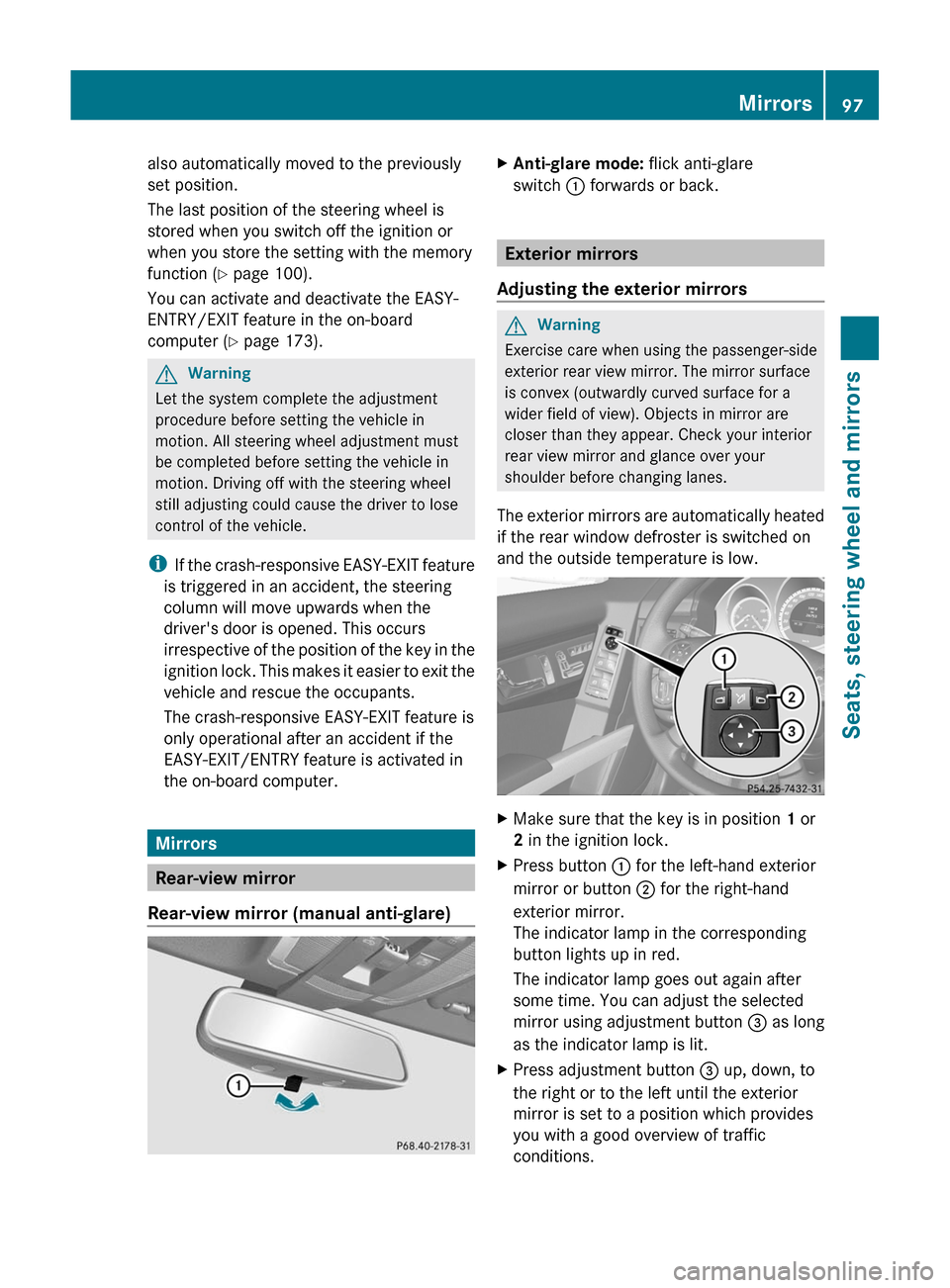
XMake sure that the key is in position 1 or
2 in the ignition lock.
XPress button : for the left-hand exterior
mirror or button ; for the right-hand
exterior mirror.
The indicator lamp in the corresponding
button lights up in red.
The indicator lamp goes out again after
some time. You can adjust the selected
mirror using adjustment button = as long
as the indicator lamp is lit.
XPress adjustment button = up, down, to
the right or to the left until the exterior
mirror is set to a position which provides
you with a good overview of traffic
conditions.
Mirrors97Seats, steering wheel and mirrorsBA 204.9 USA, CA Edition A 2011; 1; 6, en-USd2mwentsVersion: 3.0.3.62010-06-15T08:58:39+02:00 - Seite 97Z