2011 MERCEDES-BENZ E300 BLUETEC Display message
[x] Cancel search: Display messagePage 194 of 400

If indicator lamp ; is lit:XPress button :.
Indicator lamp ; goes out. The vehicle is
adjusted to normal level.
Suspension tuning
The electronically controlled damping system
works continuously. This improves driving
safety and ride comfort.
The damping is tuned individually to each
wheel and depends on:
R your driving style, e.g. sporty
R the road surface condition, e.g. bumps
R your individual selection, i.e. sports or
comfort
Your selection remains stored even if you
remove the SmartKey from the ignition lock.
Sports tuning
The firmer suspension tuning in Sport mode
ensures even better contact with the road.
Select this mode when employing a sporty
driving style, e.g. on winding country roads.
XPress button :.
Indicator lamp ; lights up. You have
selected the suspension for a sporty driving
style.
The AIRMATIC SPORT message appears in
the multifunction display.
Comfort tuning
In comfort mode, the driving characteristics
of your vehicle are more comfortable. Select
this mode if you prefer a more comfortable
driving style, but also when driving fast on
straight roads, e.g. highways.XPress button :.
Indicator lamp = lights up. You have
selected the suspension for a comfortable
driving style.
The AIRMATIC COMFORT message appears
in the multifunction display.
AMG RIDE CONTROL sports
suspension
General notes
i AMG RIDE CONTROL sports suspension
is available for the E 63 AMG model.
Rear axle level control
The vehicle automatically sets the vehicle
level at the rear axle. Rear axle self-leveling
ensures the best possible suspension and
ensures that the ground clearance remains
constant, even when the vehicle is loaded.
This improves driving safety and fuel
consumption.
Suspension tuning
The electronically controlled damping system
works continuously. This improves driving
safety and ride comfort.
The damping is tuned individually to each
wheel and depends on:
R your driving style, e.g. sporty
R the road surface condition, e.g. bumps
R your individual selection of Sport, Sport +
or Comfort
If you select Sport or Sport + mode and
restart the engine, the suspension setting
reverts to Comfort mode.
192Driving systemsDriving and parking
BA 212 USA, CA Edition B 2011; 1; 5, en-USdimargiVersion: 3.0.3.62010-05-20T13:33:46+02:00 - Seite 192
Page 195 of 400
Sport mode
The firmer suspension tuning in Sport mode
ensures even better contact with the road.
Select this mode when employing a sporty
driving style, e.g. on winding country roads.
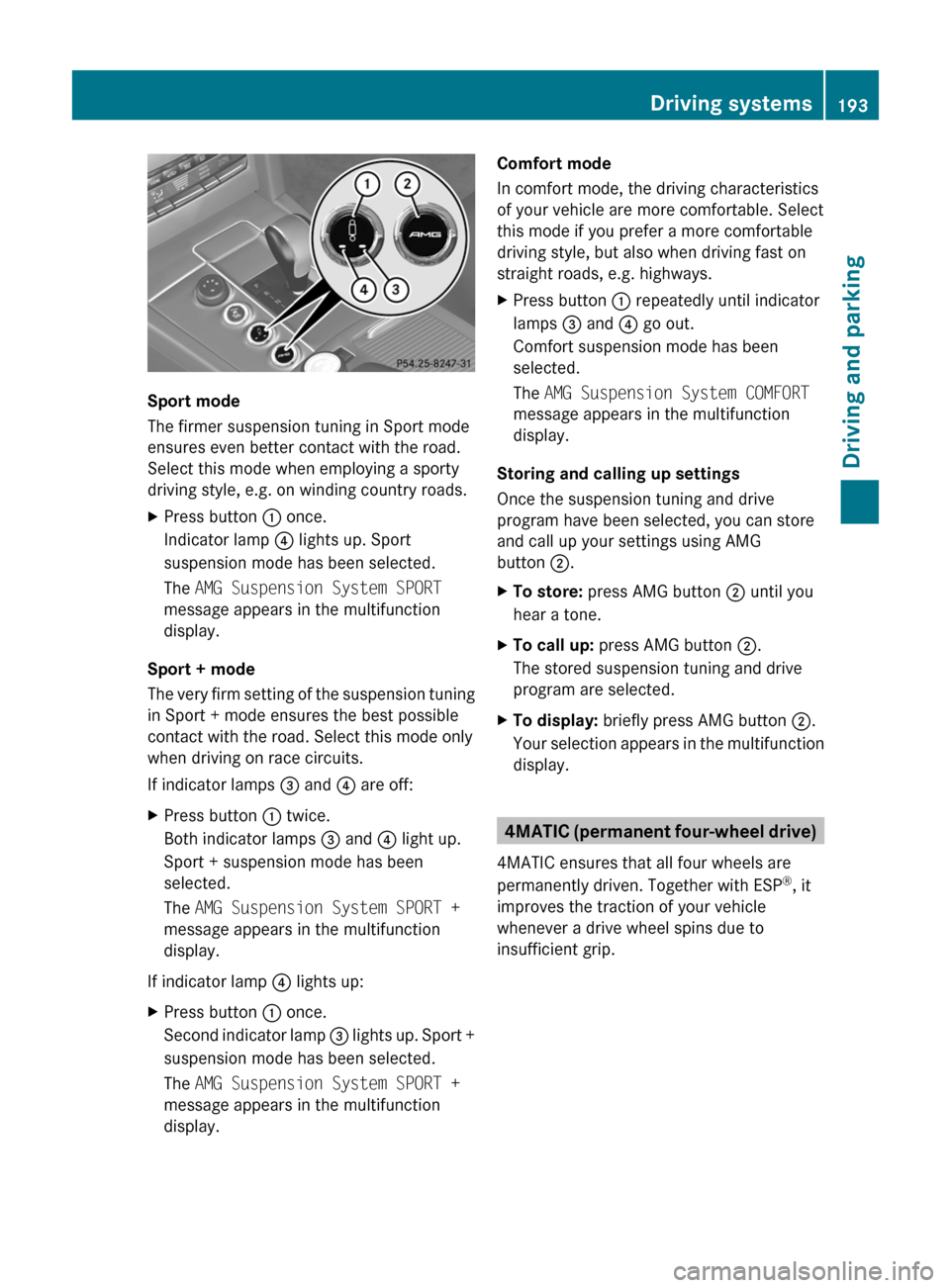
XPress button : once.
Indicator lamp ? lights up. Sport
suspension mode has been selected.
The AMG Suspension System SPORT
message appears in the multifunction
display.
Sport + mode
The very firm setting of the suspension tuning
in Sport + mode ensures the best possible
contact with the road. Select this mode only
when driving on race circuits.
If indicator lamps = and ? are off:
XPress button : twice.
Both indicator lamps = and ? light up.
Sport + suspension mode has been
selected.
The AMG Suspension System SPORT +
message appears in the multifunction
display.
If indicator lamp ? lights up:
XPress button : once.
Second indicator lamp = lights up. Sport +
suspension mode has been selected.
The AMG Suspension System SPORT +
message appears in the multifunction
display.Comfort mode
In comfort mode, the driving characteristics
of your vehicle are more comfortable. Select
this mode if you prefer a more comfortable
driving style, but also when driving fast on
straight roads, e.g. highways.XPress button : repeatedly until indicator
lamps = and ? go out.
Comfort suspension mode has been
selected.
The AMG Suspension System COMFORT
message appears in the multifunction
display.
Storing and calling up settings
Once the suspension tuning and drive
program have been selected, you can store
and call up your settings using AMG
button ;.
XTo store: press AMG button ; until you
hear a tone.XTo call up: press AMG button ;.
The stored suspension tuning and drive
program are selected.XTo display: briefly press AMG button ;.
Your selection appears in the multifunction
display.
4MATIC (permanent four-wheel drive)
4MATIC ensures that all four wheels are
permanently driven. Together with ESP ®
, it
improves the traction of your vehicle
whenever a drive wheel spins due to
insufficient grip.
Driving systems193Driving and parkingBA 212 USA, CA Edition B 2011; 1; 5, en-USdimargiVersion: 3.0.3.62010-05-20T13:33:46+02:00 - Seite 193Z
Page 201 of 400
appears. Parking Guidance only displays
parking spaces on the front-passenger side
as standard. Parking spaces on the driver's
side are displayed as soon as the turn signal
on the driver's side is activated. To park on
the driver's side, you must leave the driver's
side turn signal switched on until you have
engaged reverse gear.
Parking Guidance will only detect parking
spaces:
R that are parallel to the direction of travel
R that are at least 5 ft (1.5 m) wide
R that are at least 4.3 ft (1.3 m) longer than
your vehicle.
A parking space is displayed while you are
driving past it, and until you are
approximately 50 ft (15 m) away from it.
ParkingGWarning!
The Parking Guidance is only an aid and may
not detect all obstacles. The Parking
Guidance does not relieve you of the
responsibility to pay attention. You are always
responsible for safety and must continue to
pay attention to your immediate surroundings
when parking and maneuvering. Otherwise,
you could endanger yourself and others.
XStop the vehicle when the parking space
symbol shows the desired parking space in
the instrument cluster.XShift the transmission to position R.
The multifunction display shows the
Check Vehicle Surroundings Press
'OK' to Confirm message.XPress a on the multifunction steering
wheel to confirm.
The multifunction display switches to
Parking Guidance.
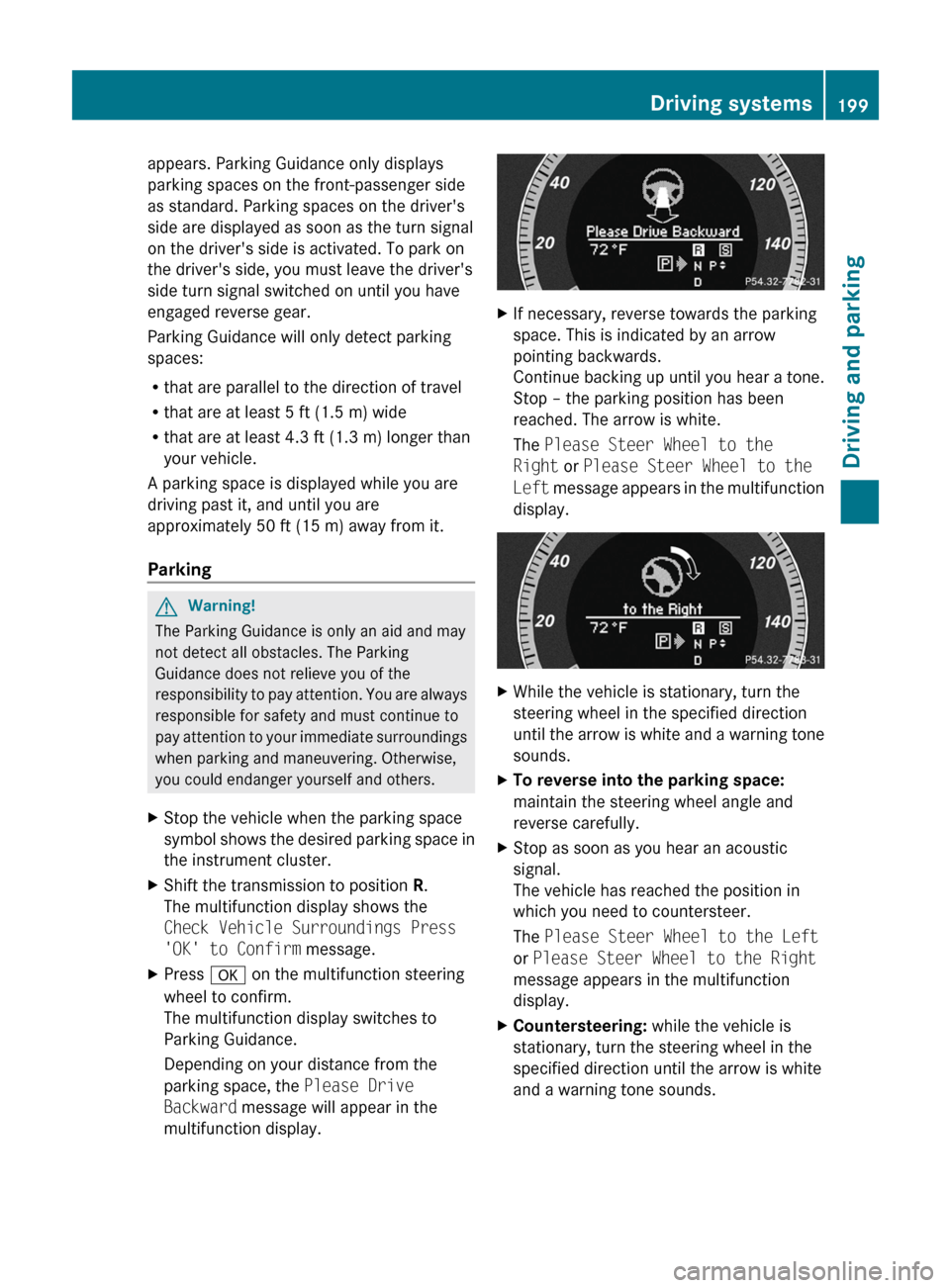
Depending on your distance from the
parking space, the Please Drive
Backward message will appear in the
multifunction display.XIf necessary, reverse towards the parking
space. This is indicated by an arrow
pointing backwards.
Continue backing up until you hear a tone.
Stop – the parking position has been
reached. The arrow is white.
The Please Steer Wheel to the
Right or Please Steer Wheel to the
Left message appears in the multifunction
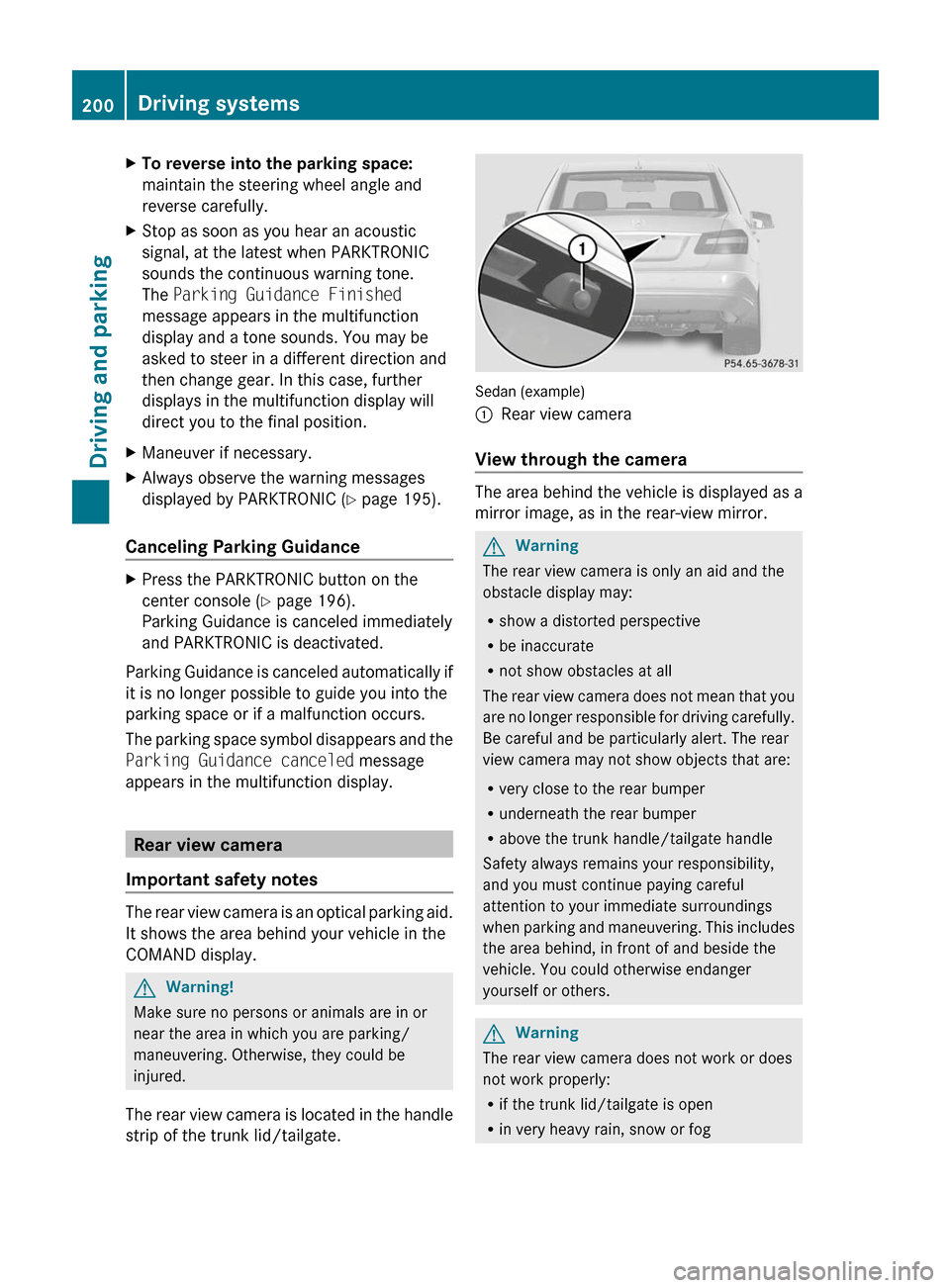
display.XWhile the vehicle is stationary, turn the
steering wheel in the specified direction
until the arrow is white and a warning tone
sounds.XTo reverse into the parking space:
maintain the steering wheel angle and
reverse carefully.XStop as soon as you hear an acoustic
signal.
The vehicle has reached the position in
which you need to countersteer.
The Please Steer Wheel to the Left
or Please Steer Wheel to the Right
message appears in the multifunction
display.XCountersteering: while the vehicle is
stationary, turn the steering wheel in the
specified direction until the arrow is white
and a warning tone sounds.Driving systems199Driving and parkingBA 212 USA, CA Edition B 2011; 1; 5, en-USdimargiVersion: 3.0.3.62010-05-20T13:33:46+02:00 - Seite 199Z
Page 202 of 400
XTo reverse into the parking space:
maintain the steering wheel angle and
reverse carefully.
XStop as soon as you hear an acoustic
signal, at the latest when PARKTRONIC
sounds the continuous warning tone.
The Parking Guidance Finished
message appears in the multifunction
display and a tone sounds. You may be
asked to steer in a different direction and
then change gear. In this case, further
displays in the multifunction display will
direct you to the final position.
XManeuver if necessary.XAlways observe the warning messages
displayed by PARKTRONIC (Y page 195).
Canceling Parking Guidance
XPress the PARKTRONIC button on the
center console (Y page 196).
Parking Guidance is canceled immediately
and PARKTRONIC is deactivated.
Parking Guidance is canceled automatically if
it is no longer possible to guide you into the
parking space or if a malfunction occurs.
The parking space symbol disappears and the
Parking Guidance canceled message
appears in the multifunction display.
Rear view camera
Important safety notes
The rear view camera is an optical parking aid.
It shows the area behind your vehicle in the
COMAND display.
GWarning!
Make sure no persons or animals are in or
near the area in which you are parking/
maneuvering. Otherwise, they could be
injured.
The rear view camera is located in the handle
strip of the trunk lid/tailgate.
Sedan (example)
:Rear view camera
View through the camera
The area behind the vehicle is displayed as a
mirror image, as in the rear-view mirror.
GWarning
The rear view camera is only an aid and the
obstacle display may:
Rshow a distorted perspective
Rbe inaccurate
Rnot show obstacles at all
The rear view camera does not mean that you
are no longer responsible for driving carefully.
Be careful and be particularly alert. The rear
view camera may not show objects that are:
Rvery close to the rear bumper
Runderneath the rear bumper
Rabove the trunk handle/tailgate handle
Safety always remains your responsibility,
and you must continue paying careful
attention to your immediate surroundings
when parking and maneuvering. This includes
the area behind, in front of and beside the
vehicle. You could otherwise endanger
yourself or others.
GWarning
The rear view camera does not work or does
not work properly:
Rif the trunk lid/tailgate is open
Rin very heavy rain, snow or fog
200Driving systemsDriving and parking
BA 212 USA, CA Edition B 2011; 1; 5, en-USdimargiVersion: 3.0.3.62010-05-20T13:33:46+02:00 - Seite 200
Page 204 of 400

Warning and display messages in the
multifunction display
Example
XActivate ATTENTION ASSIST using the on-
board computer ( Y page 228).
Symbol : appears in the multifunction
display.
If ATTENTION ASSIST is active, it will not warn
you until at least 20 minutes after your
journey has begun. You then hear an
intermittent warning tone twice and the
Attention Assist: Time for a rest?
message appears in the multifunction
display.
XIf necessary, take a break.XPress a to confirm the message.
On long journeys, take regular breaks in good
time to allow yourself to rest properly. If you
do not take a break and ATTENTION ASSIST
still detects fatigue or increasing lapses in
concentration, you will be warned again after
15 minutes at the earliest.
ATTENTION ASSIST is reset when you
continue your journey; it reassesses your
tiredness if:
R you switch off the engine.
R you take off your seat belt and open the
driver's door, e.g. for a change of drivers or
to take a break.
Night View Assist Plus
Important safety notes
In addition to the illumination provided by the
normal headlamps, Night View Assist Plus
uses infrared light to illuminate the road. A
camera at the top of the windshield picks up
the infrared light and displays a black-and-
white image in the COMAND display. The
image displayed in COMAND corresponds to
a road lit up by high-beam headlamps. This
enables you to see the road's course and any
obstacles in good time. If pedestrian
recognition is activated, pedestrians
recognized by the system are highlighted in
the Night View Assist Plus display.GWarning
Night View Assist Plus is only an aid designed
to assist driving. It is not a substitute for
attentive driving. Do not rely solely on the
Night View Assist Plus display. Continue to
look through the windshield. You are
responsible for safety and must drive in
accordance with traffic conditions. You could
otherwise put yourself and others in danger.
The system may be impaired or unavailable if:
R there is poor visibility, e.g. due to snow,
rain, fog or heavy spray.
R the windshield is dirty, fogged up or
covered, for instance by a sticker, in the
vicinity of the camera.
R you are driving on bends, uphill gradients
or downhill gradients.
Light from the headlamps of oncoming
vehicles does not affect the Night View Assist
Plus display in the multifunction display. This
is also the case if you cannot switch on the
high-beam headlamps because of oncoming
traffic.
GWarning!
The Night View Assist Plus cannot record
objects immediately in front of or next to the
vehicle. When maneuvering, continue to look
through the windshield. Make sure no
persons or animals are in the area in which
you are maneuvering. You could otherwise
injure them.
i Infrared light is not visible to the human
eye and therefore does not glare. Night
View Assist Plus can therefore remain
202Driving systemsDriving and parking
BA 212 USA, CA Edition B 2011; 1; 5, en-USdimargiVersion: 3.0.3.62010-05-20T13:33:46+02:00 - Seite 202
Page 215 of 400

Ra driving safety system intervenes, such as
ABS, BAS or ESP ®
.
R you switch on the turn signals. In this event,
the warnings are suppressed for a certain
period of time.
Lane-correcting brake application
If you leave your lane under certain
circumstances, the vehicle will brake briefly
on one side. This is designed to help you bring
the vehicle back into the original lane.
This function is available in the range between
40 mph and 120 mph (60 km/h and
200 km/h).
A lane-correcting brake application can only
be made after driving over a solid,
recognizable lane marking. You will be
warned beforehand by means of an
intermittent vibration in the steering wheel.
In addition, a lane with lane markings on both
sides must be recognized. The brake
application also slightly reduces driving
speed.
If a lane-correcting brake application occurs,
the following message appears in the
multifunction display:
i A further lane-correcting brake
application can only occur after your
vehicle has returned to the original lane.
GWarning
Active Lane Keeping Assist does not keep
your vehicle in its lane. It is only an aid
designed to assist driving. It is not a substitute
for attentive driving. In some cases, the lane-
correcting brake application is not sufficient
to bring your vehicle back to the original lane.
In such cases, you must steer the vehicle
yourself to ensure that it does not leave the
lane.
Active Lane Keeping Assist does not detect
road and traffic conditions. Always make sure
that there is sufficient distance to the side for
other traffic or obstacles. In rare cases,
unclear markings or particular structures on
the roadway can be recognized as solid lane
markings. An inappropriate brake application,
e.g. after intentionally driving over a solid lane
marking, may be interrupted at any time by
steering slightly in the opposite direction.
Active Lane Keeping Assist cannot take
account of weather conditions.
You are responsible for the vehicle's speed,
braking in good time, and steering correctly.
Always adapt your driving style to suit the
prevailing road and weather conditions.
Always pay attention to traffic conditions and
your surroundings. Otherwise, you may fail to
recognize dangers in time, cause an accident
and injure yourself and others.
No lane-correcting brake application occurs
if:
R you clearly and actively steer, brake, or
accelerate.
R you cut the corner on a sharp bend.
R you switch on the turn signals.
R a driving safety system intervenes, such as
ESP ®
, PRE-SAFE ®
Brake or Active Blind
Spot Assist.
R you have adopted a sporty driving style with
high cornering speeds or high rates of
acceleration.
R ESP ®
is deactivated.
R the transmission is not in position D.
R a loss of tire pressure or a defective tire has
been detected and displayed.Driving systems213Driving and parkingBA 212 USA, CA Edition B 2011; 1; 5, en-USdimargiVersion: 3.0.3.62010-05-20T13:33:46+02:00 - Seite 213Z
Page 217 of 400
Vehicle equipment ............................216
Important safety notes ....................216
Displays and operation ....................216
Menus and submenus ......................219
Display messages ............................. 234
Warning and indicator lamps in the
instrument cluster ............................263215On-board computer and displaysBA 212 USA, CA Edition B 2011; 1; 5, en-USdimargiVersion: 3.0.3.62010-05-20T13:33:46+02:00 - Seite 215
Page 218 of 400

Vehicle equipment
i This manual describes all the standard
and optional equipment of your vehicle
which was available at the time of
purchase. Country-specific differences are
possible. Bear in mind that your vehicle
may not feature all functions described
here. This also refers to safety-related
systems and functions.
Important safety notes
You will find an illustration of the instrument
cluster in the "At a glance" section
( Y page 28).
GWarning
A driver's attention to the road and traffic
conditions must always be his/her primary
focus when driving.
For your safety and the safety of others,
selecting features through the multifunction
steering wheel should only be done by the
driver when traffic and road conditions permit
it to be done safely.
Bear in mind that at a speed of just 30 mph
(approximately 50 km/h ), your vehicle is
covering a distance of 44 feet (approximately
14 m) every second.
GWarning!
No messages will be displayed if either the
instrument cluster or the multifunction
display is inoperative.
As a result, you will not be able to see
information about your driving conditions,
such as
R speed
R outside temperature
R warning/indicator lamps
R malfunction/warning messages
R failure of any systems
Driving characteristics may be impaired.
If you must continue to drive, do so with added
caution. Contact an authorized Mercedes-
Benz Center as soon as possible.GWarning
Malfunction and warning messages are only
indicated for certain systems and are
intentionally not very detailed. The
malfunction and warning messages are
simply a reminder with respect to the
operation of certain systems. They do not
replace the owner's and/or driver's
responsibility to maintain the vehicle's
operating safety. Have all required
maintenance and safety checks performed on
the vehicle. Bring the vehicle to an authorized
Mercedes-Benz Center to address the
malfunction and warning messages.
Displays and operation
Coolant temperature gauge
GWarning
Driving when your engine is overheated can
cause some fluids which may have leaked into
the engine compartment to catch fire. You
could be seriously burned.
Steam from an overheated engine can cause
serious burns which can occur just by opening
the engine hood. Stay away from the engine
if you see or hear steam coming from it.
Stop the vehicle in a safe location away from
other traffic. Turn off the engine, get out of the
vehicle and do not stand near the vehicle until
the engine has cooled down.
The coolant temperature gauge is in the
instrument cluster on the right-hand side.
Under normal operating conditions and with
the specified coolant level, the coolant
temperature may rise to 248 ‡ (120 †).
! If the coolant temperature is too high a
display message is shown.
216Displays and operationOn-board computer and displays
BA 212 USA, CA Edition B 2011; 1; 5, en-USdimargiVersion: 3.0.3.62010-05-20T13:33:46+02:00 - Seite 216