2011 MERCEDES-BENZ C-CLASS COUPE service reset
[x] Cancel search: service resetPage 19 of 373

Multifunction steering wheel (4
buttons)
see 4-button multifunction steer-
ing wheel N
Navigation Menu (on-board computer) ............216
On-board computer (12-button
multifunctio nsteering wheel) ........216
see separate operating instructions
NECK-PRO head restraints
Operation ........................................ .50
Resetting after being triggered ........51
Notes on running in anew vehicle ..136 O
Occupant safety Childre ninthe vehicle ..................... 55
Important safety notes ....................44
Odometer
4-button multifunction steering
wheel ............................................. 209
see Total distance recorder
see Trip meter
Oil
see Engine oil
On-board computer
RACETIMER ................................... 229
On-board computer (12-button
multifunction steering wheel)
AMG menu ..................................... 229
Assist menu ................................... 220
Audi omenu ................................... 217
Convenience submenu ..................228
DISTRONI CPLUS ........................... 171
Important safety notes ..................206
Instrument cluster submenu ..........223
Lights submenu ............................. 224
Menu overview .............................. 214
Navigation menu ............................ 216
Operating ...................................... .211
Operating the vide oDVD ............... 218
Range ............................................ 215
Service menu ................................. 222
Standard display submenu ............215 Telephone menu
............................ 219
Trip menu ...................................... 215
On-board computer (12-button
multifunction steering wheel)
Displaying service messages .........305
Display messages ..........................232
Heating submenu ........................... 227
Message memory .......................... 233
Vehicle submenu ........................... 225
On-board computer (12-button
multifunction steering wheel)Set-
tings menu ......................................... 223
On-board computer (12-button
multifunction steering wheel) sub-
menu
Factory setting ............................... 228
On-board computer (4-button mul-
tifunction steering wheel)
Important safety notes ..................206
Menu overview .............................. 209
Switching daytime driving lights
on/off ............................................ 210
On-board computer (4-button mul-
tifunction steering wheel)
Displaying service messages .........305
Display messages ..........................232
Individual vehicle settings ..............207
Message memory .......................... 232
Operating ...................................... .207
Range ............................................ 210
Standard displa y............................ 209
Trip computer ................................ 210
Opening and closing the side trim
panels ................................................. 117
Operating system see On-board computer
Outside temperature
Display (12-button multifunction
steering wheel) .............................. 211
Display (4-button multifunction
steering wheel) .............................. 207
Overhead control panel ......................41 P
Pain tcode .......................................... 352
Paintwork (cleaning instructions) ...307 16
Index
Page 22 of 373

Seat
Seat backrest display message
(12-button multifunction steering
wheel) ............................................ 268
Seat backrest display message (4-
button multifunction steering
wheel) ............................................ 266
Seat belt
Activating/deactivating seat-belt
adjustment (12-button multifunc-
tion steering wheel) .......................228
Adjusting the driver's and front-
passenger sea tbelt ......................... 53
Belt force limiter .............................. 54
Belt tensioner .................................. 54
Cleaning ......................................... 311
Display message (12-button mul-
tifunctio nsteering wheel) ..............242
Display message (4-button multi-
function steering wheel) ................236
Fastening ......................................... 53
Important safety guidelines .............51
Rea rseat belt status indicator .........54
Releasing ......................................... 53
Warning lamp (function) ................... 54
Seat belts
Warning lamp ................................. 273
Seats
Adjusting (electrically). ....................98
Adjusting (manually and electri-
cally) ................................................ 98
Adjusting the 4-way lumba rsup-
por t.................................................. 99
Adjusting the head restraint ............98
Cleaning the cover .........................311
Correct driver's seat position ........... 96
Folding the backrests forward/
back ................................................ .99
Important safety notes ....................97
Seat heating problem ....................100
Seat ventilation problem ................101
Storing settings (memory func-
tion) ............................................... 105
Switching sea theating on/off .......100
Switching the sea tventilation on/
off .................................................. 100
Sensors (cleaning instructions) .......309 Service
see ASSYST PLUS service interval
display
Service menu (12-button multi-
function steering wheel) ..................222
Service products Brake fluid ..................................... 356
Coolant (engine) ............................ 356
Engine oil ....................................... 355
Fuel ................................................ 354
Important safety notes ..................353
Settings
Factory (12-button multifunction
steering wheel) .............................. 228
On-board computer (12-button
multifunctio nsteering wheel) ........223
Setting the air distribution ...............125
Setting the airflow ............................125
SETUP (on-board computer) .............229
Shifting to neutral (manual trans-
mission) ............................................. 145
Sidebag ................................................ 48
Side marker lamp Display message (12-button mul-
tifunctio nsteering wheel) ..............250
Display message (4-button multi-
function steering wheel) ................246
Side windows
Convenience closing ........................89
Convenience opening ......................88
Important safety notes ....................88
Opening/closing .............................. 88
Problem (malfunction) .....................90
resetting .......................................... 90
Sliding sunroof
see Panorama sliding sunroof
Snow chains ...................................... 338
Socket Centre console .............................. 292
Points to observe before use .........291
Rea rcompartmen t......................... 292
Spare wheel
Storage location ............................ 316
see Emergency spare wheel
Specialist workshop ............................ 26
Speed, controlling see Cruise control Index
19
Page 25 of 373

Couplin
gupatrailer...................... 202
Decoupling atrailer ....................... 202
Driving tips .................................... 199
ESP ®
................................................ 70
Folding in the ball coupling ............202
Folding out the ball coupling ..........201
Important safety notes ..................199
Mounting dimensions ....................361
Parking Guidance ........................... 186
Parktroni c...................................... 182
Power supply ................................. 203
Shift range ..................................... 147
Trailer loads ................................... 362
Transmission
see Automatic transmission
see Manual transmission
Transporting the vehicle ..................332
Trim pieces (cleaning instructions) .311
Trip computer On-board computer (12-button
multifunctio nsteering wheel) ........215
On-board computer (4-button
multifunctio nsteering wheel) ........210
Trip meter
Displaying/resetting (4-button
multifunctio nsteering wheel) ........209
Displaying (12-button multifunc-
tion steering wheel) .......................215
Resetting (12-button multifunc-
tion steering wheel) .......................216
Trip odometer
see Trip meter
Turn signal
Display message (12-button mul-
tifunctio nsteering wheel) ..............248
Display message (4-button multi-
function steering wheel) ................245
Turn signals
Switching on/off ........................... 110
Two-way radio
Frequencies ................................... 351
Installatio n..................................... 351
Transmission output (maximum) .... 351
Type identification plate
see Vehicle identification plate Tyre pressure
Calling up (on-board computer) .....342
Display message (12-button mul-
tifunctio nsteering wheel) ..............263
Display message (4-button multi-
function steering wheel) ................262
Not reached (TIREFIT) ....................319
Pressure loss warning ....................340
Reached (TIREFIT) ..........................320
Recommended ............................... 339
Tyre pressure monitor
Function/notes ............................. 342
Restarting ...................................... 343
Warning lamp ................................. 282
Tyres
Checking ........................................ 336
Direction of rotatio n...................... 344
Display message (12-button mul-
tifunctio nsteering wheel) ..............263
Display message (4-button multi-
function steering wheel) ................262
Grip ................................................ 161
Important safety notes ..................336
Replacing ....................................... 344
Service life ..................................... 337
Storing ........................................... 344
Tyr esize (data) .............................. 345
Tyr etread ...................................... 337
see Flat tyre U
Unladen weight see Technical data
Unlocking
Emergency unlocking .......................85
From inside the vehicle (central
unlocking button) ............................. 84 V
Vanity mirror (in sun visor) ..............290
Vehicle Correct use ...................................... 27
Data acquisition ............................... 27
Electronics ..................................... 351
Equipment ....................................... 25
Implied warranty .............................. 27
Individua lsettings .......................... 22322
Index
Page 54 of 373
G
WARNING
Only use head restraint covers which have
been tested and approved by Mercedes-Benz
for yourv ehicle model.
The use of non-approved head restraint cov-
ers may prevent NECK-PRO head restraints
from triggering properly. Consequently, the
NECK-PRO head restraints cannot provide the
intended level of protection.
Consult a Mercedes-Benz Service Centre
regarding availability.
If the NECK-PRO head restraints have been
triggered in an accident, reset the NECK-PRO
head restraints on the driver’s and front-
passenger seat (Y page 51). Otherwise, the
additional protection will not be available in
the event of another rear-end collision. You
can recognise when NECK-PRO head
restraints have been triggered by the fact that
they have moved forwards and can no longer
be adjusted. Resetting triggered NECK-PRO head
restraints
Following a rear-end collision, Mercedes-
Benz recommends that you have NECK-PRO
head restraints checked at a qualified spe-
cialist workshop, e.g. a Mercedes-Benz
Service Centre.
i Resetting the NECK-PRO head restraints
requires a lot of strength. If you have diffi-
culty resetting the NECK-PRO head
restraints, have this work carried out at a
qualified specialist workshop, e.g. a
Mercedes-Benz Service Centre. X
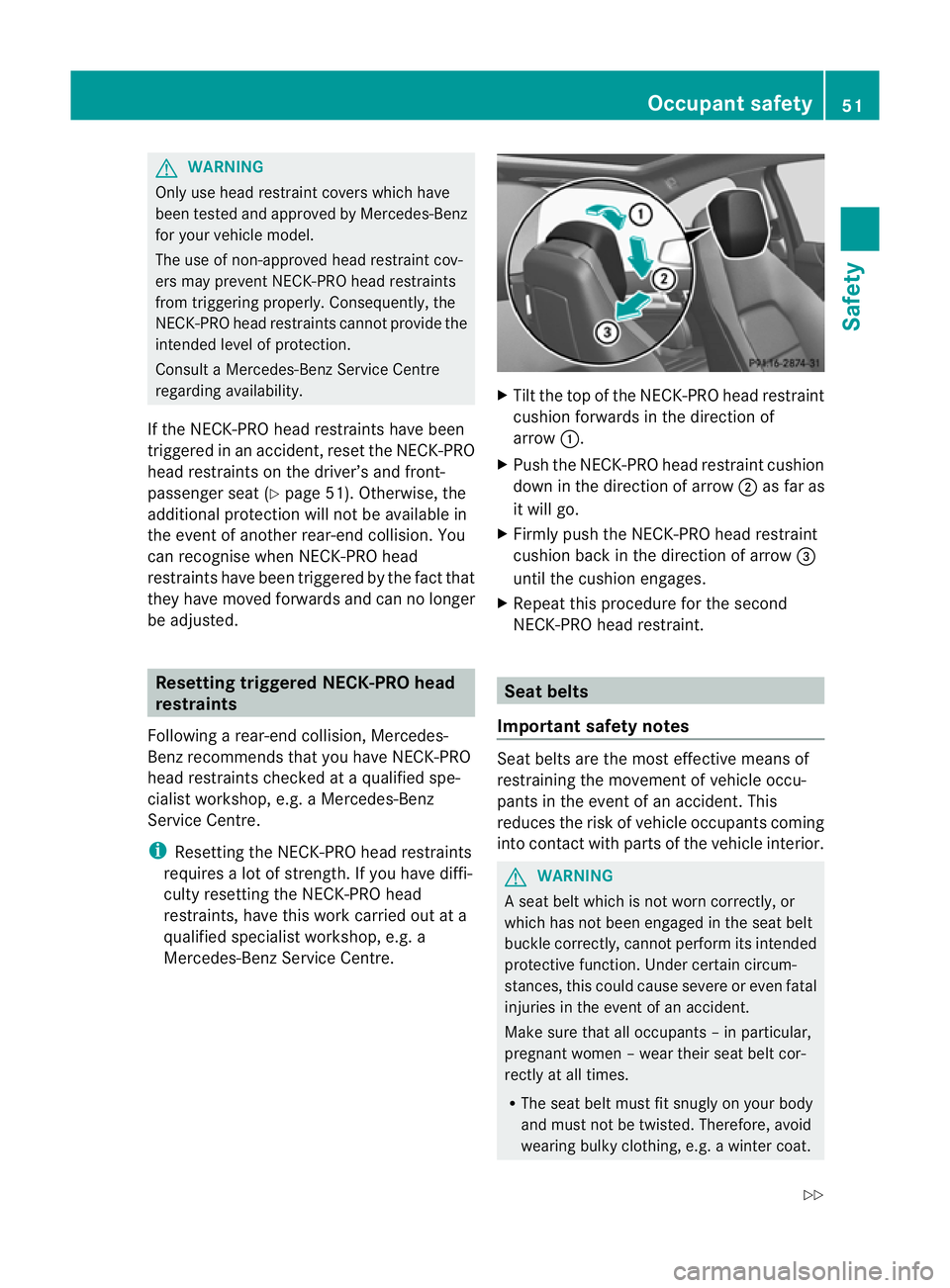
Tilt the top of the NECK-PRO head restraint
cushion forwards in the direction of
arrow :.
X Push the NECK-PRO head restraint cushion
down in the direction of arrow ;as far as
it will go.
X Firmly push the NECK-PRO head restraint
cushion back in the direction of arrow =
until the cushion engages.
X Repeat this procedure for the second
NECK-PRO head restraint. Seat belts
Important safety notes Seat belts are the most effective means of
restraining the movement of vehicle occu-
pants in the event of an accident. This
reduces the risk of vehicle occupants coming
into contact with parts of the vehicle interior. G
WARNING
A seat belt which is not worn correctly, or
which has not been engaged in the seat belt
buckle correctly, cannot perform its intended
protective function. Under certain circum-
stances, this could cause severe or even fatal
injuries in the event of an accident.
Make sure that all occupants –inparticular,
pregnant women – wear their seat belt cor-
rectly at all times.
R The seat belt must fit snugly on your body
and must no tbe twisted. Therefore, avoid
wearing bulky clothing, e.g. a winter coat. Occupant safety
51Safety
Z
Page 212 of 373
Menu overview
Function
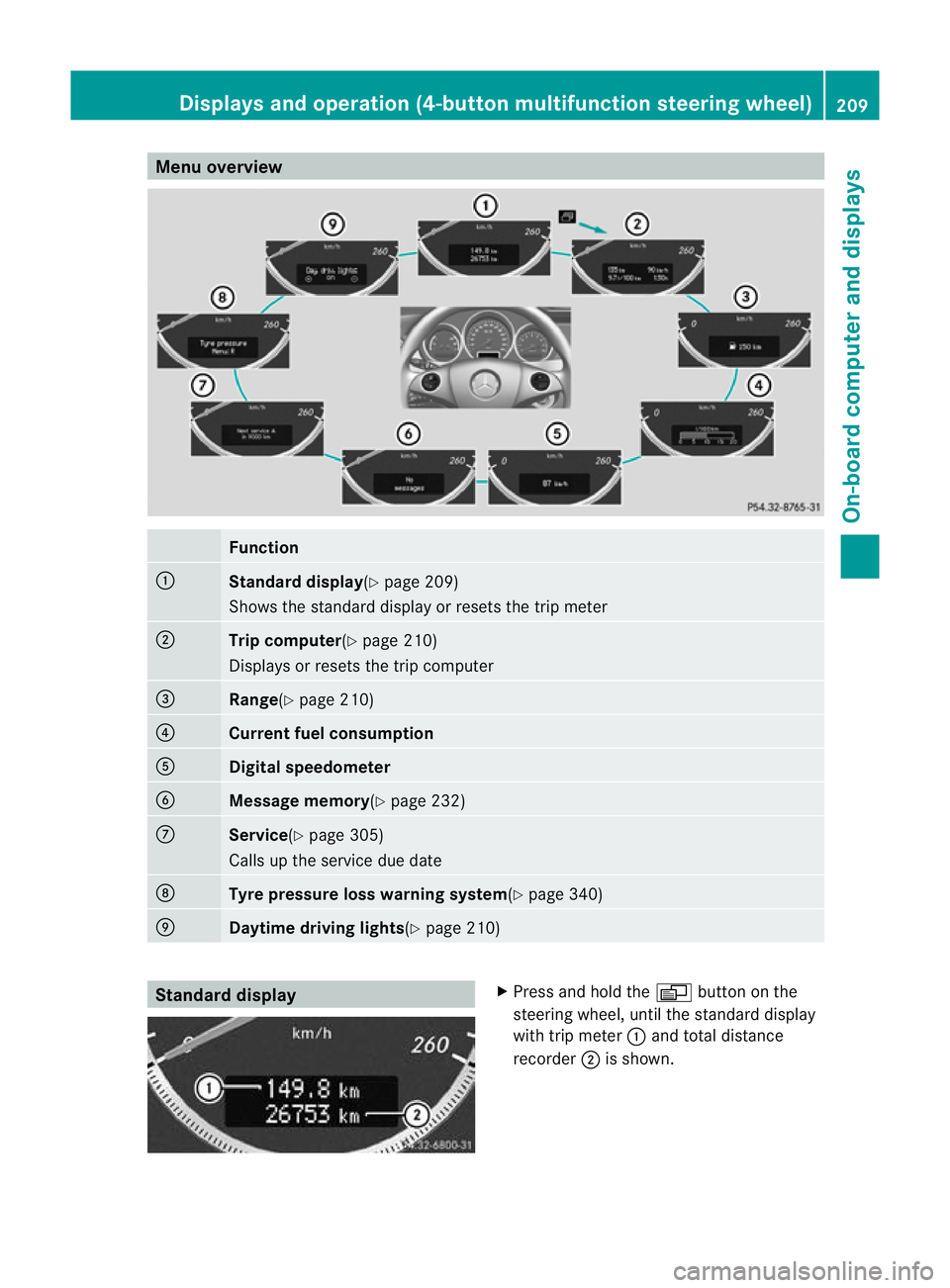
:
Standard display
(Ypage 209)
Shows the standard display or resets the trip meter ;
Trip computer
(Ypage 210)
Displays or resets the trip computer =
Range(Y
page 210) ?
Current fuel consumption
A
Digital speedometer
B
Message memory(Y
page 232)C
Service(Y
page 305)
Calls up the service due date D
Tyre pressure loss warnin
gsystem(Y page 340) E
Daytime driving lights(Y
page 210)Standard display X
Press and hold the Vbutton on the
steering wheel, until the standard display
with trip meter :and total distance
recorder ;is shown. Displays and operation (4-button multifunction steering wheel)
209On-board computer and displays Z
Page 225 of 373
Ä
symbol as long as the HOLD function is
not activated (Y page 177).
Vehicles with Parking Guidance: if PARK-
TRONIC is activated and you are driving at a
speed under 35 km/h, the jParking Guid-
ance symbol is shown instead of the Ä
symbol.
Activating/deactivating Attention
Assist X
Press =or; on the steering wheel
to select the Assist. menu.
X Press the 9or: button to select
Attention Asst. .
X Press a.
The current selection is displayed.
X To activate/deactivate: pressa
again.
When ATTENTION ASSIST (Y page 188) is
activated, the Àsymbol appears in the
multifunction display when the ignition is on.
Activating/deactivating Blind Spot
Assist You can use the
Blind Spot Asst. function
to activate or deactivate Blind Spot Assist
(Y page 190) or Active Blind Spot Assist
(Y page 194).
X Press =or; on the steering wheel
to select the Assist. menu.
X Press 9or: to select Blind Spot
Asst. .
X Press a.
If the function is activated, the monitored
areas in the multifunction display light up
red.
X To activate/deactivate: pressa
again.
Activating/deactivating Lane Keeping
Assist You can use the
Lane Keep. Asst. function
to activate/deactivate Lane Keeping Assist (Y
page 192) or Active Lane Keeping Assist
(Y page 197).
X Press =or; on the steering wheel
to select the Assist. menu.
X Press 9or: to select Lane Keep.
Asst. .
X Press a.
If the function is activated, the lane marking
symbol in the multifunction display lights
up red.
X To activate/deactivate: pressa
again.
When Lane Keeping Assist or Active Lane
Keeping Assist is activated, the Ãsymbol
appears in the multifunction display when the
ignition is on. Service menu
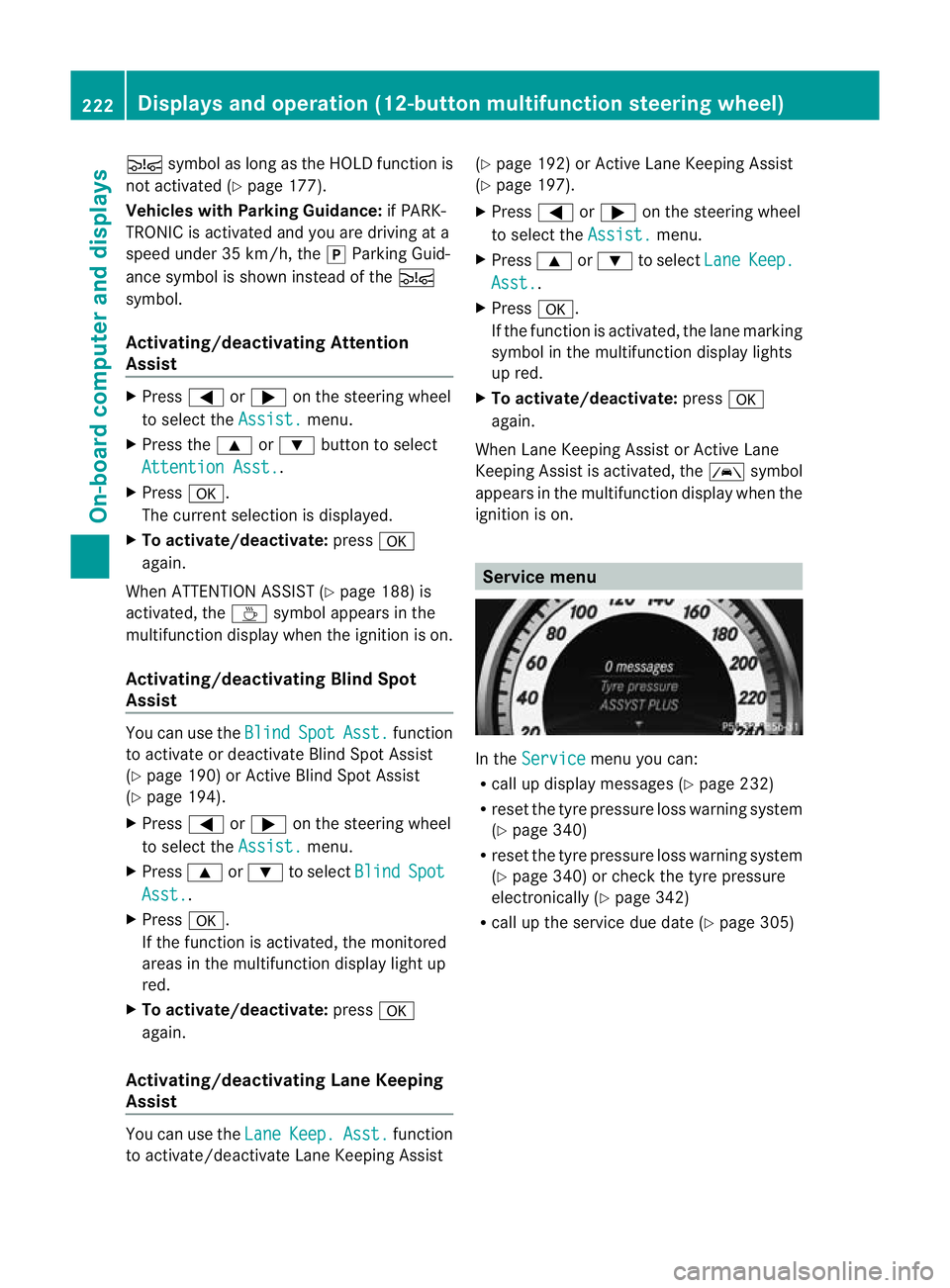
In the
Service menu you can:
R call up display messages (Y page 232)
R reset the tyre pressure loss warning system
(Y page 340)
R reset the tyre pressure loss warning system
(Y page 340) or check the tyre pressure
electronically (Y page 342)
R call up the service due date (Y page 305)222
Displays and operation (12-button multifunction steering wheel)On-board computer and displays
Page 308 of 373
and windscree
nwasher concentrate (e.g.
MB WinterFit) .Adapt the mixing ratio to the
outside temperatures.
X To open: pull cap:upwards by the tab.
X Top up with the premixed washer fluid.
X To close: press cap :onto the filler neck
until it engages. Maintenance
ASSYST PLUS service interval display
Service messages Information on the type of service and service
intervals (see separate Service Booklet).
You can obtain further information from a
Mercedes-Benz Service Centre.
The ASSYST PLUS service interval display
informs you when the nex tservice is due.
The multifunction display shows a service
message for a few seconds, e.g.:
Next service A due in .. days Service A due
Service A overdue by ... days
The letter indicates which service is due.
Astands for a minor service and
B for a major
service. A number or another letter may be
displayed after the letter. This figure indicates
any necessary additional maintenance work
to be performed.
If you report this displayed information to a
qualified specialist workshop, for example a
Mercedes-Benz Service Centre, they can
infor myou of the costs the service will incur.
The ASSYST PLUS service interval display
does not take into account any periods of
time during which the battery is disconnec-
ted. Maintaining the time-dependent service
schedule:
X
Note down the service due date displayed
in the multifunction display before discon-
necting the battery.
or
X Subtract the battery disconnection periods
from the service date shown on the display
after reconnecting the battery.
i The ASSYST PLUS service interval display
does not show any information on the
engine oil level. Observe the notes on the
engine oil level (Y page 302).
Hiding aservice message X
4-button multifunction steering wheel:
press C.
X 12-button multifunction steering
wheel: press%ora.
Displaying service messages X
Switch the ignitio non.
4-button multifunction steering wheel
X Use V to select the Servicemenu.
The service due date appears in the multi-
functio ndisplay.
12-button multifunction steering wheel
X Press the =or; button to selec tthe
Serv. menu.
X Press the 9or: button to select the
ASSYST PLUS submenu and confirm by
pressing the abutton.
The service due date appears in the multi-
function display.
Please bear the following in mind Resetting the ASSYST PLUS service inter-
val display
Aq
ualified specialist workshop, e.g. a
Mercedes-Ben zService Centre, will reset the Maintenance
305Maintenance and care Z
Page 309 of 373

ASSYST PLUS service interval display after
the service work has been carried out.
You can obtain further information, e.g.
regarding service work, fro maMercedes-
Benz Service Centre or directly from
Mercedes-Benz.
! If the ASSYST PLUS service interval dis-
play has been inadvertently reset, this set-
ting can be corrected at a Mercedes-Benz
Service Centre.
Have service work carried out as described
in the Service Booklet. This may otherwise
lead to increased wear and damage to the
major assemblies or the vehicle.
Driving abroad
An extensive Mercedes-Benz Service network
is also available in other countries. The
Service Hotline's current telephone numbers
for use when you are abroad are to be found
in the "Mercedes-Benz Service24h" section
of the Service Booklet. Care
Notes on care
Regular care of your vehicle is a condition for
retaining the quality in the long term.
Use care products and cleaning agents rec-
ommended and approved by Mercedes-Benz.
! For cleaning your vehicle, do not use any
of the following:
R dry, rough or hard cloths
R abrasive cleaning agents
R solvents
R cleaning agents containing solvents
Do not scrub.
Do not touch the surfaces or protective
films with hard objects, e.g. a ring or ice
scraper. You could otherwise scratch or
damage the surfaces and protective film. H
Environmental note
Dispose of empty packaging and cleaning
cloths in an environmentally responsible man-
ner.
! Do not park up the vehicle for an extended
period straight after cleaning it, particularly
after having cleaned the wheels with wheel
cleaner. Wheel cleaners could cause
increased corrosion of the brake discs and
brake pads/linings. For this reason, you
should drive for a few minutes after clean-
ing. Braking heats the brake discs and the
brake pads/linings, thus drying them. The
vehicle can then be parked up. Care of the exterior
Automatic car wash G
WARNING
Braking efficiency is reduced after washing
the vehicle. This could cause an accident. For
this reason, following a car wash, drive with
particular care until the brakes are dry. G
WARNING
The vehicle is braked when the HOLD function
or DISTRONIC PLUS is activated. Therefore,
deactivate the HOLD function and DISTRONIC
PLUS before the vehicle is washed in an auto-
matic car wash.
You can wash the vehicle in an automatic car
wash from the very start.
If the vehicle is very dirty, pre-wash it before
cleaning it in an automatic car wash.
! Make sure that the automatic transmis-
sion is in position Nwhen washing your
vehicle in a tow-through car wash. The vehi-
cle could be damaged if the transmission is
in another position.
! Make sure that: 306
CareMaintenance and care