Page 430 of 821
360
3-3. Using the Bluetooth® audio system
Deleting a registered portable player
Select “Delete Audio Player (Delete Audio)” using a voice com-
mand or .
Pattern A
Select the portable player to be deleted by either of the following
methods and select “Confirm” using a voice command or :
a. Press the talk switch and say the name of the desired portable
player.
b. Press the talk switch and say “List Audio Players”. When the
name of the desired portable player is read aloud, press the
talk switch.
Pattern B
Select the desired portable player to be deleted using .
If the portable player to be deleted is paired as a Bluetooth® phone, the
registration of the mobile phone can be deleted at the same time. A voice
guidance instruction to delete a mobile phone is heard.
Select “Yes” or “No” using a voice command or .
(Bluetooth® phone →P. 364)
nThe number of portable players that can be registered
Up to 2 portable players can be registered in the system.
STEP1
STEP2
STEP2
STEP3
Page 439 of 821

369
3-4. Using the hands-free phone system (for mobile phones)
3
Interior features
Using the hands-free phone system for the first time
Before using the hands-free phone system, it is necessary to register a
mobile phone in the system. The system will enter phone registration
mode automatically when starting the system with no mobile phone reg-
istered. Follow the procedure below to register (pair) a mobile phone:
Press the off-hook switch or the talk switch.
The introductory guidance and phone name registration instructions are
heard.
Select “Pair Phone” using a voice command or .
Register a phone name by either of the following methods:
a. Select “Record Name” using , and say the name to be
registered.
b. Press the talk switch and say the name to be registered.
A voice guidance instruction to confirm the input is heard.
Select “Confirm” using a voice command or .
A passkey is displayed and heard, and a voice guidance instruction for
inputting the passkey into the mobile phone is heard.
Input the passkey into the mobile phone.
Refer to the manual that comes with the mobile phone for the operation
of the phone.
Guidance for registration completion is heard.
If the mobile phone has a Bluetooth® audio player, the audio player can
be registered at the same time. A voice guidance instruction to register a
Bluetooth® audio player is heard.
STEP1
STEP2
STEP3
STEP4
STEP5
Page 440 of 821
370
3-4. Using the hands-free phone system (for mobile phones)
Select “Yes” or “No” using a voice command or .
(Bluetooth® audio player →P. 343)
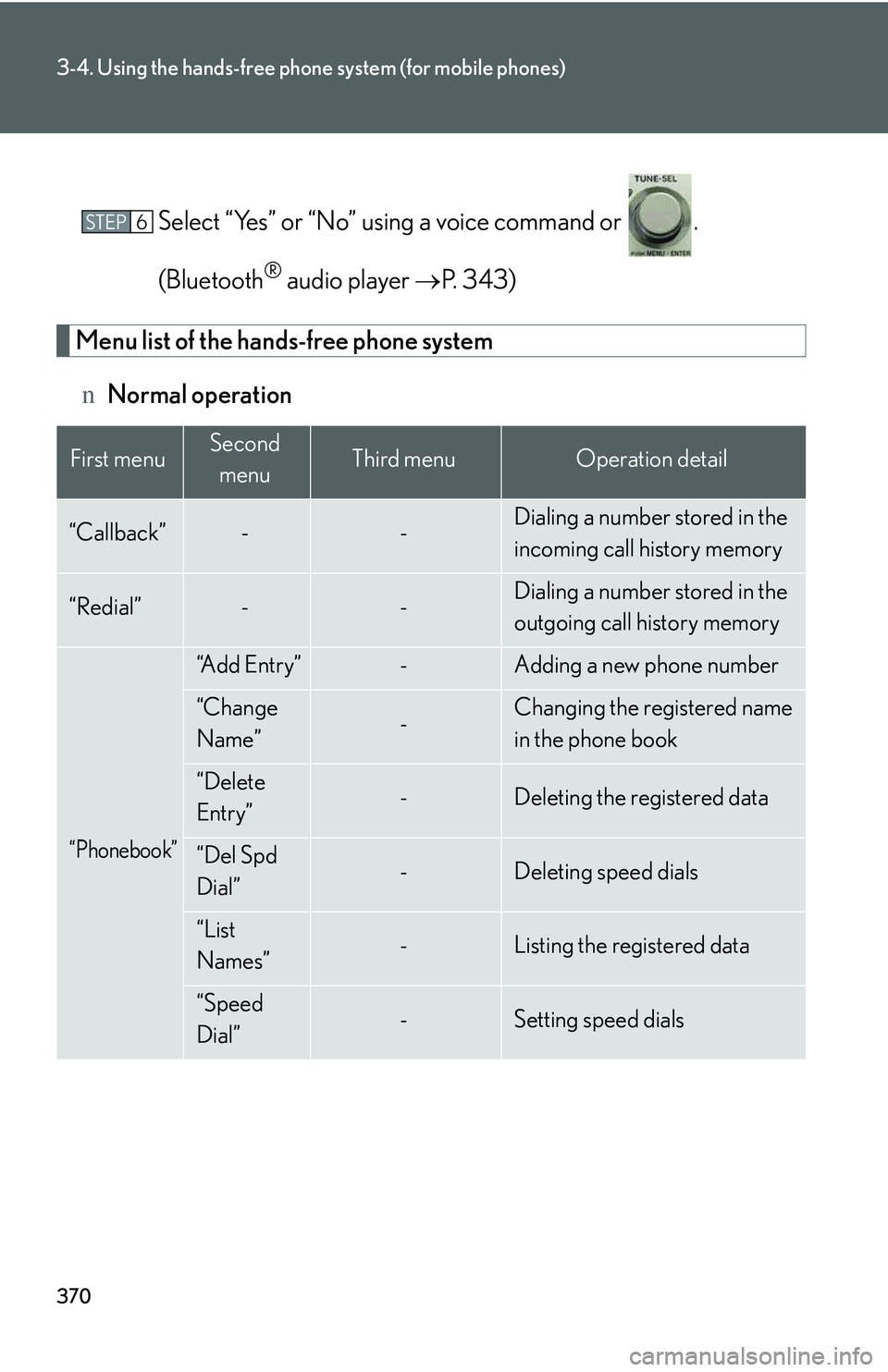
Menu list of the hands-free phone system
nNormal operation
First menuSecond
menuThird menuOperation detail
“Callback”--Dialing a number stored in the
incoming call history memory
“Redial”--Dialing a number stored in the
outgoing call history memory
“Phonebook”
“A d d E n t r y ”-Adding a new phone number
“Change
Name”-Changing the registered name
in the phone book
“Delete
Entry”-Deleting the registered data
“Del Spd
Dial”-Deleting speed dials
“List
Names”-Listing the registered data
“Speed
Dial”-Setting speed dials
STEP6
Page 454 of 821
384
3-4. Using the hands-free phone system (for mobile phones)
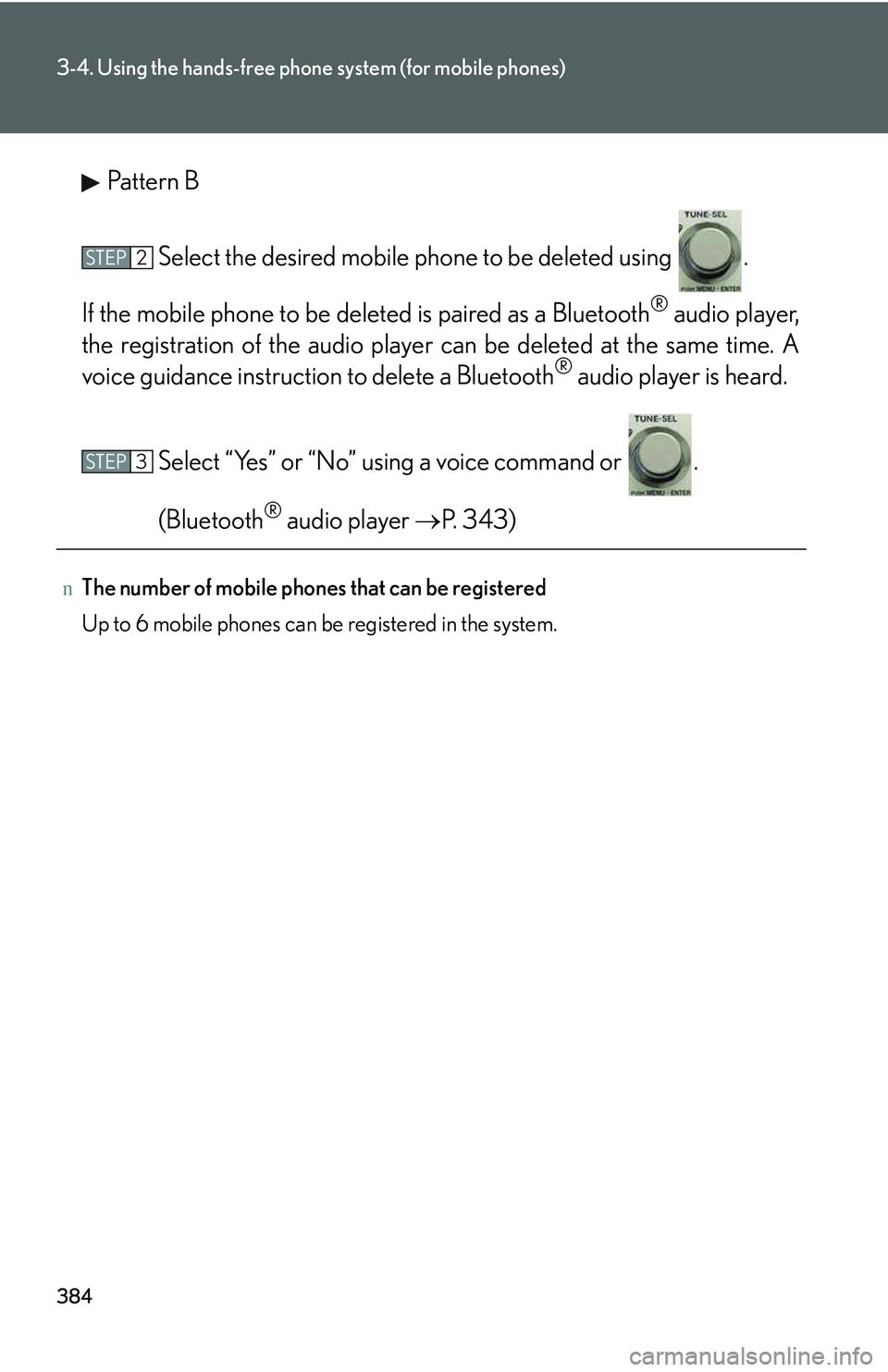
Pattern B
Select the desired mobile phone to be deleted using .
If the mobile phone to be deleted is paired as a Bluetooth® audio player,
the registration of the audio player can be deleted at the same time. A
voice guidance instruction to delete a Bluetooth® audio player is heard.
Select “Yes” or “No” using a voice command or .
(Bluetooth® audio player →P. 343)
nThe number of mobile phones that can be registered
Up to 6 mobile phones can be registered in the system.
STEP2
STEP3
Page 720 of 821

651
Alphabetical index
Alarm ..........................................................103
Anti-lock brake system........................ 231
Armrest ......................................................418
Audio input ..............................................337
Audio system
Audio input ............................................337
AUX port ...............................................337
CD player/changer ..........................297
iPod ............................................................ 317
MP3/WMA disc ............................... 307
Optimal use.......................................... 334
Portable audio device......................337
Radio........................................................ 287
Steering wheel audio switch........ 339
USB memory ...................................... 325
USB port................................................ 325
Automatic air conditioning system
Air conditioning filter........................493
Air conditioning system .................. 274
Automatic headlight leveling
system ..................................................... 188
Automatic high beam system ........... 189
Automatic light control system ........ 184
Automatic transmission
Automatic transmission ................... 159
If the shift lever cannot be
shifted from P ...................................579
S mode ....................................................... 161
AUX port ................................................. 337
Page 721 of 821
652
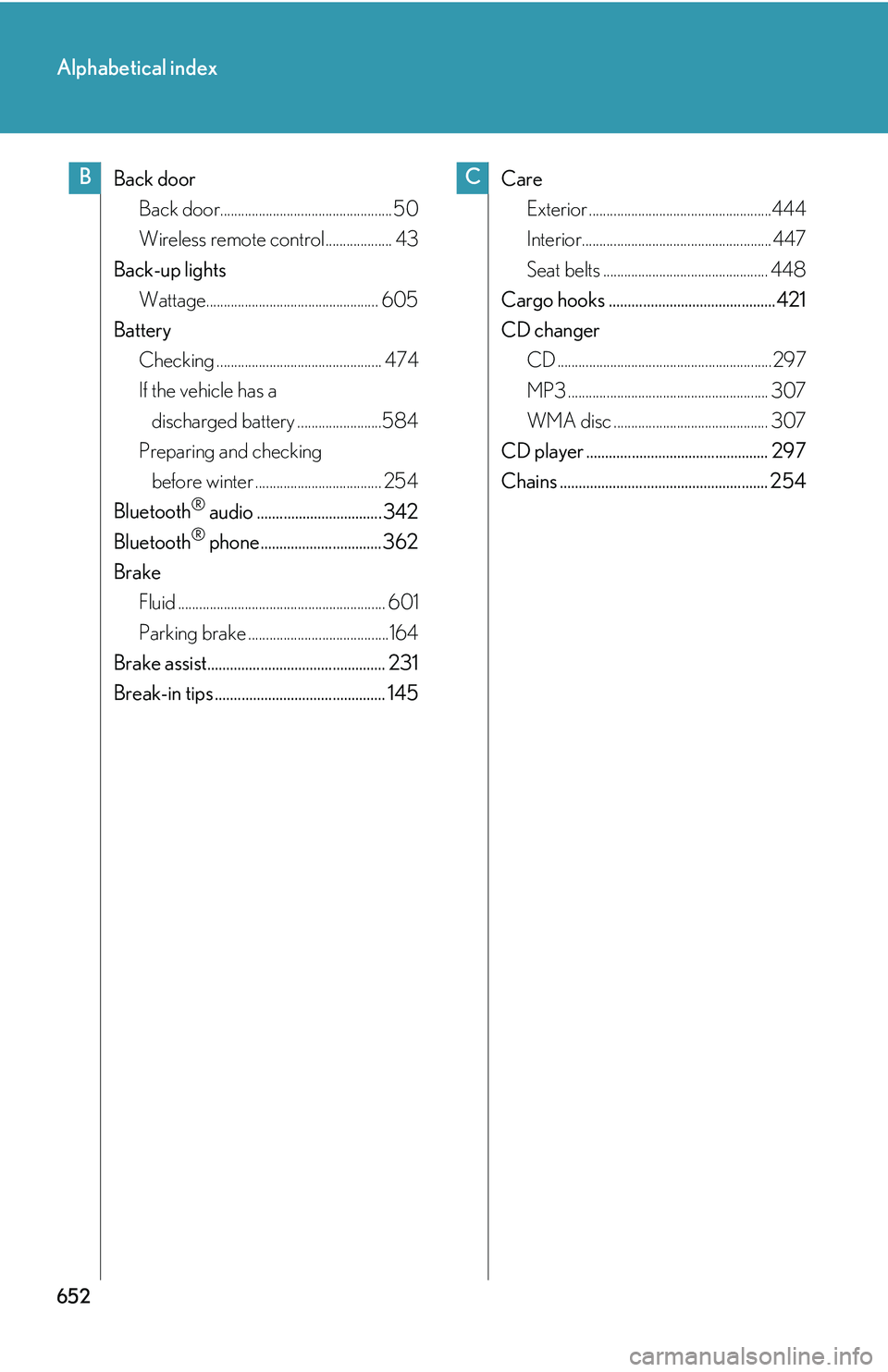
Alphabetical index
Back door
Back door................................................. 50
Wireless remote control................... 43
Back-up lights
Wattage................................................. 605
Battery
Checking ............................................... 474
If the vehicle has a
discharged battery ........................584
Preparing and checking
before winter .................................... 254
Bluetooth® audio ................................. 342
Bluetooth® phone................................ 362
Brake
Fluid ........................................................... 601
Parking brake ........................................164
Brake assist............................................... 231
Break-in tips ............................................. 145
Care
Exterior ....................................................444
Interior...................................................... 447
Seat belts ............................................... 448
Cargo hooks ............................................421
CD changer
CD .............................................................297
MP3 ......................................................... 307
WMA disc ............................................ 307
CD player ................................................ 297
Chains ....................................................... 254
BC