Page 114 of 821
41
1-2. Opening, closing and locking the doors
1
Before driving
For vehicles sold in the mainland U.S.A.
FCC ID: NI4TMLF8-6
FCC ID: HYQ14ACX
FCC ID: HYQ14AEB
FCC ID: HYQ13CZF
FCC ID: HYQ14ADF
FCC ID: HYQ14AEF
FCC ID: HYQ13CZG
NOTE:
This device complies with Part 15 of the FCC Rules. Operation is subject to the fol-
lowing two conditions: (1) this device may not cause harmful interference, and (2)
this device must accept any interference received, including interference that may
cause undesired operation.
FCC WARNING:
Changes or modifications not expressly approved by the party responsible for
compliance could void the user's authority to operate the equipment.
For vehicles sold in Canada
NOTE:
Operation is subject to the following two conditions; (1) this device may not cause
interference, and (2) this device must accept any interference, including interfer-
ence that may cause undesired operation of the device.
L’utilisation de ce dispositif est autorisée seulement aux deux conditions suivantes:
(1) il ne doit pas produire de brouillage, et (2) l’utilisateur du dispositif doit être prêt
à accepter tout brouillage radioélectrique reçu, même si ce brouillage est
susceptible de compromettre le fonctionnement du dispositif.
Page 171 of 821
98
1-5. Refueling
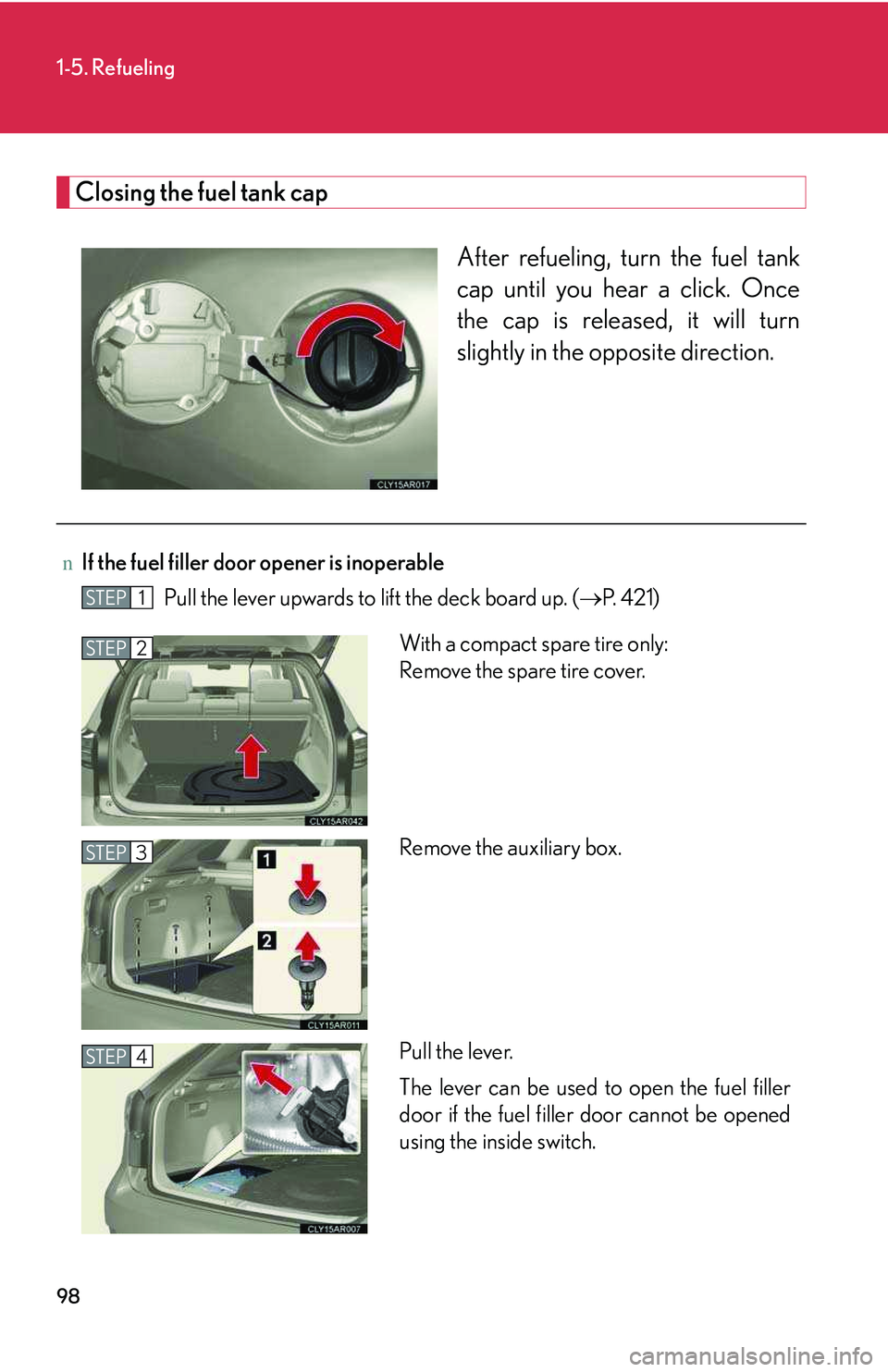
Closing the fuel tank cap
After refueling, turn the fuel tank
cap until you hear a click. Once
the cap is released, it will turn
slightly in the opposite direction.
nIf the fuel filler door opener is inoperable
Pull the lever upwards to lift the deck board up. (→P. 4 2 1 )STEP1
With a compact spare tire only:
Remove the spare tire cover.
Remove the auxiliary box.
Pull the lever.
The lever can be used to open the fuel filler
door if the fuel filler door cannot be opened
using the inside switch.
STEP2
STEP3
STEP4
Page 175 of 821
102
1-6. Theft deterrent system
nCertifications for the engine immobilizer system
For vehicles sold in the U.S.A.
FCC ID: NI4TMIMB-1
This device complies with Part 15 of the FCC Rules. Operation is subject to the fol-
lowing two conditions: (1) this device may not cause harmful interference, and (2)
this device must accept any interference received, including interference that may
cause undesired operation.
For vehicles sold in Canada
Operation is subject to the following two conditions: (1) this device may not cause
interference, and (2) this device must accept any interference, including interfer-
ence that may cause undesired operation of the device.
L’utilisation de ce dispositif est autorisée seulement aux deux conditions suivantes:
(1) il ne doit pas produire de brouillage, et (2) l’utilisateur du dispositif doit être prêt
à accepter tout brouillage radioélectrique reçu, même si ce brouillage est
susceptible de compromettre le fonctionnement du dispositif.
CAUTION
nCertifications for the immobilizer system
Changes or modifications not expressly approved by the party responsible for
compliance could void the user’s authority to operate the equipment.
NOTICE
nTo ensure the system operates correctly
Do not modify or remove the system. If modified or removed, the proper operation
of the system cannot be guaranteed.
Page 355 of 821
285
3-2. Using the audio system
3
Interior features
Type C
Ti t l ePa g e
Using the radioP. 2 8 7
Using the CD playerP. 2 9 7
Playing MP3 and WMA discsP. 3 0 7
Operating an iPodP. 3 1 7
Operating a USB memoryP. 3 2 5
Optimal use of the audio systemP. 3 3 4
Using the AUX portP. 3 3 7
Using the steering wheel audio switchesP. 3 3 9
Page 407 of 821
337
3-2. Using the audio system
3
Interior features
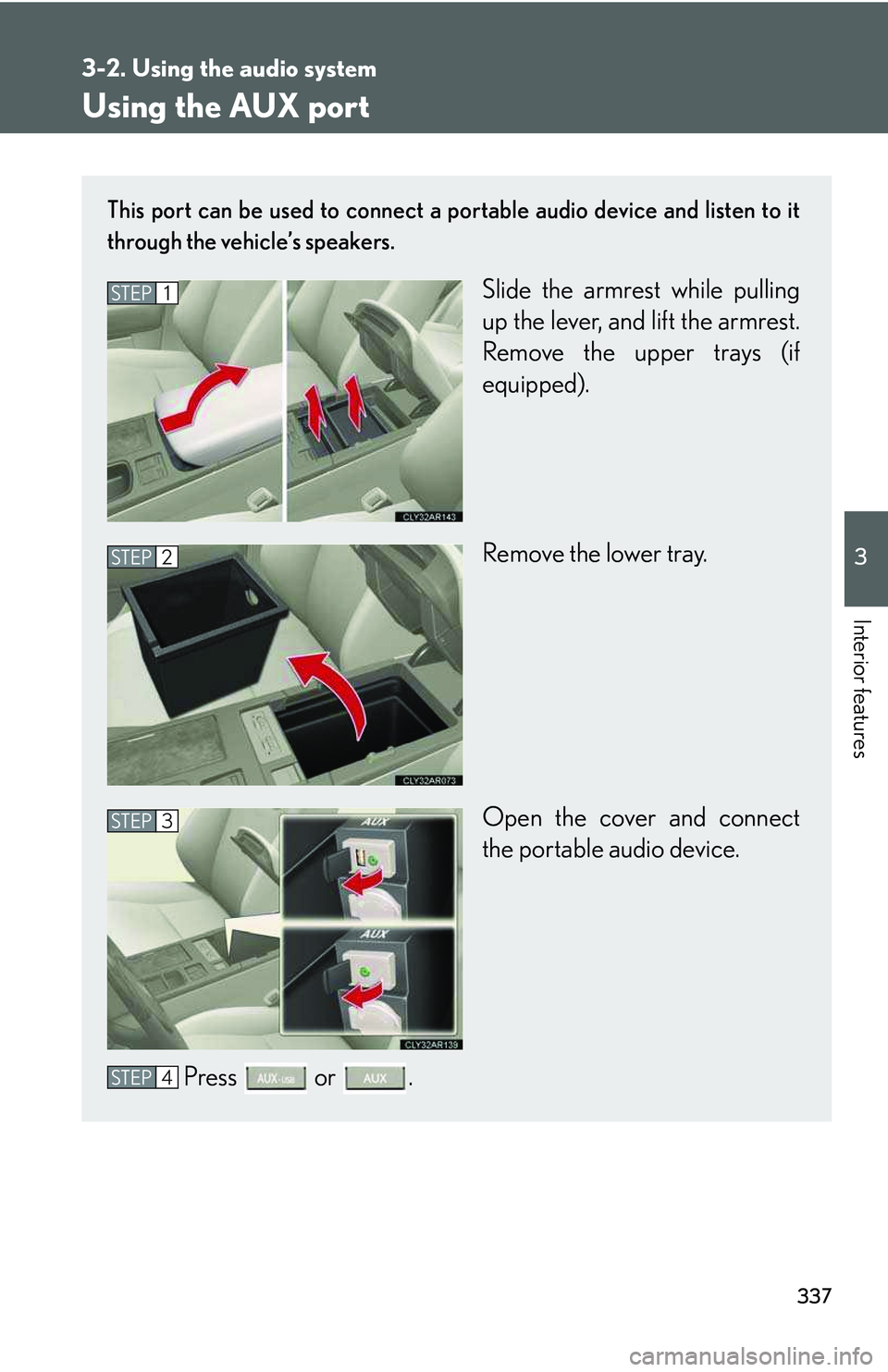
Using the AUX port
This port can be used to connect a portable audio device and listen to it
through the vehicle’s speakers.
Slide the armrest while pulling
up the lever, and lift the armrest.
Remove the upper trays (if
equipped).
Remove the lower tray.
Open the cover and connect
the portable audio device.
Press or .
STEP1
STEP2
STEP3
STEP4
Page 410 of 821

340
3-2. Using the audio system
Changing the audio source
Press when the audio system is turned on. The audio source
changes as follows each time the button is pressed. If no discs are
inserted in the player, that mode will be skipped.
Type A:
FM1→FM2→SAT1→SAT2→SAT3→CD player→
Bluetooth® audio→AUX→iPod or USB memory→AM→FM1
Type B:
FM1→FM2→SAT1→SAT2→SAT3→CD player→
Bluetooth® audio→AUX→AM→FM1
Type C:
FM1→FM2→CD player→AUX→AM→FM1
Adjusting the volume
Press “+” on to increase the volume and “-” to decrease the vol-
ume.
Hold down the button to continue increasing or decreasing the volume.
Selecting a radio station
Press to select radio mode.
Press “∧” or “∨” on to select a radio station.
To scan for receivable stations, press and hold “∧” or “∨” on the button
until you hear a beep.
Selecting a track/file or song
Press to select CD, Bluetooth® audio (type A and B), iPod
(type A) or USB memory (type A) mode.
Press “∧” or “∨” on to select the desired track/file or song.
STEP1
STEP2
STEP1
STEP2
Page 416 of 821
346
3-3. Using the Bluetooth® audio system
Operating the system using voice commands
By following voice guidance instructions output from the speaker, voice
commands enable to the operation of the Bluetooth® audio system with-
out the need to check the display or operate .
nOperation procedure when using voice commands
Press the talk switch and follow voice guidance instructions.
nAuxiliary commands when using voice commands
The following auxiliary commands can be used when operating the
system using a voice command:
“Cancel”: Exits the Bluetooth® audio system
“Repeat”: Repeats the previous voice guidance instruction
“Go back”: Returns to the previous procedure
“Help”: Reads aloud the function summary if a help comment is regis-
tered for the selected function
Page 438 of 821
368
3-4. Using the hands-free phone system (for mobile phones)
Operating the system using voice commands
By following voice guidance instructions output from the speaker, voice
commands enable to the operation of the hands-free phone system with-
out the need to check the display or operate .
nOperation procedure when using voice commands
Press the talk switch and follow voice guidance instructions.
nAuxiliary commands when using voice commands
The following auxiliary commands can be used when operating the
system using a voice command:
“Cancel”: Exits the hands-free phone system
“Repeat”: Repeats the previous voice guidance instruction
“Go back”: Returns to the previous procedure
“Help”: Reads aloud the function summary if a help comment is regis-
tered for the selected function