Page 343 of 563
341
3-7. Other interior features
3
Interior features
ES350_U
Trunk features
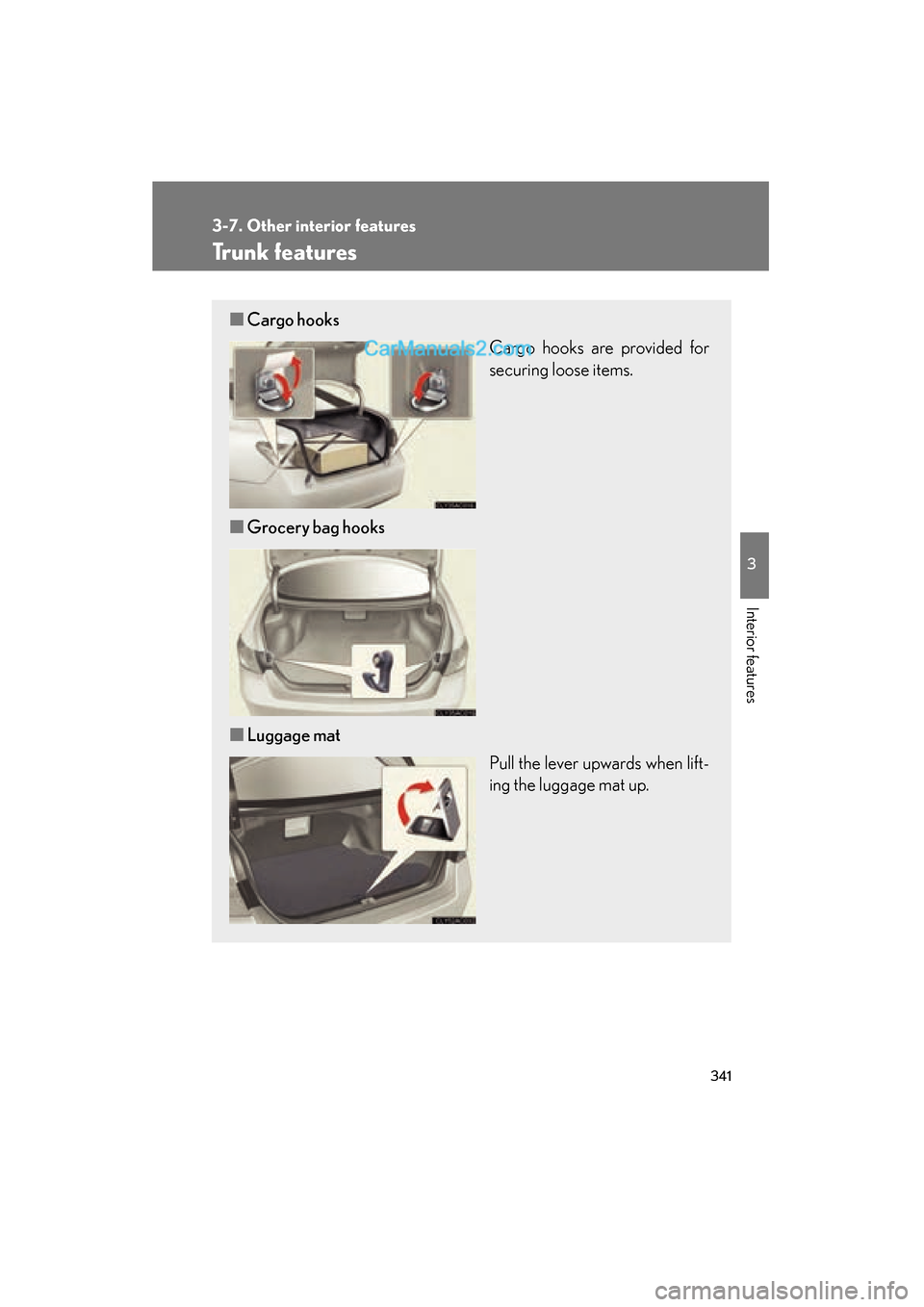
■Cargo hooks
Cargo hooks are provided for
securing loose items.
■ Grocery bag hooks
■ Luggage mat
Pull the lever upwards when lift-
ing the luggage mat up.
Page 345 of 563
343
3-7. Other interior features
3
Interior features
ES350_U
Garage door opener
The garage door opener (HomeLink Universal Transceiver) is manufactured
under license from HomeLink.
Programming the HomeLink
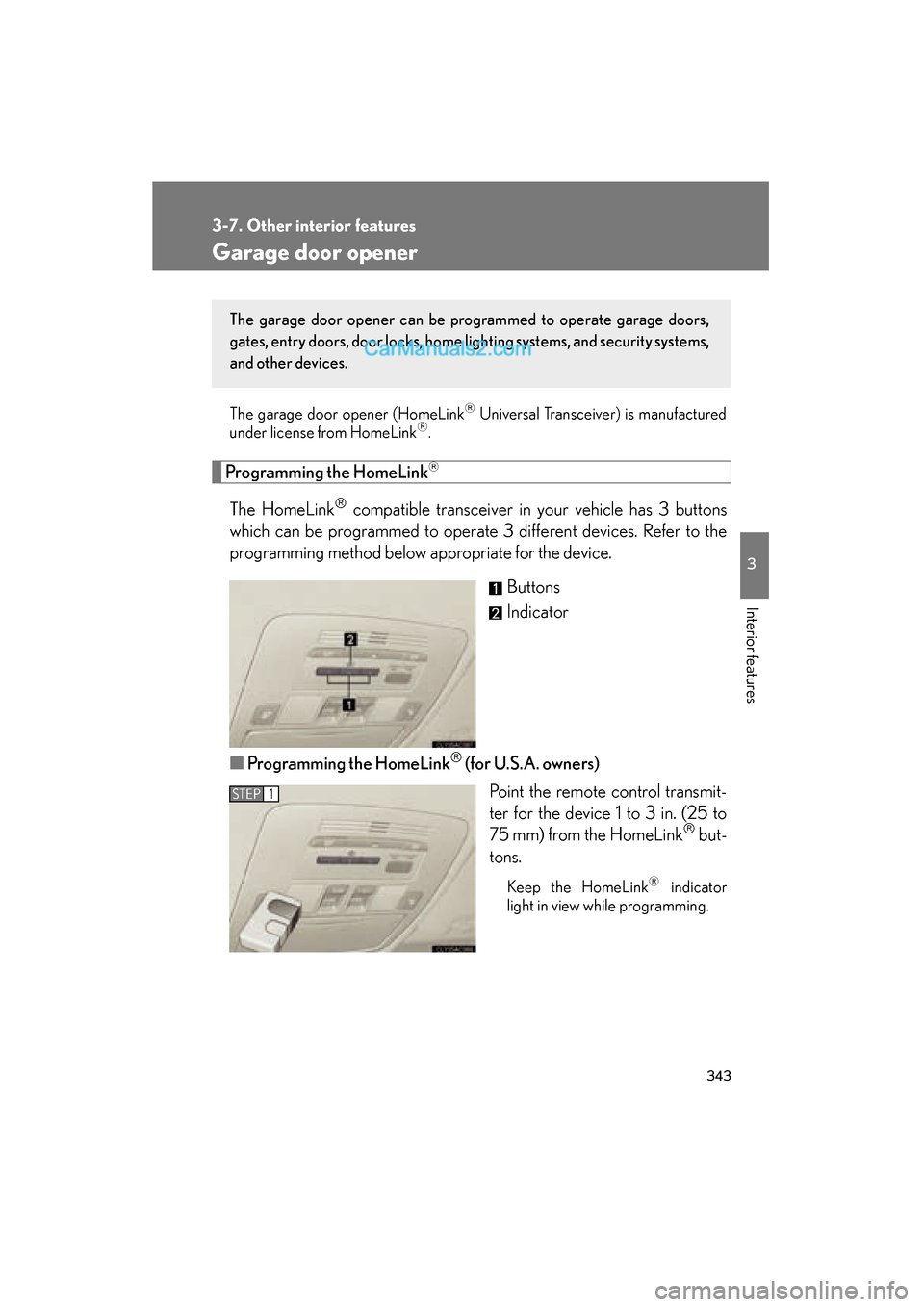
The HomeLink compatible transceiver in your vehicle has 3 buttons
which can be programmed to operate 3 different devices. Refer to the
programming method below appropriate for the device.
Buttons
Indicator
■ Programming the HomeLink
(for U.S.A. owners)
Point the remote control transmit-
ter for the device 1 to 3 in. (25 to
75 mm) from the HomeLink
but-
tons.
Keep the HomeLink indicator
light in view while programming.
The garage door opener can be pr ogrammed to operate garage doors,
gates, entry doors, door locks, home lighting systems, and security systems,
and other devices.
STEP1
Page 348 of 563
346
3-7. Other interior features
ES350_UTest the operation of the HomeLink
by pressing the newly pro-
grammed button. Check to see if the gate/device operates cor-
r e c t l y.
Repeat the steps above to program another device for each of
the remaining HomeLink
buttons.
■ Programming other devices
To program other devices such as home security systems, home door
locks or lighting, contact your authorized Lexus dealer for assistance.
■ Reprogramming a button
The individual HomeLink
buttons cannot be erased but can be
reprogrammed. To reprogram a button, follow the “Reprogramming a
HomeLink
button” instructions.
Operating the HomeLink
Press the appropriate HomeLink button. The HomeLink indicator
light should come on.
The HomeLink compatible transceiver in your vehicle continues to send a
signal for up to 20 seconds as long as the button is pressed.
Reprogramming a HomeLink button
Press and hold the desired HomeLink
button. After 20 seconds, the
HomeLink indicator light will start flashing slowly. Next, while still press-
ing and holding the HomeLink button, press and hold the button on the
transmitter until the HomeLink indicator light changes from a slow to a
rapid flash.
STEP5
STEP6
Page 354 of 563

352
3-7. Other interior features
ES350_U
■Conditions unfavorable to correct operation
The compass may not show the correct direction in the following conditions:
●The vehicle is stopped immediately after turning.
●The vehicle is on an inclined surface.
●The vehicle is in a place where the earth's magnetic field is subject to interfer-
ence by artificial magnetic fields (underground car park/parking lot, under a
steel tower, between buildings, roof car park/parking lot, near an intersection,
near a large vehicle, etc.).
●The vehicle has become magnetized.
(There is a magnet or metal object near the inside rear view mirror.)
●The battery has been disconnected.
●A door is open.
CAUTION
■While driving the vehicle
Do not adjust the display. Be sure to adjust the display only when the vehicle is
stopped.
■When doing the circling calibration
Be sure to secure a wide space, and watch out for people and vehicles in the neigh-
borhood. Do not violate any local traffic rules while performing circling calibration.
NOTICE
■To avoid compass malfunctions
Do not place magnets or any metal objects near the inside rear view mirror.
Doing this may cause a malfunction of the compass sensor.
■To ensure normal operation of the compass
●Do not perform circling calibration of the compass in a place where the earth's
magnetic field is subject to interference by artificial magnetic fields.
●During calibration, do not operate electric systems (moon roof, power windows,
etc.) as they may interfere with the calibration.
Page 355 of 563
353
3-7. Other interior features
3
Interior features
ES350_U
Safety Connect∗
∗: If equipped
Safety Connect is a subscription-based telematics service that uses Global
Positioning System (GPS) data and embedded cellular technology to pro-
vide safety and security features to subscribers. Safety Connect is sup-
ported by Lexus’ designated response center, which operates 24 hours per
day, 7 days per week.
Safety Connect service is available by subscription on select, telematics
hardware-equipped vehicles.
By using the Safety Connect service, you are agreeing to be bound by the
Telematics Subscription Service Agreement and its Terms and Conditions,
as in effect and amended from time to time, a current copy of which is avail-
able at Lexus.com. All use of the Safety Connect service is subject to such
then-applicable Terms and Conditions.
■ System components
“SOS” button
Microphone
LED light indicators
Page 373 of 563
371
4-2. Maintenance
4
Maintenance and care
ES350_U
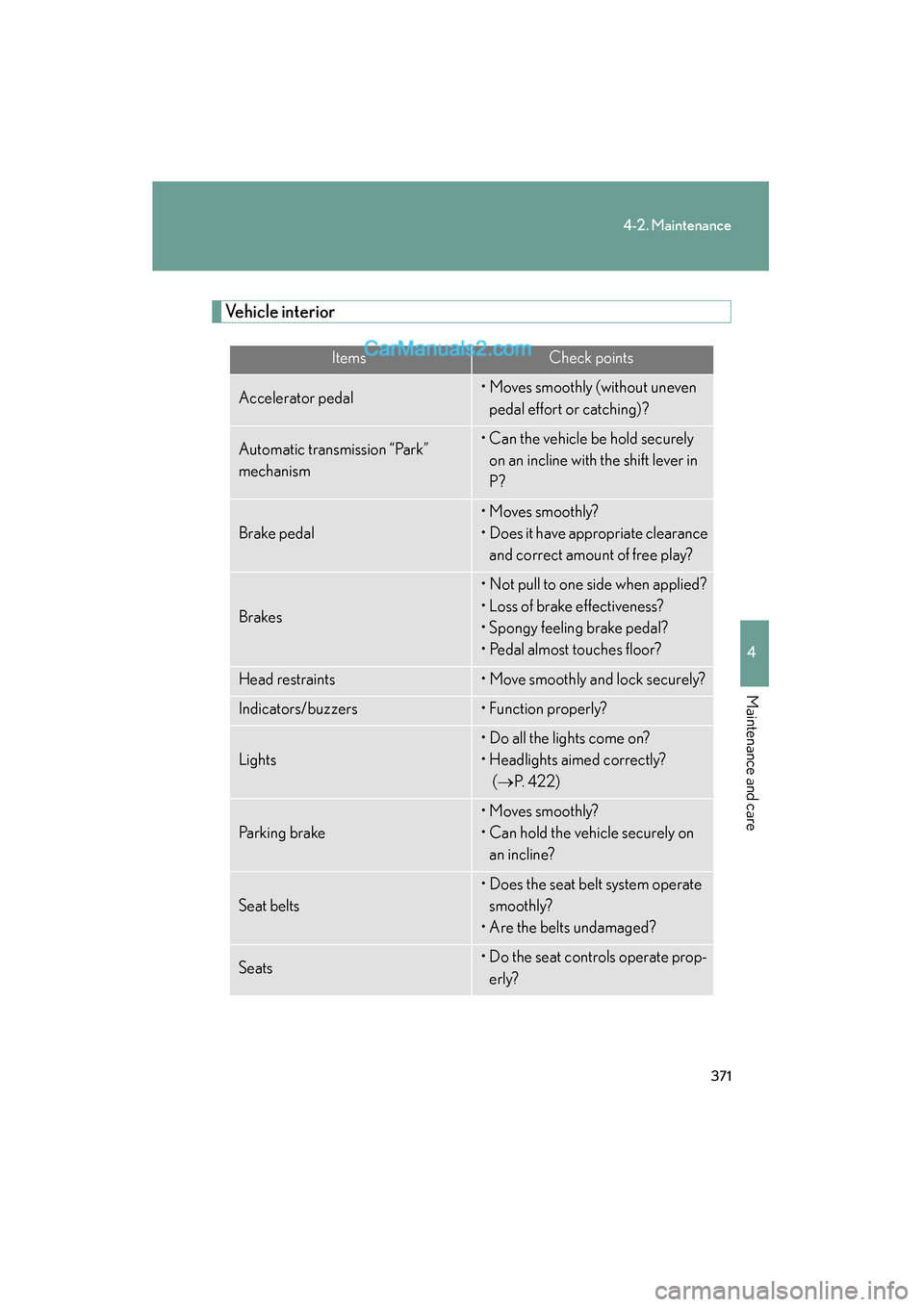
Vehicle interior
ItemsCheck points
Accelerator pedal• Moves smoothly (without uneven pedal effort or catching)?
Automatic transmission “Park”
mechanism• Can the vehicle be hold securely on an incline with the shift lever in
P?
Brake pedal
• Moves smoothly?
• Does it have appropriate clearance and correct amount of free play?
Brakes
• Not pull to one side when applied?
• Loss of brake effectiveness?
• Spongy feeling brake pedal?
• Pedal almost touches floor?
Head restraints• Move smoothly and lock securely?
Indicators/buzzers• Function properly?
Lights
• Do all the lights come on?
• Headlights aimed correctly? (→ P. 422)
Parking brake
• Moves smoothly?
• Can hold the vehicle securely on
an incline?
Seat belts
• Does the seat belt system operate smoothly?
• Are the belts undamaged?
Seats• Do the seat controls operate prop- erly?
Page 419 of 563
417
4-3. Do-it-yourself maintenance
4
Maintenance and care
ES350_U
12A LT140 A
PSB, H-LP CLN, P-P/SEAT, RR DEF,
ABS NO.2, FAN MAIN, ABS NO.1,
HTR, RR FOG, RR DOOR RH, RR
DOOR LH, FUEL OPN, FR FOG,
OBD, STOP, TI & TE, A/C, PWR,
DOOR NO.2, S/ROOF, GAUGE
NO.2, POWER, P/SEAT
13STR LOCK20 ASteering lock system
14IG220 A
GAUGE NO.2, IGN, multiport fuel
injection system/sequential multiport
fuel injection system
15HAZ15 ATurn signal lights
16ETCS10 AElectronic throttle control system
17E-ACM10 AElectric active control mount
18A/C CTRL PNL15 AAir conditioning system
19MAYDAY10 AMayday system
20A LT- S7. 5 ACharging system
21AM27. 5 AStarting system
22EFI MAIN30 AEFI NO.2, EFI NO.3, fuel system, ECT
system
23AMP30 AAudio system
24AMP230 AAudio system
25DOOR NO.125 APower door lock system
26R A D I O N O.115 AAudio system
27ECU-B NO.110 AECU powers
28DOME10 AInterior lights, meters, vanity lights
29H-LP (LH)15 ALeft-hand headlight (high beam)
FuseAmpereCircuit
Page 421 of 563
419
4-3. Do-it-yourself maintenance
4
Maintenance and care
ES350_U■
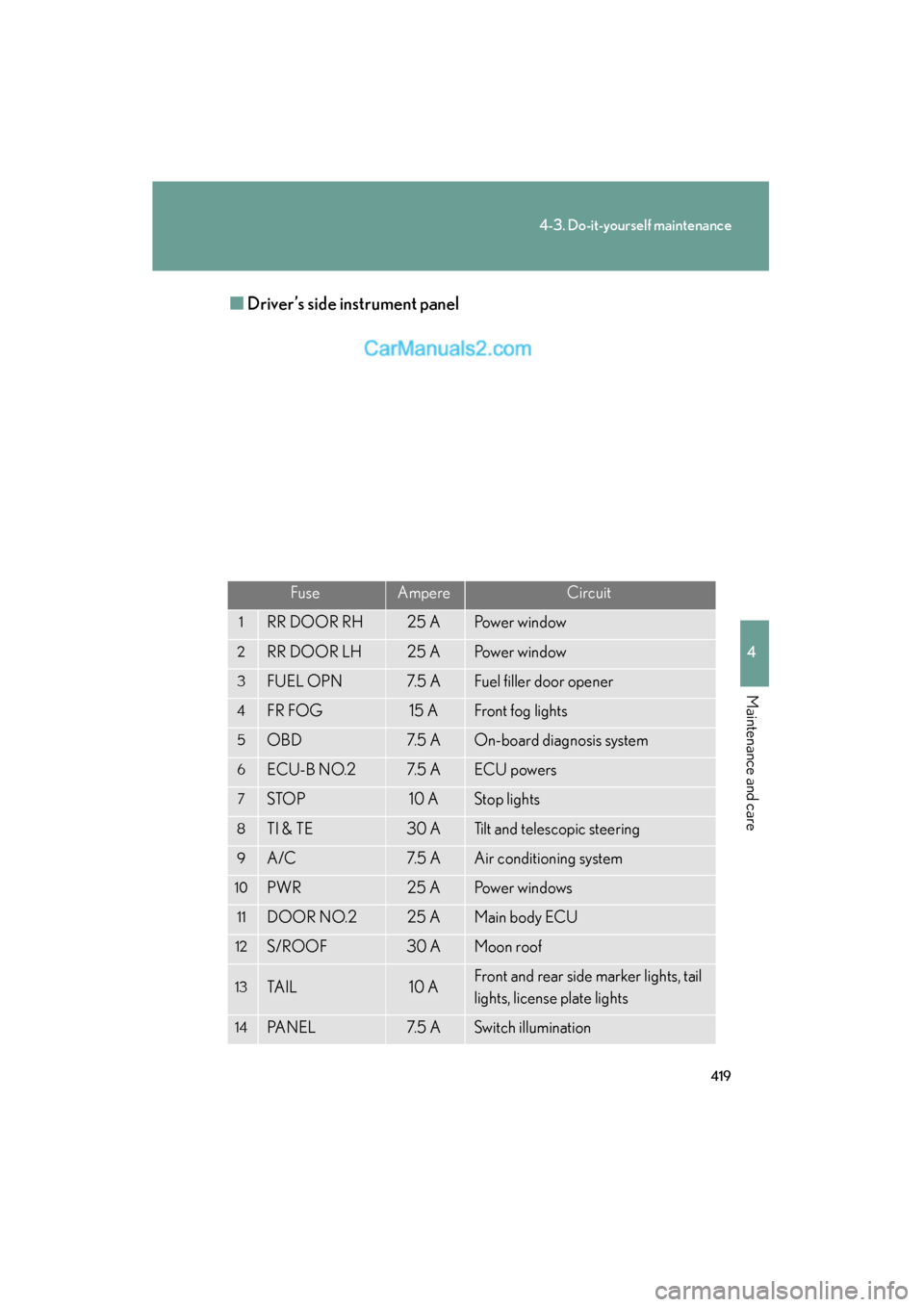
Driver’s side instrument panel
FuseAmpereCircuit
1RR DOOR RH25 APower window
2RR DOOR LH25 APower window
3FUEL OPN7. 5 AFuel filler door opener
4FR FOG15 AFront fog lights
5OBD7. 5 AOn-board diagnosis system
6ECU-B NO.27. 5 AECU powers
7STO P10 AStop lights
8TI & TE30 ATilt and telescopic steering
9A/C7. 5 AAir conditioning system
10PWR25 APower windows
11DOOR NO.225 AMain body ECU
12S/ROOF30 AMoon roof
13TA I L10 AFront and rear side marker lights, tail
lights, license plate lights
14PA N E L7. 5 ASwitch illumination