Page 134 of 563

132
2-1. Driving procedures
ES350_U
■Downshifting restrictions warning buzzer (in the S mode)
To help ensure safety and driving performance, downshifting operation may some-
times be restricted. In some circumstances, downshifting may not be possible even
when the shift lever is operated. (The warning buzzer will sound twice.)
■When driving with the cruise control system or dynamic radar cruise control sys-
tem
The engine brake will not operate in the S mode, even when downshifting to 5 or 4.
( → P. 155, 158)
■If the shift lever cannot be shifted from P
→P. 4 7 8
■If the indicator does not come on even after shifting the shift lever to S
mode driving position
This may indicate a malfunction in the automatic transmission system. Have the
vehicle inspected by your Lexus dealer immediately.
(In this situation, the transmission will operate in the same as manner as when the
shift lever is in D.)
■S mode
●When the shift range is 5 or lower, holding the shift lever toward “+” sets the shift
range to 6.
●To prevent excessive engine speed, a function was adopted that automatically
selects a higher shift range before engine speed becomes too high.
●To protect the automatic transmission, a function is adopted that automatically
selects a higher shift range when the fluid temperature is high.
■AI-SHIFT
AI-SHIFT automatically selects the suitable gear according to driver performance
and driving conditions.
AI-SHIFT automatically operates when the shift lever is in the D position. (Shifting
the shift lever to the S mode driving position cancels the function.)
Page 136 of 563
134
2-1. Driving procedures
ES350_U
Parking brake
■Usage in winter time
See “Winter driving tips” for parking brake usage in winter time. (→P. 1 9 1 )
NOTICE
■Before driving
Fully release the parking brake.
Driving the vehicle with the parking brake set will lead to brake components over-
heating, which may affect braking performance and increase brake wear.
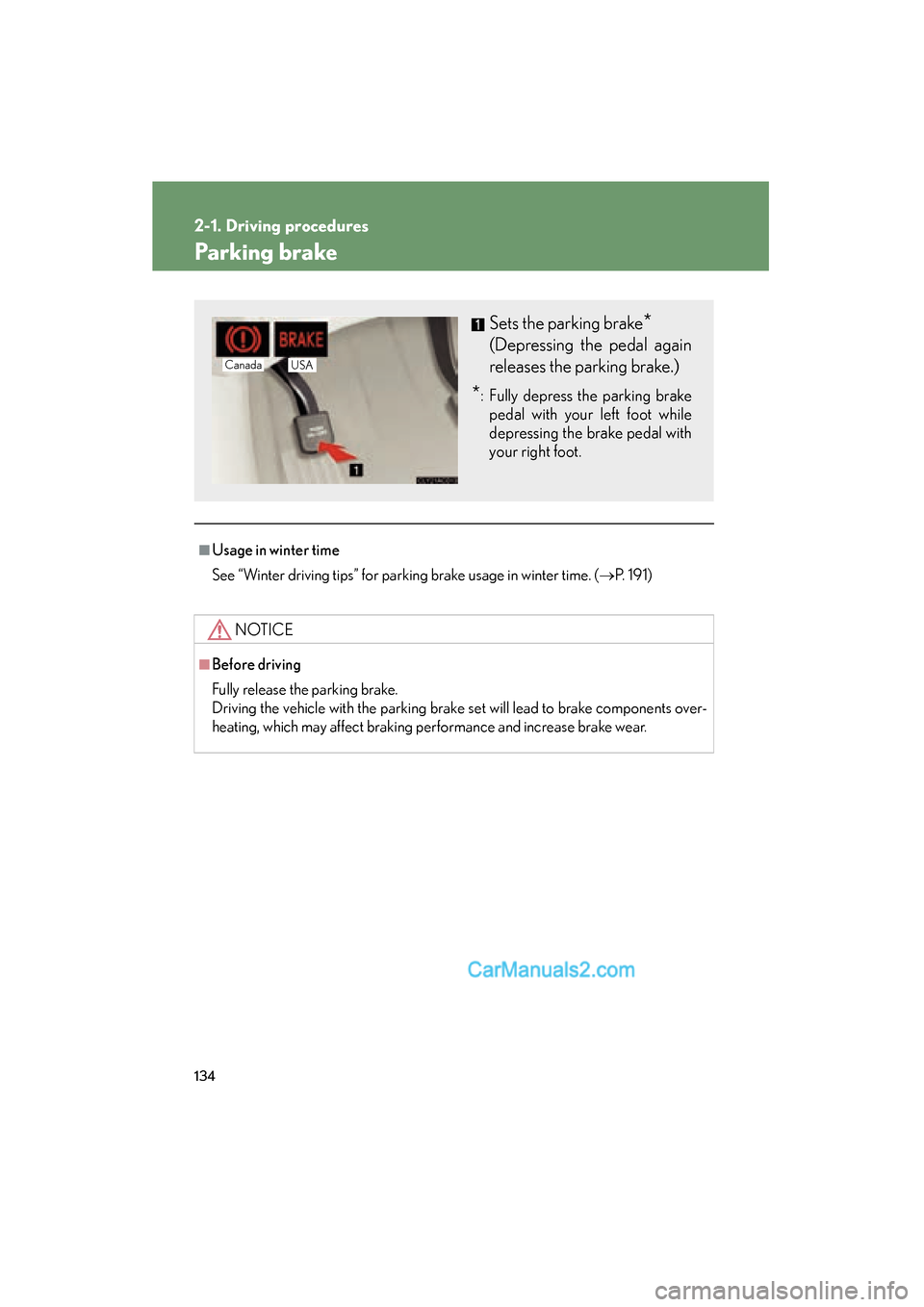
Sets the parking brake*
(Depressing the pedal again
releases the parking brake.)
*: Fully depress the parking brake
pedal with your left foot while
depressing the brake pedal with
your right foot.
Canada USA
Page 151 of 563

149
2-3. Operating the lights and windshield wipers
2
When driving
ES350_U
■Daytime running light system
●To make your vehicle more visible to other drivers, the headlights turn on auto-
matically (at a reduced intensity) whenever the engine is started and the parking
brake is released. Daytime running lights are not designed for use at night.
●Compared to turning on the headlights, the daytime running light system offers
greater durability and consumes less electricity, so it can help improve fuel
economy.
■Headlight control sensor
■Automatic light off system
●When the headlights come on: The headlights and tail lights turn off 30 seconds
after all doors are closed with the “ENGINE START STOP” switch switched to
ACCESSORY mode or turned OFF. (The light turns off immediately if
the button on the key is pressed after all doors are locked.)
●When only the tail lights come on: The tail lights turn off automatically if the
“ENGINE START STOP” switch is switched to ACCESSORY mode or turned
OFF and driver’s door is opened.
To turn the lights on again, switch to IGNITION ON mode, or turn the light switch
OFF once and then back to the
or position.
■Automatic headlight leveling system (vehicles with discharge headlights)
The level of the headlights is automatically adjusted according to the number of
passengers and the loading condition of the vehicle to ensure that the headlights do
not interfere with other road users.
■If the indicator flashes... (vehicles with discharge headlights)
It may indicate a malfunction in the system. Contact your Lexus dealer. The sensor may not function properly if an
object is placed on the sensor, or anything
that blocks the sensor is affixed to the wind-
shield.
Doing so interferes with the sensor detecting
the level of ambient light and may cause the
automatic headlight control system to mal-
function.
Page 158 of 563
![Lexus ES350 2011 Owners Manuals 156
2-4. Using other driving systems
ES350_U
■Fine adjustment of the set speed
Fine adjustment of the set speed (approximately 1.0 mph [1.6 km/h]) can be made
by lightly pressing the lever up or dow](/manual-img/36/12968/w960_12968-157.png "Lexus ES350 2011 Owners Manuals 156
2-4. Using other driving systems
ES350_U
■Fine adjustment of the set speed
Fine adjustment of the set speed (approximately 1.0 mph [1.6 km/h]) can be made
by lightly pressing the lever up or dow")
156
2-4. Using other driving systems
ES350_U
■Fine adjustment of the set speed
Fine adjustment of the set speed (approximately 1.0 mph [1.6 km/h]) can be made
by lightly pressing the lever up or down and releasing it.
■Cruise control can be set when
●The shift lever is in the D or 4, 5, or 6 range of S.
●Vehicle speed is above approximately 25 mph (40 km/h).
■Accelerating
The vehicle can be accelerated normally. After acceleration, the set speed
resumes.
■Automatic cruise control cancellation
The set speed is automatically cancelled in any of the following situations.
●Actual vehicle speed falls more than approximately 10 mph (16 km/h) below the
preset vehicle speed.
At this time, the memorized set speed is not retained.
●Actual vehicle speed is below approximately 25 mph (40km/h).
●VSC is activated.
■Canceling and resuming regular acceleration
Cancel
Pull the lever towards you to
cancel cruise control.
The speed setting is also can-
celed when the brakes are
applied.
Resume
To resume cruise control and
return to the set speed, push the
lever up.
Page 163 of 563
161
2-4. Using other driving systems
2
When driving
ES350_U
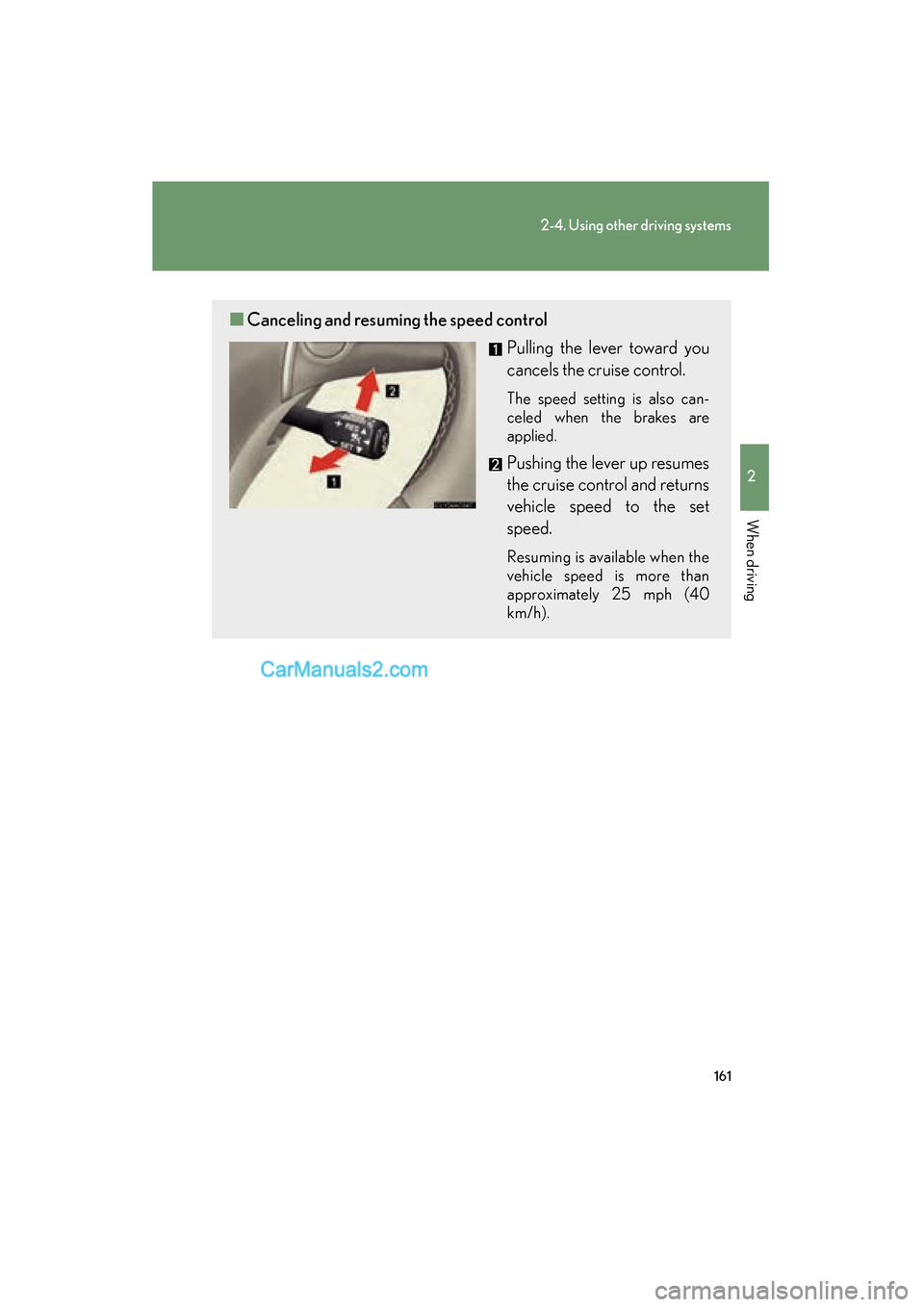
■Canceling and resuming the speed control
Pulling the lever toward you
cancels the cruise control.
The speed setting is also can-
celed when the brakes are
applied.
Pushing the lever up resumes
the cruise control and returns
vehicle speed to the set
speed.
Resuming is available when the
vehicle speed is more than
approximately 25 mph (40
km/h).
Page 164 of 563

162
2-4. Using other driving systems
ES350_U
Driving in vehicle-to-vehicle distance control mode
This mode employs a sensor to detect the presence of vehicles up to
approximately 400 ft. (120 m) ahead and to judge the distance between
your vehicle and those the vehicle ahead of you.
Note that vehicle-to-vehicle distance will close in when traveling on long
downhill slopes.
Example of constant speed cruising
When there are no vehicles ahead
The vehicle travels at the speed set by the driver. The desired vehicle-to-vehi-
cle distance can also be set by operating the vehicle-to-vehicle distance con-
trol.
Example of deceleration cruising
When the vehicle ahead is driving slower than the set speed
When a vehicle is detected running ahead of you, the system automatically
decelerates your vehicle. When a greater reduction in vehicle speed is nec-
essary, the system applies the brakes. A warning tone warns you when the
system cannot decelerate sufficiently to prevent your vehicle from closing in
on the vehicle ahead.
Page 165 of 563
163
2-4. Using other driving systems
2
When driving
ES350_UExample of follow-up cruising
When following a vehicle driving slower than the set speed
The system continues follow-up cruising while adjusting for changes in the
speed of the vehicle ahead in order to maintain the vehicle-to-vehicle dis-
tance set by the driver.
Example of acceleration
When there are no longer any vehicles ahead driving slower than the
set speed
The system accelerates until the set speed is reached. The system then
returns to constant speed cruising.
Approach warning
When your vehicle is too close to a vehicle ahead, and sufficient auto-
matic deceleration via the cruise control is not possible, the display will
flash and the buzzer will sound to alert the driver. An example of this
would be if another driver cuts in front of you while you are following a
vehicle. Apply the brakes to ensure an appropriate vehicle-to-vehicle dis-
tance.
Page 170 of 563
168
2-4. Using other driving systems
ES350_U
CAUTION
■Before using dynamic radar cruise control
Do not overly rely on vehicle-to-vehicle distance control.
Be aware of the set speed. If automatic deceleration/acceleration is not appropri-
ate, adjust the vehicle speed, as well as the distance between your vehicle and vehi-
cles ahead by applying the brakes etc.
■Cautions regarding the driving assist systems
Observe the following precautions.
Failure to do so may cause an accident resulting in death or serious injury.
●Assisting the driver to measure following distance
The dynamic radar cruise control is only intended to help the driver in determin-
ing the following distance between the driver’s own vehicle and a designated
vehicle traveling ahead. It is not a mechanism that allows careless or inattentive
driving, and it is not a system that can assist the driver in low-visibility conditions. It
is still necessary for driver to pay close attention to the vehicle’s surroundings.
●Assisting the driver to judge proper following distance
The dynamic radar cruise control determines whether the following distance
between the driver’s own vehicle and a designated vehicle traveling ahead is
appropriate or not. It is not capable of making any other type of judgement.
Therefore, it is absolutely necessary for the driver to remain vigilant and to deter-
mine whether or not there is a possibility of danger in any given situation.
●Assisting the driver to operate the vehicle
The dynamic radar cruise control has no capability to prevent or avoid a collision
with a vehicle traveling ahead. Therefore, if there is ever any danger, the driver
must take immediate and direct control of the vehicle and act appropriately in
order to ensure the safety of all involved.
■To avoid inadvertent cruise control activation
Switch the cruise control off using the “ON-OFF” button when not in use.