2011 KIA CEED ECU
[x] Cancel search: ECUPage 95 of 390

Features of your vehicle
24
4
(Continued)
Use only approved portable plas-
tic fuel containers designed to
carry and store gasoline.
Do not use cellular phones while refueling. Electric current and/or
electronic interference from cel-
lular phones can potentially
ignite fuel vapors causing a fire.
When refueling, always shut the engine off. Sparks produced byelectrical components related to
the engine can ignite fuel vapors
causing a fire. Once refueling is
complete, check to make sure thefiller cap and filler door are
securely closed, before starting
the engine.
DO NOT use matches or a lighter and DO NOT SMOKE or leave a lit
cigarette in your vehicle while at
a gas station especially during
refueling. Automotive fuel is
highly flammable and can, when
ignited, result in fire.
(Continued)(Continued)
Do not get back into a vehicleonce you have begun refueling
since you can generate static
electricity by touching, rubbing
or sliding against any item or fab-
ric (polyester, satin, nylon, etc.)
capable of producing static elec-
tricity. Static electricity discharge
can ignite fuel vapors resulting in
rapid burning. If you must re-
enter the vehicle, you should
once again eliminate potentially
dangerous static electricity dis-
charge by touching a metal part
of the vehicle, away from the fuel
filler neck, nozzle or other gaso-
line source.
When using an approved portable fuel container, be sure toplace the container on the
ground prior to refueling. Static
electricity discharge from the
container can ignite fuel vapors
causing a fire. Once refueling has
begun, contact with the vehicleshould be maintained until the
filling is complete.
(Continued)WARNING - Refueling dan-
gers
Automotive fuels are flammable
materials. When refueling, please
note the following guidelines care-
fully. Failure to follow these guide-
lines may result in severe personal
injury, severe burns or death by fire
or explosion.
Read and follow all warning at the gas station facility.
Before refueling note the location of the Emergency Gasoline Shut-
Off, if available, at the gas station
facility.
Before touching the fuel nozzle, you should eliminate potentially
dangerous static electricity dis-
charge by touching another metal
part of the vehicle, a safe dis-
tance away from the fuel filler
neck, nozzle, or other gas source.
(Continued)
ED(FL) ENG 4(~103).QXP 10/28/2010 6:54 PM Page 24
Page 96 of 390

425
Features of your vehicle
(Continued)
If a fire breaks out during refuel-ing, leave the vicinity of the vehi-
cle, and immediately contact the
manager of the gas station and
then contact the local fire depart-
ment. Follow any safety instruc-
tions they provide.CAUTION
Make sure to refuel your vehicle
according to the “Fuel require-
ments” suggested in section 1.
If the fuel filler cap requires replacement, use only a genuineKIA cap or the equivalent speci-
fied for your vehicle. An incorrect fuel filler cap can result in a seri-ous malfunction of the fuel sys- tem or emission control system.
Do not spill fuel on the exterior surfaces of the vehicle. Any typeof fuel spilled on painted surfacesmay damage the paint.
After refueling, make sure the fuel cap is installed securely to pre-vent fuel spillage in the event ofan accident.
ED(FL) ENG 4(~103).QXP 10/28/2010 6:54 PM Page 25
Page 119 of 390

Features of your vehicle
48
4
Charging system warning
light
This warning light indicates a malfunction
of either the generator or electricalcharging system.
If the warning light illuminates on while
the vehicle is in motion:
1. Drive to the nearest safe location.
2. With the engine off, check the genera- tor drive belt for looseness or break-
age.
3. If the belt is adjusted properly, a prob- lem exists somewhere in the electrical
charging system. Have an authorized
KIA dealer correct the problem as
soon as possible.
Tailgate open warning light
This warning light illuminates when the tailgate is not closed securely with the
ignition switch in any position.
Door ajar warning light
This warning light illuminates when a door is not closed securely with the igni-
tion switch in any position.
Immobilizer indicator
(if equipped)
This light illuminates when the immobiliz-
er key is inserted and turned to the ON
position to start the engine.
At this time, you can start the engine. The
light goes out after the engine is running.
If this light blinks when the ignition switch
is in the ON position before starting the
engine, have the system checked by an
authorized KIA dealer.
Low fuel level warning
This warning light indicates the fuel tank
is nearly empty. When it comes on, you
should add fuel as soon as possible.
Driving with the fuel level warning light on
or with the fuel level below “0” can causethe engine to misfire and damage the
catalytic converter (if equipped).
Malfunction indicator lamp
(MIL) (check engine light) (if equipped)
This indicator is part of the Engine
Control System which monitors various
emission control system components. If
this indicator illuminates while driving, itindicates that a potential malfunction has
been detected somewhere in the emis-sion control system. This indicator will also illuminates when
the ignition switch is turned to the ON
position, and will go off in a few seconds
after the engine is started. If it illuminates
while driving, or does not illuminate when
the ignition switch is turned to the ON
position, take your vehicle to the nearest
authorized KIA dealer and have the sys-
tem checked.
Generally, your vehicle will continue to be
drivable, but have the system checked by
an authorized KIA dealer promptly.
ED(FL) ENG 4(~103).QXP 10/28/2010 6:56 PM Page 48
Page 124 of 390

453
Features of your vehicle
LCD display warnings and indica-
tors
Calendar / Clock / Outside ambientTemperature (if equipped)
The monitor will display the outside ambi-
ent temperature, date and time.
The date display when the radio power is
turned off.
To change the date, time or temperature unit(°C ↔ °F), press the SET button for
more than 1 seconds.
Then you will enter the set-up mode and
mode changes in the following order as
you press the SET button less than 1second. YEAR →MONTH →DAY →HOUR →
MINUTE →TEMPERATURE UNIT
CHANGE →Escape set-up mode Press the SET button less than 1 second to select the mode and set the data usingthe UP(
▲) and DOWN( ▼) button while
the selected setting mode blinks.
To cancel the SET UP mode, do one of
the following :
- Press the SET button less than 1 sec- ond in set-up temperature unit change mode
- Press the SET button more than 1 sec- ond in any set-up mode
- After 15 seconds without any key press
- Ignition is On or OFF in Set-up mode
- Battery is disconnected
Door and tailgate open display
The monitor will display the correspon- ding door or tailgate that is not closed
securely.
OED040075OED040080
ED(FL) ENG 4(~103).QXP 10/28/2010 6:57 PM Page 53
Page 161 of 390

Features of your vehicle
90
4
These compartments can be used to
store small items.
Center console storage
These compartments can be used to
store small items required by the driver
or front passenger.
To open either of the console storage
compartments, pull up on the locking tab1 or 2.Glove box
To open the glove box, pull the handle
and the glove box will automatically
open. Close the glove box after use.
STORAGE COMPARTMENT
OED040351
WARNING
To reduce the risk of injury in an
accident or sudden stop, always
keep the glove box door closedwhile driving.
OED036053
WARNING - Flammable
materials
Do not store cigarette lighters,
propane cylinders, or other flamma-
ble/explosive materials in the vehi-
cle. These items may catch fire
and/or explode if the vehicle is
exposed to hot temperatures for
extended periods.
CAUTION
To avoid possible theft, do not leave valuables in the storagecompartment.
Always keep the storage com- partment covers closed whiledriving. Do not attempt to place
so many items in the storagecompartment that the storage compartment cover cannot close
securely.
ED(FL) ENG 4(~103).QXP 10/28/2010 7:00 PM Page 90
Page 165 of 390
Features of your vehicle
94
4
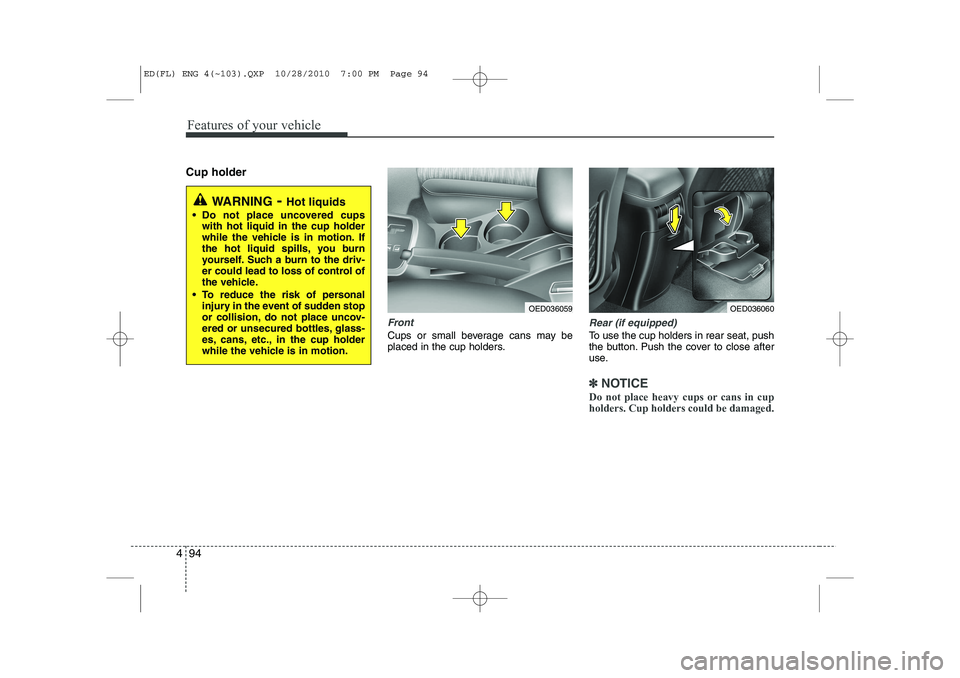
Cup holder
Front
Cups or small beverage cans may be
placed in the cup holders.
Rear (if equipped)
To use the cup holders in rear seat, push
the button. Push the cover to close after
use.
✽✽
NOTICE
Do not place heavy cups or cans in cup holders. Cup holders could be damaged.
WARNING - Hot liquids
Do not place uncovered cups with hot liquid in the cup holder
while the vehicle is in motion. If
the hot liquid spills, you burn
yourself. Such a burn to the driv-
er could lead to loss of control of
the vehicle.
To reduce the risk of personal injury in the event of sudden stop
or collision, do not place uncov-
ered or unsecured bottles, glass-
es, cans, etc., in the cup holder
while the vehicle is in motion.
OED036059OED036060
ED(FL) ENG 4(~103).QXP 10/28/2010 7:00 PM Page 94
Page 166 of 390

495
Features of your vehicle
Sunvisor
Use the sunvisor to shield direct light
through the front or side windows.
To use a sunvisor, pull it downward.
To use a sunvisor for a side window, pull
it downward, unsnap it from the bracket
(1) and swing it to the side.
To use the vanity mirror, pull down the
visor and open the mirror cover (2).
The vanity mirror lamp (if equipped) will
turn off after closing the mirror cover or
returning the sunvisor to its original posi-tion.
✽✽NOTICE
Close the vanity mirror cover securely
and return the sunvisor to its original
position after use.
If the vanity mirror lamp (if equipped)
stays on, it could result in battery dis-
charge and possible sunvisor damage.
Power outlet (if equipped)
The power outlet is designed to provide
power for mobile telephones or other
devices designed to operate with vehicle
electrical systems. The devices should
draw less than 10 amps with the engine
running.
OED036091
OED030061
OED037061L
Rear (if equipped)
Front
ED(FL) ENG 4(~103).QXP 10/28/2010 7:00 PM Page 95
Page 168 of 390
497
Features of your vehicle
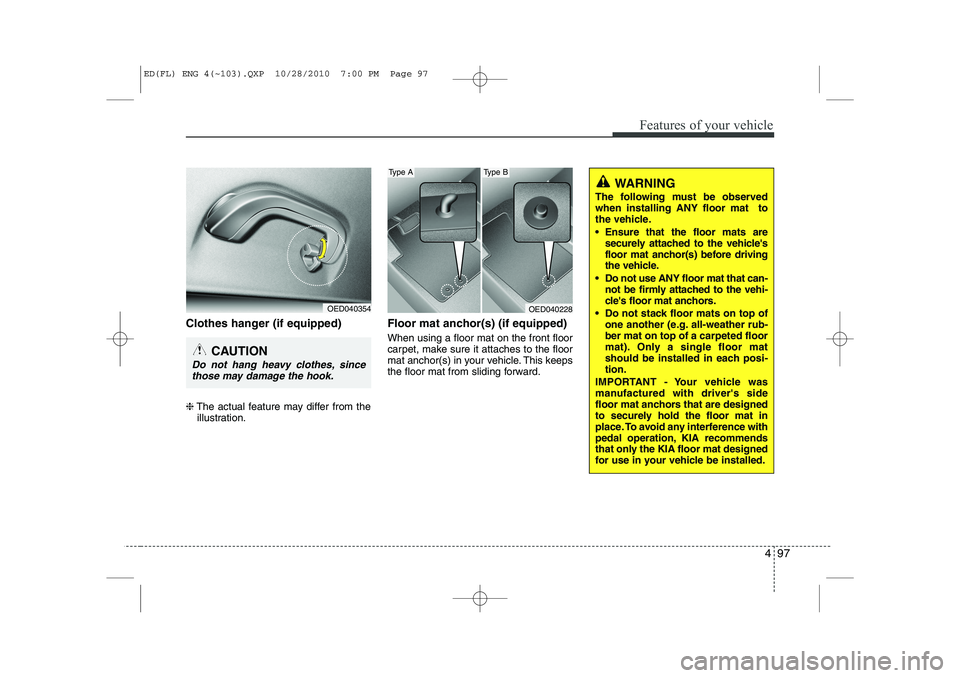
Clothes hanger (if equipped) ❈The actual feature may differ from the
illustration. Floor mat anchor(s) (if equipped) When using a floor mat on the front floor
carpet, make sure it attaches to the floor
mat anchor(s) in your vehicle. This keeps
the floor mat from sliding forward.
OED040354
CAUTION
Do not hang heavy clothes, since
those may damage the hook.
WARNING
The following must be observed when installing ANY floor mat to
the vehicle.
Ensure that the floor mats are securely attached to the vehicle's
floor mat anchor(s) before driving
the vehicle.
Do not use ANY floor mat that can- not be firmly attached to the vehi-
cle's floor mat anchors.
Do not stack floor mats on top of one another (e.g. all-weather rub-ber mat on top of a carpeted floor
mat). Only a single floor mat
should be installed in each posi-tion.
IMPORTANT - Your vehicle was
manufactured with driver's side
floor mat anchors that are designed
to securely hold the floor mat in
place. To avoid any interference with
pedal operation, KIA recommends
that only the KIA floor mat designed
for use in your vehicle be installed.
OED040228
Type AType B
ED(FL) ENG 4(~103).QXP 10/28/2010 7:00 PM Page 97