Page 210 of 427

Your vehicle’s audio system will
disable itself if it is disconnected
f rom electrical power f or any reason.
To make it work again, you must
enter a specific code with the preset
bars. Because there are hundreds of
number combinations possible f rom
the f ive digits, making the system
work without knowing the exact
code is nearly impossible.
If you lose the card, you must obtain
the code number f rom your dealer.
To do this, you will need the audio
system’s serial number.
You should have received a radio
code card that lists your audio
system’s code and serial numbers. It
is best to store this card in a saf e
place at home. In addition, you
should write the audio system’s
serial number in this owner’s manual. If your vehicle’s battery is
disconnected or goes dead, or the
radio f use is removed, the audio
system will disable itself . If this
happens, you will see
‘‘ENTER CODE’’ in the f requency
display the next time you turn on the
system. Use the preset bars to enter
the code. The code is located on the
radio code card included in your
owner’s manual kit. When it is
entered correctly, the radio will start
playing.
If you make a mistake entering the
code, do not start over; complete the
sequence, then enter the correct
code. You have ten tries to enter the
correct code. If you are unsuccessf ul
in ten attempts, you must then leave
the system on f or 1 hour bef ore
trying again.
Radio T hef t Prot ection
206
Main MenuTable of Contents
Page 211 of 427

Press and hold the H (Preset 1) side
of the bar until the hour advances to
the desired time. Press and hold the
M (Preset 2) side of the bar until the
minutes advance to the desired time.
To set the time, press the CLOCK
button until you hear a beep. The
displayed time begins to blink.
If your vehicle’s battery is
disconnected or goes dead, you may
need to set the clock. You can quickly set the time to the
nearest hour. If the displayed time is
bef ore the half hour, pressing the
clock set button until you hear a
beep, then pressing the R (Preset 3)
side of the bar sets the clock back to
the previous hour.
If the displayed time is after the half
hour, the clock sets f orward to the
beginning of the next hour.
Press the clock set button again to
enter the set time.
For example:
The navigation system receives
signals f rom the global positioning
system (GPS), and the displayed
time is updated automatically by the
GPS. Ref er to the navigation system
manual f or how to adjust the time.1:06 will reset to 1:00
1:52 will reset to 2:00
On models with navigation system
On models without navigation system
Setting the Clock
Features
207
PRESET BARS
CLOCK BUTTON
CLOCK BUTTON
Model without XM sate llite
radio is shown.
RT, Canadian DX, and VP models
PRESET BARS
RTS, RTL, and Canadian EX-L models without navigation system
Main MenuTable of Contents
Page 213 of 427
The security system will not set if
the hood, In-Bed Trunk, or any door
is not f ully closed. If the system will
not set, check the door and tailgate
open monitor and In-Bed Trunk open
indicator on the instrument panel
(see pages and ) to see if the
doors and In-Bed Trunk are f ully
closed. Since it is not part of the
monitor display, manually check thehood.Use the remote transmitter
to quickly check that the hood,
In-Bed Trunk, and all doors are
closed. Push the lock button twice
within 5 seconds. There should be an
audible conf irmation beep.
Do not attempt to alter this system
or add other devices to it.
11 75
Security System
Features
209
NOTE:
Main MenuTable of Contents
Page 218 of 427
Drive the vehicle slowly in circles
at less than 5 mph (8 km/h) until
the center icon turns blue. This
icon also turns blue by continuing
to drive the vehicle under normal
driving conditions. When you see
an actual heading on the compass,
calibration is completed.
The compass may need to be
manually calibrated af ter exposure to
a strong magnetic field. If the
compassseemstocontinuallyshow
the wrong direction, do this.
Do this procedure in an open
area, away f rom buildings, power
lines, and other vehicles.
With the blue center icon
displayed,pressandholdthe
compass button for about 6
seconds. When the center icon
turns red, release the button.
The compass mirror has a light
sensor behind the right side of the
rearview mirror. Make sure the
extended sun visor or an accessory is
not covering the sensor.
2.
1.
Compass
Compass Calibration
214
NOTE:
Main MenuTable of Contents
Page 219 of 427
CONT INUED
In most areas, there is a variation
between magnetic north and true
north. Zone selection is required so
the compass can compensate f or this
variation. To check and select the
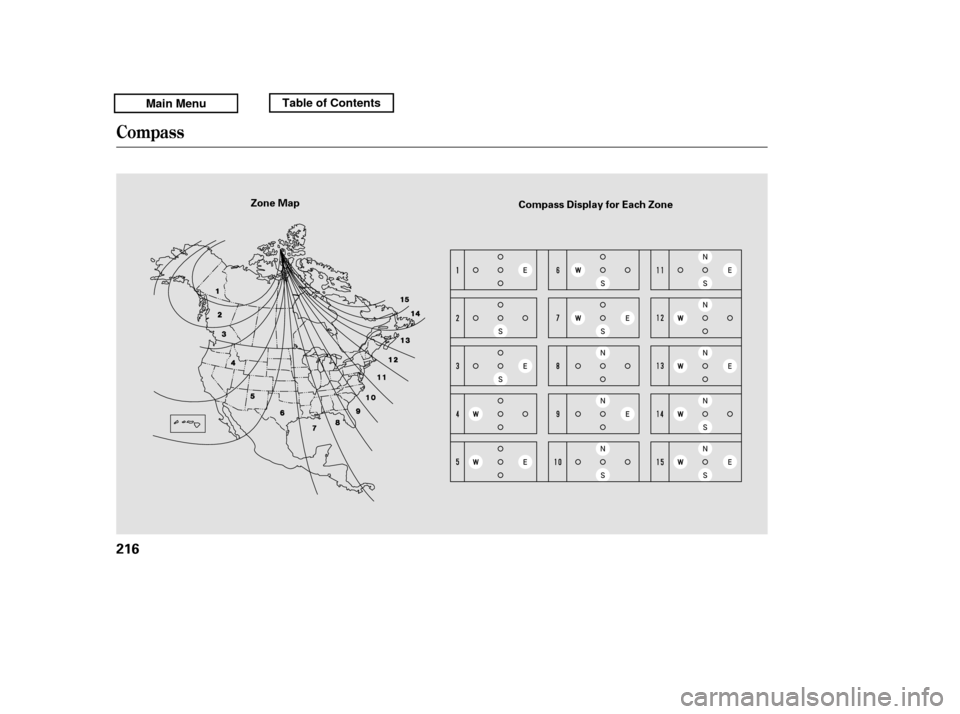
zone, do this:Find the zone f or your area on the
zone map (see page ). Each
zone number (1 through 15)
corresponds to a compass zone on
the table (see page ). Press and hold the compass
button f or about 3 seconds. When
all of the direction icons begin to
blink, release the button.
The blue direction icon(s) blink
and show the current zone.
If the zone is incorrect, press and
release the compass button
repeatedly to get to the correct
number.
The compass will return to the
normal display about 4 seconds
af ter you stop adjusting a zone
number.
2. 3. 4.
1. 5.
216
216
Compass
Compass Zone Selection
Features
215
Main MenuTable of Contents
Page 220 of 427
Compass
216
Zone MapCompass Display for Each Zone
Main MenuTable of Contents
Page 227 of 427
CONT INUED
To hear general HFL inf ormation,
including help on pairing a phone
or setting up the system, say
‘‘Tutorial.’’
For help at any time, including a
list of available commands, say
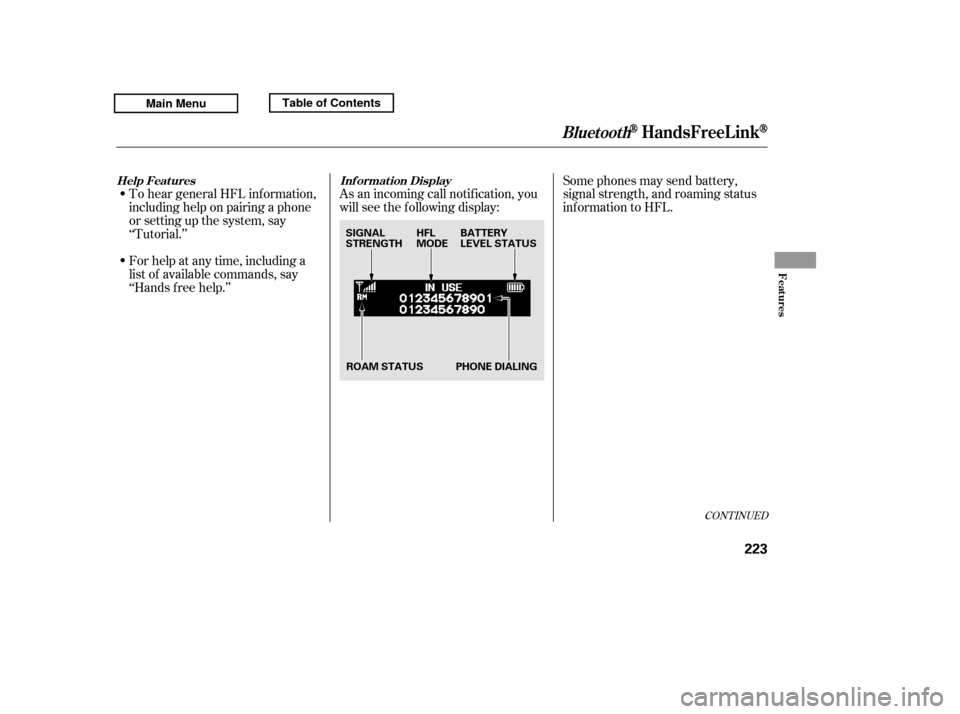
‘‘Hands f ree help.’’As an incoming call notif ication, you
will see the f ollowing display:
Some phones may send battery,
signal strength, and roaming status
inf ormation to HFL.
BluetoothHandsFreeL ink
Help Feat ures Inf ormat ion Display
Features
223
PHONE DIALING
HFL
MODE
BATTERY
LEVEL STATUS
ROAM STATUS
SIGNAL
STRENGTH
Main MenuTable of Contents
Page 228 of 427
A notif ication that there is an
incoming call, or HFL is in use, will
appear on the navigation screen
when the audio system is on.When there is an incoming call, or
HFL is in use, ‘‘HANDS FREE
LINK’’ will appear on the audio
display.
The Bluetooth icon will also
appear on the audio display when a
phone is linked.
BluetoothHandsFreeL ink
224
BLUETOOTH INDICATOR
Main MenuTable of Contents