Page 310 of 574
You can disconnect the USB f lash
memory device at any time even if
the USB mode is selected on the
audio system. Make sure to f ollow
the USB f lash memory device’s
instructions when you remove it.
When you disconnect the USB f lash
memory device while it is playing,
the center display and the audio
screen (if selected) show NO DATA.If you see an error message in the
center display, see page .
To play the radio, press the AM, FM,
or XM button. Press the CD or CD/
AUX button to switch to the disc
mode (if a disc is loaded).
If you reconnect the same USB f lash
memory device, the system will
begin playing where it lef t of f . 307
To Stop Playing a USB Flash
Memory Device
USB Flash Memory Device Error
Messages
Disconnect ing a USB Flash Memory
Device
Playing a USB Flash Memory Device (Models with navigation system)
306
10/01/26 19:15:27 31SZA620_311
2011 Pilot
Page 311 of 574
If you see an error message in the
center display while playing a USB
f lash memory device, f ind the
solution in the chart to the right. If
you cannot clear the error message,
take your vehicle to your dealer.Error Message
Solution
The system cannot read the file(s). Check the files in the USB flash
memory device. There is a possibility that the files have been
damaged.
Appears when an unsupported USB flash memory device is connected.
USB Flash Memory Device Error Messages (Models with navigation system)
Features
307
FILE ERROR
MEDIA ERROR
10/01/26 19:15:32 31SZA620_312
2011 Pilot
Page 367 of 574
CONT INUED
To hear general HFL inf ormation,
including help on pairing a phone
or setting up the system, say
‘‘Tutorial.’’
For help at any time, including a
list of available commands, say
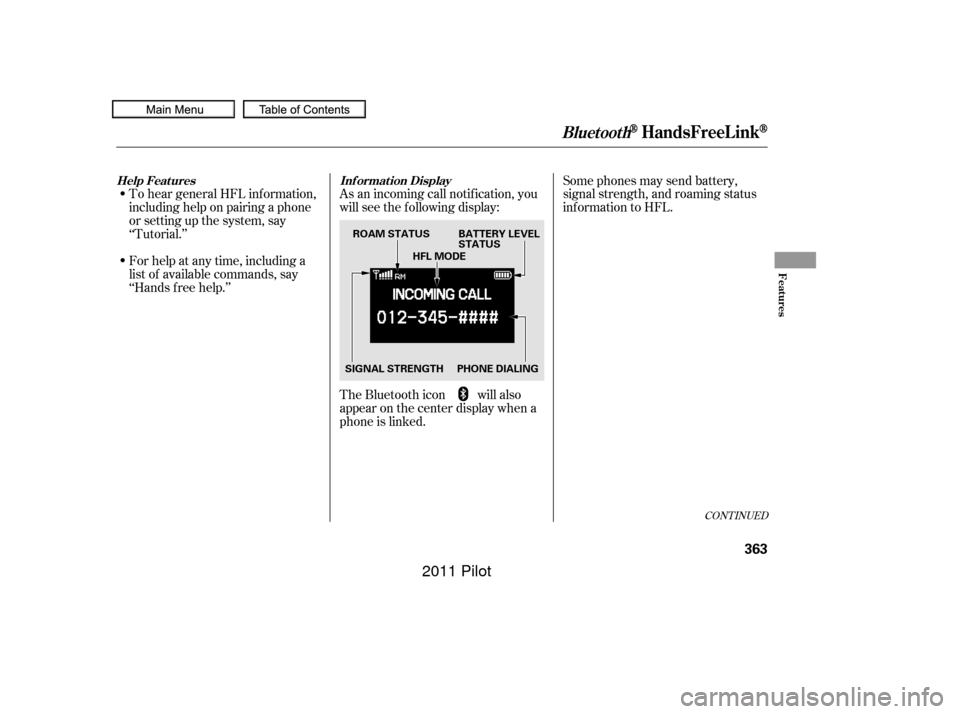
‘‘Hands f ree help.’’As an incoming call notif ication, you
will see the f ollowing display:
Some phones may send battery,
signal strength, and roaming status
inf ormation to HFL.
The Bluetooth icon will also
appear on the center display when a
phone is linked.
BluetoothHandsFreeL ink
Help Features Inf ormation Display
Features
363
PHONE DIALINGBATTERY LEVEL
STATUS
SIGNAL STRENGTH HFL MODE
ROAM STATUS
10/01/26 19:24:56 31SZA620_368
2011 Pilot
Page 368 of 574
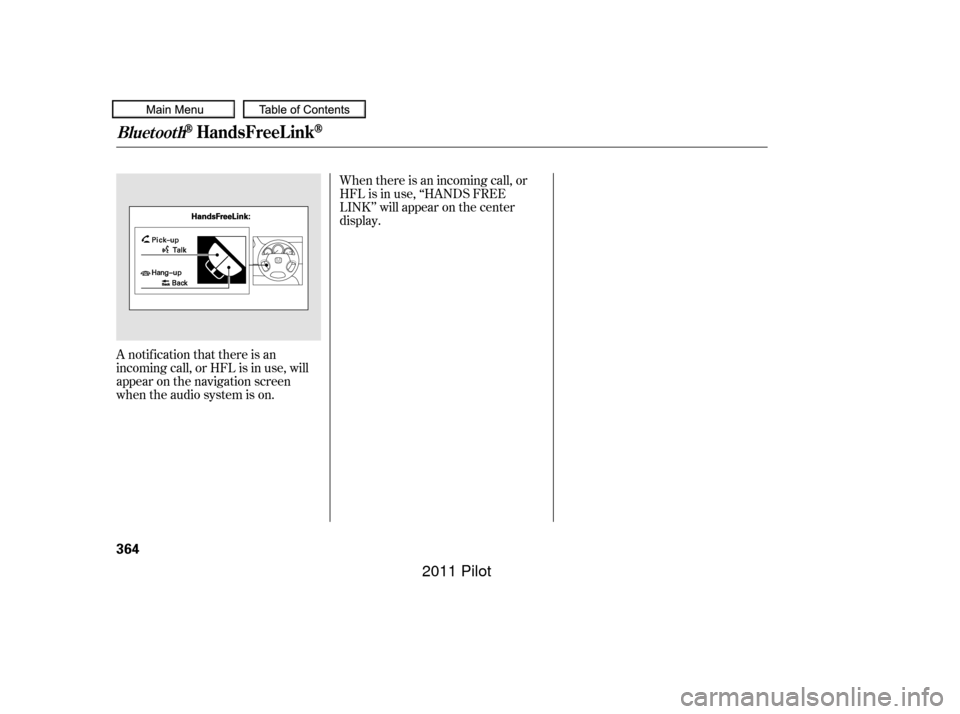
A notif ication that there is an
incoming call, or HFL is in use, will
appear on the navigation screen
when the audio system is on.When there is an incoming call, or
HFL is in use, ‘‘HANDS FREE
LINK’’ will appear on the center
display.
BluetoothHandsFreeL ink
364
10/01/26 19:25:01 31SZA620_369
2011 Pilot
Page 390 of 574

All obstacles may not always be
sensed. Even when the system is on,
you should look f or obstacles near
yourvehicletomakesureitissafeto
park.
Your vehicle has a parking sensor
system. The system lets you know
theapproximatedistancebetween
your vehicle and most obstacles
while you are parking. When the
system is on and your vehicle is
nearinganobstacle,youwillheara
beeper and see system messages on
the multi-information display.
To activate the system, push the
switch on the dashboard with the
ignition in the ON (II) position. The
indicator in the switch comes on
when the system is on. To turn the
system of f , push the switch again.The system has two front corner
sensors, two rear corner sensors,
and two rear center sensors.
The rear center sensors work when
the shif t lever is in reverse (R).
The corner sensors do not work
when the shift lever is in drive (D),
and the vehicle speed is more than 5
mph (8 km/h).
On Touring models
Parking Sensor System
386
PARKING SENSOR SYSTEM SWITCH
10/01/26 19:29:35 31SZA620_391
2011 Pilot
Page 393 of 574

The system may not f unction
properly under these conditions:The sensors are covered with
snow,ice,mud,etc.
When the vehicle is on a rough
road, on grass, or on a hill.
After the vehicle has been sitting
out in hot or cold weather.
The range of the corner sensors and
the rear center sensors are limited.
Each corner sensor is capable of
sensing an obstacle only when your
vehicleis24in(60cm)orcloser.
The rear center sensor senses an
obstacle that is behind your vehicle
40 in (100 cm) or closer.
Do not put any accessories on or
around the sensors.
If the system develops a problem,
you will see a ‘‘CHECK PARKING
SENSOR SYSTEM’’ message on the
multi-inf ormation display, and a
beeper sounds continuously. Very
of ten, a sensor covered with mud, ice,
snow,etc.isthecauseof this
message. Check the sensors f irst. If
the message stays on or the beeper
does not stop, have the system
checked by your dealer.
CONT INUED
Parking Sensor System
Features
389
Within about 24 in (60 cm)
Within about 40 in (100 cm)
10/01/26 19:30:11 31SZA620_394
2011 Pilot