Page 491 of 722
Example shown: Obstacle is at the lef t f ront of the vehicle.Beeper Indicator
Audio
Screen
Indicator
Color Distance About 14 in
(35 cm) or less
About 14-18 in
(35-45 cm)
About 18-24 in
(45-60 cm)
Short beeps
Very short beepsContinuous
beeps
Red
Amber Upper lef t indicator stays on.
Indicator blinks.Corner Sensor Operat ionParking Sensor System488
AUDIO SCREEN
MULTI-INFORMATION DISPLAY INDICATOR
INSTRUMENT PANEL
10/07/19 15:58:45 31TK8600_493
2011 Odyssey
Page 492 of 722
CONT INUED
Distance
Indicator
Beeper
Audio
Screen
Indicator
ColorAbout 28-43 in
(70-110 cm)
About 18 in
(45 cm) or less
About 18-22 in
(45-55 cm)
About 22-28 in
(55-70 cm)
Long beeps Continuous
beeps
Very short beeps
Short beeps
Yellow Red
Amber
Bottom indicator stays on.
Indicator blinks.Rear Cent er Sensor Operat ion
Parking Sensor System
Features
489
AUDIO SCREEN
MULTI-INFORMATION DISPLAY INDICATOR
INSTRUMENT PANEL
10/07/19 15:58:53 31TK8600_494
2011 Odyssey
Page 493 of 722
If the system develops a problem,
you will see a ‘‘CHECK PARKING
SENSOR SYSTEM’’ message on the
multi-inf ormation display, and a
beeper sounds continuously.If the system develops a problem,
you will see all parking sensor
indicators on the instrument panel,
and a beeper sounds continuously.
If there is a problem with any of the
operational sensors, the indicators
f or these sensors will appear
constantly in red.
Very of ten, a sensor covered with
mud, ice, snow, etc. is the cause of
this display. Check the sensors f irst.
If the indicators stay on or the
beeper does not stop, have the
system checked by your dealer.On models with multi-inf ormation
display Canadian EX-L modelsParking Sensor System490
10/07/19 15:58:59 31TK8600_495
2011 Odyssey
Page 494 of 722

Do not put any accessories on or
around the sensors.The system may not f unction
properly under these conditions:
The sensors are covered with
snow,ice,mud,etc.
When the vehicle is on a rough
road, on grass, or on a hill.
After the vehicle has been sitting
out in hot or cold weather. When the system is af f ected by
some electrical equipment or
devices generating an ultrasonic
wave.
When operating the vehicle in bad
weather.
Thesystemmaynotsensethinor
low objects, or sonic-absorptive
materials such as snow, cotton, or
sponge.
The system cannot sense objects
directly under the bumper.
The range of the corner sensors and
the rear center sensor are limited.
Each corner sensor is capable of
sensing an obstacle only when your
vehicleis24in(60cm)orcloser.
The rear center sensor senses an
obstacle that is behind your vehicle
43 in (1.1 m) or closer.
CONT INUED
Parking Sensor System
Features
491
Within about 24 in (60 cm)
Within about 43 in (1.1 m)
10/07/17 10:40:15 31TK8600_496
2011 Odyssey
Page 495 of 722

The parking sensor system must be
turned of f bef ore beginning this
procedure.When you shif t to reverse (R), the
LED indicator in the switch will blink
as a reminder that the rear sensors
are disabled.
Press and hold the parking sensor
system switch and then turn the
ignition switch to the ON (II)
position.
Keep pressing the switch f or 10
seconds. The LED indicator in the
switch will f lash. To return to the original setting,
repeat the procedure. A beeper will
sound 3 times to conf irm that the
rear sensors are now enabled.
Press the switch again and the
LED indicator will turn off. A
beeper will sound twice to conf irm
that the rear sensors are now
disabled.
1.
2.
3.
Canadian Owners:
This device complies with IndustryCanada Standard RSS-210. Operation issubject to the f ollowing two conditions:(1) this device may not causeinterf erence, and (2) this device mustaccept any interf erence that may causeundesired operation of the device.
This ISM device complies with CanadianICES-001.
Parking Sensor SystemTo turn of f all rear sensors492
10/07/17 10:40:23 31TK8600_497
2011 Odyssey
Page 496 of 722
Whenever you shif t to reverse (R)
with the ignition switch in the ON
(II) position, the rearview is shown
on the display.The camera display has parking
guidelines that indicate distance
f rom your vehicle.
The parking sensor indicators are
automatically displayed on the audio
screen when an obstacle is detected. 1st Line
2nd Line
3rd Line
4th Line
20 in (0.5 m)
39 in (1 m)
79 in (2 m)
118 in (3 m)
CONT INUED
On Canadian EX and EX-L without
navigation system
Canadian EX-L models
Rearview Camera and Monitor
Features
493
4th Line 3rd Line 2nd Line 1st Line
SCREEN DISPLAY
ACTUAL DISTANCE
10/07/17 10:40:30 31TK8600_498
2011 Odyssey
Page 547 of 722
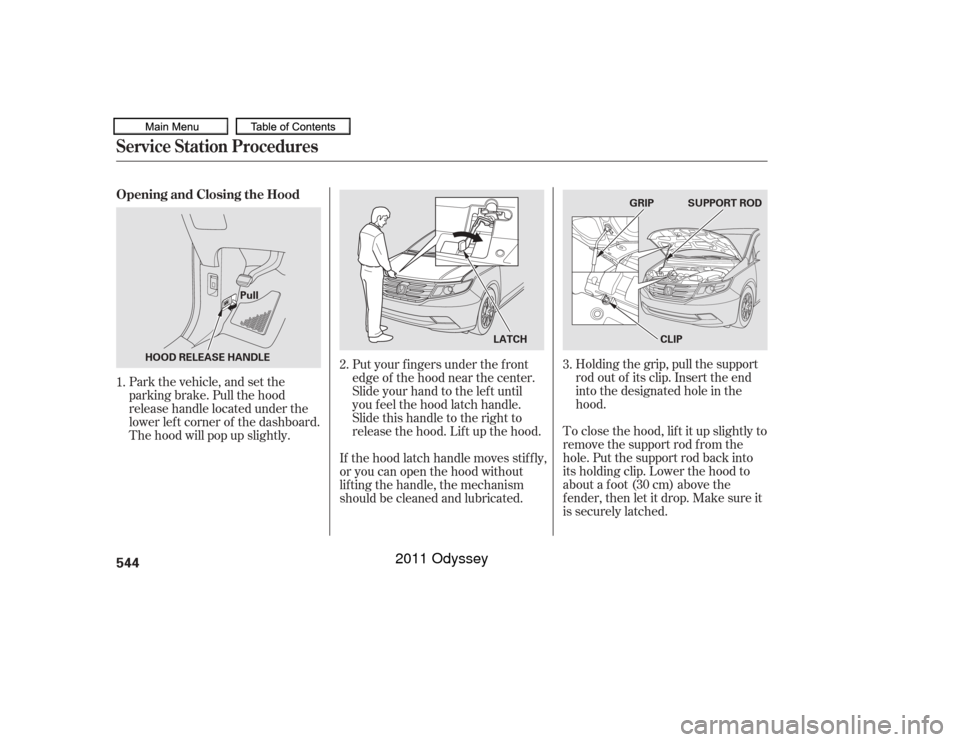
Holding the grip, pull the support
rod out of its clip. Insert the end
into the designated hole in the
hood.
To close the hood, lif t it up slightly to
remove the support rod f rom the
hole. Put the support rod back into
its holding clip. Lower the hood to
about a f oot (30 cm) above the
f ender, then let it drop. Make sure it
is securely latched.
Put your f ingers under the f ront
edge of the hood near the center.
Slide your hand to the lef t until
you f eel the hood latch handle.
Slide this handle to the right to
release the hood. Lif t up the hood.
If the hood latch handle moves stif f ly,
or you can open the hood without
lif ting the handle, the mechanism
should be cleaned and lubricated.
Park the vehicle, and set the
parking brake. Pull the hood
release handle located under the
lower lef t corner of the dashboard.
The hood will pop up slightly.
1.
3.
2.
Service Station ProceduresOpening and Closing the Hood544
SUPPORT ROD
LATCH CLIP
GRIP
Pull
HOOD RELEASE HANDLE
10/07/17 10:47:36 31TK8600_549
2011 Odyssey
Page 560 of 722
This section gives you tips on
starting the engine under various
conditions, and how to operate the
automatic transmission. It also
includes important inf ormation on
parking your vehicle, the braking
system, the vehicle stability assist
(VSA
) system, the tire pressure
monitoring system (TPMS), and
f acts you need if you are planning to
tow a trailer. ........................
Preparing to Drive .558
.......................
Starting the Engine .559
Check Starter System .................................
Message .560
..............
Automatic Transmission . 561
...........................................
Parking .566
.............................
Braking System .567
...............
Anti-lock Brakes (ABS) . 568
Vehicle Stability Assist (VSA
),
aka Electronic Stability ........
Control (ESC), System . 570
Tire Pressure Monitoring System ......................................
(TPMS) .572
Blind Spot Inf ormation System ...........................................
(BSI) .579
...........................
Towing a Trailer .588
...................
Towing Your Vehicle . 595
Driving
Driving
557
10/07/17 10:49:29 31TK8600_562
2011 Odyssey


