Page 65 of 722
�Î
�Î
�Î �Î �Î
�Î�Î
�Î
�Î
: If equipped
Control L ocations62
HOOD RELEASE HANDLE PARKING BRAKE PEDAL
FUEL FILL DOOR
RELEASE HANDLE
POWER WINDOW
SWITCHES
POWER DOOR LOCK
MASTER SWITCH
MIRROR CONTROLS INSTRUMENT PANEL
INDICATORS
GAUGES
MIRROR CONTROL AUTO BUTTON
Vehicle with navigation system is shown. DRIVING POSITION
MEMORY SYSTEM
CLIMATE CONTROL
SYSTEM HEATING AND COOLING
SYSTEM
USB ADAPTER CABLE
ACCESSORY POWER
SOCKETS AUTOMATIC
TRANSMISSION BSI ALERT INDICATOR
BSI ALERT INDICATOR
(P.63)
(P.77)
(P.190)
(P.198) (P.155)
(P.192)
(P.199)(P.211) (P.288,
298,385,395)
(P.225)
(P.218)
(P.197)
(P.483)
(P.195)
(P.582)
(P.541) (P.561) (P.582)
(P.544) MOONROOF SWITCH HOMELINK BUTTONS
10/07/19 15:50:18 31TK8600_067
2011 Odyssey
Page 66 of 722

�Î
�Î �Î
�Î
�Î
The U.S. instrument panel is shown. Dif f erences f or the Canadian models are noted in the text.
: If equipped
Instrument Panel
Instruments and Controls
LX, EX, EX-L models
63
LOW TIRE PRESSURE INDICATOR
LIGHTS ON INDICATORDAYTIME RUNNING
LIGHTS (DRL)
INDICATOR
SEAT BELT
REMINDER
INDICATOR
LOW FUEL
INDICATOR
STARTER SYSTEM INDICATOR
CRUISE MAIN INDICATOR
CRUISE CONTROL INDICATOR
IMMOBILIZER SYSTEM
INDICATOR VSA OFF INDICATOR VEHICLE STABILITY ASSIST (VSA)
SYSTEM INDICATOR MALFUNCTION INDICATOR LAMP FUEL ECONOMY INDICATOR
MAINTENANCE MINDER INDICATOR
SIDE AIRBAG OFF INDICATOR
HIGH BEAM INDICATOR
PARKING BRAKE AND BRAKE
SYSTEM INDICATOR
TIRE PRESSURE
MONITORING
SYSTEM (TPMS)
INDICATOR
CHARGING SYSTEM INDICATOR
LOW OIL PRESSURE INDICATOR
DOOR and TAILGATE OPEN INDICATOR SECURITY SYSTEM INDICATOR
PARKING SENSOR INDICATORS
POWER SLIDING DOOR INDICATOR POWER TAILGATE INDICATOR (P.71)
(P.75)
(P.69)
(P.69)
(P.69)
(P.72) (P.66)
(P.66)
(P.74) (P.75)
(P.487)
(P.75)
(P.66)
(P.76) (P.73)
(P.76)
(P.70)
(P. 75)
(P.75)
(P.73)
(P. 73)
(P.65) (P. 74)
(P.68)
(P.67)
SUPPLEMENTAL RESTRAINT
SYSTEM (SRS) INDICATOR
(P.
67)
ANTI-LOCK BRAKE SYSTEM (ABS) INDICATOR (P.68)
10/07/19 15:50:28 31TK8600_068
2011 Odyssey
Page 67 of 722

�Î
�Î
The U.S. instrument panel is shown. Dif f erences f or the Canadian models are noted in the text.: If equippedInstrument PanelT ouring models64
FUEL ECONOMY INDICATOR SYSTEM MESSAGE INDICATOR
ANTI-LOCK BRAKE SYSTEM INDICATOR SIDE AIRBAG OFF INDICATOR
MALFUNCTION INDICATOR LAMP
VEHICLE STABILITY ASSIST (VSA)
SYSTEM INDICATOR
VSA OFF INDICATOR
IMMOBILIZER SYSTEM
INDICATOR
CHARGING SYSTEM
INDICATOR
LOW OIL PRESSURE INDICATOR
PARKING BRAKE AND BRAKE SYSTEM INDICATORSEAT BELT REMINDER INDICATOR
SUPPLEMENTAL RESTRAINT
SYSTEM INDICATOR
LOW FUEL
INDICATOR
HIGH BEAM INDICATOR SECURITY SYSTEM INDICATOR
CRUISE MAIN INDICATOR
CRUISE CONTROL INDICATORLIGHTS ON INDICATOR
FOG LIGHT
INDICATOR
BLIND SPOT INFORMATION SYSTEM INDICATOR (P.73)
(P.75)
(P.66)
(P.69) (P.69)
(P.69)
(P.66) (P.66)(P.70)
(P.68) (P.
76)
(P. 76)
(P.75) (P.75)
(P.73)
(P. 73)
(P. 74)
(P. 65)
(P. 67)
(P. 68)
(P.67)
LOW TIRE PRESSURE/TPMS INDICATOR (P.71)
DOOR and TAILGATE OPEN INDICATOR (P.75)
10/07/19 15:50:37 31TK8600_069
2011 Odyssey
Page 76 of 722

If this indicator comes on when the
ignition switch is turned to the ON
(II) position and the parking brake is
released, it means there is a problem
in the high beam headlight’s circuit.
Have your vehicle checked by your
dealer.
This indicator reminds you that the
exterior lights are on. It comes on
when the light switch is in either the
or position. If you turn the
ignition switch to the ACCESSORY
(I) or the LOCK (0) position without
turning of f the light switch, this
indicator will remain on. A reminder
chime will also sound when you open
the driver’s door without the key in
the ignition switch. If you see a ‘‘CHECK DRL
SYSTEM’’ message on the multi-
inf ormation display, there is a
problem in the high beam headlight’s
circuit. Take your vehicle to a dealer
to have it checked (see page ).This indicator comes on with the
high beam headlights. For more
inf ormation, see page .
This indicator comes on when you
turn on the fog lights. See page
f or inf ormation on f og light
operation.
This indicator also comes on when
the light switch is in AUTO and the
lights turn on automatically. 92137
139
On all models except LX On Touring models
On Touring models
Instrument Panel Indicators
Lights On Indicator
Daytime Running Lights
IndicatorHigh Beam Indicator
Fog L ight Indicator
Instruments and Controls
73
10/07/17 09:44:12 31TK8600_078
2011 Odyssey
Page 96 of 722
�Û�Ý
CONT INUED
On Touring ModelsYou can customize some vehicle
control settings. To change the
settings, the ignition switch must be
in the ON (II) position, and the
vehicle must be stopped with the
transmission in Park.
To enter the customizing mode,
press either INFO button ( / )
repeatedly until ‘‘CUSTOMIZE
SETTINGS’’ is displayed, then press
the SEL/RESET button.
If you try to enter the customizing
mode while the vehicle is moving,
you will see a ‘‘MUST STOP AND
SHIFTTOPARKTOCHANGE
SETTINGS’’ message and you
cannot change the settings.You can customize some vehicle
control settings f or ‘‘DRIVER 1’’ and
‘‘DRIVER 2’’ separately. If ‘‘DRIVER
1’’ or ‘‘DRIVER 2’’ is not displayed,
customizing is not possible.
To have the driver’s ID detected,
make sure your remote transmitter
is linked to the system and the
driver’s door is unlocked with a
corresponding remote transmitter. If you want the settings as they were
when the vehicle lef t the f actory,
select DEFAULT ALL, as described
on page .
If you want to change any vehicle
control settings, select CHANGE
SETTINGS, then press the SEL/
RESET button.
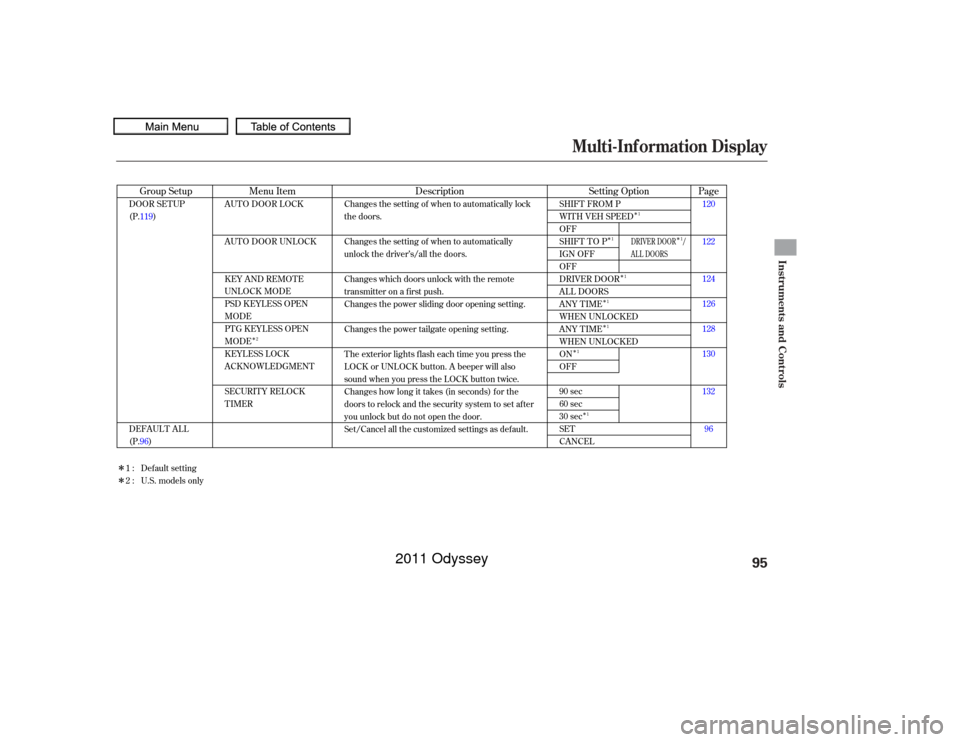
Ref er to the table on the next page
about the settings you can customize.
96
Multi-Inf ormation Display
Customized Settings
Instruments and Controls
93
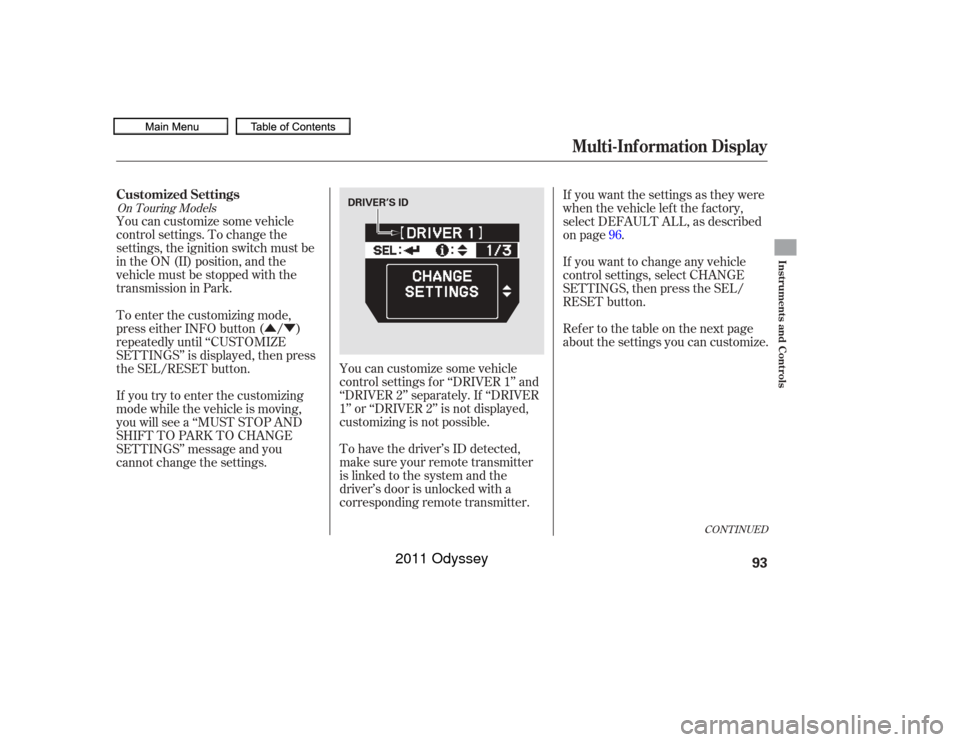
DRIVER’S ID
10/07/17 09:47:14 31TK8600_098
2011 Odyssey
Page 98 of 722
Multi-Inf ormation Display
Instruments and Controls
95
10/07/17 09:47:14 31TK8600_098
�Î�Î
�Î
�Î
�Î
�Î
�Î
�Î �Î
�Î
�Î
Page
Menu Item Setting Option
Group Setup Description120
122
124
126
128
130
132
96
AUTO DOOR LOCK
AUTO DOOR UNLOCK
KEY AND REMOTE
UNLOCK MODE
PSD KEYLESS OPEN
MODE
PTG KEYLESS OPEN
MODE
KEYLESS LOCK
ACKNOWLEDGMENT
SECURITY RELOCK
TIMER
SHIFT FROM P
WITH VEH SPEED
OFF
SHIFT TO P
IGN OFF
OFF
DRIVER DOOR
ALL DOORS
ANY TIME
WHEN UNLOCKED
ANY TIME
WHEN UNLOCKED
ON
OFF
90 sec
60 sec
30 sec
SET
CANCEL
DOOR SETUP
(P.119)
DEFAULT ALL
(P.96) Changes the setting of when to automatically lock
the doors.
Changes the setting of when to automatically
unlock the driver’s/all the doors.
Changes which doors unlock with the remote
transmitter on a first push.
Changes the power sliding door opening setting.
Changes the power tailgate opening setting.
The exterior lights flash each time you press the
LOCK or UNLOCK button. A beeper will also
sound when you press the LOCK button twice.
Changes how long it takes (in seconds) for the
doors to relock and the security system to set after
you unlock but do not open the door.
Set/Cancel all the customized settings as default.
Default setting
1:
2 : U.S. models only
2 1
1
1
1
1
1
1 1
DRIVER DOOR /
AL L DOORS
2011 Odyssey
Page 122 of 722
�Û�Ý
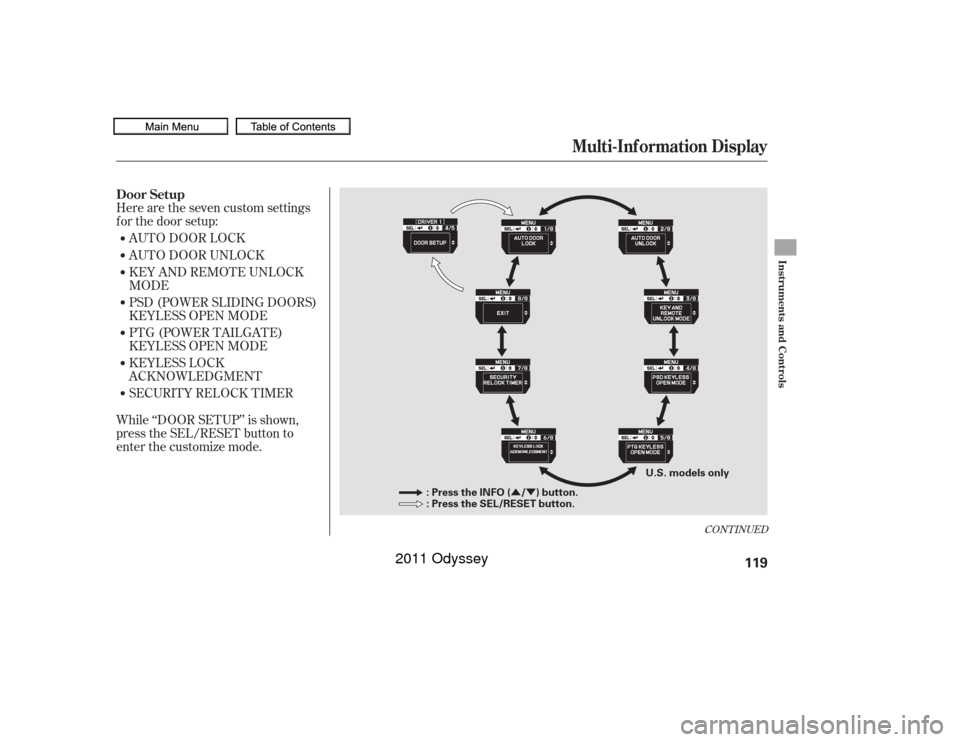
Here are the seven custom settings
f or the door setup:
While ‘‘DOOR SETUP’’ is shown,
press the SEL/RESET button to
enter the customize mode.AUTO DOOR LOCK
AUTO DOOR UNLOCK
KEY AND REMOTE UNLOCK
MODE
PSD (POWER SLIDING DOORS)
KEYLESS OPEN MODE
PTG (POWER TAILGATE)
KEYLESS OPEN MODE
KEYLESS LOCK
ACKNOWLEDGMENT
SECURITY RELOCK TIMER
CONT INUED
Door Setup
Multi-Inf ormation Display
Instruments and Controls
119
: Press the INFO ( / ) button.
: Press the SEL/RESET button.
U.S. models only
10/07/17 09:50:00 31TK8600_124
2011 Odyssey
Page 123 of 722
�Û�Ý�Û�Ý
�Û
�Ý
�Û�Ý
�µ �µ
�µ You can choose this item to
customize f rom ‘‘DOOR SETUP’’ by
pressing the INFO ( / ) button
repeatedly.
Press the SEL/RESET button to
enter the selecting mode.
Select the desired setting by
pressing the INFO ( / ) button,
then enter your selection by pressing
the SEL/RESET button.
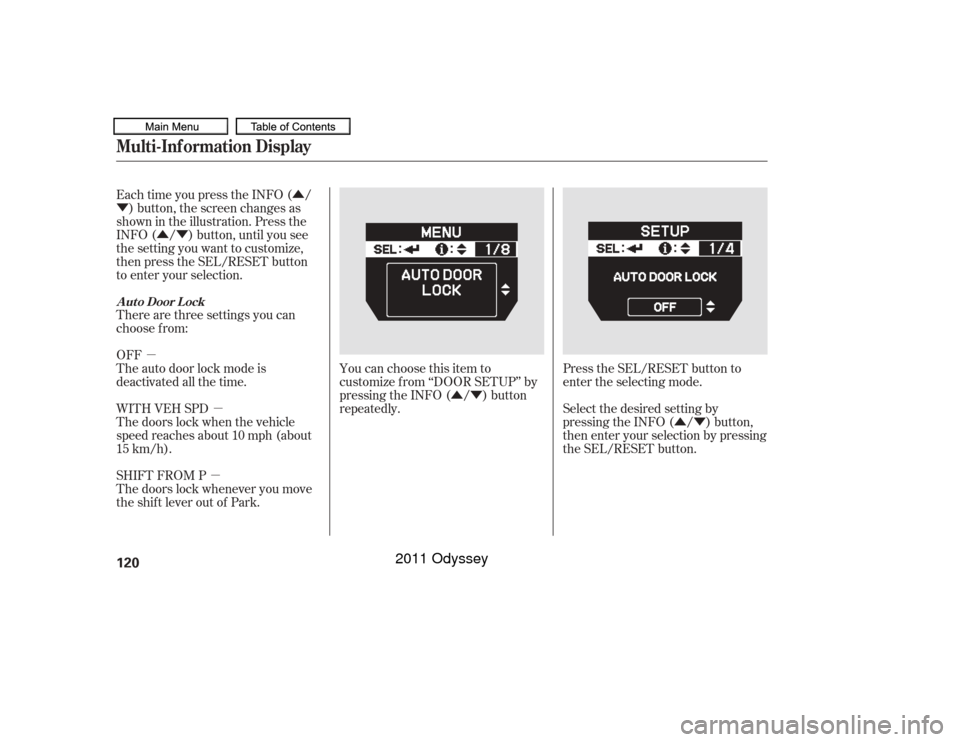
Each time you press the INFO ( /
) button, the screen changes as
shown in the illustration. Press the
INFO ( / ) button, until you see
the setting you want to customize,
then press the SEL/RESET button
to enter your selection.
There are three settings you can
choose f rom:
OFF
The auto door lock mode is
deactivated all the time.
WITH VEH SPD
The doors lock when the vehicle
speed reaches about 10 mph (about
15 km/h).
SHIFT FROM P
The doors lock whenever you move
the shift lever out of Park.
Multi-Inf ormation DisplayA ut o Door L ock120
10/07/17 09:50:08 31TK8600_125
2011 Odyssey