Page 161 of 356
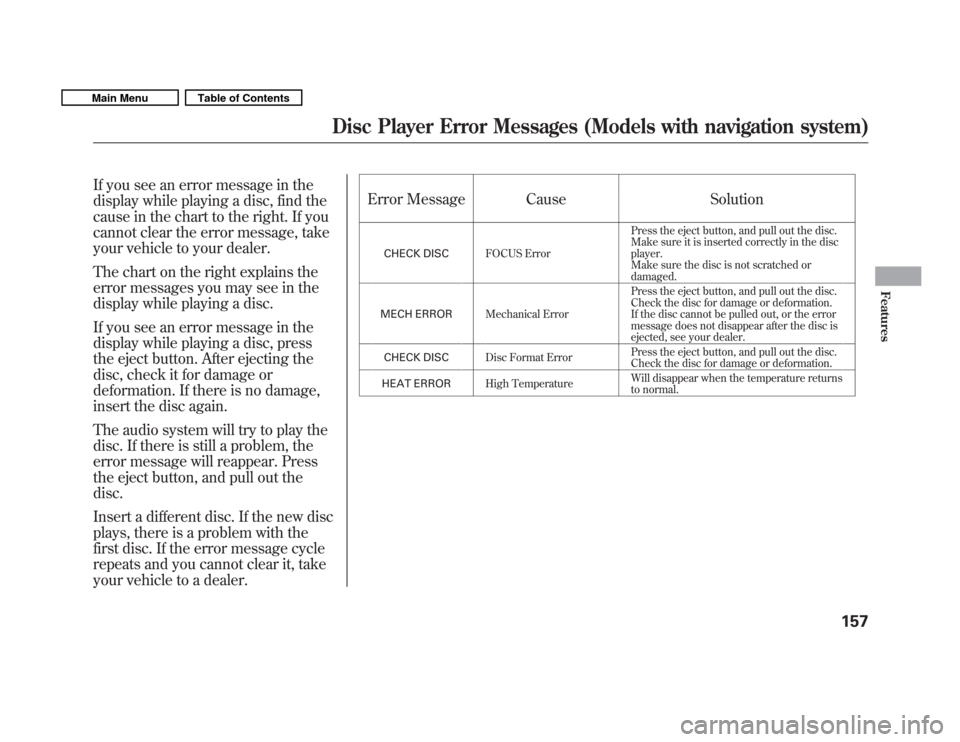
If you see an error message in the
display while playing a disc, find the
cause in the chart to the right. If you
cannot clear the error message, take
your vehicle to your dealer.
The chart on the right explains the
error messages you may see in the
display while playing a disc.
If you see an error message in the
display while playing a disc, press
the eject button. After ejecting the
disc, check it for damage or
deformation. If there is no damage,
insert the disc again.
The audio system will try to play the
disc. If there is still a problem, the
error message will reappear. Press
the eject button, and pull out thedisc.
Insert a different disc. If the new disc
plays, there is a problem with the
first disc. If the error message cycle
repeats and you cannot clear it, take
your vehicle to a dealer.Error Message Cause Solution
CHECK DISC FOCUS Error Press the eject button, and pull out the disc.
Make sure it is inserted correctly in the discplayer.
Make sure the disc is not scratched or
damaged.
MECH ERROR Mechanical Error Press the eject button, and pull out the disc.
Check the disc for damage or deformation.
If the disc cannot be pulled out, or the error
message does not disappear after the disc is
ejected, see your dealer.
CHECK DISC Disc Format Error Press the eject button, and pull out the disc.
Check the disc for damage or deformation.
HEAT ERROR High Temperature Will disappear when the temperature returns
to normal.
Disc Player Error Messages (Models with navigation system)
157
Features
Main MenuTable of Contents
Page 162 of 356
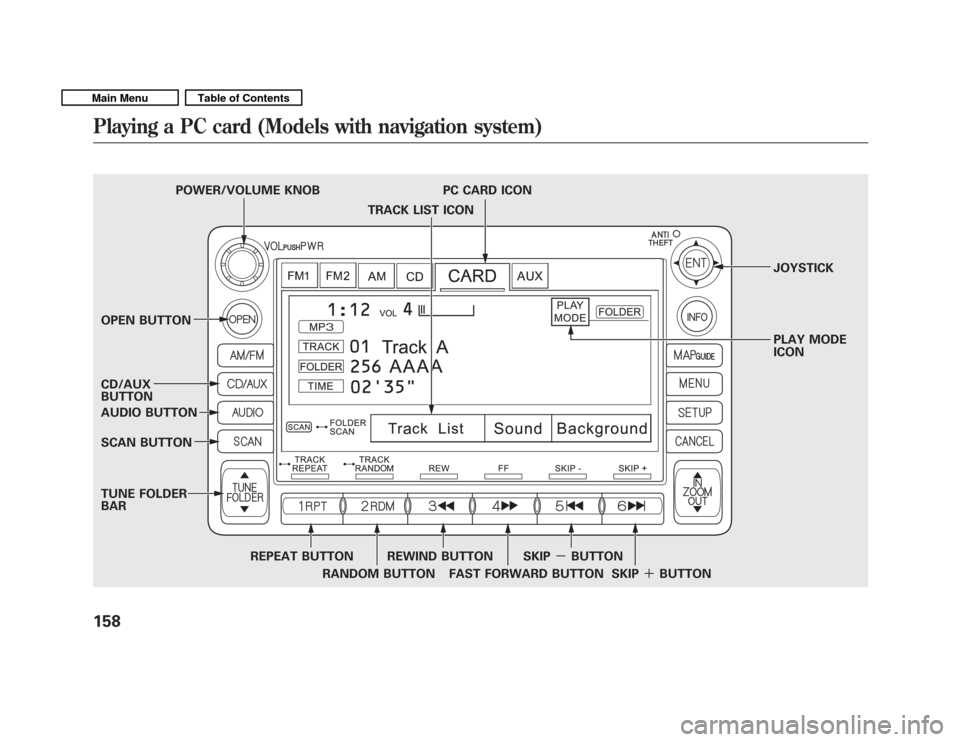
TRACK LIST ICON
POWER/VOLUME KNOB PC CARD ICON
JOYSTICK
OPEN BUTTON PLAY MODE ICON
CD/AUX BUTTON
AUDIO BUTTON
SCAN BUTTON
TUNE FOLDER BAR
REPEAT BUTTONRANDOM BUTTONREWIND BUTTON
FAST FORWARD BUTTON SKIP
-BUTTON
SKIP�BUTTON
Playing a PC card (Models with navigation system)
158
Main MenuTable of Contents
Page 164 of 356
In WMA format, DRM (digital rights
management) files cannot be played.
If the system finds a DRM file, it
skips that file and plays the next
available folder or file.Loading a PC Card
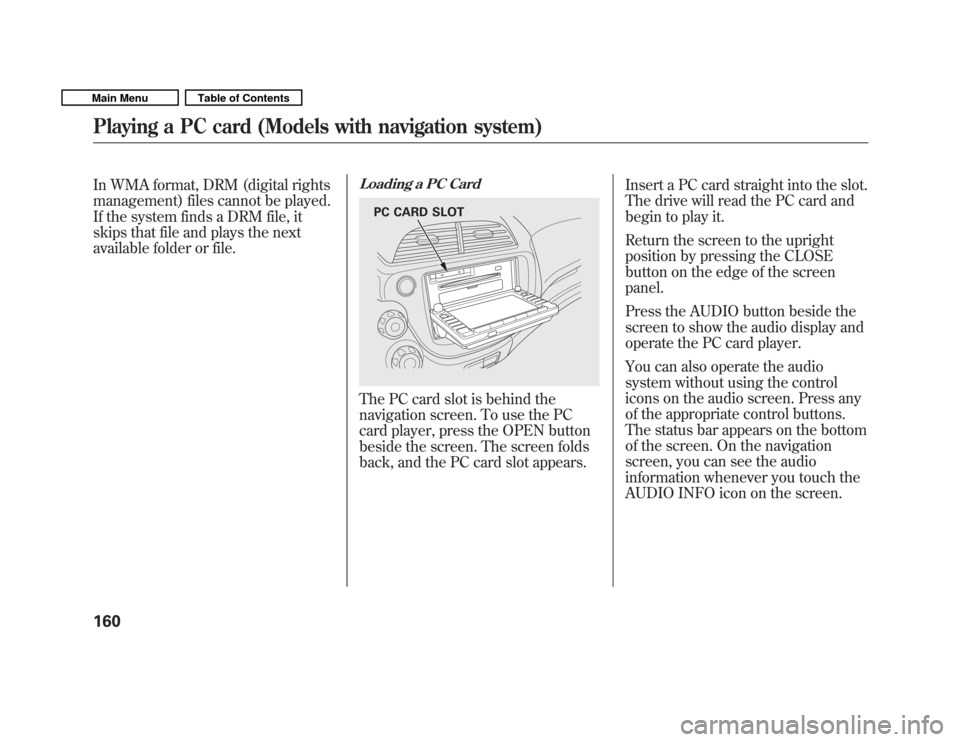
The PC card slot is behind the
navigation screen. To use the PC
card player, press the OPEN button
beside the screen. The screen folds
back, and the PC card slot appears.Insert a PC card straight into the slot.
The drive will read the PC card and
begin to play it.
Return the screen to the upright
position by pressing the CLOSE
button on the edge of the screenpanel.
Press the AUDIO button beside the
screen to show the audio display and
operate the PC card player.
You can also operate the audio
system without using the control
icons on the audio screen. Press any
of the appropriate control buttons.
The status bar appears on the bottom
of the screen. On the navigation
screen, you can see the audio
information whenever you touch the
AUDIO INFO icon on the screen.
PC CARD SLOT
Playing a PC card (Models with navigation system)
160
Main MenuTable of Contents
Page 166 of 356
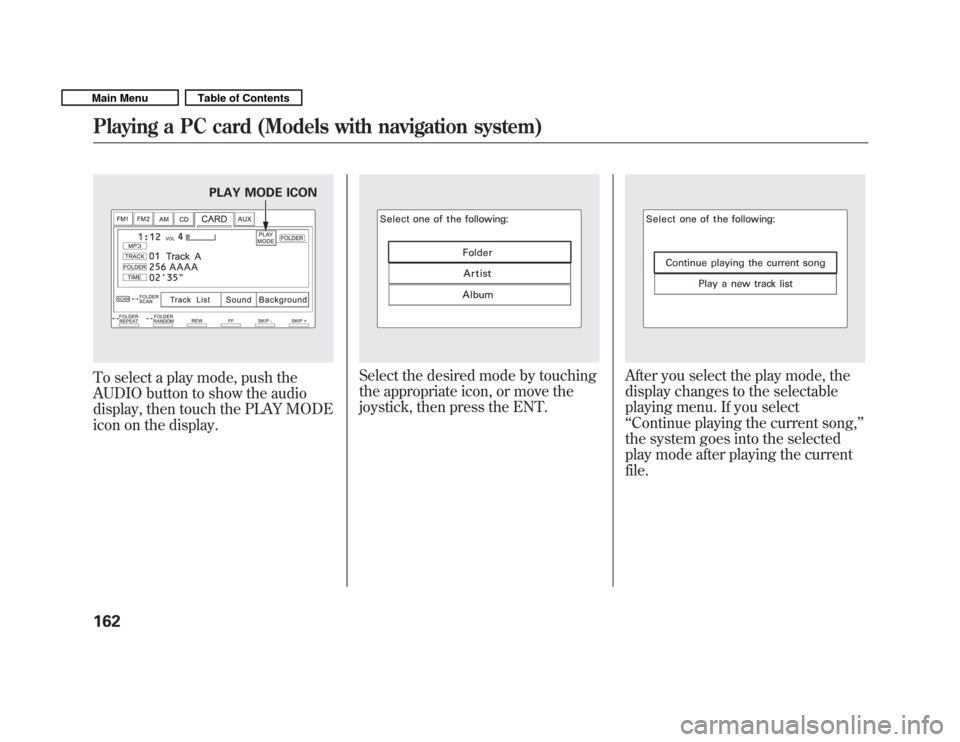
To select a play mode, push the
AUDIO button to show the audio
display, then touch the PLAY MODE
icon on the display.Select the desired mode by touching
the appropriate icon, or move the
joystick, then press the ENT.After you select the play mode, the
display changes to the selectable
playing menu. If you select‘‘Continue playing the current song, ’’
the system goes into the selected
play mode after playing the currentfile.
PLAY MODE ICON
Playing a PC card (Models with navigation system)
162
Main MenuTable of Contents
Page 167 of 356
If you select‘‘Play a new track list, ’’
the system goes into the selected
play mode immediately and begins to
play the new track list.
To go back to the previous screen,
press the CANCEL button on the
right side of the screen. To exit the
play mode screens, press the AUDIObutton.To Change or Select Tracks/Files
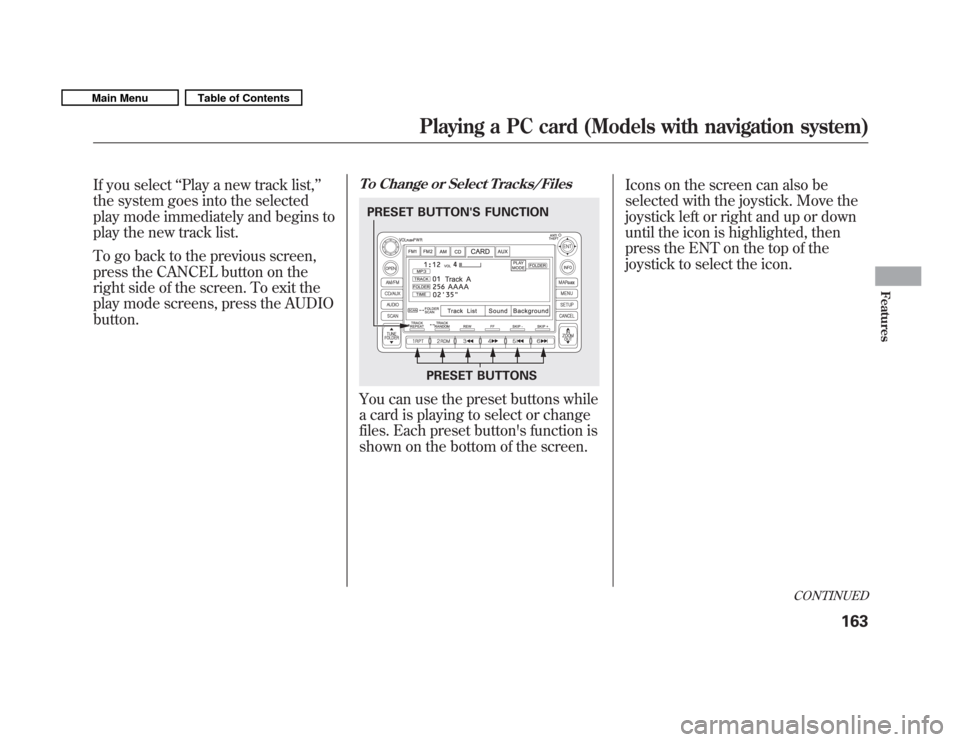
You can use the preset buttons while
a card is playing to select or change
files. Each preset button's function is
shown on the bottom of the screen. Icons on the screen can also be
selected with the joystick. Move the
joystick left or right and up or down
until the icon is highlighted, then
press the ENT on the top of the
joystick to select the icon.
PRESET BUTTONS
PRESET BUTTON'S FUNCTION
CONTINUED
Playing a PC card (Models with navigation system)
163
Features
Main MenuTable of Contents
Page 170 of 356
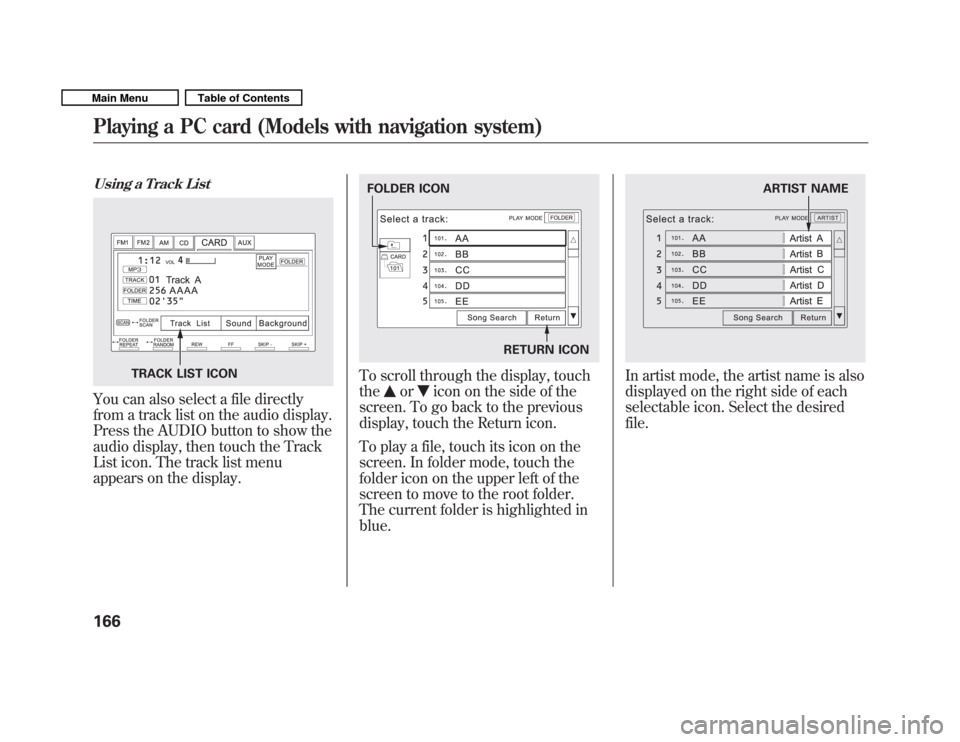
Using a Track List
You can also select a file directly
from a track list on the audio display.
Press the AUDIO button to show the
audio display, then touch the Track
List icon. The track list menu
appears on the display.
To scroll through the display, touch the
oricon on the side of the
screen. To go back to the previous
display, touch the Return icon.
To play a file, touch its icon on the
screen. In folder mode, touch the
folder icon on the upper left of the
screen to move to the root folder.
The current folder is highlighted inblue.
In artist mode, the artist name is also
displayed on the right side of each
selectable icon. Select the desiredfile.TRACK LIST ICON
FOLDER ICON
RETURN ICONARTIST NAME
Playing a PC card (Models with navigation system)
166
Main MenuTable of Contents
Page 173 of 356
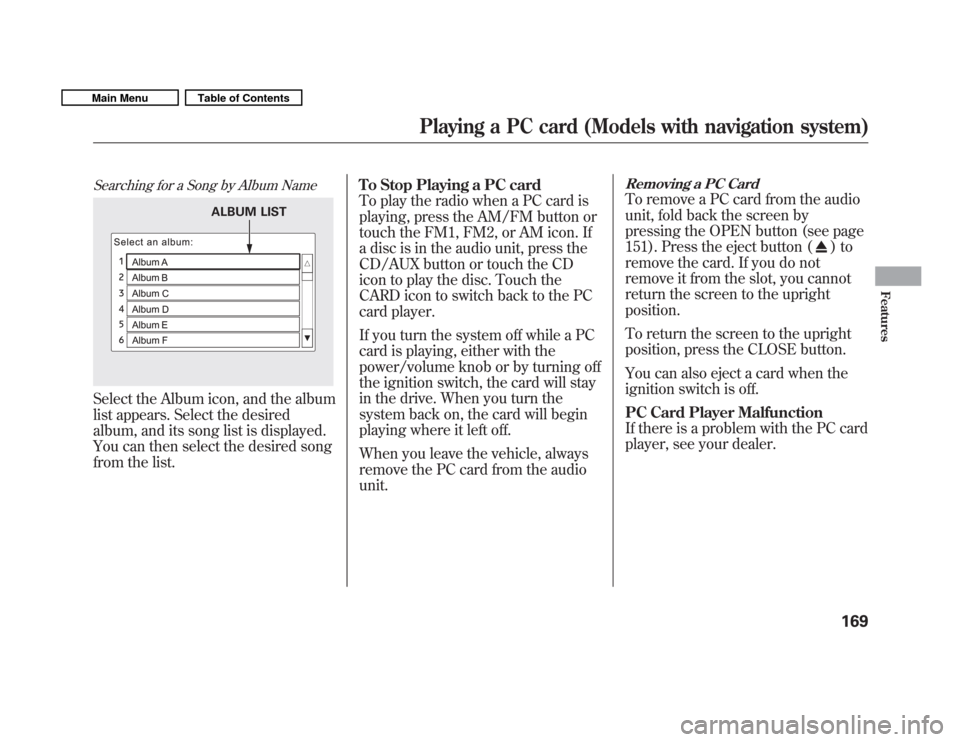
Searching for a Song by Album Name
Select the Album icon, and the album
list appears. Select the desired
album, and its song list is displayed.
You can then select the desired song
from the list.To Stop Playing a PC card
To play the radio when a PC card is
playing, press the AM/FM button or
touch the FM1, FM2, or AM icon. If
a disc is in the audio unit, press the
CD/AUX button or touch the CD
icon to play the disc. Touch the
CARD icon to switch back to the PC
card player.
If you turn the system off while a PC
card is playing, either with the
power/volume knob or by turning off
the ignition switch, the card will stay
in the drive. When you turn the
system back on, the card will begin
playing where it left off.
When you leave the vehicle, always
remove the PC card from the audiounit.
Removing a PC Card
To remove a PC card from the audio
unit, fold back the screen by
pressing the OPEN button (see page
151). Press the eject button (
)to
remove the card. If you do not
remove it from the slot, you cannot
return the screen to the uprightposition.
To return the screen to the upright
position, press the CLOSE button.
You can also eject a card when the
ignition switch is off.
PC Card Player Malfunction
If there is a problem with the PC card
player, see your dealer.
ALBUM LIST
Playing a PC card (Models with navigation system)
169
Features
Main MenuTable of Contents
Page 175 of 356
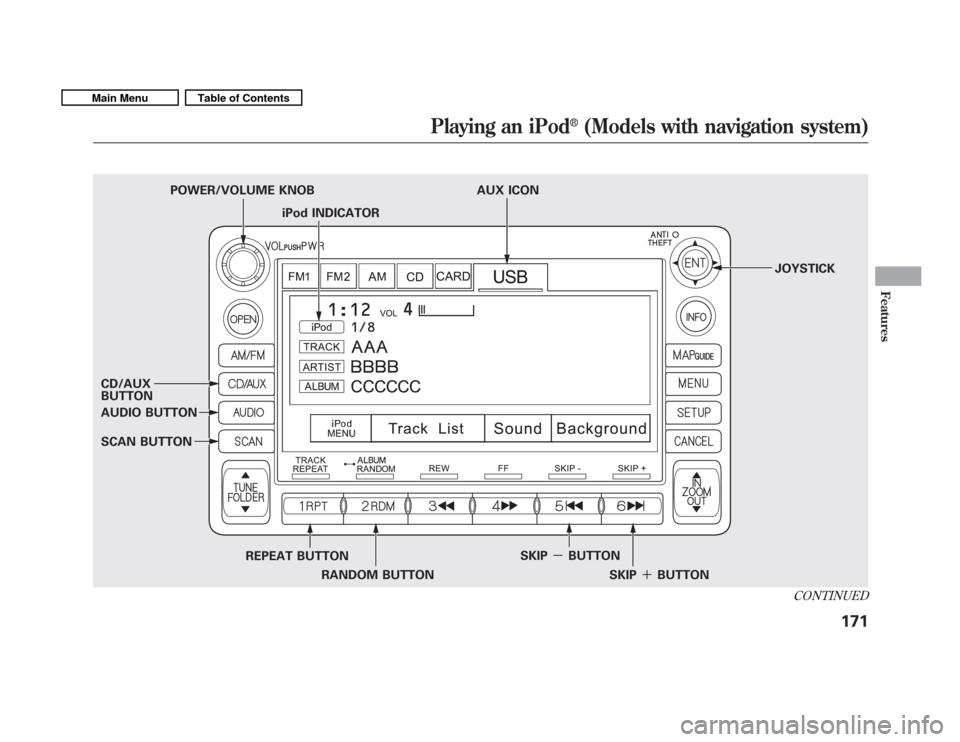
iPod INDICATOR
POWER/VOLUME KNOB AUX ICON
JOYSTICK
CD/AUX BUTTON
AUDIO BUTTON
SCAN BUTTON REPEAT BUTTONRANDOM BUTTON SKIP
-BUTTON
SKIP�BUTTON
CONTINUED
Playing an iPod