2011 HONDA CIVIC COUPE ESP
[x] Cancel search: ESPPage 137 of 400

Depending on where you drive, you
may experience reception problems.
Interf erence can be caused by any of
these conditions:Driving on the north side of a
large commercial truck on an
east/west road.
Driving in tunnels.
Driving on a road beside a vertical
wall, steep clif f , or hill to the south
of you.
Driving on the lower level of a
multi-tiered road.
Driving on a single lane road
alongside dense trees taller than
50 ft. (15 m) to the south of you.
Driving on the north side of an
east/west mountain road.
Large items carried on a roof rack.
There may be other geographic
situations that could af f ect XM Radio
reception. If your XM Radio service has expired
or you purchased your vehicle f rom
a previous owner, you can listen to a
sampling of the broadcasts available
on XM Radio. With the ignition
switch in the ACCESSORY (I) or ON
(II) position, push the power/volume
knob to turn on the audio system and
press the AUX button. A variety of
music types and styles will play.
If you decide to purchase XM Radio
service, contact XM Radio at
,orat
1-800-852-9696. You will need to give
them your radio I.D. number and
your credit card number. To get your
radio I.D. number, turn the TUNE
knob until ‘‘0’’ appears in the display. Your I.D. will appear in the display.
While waiting f or activation, make
sure your vehicle remains in an open
area with good reception. Once your
audio system is activated, you’ll be
able to listen to XM Radio broadcasts.
XM Radio will continue to send an
activation signal to your vehicle f or
at least 12 hours from the activation
request. If the service has not been
activated after 36 hours, contactXM
Radio. In Canada, contact XM
CANADA
.
After you’ve registered with XM
Radio, keep your audio system in the
XM Radio mode while you wait f or
activation. This should take about 30
minutes.
As required by the FCC:
Changes or modif ications not expresslyapproved by the party responsible f or
compliance could void the user’sauthority to operate the equipment.
www.xmradio.com
Receiving XM Radio Service
Playing t he XMRadio (Models without navigation system)
Features
133
Main Menu
Page 173 of 400

Driving in tunnels.
Driving on a road beside a vertical
wall, steep clif f , or hill to the south
of you.
Driving on the lower level of a
multi-tiered road.
Driving on a single lane road
alongside dense trees taller than
50 ft. (15 m) to the south of you.
Large items carried on a roof rack.
There may be other geographic
situations that could af f ect XM Radio
reception. If your XM Radio service has expired
or you purchased your vehicle f rom
a previous owner, you can listen to a
sampling of the broadcasts available
on XM Radio. With the ignition
switch in the ACCESSORY (I) or ON
(II) position, push the power/volume
knob to turn on the audio system and
press the CD/XM button. A variety
of music types and styles will play.
If you decide to purchase XM Radio
service, contact XM
Radio at
,orat
1-800-852-9696. You will need to give
them your radio I.D. number and
your credit card number. To get your
radio I.D. number, press the TUNE
bar until ‘‘0’’ appears in the display.
Your I.D. will appear in the display. After you’ve registered with XM
Radio, keep your audio system in the
XM radio mode while you wait f or
activation. This should take about 30
minutes.
While waiting f or activation, make
sure your vehicle remains in an open
area with good reception. Once your
audio system is activated, you’ll be
able to listen to XM Radio broadcasts.
XM Radio will continue to send an
activation signal to your vehicle f or
at least 12 hours from the activation
request. If the service has not been
activated after 36 hours, contactXM
Radio. In Canada, contact XM
CANADA
.
As required by the FCC:
Changes or modif ications not expresslyapproved by the party responsible f or
compliance could void the user’sauthority to operate the equipment. www.xmradio.com
Playing t he XMRadio (Models with navigation system)
Receiving XM Radio Service
Features
169
Main Menu
Page 219 of 400
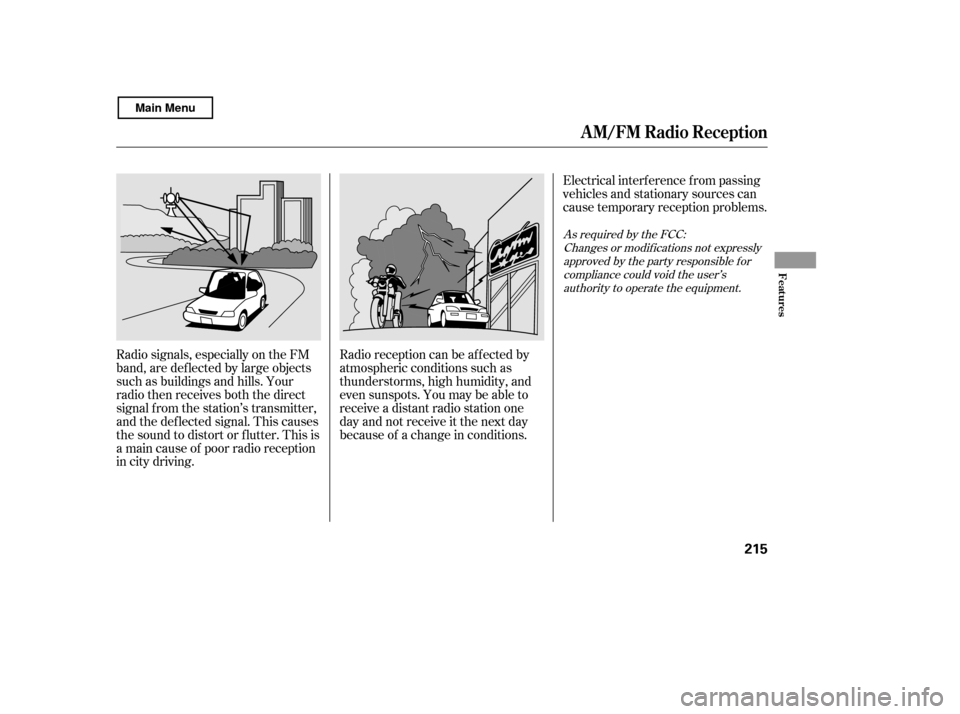
Radio signals, especially on the FM
band, are def lected by large objects
such as buildings and hills. Your
radio then receives both the direct
signal f rom the station’s transmitter,
and the def lected signal. This causes
the sound to distort or flutter. This is
a main cause of poor radio reception
in city driving.Radio reception can be af f ected by
atmospheric conditions such as
thunderstorms, high humidity, and
even sunspots. You may be able to
receive a distant radio station one
day and not receive it the next day
because of a change in conditions.Electrical interf erence f rom passing
vehicles and stationary sources can
cause temporary reception problems.
As required by the FCC:
Changes or modif ications not expresslyapproved by the party responsible f or
compliance could void the user’sauthority to operate the equipment.
A M/FM Radio Recept ion
Features
215
Main Menu
Page 253 of 400

This operation clears the passcodes,
paired phones, all names in the HFL
phonebook, and all imported
phonebook data.
Press and release the HFL Talk
button bef ore a command.Say ‘‘ .’’
Say‘‘ ’’aftertheprompts.
Follow the HFL prompts to
continue to complete the clearing
procedure.
You can also clear the system when
you have f orgotten the passcode and
cannot access HFL. When HFL asks
you f or the passcode, say ‘‘ .’’ Paired phones, all names in
the HFL phonebook and all imported
phonebook data will be lost. Thename and logos are
registered trademarks owned by
Bluetooth SIG, Inc. and any use of
such marks by Honda Motor Co.,
Ltd. is under license. Other
trademarks and trade names are
those of their respective owners.
1. 2.3.Bluetooth As required by the FCC:
This device complies with Part 15 of theFCC rules. Operation is subject to thef ollowing two conditions: (1) This device
may not cause harmf ul interf erence, and(2) this device must accept anyinterf erence received, including
interf erence that may cause undesiredoperation.
Changes or modif ications not expresslyapproved by the party responsible f orcompliance could void the user’s
authority to operate the equipment.
System setup
Clear
System
clear
Wireless TechnologyT o clear t he syst em: Bluet oot h
BluetoothHandsFreeL ink
Features
249
Main Menu
Page 286 of 400

The VSA system cannot enhance the
vehicle’s driving stability in all
situations and does not control your
vehicle’s entire braking system. It is
still your responsibility to drive and
corner at reasonable speeds and to
leave a sufficient margin of safety.
When VSA activates, you will see the
VSA Activation indicator blinks.
If this indicator comes on while
driving, pull to the side of the road
when it is saf e, and turn of f the
engine. Reset the system by
restarting the engine. If the VSA
system indicator stays on or comes
back on while driving, have the VSA
system inspected by your dealer.
The vehicle stability assist (VSA)
system helps to stabilize the vehicle
during cornering if the vehicle turns
more or less than desired. It also
assists you in maintaining traction
while accelerating on loose or
slippery road surf aces. It does this
by regulating the engine’s output and
by selectively applying the brakes.
When VSA activates, you may notice
that the engine does not respond to
the accelerator in the same way it
does at other times. There may also
be some noise f rom the VSA
hydraulic system. You will also see
the VSA activation indicator blink.
The main f unction of the
VSA system is generally known as
Electronic Stability Control (ESC).
The system also includes a traction
control f unction.
Without VSA, your vehicle will have
normal braking and cornering ability,
but it will not have VSA traction and
stability enhancement.
If the low tire pressure indicator or
TPMS indicator comes on, the VSA
system automatically turns on even if
the VSA system is turned of f by
pressing the VSA OFF switch (see
page ). If this happens, you
cannot turn the VSA system of f by
pressing the VSA OFF switch again. 283
U.S. models
EX-LandSimodels
VSA A ctivation Indicator
Vehicle Stability Assist
(VSA ) System Indicator
Vehicle St abilit y A ssist (VSA), aka Electronic Stability Control (ESC), System
282
NOTE:
Main Menu
Page 290 of 400

As required by the FCC:This device complies with Part 15 of theFCC rules. Operation is subject to the
f ollowing two conditions: (1) This devicemay not cause harmf ul interf erence, and(2) this device must accept any
interf erence received, includinginterf erence that may cause undesiredoperation.
Changes or modif ications not expresslyapproved by the party responsible f or
compliance could void the user’sauthority to operate the equipment.
This device complies with IndustryCanada Standard RSS-210.Operation is subject to the f ollowing two
conditions: (1) this device may not causeinterf erence, and (2) this device mustaccept any interf erence that may cause
undesired operation of the device.
If you have a f lat tire, the low tire
pressure indicator will come on.
Replace the flat tire with the
compact spare tire (see page ).
Each wheel (except the compact
sparetirewheel)isequippedwitha
tire pressure sensor. You must use
TPMS specif ic wheels. It is
recommended that you always have
your tires serviced by your dealer or
qualif ied technician. The low tire pressure indicator or
the TPMS indicator will go off, after
several miles (kilometers) driving,
when you replace the spare tire with
the specif ied regular tire equipped
with the tire pressure monitor sensor.
Never use a puncture-repairing agent
in a f lat tire. If used, you will have to
replace the tire pressure sensor.
Havetheflattirerepairedbyyour
dealer as soon as possible.
After you replace the flat tire with
thecompactsparetire,thelowtire
pressure indicator stays on. This is
normal; the system is not monitoring
the spare tire pressure. Manually
check the spare tire pressure to be
sure it is correct. Af ter several miles
(kilometers) driving with the
compact spare tire, the TPMS
indicator comes on and the low tire
pressure indicator goes of f . 339
Changing a T ire with T PMS
Tire Pressure Monitoring System (TPMS)
286
Main Menu
Page 358 of 400

If the replacement fuse of the
same rating blows in a short time,
there is probably a serious
electrical problem in your vehicle.
Leave the blown fuse in that
circuit and have your vehicle
checked by a qualif ied technician.
Look f or a blown wire inside the
f use. If it is blown, replace it with
oneof thesparefusesof thesame
rating or lower. If you cannot drive the vehicle
without f ixing the problem, and you
do not have a spare fuse, take a fuse
of the same rating or a lower rating
f rom one of the other circuits. Make
sureyoucandowithoutthatcircuit
temporarily (such as the accessory
power socket).
If you replace the blown f use with a
spare f use that has a lower rating, it
might blow out again. This does not
indicate that anything is wrong.
Replace the f use with one of the
correct rating as soon as you can.
6.
5.
Fuses
354
BLOWN
Replacing a f use with one that has a
higher rating greatly increases the
chances of damaging the electrical
system. If you do not have a
replacement f use with the proper rating
f or the circuit, install one with a lower
rating.
Main Menu
Page 372 of 400

The temperature grades are A (the
highest), B, and C, representing the
tire’s resistance to the generation of
heat and its ability to dissipate heat
when tested under controlled
conditions on a specif ied indoor
laboratory test wheel. Sustained high
temperature can cause the material
of the tire to degenerate and reduce
tire life, and excessive temperature
can lead to sudden tire f ailure. The
grade C corresponds to a level of
perf ormance which all passenger car
tires must meet under the Federal
Motor Vehicle Saf ety Standard No.
109. Grades B and A represent
higher levels of perf ormance on the
laboratory test wheel than the
minimum required by law.Warning: The temperature grade f or
this tire is established f or a tire that
is properly inf lated and not
overloaded. Excessive speed,
underinf lation, or excessive loading,
either separately or in combination,
can cause heat buildup and possible
tire f ailure.
Temperature
DOT T ire Quality Grading (U.S. Vehicles)
368
Main Menu